
Running an art gallery is an act of perpetual reinvention. You curate stunning exhibitions, manage relationships with artists and collectors, and coordinate shipping of objects worth more than most cars. Somehow you also deal with invoices, contracts, staff scheduling, and the eternal question of whether your email backup actually works. The art world deserves better IT. Fortunately, a Microsoft 365 art gallery setup was built precisely for businesses where creativity and operations collide.
🎨 Ready to bring your gallery’s back office into the 21st century?
We help creative businesses set up Microsoft 365 environments that are as polished as their exhibitions — with subscription pricing as predictable as your rent.
📅 Book a Free 30-Min Call | 💬 Chat on WhatsApp | See Our Plans →
🏛️ The Microsoft 365 Art Gallery Problem (You Know the One)
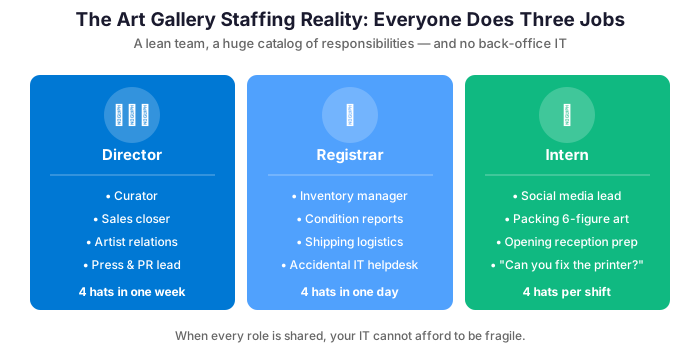
Art galleries operate with a lean team doing the work of several departments simultaneously. Your director is also part of the sales team. Your registrar also doubles as the IT problem-solver. Your intern is somehow responsible for both social media and packing works worth six figures. In this environment, technology that requires maintenance, troubleshooting, or dedicated IT expertise is a liability, not an asset.
The other challenge is collaboration across distance. Galleries deal with artists in different time zones, collectors across the country, and shipping partners coordinating international logistics. Email alone is insufficient, but so is any tool that requires your team to learn a complex new system.
⚙️ Microsoft 365 Art Gallery Setup: What Actually Matters
✉️ Professional Email That Reflects Your Brand
Your gallery communicates with collectors, artists, museums, and press. A professional branded email address — director@yourgallery.com rather than yourgallery@gmail.com — signals seriousness. Exchange Online delivers it with rock-solid reliability, 99.9% uptime, and 100GB of mailbox storage per user. It also includes powerful shared calendar features for coordinating openings, art fairs, and studio visits across the team.
📂 Document Management That Doesn’t Require a PhD
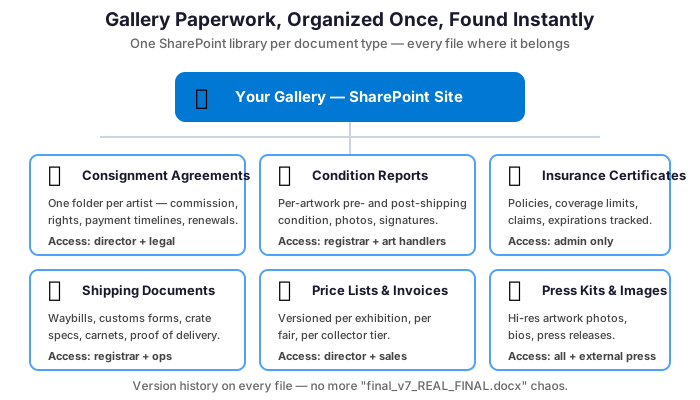
Consignment agreements, artist contracts, insurance certificates, shipping documents, price lists, press kits — galleries generate a surprising amount of paperwork. SharePoint gives you a centralized, permission-controlled document library. The right people access the right files from anywhere. There is no chaos of a shared drive where files mysteriously disappear or get renamed to “FINAL_v3_REAL_USE_THIS_ONE.pdf.”
💬 Collaboration Without the Commute
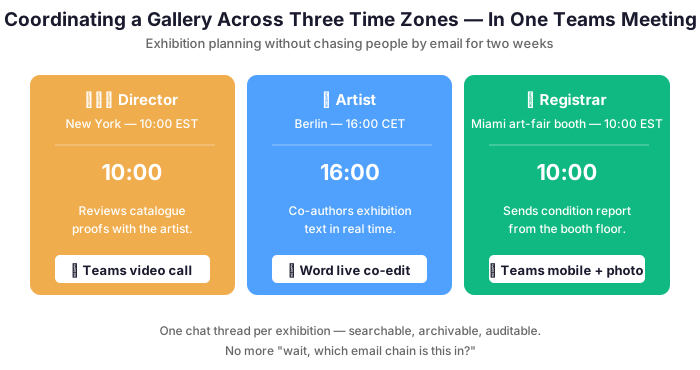
Art fairs require coordinating with artists who are never in the same city. Exhibition planning involves collaborators spread across time zones. Microsoft Teams handles all of it: video calls, chat, file sharing, and even co-authoring exhibition texts in real time. The gallery director in New York and the artist in Los Angeles can review a press release together. Neither has to travel or send seventeen email attachments.
🛡️ Security That Protects Your Clients and Your Reputation
Collector databases, acquisition prices, and artist financial arrangements represent some of the most confidential information your gallery handles. Moreover, galleries are increasingly targets for sophisticated phishing attacks impersonating artists or shipping companies. Microsoft 365 Business Premium includes anti-phishing protection, multi-factor authentication, and data loss prevention — tools that protect your gallery’s most sensitive relationships without requiring a cybersecurity degree to operate.
💰 The Cost Question (Because You Asked)
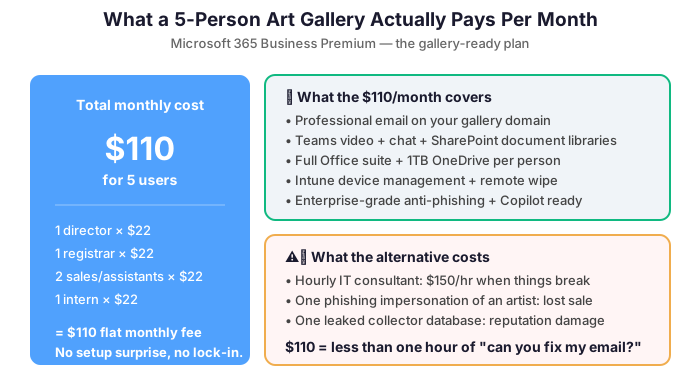
A five-person Microsoft 365 art gallery setup running Business Premium pays approximately $110 per month total. That covers professional email, Teams, SharePoint, OneDrive, the full Office suite, device management, and enterprise security for every person in the gallery. Compare that to the hourly rate of a freelance IT consultant called in for emergencies, and the math becomes compelling rather quickly.
Additionally, subscription pricing means your IT costs scale naturally with your team. Hire a new associate? Add one license. Open a second space? Add more users. Close for the summer? Adjust accordingly. It is the kind of flexibility that fits the art world’s inherently seasonal and project-driven rhythms.
🚀 Getting Started: What Setup Looks Like
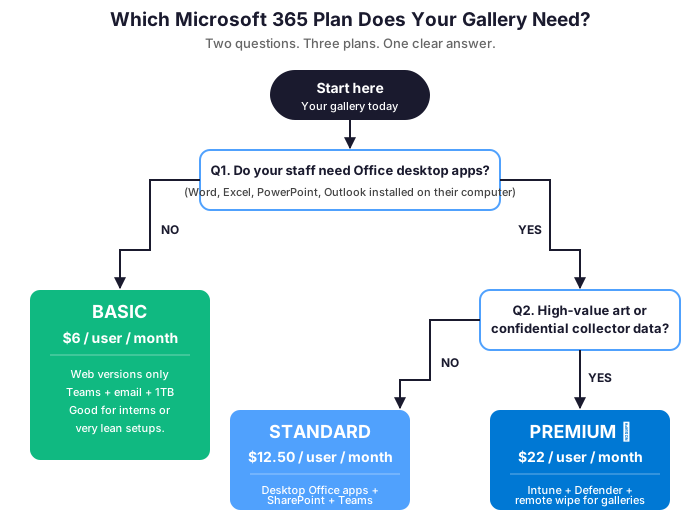
Setting up a Microsoft 365 art gallery typically takes a few days, not weeks. We handle domain verification, email migration, SharePoint structure, and user onboarding while your team keeps running without interruption. Most galleries are fully operational on the new platform before the next opening. If you are currently on Gmail or an older Exchange server, migration is straightforward and your emails, contacts, and calendar entries come along for the ride.
The transition is also an opportunity to clean up years of accumulated digital clutter. You can establish sensible folder structures and set up the shared calendars and document libraries. Those will save your team hours every week going forward. Consider it a digital installation, with considerably less bubble wrap.
📜 Consignment Agreements, Condition Reports, and the Documents That Protect Your Artists
The relationship between a gallery and its artists is governed by paperwork. That paperwork includes consignment agreements that define commission structures, exhibition rights, and payment timelines. It also covers condition reports that document the state of each work before it leaves the studio. Add to that insurance certificates that confirm coverage during transit and exhibition, plus invoices that reflect agreed prices and buyer premium structures. In a small gallery managing relationships with fifteen to thirty artists simultaneously, this documentation load is substantial — and losing any part of it creates real exposure.
SharePoint provides a per-artist document library where consignment agreements, condition reports, exhibition history, and provenance documentation live in one organized, version-controlled location. When an artist asks for the consignment agreement you signed three years ago, the answer takes seconds. The same applies when a collector’s due diligence team requests provenance documentation for a major acquisition. No more afternoon of inbox archaeology. Furthermore, permission controls mean your artists can see their own documents — reducing the “can you send me my consignment agreement” requests that currently interrupt your install days.
🎨 Art Fair Logistics Without the Group Text
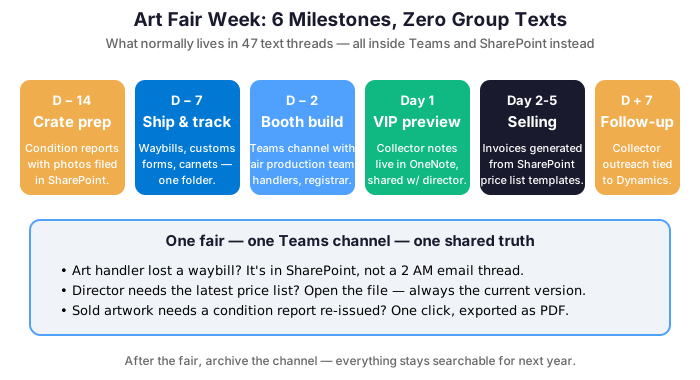
Art fairs represent the most operationally intensive weeks of a gallery’s year. A single week involves coordinating crate shipments with art handlers and managing booth build with the fair’s production team. It also means tracking VIP previews and collector appointments, plus following up on sales inquiries while simultaneously managing the stand. The communication load during a fair week typically overwhelms whatever system a gallery uses the rest of the year. Important messages end up buried in personal inboxes. Key decisions get made on WhatsApp threads nobody can find later. Microsoft Teams handles art fair logistics as a dedicated project channel. That channel hosts the shared install schedule, booth layout documents, artist bio PDFs, price lists, and collector contact log. It also carries real-time communication between the gallery director at the fair and the team holding down the space back home.
📱 Coordinating the Gallery Team on Site
📚 More for Galleries
Microsoft 365 for Event Management Companies: Coordinate the Chaos
Microsoft 365 for Architecture Firms: Build a Better Back Office
Not ready for a call yet?
See exactly what we audit before engaging. Download our free 50-point M365 Tenant Security Audit Checklist — the same framework we use on every client onboarding.