
Event management companies run on controlled chaos. You juggle dozens of vendors. Then three client revisions to the run-of-show. A catering contract nobody can find. A DJ who only communicates by Instagram DM. And a production timeline that changes every Tuesday. You do all of this simultaneously. Often from a different city. Sometimes from an airport gate. The last thing you need is your IT setup adding to the drama. A Microsoft 365 event management company setup will not make your clients less indecisive. But it will make everything around them much more manageable.
🎉 Ready to bring order to your event company’s chaos?
We set up Microsoft 365 for event companies, agencies, and production teams across the US — professional email, shared calendars, vendor portals, and secure document management on a flat monthly rate.
📅 Book a Free 30-Min Call | 💬 Chat on WhatsApp | See Our Plans →

📧 The Microsoft 365 Event Management Company IT Problem (In Four Emails)
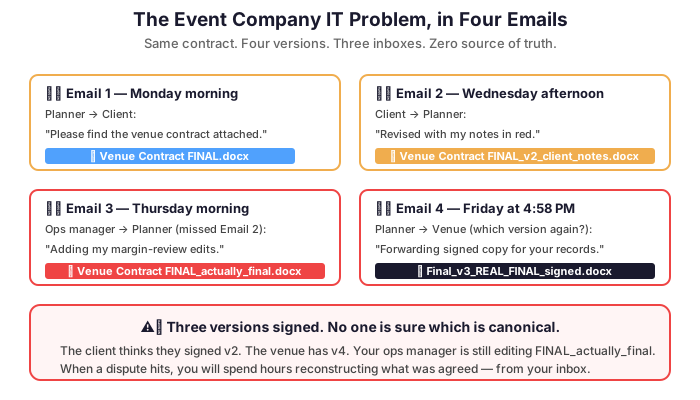
Picture this: your lead planner sends “Venue Contract FINAL.docx” to the client. The client sends back “Venue Contract FINAL_v2_client_notes.docx.” Your operations manager, who missed that email, is still working on “Venue Contract FINAL_actually_final.docx.” Three versions, three people, zero clarity. The venue needs a signature in two hours. This is not a hypothetical — this is Tuesday for most event companies still relying on email attachments as a document management system.
Consequently, the industry loses thousands of hours per year. Time goes to version confusion. Plus missed messages. Plus the anxiety of wondering whether the right contract went to the right vendor. Fortunately, every one of these problems has a solution. It is built into a Microsoft 365 event management company setup.
🎯 One Place for Every Event: SharePoint as Your Command Center
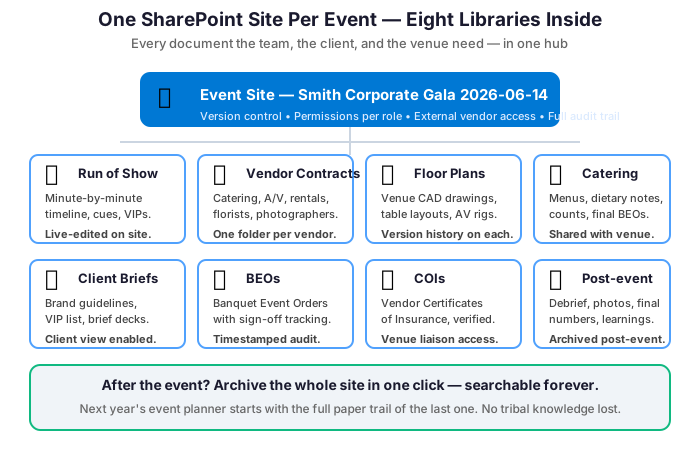
Imagine a dedicated SharePoint site for each event you manage. One hub for everything. The run-of-show, vendor contracts, floor plans, catering menus, client briefs, and post-event reports all live there. Organized. Permission-controlled. Clients see their documents. Vendors access theirs. Your internal team sees everything. Nobody accidentally sends the budget breakdown to the florist.
Moreover, SharePoint integrates directly with Outlook and Teams. Attaching the correct contract to a vendor email means clicking a link. No more hunting through your Downloads folder at 11 PM. Version history logs every change to every document. If someone makes a catastrophic edit to the master timeline, you can restore a previous version in two clicks.
🎤 Microsoft Teams: Your Production Calls, Run-of-Show Reviews, and Vendor Briefs in One Place
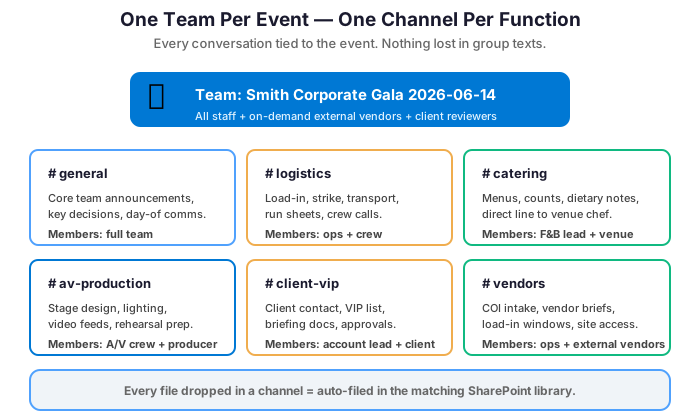
Event production involves relentless communication. Across time zones, job functions, and personality types. Microsoft Teams handles all of it from one application. Create a Team for each event. Add dedicated channels for logistics, catering, A/V, client communications, and on-site coordination. Then your freelance photographer in Chicago, your sound engineer in Miami, and your venue contact in Dallas all collaborate in the same space. No accounts on three different platforms.

Teams also handles the video calls that have replaced site visits. Plus the quick questions that used to require phone tag. And the file sharing that once meant emailing 40MB attachments to twelve people. With Microsoft 365 Copilot, Teams generates meeting summaries automatically. So your post-production-call recap writes itself. You move on to the next crisis.
📅 Shared Calendars That Actually Work Across Your Whole Team
Event companies live and die by their calendars. Load-in days, client walkthroughs, vendor deliveries, rehearsals, strike days. The schedule is the product. Exchange Online’s shared calendar features let your entire team see who is on-site. Plus who is in a client meeting. And which events are overlapping. All before you agree to produce two galas on the same weekend in different cities. (It happens. It should not happen twice.)
Furthermore, shared calendars synchronize across every device: laptop, iPhone, iPad. Your on-site coordinator sees the same real-time view as the office team managing logistics. When the catering delivery time changes at 7 AM on event day, everyone sees the update immediately.
🔐 Security for Client Contracts and Confidential Budgets
Event budgets, client personal information, venue security requirements, and VIP logistics are sensitive data. A data leak involving a high-profile client’s event details can be reputationally catastrophic. Our industry is built on discretion and trust. Microsoft 365 Business Premium includes data loss prevention policies. These prevent sensitive documents from being forwarded outside your organization. It also includes multi-factor authentication. MFA blocks unauthorized access even if a password is compromised. And Microsoft Intune manages every device your team uses in the field.
| Function | Microsoft 365 tool | Event company use case |
|---|---|---|
| 📅 Shared scheduling | Exchange Online shared calendars | Multi-team view: who is on site, who is in a client meeting, which events overlap — before you double-book a weekend. |
| ✉️ Branded email | Exchange + custom domain | events@yourcompany.com beats a generic Gmail address. Clients notice before they open the message. |
| 📨 Shared mailboxes | Exchange shared mailboxes | info@ and bookings@ let multiple team members monitor inquiries simultaneously — nothing slips through. |
| 🔄 Device-wide sync | Exchange + Outlook mobile | Calendar changes at 7 AM on event day reach every device in seconds — laptop, iPhone, iPad. |
| 🚫 Data loss prevention | Microsoft 365 DLP policies | Block sensitive client documents from being forwarded outside your organization by accident or on purpose. |
| 🔐 Multi-factor auth | Microsoft Entra ID | Blocks unauthorized access to client contracts and VIP data even if a team password is leaked. |
| 📱 Device management | Microsoft Intune | Manage every laptop and phone your team uses in the field. Remote wipe if a device is lost or stolen on site. |
✨ Client-Facing Professionalism That Matches Your Events
You produce polished, memorable experiences for your clients. Your back-office tools should reflect the same standard. A branded email address like events@yourcompany.com signals professionalism. That beats yourcompanyevents@gmail.com every time. Clients notice before they even open the message. Microsoft 365 also includes branded email signatures and out-of-office management for your whole team. You can also set up shared mailboxes. Addresses like info@ or bookings@ let multiple team members monitor emails simultaneously.
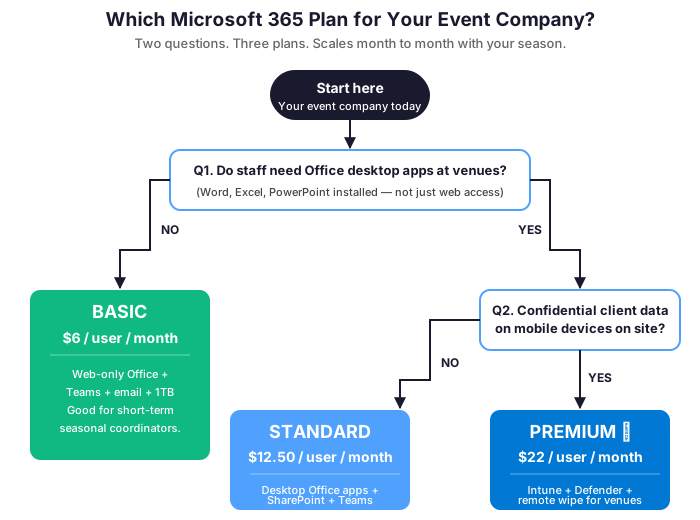
💰 Microsoft 365 Event Management Company Pricing That Fits Project Work
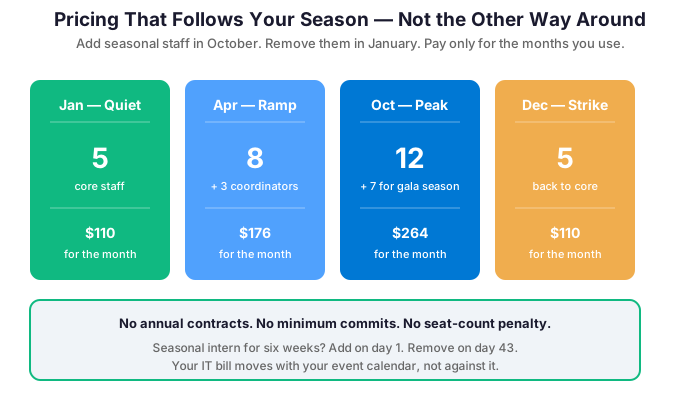
Event companies often scale their teams seasonally or project by project. A Microsoft 365 event management company plan is designed for exactly this flexibility. Add a license for a seasonal coordinator in October. Remove it in January. Bring on a production intern for a six-week project. Scale back when it wraps. You pay per user per month. No long-term hardware commitments. No infrastructure to maintain between events. For a five-person core team, the total monthly cost is under $120. That is less than a single hour of AV equipment rental. And it covers every tool your team uses. To communicate, collaborate, and deliver events people remember for the right reasons.
📋 BEOs, COIs, and the Documents That Protect You When Things Go Wrong
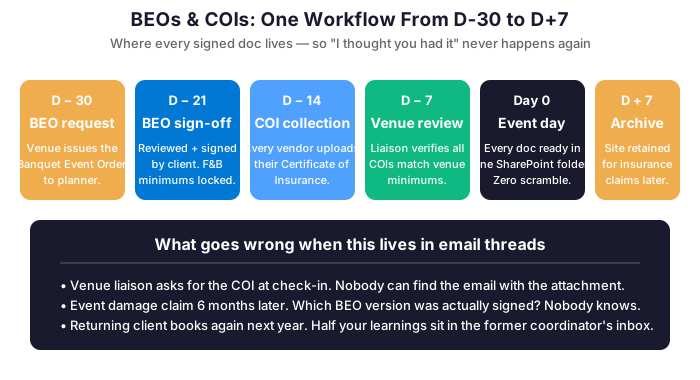
Event contracts generate a specific document ecosystem. Banquet Event Orders (BEOs) come from venues. They need review and sign-off before food and beverage minimums are committed. Certificates of Insurance (COIs) come from every vendor. They must be collected, verified, and filed before load-in. Attrition clauses sit in hotel room blocks. They need monitoring against actual bookings. Program flow documents exist in four versions. The client changed the keynote order twice. Each of these documents has a deadline. Each has a counterparty. And each has a financial consequence if it goes missing or the wrong version gets executed.
🛠️ How SharePoint Keeps the Document Trail Clean
A SharePoint event site with a dedicated COI library eliminates the “I have the certificate somewhere” conversation at venue check-in. Specifically, assign your operations coordinator to collect and upload each vendor COI as it arrives, set a permission-controlled view for the venue liaison. And The document exists exactly where it needs to be when the venue’s event coordinator asks for it at 6 AM on load-in day. Version-controlled BEOs mean the food and beverage director always executes from the current revision, not the one that was superseded when the client added the dessert station. Consequently, the financial exposure from executing a superseded BEO — real, and more common than venues like to admit — goes to essentially zero.

📚 More for Event Teams
Microsoft 365 for Art Galleries: Curate Your Back Office Too
Microsoft 365 for Architecture Firms: Build a Better Back Office
Not ready for a call yet?
See exactly what we audit before engaging. Download our free 50-point M365 Tenant Security Audit Checklist — the same framework we use on every client onboarding.