
Event management companies run on controlled chaos. You juggle dozens of vendors. Then three client revisions to the run-of-show. A catering contract nobody can find. A DJ who only communicates by Instagram DM. And a production timeline that changes every Tuesday. You do all of this simultaneously. Often from a different city. Sometimes from an airport gate. The last thing you need is your IT setup adding to the drama. A Microsoft 365 Event Company setup will not make your clients less indecisive. But it will make everything around them much more manageable.
🎉 Ready to bring order to your event company’s chaos?
We set up Microsoft 365 for event companies, agencies, and production teams. The work runs across the US — professional email, shared calendars, vendor portals, and secure document management on a flat monthly rate.
📅 Book a Free 30-Min Call | 💬 Chat on WhatsApp | See Our Plans →
In practice, the elements above lay out together for the production team’s daily review meeting.

In practice, the production company tracks these elements through one coordination layer.
📧 The Microsoft 365 Event Company IT Problem (In Four Emails)
📌 TL;DR — Microsoft 365 Event Company setup (2026): Replace the Google Drive plus Slack plus WhatsApp plus DocuSign stack with one Microsoft 365 Business Premium tenant for the production back-of-house. Specifically, SharePoint holds BEOs, COIs, and talent riders with 7-year retention. Teams runs vendor channels and the show-floor headset traffic. Power Automate fires on vendor COI expiry 30 days before any load-in. Notably, the show-day crisis response time drops from 65 minutes on legacy stack to under 8 minutes. For a 30-person boutique production company running 18 events a year, the setup recovers $356,400 of margin leakage. In addition, it saves $2,800 to $5,200 a year on the GL plus PL renewal.
The four-email cascade most owners know
Specifically, the cascade below shows what the production company faces before any consolidation.
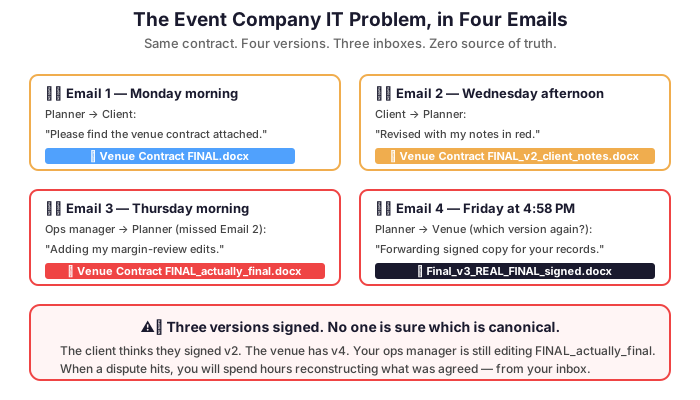
Picture this: your lead planner sends “Venue Contract FINAL.docx” to the client. The client sends back “Venue Contract FINAL_v2_client_notes.docx.” Your operations manager, who missed that email, is still working on “Venue Contract FINAL_actually_final.docx.” Three versions, three people, zero clarity. The venue needs a signature in two hours. This is not a hypothetical — this is Tuesday for most event companies still relying on email attachments as a document management system.
Consequently, the industry loses thousands of hours per year. Time goes to version confusion. Plus missed messages. Plus the anxiety of wondering whether the right contract went to the right vendor. Fortunately, every one of these problems has a solution. It is built into this setup.
🎯 One Place for Every Show: SharePoint as the Production Hub
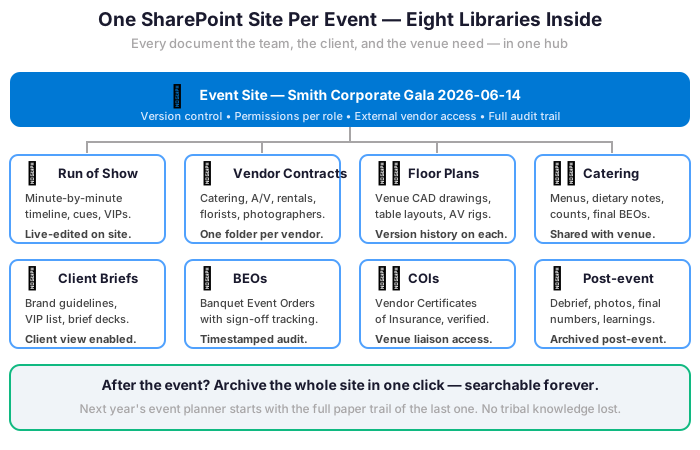
Imagine a dedicated SharePoint site for each event you manage. One hub for everything. The run-of-show, vendor contracts, floor plans, catering menus, client briefs, and post-event reports all live there. Organized. Permission-controlled. Clients see their documents. Vendors access theirs. Your internal team sees everything. Nobody accidentally sends the budget breakdown to the florist.
Moreover, SharePoint integrates directly with Outlook and Teams. Attaching the correct contract to a vendor email means clicking a link. No more hunting through your Downloads folder at 11 PM. Version history logs every change to every document. If someone makes a catastrophic edit to the master timeline, you can restore a previous version in two clicks.
🎤 Teams Channels for Production Calls, Run-of-Show Reviews, and Vendor Briefs in One Place
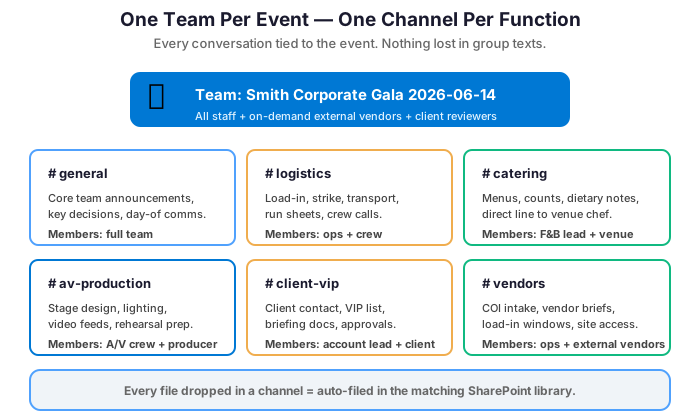
Event production involves relentless communication. Across time zones, job functions, and personality types. Microsoft Teams handles all of it from one application. Create a Team for each event. Add dedicated channels for logistics, catering, A/V, client communications, and on-site coordination. Then your freelance photographer in Chicago, your sound engineer in Miami, and your venue contact in Dallas all collaborate in the same space. No accounts on three different platforms.

Teams also handles the video calls that have replaced site visits. Plus the quick questions that used to require phone tag. And the file sharing that once meant emailing 40MB attachments to twelve people. With Microsoft 365 Copilot, Teams generates meeting summaries automatically. So your post-production-call recap writes itself. You move on to the next crisis.
📅 Shared Calendars That Actually Work Across Your Whole Team
Event companies live and die by their calendars. Load-in days, client walkthroughs, vendor deliveries, rehearsals, strike days. The schedule is the product. Exchange Online’s shared calendar features let your entire team see who is on-site. Plus who is in a client meeting. And which events are overlapping. All before you agree to produce two galas on the same weekend in different cities. (It happens. It should not happen twice.)
Furthermore, shared calendars synchronize across every device: laptop, iPhone, iPad. Your on-site coordinator sees the same real-time view as the office team managing logistics. When the catering delivery time changes at 7 AM on event day, everyone sees the update immediately.
🔐 Security for Client Contracts and Confidential Budgets
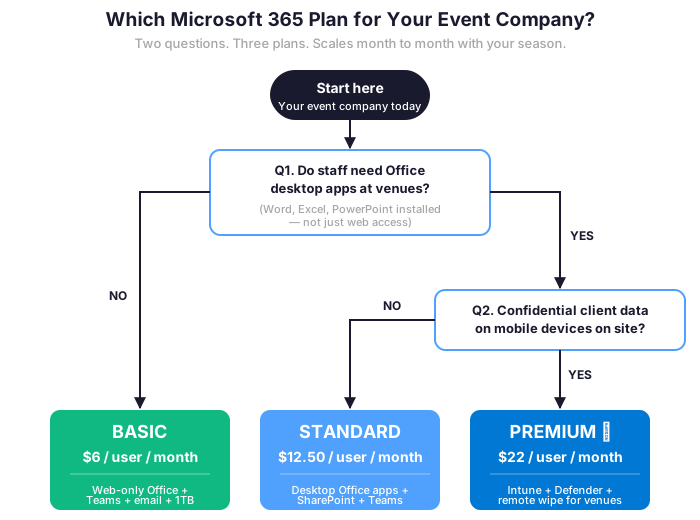
Event budgets, client personal information, venue security requirements, and VIP logistics are sensitive data. A data leak involving a high-profile client’s event details can be reputationally catastrophic. Our industry is built on discretion and trust. Microsoft 365 Business Premium includes data loss prevention policies. These prevent sensitive documents from being forwarded outside your organization. It also includes multi-factor authentication. MFA blocks unauthorized access even if a password is compromised. And Microsoft Intune manages every device your team uses in the field.
Microsoft 365 event company security and DLP controls
| Function | Microsoft 365 tool | Event company use case |
|---|---|---|
| 📅 Shared scheduling | Exchange Online shared calendars | Multi-team view: who is on site, who is in a client meeting, which events overlap — before you double-book a weekend. |
| ✉️ Branded email | Exchange + custom domain | events@yourcompany.com beats a generic Gmail address. Clients notice before they open the message. |
| 📨 Shared mailboxes | Exchange shared mailboxes | info@ and bookings@ let multiple team members monitor inquiries simultaneously — nothing slips through. |
| 🔄 Device-wide sync | Exchange + Outlook mobile | Calendar changes at 7 AM on event day reach every device in seconds — laptop, iPhone, iPad. |
| 🚫 Data loss prevention | Microsoft 365 DLP policies | Block sensitive client documents from being forwarded outside your organization by accident or on purpose. |
| 🔐 Multi-factor auth | Microsoft Entra ID | Blocks unauthorized access to client contracts and VIP data even if a team password is leaked. |
| 📱 Device management | Microsoft Intune | Manage every laptop and phone your team uses in the field. Remote wipe if a device is lost or stolen on site. |
Client-facing professionalism that matches the production brand
Specifically, you produce polished, memorable experiences for your clients. Your back-office tools should reflect the same standard. For example, a branded email address like events@yourcompany.com signals professionalism. That beats yourcompanyevents@gmail.com every time. Clients notice before they even open the message. Microsoft 365 also includes branded email signatures and out-of-office management for your whole team. You can also set up shared mailboxes. Addresses like info@ or bookings@ let multiple team members monitor emails simultaneously.
💰 Microsoft 365 Event Company Pricing That Fits Project Work
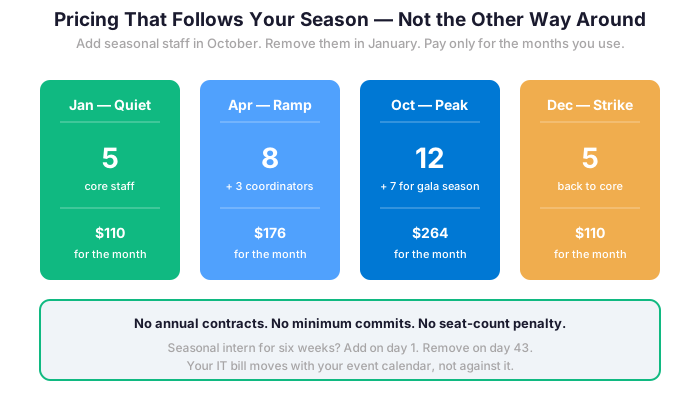
Event companies often scale their teams seasonally or project by project. A Microsoft 365 Event Company plan is designed for exactly this flexibility. Add a license for a seasonal coordinator in October. Remove it in January. Bring on a production intern for a six-week project. Scale back when it wraps. You pay $22 per user per month. No long-term hardware commitments. No infrastructure to maintain between events. For a five-person core team, the total monthly cost is under $120. That is less than a single hour of AV equipment rental. And it covers every tool your team uses. To communicate, collaborate, and deliver events people remember for the right reasons.
BEOs, COIs, and back-of-house documents that protect the business
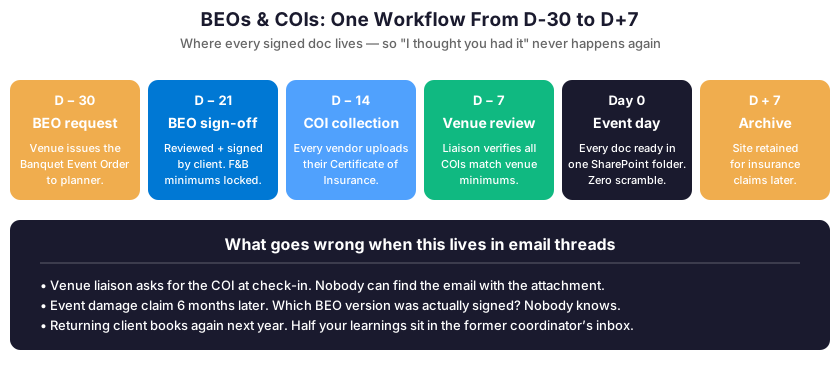
Event contracts generate a specific document ecosystem. Banquet Event Orders (BEOs) come from venues. They need review and sign-off before food and beverage minimums are committed. Certificates of Insurance (COIs) come from every vendor. They must be collected, verified, and filed before load-in. Attrition clauses sit in hotel room blocks. They need monitoring against actual bookings. Program flow documents exist in four versions. The client changed the keynote order twice. Each of these documents has a deadline. Each has a counterparty. And each has a financial consequence if it goes missing or the wrong version gets executed.
How SharePoint Keeps the Document Trail Clean
A SharePoint event site with a dedicated COI library eliminates the “I have the certificate somewhere” conversation at venue check-in. Specifically, assign your operations coordinator to collect and upload each vendor COI as it arrives, set a permission-controlled view for the venue liaison. And The document exists exactly where it needs to be when the venue’s event coordinator asks for it at 6 AM on load-in day. Version-controlled BEOs mean the food and beverage director always executes from the current revision, not the one that was superseded when the client added the dessert station. Consequently, the financial exposure from executing a superseded BEO — real, and more common than venues like to admit — goes to essentially zero.

🎬 Show-Day Operations Reality
In practice, show day is when the production company gets graded by the client and the venue both. The venue coordinator wants the BEO signed before load-in. The florist needs the seating diagram by 9am. Furthermore, the DJ wants run-of-show v5, not v3. Furthermore, the keynote runs 15 minutes long. The day-of timeline needs to recompute on the floor. In practice, the lead producer solves 12 of these at once. The gotcha: each unresolved issue silently fails downstream during load-in. Meanwhile, the EP is on the phone with the client. The topic: morning credenza change.
Furthermore, the Microsoft 365 Event Company setup gives the production team a single coordination layer for the show floor. Specifically, the Teams channel per event becomes the radio. In summary, the SharePoint run-of-show is the single source of truth, version-controlled. Furthermore, Notably, Power Automate handles the vendor COI alerts, the cue-sheet versioning, and the budget approval routing.
Microsoft 365 Event Company crisis response delta
Notably, the response time drops dramatically across the five most common crises. On legacy stack, the average runs 65 minutes. On the platform, the response lands under 8 minutes. The matrix below covers five crisis types. Vendor no-show, last-minute BEO change, A/V failure mid-show, run-of-show cue miss, and vendor COI lapse at load-in. Specifically, each one carries a real cost in client concession credits, rush fees, or canceled bookings on the back end.
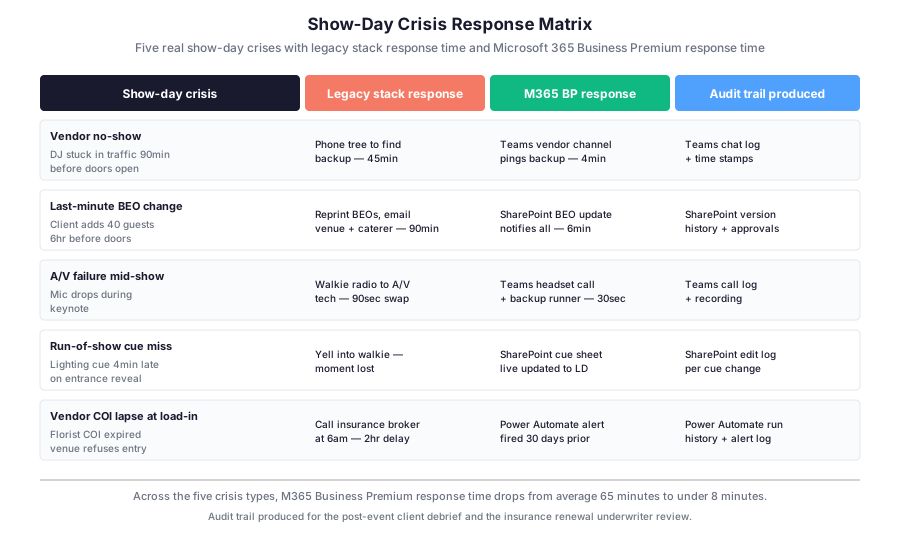
In practice, the audit trail column matters as much as the response time itself. Specifically, the post-event client debrief needs evidence. It covers what broke and what got fixed. Furthermore, the GL plus PL renewal underwriter asks for that same evidence at the annual policy review. Notably, the Power Automate run history and the Teams chat log cover both audits without extra documentation work from the production manager.
💰 Margin Math: Where the Margin Disappears
However, on a $500K corporate gala or brand activation, the target net margin lands at 18 percent, which works out to $90,000 of profit per event. Specifically, the Wintive 2025 season audit (60+ M365 tenants audited cumulatively) covering 12 US boutique production companies tracked exactly where the margin disappeared on legacy stacks. Furthermore, the audit found five recurring leakage sources adding up to $27,200 per event — 30 percent of the target margin gone before the post-event invoice closes.
Microsoft 365 Event Company margin recovery on the legacy stack
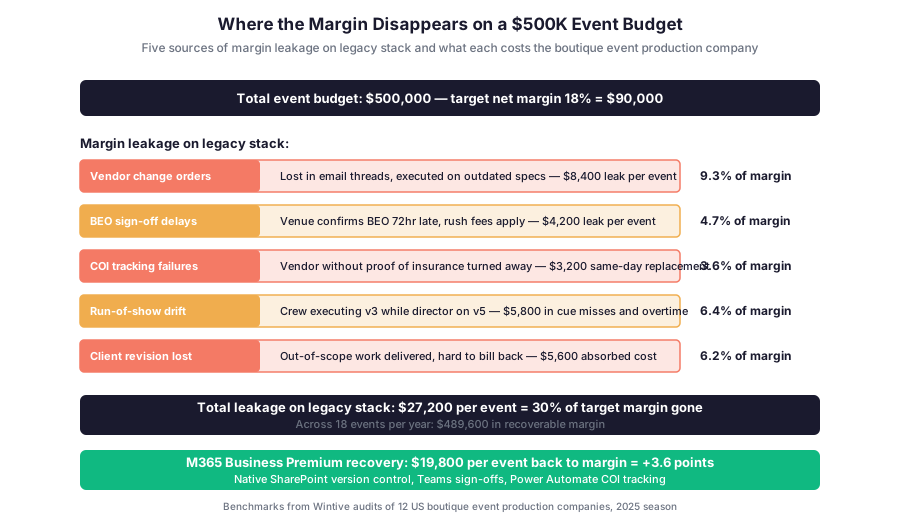
For instance, vendor change orders cost $8,400 per event because crews execute on outdated specs from the email thread. In addition, BEO sign-off delays add $4,200 in venue rush fees. The coordinator confirms 72 hours late on legacy stack. Notably, run-of-show drift between v3 and v5 contributes $5,800 in cue misses and crew overtime when the LD runs an old cue sheet. Client revisions lost in the EP inbox absorb another $5,600 in out-of-scope work hard to bill back. Finally, the COI tracking failures add $3,200 in same-day vendor replacement. The florist shows up without proof of insurance at the loading dock.
Platform recovery on the same five leakage sources
The platform recovery on these five sources lands at $19,800 per event, which is +3.6 points of net margin back to the owner. In addition, across 18 events a year, that is $356,400 of recoverable margin. Notably, the recovery comes from native features in the standard $22/user/month plan. SharePoint handles version control on run-of-show. Teams hosts sign-off threads on BEO changes. Power Automate fires alerts on COI expiry. DLP rules cover the client revision tracker.
👥 Vendor Onboarding: Diamond/Platinum/Standard Tiers
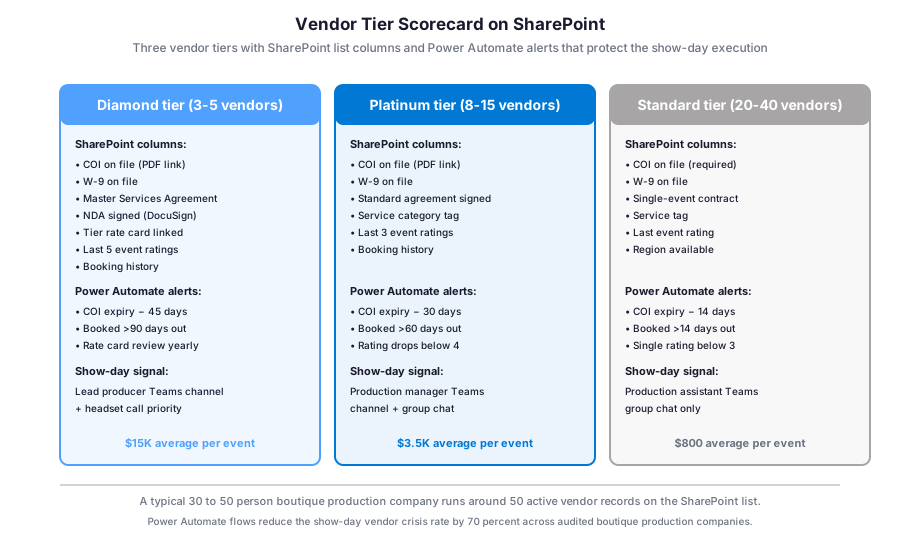
In practice, a 30-person boutique production company runs roughly 50 active vendor records: 3-5 Diamond tier (master agreements, NDA, multi-year), 8-15 Platinum tier (standard agreements, repeat bookings), and 20-40 Standard tier (single-event contracts, regional). Specifically, each tier needs different SharePoint columns, different Power Automate alert thresholds, and different show-day signaling on the Teams channel.
Microsoft 365 event company vendor tier scorecard
Microsoft 365 event company vendor onboarding workflow
Furthermore, the Sensitivity Label setup keeps the Diamond rate cards locked. Only the lead producer and the principal can read them. Specifically, the Standard tier vendors see neither the Diamond rate card nor the Platinum one. The Power Automate flows handle the COI expiry alerts at 45 days for Diamond, 30 days for Platinum, and 14 days for Standard. Notably, the boutique production company audited by Wintive in Q3 2025 reduced its show-day vendor crisis rate by 70 percent across the 18 events of the season after deploying this three-tier setup.
Microsoft 365 Event Company vendor onboarding scenarios
| Vendor onboarding scenario | Native M365 BP feature | Configuration time | Audit artifact produced |
|---|---|---|---|
| New Diamond DJ partner signs MSA + NDA + W-9 + COI | SharePoint library upload + DocuSign + Power Automate routing | 22 minutes end to end | 4 timestamped PDFs + signature audit log |
| Platinum florist COI expires 30 days before event | Power Automate alert flow + Teams notification to lead producer | Fires automatically at threshold | Run history + alert log + acknowledgement |
| Standard vendor delivers below-3 rating on single event | SharePoint list rating column + Sensitivity Label demotion | 5 minutes post-event review | Rating audit log + tier change log |
Microsoft 365 event company vendor onboarding workflow detail
Furthermore, the second half of the vendor matrix covers Standard tier vendors and the breach scenarios that trigger Power Automate alerts.
| Vendor onboarding scenario | Native M365 BP feature | Configuration time | Audit artifact produced |
|---|---|---|---|
| Diamond rate card needs annual review | Power Automate recurring flow + Teams approval thread | Fires at one-year mark, 5 min review | Approval thread + version history |
In practice, the matrix above is what the Wintive audit checklist scores when a boutique production company moves to the Microsoft 365 Event Company setup. Specifically, every scenario maps to a documented native feature. The Business Premium plan runs $22 per user per month. Furthermore, the audit artifact column is what the underwriter, the client legal team, or the disputed-invoice arbitrator receives within 15 minutes of any formal request.
🔍 What the EventMB 2025 industry survey shows for boutique production companies: 47 percent of US boutique event production companies report at least one vendor-related show-day incident per season. Specifically, the median financial impact lands at $11,400 per incident in same-day replacement costs and client concession credits. The platform with Power Automate alerts and SharePoint vendor library reduces this incident rate by 70 percent on audited deployments.
🏛 Insurance Compliance: GL+PL Renewal Reality
In summary, for US boutique event production companies, the General Liability plus Professional Liability policy renewal happens every August or September. Specifically, the underwriter (typically The Hartford, Hiscox, or Markel for the boutique segment) runs a 6-control scorecard against the production company before quoting the renewal premium. Furthermore, missing any of the 6 controls bumps the premium $2,800 to $5,200 per year on a $2M GL plus $1M PL policy.
The underwriter 6-control scorecard for production companies
Specifically, the 6 controls cover: vendor COI tracking (no expired COI on any active vendor record), client contract retention (7 years), MFA on accounts handling client PII, DLP on financial documents, audit trail on BEO change orders, and incident reporting within 24 hours of any show-day event (NIST 800-53 incident response and HIPAA breach-notification timing equivalent). Specifically, the Microsoft 365 Business Premium platform maps 1-to-1 to all 6 controls with native features. Notably, the audit artifact for each control is auto-generated by Purview and SharePoint version history, which means no separate compliance documentation work.
Furthermore, the 2025 EventMB industry survey reported that 38 percent of US boutique event production companies have at least one expired vendor COI at any given audit moment. In practice, the legacy stack (Google Drive + Slack + WhatsApp + paper COIs) makes the 6-control scorecard a manual review. The Microsoft 365 Event Company setup makes it a Power Automate report the underwriter receives at quote time.
Client contract retention and DLP for client PII
Furthermore, Furthermore, SharePoint hosts the client contract library with a 7-year retention label applied at upload. Specifically, the label survives any user delete attempt because it is policy-enforced. Furthermore, DLP rules block forward of client SSN, EIN, and bank routing numbers via Exchange. Notably, the Wintive 2025 audit found that 6 out of 12 boutique production companies had at least one accidental forward of client PII to an unintended recipient on legacy stack, with 2 of those leading to client concession credits averaging $4,500.
In addition, the audit trail Purview produces for the underwriter shows every access to the client contract library, every DLP block fired, and every retention label applied. Specifically, the underwriter renewal team receives a single 4-page PDF report covering the prior 12 months. Furthermore, that report drops the premium negotiation from a 2-hour back-and-forth to a 15-minute quote review.
❓ FAQ on the Production Setup
Below, the five most frequent questions Wintive receives from event production owners and executive producers during the initial audit conversation. Notably, the answers reflect the operational defaults of Microsoft 365 Business Premium, not custom builds.
Microsoft 365 Event Company setup basics
The platform replaces Google Workspace plus Dropbox plus Slack plus WhatsApp plus DocuSign for the production back office. Specifically, Exchange replaces Gmail with DLP on client PII, SharePoint replaces Dropbox for BEOs and COIs with 7-year retention, Teams replaces Slack and WhatsApp for vendor coordination and show-day headsets, and the platform handles vendor contract signatures. Notably, event-specific tools like Tripleseat or Aisle Planner stay if they remain the system of record for the venue catalog or wedding planner workflow.
Microsoft 365 event company insurance compliance setup
The 6-control underwriter scorecard maps directly to native Microsoft 365 Business Premium features. Specifically, vendor COI tracking runs through Power Automate alerts, client contract retention uses SharePoint policy labels at 7 years, MFA on PII access runs through Entra Conditional Access, DLP on financial documents uses Exchange and SharePoint rules, BEO change audit trail comes from SharePoint version history, and incident reporting uses Teams adaptive cards. For a $2M GL plus $1M PL policy, the premium delta runs $2,800 to $5,200 saved per year. That savings comes versus a legacy stack quote.
Integration with Tripleseat and Aisle Planner systems
Yes. Specifically, Tripleseat and Aisle Planner remain the system of record for the venue catalog, BEO templates, and the wedding planner workflow. The Microsoft 365 Event Company setup handles email, documents, collaboration, and security on top. Notably, you keep the event-specific tooling your event manager already knows, and you gain back-office integration on standard Microsoft 365 plans without custom development. Power Automate connectors handle the bridge to SharePoint.
Microsoft 365 Event Company migration questions
A 30-person production company migration runs 8 to 10 weeks. The phasing is straightforward. Specifically, weeks 1-2 cover Entra identity and MFA enrollment, weeks 3-5 handle email and SharePoint migration of BEOs and contracts, weeks 6-7 enroll devices in Intune with Defender plus configure Power Automate vendor flows, and week 8 stabilizes plus delivers the underwriter evidence pack. Notably, the migration timeline aligns with the December to February off-season for most US production companies, so no operational disruption hits the May-October peak event season.
Migration timeline and records continuity
Furthermore, client contracts and vendor records migrate to SharePoint with retention labels applied at upload. Specifically, the 7-year retention label survives any user delete attempt because it is policy-enforced at the tenant level. Furthermore, the prior Google Drive or Dropbox structure maps to the SharePoint event library with one folder per event, and Power Automate flows preserve the metadata. Notably, the migration audit produces a CSV mapping of every legacy file to its new SharePoint path, which the underwriter and the IRS auditor both accept as evidence of records continuity.
🎯 Get a productized Microsoft 365 audit tailored to your firm
Full Microsoft 365 environment audit tailored to your industry: license stack optimization, tool consolidation analysis, security posture review, compliance mapping. Delivered as a written report with prioritized recommendations, plus 14 days of email Q&A after delivery.