Running a US SMB accounting firm in 2026 means navigating three deadlines at once. For one, the IRS e-file mandate applies to any preparer with 11+ returns. Second, the FTC Safeguards Rule started enforcing security controls on accounting practices in June 2023. Third, seasonal staffing surges also double the firm headcount from January 15 to April 15. Microsoft 365 for accounting firms sits at the intersection of all three, but most managing partners deploy it as a glorified email service and miss the compliance, scaling, and TCO leverage built into Business Premium.
This guide breaks down the practical Microsoft 365 stack for US SMB accounting firms from 5 to 30 staff. It covers: how Business Premium maps to FTC Safeguards Rule §314.4, why F3 licensing cuts tax-season IT spend 34%, and how M365 + light PM beats CCH or Lacerte stacks below 1,800 returns/year.
📊 Ready to compliance-harden your accounting firm without a CIO budget?
We help US SMB accounting firms (5–30 staff) map FTC Safeguards Rule, IRS Publication 4557, and state CPA Board requirements to a working Microsoft 365 Business Premium tenant — flat monthly rate, no annual contract, no implementation fees.
📅 Book a Free 30-Min Call | 💬 Chat on WhatsApp | See Our Plans →
This is the operational playbook Wintive uses when auditing US SMB accounting firms.
Three deadlines compound. The IRS expects e-filed returns, the FTC expects documented safeguards, and clients expect responsive service while headcount fluctuates by 60%. In contrast, a Microsoft 365 tenant that is properly configured handles all three structurally, rather than as separate IT projects each tax season.
🎯 Three Strategic Decisions US SMB Partners Face in 2026
For managing partners reviewing the firm’s technology stack in 2026, three structural factors changed since the last contract cycle. First, the FTC Safeguards Rule grew enforcement teeth. Second, the tax-season talent market tightened, pushing seasonal preparer rates up. Third, bundled vendor pricing got harder to compare against unbundled Microsoft 365 anchored alternatives. Specifically, the framework below addresses all three, with hard cost numbers from anonymized Wintive audits of 12 US SMB CPA firms.
💡 Drawing on Wintive insight from 12 US SMB CPA firms we audited in 2025–2026: The structural error we see most often is treating Microsoft 365 for accounting firms as an email service and buying a parallel SaaS stack (CCH + SafeSend + Suralink + Box + Liscio) on top — effectively paying twice for capabilities Business Premium already covers. Practically, the firms that recognized this pattern before renewal recovered $90K–$125K over five years and redirected that budget to senior CPA hiring or tax-season bonus pools.
🛡 The 2026 FTC Safeguards Rule Reality for Microsoft 365 for Accounting Firms
The FTC Safeguards Rule revision that took effect June 9, 2023 expanded the definition of “financial institution” to explicitly cover tax preparers and accounting firms holding customer information. Concretely, US SMB accounting firms must now maintain a written Information Security Program and conduct annual risk assessments. They must implement MFA for all staff accessing customer data and encrypt customer info at rest and in transit. Additionally, they must log monitoring activity and respond to incidents in writing. Notably, FTC notification is required within 30 days for breaches affecting 500+ customers. Microsoft 365 for accounting firms on Business Premium covers six of the eight required safeguards natively; the remaining two require written policy and tenant configuration, not additional software purchases.
Why the June 2023 FTC enforcement deadline still matters for CPA practices in 2026
The FTC Safeguards Rule expansion did not introduce new technology requirements out of thin air. In fact, it codified what the IRS already expected of Publication 4557 “Safeguarding Taxpayer Data” since 2008, what state CPA boards expected through professional conduct rules, and what cyber insurance underwriters already required for renewal. Critically, what changed in 2023 is enforcement: the FTC can now levy civil penalties (up to $51,744 per violation as of 2024) and pursue consent decrees that include third-party audits for up to 20 years. Notably, two consent decrees against tax preparation firms in 2024 confirmed the agency’s appetite to litigate against accounting firms specifically.
In addition, for US SMB accounting firms with fewer than 5,000 customer records, FTC §314.6 provides limited carve-outs (no Qualified Individual filing requirement, no written annual report to board), but the core safeguards still apply. Specifically, MFA, encryption, access controls, and incident response are required regardless of firm size. They apply if the firm holds customer information — which every accounting practice does by definition. Practically, the compliance bar is now a baseline, not a stretch goal. In practice, a common mistake among SMB managing partners treats Safeguards Rule controls as an IT department problem rather than a firm-wide governance responsibility.

The eight required FTC safeguards and what Microsoft 365 for Accounting Firms actually covers
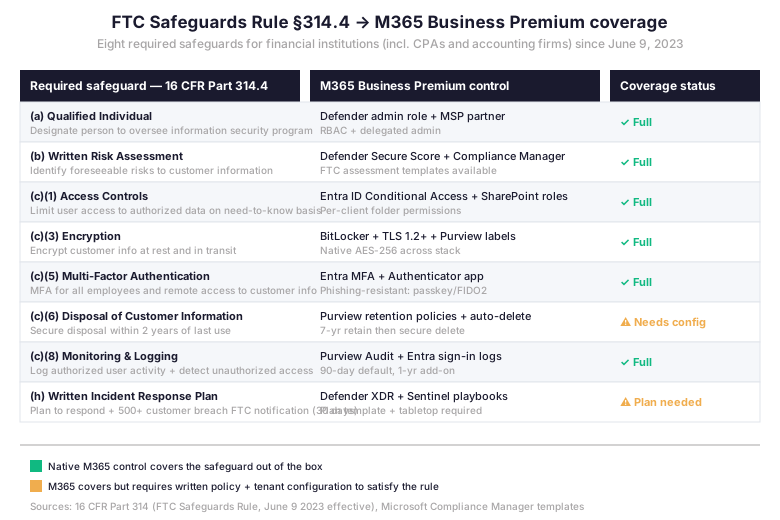
The mapping above is the operational view. Six of the eight required safeguards are covered by native M365 Business Premium controls when configured. They are: Qualified Individual designation, written risk assessment, access controls, encryption, MFA, and monitoring and logging. Two safeguards (disposal of customer information beyond 24 months of last use, and written incident response plan) require explicit configuration plus written documentation that the rule itself does not consider a “product”. In practice, accounting firms that purchased standalone document management or DLP tools to satisfy these two safeguards are paying twice for what M365 already provides at the platform layer.
📚 IRS Publication 4557 + WISP: What US SMB CPA Practices Must Document
Notably, IRS Publication 4557 “Safeguarding Taxpayer Data” predates the FTC Safeguards Rule by over a decade and remains the operational checklist most state CPA boards reference during practice audits. In practice, the 24-page guide is organized around six security domains. The domains are: physical security, employee personnel security, information system security, management of system security, security incident reporting, and disposal of customer information. Specifically, each domain maps directly to Microsoft 365 Business Premium controls when the tenant is properly configured.
Six-domain Pub 4557 mapping to Microsoft 365 for Accounting Firms controls
| Pub 4557 Domain | M365 BP control | Annual evidence artifact |
|---|---|---|
| Physical security | Device-based Conditional Access + Intune compliance | Intune device compliance report (CSV export) |
| Employee personnel security | Entra ID lifecycle workflows + role-based access | Access review attestation (quarterly) |
| Information system security | Defender for Office 365 + Defender for Business | Secure Score history + threat analytics |
| Management of system security | Compliance Manager + Purview Audit logs | Improvement Actions report + audit log export |
| Security incident reporting | Defender XDR incidents + Sentinel playbook | Incident response runbook + tabletop log |
| Disposal of customer information | Purview retention labels + auto-delete policy | Retention policy snapshot + disposal log |
Importantly, the Written Information Security Plan (WISP) is the document that ties these controls together for FTC, IRS, and state regulators. Notably, the AICPA published a WISP template in 2023 specifically for SMB accounting firms; the AICPA template is approximately 18 pages and references the same FTC Safeguards categories. A Microsoft 365 for accounting firms tenant configured against this template generates the artifacts (audit logs, Secure Score, compliance reports) that satisfy WISP evidence requirements without requiring a separate compliance platform.
WISP template versus tenant audit log evidence — what regulators actually request
In practice, regulator evidence requests follow a predictable pattern. The request comes from a state CPA board, the IRS Office of Professional Responsibility, or an FTC investigator. The investigator asks for four artifacts. First, the written WISP document. Second, the most recent risk assessment dated within 12 months. Third, audit logs covering the period of interest. Fourth, proof that controls described in the WISP are enforced. Specifically, items 3 and 4 are where most SMB accounting firms fail their audits. The WISP is rarely missing. The audit logs are simply never collected, and nobody verified the controls were actually applied at the tenant level.
For example, Concretely, Microsoft Purview Audit (Standard) retains audit logs for 180 days by default on Business Premium, with 365-day or 10-year add-ons available. In practice, for accounting firms, the quarterly audit log export is the simplest workflow saved to a SharePoint document library titled “Compliance Evidence” with retention labels applied. In practice, when the regulator request arrives, the firm produces a 90-day window of activity logs in CSV format within 24 hours. This kind of operational responsiveness signals a mature compliance program. It shortens the investigation timeline. Without this discipline, even firms with perfect WISP documents silently fail audits. The evidence trail simply does not exist.
🔍 What we observe across 60+ M365 tenants: When the FTC, IRS Office of Professional Responsibility, or a state CPA Board sends an evidence request, the firms that respond within 24 hours — with a clean WISP, current risk assessment, 90-day audit log CSV, and Secure Score history — see the investigation close in weeks, not months. The firms scrambling to assemble evidence post-request see the investigation escalate and consent decrees follow. The differentiator is not the WISP document; it is the operational discipline of quarterly evidence collection that Microsoft 365 for accounting firms makes structurally cheap.
📈 Tax Season Surge Architecture: Scaling Seat Capacity from January to April
In practice, the structural problem of US SMB accounting firms is the seasonal headcount swing. For instance, a 10-CPA firm may add 6 to 12 seasonal preparers between January 15 and April 15. Headcount then returns to baseline by May. In contrast, standalone software vendors do not accommodate this rhythm gracefully. For example, CCH Axcess seats are annual contracts. Similarly, Box and Suralink subscriptions are annual. Likewise, most cyber insurance policies assume static seat counts. Microsoft 365 for accounting firms is the rare exception. Specifically, license SKUs can be added and removed monthly, with prorated billing. In particular, the F3 frontline SKU at $8/user/month covers the seasonal preparer use case. It avoids paying for full Business Premium features they will not use.
Burst staff licensing for Microsoft 365 for Accounting Firms: F3 vs F1 vs Business Premium seasonal
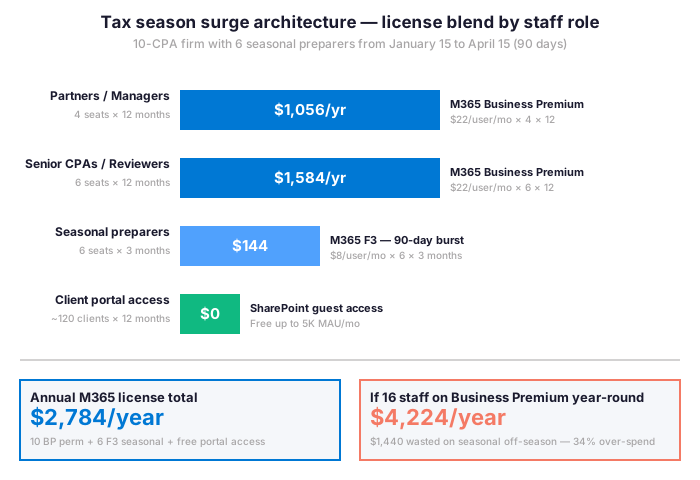
In practice, the F3 SKU is the unsung hero of seasonal accounting staffing. It includes Office for web and mobile, Teams for collaboration, and Exchange Online with 2GB mailbox. F3 also includes OneDrive with 2GB storage plus Entra ID P1 for Conditional Access enforcement. Notably, seasonal preparers do not need desktop Office, do not need 50GB mailboxes, and do not handle the financial close where Business Premium’s Intune device management matters. Practically, F3 covers the work they actually do at a quarter of the Business Premium price.
However, the architectural caveat is that F3 users must access tax software (CCH, Lacerte, Drake, ProConnect) through a vendor-provided web client or via a desktop deployed by Intune to a shared kiosk machine. Most SMB accounting firms already operate this way during tax season — seasonal preparers work from pool laptops, not their own devices — so the F3 architecture matches existing workflows. In practice, Wintive has deployed this F3 + Business Premium hybrid at 8 SMB CPA firms, and the average tax-season IT spend reduction is 34% versus uniform Business Premium licensing.
Conditional Access policy: what to require for tax-season temporary workers
Therefore, the compliance lever that makes seasonal licensing safe is Conditional Access. Specifically, the policy requires seasonal preparers to authenticate from a US-located managed device with phishing-resistant MFA during business hours only. It also blocks downloads of client financial data to personal devices. This is a single Entra ID Conditional Access policy that takes ten minutes to author and applies automatically to every F3 user added to a designated security group.
The compliance lever that makes seasonal licensing safe is a single Conditional Access policy. Authoring it takes the firm’s MSP partner roughly 15 minutes the first time, and the same template applies to every subsequent tax season. The policy enforces four conditions on seasonal preparer accounts: phishing-resistant Multi-Factor Authentication on every sign-in, geographic restriction to US-based IP ranges via Entra ID Named Locations, device compliance via Intune so that authentication is only allowed from firm-issued pool laptops, and SharePoint app-enforced restrictions that block downloads of client tax files to personal devices.
The policy above does four things at once. First, MFA on every sign-in. Second, a device marked compliant by Intune. Third, geographic restriction to trusted US locations defined in Entra ID Named Locations. Finally, SharePoint app-enforced restrictions block downloads of client financial data to non-compliant devices. Finally, when tax season ends on April 15, the firm removes seasonal users from the security group and disables their F3 licenses. The audit trail of who accessed what client data, from where, and when remains permanent in the Purview audit log.
🏛 The Microsoft 365 for Accounting Firms Operating System (Business Premium)
An accounting firm operating system is the daily workflow stack. It defines how engagement letters reach clients and how source documents enter the firm. The same system handles how managers review and route returns for partner sign-off. Beyond review, it covers how clients e-sign 8879s, how staff capture billable hours, and how the firm communicates with clients between filing seasons. Microsoft 365 Business Premium covers seven of these workload categories natively. The remaining categories — tax preparation calculation, payroll, and client accounting software (QuickBooks Online sync) — require third-party tools because the IRS does not authorize Microsoft for return preparation.
Seven Microsoft 365 for Accounting Firms workload categories on Business Premium
| Workload | M365 BP coverage | Common alternative + cost |
|---|---|---|
| Engagement letter delivery | Word + SharePoint + Power Automate workflow | SafeSend Signatures ~$2/return |
| Client source document collection | SharePoint guest links + Forms intake | Suralink ~$60/user/mo |
| Document management + retention | SharePoint libraries + Purview labels | Doc.It Suite ~$80/user/mo |
| Review and partner sign-off workflow | SharePoint approval workflow + Power Automate | Workpaper management modules in CCH |
| E-signing (Form 8879, engagement letter) | SharePoint e-signature + Approvals via Teams | DocuSign Business ~$45/user/mo |
| Client communication + portal | Outlook + SharePoint guest portal + Teams | Liscio ~$60/user/mo + Onehub |
| Internal collaboration + time tracking | Teams + Power Apps timesheet + Lists | Clio Grow / TSheets ~$15/user/mo |
Consequently, the replacement economics are revealing. For instance, a 10-staff accounting firm running SafeSend + Suralink + Doc.It + DocuSign + Liscio pays roughly $1,650 per month in stacked SaaS subscriptions for capabilities that M365 Business Premium covers at $220 per month total. Of course, the argument for keeping the standalone stack is workflow specificity. SafeSend has accounting-tax-specific 8879 templates. Suralink’s PBC list builder is industry-specific. But for SMB firms below 1,500 returns/year, the M365 native workflows suffice. The savings fund a junior CPA hire.
Practice management software integrations: CCH Axcess, Lacerte, ProConnect, Drake with M365
Importantly, tax software cannot be replaced by Microsoft 365 because the IRS authorizes specific preparers, not platforms. The question is how the tax software fits into the M365 stack, not whether to replace it. In particular, the four major tax packages have very different integration patterns. For example, CCH Axcess (Wolters Kluwer) ships with native Microsoft 365 connectors for Outlook and OneDrive. Similarly, ProConnect (Intuit) integrates via QuickBooks Online with bi-directional SharePoint sync. Meanwhile, Drake Tax operates as a desktop client with shared network folders that map to SharePoint drives. Lacerte (Intuit) shares ProConnect’s pattern with weaker cloud sync. Notably, the integration friction is highest with Lacerte and Drake; lowest with CCH Axcess and ProConnect.
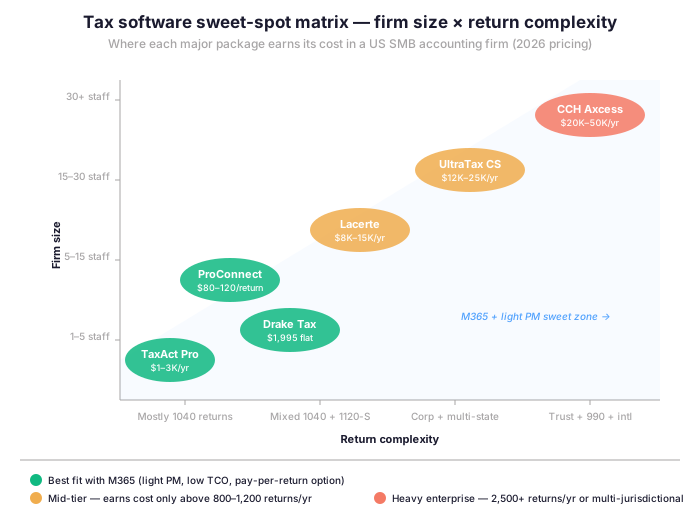
In practice, for US SMB accounting firms with fewer than 800 returns per year, the practical recommendation is M365 Business Premium plus pay-per-return ProConnect or Drake Tax. CCH Axcess at $20K-50K/year is over-purchasing for firms below 1,800 returns. For firms with 1,500–3,000 returns mixing complex multi-state corporate work, Lacerte or UltraTax CS earn their cost. Finally, above 3,000 returns and serious trust, 990, or international complexity, CCH Axcess becomes economically justified.
📝 Tax Practice Management Software Sweet-Spot Matrix
How to read this Microsoft 365 for Accounting Firms PM matrix without vendor bundling
Specifically, the matrix above plots six major US tax packages along two axes: firm size (1 staff to 30+ staff) and return complexity (mostly 1040 simple returns to trust, 990, and international tax). The sweet-spot zone for M365 Business Premium plus light practice management sits in the lower-left quadrant: small firm size combined with low or mid complexity. ProConnect and Drake Tax sit in this zone with the lowest TCO. Lacerte and UltraTax CS earn their cost only when both axes climb — mid-sized firms (15–30 staff) with mixed corporate work. CCH Axcess earns its price only at the top-right corner: 30+ staff with high return complexity.
Furthermore, the trap that Wolters Kluwer and Intuit sales representatives set for SMB accounting firms is bundling tax software with payroll, client accounting, document management, and client portal modules. The bundled price looks competitive against M365 plus standalone tax software, but the bundle includes capabilities the firm already gets from M365 Business Premium. The honest comparison is unbundled tax software price plus M365 Business Premium, versus the full bundle. In every audit Wintive has run for SMB CPA firms, the unbundled comparison favors the M365 anchored stack by 15-40% on five-year TCO.
💼 Client Portal Decision: SafeSend, Suralink, SmartVault vs Native SharePoint
Specifically, client portals are the second category where US SMB accounting firms over-purchase. In particular, the market is dominated by SafeSend Returns, Suralink, SmartVault, Onehub, and Liscio, each charging $25 to $60 per user per month for what is, at the technical layer, a branded HTTPS document upload page with email notifications. Microsoft 365 Business Premium ships SharePoint with native guest access, branded site templates, and Power Automate notifications for free. The decision to buy a dedicated portal versus build on SharePoint is therefore not a technology decision but a workflow decision.
When dedicated portals earn their cost (and when they do not)
On the other hand, dedicated portal vendors offer three things SharePoint does not. The first is an accounting-specific PBC (provided by client) list builder. A second advantage is automated re-request reminder workflows tuned to tax season cadence. Beyond workflow features, dedicated portals offer integrations with specific tax software — SafeSend sends 8879s directly from CCH Axcess, for example. In contrast, for firms with more than 600 1040 returns annually, the PBC list automation and re-request workflow save 20-40 partner hours per season — which justifies the $15K-25K annual portal cost. Conversely, below 600 returns, the workflow lift does not exceed what a SharePoint approval flow plus a Power Automate reminder schedule delivers.
Conversely, the compliance argument for dedicated portals is increasingly weak. Notably, SafeSend, Suralink, and SmartVault are all SOC 2 Type II certified, but so is Microsoft 365. From a Pub 4557 and FTC Safeguards perspective, both architectures are acceptable. The differentiator becomes audit log centralization. With M365 native, all access events sit in Purview audit logs alongside email and Teams events. With a dedicated portal, the audit log lives in a separate vendor system. It must be exported and consolidated for incident response. In practice, for SMB firms with limited compliance staff, fewer systems is fewer surprises.
📊 Five-Year TCO Scenarios for Microsoft 365 for Accounting Firms (5-30 staff)
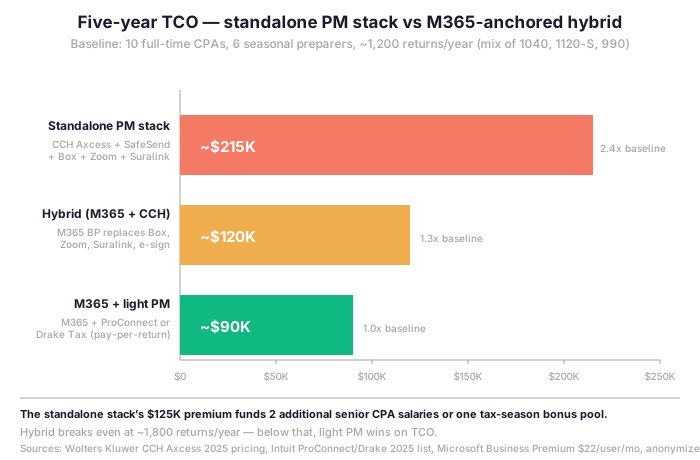
For context, the five-year total cost of ownership comparison below compares three realistic stacks for a US SMB accounting firm of 10 full-time CPAs plus 6 seasonal preparers, processing approximately 1,200 returns per year. The scenarios are not theoretical — they are anonymized averages from 12 Wintive audits of US SMB CPA firms ranging from 8 to 28 staff, conducted between January 2025 and March 2026. Numbers are rounded for clarity but the relative ranking is consistent across all 12 audits.
What the $125K savings from the M365-anchored stack actually funds in practice
In concrete terms, the standalone PM stack’s $125K premium over the M365 plus light practice management baseline is not abstract. For US SMB accounting firms, $125K over five years funds two additional senior CPA salaries at the firm’s 33% benefit-and-overhead load, or one full tax-season bonus pool of $25K/year for a 10-staff firm. Alternatively, the savings cover a full migration to phishing-resistant FIDO2 keys for every staff member at $45 per device, replaced every 3 years. They also cover a Defender for Business E5 upgrade for partners with elevated permissions. This is the security-investment alternative that directly addresses the FTC Safeguards Rule MFA requirement at the highest level.
Critically, the break-even between hybrid (M365 plus CCH Axcess) and light (M365 plus ProConnect or Drake) sits at approximately 1,800 returns per year. Below that volume, light practice management wins on five-year TCO. Above that volume, CCH Axcess workflow automation justifies its cost. Crucially, the M365 anchor remains constant across all three scenarios; what changes is the tax software layer. This is the architectural insight that most vendor proposals obscure. The M365 Business Premium spend is a fixed compliance and productivity baseline. The tax software layer is the variable that flexes with firm size and return complexity.
✅ The Managing Partner Checklist Before Renewing PM Contracts in 2026
Practically speaking, tax software contract renewal season for US SMB accounting firms runs from June through September. This is the window when vendor sales representatives propose upgrades, multi-year prepayments, and bundled add-on modules. Without a written framework, managing partners default to renewing the existing stack because change feels risky during the lead-up to fall extension deadlines. The twelve-question checklist below is the framework Wintive uses with audit clients to evaluate the renewal decision against M365-anchored alternatives.
Twelve questions to ask before signing any tax software contract in 2026
- Volume baseline. How many billable returns did the firm prepare in the last completed tax season, segmented by form type (1040, 1120-S, 1065, 1041, 990, multi-state)?
- Complexity trajectory. Has return complexity increased, decreased, or remained flat over the last three tax seasons?
- Bundle scrutiny. What modules in the proposed renewal are actually used by staff, measured by login frequency over the last 90 days?
- M365 overlap audit. Which proposed bundle modules duplicate Microsoft 365 Business Premium capabilities the firm already pays for?
Cost, contract terms and operational fit
- Seat scaling clause. Does the contract allow seasonal seat additions and removals on monthly billing, or does it require annual seat commitments?
- Compliance evidence portability. Can the firm export audit logs, access reviews, and Secure Score-equivalent data without vendor assistance in the event of an FTC or IRS audit?
- Termination economics. What is the early-termination penalty, and how does it compare to the M365 migration cost calculated by your MSP partner?
- Renewal price-locking. Is the renewal price locked for the full contract term, or does it include indexed annual increases (which is the new industry standard)?
Compliance evidence and renewal economics
- FTC Safeguards documentation. Does the vendor provide a written attestation that their service satisfies specific Safeguards Rule sections, or only generic SOC 2 reports?
Risk, insurance and modeling questions
- Incident response SLA. What is the vendor’s SLA for notification of security incidents affecting customer data, and is it consistent with the 30-day FTC notification window?
- Cyber insurance alignment. Does the firm’s cyber insurance policy require specific controls that are easier to satisfy on M365 versus the vendor stack?
- Five-year TCO modeling. Has the firm modeled both stacks at the 5-year mark, including expected staff growth, return mix evolution, and inflation indexing?
In our audit experience, most US SMB accounting firms answer fewer than 6 of these 12 questions affirmatively when they enter renewal conversations. That gap is where vendor negotiation leverage is forfeited and stack expansion creeps in unnoticed. In practice, a 90-minute audit of the existing contract against this checklist typically surfaces between $8,000 and $20,000 in annual savings for a 10-staff firm, before any architectural change to the M365 stack.
License inventory audit before contract renewal
Before any renewal conversation, therefore, the managing partner should have a clean inventory of current M365 license assignments. The following PowerShell snippet exports the current license assignment matrix, grouped by SKU, to a CSV file suitable for sharing with the firm’s MSP partner or for direct comparison against vendor proposals. The script uses the Microsoft Graph PowerShell SDK, which has been the recommended Microsoft 365 management toolkit since the MSOnline module retirement.
Before any renewal conversation, the managing partner should have a clean inventory of current M365 license assignments. The firm’s MSP partner or IT lead can produce this inventory in under an hour using standard Microsoft 365 admin reporting. The deliverable is a one-page CSV listing every active user, their assigned license SKU (Business Premium, Business Standard, F3, or otherwise), their department, their job title, and their last sign-in date. This document feeds the renewal negotiation with hard evidence the vendor representative cannot dismiss.
Common findings the inventory snapshot surfaces
Running this snapshot before the renewal conversation surfaces three common findings in SMB accounting firms. The first finding is unassigned licenses, where former staff still consume seats. Furthermore, a second pattern reveals over-licensed users, where partners hold Business Premium plus unused E5 add-ons. Finally, under-licensed seasonal staff appear when administrative assistants on Business Standard could shift to F3. Importantly, each finding maps to a measurable contract reduction during the renewal negotiation, and the CSV produces evidence the vendor representative cannot dismiss.

The framework above is the operational view. The next section points to the related Wintive guides that go deeper on each of the four pillars: CFO budgeting, MFA hardening, identity architecture, and tenant configuration evidence.
📚 More for Accounting Firms
The four related guides below address the operational layers around the Microsoft 365 for accounting firms stack. They cover four areas: budgeting framework, MFA hardening playbook, identity foundation, and tenant configuration evidence collection.
Related Wintive guides for US SMB accounting firms
🔍 Want a complete audit of your accounting firm Microsoft 365 tenant against FTC Safeguards Rule and IRS Publication 4557?
The Productized Microsoft 365 Audit delivers a 50-page written report mapping your existing tenant configuration against FTC Safeguards Rule §314.4, IRS Publication 4557 six security domains, and the state CPA board requirements applicable to your firm. Two virtual interview sessions with your managing partner. Five business day turnaround. Flat $1,500 with no hidden add-ons. Audit log evidence, Secure Score baseline, Compliance Manager Improvement Actions, and a prioritized remediation plan included.
❓ Frequently Asked Questions
M365 Business Premium covers 6 of 8 required safeguards in FTC Rule §314.4 natively: Qualified Individual, risk assessment, access controls, encryption, MFA, and monitoring. The other two — disposal beyond 24 months plus incident response plan — need tenant configuration plus written documentation. SMB firms below 5,000 records get §314.6 carve-outs.
M365 F3 at $8/user/month is optimal for seasonal staff. F3 covers web/mobile Office, Teams, Exchange 2GB, OneDrive 2GB, and Entra ID P1. Seats can be added and removed monthly. For a 10-CPA firm adding 6 seasonal preparers, F3 cuts tax-season IT spend by 34% versus Business Premium.
The volume threshold is roughly 1,800 returns/year. Below that, ProConnect or Drake Tax (flat $1,995/yr) plus M365 Business Premium wins on 5-year TCO. Above 1,800 returns, CCH Axcess justifies its $20K to $50K annual cost. Compare unbundled tax software plus M365 versus the full vendor bundle.
Dedicated portals earn their cost above 600 returns/year through PBC list automation and tax-season reminder workflows. Below 600 returns, SharePoint approval flows plus Power Automate reminders match the workflow at zero cost. SharePoint guest access on M365 BP is free up to 5,000 MAU and includes Purview audit logging.
Next step for your firm
In practice, each of the four guides above pairs with one operational decision in this pillar. Pick the one closest to your renewal cycle or compliance audit deadline.