
In practice, most managing partners discover that their email as legal evidence posture is broken only after the duty to preserve has been triggered. By then, the choice is no longer architectural. It is between paying for curative measures, accepting an adverse inference jury instruction, or settling. Federal courts have documented sanctions ranging from $200,000 to $7.5 million for email mishandling under FRCP 37(e). Critically, for a 10-attorney US SMB law firm, the financial exposure of a single mishandled litigation hold often exceeds five years of M365 Business Premium licensing.
⚖️ Need a defensible email evidence framework configured on your existing M365 tenant?
Practically, Wintive has hardened 60+ M365 tenants for US SMB law firms (60+ tenants total) and maps FRCP 37(e), ABA Rule 1.6(c), and your state bar retention rules to Microsoft 365 Business Premium controls. No PMS vendor incentive, no kickback agreements. The output is a written report your managing partner can sign off on and your IT lead can implement.
📅 Book a Free 30-Min Call | 💬 Chat on WhatsApp | See Our Plans →
Four operational dimensions covered for managing partners
This guide treats email as legal evidence as a procurement, compliance, and risk-management decision for US SMB law firms 5-30 attorneys. Four operational questions drive the architecture: which sanctions framework applies, what your M365 stack already covers, where Purview Standard suffices versus where Premium or Relativity becomes necessary, and how retention policies map to malpractice exposure. Every section below is decideur-oriented with concrete dollar figures and documented case law.
📍 What this guide covers: A US SMB law firm decision framework for litigation-ready email in 2026. Subsequently, four operational dimensions: FRCP 37(e) sanctions exposure, ABA Op. 477R seven-factor due-diligence mapping, eDiscovery TCO procurement decision (M365 Purview vs Logikcull vs Relativity), and retention policy by matter type. Read time: 12-15 minutes. Audience: managing partners, IT leads, and general counsel of 5-30 attorney firms.
📜 Why Email as Legal Evidence Is the Highest-Stakes Operational Risk for US Law Firms in 2026
For most US SMB law firms, email plays three roles in litigation readiness: the primary client communication channel, the operational backbone of matter management, and the highest-volume discoverable record. Indeed, when litigation arrives, federal and state courts treat email as the de facto ESI baseline. Significantly, the 2015 amendment to FRCP 37(e) raised the floor. Failure to take reasonable preservation steps now exposes firms to curative measures. Adverse inference instructions or outright dismissal of claims are also on the table. Moreover, the exposure scales with attorney count: a 10-attorney firm with five active litigation matters faces compounded risk across every active inbox.
Documented federal sanctions establish the financial exposure baseline
Critically, this is not a theoretical concern. Documented federal sanctions for email mishandling include Klipsch Group v. ePlus ($1.7 million, 2018), Pension Committee v. Banc of America ($7$7.5 million in legal costs, 2010), and the foundational Zubulake series ($29 million combined sanctions and judgment). Notably, the pattern across these cases is consistent: the underlying litigation outcome shifts when email evidence is incomplete, altered, or destroyed. For managing partners, the question is therefore not whether email evidence rules apply. It is whether your firm has documented preservation, defensible chain of custody, and budget-aligned eDiscovery capacity for the typical matter volume your practice generates.
💡 Wintive insight (60+ tenants): The most common mistake is treating litigation hold as a one-time configuration. In practice, admins struggle to maintain quarterly hold testing. Silent failures of custodian acknowledgment workflows can later turn a defensible posture into a Zubulake V violation. The fix is operational, not architectural: a written quarterly procedure with named owner, plus a 50GB simulated matter test in Purview Compliance Center.
⚖️ FRCP 37(e) Safe Harbor: The Four-Step Sanctions Test for Email Evidence
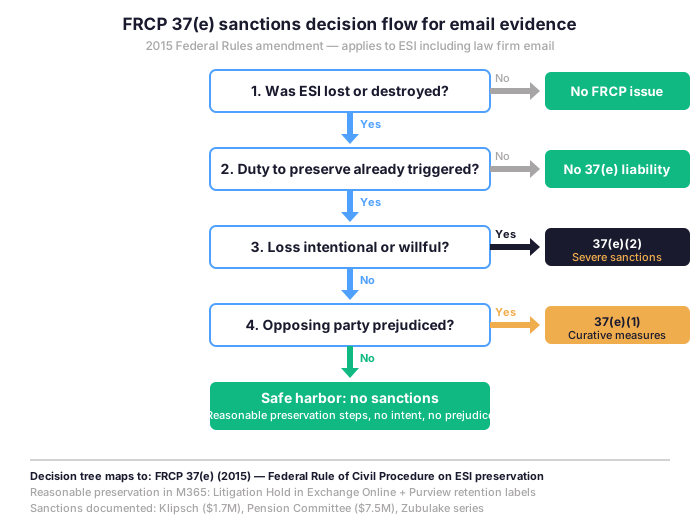
FRCP 37(e) defines a four-step test that determines whether a US federal court will sanction your firm for lost ESI. Crucially, the structure matters because the safe harbor exists, and most US SMB law firms can reach it with native M365 Business Premium controls. Specifically, the decision flow below maps the four sequential gates from ESI loss to sanction outcome.
When the duty to preserve actually triggers
Specifically, the duty to preserve email triggers when litigation is reasonably anticipated. It does not wait for the complaint to be filed. In practice, federal courts construe this broadly. A demand letter, a workers comp filing, a discovery letter from opposing counsel, or even a documented internal complaint from an employee can start the clock. Therefore, for US SMB law firms, the practical implication is that your retention defaults must be defensible by themselves, and your litigation hold mechanism must activate within days, not weeks. Notably, the Zubulake V decision established a clear standard. Counsel has an affirmative duty to direct preservation and verify compliance. Issuing a notice and walking away is not enough.
Documented FRCP 37(e) sanctions and what they actually cost US firms
In practice, the financial pattern across federal sanction orders is consistent. Specifically, Klipsch Group v. ePlus Inc. (2018) imposed $1.7 million in monetary sanctions. The defendant had failed to preserve discoverable email records. Pension Committee v. Banc of America Securities (2010) cost the defendants approximately $7.5 million. The additional legal fees and discovery costs followed Judge Scheindlin finding gross negligence in preservation. Likewise, Likewise, Brown Jordan International v. Carmicle (2018) added $1.8 million in fee shifting. Even at the smaller end, average sanctions for negligent preservation cluster around $250,000 to $500,000. The figure includes curative discovery and motion costs. In context, for a 10-attorney firm, one mishandled hold dwarfs five years of M365 licensing budget.
🛡️ ABA Formal Opinion 477R: Seven Factors for Email Evidence Due-Diligence
Furthermore, ABA Formal Opinion 477R extends ABA Model Rule 1.6(c) to email and cloud communications. Specifically, the opinion identifies seven due-diligence factors managing partners must apply to evaluate whether their email system meets the reasonable efforts standard for protecting confidential client information. Practically, In practice, Microsoft 365 Business Premium maps to six of seven factors natively. One factor (Audit Premium) requires an inexpensive add-on for firms above 50 attorneys. The same applies to firms with active multi-matter litigation.
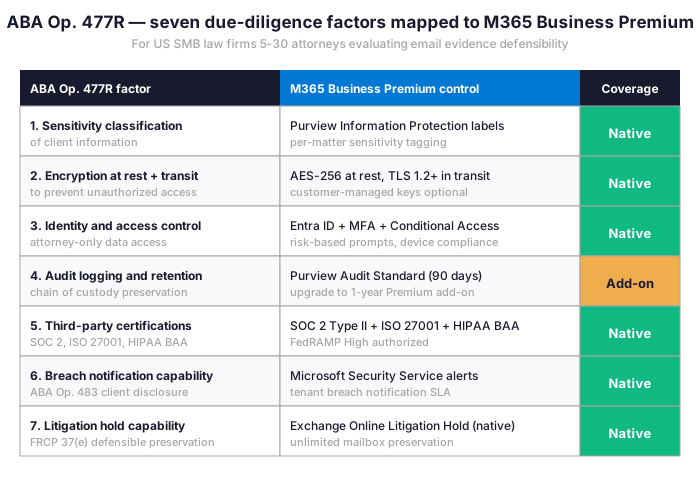
Notably, the seven factors do not require firms to chase enterprise security certifications they will never use. Specifically, they require demonstrable, documented control selection appropriate to the firm size and matter sensitivity. For instance, a 10-attorney firm handling commercial litigation needs different controls. A 30-attorney firm doing class action defense needs another tier. Notably, the Florida Bar Ethics Opinion 20-1 (2021) explicitly extends this analysis to cloud-based PMS and remote work, confirming that the seven-factor framework is the operative standard across most US jurisdictions for these determinations.
🔍 What Makes Email Admissible as Legal Evidence in US Federal Courts
Importantly, admissibility of email evidence in federal court turns on three structural requirements under Federal Rules of Evidence 901 and 902. First, authenticity requires the proponent to show the email is what it purports to be. Second, integrity requires the content to be demonstrably unchanged from creation through production. Third, chain of custody requires the path from custodian inbox to evidentiary exhibit must be documented. Crucially, Microsoft 365 Exchange Online satisfies all three when configured with Litigation Hold and Purview audit logging enabled, because the platform timestamps, signs, and preserves email server-side beyond user reach.

Concretely, federal magistrate judges have repeatedly admitted M365 Exchange Online email evidence. The strength comes from native authentication mechanisms. These include tenant-bound message IDs, server-side timestamps that survive client manipulation, SHA-256 hashes computed at delivery, and the Purview audit trail that documents every administrative access. However, Gmail consumer accounts and on-premises Exchange Server installations frequently face authentication challenges. Opposing counsel often argues plausible tampering. Therefore, the platform choice has direct evidentiary consequences.
📥 Litigation Hold Mechanics on Microsoft 365 for Email Evidence Preservation
Practically, for managing partners, the operational question is not whether M365 supports litigation hold but how the six-step workflow maps to your firm responsibilities under FRCP 26(f) and your state bar discovery rules. Specifically, the workflow runs from trigger event through release after matter disposition, with timestamped audit records at each step. Importantly, each step has a specific responsibility owner (managing partner, IT lead, or custodian) and a defensible documentation requirement for chain of custody.
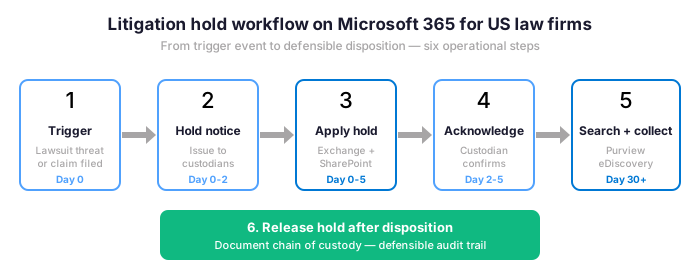
Specifically, the Specifically, the Day 0 trigger starts when litigation is reasonably anticipated, not when the complaint is filed. Next, the hold notice (Day 0-2) goes to identified custodians by email with read confirmation tracking. Then, the In-Place Hold (Day 0-5) applies through Exchange Online and SharePoint Online without alerting the custodian or interrupting their work. Subsequently, custodian acknowledgment (Day 2-5) creates the affirmative paper trail required by Zubulake V. Afterwards, search and collect (Day 30+) runs through Purview eDiscovery when discovery requests arrive. Finally, release after disposition documents the chain of custody from notice through final exhibit.
💰 eDiscovery 5-Year TCO for Email as Legal Evidence: M365 Purview vs Relativity vs Logikcull
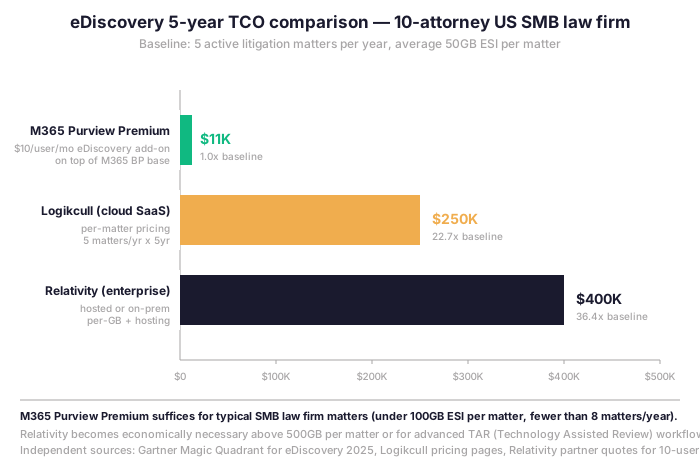
Indeed, the eDiscovery procurement decision splits cleanly along firm size and matter complexity. Conversely, for US SMB law firms 5-30 attorneys handling typical commercial litigation with email at the operational core, Microsoft 365 Purview Premium covers approximately 90 percent of practical eDiscovery use cases. Conversely, above that envelope, enterprise platforms become economically necessary. Consequently, the five-year TCO comparison for a 10-attorney firm with five active matters per year quantifies the differential.
When Purview Premium suffices and when Relativity becomes economically necessary
Critically, the breakpoint is not firm size but matter volume and complexity. In practice, Concretely, M365 Purview Premium handles ESI volumes up to roughly 100GB per matter. Native review, redaction, and production workflows are included. However, beyond 500GB per matter or when Technology Assisted Review (predictive coding under Rule 502) becomes essential, Relativity becomes the defensible choice. Meanwhile, Logikcull occupies the middle ground. It fits firms with eight to fifteen matters per year that exceed Purview capability but cannot justify Relativity infrastructure. For most managing partners running a 10-attorney commercial litigation practice, the procurement math is clear. Purview Premium runs roughly $11,000 over five years. Logikcull runs $250,000 over the same period.
📁 Email Retention Framework for Email as Legal Evidence by Matter Type and US Jurisdiction
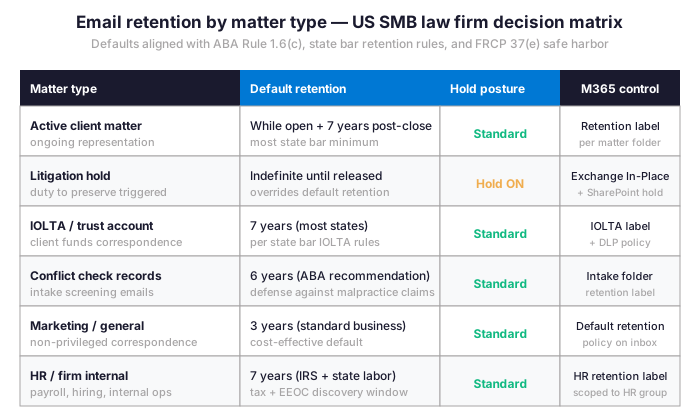
Importantly, email retention is not a single default but a matrix of policies aligned to matter type, state bar rules, and federal compliance requirements. In practice, a US SMB law firm running a single default retention policy across all inboxes is either over-retaining (cost and discovery exposure) or under-retaining (sanctions risk). Specifically, the matrix below maps the six dominant matter categories to defensible retention periods and the corresponding M365 control.
Implementing the retention matrix in Microsoft 365 Purview
By design, Concretely, M365 Purview retention labels apply automatically based on matter folder structure, sender or recipient pattern, and keyword detection. Helpfully, the implementation does not require user training or behavior change. Specifically, the IT lead configures the policy once, and email flowing into matter-specific Outlook folders (organized by sensitivity label or shared mailbox per matter) inherits the correct retention default. Furthermore, for firms that already segment matters via SharePoint matter sites, this layer drops in cleanly without disrupting workflow.
📊 Quantified Malpractice and Bar-Discipline Exposure for US SMB Law Firms
Therefore, the relevant exposure analysis for decision-makers combines three risk channels: federal FRCP 37(e) sanctions, state bar disciplinary action under Rule 1.6, and direct malpractice claims from clients whose matter outcome shifted due to email preservation failures. Importantly, the matrix below documents typical financial exposure ranges based on US federal case law and state bar disciplinary records 2020-2025.
Three risk channels combine for total annual exposure
| Exposure channel | Typical financial range | Documented precedent |
|---|---|---|
| FRCP 37(e)(1) curative measures | $200K – $750K per matter | Brown Jordan v. Carmicle ($1.8M) |
| FRCP 37(e)(2) severe sanctions | $1M – $7.5M per matter | Pension Committee ($7.5M) |
| Adverse inference jury instruction | Effective case loss | Zubulake series ($29M combined) |
| State bar Rule 1.6 disciplinary | $10K – $50K + suspension | NY Bar Op. 1019, FL Bar Op. 20-1 |
| Direct malpractice claim | 1x – 3x underlying matter value | ABA Standing Committee data 2024 |
| Total annual exposure (10-atty firm) | $250K – $2.5M plausible range | Composite federal sanction data |
Specifically, the bottom row aggregates plausible annual exposure for a 10-attorney US SMB law firm with five active litigation matters. Critically, the range of $250,000 to $2.5 million per year is not theoretical: it represents a 1 to 10 percent probability of one severe outcome multiplied by documented sanction sizes. By contrast, M365 Business Premium licensing at $22 per user per month plus Purview Premium add-on totals approximately $4,000 per year. The risk-adjusted return on hardening this preservation framework exceeds 50x for most firms.
Investment vs exposure: M365 native controls under 0.5% of annual sanction risk
| Investment line | Annual cost (10 attorneys) | What it covers |
|---|---|---|
| M365 Business Premium | $2,640 / year | Exchange Online, Litigation Hold, Purview Audit Standard, Entra ID + MFA, Conditional Access |
| Purview Premium add-on | $1,200 / year | eDiscovery Premium, custodian communications, advanced indexing, predictive coding |
| Wintive Productized M365 Audit | $1,500 one-time | FRCP 37(e) gap analysis, ABA Op. 477R mapping, retention policy decision matrix, written report |
| Total Year 1 | $5,340 | Defensible posture with quarterly testing |
Therefore, the gap between current annual sanction exposure and the cost of defensible posture is the central procurement argument for managing partners. The checklist below converts this exposure analysis into an operational diagnostic any IT lead can run against a live M365 tenant.

✅ Managing Partner Checklist: Ten Questions Before Relying on Email as Legal Evidence
Practically, for US managing partners, the structural checklist below surfaces the operational gaps that turn into sanctions exposure when litigation arrives. Practically, run this checklist against your current M365 tenant configuration once per quarter, and again before signing any matter engagement letter that carries litigation probability above ten percent.
Litigation hold readiness and chain-of-custody questions
- Is Exchange Online Litigation Hold available and tested on every attorney inbox? Confirm via Purview Compliance Center that the hold capability is licensed and that an end-to-end test has documented chain of custody.
- What is the documented duty-to-preserve trigger threshold for our firm? Demand letter, workers comp, internal complaint, and discovery letter should each have a documented response SLA under five days.
- Who is the named litigation hold administrator and what is their backup? A single point of failure on hold administration is itself a Zubulake V violation.
- What retention defaults apply to each matter type today? Active, closed, IOLTA, conflict check, marketing, and HR should each have a documented retention period mapped to a Purview retention label.
- Can our IT lead produce a defensible chain-of-custody report within 72 hours of a discovery request? If the answer is uncertain, the Purview eDiscovery configuration needs a structured review.
Retention, eDiscovery, and breach posture questions
- Have we tested Purview eDiscovery search against a 50GB simulated matter dataset? Untested capability is not defensible capability.
- What is the documented breach notification SLA from Microsoft to our tenant? ABA Op. 483 (2018) requires this disclosure conversation with clients post-breach.
- Are sensitivity labels applied to client matter folders and inherited by email? Without inheritance, manual labeling at scale fails within six months.
- What is our annual eDiscovery budget envelope versus our worst-case matter projection? A 10-attorney firm should budget $5K-$20K per year for Purview Premium plus contingency for one Logikcull engagement.
- When is the last documented end-to-end test of the six-step litigation hold workflow? Quarterly is the defensible minimum for any firm with active litigation practice.
Importantly, a firm that answers all ten with documented evidence has already cleared FRCP 37(e) reasonable preservation. Conversely, a firm with three or more gaps faces the financial exposure mapped in the matrix above. Critically, the gap analysis is not a future project. Indeed, it is the documented procurement and risk decision that determines whether your next litigation matter generates revenue or sanctions.
📚 More for US Law Firms
🎯 Get a productized Microsoft 365 audit tailored to your law firm
Full Microsoft 365 environment audit tailored to your law firm: FRCP 37(e) preservation posture, ABA Rule 1.6(c) compliance mapping, Litigation Hold readiness assessment on Exchange + SharePoint + Teams, eDiscovery TCO decision (Purview vs Logikcull vs Relativity), and retention policy mapping by matter type. Specifically, delivered as a written report with prioritized recommendations, plus 14 days of email Q&A after delivery.
❓ Frequently Asked Questions on Email as Legal Evidence
FRCP 37(e) and ABA Rule 1.6(c) compliance posture
Yes, when configured with Exchange Online Litigation Hold and Purview retention labels per matter type. Specifically, the native In-Place Hold preserves email server-side beyond user reach. Importantly, timestamps and message IDs are tenant-bound and tamper-evident. The Purview audit trail documents chain of custody. Federal magistrate judges have admitted M365 email as legal evidence based on these mechanisms. Configuration is the differentiator, not the underlying platform capability.
Documented federal sanctions range from $200,000 to $7.5 million. Specifically, the smaller end covers curative measures. Conversely, the higher end reflects gross negligence (Pension Committee v. Banc of America, 2010). In practice, average sanctions for negligent preservation cluster around $250,000 to $500,000 once curative discovery and motion costs are tallied. Notably, severe sanctions under 37(e)(2) are rarer but functionally end the case. Practically, the annual risk-adjusted exposure for a 10-attorney firm ranges from $250,000 to $2.5 million.
Operational implementation on Microsoft 365
Critically, the economic breakpoint is matter complexity, not firm size. Notably, M365 Purview Premium covers 90 percent of typical SMB law firm use cases (matters under 100GB ESI, fewer than 10 active matters per year). In contrast, Logikcull becomes economically reasonable in the eight to fifteen matters per year range. Furthermore, Relativity is justified above 500GB per matter. It also fits when Technology Assisted Review under Rule 502 becomes essential. For a 10-attorney commercial litigation practice with five active matters, Purview Premium at $11,000 over five years versus Logikcull at $250,000 is usually the clear choice.
Indefinite until the matter is fully resolved. Then, all appeals must be exhausted. The duty to preserve must be documented as released. Typically, most US federal civil matters take 18 to 36 months from filing to final disposition. Critically, litigation hold overrides default retention periods, so an active hold preserves email beyond standard retention without exception. Subsequently, the release decision is documented in writing by the managing partner or general counsel. Subsequently, chain-of-custody records are preserved indefinitely in Purview audit logs for malpractice defense.