In US law firms, billable hours are the the lifeblood of revenue, and law firm billable hours are the single biggest predictor of practice profitability. Yet according to Clio’s 2025 Legal Trends Report, the average attorney captures only 2.9 billable hours per 8-hour workday — a 37% utilization rate that translates to roughly $155,000 per year of unrealized revenue per attorney. The leak is architectural, not behavioral. And most of it is recoverable on the Microsoft 365 tenant your firm already pays for.
⚖ Struggling to manage matters across a fragmented tech stack?
We build Microsoft 365 environments for law firms where every matter lives in one place — SharePoint libraries, Teams channels, and Exchange all connected. Book a free call to see what a properly configured environment looks like for a firm your size.
📅 Book a Free 30-Min Call | 💬 Chat on WhatsApp | See Our Plans →
💰 The $155K Question Every Managing Partner Should Be Asking About Law Firm Billable Hours
Notably, Clio’s 2025 Legal Trends Report puts the industry average utilization rate at 37% — 2.9 billable hours captured out of 8 worked. Realization sits at 88% (12% of billable work never makes it to an invoice), and collection at 93%. The effective billing rate — utilization × realization × collection — is roughly 29.6%. Less than one-third of working time converts to collected revenue.
By contrast, the gap between solo firms (26% utilization) and 20+ attorney firms (45%) is not about working harder. Larger firms have systems that protect billable time. As a result, the 19-point spread represents a $637 per day per attorney revenue gap — $155,000+ per year in unrealized revenue at the average $349 hourly rate (Clio 2025; LexHelper analysis).
Specifically, the question every Managing Partner should be asking is not “which software should we buy next?” The question is: where is the time actually going, and why does each new piece of software fail to close the gap? The thesis of this piece: the leak is architectural. Lawyers are not lazy. Their tools force context-switching that fragments billable work into unbillable scraps. The fix is to redesign the architecture — not buy more software on top of the architecture you already have.
🩸 Where Law Firm Billable Hours Actually Bleed Out of Your Inbox
Specifically, of the 5+ non-billable hours in an average attorney’s day, three buckets dominate. Furthermore, each one is a friction point that the Matter Operating System (introduced below) eliminates directly:
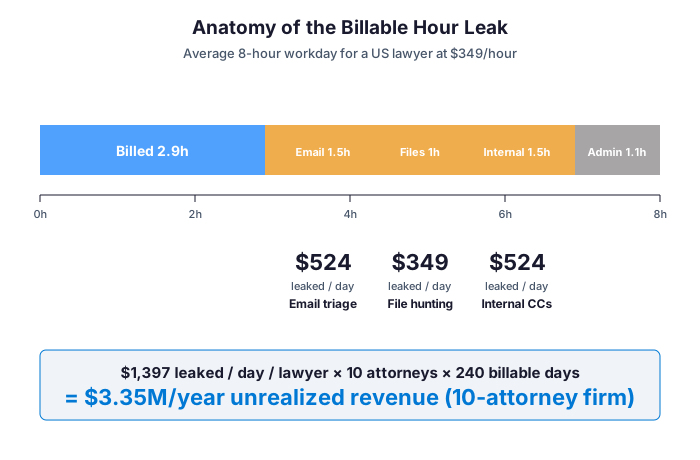
- Email triage (~1.5h/day) — Outlook reaches inbox-zero only to refill 90 minutes later. Threads about active matters get buried under marketing, opposing-counsel CCs and intra-firm chatter. Lawyers re-read emails to remember context. The common mistake here is treating email as a system of record rather than a queue of decisions. Each re-read is a cognitive switch that does not become a billable entry.
- File hunting (~1h/day) — Where is the latest draft? Is the SharePoint version the same as the one Bob emailed yesterday? Lawyers spend a measurable chunk of every day reconciling versions across email attachments, OneDrive, shared drives, and (if a DMS exists) NetDocuments.
- Internal CCs and coordination (~1.5h/day) — Paralegal asks attorney via email. Attorney replies. Paralegal needs clarification. The decision is now spread across 4-6 messages with no clean matter record.
Therefore at $349/hour, those three buckets alone cost $1,397/day per attorney. Therefore for a 10-attorney firm working 240 billable days per year, that is $3.35M annually that never makes it to an invoice. This is the conversation no Managing Partner has at firm leadership meetings, because everyone assumes the time loss is just “how the job works.” It is not.
📊 The Real Cost of Adding Clio on Top of M365 (And How It Affects Billable Hours)
However, the market sells “all-in-one” practice management systems as the solution. Clio. MyCase. PracticePanther. Smokeball. Entry tier is $39-$49 per user per month; mid-tier (the one most firms actually buy) is $89-$99; top-tier is $149-$169. Specifically, what most Managing Partners do not compute: this is stacked on top of Microsoft 365 they already buy for email, document collaboration and security.
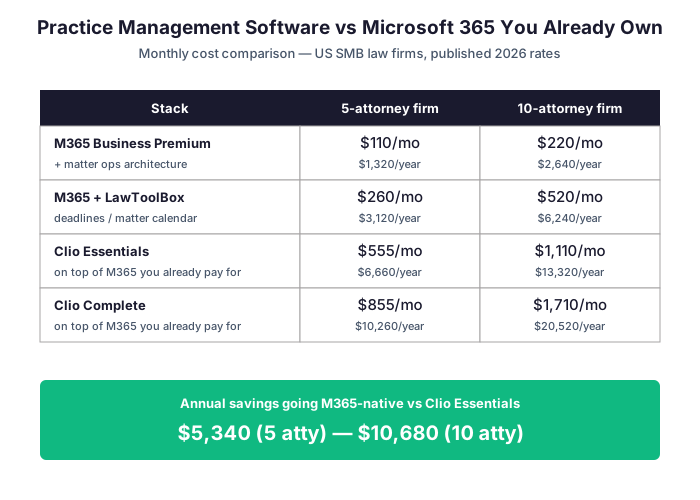
Notably, the numbers in the table below assume standard published rates per user per month for each practice management vendor. Notably, bulk negotiation or annual prepayment can reduce list pricing by 10-20% on Clio and MyCase, but the order-of-magnitude gap between a M365-native stack and a dedicated PMS-plus-M365 stack remains the same regardless of discounting tactics.
| Stack option | 5-attorney firm (annual) | 10-attorney firm (annual) |
|---|---|---|
| M365 Business Premium ($22/user/mo) | $1,320 | $2,640 |
| M365 + LawToolBox deadlines | $3,120 | $6,240 |
| M365 + Clio Essentials ($89/user/mo) | $7,980 total | $15,960 total |
| M365 + Clio Complete ($149/user/mo) | $11,580 total | $23,160 total |
What Microsoft 365 Business Premium actually includes
In practice, M365 Business Premium runs $22 per user per month and includes Outlook, SharePoint, Teams, Microsoft Defender for Business, Intune, Entra ID P1, Microsoft Purview and the Copilot foundation. Unlike AWS, GCP or Okta-centric identity stacks that require separate identity, file, mail and collaboration vendors, the M365 tenant unifies all four pillars under one bill, one audit log and one Conditional Access policy engine. Furthermore for a 5-attorney firm running M365 alone with a properly designed matter operating system: $1,320/year. By contrast, the same firm adding Clio Essentials on top costs $7,980/year. As a result, the annual difference of $6,660 funds two more months of paralegal billable capacity — or 4 hours per week of architecture and training that compounds across the entire practice.
Critically, that is the math nobody runs for you. Therefore the honest answer about whether to keep the practice management system depends on what your firm actually does day-to-day. Finally, Section 10 covers the three scenarios where Clio or MyCase still earn their cost. For everyone else, the M365-native path closes the gap on law firm billable hours capture without an additional software bill.
🏛 What a Matter Operating System Looks Like on M365 (Architecture for Billable Hours Recovery)
Specifically, a Matter Operating System (Matter OS) is a discipline, not a product. Specifically, it is the set of conventions that make every matter findable, every artefact attached to its matter, every hour of work logged at the moment of work, and every retention obligation enforced automatically. Notably, Wintive has implemented this pattern across 60+ M365 tenants.
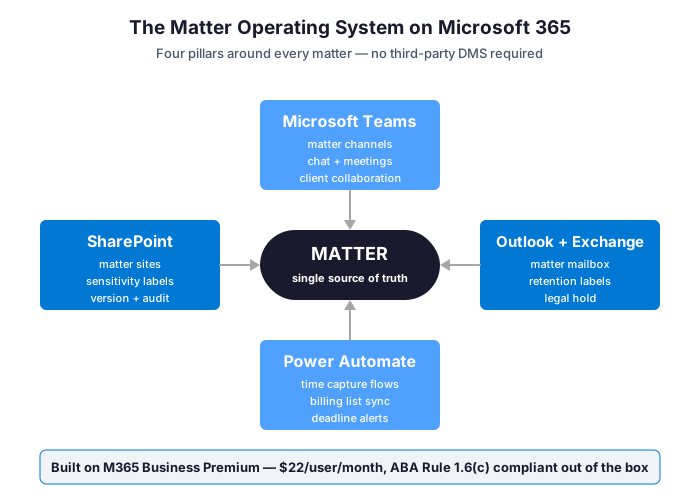
In practice, the four pillars on M365 Business Premium:
- SharePoint matter sites — each active matter is its own site (or library, depending on volume) with consistent metadata: client, matter number, practice area, sensitivity label.
- Microsoft Teams matter channels — chat, meetings and file access scoped to that matter; no cross-contamination, no Slack or email side conversations.
- Outlook + Exchange retention — sensitivity labels enforce ABA Rule 1.6(c). Emails about matter X automatically inherit matter X retention policy. Legal hold is available without third-party software.
- Power Automate workflows — time entries, billing list sync, deadline alerts and retention triggers, all running natively on the M365 tenant.
Furthermore what makes the four pillars operate as a system (and not just four tools): a shared matter taxonomy (matter ID convention), sensitivity labels wired across the stack, and automation flows that connect the pillars without requiring lawyers to switch apps. The discipline is the architecture; the tools just enforce it.
📥 Lever 1 — Email-to-Matter Discipline (Outlook + SharePoint + Retention Labels)
Critically, the single highest-impact change for billable hour recovery is converting email triage from rework into matter logging. In practice, three concrete moves below:
- Outlook category = matter ID — when an email arrives about matter X, it gets the matter X category. Done in one click. A simple Outlook rule auto-categorizes based on subject prefix or sender domain for active matters.
- Save-to-SharePoint plug-in — every email worth keeping (decisions, agreements, opposing counsel positions) gets saved with one click to the matter SharePoint site under the matter folder. Outlook’s native “Save as” or third-party tools like harmon.ie do this in one shortcut.
- Retention label applied automatically — labels propagate from the matter site to anything saved into it. Privilege markings (Attorney-Client Privilege / Work Product) inherit too. ABA Rule 1.6(c) “reasonable efforts” gets built into the flow without lawyer effort.

As a result, expected billable hour recovery: 1 to 1.5 hours per attorney per day, building over 4-6 weeks as discipline propagates. Therefore for a 10-attorney firm, that is 10-15 recovered billable hours per day at $349/hour, equivalent to $3,490-$5,235/day or $838,000-$1.26M/year in additional capacity.
📁 Lever 2 — Findable Matter Files Recover Billable Hours Without NetDocuments
By contrast, NetDocuments, iManage and SuiteFiles are excellent products on their own merits. However, they cost $50-$120 per user per month on top of M365. Specifically, most SMB law firms in the 5-30 attorney range do not need them — they need SharePoint matter sites with conventions.
Critically, three architecture decisions for matter file management on SharePoint:
- One matter = one site (or library) — pick the scale that fits your matter volume. Less than 100 active matters: one site per matter. 100-500: libraries inside grouped sites by practice area. More than 500: subscribe to SharePoint Syntex for AI-assisted classification.
- Three columns of metadata, always — Matter ID, Client, Document Type. Search filters become precise. Power BI matter dashboards are 3 clicks away.
- Sensitivity labels for privilege — the “Privileged & Confidential” label encrypts at rest, restricts copy/print, and watermarks PDFs. Auto-applied to files saved in matter libraries.
As a result, expected billable hour recovery: 0.5 to 1 hour per attorney per day from eliminating file-hunting friction. At $349/hour for a 10-attorney firm, that is $1,745-$3,490 per day or $419,000-$838,000 per year of recovered billable capacity.
⏱ Lever 3 — Contemporaneous Time Capture Closes the Billable Hours Gap
Notably, the realization rate gap (88%, meaning 12% of billable work never makes it to an invoice) collapses when time gets logged at the moment of work, not Friday afternoon. Specifically, three M365-native time capture patterns:
- Outlook plug-in time entry — write the email, hit a button, time logs to the matter category with subject and duration. No app switching. Available natively in Outlook or via simple add-ins (Bigle, Drift, custom Power Automate).
- Teams meeting auto-log — a meeting attached to a matter channel automatically becomes a time entry. The meeting was 47 minutes? That is logged as 0.8 of an hour.
- Power Automate billing list — Excel sheet or SharePoint list aggregates all time entries from all sources (Outlook, Teams, manual). Friday review is 20 minutes, not 4 hours. Where most law firms silently fail is end-of-week batch logging that leaves 12% of billable work on the table.
Quantified law firm billable hours recovery from Lever 3
Finally, expected law firm billable hours recovery from Lever 3: 0.5 hour per attorney per day plus a 5-9 point realization rate improvement (more billable work makes it to invoice). At a 10-attorney firm, that is roughly $1,750/day in recovered hours plus an additional 5-9% revenue lift on existing billable work.
🔍 What we see across 60+ M365 tenants — when contemporaneous time capture goes live, realization rate jumps from 88% to 95-97% within 8-10 weeks. Collection rate does not change. That recovered revenue is pure margin: no extra work, no new hires. As a result, the Managing Partner conversation shifts from “we need more attorneys” to “we need less leakage on the attorneys we have.”
As a result, across all three levers combined, the financial picture becomes explicit for any managing partner who wants to see the numbers. Notably, recovery estimates in the table below assume the 10-attorney baseline introduced earlier; smaller firms divide proportionally by headcount, while larger firms compound the recovery further as discipline scales across the entire practice.
| Lever | Hours/day/attorney | 10-attorney firm (annual at $349/hr) |
|---|---|---|
| Lever 1: Email-to-Matter | 1.0-1.5h recovered | $838K-$1.26M |
| Lever 2: Findable files | 0.5-1.0h recovered | $419K-$838K |
| Lever 3: Time capture | 0.5h + 5-9% realization | $420K + 5-9% on billed |
| Combined potential | 2-3h/day/attorney | $1.7M-$2.5M+ recovered |
As a result, beyond the three levers built into the Matter Operating System architecture, Microsoft Copilot for M365 adds a second wave of billable hour recovery that compounds on top of the structural fix.
🤖 Where Microsoft Copilot Actually Recovers Billable Hours
In practice, Microsoft Copilot for M365 ($30 per user per month, added on top of Business Premium) compounds the Matter OS architecture and adds a second wave of law firm billable hours recovery on top of the structural fix. Specifically, four legal-specific workflows where Copilot actually moves the billable needle:

- Deposition transcript summarization — paste a 150-page transcript, Copilot extracts witness statements, contradictions and exhibits referenced. What took 4 hours of paralegal time runs in 8 minutes with attorney review.
- Email triage acceleration — Copilot drafts replies, summarizes long threads and extracts action items. Email triage time drops from 1.5h to 30-45 minutes per day.
- Brief drafting from research notes — voice memos and research files become a first-pass brief structure. Attorney edits to final. 60% time reduction on first drafts.
- Contract review — Copilot flags non-standard clauses against firm precedent in Word. Junior attorney review becomes spot-check, not full read.
Furthermore the Miami-Dade Bar estimates $100,000 of new billable time per lawyer per year for US firms that combine M365 + Copilot with proper matter architecture (Miami-Dade Bar reference). Clio’s 2025 data: 79% of legal professionals already use AI, 69% report positive revenue impact, top performers handle 25-37% more cases per lawyer.
🛡 ABA Rule 1.6(c) Compliance Built-In, Not Bolted-On
Critically, ABA Model Rule 1.6(c) requires “reasonable efforts to prevent the inadvertent or unauthorized disclosure of, or unauthorized access to, information relating to the representation of a client.” Rule 1.1 Comment 8 requires technological competence. ABA Formal Opinion 477R (cloud security) addresses electronic communications.
Specifically, For law firm billable hours protection, Microsoft 365 Business Premium ships with:
- Encryption at rest and in transit — TLS 1.2+, AES-256 storage.
- Microsoft Purview Data Loss Prevention (DLP) — blocks accidental SSN/PHI/PII email exfiltration.
- Sensitivity labels — Attorney-Client Privilege markings enforced across Word, Excel, Outlook and SharePoint.
- Conditional Access (Entra ID P1) — blocks logins from foreign IPs, forces MFA, gates by device compliance.
- Audit log retention 1 year — answers “who accessed this matter, when, from where.”
- Legal hold (eDiscovery) — preserves emails and SharePoint files for litigation hold without third-party software.
- US data residency — choose United States as the tenant data location; SOC 2 Type 2 and FedRAMP audited.
Notably, the IBM 2024 Cost of a Data Breach Report puts the average breach cost in professional services at $4.45M; ransomware specifically averages over $1.2M. Furthermore, ABA Formal Opinion 483 (2018) requires lawyers to notify clients of breaches affecting their information. Therefore the Matter OS on M365 Business Premium addresses ABA Rule 1.6(c) reasonable-efforts standard with native controls rather than bolt-on tools.
📋 When Law Firm Billable Hours Justify a Dedicated Practice Management System
However, not every law firm should ditch Clio or MyCase. Specifically, there are three concrete scenarios where a dedicated practice management system earns its $445-$1,710 per month:
- High-volume trust accounting — if you process 30+ IOLTA transactions per month with three-way reconciliation, Clio’s IOLTA module and MyCase’s trust accounting are genuinely better than building it on M365. Trust accounting compliance failures are bar discipline territory; do not improvise.
- Complex active conflict checking — 50+ active matters with multi-party disclosure obligations require a purpose-built conflict engine. SharePoint search will not catch the edge cases. Clio Manage’s conflict check + matter intake workflow is hard to replicate.
- High-volume e-filing across multiple state courts — court-specific filing rules, deadline calculators and integration with state e-filing portals (PACER, NextGen) are specialized. LawToolBox plugs into M365 for deadline calculation; Clio integrates with court systems directly for e-filing.
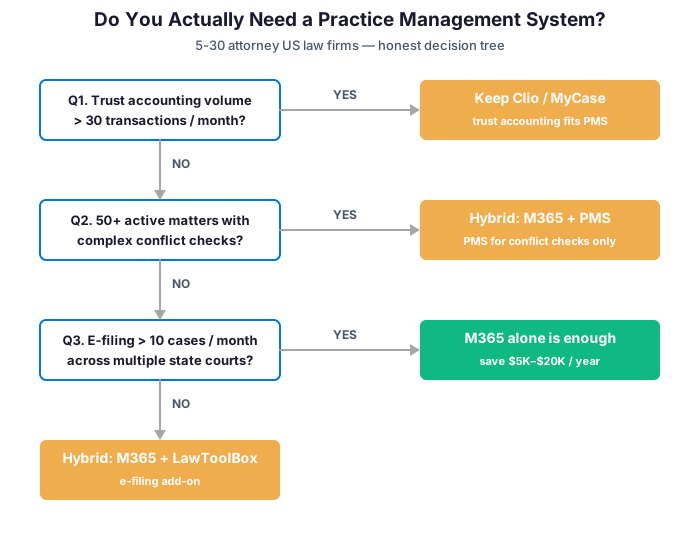
In practice, most SMB law firms in the 5-30 attorney range handle modest trust accounting, manageable conflict checks (under 50 active matters) and limited multi-state e-filing. Therefore M365 alone covers them — with the Matter OS architecture in place. Finally, the decision is not “Clio or M365.” The decision is “what does our practice actually demand?” The honest answer is that most firms over-buy because nobody runs the math against their actual practice profile.
📚 More for Law Firms
🎯 Get a productized Microsoft 365 audit tailored to your firm
Full Microsoft 365 environment audit tailored to your industry: license stack optimization, tool consolidation analysis, security posture review, compliance mapping. Specifically, delivered as a written report with prioritized recommendations, plus 14 days of email Q&A after delivery.
❓ Frequently Asked Questions
Architecture, cost & implementation
For 80% of 5-30 attorney firms, yes — with proper Matter Operating System architecture. The 20% that genuinely needs a dedicated practice management system is covered in section 10: high-volume trust accounting, 50+ active matters with complex conflict checking, or high-volume multi-state e-filing. Most SMB firms over-buy because nobody runs the financial math on law firm billable hours against their actual practice profile.
$220/month = $2,640/year for 10 users at the standard $22/user/month rate. By comparison, Clio Essentials runs $1,110/month = $13,320/year for the same 10 attorneys. Microsoft 365 Business Premium includes Outlook, SharePoint, Teams, Defender, Intune, Entra ID, Purview and the Copilot foundation — enough to run a Matter OS with no add-ons for most firms.
4-6 weeks for a 5-attorney firm with proper architecture work. Specifically, phase 1 (weeks 1-2): SharePoint matter site template + sensitivity labels + retention policies. Phase 2 (weeks 3-4): Outlook category convention + Teams matter channels + Power Automate time capture flow. Phase 3 (weeks 5-6): Copilot onboarding + Power BI matter dashboards. DIY runs 3-6 months and most attempts stall.
Law firm billable hours recovery & ABA compliance
According to Clio’s 2025 Legal Trends Report, the industry average is 2.9 billable hours per 8-hour workday (37% utilization). Solo firms run at 26%, larger firms (20+ attorneys) at 45%. The gap is architectural, not behavioral. Better matter management converts non-billable email and file-hunting time into billable work.
Email-to-Matter discipline (Lever 1 in our framework). Outlook category = matter ID + Save-to-SharePoint plug-in + retention label inheritance. Expected recovery is 1 to 1.5 billable hours per attorney per day, building over 4-6 weeks. For a 5-attorney firm at $349/hour, that is $1,745-$2,617 per day = $419K-$628K per year in additional billable revenue.
Yes, with proper configuration. Business Premium includes encryption at rest and in transit, sensitivity labels for privilege markings, DLP for accidental exfiltration prevention, Conditional Access for MFA enforcement, audit log retention and eDiscovery for legal hold. ABA Formal Opinion 477R (cloud security) and Formal Opinion 483 (breach notification) requirements are addressable with Business Premium configuration — but configuration is the operative word.