Typically, most articles on legal practice management software are written by vendors or their affiliates. The vendor-funded narrative is consistent: every law firm needs a PMS, Clio is the gold standard, the checklist matters. What they omit matters more. The entire US PMS market is owned by six PE-backed groups. Clio is forcing every Clio + LawPay customer to migrate by August 31, 2026. Concretely, a 10-attorney firm pays $83,400 over five years for Clio Essentials. The same firm pays $18,200 for the Microsoft 365 stack it already owns. This guide is for US SMB managing partners. The audience: 5-30 attorney firms. The need: a structural picture before signing a multi-year PMS contract in 2026.
💼 Get a vendor-neutral assessment of your practice management stack.
Notably, Wintive is a Microsoft 365 consulting firm. We are not a PMS vendor. We have no kickback agreements with Clio, MyCase, or any practice management software company. Our team helps US law firms 5-30 attorneys decide which PMS modules they actually need. Then we architect M365 to cover the rest. Book a free 30-minute call.
📅 Book a Free 30-Min Call | 💬 Chat on WhatsApp | See Our Plans →
Reframing the legal practice management software decision for US SMB law firms
First, before diving into the architecture decision, here is the most important reframing the SERP rarely surfaces. The right question is not whether to buy a PMS; it is whether your firm meets the empirical triggers that justify the cost. We will get to those in Section 3.
💡 Drawing on Wintive insight from more than 60 M365 tenants we have implemented (60+ tenants benchmark across 5-30 attorney US law firms): In particular, a common mistake is buying full-stack PMS for the one workflow where it excels, then paying for the 80 percent of features that silently fail to deliver ROI. Fundamentally, the structural decision is upstream of the feature comparison.
🏛 The 2026 LegalTech Consolidation Crisis Changes the Legal Practice Management Software Decision
To establish the baseline, until five years ago the US legal practice management software market was genuinely competitive. Each major PMS vendor was independent and had to win every customer on merit. That market does not exist anymore. As of 2026, six PE-backed ownership groups control virtually every PMS product a US SMB law firm could realistically buy. The competitive market vendor marketing still implies no longer exists. A small oligopoly of holding companies has replaced it. These holding companies increasingly steer customers toward bundled products inside their own portfolio.
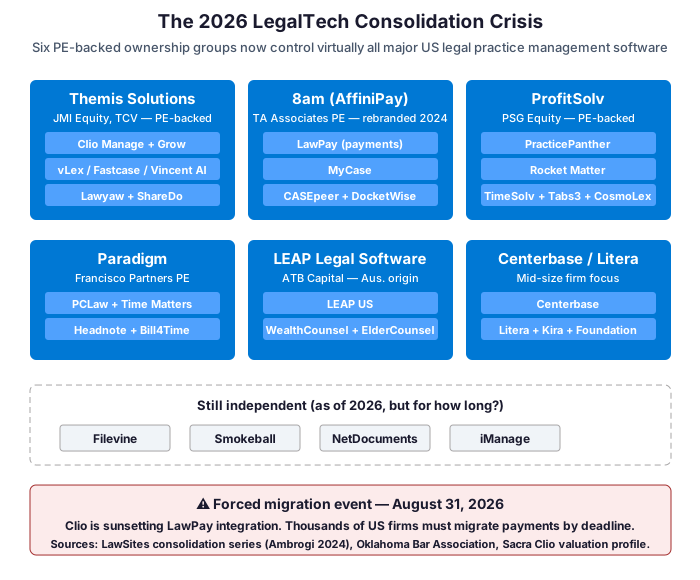
How the August 31, 2026 Clio-LawPay sunset proves the structural shift
Notably, the most concrete proof point for this shift hits US firms this year. On March 5, 2026, Clio formally notified its customers that it is sunsetting the longtime LawPay integration on August 31, 2026. As LawSites founder Robert Ambrogi noted in his series on the shrinking ownership of law practice management technology, LawPay was for years the “Switzerland of LegalTech” — a neutral payment processor integrating with every major PMS. That neutrality ended in June 2022 when AffiniPay, LawPay’s parent company (now rebranded 8am), acquired MyCase. Overnight, a payment processor became a direct competitor of every PMS that used it, and the inevitable unwinding of cross-vendor integrations began.
Notably, for US SMB managing partners, the practical question changes shape. The old question: “Which legal practice management software is best for my firm?” The 2026 question: “How do I architect my firm so I retain leverage over my vendors, instead of the reverse?” Notably, this is the structural reframing missing from every vendor-funded comparison guide on the SERP. When six PE groups own the entire field, forced migrations become a normal market event. The cost of vendor lock-in stops being hypothetical. It becomes a line item in your five-year financial plan.
💰 What Legal Practice Management Software Actually Costs in 2026 (Hidden TCO)
To begin with, published per-user pricing is the part of legal practice management software cost that vendors put on the comparison page. It is roughly 30 to 40 percent of what a US SMB law firm actually pays over five years. The other 60 to 70 percent appears in implementation budgets, integration subscriptions, payment processing fees, and the opportunity cost of two attorneys spending three months learning a new platform instead of billing. In practice, the most useful number for a managing partner is not the headline price per user per month. It is the cumulative outflow over a realistic five-year horizon for a specific firm size.
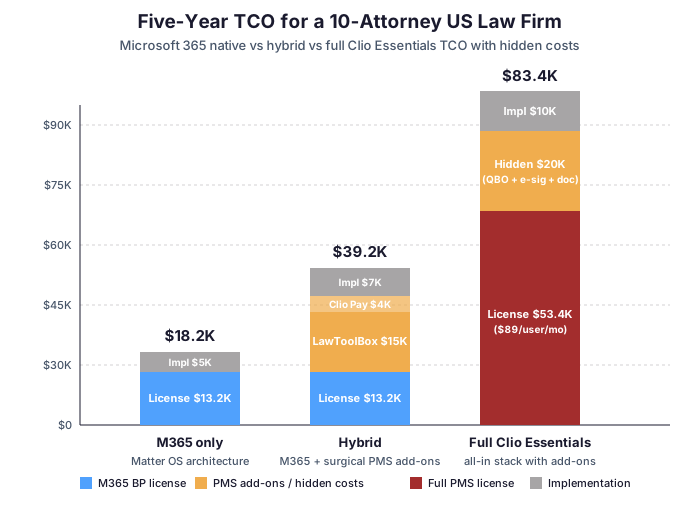
Hidden costs the legal practice management software comparison charts never show
Critically, the Clio Essentials column on the right of the chart deserves a footnote. This $53,400 license number assumes ten attorneys at the annual-billing Essentials rate of $89 per user per month for sixty months. The $20,000 in hidden add-ons is the documented mid-point from independent reviews: QuickBooks integration at $30 per month, e-signature at $40 per month, document assembly at $50 to $100 per month, plus the inevitable upgrade conversation when Essentials limits become visible around month 18. Implementation at $10,000 is conservative for a 10-attorney firm. The estimate must include the parallel-running phase. Independent migration consultants typically recommend two to six months of parallel running. Productivity drops by 20 to 30 percent during weeks 1 to 8.
Payment processing and integration costs Clio omits from sticker pricing
Furthermore, what the chart does not include is payment processing. Clio Payments charges 2.9 percent plus $0.30 per credit card transaction. For a 10-attorney firm processing $1.5M of revenue annually through the platform, this adds approximately $43,500 per year. Over five years, that totals $217,500. For comparison, processing the same volume through an independent merchant account or ACH-first workflow typically costs 0.5 to 1.5 percent. Critically, payment processing fees do not appear on vendor comparison charts. Yet they are often the single largest line item once a firm exceeds $1M in annual revenue.
By contrast, the independent benchmark widely cited by US legal accounting consultants in 2026 is approximately $13,000 to $15,000 per year for a 5-attorney firm running Clio with typical add-ons. By contrast, the same firm running M365 Business Premium standalone pays $1,320 per year (5 attorneys at $22 per user per month). For a managing partner who has not run this math themselves, the order-of-magnitude difference is genuinely surprising. The 10x cost gap is real. The compound effect plays out across a five-year horizon. Practice management software handles more workflows over time. Getting the structural decision right the first time matters.
🔍 Three Empirical Triggers That Justify a Dedicated Legal Practice Management Software
Drawing on direct fieldwork, after implementing the Matter Operating System architecture across 60+ US M365 tenants, three workflow patterns consistently justify the cost of a dedicated practice management system on top of Microsoft 365. The first is high IOLTA volume: a US law firm processing more than 30 trust account transactions per month genuinely benefits from purpose-built trust accounting with three-way reconciliation, automated bar-association-compliant reporting, and matter-specific ledgers. M365 with QuickBooks integration can handle trust accounting up to about 30 transactions per month with careful manual workflows; past that threshold, the manual reconciliation overhead exceeds the cost of a dedicated tool like Clio Essentials, CosmoLex, or Headnote.
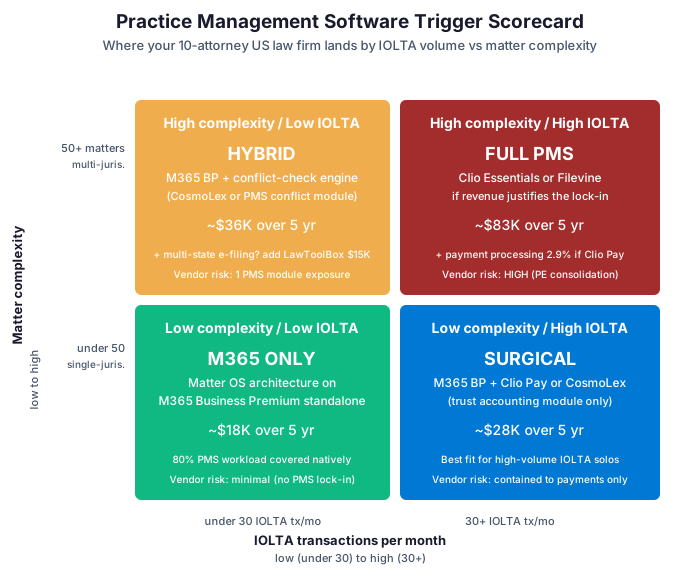
Triggers 2 and 3: PMS conflict checks and multi-state e-filing
The second trigger is multi-jurisdiction conflict checking on a substantial active matter portfolio. Take a US firm with 50+ active matters across multiple state jurisdictions. Conflict checks must search prior matters, opposing parties, related entities, and historical client relationships. At that scale, spreadsheet-based checking breaks. A dedicated conflict-check engine inside a PMS becomes real ABA Model Rule 1.7 risk mitigation. It is not a feature. It is a malpractice prevention layer. Firms below this matter threshold typically run SharePoint-list-based conflict checks adequately. Power Automate flows scan incoming intake forms against historical matter records.
By contrast, the third trigger is e-filing volume across multiple state courts. A US firm filing 10+ documents per month across 3+ state jurisdictions hits friction with manual e-filing portal workflows quickly. In practice, LawToolBox or a Clio Manage e-filing add-on pays for itself within 90 days at this volume. Importantly, this is the easiest trigger to address surgically: a firm meeting only the e-filing trigger does not need a full PMS migration. It needs a $25 per user per month e-filing add-on that integrates with Outlook. The Matter Operating System on M365 handles everything else.
Applying the three-trigger test to your law firm in practice
Critically, if none of the three triggers apply to your firm — fewer than 30 IOLTA transactions monthly, fewer than 50 active matters with simple conflict patterns, minimal multi-state e-filing — then Microsoft 365 Business Premium covers approximately 80 percent of what a dedicated PMS provides. The cost: roughly 10 percent of the PMS bill. Furthermore, the data stays in your tenant. Most importantly, you preserve vendor leverage in a market where six PE groups now play musical chairs with each other’s products.

⚖️ What ABA Model Rule 1.6(c) and Formal Opinion 477R Actually Require
As background, the ABA Standing Committee on Ethics and Professional Responsibility issued Formal Opinion 477R in May 2017, interpreting Model Rule 1.6(c). The opinion establishes that lawyers must make “reasonable efforts” to prevent unauthorized disclosure of client information when transmitting it electronically. The opinion lists seven non-exclusive factors. Lawyers must analyze each when selecting a vendor for client-data systems. These factors apply directly to choosing between Microsoft 365 and a dedicated PMS vendor. The Florida Bar extended this analysis specifically to cloud-based practice management. Ethics Opinion 20-1 (2021) made cloud PMS due diligence a per-jurisdiction enforceable obligation.
Seven-factor ABA compliance matrix: M365 versus PMS coverage
| ABA Op. 477R factor | Microsoft 365 Business Premium | Clio Essentials | MyCase |
|---|---|---|---|
| 1. Nature of threat (target attractiveness) | Hyperscale provider (Azure), multi-tenant, 99.9% MFA block rate | Single-vendor, 200K+ user database, prior breach incidents reported | Single-vendor, post-AffiniPay integration scope |
| 2. Sensitivity of information | Sensitivity labels per matter, encryption at rest + in transit | Document-level only, no in-platform classification | Document-level only |
| 3. Cost of safeguards relative to fee | $22/user/mo includes all controls | $89/user/mo + add-ons for security features | $79/user/mo, security tier add-on |
| 4. Ease of use after safeguards | Conditional Access with risk-based prompts | MFA optional, no Conditional Access equivalent | MFA optional, no Conditional Access equivalent |
| 5. Vendor security investigation | SOC 2 Type II, ISO 27001, HIPAA BAA, FedRAMP High | SOC 2 Type II only | SOC 2 Type II only |
| 6. Encryption (rest + transit) | AES-256 at rest, TLS 1.2+ in transit, customer-managed keys available | Vendor-managed encryption | Vendor-managed encryption |
| 7. Breach notification mechanism | Microsoft 365 Service Health + customer-tenant-specific incident reporting | Notification at vendor discretion + contractual SLA | Notification at vendor discretion |
What the seven-factor analysis means in practice
Notably, the pattern across all seven factors is the same. M365 Business Premium provides infrastructure-grade security controls. These map directly to the ABA factors and exceed what a typical PMS vendor offers at any tier. This is not because Clio or MyCase are bad products. They are mid-size SaaS companies. They compete against a hyperscale cloud provider with infrastructure investments in the hundreds of billions of dollars. Notably, the FedRAMP High authorization Microsoft 365 holds is the same one used by US federal agencies for classified workloads. No PMS vendor has equivalent certification.
In practice, for US managing partners, the practical implication of ABA Opinion 477R and follow-on Opinion 483 (breach notification, 2018) is straightforward. The reasonable efforts standard sets a floor your stack must meet. M365 Business Premium meets that floor by default. Sensitivity labels and Conditional Access push it past the floor. A standalone PMS does not meet the floor by default. The result depends on add-on security tiers, customer-side configuration, and the vendor’s ongoing security posture. The compliance risk profile of these two architectures is structurally different.
🛡️ Cyber Insurance Requirements That Drive 2026 Procurement Decisions
Notably, cyber insurance underwriting for US law firms has tightened materially since 2024. Major carriers now cross-reference cyber coverage applications with malpractice insurer records. Coalition, Beazley, Chubb, AXA XL, ALPS (Attorneys’ Liability Protection Society), and the Florida Lawyers Mutual Insurance Company all use this approach. Beazley’s underwriting guidelines, updated in Q3 2024, explicitly require documented phishing simulation results for firms with more than 10 employees, with 90 percent annual completion rates as the threshold. The implication is significant. Procurement decisions about legal practice management software are now joint conversations. The managing partner, the IT decision-maker, and the firm’s cyber insurance broker all participate. A PMS choice that increases attack surface costs more in premium. It also reduces coverage.
Cyber insurer control mapping for 2026 procurement baseline
| Cyber insurer control (2026 baseline) | Microsoft 365 Business Premium | Standalone PMS impact |
|---|---|---|
| Multi-factor authentication enforced | Native (Entra ID + Conditional Access) | Vendor-specific, requires separate enforcement policy |
| Endpoint detection and response (EDR) | Defender for Endpoint included | Not provided by PMS, separate stack required |
| Email security (Defender for O365 Plan 2) | Native | Not applicable (PMS does not own email) |
| DMARC / DKIM / SPF enforcement | Configurable in Exchange Online | Not applicable |
| Data loss prevention (DLP) on client comms | Microsoft Purview DLP native | Document-level only inside PMS scope |
| Immutable backup with documented restore | Requires Datto/Veeam (add-on) | Vendor backup, restore process documented by vendor |
| Phishing simulation with 90%+ completion | Requires KnowBe4 or Microsoft Attack Simulator (add-on) | Not applicable |
| Written incident response plan + tabletop | Firm responsibility | Firm responsibility |
Why fewer vendors equals lower cyber insurance premiums
Importantly, the asymmetry is structural. Critically, M365 Business Premium ships six of the eight baseline controls insurers require by default; the firm adds two complementary services (immutable backup and phishing simulation) for roughly $10-15 per user per month. By contrast, a standalone PMS does not own the email, the endpoints, or the identity layer. Most attacks happen at exactly those layers. The PMS sits adjacent to all of them. Critically, from an insurer’s underwriting perspective, fewer vendors equals fewer attack-surface gaps. Consider a 5-attorney firm running M365 BP as its security backbone. Add a single PMS module bolted on for a specific workflow trigger. This presents a materially lower risk profile than the same firm running Clio plus separate identity, separate endpoint, separate email, and separate document management.
Notably, this is the conversation most cyber insurance brokers will have with managing partners in 2026 if asked directly: consolidating the security perimeter inside M365 reduces premium by 15 to 30 percent compared to a multi-vendor stack at the same coverage limits. As a result, the procurement decision shifts. Spending $89 per user per month on Clio Essentials is no longer just a software purchase; it is an implicit insurance premium increase. Our deeper analysis of email security and confidentiality on M365 for law firms covers the technical implementation of these controls.
🏛 The Microsoft 365 Business Premium Matter Operating System
To summarize the architectural pattern, a Matter Operating System on Microsoft 365 Business Premium is not a product. It is an architecture pattern Wintive has implemented across 60+ US M365 tenants for law firms 5-30 attorneys. The pattern uses four pillars of M365 — SharePoint, Outlook + Exchange, Microsoft Teams, and Power Automate — organized around the matter as the unit of work. The shift from inbox-centric or document-folder-centric organization to matter-centric organization is the architectural decision that determines whether M365 covers 80 percent of what a legal practice management software does, or only 30 percent.
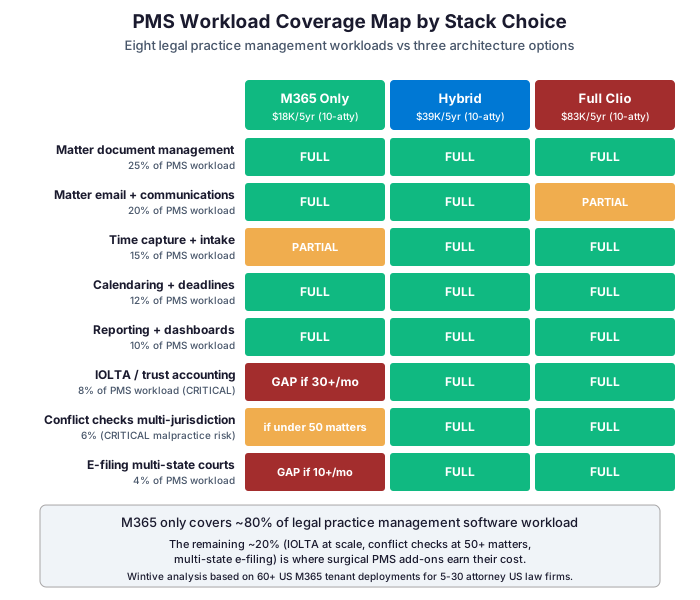
How M365 covers eight legal practice management software workload categories
Specifically, the coverage heatmap above breaks down the eight PMS workload categories into a per-stack assessment. Five of the eight workloads (document management, email, calendaring, reporting, time capture once configured) are fully covered by M365 BP alone. Two workloads (IOLTA at scale, conflict checks at 50+ matters) become gaps when M365 stands alone. One workload (multi-state e-filing) is a gap unless surgical add-ons fill it. Notably, the Matter Operating System architecture on M365 BP captures the FULL row for five of eight categories at one tenth the five-year cost of a comparable Full Clio deployment. Notably, Microsoft Copilot for M365 compounds the architecture. It costs an additional $30 per user per month for firms that opt in. Capabilities include intelligent matter summarization, time-entry suggestion from email and Teams chat, and document drafting based on prior matter templates.
However, what it does not cover natively is the remaining 20 percent: three-way trust account reconciliation against bar association requirements, a formal conflict-check engine with multi-jurisdiction search, and integrated multi-state court e-filing portals. These are the exact three triggers from Section 3. This is where surgical PMS add-ons earn their cost. Not as foundations. As specialized connectors to specific workflows the M365 stack does not own.
📋 Where Each Major Legal Practice Management Software Actually Earns Its Cost
In practice, each major US legal practice management software vendor has a genuine sweet spot where it pays for itself. The mistake most firms make is buying the full-stack PMS for the one workflow where it excels. The result: paying for 80 percent of features they will never use. By contrast, the surgical approach is to identify the specific trigger your firm meets and adopt the PMS that handles that workflow best, while keeping M365 as the matter operating system underneath.
Major PMS pricing and sweet-spot matrix for 2026
| PMS | 2026 price (annual) | Sweet spot | Pair with M365 as |
|---|---|---|---|
| Clio Essentials / Complete | $89-149/user/mo | High IOLTA volume (30+ tx/mo), strong integrations ecosystem | Trust accounting only – use Clio Payments for IOLTA, M365 for everything else |
| MyCase | $39-99/user/mo | Solo and 2-3 attorney firms wanting one predictable bill | If the trigger profile fits, MyCase replaces more of M365. Otherwise pair as IOLTA-only |
| PracticePanther | $59-99/user/mo | Budget all-in-one for firms moving off legacy desktop tools | IOLTA + reporting layer; M365 owns document and email |
| Smokeball | $49+/user/mo (36-mo) | Windows-first desktop-heavy practices, family / immigration | Document automation layer; M365 owns everything else |
| Filevine | Custom (not public) | Personal injury / mass tort with customized case workflows | Replacement, not pair – not appropriate for 5-30 atty SMB |
| LawToolBox | $25-35/user/mo | E-filing automation across multiple state courts | Surgical e-filing add-on – best fit for hybrid M365 architecture |
| CosmoLex | $49-89/user/mo | Integrated bookkeeping + IOLTA in one tool | Trust accounting + accounting layer; M365 owns documents and matter ops |
How to read this legal practice management software matrix without falling for vendor bundling
In practice, the honest read on this table is simple. No single PMS dominates across all firm profiles. Each one has a sweet spot. Outside that sweet spot, the tool becomes overpriced and overweight. Take a 10-attorney US firm with high IOLTA volume, no e-filing burden, and simple conflict checks. The right architecture is M365 Business Premium plus Clio Payments for trust accounting only. Full Clio Essentials would be overkill. That single decision saves $40,000 to $60,000 over five years compared to the full PMS subscription.
🔧 The Hybrid Architecture: M365 + Surgical Legal Practice Management Software Add-Ons
Specifically, the hybrid architecture is the pragmatic middle ground for US SMB law firms meeting one or two of the three triggers, but not all three. It places Microsoft 365 Business Premium as the matter operating system core. Then it selectively bolts on PMS modules for specific workflow triggers. As a result, the firm gets best-in-class capability for the workflows that matter. It avoids paying full-stack PMS prices for the 80 percent of features it will not use.
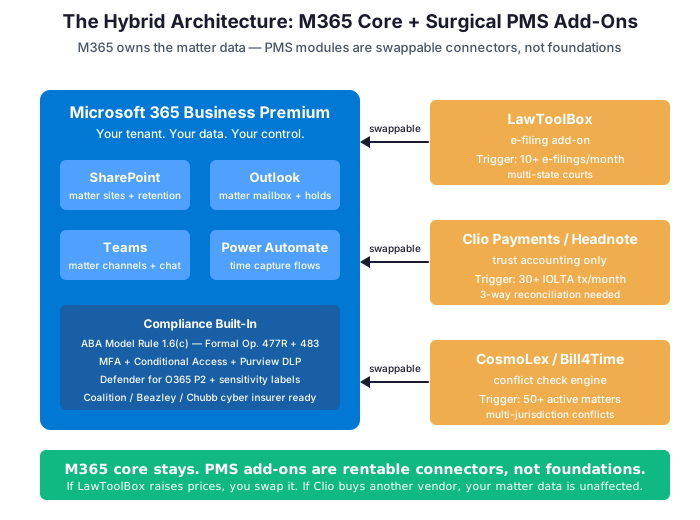
As a result, the structural advantage of the hybrid model is vendor leverage. Notably, if LawToolBox raises prices, you swap it for a different e-filing tool while keeping your matter data, matter sites, retention policies, and conflict checks intact inside SharePoint. If Clio is acquired by a different PE group next year (it has happened twice in the past four years to MyCase and CASEpeer), the impact on your firm is limited to one workflow (trust accounting), not your entire data foundation. By contrast, in a full-PMS architecture, every workflow is hostage to the vendor’s next strategic pivot.
Three hybrid legal practice management software configurations for US SMB law firm profiles
In practice, three concrete hybrid configurations cover most US SMB law firm profiles. First: M365 + LawToolBox for firms triggering only the e-filing volume condition. Second: M365 + Clio Payments or CosmoLex for firms triggering only the high IOLTA volume. Third: M365 + a conflict-check engine subscription for firms triggering only the 50+ active matter threshold. Each hybrid configuration runs roughly $30 to $50 per user per month total — less than half the cost of a full PMS, with structurally lower vendor lock-in.
📊 Five-Year TCO Scenarios for US SMB Law Firms (5-30 Attorneys)
In practice, the TCO table below maps four firm sizes against three architecture choices. Numbers assume US annual billing rates published as of mid-2026, including implementation cost and typical add-on subscriptions. Payment processing fees are excluded since they vary with revenue, but for any firm processing more than $1M annually through Clio Payments, add approximately 2.9 percent of credit card revenue per year on top of the Full Clio column.
| Firm size | M365 only (5-yr) | Hybrid (5-yr) | Full Clio Essentials (5-yr) | M365 savings vs Full Clio |
|---|---|---|---|---|
| 5 attorneys | $11,600 | $22,400 | $45,200 | $33,600 |
| 10 attorneys | $18,200 | $39,200 | $83,400 | $65,200 |
| 20 attorneys | $31,400 | $72,800 | $159,800 | $128,400 |
| 30 attorneys | $44,600 | $106,400 | $236,200 | $191,600 |
What the five-year legal practice management software savings actually fund
Critically, the savings figures in the last column represent reinvestable capital. As a result, a 10-attorney firm choosing M365-only over Full Clio Essentials over five years frees up $65,200 — enough to fund Microsoft Copilot for the entire firm for two years, or hire a part-time legal assistant, or absorb a Clio Payments surgical add-on for trust accounting if the firm later crosses the IOLTA volume trigger. Furthermore, the M365-only baseline is a one-way improvement option: starting M365-native and adding surgical PMS modules later costs the same as starting hybrid from day one, but starting Full PMS and migrating off later costs $50,000 to $200,000 in data migration consulting alone.
Finally, this is the structural asymmetry behind the M365-native recommendation for most 5-30 attorney US firms. The downside of starting too lean is small (you add a PMS module when triggered). The downside of starting too heavy is large (you eat a six-figure migration cost when you eventually right-size). Critically, in a market where six PE groups now rotate ownership of PMS vendors approximately every 24-36 months, the “eventually right-size” scenario is no longer an edge case. It is the central tendency.

✅ The Managing Partner Checklist Before Signing a PMS Contract in 2026
Why the legal practice management software checklist matters in 2026
Critically, before signing a multi-year legal practice management software contract in 2026, the questions below distinguish a structurally sound procurement decision from one driven by vendor sales pressure. Specifically, the checklist below combines ABA Formal Opinion 477R due diligence requirements, 2026 cyber insurer underwriting expectations, and the vendor risk realities of the consolidated PMS market.
Twelve questions to ask before signing a legal practice management software contract
- Which of the three triggers (IOLTA volume, conflict check complexity, e-filing volume) does our firm actually meet? If zero, M365 alone is the right answer for 5-30 attorney firms.
- What is the documented data export format and SLA? Ask for a sample export of a 10-matter dataset before signing. If the vendor cannot provide one in writing, you have a vendor lock-in problem.
- Who owns the PMS today, and what is the PE ownership horizon? A vendor 3 years into a 5-7 year PE hold cycle will likely be acquired or recapitalized before your contract renews.
- What is the FULL 5-year TCO including payment processing fees at our expected revenue volume? Get the vendor to model this with realistic revenue assumptions, not the published per-user rate alone.
- What security certifications does the vendor hold beyond SOC 2 Type II? ISO 27001, HIPAA BAA, FedRAMP authorization status matter for ABA 477R compliance.
- Does our cyber insurance carrier offer a premium reduction for M365 BP-native security stack? Ask your broker before procurement, not after.
Cost, contract terms and operational fit questions
- What integrations are bundled vs add-on, and at what monthly cost? QuickBooks, e-signature, document automation typically add $120-200/mo per user across all add-ons.
- What is the termination clause and minimum commitment? Some PMS vendors enforce 36-month minimums with material early-exit penalties.
- What is the vendor’s breach notification SLA and historical incident record? ABA Formal Opinion 483 (2018) requires this disclosure conversation with clients post-breach.
- What is the parallel-running plan and expected productivity dip during weeks 1-8? Independent consultants typically observe 20-30% productivity reduction in the first two months post-migration.
- Will our existing Microsoft 365 investment be displaced or coexist with the PMS? Most firms forget to negotiate Office app license reductions when adopting a PMS that bundles redundant tools.
- If we hit a workflow trigger that this PMS does not handle well, what is the next decision point? A PMS is not the last architectural decision; it is part of a 5-7 year stack roadmap.
The vendor-neutral assessment alternative
In practice, for US managing partners who want to run this checklist against their current stack with a vendor-neutral consultant, the productized M365 audit at the end of this article is the next step. Wintive has no kickback agreements with any PMS vendor and no incentive to push you toward or away from any specific tool. The output is a written report mapping your firm to one of the four canonical architectures: M365 only, Hybrid (M365 + one surgical PMS), Full PMS (Clio or equivalent), or Migration recovery if you are currently stuck in a sub-optimal stack.
📚 More for Law Firms
🎯 Get a productized Microsoft 365 audit tailored to your law firm
Full Microsoft 365 environment audit tailored to your law firm: ABA Rule 1.6(c) compliance mapping, cyber insurance baseline coverage assessment, Matter Operating System architecture readiness, and a written recommendation on whether you need legal practice management software or which surgical PMS module fits your firm. Specifically, delivered as a written report with prioritized recommendations, plus 14 days of email Q&A after delivery.
❓ Frequently Asked Questions
Cost & decision framework
In most cases, no — if your firm does not meet any of the three empirical triggers (30+ IOLTA transactions per month, 50+ active matters with multi-jurisdiction conflict checks, 10+ e-filings per month across multiple state courts). Microsoft 365 Business Premium configured as a Matter Operating System covers approximately 80% of what a full PMS does, at roughly 10% of the five-year cost. If you meet one or two triggers, the hybrid architecture (M365 + a surgical PMS add-on for the specific workflow) is the right answer.
Pricing reality across PMS vendors and M365 alternatives
Approximately $83,400 for license and implementation, plus $20,000 in typical hidden add-ons (QuickBooks integration, e-signature, document automation), bringing the all-in cost to $83,400 over five years. If the firm processes $1.5M annually through Clio Payments at 2.9% + $0.30 per transaction, add approximately $43,500 per year in payment processing fees — an additional $217,500 over five years. The comparable M365 Business Premium native cost for the same firm is $18,200 over five years.
PracticePanther at $59 per user per month or MyCase EasyStart at $39 per user per month are the budget options. For most US solo and 2-3 attorney firms with predictable workflows, however, the cheaper structural answer is Microsoft 365 Business Premium at $22 per user per month with the Matter Operating System architecture. The published per-user PMS pricing is only 30-40% of total cost of ownership once add-ons, implementation, and payment processing fees are included.
Compliance, vendor risk & the legal practice management software market
Yes, with proper configuration. M365 Business Premium meets all seven due diligence factors of ABA Formal Opinion 477R: hyperscale security infrastructure, sensitivity labels per matter, AES-256 encryption at rest and TLS 1.2+ in transit, SOC 2 Type II + ISO 27001 + HIPAA BAA + FedRAMP High authorization, Conditional Access with risk-based prompts, and customer-tenant breach notification. The Florida Bar Ethics Opinion 20-1 (2021) explicitly extends Rule 1.6(c) to cloud-based PMS and remote access, and M365 BP exceeds the reasonable efforts floor.
PE ownership risk and Clio LawPay sunset implications
It depends on your data architecture. In a full-PMS stack, all matter data, documents, time entries, conflict checks, and trust accounting records live inside the vendor’s system and are subject to whatever data export terms the contract specifies. Within the consolidated 2026 PMS market, vendor M&A and product sunsets are no longer hypothetical — AffiniPay acquired MyCase in 2022, CASEpeer in 2021, and Clio acquired vLex for $1B in 2025. In a hybrid or M365-native architecture, your matter data lives in your own Microsoft 365 tenant. Vendor M&A affects only the surgical PMS module you bolted on, not your data foundation.
On March 5, 2026, Clio formally notified customers that the LawPay integration inside Clio Manage will be disabled on August 31, 2026 (Oklahoma Bar Association advisory). Firms using both Clio and LawPay must migrate to either Clio Payments (Clio’s native processor) or continue using LawPay outside the integration, losing automatic sync. The deeper context is that AffiniPay (now rebranded 8am) acquired MyCase in 2022, making the LawPay-Clio integration a relationship between direct competitors — the natural termination was inevitable. This is the most concrete recent proof point of the 2026 LegalTech consolidation crisis.