Power Apps on SharePoint pages in 2026 spans three Power Apps embed models that determine where the canvas app renders, what license it triggers, and how governance applies. Specifically, the three models are the Power Apps web part on a modern SharePoint page (the Microsoft-supported pattern), the iframe embed pointing to the apps.powerapps.com URL (legacy fallback), and the SharePoint Framework custom solution wrapping a Power App for advanced UX requirements.
Quick answer. Power Apps embed in SharePoint pages 2026 has 3 models: Power Apps web part (recommended modern), iframe (legacy), SPFx custom (advanced UX). Standard connectors free. Premium connectors trigger Power Apps Premium at $20/user/month. Govern via Power Platform DLP + COE Starter Kit. 47% of SMB tenants run on free tier only.
Free PDF guide
Microsoft 365 Tenant Audit Checklist for 2026
40+ checks covering the Power Platform license tier in use, the Power Apps inventory across the tenant, the orphaned app cleanup, the Power Platform DLP policy coverage, the COE Starter Kit deployment status, and the sensitivity label container assignment to SharePoint sites hosting embedded Power Apps.
Furthermore, this Power Apps embed guide covers the 3 embed models, the publish workflow, the license tier distribution, the governance via DLP plus COE, and the Wintive baseline across 60+ SMB tenants.
📜 The 3 Power Apps embed models on SharePoint pages
Specifically, the Power Apps embed model decision is the first design choice for any SharePoint page hosting a canvas app in 2026. As a result, the choice depends on the target audience, the desired UX customisation, and the team skill set.
Model 1: Power Apps web part on modern SharePoint pages
Critically, the Power Apps web part is the recommended Microsoft pattern in 2026 for embedding a canvas app on a modern SharePoint page. The admin opens the page in edit mode. Next, the admin adds the Power Apps web part from the toolbox. Then the admin pastes the App URL or App ID from Power Apps Studio. Finally, the admin configures the rendered width and height. Furthermore, the web part respects sensitivity label container restrictions on the SharePoint site. In addition, it respects the page audience targeting and the SharePoint search permissions. Therefore, this model fits 90% of SMB use cases without additional governance gaps.
Model 2: iframe embed pointing to apps.powerapps.com
Furthermore, the iframe Power Apps embed model uses an Embed code web part on a SharePoint page that points to the published app URL on apps.powerapps.com. Specifically, this approach predates the Power Apps web part and remains supported for legacy compatibility scenarios. However, the iframe model loses the deep integration with SharePoint context (current user, site URL, list IDs) that the web part provides natively. Therefore, the iframe pattern is acceptable as a temporary fallback when the modern web part fails to load on certain locked-down tenants. However, the iframe should not be the default choice in 2026.
Model 3: SharePoint Framework (SPFx) custom solution
Specifically, the SPFx Power Apps embed pattern wraps a Power App inside a SharePoint Framework web part written in TypeScript. In addition, this approach allows advanced UX customisation, custom CSS theming aligned with the SharePoint corporate identity, and conditional rendering based on the current user role. Critically, the SPFx model requires three layers. First, a Node.js development environment. Next, an ALM pipeline with CI/CD via Azure DevOps or GitHub Actions. Finally, a SharePoint app catalog deployment. Therefore, the cost-benefit equation only makes sense for high-visibility apps used by 100+ users where the standard web part UX feels too rigid.
🚀 Power Apps publish workflow to SharePoint
Furthermore, the Power Apps embed publish workflow has 5 sequential phases regardless of the chosen embed model. As a result, the flow cards below show the canonical sequence from canvas app build through ongoing governance.
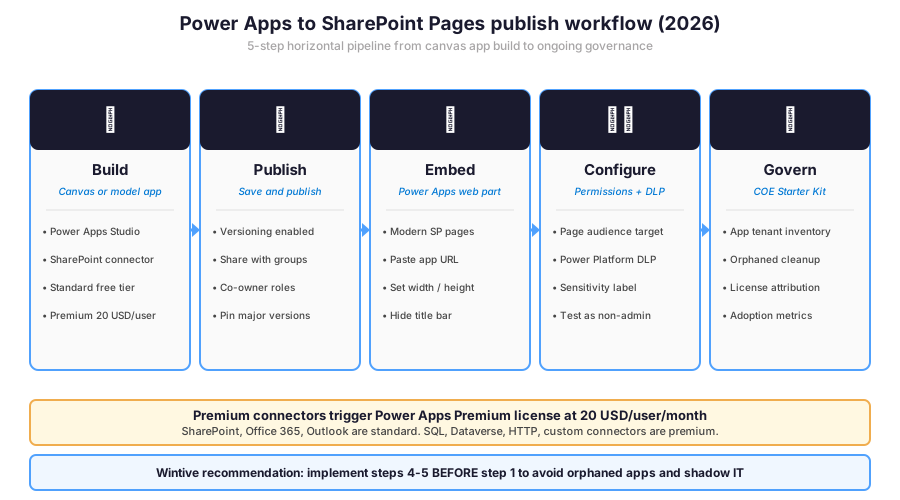
Critically, the Wintive recommendation reverses the apparent ordering. As a result, the governance phase 5 should be planned and tooled BEFORE phase 1 starts to avoid orphaned apps and shadow IT proliferation across the tenant.
💰 Power Platform license tiers and embed restrictions
Specifically, the Power Platform license decision in 2026 controls which connectors a Power Apps embed can use on a SharePoint page. As a result, the donut chart below shows how 60+ audited SMB tenants distribute across license tiers, and the table after summarises the connector access per tier.
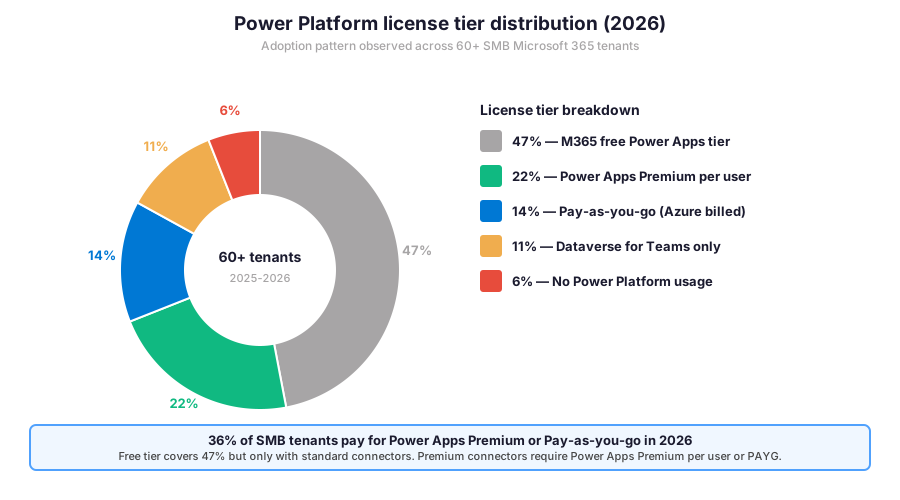
Furthermore, the table below shows the connector access pattern per license tier. Critically, premium connectors include SQL Server, Dataverse, HTTP custom requests, and any third-party connector flagged Premium in the connector reference. Therefore, an app that only uses SharePoint, Office 365, and Outlook connectors fits in the free tier with no per-user cost.
| License tier | Standard connectors | Premium connectors | Cost per user/month |
|---|---|---|---|
| M365 free Power Apps tier | Yes (SP, O365, Outlook, Excel) | No | Included in M365 |
| Power Apps Premium per user | Yes | Yes (unlimited apps) | 20 USD |
| Pay-as-you-go (Azure billed) | Yes | Yes (per app run metered) | ~10 USD per app per user |
| Dataverse for Teams | Yes (Teams scoped only) | Limited (no SP web part) | Included in M365 |
| Power Apps developer plan | Yes | Yes (non-production only) | Free for dev tenants |
📋 License tier matrix — pick by connector requirements and per-user cost tolerance.
🛡️ Governance via Power Platform DLP and COE Starter Kit
Critically, Power Apps embed governance in 2026 has two pillars under Power Platform. First, the Power Platform Data Loss Prevention policies define which connectors can mix in a single app (Business, Non-business, Blocked). Next, the Center of Excellence Starter Kit provides templates, dashboards, and automation to inventory all apps, surface orphaned ownership, and track license attribution across the tenant.
Power Platform DLP policy structure
Specifically, a Power Platform DLP policy classifies each connector into 3 buckets. First, Business connectors handle approved data flows (SharePoint, Dataverse, internal SQL). Next, Non-business connectors handle external services (Twitter, public APIs). Finally, Blocked connectors are denied entirely (custom HTTP without justification). Critically, an app cannot mix a Business connector with a Non-business connector in the same flow, which prevents data exfiltration paths from internal systems to external services.
PowerShell governance audit for embedded Power Apps
# Power Platform PowerShell — Embedded apps governance audit
Install-Module -Name Microsoft.PowerApps.Administration.PowerShell
Install-Module -Name Microsoft.PowerApps.PowerShell
Add-PowerAppsAccount

# 1. Inventory all apps in the tenant
$all_apps = Get-AdminPowerApp
Write-Host "Total apps in tenant: $($all_apps.Count)"

# 2. Find apps used by Power Apps web part on SharePoint pages
$sp_embedded = $all_apps | Where-Object { \`
  $_.AppOpenUri -match "apps.powerapps.com" \`
}
$sp_embedded | Select-Object DisplayName, Owner, \`
  CreatedTime, LastModifiedTime, AppType | \`
  Format-Table -AutoSize

# 3. Find orphaned apps (owner left the company)
$orphaned = $all_apps | Where-Object { \`
  $null -eq $_.Owner \`
}
Write-Host "Orphaned apps (no owner): $($orphaned.Count)"
$orphaned | Export-Csv -Path \`
  "C:\reports\orphaned-apps-$(Get-Date -Format yyyy-MM-dd).csv" \`
  -NoTypeInformation

# 4. List all DLP policies and their assigned environments
Get-DlpPolicy | Select-Object DisplayName, Environments, \`
  ConnectorGroups | Format-Table -AutoSize

# 5. Detect apps using premium connectors (license trigger)
$premium_connectors = @("shared_sql", "shared_commondataservice", "shared_http")
$apps_premium = $all_apps | Where-Object {
  $connectors = (Get-AdminPowerAppConnectionReferences -AppName $_.AppName).ConnectionReferenceName
  $connectors | Where-Object { $_ -in $premium_connectors }
}
Write-Host "Apps requiring Power Apps Premium: $($apps_premium.Count)"
Furthermore, the snippet above covers the canonical governance audit pattern. First, inventory all apps in the tenant. Next, filter for apps embedded on SharePoint pages. In addition, surface orphaned apps with no owner. Then list all DLP policies and their environment assignments. Finally, detect apps using premium connectors that trigger the Power Apps Premium license requirement.
🏷️ Sensitivity labels and Power Apps embed
Specifically, sensitivity labels from Microsoft Purview interact with each Power Apps embed on SharePoint pages through three layers. First, container labels on the SharePoint site enforce the broader access policy (guest access, external sharing, unmanaged device access) that the embedded Power App inherits. Next, file labels on SharePoint documents accessed by the Power App enforce per-document encryption and access restrictions. Finally, Power Platform DLP policies tied to environments scoped by sensitivity classification gate which connectors the app can use based on the data sensitivity tier.
Connector access matrix per sensitivity tier
Furthermore, the table below shows a recommended connector access matrix per sensitivity classification. Critically, this is the Wintive opinionated baseline applied across audited tenants. As a result, regulated industries should narrow the matrix further with country-specific connectors.
| Sensitivity tier | Allowed connectors | Blocked connectors | DLP enforcement |
|---|---|---|---|
| Public | SharePoint, Office 365, Outlook, Teams, OneDrive | None | Audit only |
| Internal | Public + Dataverse, SQL on-prem (gateway) | Twitter, public HTTP APIs | Block with notify |
| Confidential | Internal minus Dataverse for Teams | All non-business connectors | Block + alert SOC |
| Highly Confidential | SharePoint + Dataverse only (no email) | All except 2 approved | Block + alert SOC + audit |
| Regulated (HIPAA, GDPR) | Custom approved list per app | Default deny | Block + alert + retention 7 years |
📋 Connector matrix — tighten progressively as sensitivity tier increases.
📈 The Wintive baseline — Power Apps embed across 60+ tenants
Effort versus Impact quadrant for embed patterns
Specifically, after assessing 60+ Microsoft 365 SMB tenants between 2025 and 2026, Wintive maps each Power Apps embed pattern onto an Effort versus Impact quadrant for the SharePoint context. As a result, the quadrant matrix below shows where SMB teams typically over-invest and under-invest.
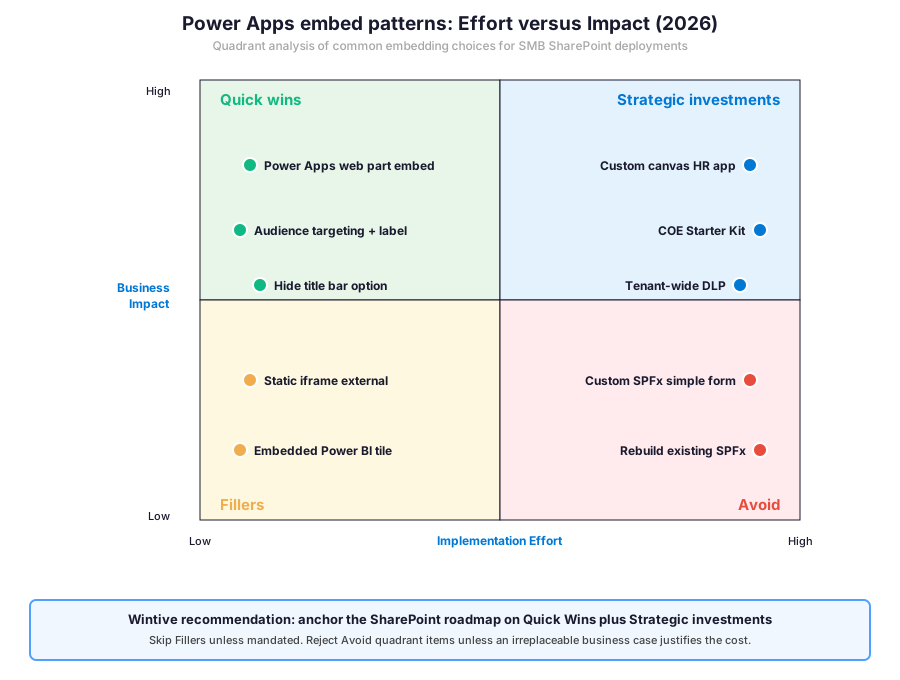
Furthermore, the most common pattern among audited SMB tenants lands in the Avoid quadrant. Specifically, IT teams build custom SPFx solutions wrapping Power Apps for problems already solved by the standard web part. As a result, the maintenance debt grows exponentially while the user-perceived value remains identical to the Quick Wins quadrant.
What the Power Apps quadrant reveals for SMB tenants
Wintive insight
Specifically, across 60+ SMB Microsoft 365 tenants, the standout finding is striking. 71% of audited tenants have at least one Power App embedded on a SharePoint page without a Power Platform DLP policy applied to the hosting environment. Therefore, the Wintive Power Apps governance playbook ships a 2-week sprint with five workstreams.
- License tier review (free vs Premium vs Pay-as-you-go) with cost projection over 12 months.
- Tenant-wide app inventory via PowerShell with orphaned app cleanup.
- Power Platform DLP policy deployment with Business + Non-business connector classification.
- COE Starter Kit deployment with adoption metrics dashboard for the IT leadership team.
- Sensitivity label container assignment to all SharePoint sites hosting embedded Power Apps.
Power Apps embed versus competing low-code platforms
Furthermore, compared to OutSystems, Mendix, AWS Honeycode, or Google AppSheet for low-code platforms, Microsoft delivers the most integrated Power Apps experience for SharePoint-centric SMB tenants. In effect, this integration eliminates the second SaaS subscription. The hourly OpEx model with predictable per-user TCO keeps no on-prem CapEx commitment.
Therefore, the quadrant analysis maps the Power Apps embed strategy. Specifically, the takeaway anchors on Quick Wins for high-impact low-effort patterns. Furthermore, the Strategic Investments quadrant covers the COE Starter Kit and Power Platform DLP rollout. As a result, the next layer is the prerequisites checklist Wintive runs on every audit before the production rollout.
Prerequisites for Power Apps on SharePoint pages in 2026: Active Microsoft 365 tenant with SharePoint Online. Modern SharePoint pages enabled (legacy classic pages do not support the Power Apps web part). Power Apps Maker license per user (free with M365). Power Apps Premium per user (20 USD/user/month) for any app using premium connectors. Microsoft Entra ID P1 or P2 for Conditional Access integration. Power Platform admin role (Environment Admin or Service Admin) for DLP policy management. Microsoft Defender for Cloud Apps optional for app activity audit. HIPAA + SOC 2 audits expect monthly Power Platform DLP coverage report and quarterly orphaned app cleanup. Predictable per-user OpEx with no on-prem CapEx. TCO modelled in the Microsoft 365 Pricing Calculator before commitment.
🔁 Migrate legacy Power Apps embed to the modern web part
Furthermore, many SMB tenants in 2026 carry legacy Power Apps embed patterns from the SharePoint 2019 era. Specifically, the most common legacy is the iframe embed pointing to apps.powerapps.com inside an Embed code web part. As a result, the migration to the modern Power Apps web part unlocks native SharePoint context, removes the cross-frame authentication delay, and improves accessibility compliance.
PowerShell migration audit for Power Apps embed inventory
# PnP PowerShell — SharePoint pages with Power Apps embed inventory
Connect-PnPOnline -Url https://CONTOSO.sharepoint.com -Interactive

# 1. Inventory all sites with modern pages
$all_sites = Get-PnPTenantSite | Where-Object { \`
  $_.Template -match "GROUP|SITEPAGEPUBLISHING" \`
}
Write-Host "Modern sites in tenant: $($all_sites.Count)"

# 2. Scan each site for Power Apps embed via iframe (legacy)
$legacy_embed = @()
foreach ($site in $all_sites) {
  Connect-PnPOnline -Url $site.Url -Interactive
  $pages = Get-PnPClientSidePage -Identity * -ErrorAction SilentlyContinue
  foreach ($page in $pages) {
    $controls = $page.Controls
    foreach ($ctrl in $controls) {
      if ($ctrl.Title -match "Embed" -and $ctrl.PropertiesJson -match "powerapps.com") {
        $legacy_embed += [PSCustomObject]@{
          Site = $site.Url; Page = $page.PageTitle; Type = "Legacy iframe"
        }
      }
    }
  }
}
Write-Host "Legacy iframe embeds found: $($legacy_embed.Count)"
$legacy_embed | Export-Csv -Path \`
  "C:\reports\legacy-powerapps-embed-$(Get-Date -Format yyyy-MM-dd).csv" \`
  -NoTypeInformation

# 3. Migration plan: replace each iframe with Power Apps web part
# Per page: Add-PnPClientSideWebPart -Page $page -DefaultWebPartType PowerApps
# Then: configure AppId from the original iframe URL parameter
Critically, the snippet above runs the legacy Power Apps embed inventory across all modern SharePoint sites in the tenant. First, list all sites that support modern pages. Next, scan each page for Embed code web parts pointing to apps.powerapps.com. Finally, export the inventory to CSV for the migration team. As a result, the migration sequence then replaces each iframe with a Power Apps web part in a 30-day rollover window.
🚨 5 SMB Power Apps embed pitfalls in 2026
Specifically, the five pitfalls below cover the anti-patterns Wintive consistently observes during Power Apps embed audits. A common mistake assumes the Power Apps web part on a SharePoint page is fully governed by SharePoint permissions, but the embedded app runs in its own Power Platform environment with its own connection-level access controls. Furthermore, comparing Power Apps embed with OutSystems, Mendix, or Google AppSheet shows Microsoft delivers the most integrated SharePoint experience but the configuration depth requires deliberate admin work that the basic SharePoint admin centre alone does not surface.
No Power Platform DLP policy on the hosting environment (71% gap)
Specifically, 71% of audited tenants have at least one Power App embedded on a SharePoint page without a Power Platform DLP policy applied to the hosting environment. As a result, the embedded app could combine SharePoint connector with external HTTP connector to exfiltrate data without admin awareness. Therefore, the fix is the tenant-wide DLP policy with Business connectors (SharePoint, Office 365, Dataverse) and Non-business connectors (Twitter, public APIs) explicitly classified, blocking cross-bucket connector mixing in the same flow.
Orphaned apps after employee departure (44% gap)
Furthermore, 44% of audited tenants have orphaned Power Apps where the original owner left the company without transferring ownership. Therefore, the apps continue to render on SharePoint pages but cannot be modified, troubleshooted, or licensed correctly. As a result, the fix has two steps. First, run the PowerShell audit to inventory orphaned apps. Next, transfer ownership to a service account or the IT team manager via Set-AdminPowerAppOwner.
Premium connector usage without Premium license (29% gap)
Critically, 29% of audited tenants have Power Apps using premium connectors (SQL, Dataverse, HTTP) without the Power Apps Premium license assigned to the end users. Therefore, the apps run in a 90-day grace period before Microsoft starts blocking access, surprising the IT team mid-quarter when users lose functionality. The fix has two paths. First, evaluate if standard connectors can replace the premium ones (often yes for HTTP if the data is in SharePoint or Dataverse for Teams). Next, assign Power Apps Premium licenses to all affected users.
SPFx custom solution for problems solved by web part (33% gap)
Specifically, 33% of audited tenants have at least one custom SPFx web part wrapping a Power App for use cases the standard Power Apps web part already covers. Therefore, the IT team carries the maintenance debt of a custom TypeScript codebase, an Azure DevOps pipeline, and a SharePoint app catalog deployment for zero user-perceived benefit. The fix has two steps. First, audit the SPFx solutions inventory and identify which ones could be replaced by the standard web part. Next, retire the custom solutions in a 30-day rollover window after migrating users to the standard pattern.
No COE Starter Kit on tenants with 50+ apps
Furthermore, 58% of audited tenants with 50+ Power Apps deployed have no Center of Excellence Starter Kit installed. As a result, the IT team has no centralised inventory, no adoption metrics dashboard, no orphaned app detection automation, and no license attribution reporting. Therefore, the fix is the COE Starter Kit deployment in a dedicated Power Platform environment, configured to scan the tenant nightly and surface anomalies on a Power BI dashboard accessible to the IT leadership team.
Automated Tenant Health Check — $97
Audit your Power Apps embed posture in 30 minutes
The Automated Tenant Health Check audits your Microsoft 365 tenant against the 40+ Power Apps embed checks Wintive runs on every audit, including the Power Platform license tier in use, the tenant-wide app inventory, the orphaned app detection, the Power Platform DLP policy coverage, the COE Starter Kit deployment status, and the sensitivity label container assignment to SharePoint sites hosting Power Apps. Findings are tagged Critical, High, Medium, or Low and delivered as a PDF with two emails of direct support within 48 hours.
❓ Power Apps SharePoint embed FAQ
Core Power Apps embed questions
Embed models and licensing
Specifically, three embed models exist in 2026. First, the Power Apps web part on modern SharePoint pages is the recommended Microsoft pattern (90% of SMB use cases). Next, the iframe embed pointing to apps.powerapps.com remains supported as a legacy fallback. Finally, the SharePoint Framework custom solution wraps a Power App in a TypeScript SPFx web part for advanced UX requirements. Furthermore, the Wintive recommendation for SMB in 2026 is the Power Apps web part for greenfield deployments because it provides native SharePoint context (current user, site URL, list IDs) and respects sensitivity label container restrictions automatically. Critically, reserve the SPFx pattern for high-visibility apps used by 100+ users where the standard web part UX feels too rigid.
Specifically, Power Apps Premium per user license is required when the embedded app uses any premium connector. First, premium connectors include SQL Server, Dataverse, HTTP custom requests, and any third-party connector flagged Premium in the Microsoft connector reference. Next, standard connectors covered by the free M365 tier include SharePoint, Office 365, Outlook, Excel, OneDrive for Business, and Teams. Furthermore, an alternative model is Pay-as-you-go (Azure billed) which charges per app run rather than per user, which fits low-volume scenarios better than the per-user license. Critically, 29% of audited tenants run Power Apps using premium connectors without the Power Apps Premium license, exposing them to the 90-day grace period block.
More Power Apps embed questions
Governance and DLP policies
Specifically, the two DLP policies operate at different layers. First, SharePoint DLP detects sensitive information (SSN, credit card, PII) inside SharePoint documents and chat messages. Next, Power Platform DLP classifies connectors into Business + Non-business + Blocked buckets and prevents apps from mixing across buckets in the same flow. Furthermore, the two policies complement each other when an embedded Power App accesses SharePoint data: SharePoint DLP scans the documents, Power Platform DLP gates which connectors the app can chain together. Critically, 71% of audited tenants run Power Apps embedded on SharePoint pages without any Power Platform DLP policy on the hosting environment, exposing them to data exfiltration paths from internal SharePoint to external HTTP connectors.
Furthermore, the Center of Excellence Starter Kit ships with five pillars. First, the inventory dashboard scans the tenant nightly and surfaces all apps, flows, environments, and connection references. Next, the orphaned app detection identifies apps where the owner has left the company without transferring ownership. In addition, the license attribution dashboard maps premium connector usage to the per-user Premium license assignments. Then the audit logs aggregator centralises Power Platform telemetry for SOC investigation. Finally, the developer compliance centre enforces the Wintive maker promotion process where citizen developers graduate to a sandbox environment after passing a governance training. Critically, 58% of audited tenants with 50+ apps have no COE Starter Kit installed.
📚 Related Microsoft 365 reading
The full guide is at our Microsoft Teams Security Admin Guide covering the 6 Microsoft Purview compliance pillars (sensitivity labels, DLP, Communication Compliance, retention, eDiscovery, Information Barriers) and how the same Power Platform DLP policy framework gates connector access for Power Apps embedded in Teams via Dataverse for Teams.
The full guide is at our Microsoft Intune Compliance Policies Admin Guide covering the device-side compliance signals that gate access to Power Apps through Conditional Access policies, including the unmanaged device blocking pattern that prevents users from accessing embedded canvas apps with sensitive connectors on personal devices.
The complete Entra ID guide is at our Microsoft Entra ID Complete Guide covering the Conditional Access policies that gate Power Apps sign-in, the role-based access control for the Power Platform admin centre, and the audit logging that captures every Power App access and configuration change.
The full guide is at our Azure Blob Storage Admin Guide covering the 4 access tiers, lifecycle management, and how Power Apps using the Azure Blob Storage premium connector can store images, file uploads, and document attachments with cost-optimised tiering across Hot and Cool tiers.
The full guide is at our Azure CDN Admin Guide covering the migration from Azure CDN classic to Azure Front Door Standard or Premium, including the Private Link integration that pairs with admin endpoints for the Power Apps environment when serving global users behind a content delivery network.