TLDR: Microsoft Entra ID is the cloud identity and access management platform behind every Microsoft 365 sign-in, formerly known as Azure Active Directory. The 2026 product family has nine services covering human identities (Entra ID, External ID, Verified ID), identity governance and security (ID Protection, ID Governance, Internet Access, Private Access), and non-human identities (Workload ID, Agent ID). Licensing escalates from Free in any M365 plan up to M365 E7 at $99 per user per month with the full Entra Suite plus Agent 365 included — both generally available May 1, 2026. Passkeys auto-enable in March 2026. Microsoft Entra ID Workload ID Premium is a separate $3 per workload SKU not included in any bundle.
🛡️ Free: M365 Tenant Security Audit Checklist
19-page PDF with 50 hands-on checks covering Entra ID, Exchange Online, SharePoint, Teams, Intune, license waste, and audit logging. PowerShell commands included. Built from 60+ real tenant audits at Wintive.
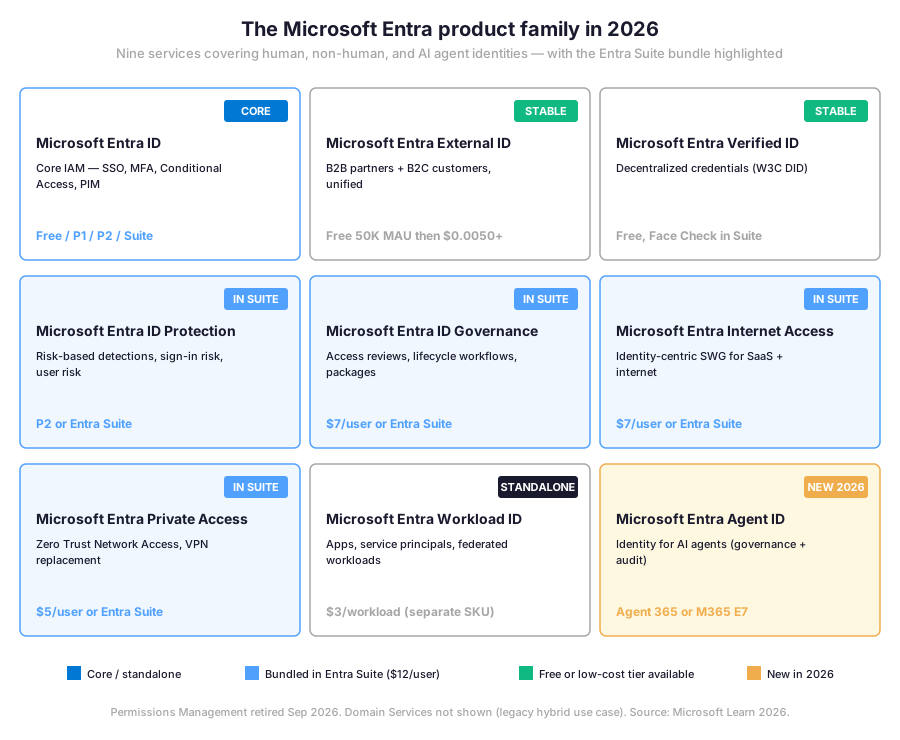
📊 The Microsoft Entra product family in 2026 — nine services, one identity platform
Microsoft Entra ID is the cloud-based identity and access management service that authenticates more than 1.2 billion sign-ins per day across Microsoft 365, Azure, Dynamics, and thousands of integrated SaaS applications. Specifically, Microsoft rebranded Azure Active Directory to Microsoft Entra ID in July 2023, and since then the surrounding product family has expanded to nine distinct services covering human identities, non-human workload identities, AI agents, decentralized credentials, and network access enforcement. Therefore, understanding Microsoft Entra ID in 2026 means understanding the Entra family as a whole, not just the core directory.
Three layers of the Microsoft Entra family
The family splits into three operational layers. The first layer covers the foundational directory itself: Microsoft Entra ID at the center, Microsoft Entra External ID for B2B and B2C scenarios (free for the first 50,000 monthly active users), and Microsoft Entra Verified ID for decentralized W3C-standard credentials (free with any Entra subscription). The second layer is the security and governance toolkit bundled in the Entra Suite: ID Protection, ID Governance, Internet Access, and Private Access. The third layer covers non-human identities: Microsoft Entra Workload ID for applications and service principals (separate SKU at $3 per workload per month), and the brand-new Microsoft Entra Agent ID for AI agents.
| Service | Audience | License path | Status |
|---|---|---|---|
| Microsoft Entra ID | Human users (employees) | Free / P1 / P2 / Suite | Core |
| Microsoft Entra External ID | B2B partners + B2C customers | Free 50K MAU then $0.0050+ | Stable |
| Microsoft Entra Verified ID | Decentralized credentials | Free, Face Check in Suite | Stable |
| Microsoft Entra ID Protection | Risk-based identity threats | P2 or Entra Suite | In Suite |
| Microsoft Entra ID Governance | Access reviews and lifecycle | $7/user or Entra Suite | In Suite |
| Microsoft Entra Internet Access | Identity-centric SWG | $7/user or Entra Suite | In Suite |
| Microsoft Entra Private Access | ZTNA, VPN replacement | $5/user or Entra Suite | In Suite |
| Microsoft Entra Workload ID | Apps and service principals | $3/workload (separate SKU) | Standalone |
| Microsoft Entra Agent ID | AI agents (NEW 2026) | Agent 365 or M365 E7 | New 2026 |
🆔 Microsoft Entra ID core capabilities — SSO, MFA, Conditional Access, PIM
Five capabilities define what Microsoft Entra ID does for a Microsoft 365 tenant. First, single sign-on or SSO unifies access across Microsoft 365, Azure, Dynamics, and any SaaS application registered in the Entra app gallery. Second, multi-factor authentication or MFA enforces a second factor on top of the password, with phishing-resistant methods (FIDO2 keys, passkeys, Windows Hello for Business) increasingly recommended over SMS or app-based codes. Third, Conditional Access evaluates every sign-in against policy: user identity, device compliance, location, real-time risk signals, and application sensitivity. Fourth, Privileged Identity Management or PIM eliminates standing administrator access by making elevation time-bound, MFA-gated, and approval-based. Fifth, Identity Protection feeds risk signals (impossible travel, leaked credentials, atypical sign-ins) back into Conditional Access automatically.
Each capability ties to a license tier. SSO and basic MFA are available on the Free tier in any Microsoft 365 subscription. Conditional Access requires Microsoft Entra ID P1, included in M365 E3, F1, F3, Business Premium, and EM+S E3. Risk-based Conditional Access, PIM, and Identity Protection require Microsoft Entra ID P2, included in M365 E5 and EM+S E5. Therefore, most SMB tenants face one practical question. Does the existing M365 plan already include P1? Or do they need to upgrade to enforce Conditional Access organization-wide? Microsoft Entra ID licensing details and the Entra Suite bundle are covered later in this guide.
🛡 The Microsoft Entra Suite — what is bundled at $12 per user per month
The Microsoft Entra Suite is an add-on at $12 per user per month that bundles five Entra services into a single SKU layered on top of any P1 or P2 base license. Specifically, the Suite bundles five services. ID Protection covers risk-based detections. ID Governance handles access reviews. Internet Access is the identity-centric SWG. Private Access replaces VPN with ZTNA. Verified ID Premium adds Face Check (8 checks per user per month). Buying the same components individually costs at least $17 per user per month on a P1 base. Buying them standalone costs at least $23 per user per month. Therefore, Microsoft positions the Suite at $12 per user as a deliberate undercut.
The Suite covers the Zero Trust agenda end-to-end: identity governance ensures the right people get the right access at the right time, Internet Access controls SaaS and web traffic with an identity-centric Secure Web Gateway, and Private Access replaces traditional VPNs with Zero Trust Network Access (ZTNA) for internal applications. Furthermore, ID Protection elevates Conditional Access policies with user-risk and sign-in-risk signals fed back automatically. Verified ID Premium with Face Check enables privacy-respecting facial matching for high-assurance scenarios such as employee onboarding and account recovery. The Suite does not include Microsoft Entra Workload ID Premium or Microsoft Entra Agent ID, both of which require separate SKUs.
🤖 Microsoft Entra Agent ID — identity for AI agents (new in 2026)
Specifically, Microsoft Entra Agent ID extends Microsoft Entra ID identity and access management capabilities to AI agents acting on behalf of users. Specifically, Agent ID provides each AI agent with a governed identity, enforces least-privilege access through Conditional Access for agents, and maintains an audit trail of every agent action. As autonomous AI systems multiply across enterprise environments, this identity layer becomes the control plane for governance and compliance — the same role human Entra ID identity plays for end users today.
Agent ID is part of Microsoft Agent 365, a new $15 per user per month plan generally available May 1, 2026. To use Agent ID features, users need either a Microsoft Agent 365 license or a Microsoft 365 E7 license — the latter being the first M365 plan to include both the Entra Suite and Agent 365 together. Importantly, the user license covers agents acting on behalf of a licensed user. They do not require their own SKU. Some Entra security capabilities for agents need additional layered licensing: Conditional Access for agents requires Microsoft Entra ID P1 or M365 E3, while ID Protection for agents requires Microsoft Entra ID P2, M365 E5, or the Microsoft Entra Suite.
Agent registry consolidation May 2026:
The Agent registry and Agent collections blades in the Entra admin center are being retired on May 1, 2026, with management consolidating into Agent 365 as the single source of truth. No administrator action is required — agent functionality and management remain unaffected, but the navigation path in the Entra admin center is changing.
🌐 Microsoft Entra supporting services — Global Secure Access, Workload ID, Verified ID
Global Secure Access is the Microsoft Entra umbrella for two complementary network access services. Microsoft Entra Internet Access is an identity-centric Secure Web Gateway (SWG) for protecting SaaS application traffic and general internet access. Specifically, compliant devices forward traffic to the Microsoft network. There, Conditional Access policies, threat protection, and tenant-specific allow/block lists apply. Therefore, Internet Access is the modern replacement for legacy proxy and SWG deployments, with the identity-aware enforcement that traditional network appliances cannot deliver. Pricing is $7 per user per month standalone or included in the Entra Suite.
Microsoft Entra Private Access is the Zero Trust Network Access (ZTNA) counterpart for private applications. The service eliminates VPN concentrators by tunneling per-application access through identity-validated, policy-controlled microtunnels. Specifically, users connect to a private application through a connector deployed near the application, after passing Conditional Access evaluation against device compliance, sign-in risk, and other signals. Private Access pricing is $5 per user per month standalone or included in the Entra Suite. Furthermore, organizations replacing legacy VPN deployments commonly bundle Internet Access and Private Access together via the Suite to capture both internet-bound and private-application traffic under one policy plane.
Microsoft Entra Workload ID and Verified ID — non-human and decentralized
Specifically, Microsoft Entra Workload ID covers the identities of applications, service principals, managed identities for Azure resources, and federated workloads (GitHub Actions, Kubernetes, third-party clouds). Specifically, Workload ID Premium adds Conditional Access for workload identities, ID Protection signals to detect compromised non-human accounts, and access reviews on a per-workload basis. Pricing is $3 per workload identity per month, billed as a separate SKU not included in any Microsoft 365 plan, EM+S plan, or the Entra Suite. Therefore, organizations running automated workflows or service principals that need policy-controlled access must budget Workload ID separately.
Therefore, the Workload ID deadline for SAP SuccessFactors integrations is November 2026: Microsoft Entra is rolling out workload identity-based authentication for SAP SuccessFactors provisioning starting May 2026, replacing the previous basic authentication mechanism. Organizations currently provisioning SuccessFactors via Entra must migrate before SAP deprecates basic authentication for the SuccessFactors APIs. Microsoft Entra Verified ID, by contrast, provides decentralized credential issuance and verification based on open W3C standards. Core issuance and verification are free with any Microsoft Entra ID subscription, including the Free plan. Face Check, the privacy-respecting facial matching premium add-on, is included in the Entra Suite with an allocation of 8 Face Checks per user per month, or available consumption-based via an Azure subscription outside the Suite.
💰 Microsoft Entra ID licensing matrix in 2026 — Free to M365 E7
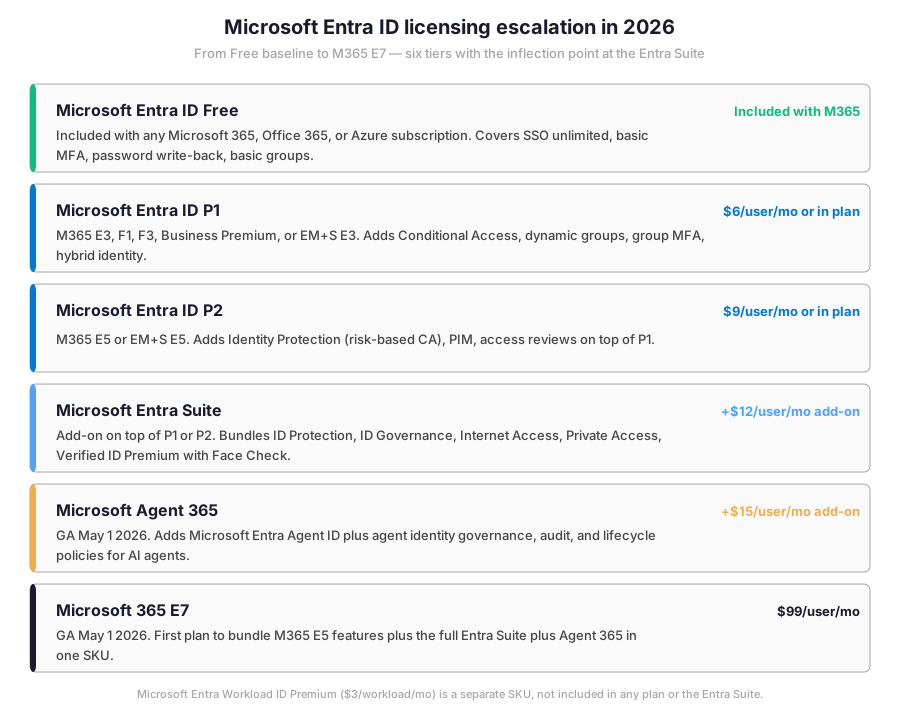
Microsoft Entra ID licensing in 2026 escalates across six tiers, each unlocking specific capabilities and each available either standalone or bundled into a Microsoft 365 plan. The chart below summarizes the price points, the M365 plans that include each tier, and the headline capabilities at every step.
How the Microsoft Entra ID license tiers compare
| License SKU | Monthly cost (per user) | What is included | Best fit |
|---|---|---|---|
| Entra ID Free | Included with Microsoft 365 | SSO, basic MFA, Security Defaults, self-service password change | Tenants under 25 users without compliance pressure |
| Entra ID P1 | $6 standalone or M365 E3 / Business Premium | Conditional Access, dynamic groups, SSO across all SaaS, group-based licensing | Most SMB tenants in 2026 |
| Entra ID P2 | $9 standalone or M365 E5 | P1 plus Identity Protection, PIM, Access Reviews, risk-based Conditional Access | Tenants under elevated regulatory or threat pressure |
| Entra Suite | $12 add-on (on top of P1 or P2) | ID Protection, ID Governance, Internet Access, Private Access, Verified ID Premium | Hybrid environments adopting Zero Trust |
| Agent 365 | $15 standalone | Agent ID, agent governance, agent observability, agent security policies | Tenants deploying AI agents at scale |
| Microsoft 365 E7 | $99 (GA 1 May 2026) | M365 E5 plus Entra Suite plus Agent 365 plus Microsoft Purview top tier | Top-tier enterprise consolidating identity, security, and AI |
Where the Microsoft Entra Suite breaks even
The licensing decision tree below visualises the same six tiers in priority order. Specifically, the diagram shows the Free baseline, the P1 plateau where most SMB tenants land, the P2 step for tenants under regulatory pressure, the Suite inflection point at $12 per user per month, and finally the Agent 365 and M365 E7 ceilings introduced in 2026. Therefore, plotting your current SKU on the diagram exposes immediately whether your tenant is over-licensed, under-licensed, or correctly aligned with the Wintive baseline.
Wintive recommendations on the Entra ID license tier choice
Specifically, three licensing nuances matter operationally. First, Conditional Access policies remain active even after P1 or P2 licenses expire — Microsoft documentation states that policies are not automatically disabled or deleted on license lapse, which means the policies continue to enforce, but the tenant is technically using unlicensed features and could face compliance issues during an audit. Second, Microsoft Entra ID Governance counts users who could use the feature, not users who actually do: if 2,000 employees can request access packages, the tenant needs 2,000 licenses even if only 150 actually request. Third, Entra Workload ID Premium at $3 per workload identity per month is never included in any Microsoft 365 plan, EM+S plan, or the Entra Suite — it is always a separate purchase.
For SMBs the practical entry point is M365 Business Premium, which includes Microsoft Entra ID P1 with Conditional Access. Frontline plans M365 F1 ($2.25 per user per month, rising to $3 from July 2026) and F3 also include P1. M365 E5 brings P2 with Identity Protection and PIM. Adding the Microsoft Entra Suite at $12 per user per month layers ID Protection, ID Governance, Internet Access, Private Access, and Verified ID Premium with Face Check on top of any P1 or P2 base. M365 E7 at $99 per user per month, generally available May 1 2026, is the first plan to include both the Entra Suite and Agent 365 together.
🔑 Passkey auto-enable March 2026 — what Entra ID admins must prepare
Specifically, Microsoft is auto-enabling passkey profiles across all Microsoft Entra ID tenants starting March 2026. Specifically, the auto-enable wave provisions device-bound passkeys (using Windows Hello for Business, Apple Touch ID/Face ID, or Android biometric platforms) as a registered authentication method on every eligible user account, without requiring administrator opt-in. Therefore, Entra ID admins should prepare three controls before the wave reaches the tenant: an Authentication methods policy that allows or restricts the new passkey enrollment, end-user communications explaining the new option, and a Conditional Access strategy that elevates passkey authentication to the preferred phishing-resistant factor.
Passkeys are phishing-resistant by design: they bind cryptographically to the origin domain, so a phishing site cannot replay the credential. For Microsoft 365 administrators, the priority targets for passkey enforcement are privileged accounts (Global Administrator, Security Administrator, Exchange Administrator) where standing access plus password-based MFA carries the highest risk. Furthermore, passkey support extends across Windows, macOS, iOS, and Android natively in 2026, removing the historic friction of FIDO2 security key procurement. The legacy Microsoft Authenticator app remains supported but no longer represents the recommended phishing-resistant factor for sensitive scenarios.
Microsoft Entra Connect to Cloud Sync transition starting July 2026
Furthermore, Microsoft Entra Connect is the long-running on-premises agent that synchronizes a Windows Active Directory forest to Microsoft Entra ID. Microsoft Entra Cloud Sync is the cloud-managed replacement, with a lightweight agent footprint and configuration centralized in the Entra admin center. Specifically, beginning July 2026 Microsoft will start notifying customers through the Microsoft 365 Message Center, Entra Connect Health, and targeted emails about their individual transition timelines from Entra Connect to Entra Cloud Sync. The transition is phased, starting with tenants for which Cloud Sync already meets all identity synchronization needs.
Cloud Sync is functionally close to Entra Connect for most SMB scenarios but lacks support for some advanced filtering, hybrid Exchange writeback, and pass-through authentication topologies. Therefore, tenants in the first phases will be those running standard scoped attribute synchronization with no on-premises identity dependencies remaining. The transition is positioned as a security and operational upgrade: Cloud Sync removes the on-premises sync server attack surface, simplifies disaster recovery, and centralizes configuration in the Entra admin center where Conditional Access already lives. The Microsoft Learn Cloud Sync documentation covers the agent footprint, supported topologies, and migration prerequisites in detail.
🛠 Essential Microsoft Entra ID setup steps with Microsoft Graph PowerShell
Therefore, the Microsoft Graph PowerShell SDK is the modern interface for Microsoft Entra ID administration. Specifically, it replaces the deprecated AzureAD and MSOnline modules and exposes the full Microsoft Graph API surface for identity, conditional access, and licensing operations. The snippet below covers four foundational tasks: connecting with the appropriate scopes, listing the current license assignments, retrieving Conditional Access policies, and pulling the standing privileged role assignments that need PIM remediation.
From identity audit to baseline Conditional Access
Prerequisites for the PowerShell setup steps below:
Microsoft Entra ID P1 license at minimum (P2 required for risk-based Conditional Access and PIM). Microsoft Graph PowerShell module v2.15 or later. Global Administrator role for initial Conditional Access policy creation, then Privileged Role Administrator delegated via PIM thereafter. A break-glass account excluded from all Conditional Access policies, kept in a sealed envelope and audited monthly. Furthermore, Wintive recommends a separate cloud-only admin account that does not match the user’s primary mailbox identity.
The PowerShell snippet below relies on the modern Microsoft Graph PowerShell module rather than the deprecated AzureAD or MSOnline modules retired by Microsoft in 2024. Specifically, the script connects with proper consent scopes. It then lists active Conditional Access policies. Furthermore, it creates a baseline policy in report-only mode and audits Global Administrator membership across the tenant.
# Install if not present
Install-Module Microsoft.Graph -Scope CurrentUser -Force

# Connect with admin scopes
Connect-MgGraph -Scopes "Directory.Read.All","Policy.Read.All","RoleManagement.Read.Directory"

# Tenant license assignments
Get-MgSubscribedSku | Select-Object SkuPartNumber, ConsumedUnits, @{N="Enabled";E={$_.PrepaidUnits.Enabled}}

# Conditional Access policies
Get-MgIdentityConditionalAccessPolicy | `
    Select-Object DisplayName, State, @{N="Users";E={($_.Conditions.Users.IncludeUsers -join ",")}}

# Standing Global Administrator assignments (PIM target)
$gaRole = Get-MgRoleManagementDirectoryRoleDefinition -Filter "displayName eq 'Global Administrator'"
Get-MgRoleManagementDirectoryRoleAssignment -Filter "roleDefinitionId eq '$($gaRole.Id)'" | `
    Select-Object PrincipalId, Id

# MFA registration report
Get-MgReportAuthenticationMethodUserRegistrationDetail -All | `
    Where-Object { $_.IsMfaCapable -eq $false } | `
    Select-Object UserPrincipalName, IsMfaRegistered
For app registration, OAuth flows, and delegated permission scopes — the foundation of every modern application calling Microsoft Graph or Exchange Online — the Microsoft Graph SDK exposes the New-MgApplication cmdlet, which provisions an Entra app registration with the requested API permissions. Furthermore, the same SDK powers the SMTP AUTH OAuth migration plan covered in our Microsoft 365 SMTP relay 5-method guide: Entra app registration, OAuth client credentials flow, and Mail.Send delegated permission together replace SMTP Basic authentication before the late December 2026 deprecation window.
📈 The Wintive baseline — Microsoft Entra ID adoption across 60+ tenants
The chart below summarizes Microsoft Entra ID adoption observed across 60+ Microsoft 365 SMB tenants audited in 2026 H1. Three findings stand out as immediate remediation priorities. First, 47% of tenants have more than 5 standing Global Administrator assignments — the canonical PIM remediation target, since Microsoft recommends keeping standing GAs to two emergency accounts. Second, only 8% of tenants have adopted the Entra Suite, even though 23% have a P2 license that would already cover most Suite-overlapping capabilities. Third, only 39% of tenants have PIM configured for admin roles despite 23% holding the P2 license that includes PIM.
Microsoft Entra ID adoption signals across SMB tenants
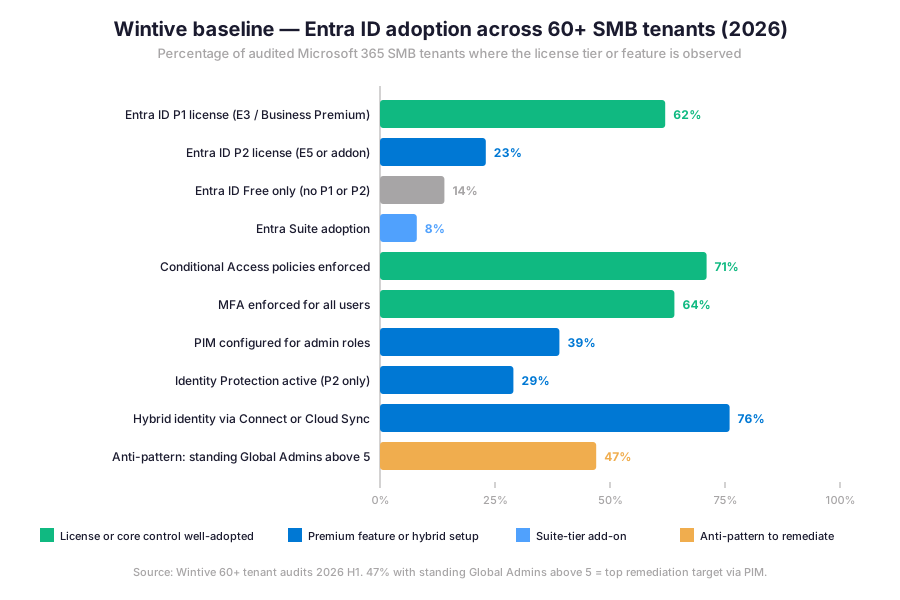
Conditional Access enforcement reaches 71% of audited tenants, which is encouraging — but the gap between policy presence and policy completeness is significant. A typical SMB tenant has two or three Conditional Access policies (block legacy auth, require MFA for admins, require compliant device for SharePoint) but lacks risk-based policies that would require P2. Furthermore, 31% of tenants still allow legacy authentication on at least one mailbox, which is the most exploitable gap in the dataset and the first item Wintive remediates during a tenant audit.
# Microsoft Graph PowerShell module — modern alternative to AzureAD module (deprecated 2024)
Install-Module Microsoft.Graph -Scope CurrentUser -Force

# Connect with proper consent scopes
Connect-MgGraph -Scopes "Policy.ReadWrite.ConditionalAccess", "User.Read.All", "Group.Read.All", "AuditLog.Read.All"

# List active Conditional Access policies in the tenant
Get-MgIdentityConditionalAccessPolicy | Select-Object DisplayName, State, CreatedDateTime

# Create a baseline policy: require MFA for all users (report-only mode first)
$params = @{
    DisplayName = "Wintive baseline - MFA for all users (report-only)"
    State = "enabledForReportingButNotEnforced"
    Conditions = @{
        Users = @{ IncludeUsers = @("All"); ExcludeUsers = @("<break-glass-object-id>") }
        Applications = @{ IncludeApplications = @("All") }
    }
    GrantControls = @{ Operator = "OR"; BuiltInControls = @("mfa") }
}
New-MgIdentityConditionalAccessPolicy -BodyParameter $params

# Audit who currently holds Global Administrator (should be 2-3 break-glass + PIM-eligible)
Get-MgDirectoryRole -Filter "DisplayName eq 'Global Administrator'" |
ForEach-Object { Get-MgDirectoryRoleMember -DirectoryRoleId $_.Id }
⚠ 5 SMB-specific Microsoft Entra ID pitfalls observed in audits
The five Microsoft Entra ID pitfalls below cover anti-patterns Wintive consistently observes during SMB tenant audits. A common mistake is to assume that buying an E5 license automatically activates Identity Protection. Admins struggle with this gotcha because the license activates the SKU but does not surface the P2 features in the admin center. The features stay dormant until an admin configures each one manually. Furthermore, comparing the Microsoft Entra approach with third-party identity platforms like Okta, Duo, or AWS IAM helps frame the trade-offs. Specifically, Microsoft Entra integrates natively across Microsoft 365, Azure, Windows endpoints, and Intune. By contrast, Okta and Duo offer broader SaaS connector libraries but require separate licensing. AWS IAM and GCP Identity stay focused on cloud workload identity rather than human Microsoft 365 users.
1 — Standing Global Administrators above 5 with no PIM elevation
The canonical anti-pattern in 47% of audited tenants. Standing privileged access exposes the tenant to credential theft amplification: one phished GA account compromises the whole environment. The fix is PIM activation for every privileged role with MFA-gated, time-bound, justification-required elevation, leaving only two emergency-access accounts as standing GAs.
2 — Conditional Access without break-glass account exclusion
A poorly scoped CA policy that requires compliant devices or specific MFA factors can lock out the very GA accounts needed to recover the tenant during an outage. The fix is to exclude two clearly named emergency-access accounts from every Conditional Access policy and to monitor those accounts with separate alerting.
3 — Legacy authentication still allowed on individual mailboxes
Tenant-wide legacy auth block via Conditional Access does not stop per-mailbox SMTP AUTH Basic when the mailbox property SmtpClientAuthenticationDisabled is set to false. The fix is the Get-CASMailbox audit covered in our SMTP relay guide, with explicit Set-CASMailbox cleanup before the late December 2026 deprecation.
4 — P2 license held but Identity Protection and PIM never configured
The most expensive misconfiguration in the dataset. Tenants paying for M365 E5 (P2 included) often run Identity Protection and PIM in default-disabled state, leaving the security upside on the shelf. The fix is a 30-minute configuration session enabling sign-in risk policies, user risk policies, and PIM activation for the four core admin roles.
5 — Workload ID licensing not budgeted for service principals
When the tenant uses Conditional Access for service principals (typical for production app registrations), each workload identity needs a $3 per workload Workload ID Premium license. Audit findings frequently flag this as silent unlicensed feature usage. The fix is either a Workload ID Premium subscription scoped to the affected service principals or a policy review to remove the unlicensed dependency.
❓ Microsoft Entra ID FAQ
Microsoft Entra ID is the new name for Azure Active Directory, rebranded by Microsoft in July 2023. The technology, APIs, and licensing remain identical — only the name changed. The rebrand reflects the broader Entra product family that now spans Entra ID, External ID, Verified ID, ID Protection, ID Governance, Internet Access, Private Access, Workload ID, and Agent ID.
The Entra Suite bundles Microsoft Entra ID Protection, Microsoft Entra ID Governance, Microsoft Entra Internet Access, Microsoft Entra Private Access, and Microsoft Entra Verified ID Premium with Face Check (8 Face Checks per user per month). It is an add-on layered on top of any P1 or P2 base license — the Suite does not include the P1 or P2 base itself.
Whenever Conditional Access policies or Identity Protection signals apply to a service principal, application, or managed identity. Workload ID Premium is $3 per workload identity per month and is never included in any Microsoft 365 plan, Enterprise Mobility plan, or the Entra Suite. The same applies to OAuth-based provisioning workloads such as the SAP SuccessFactors integration migrating off basic auth before November 2026.
More Microsoft Entra ID questions
Microsoft Entra Agent ID extends identity and access management to AI agents, providing each agent with a directory object, governance policies, and audit trails. Agent ID is included in Microsoft Agent 365 ($15 per user per month) and in Microsoft 365 E7 ($99 per user per month, GA May 1 2026). Standalone Agent ID licensing is not announced as of May 2026.
Microsoft is auto-enabling passkey profiles across all Entra ID tenants starting March 2026. Eligible users will see passkey enrollment prompts even if the tenant has not explicitly configured the Authentication methods policy. Admins should pre-configure the Authentication methods policy to allow or restrict passkey enrollment, communicate the change to end-users, and elevate Conditional Access policies for high-privilege accounts before the auto-enable rollout reaches the tenant.
📚 Related Microsoft 365 reading
The complete migration path is at our Microsoft 365 SMTP Relay 5-method guide covering OAuth client credentials, certificate auth, and the SMTP AUTH retirement timeline.
The full rollout sequence is documented at our Microsoft 365 MFA and Conditional Access deployment guide with report-only mode, break-glass exclusion, and phased enforcement.
The 12 highest-value tasks are listed in our 12 Exchange Online admin productivity wins for 2026 covering EXO V3 PowerShell, Copilot in Outlook, and the EWS retirement timeline.
The 40+ checks across Entra ID, Exchange Online, SharePoint, Teams, and Intune are gathered in our free Microsoft 365 Tenant Audit Checklist ready for Wintive remediation.
This tutorial covered one focused Microsoft 365 admin task. For a complete picture of how your full tenant performs against best practices:
🔍 Want a complete audit of your Microsoft 365 tenant?
The Automated Tenant Health Check scans your M365 environment in under 10 minutes: license waste, security posture, MFA coverage, compliance gaps, license rightsizing opportunities. Full PDF report with prioritized recommendations delivered instantly.