TLDR: Microsoft 365 SMTP relay in 2026 has five viable methods. The list: SMTP AUTH with OAuth 2.0 for modern apps; Connector relay over port 25 for MFP and legacy devices with static IP; Direct Send for internal-only senders without auth; High Volume Email or HVE for LOB apps over 10K messages per day, internal only, GA March 2026; and Azure Communication Services Email for external transactional traffic via REST or SMTP. Microsoft updated the Basic Auth deprecation timeline in January 2026. SMTP AUTH Basic authentication stays unchanged until late December 2026. Then it disables by default on existing tenants. The final removal lands in H2 2027. Mail Contact is not a relay method — it is a directory object that receives mail.
Free guide
Tenant audit checklist for SMTP relay readiness
Inventory every Basic Auth sender, document fallback methods, and prepare your December 2026 cutover plan with the same checklist Wintive uses on 60+ tenants.
📊 The 2026 Microsoft 365 SMTP relay landscape after Basic Auth update
The Microsoft 365 SMTP relay surface in 2026 has five distinct methods after Microsoft confirmed the updated Basic Auth deprecation timeline in January 2026. Specifically, the new timeline disables SMTP AUTH Basic authentication by default in late December 2026 on existing tenants, with the final removal date scheduled for announcement in H2 2027. Therefore, every method illustrated below remains usable today — however, four of them (SMTP AUTH OAuth, Connector relay, HVE, and ACS Email) survive the deprecation cleanly, while SMTP AUTH Basic authentication needs an active migration before the cutoff.
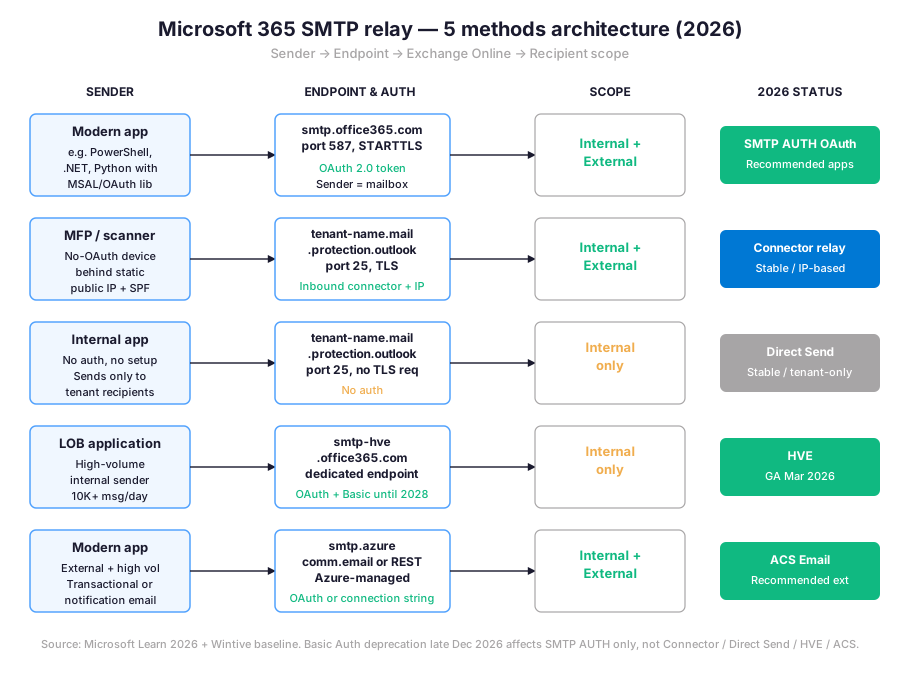
Specifically, each method matches a different operational profile. SMTP AUTH OAuth fits modern apps that can call MSAL or another OAuth library. Connector relay covers MFPs, scanners, and legacy applications behind a static public IP. Direct Send sends to internal recipients with no setup. High Volume Email targets line-of-business apps producing 10K or more messages per day to internal recipients. Azure Communication Services Email is the modern path for transactional or notification email to external recipients at scale. The next sections walk through each method with concrete PowerShell, then close with a Wintive baseline drawn from 60+ tenant audits.
🚦 Microsoft 365 SMTP relay decision tree by auth, scope, and volume
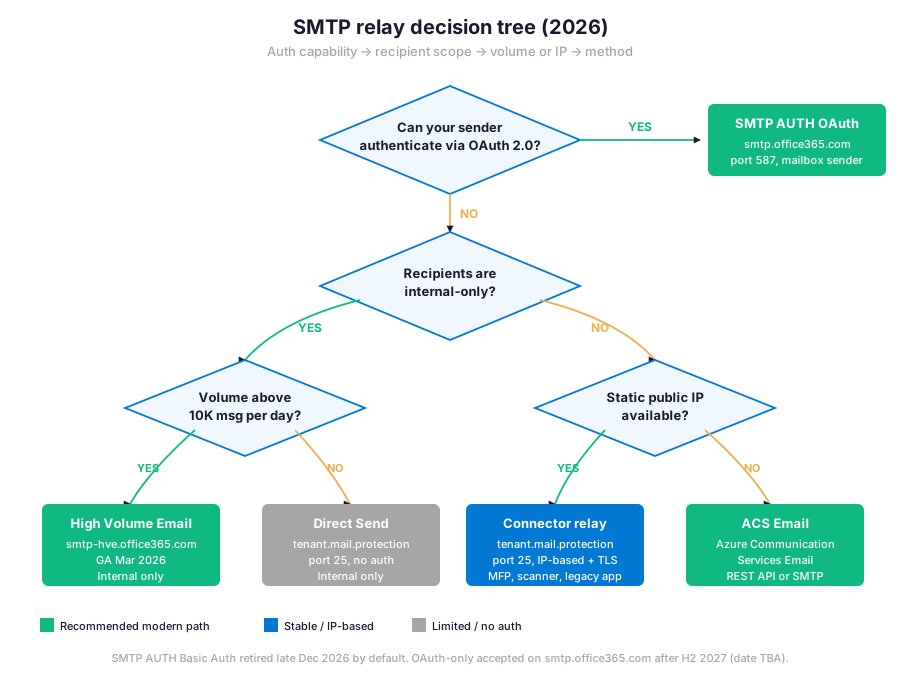
Three questions narrow the right Microsoft 365 SMTP relay method for any given sender: can the sender authenticate with OAuth 2.0, does the message reach internal-only or external recipients, and either how high is the daily volume or whether a static public IP is available. The decision tree below collapses those three branches into five concrete outcomes. Furthermore, each leaf in the tree maps to one of the methods detailed in the next sections, so the choice carries directly into PowerShell setup.
| Method | Endpoint | Auth | Recipient scope | Best for |
|---|---|---|---|---|
| SMTP AUTH OAuth | smtp.office365.com:587 | OAuth 2.0 token | Internal + external | Modern apps with MSAL |
| Connector relay | tenant-mx, port 25 | None (static IP) | Internal + external | MFP, scanner, legacy |
| Direct Send | tenant-mx, port 25 | None | Internal only | Backup, monitoring |
| HVE | smtp-hve.office365.com | OAuth or Basic (until 2028) | Internal only | LOB high-volume |
| ACS Email | smtp.azurecomm.net or REST | OAuth or conn-string | Internal + external | External transactional |
Microsoft 365 SMTP relay method summary — endpoint, authentication mode, recipient scope, and primary use case for each of the five viable paths in 2026.
Two practical caveats apply. First, OAuth-capable senders can also legitimately use Azure Communication Services Email when external volume is high and the sender does not need to appear as a tenant mailbox — ACS is increasingly the Microsoft-recommended path for transactional email outside the tenant. Second, Connector relay accepts traffic without authentication when the public IP matches an inbound connector, which is why it survives the SMTP AUTH Basic Auth deprecation. The retirement only affects Client Submission via smtp.office365.com on port 587.
⚡ Method 1 — SMTP AUTH with OAuth 2.0 on smtp.office365.com
Specifically, SMTP AUTH with OAuth 2.0 is the modern path for any application that can call an OAuth library and send through a tenant mailbox. The sender authenticates against Microsoft Entra ID, receives a short-lived access token, then connects to smtp.office365.com on port 587 with STARTTLS. Specifically, the token replaces the username and password formerly used by Basic authentication. The From address is the mailbox the application authenticates as, or one of its accepted aliases.
Prerequisites: Microsoft Entra app registration with Mail.Send delegated or application permission. SMTP AUTH enabled on the sending mailbox via Set-CASMailbox -SmtpClientAuthenticationDisabled $false. Exchange Online PowerShell v3.4 or later for tenant-level audit. TLS 1.2 or 1.3 support on the sending host. The application must support OAuth 2.0 client credentials flow or device code flow.
Audit and enable SMTP AUTH OAuth at tenant level
The PowerShell snippet below verifies SMTP AUTH state across the tenant, identifies mailboxes ready to receive OAuth-based submission, and surfaces any remaining Basic Auth dependency. Run as Exchange Administrator or Global Administrator after connecting to Exchange Online.
# Connect first
Connect-ExchangeOnline -ShowBanner:$false

# Tenant default for SMTP AUTH (organization-level setting)
Get-TransportConfig | Format-List SmtpClientAuthenticationDisabled

# List all mailboxes where SMTP AUTH is explicitly enabled
Get-CASMailbox -ResultSize Unlimited | \
    Where-Object { $_.SmtpClientAuthenticationDisabled -eq $false } | \
    Select-Object DisplayName, PrimarySmtpAddress

# Enable SMTP AUTH for a specific mailbox (use with care)
Set-CASMailbox -Identity "app-sender@contoso.com" -SmtpClientAuthenticationDisabled $false

# Pull the SMTP AUTH report (OAuth vs Basic split)
Get-AuthenticationReport -StartDate (Get-Date).AddDays(-7) -EndDate (Get-Date) | \
    Where-Object { $_.Protocol -eq "SMTP" } | \
    Group-Object AuthenticationType | Select-Object Name, Count
Application code typically uses MSAL.NET for .NET, MSAL.js for Node, or msal for Python to acquire the token, then submits via standard SMTP libraries with the token in the XOAUTH2 SASL mechanism. The Exchange Online team published a step-by-step guide for IMAP, POP, and SMTP OAuth submission covering the registration, scopes, and token format. Furthermore, the per-mailbox limit of 10,000 recipients per day applies to OAuth submission identically to Basic Auth submission, so volume planning carries over directly from existing setups.
🔌 Method 2 — Connector relay over port 25 with static public IP
Connector relay is the canonical Microsoft 365 SMTP relay path for devices and applications that cannot speak OAuth. Specifically, the sender connects on port 25 to the tenant MX endpoint tenant-name.mail.protection.outlook.com from a static public IP. An inbound connector configured in the Exchange admin center matches the IP (and optionally a TLS certificate) and authorizes the relay. Therefore, no username, no password, and no token is required — the public IP is the credential. Common consumers include MFPs and scanners. On-premises line-of-business apps without OAuth support also fit. IIS SMTP virtual servers and PowerShell-based notification scripts on dedicated hardware round out the list.
Provision the inbound connector and SPF mechanism
The connector setup splits into three steps: confirm the tenant MX endpoint, create the inbound connector with the static IP, then validate the SPF record so the receiving side trusts the relay. The PowerShell snippet below creates an inbound connector restricted to a single static IP and tags it for downstream auditing.
# Connect first
Connect-ExchangeOnline -ShowBanner:$false

# Locate the tenant MX endpoint to send to
Get-AcceptedDomain | Where-Object { $_.Default -eq $true } | \
    Select-Object DomainName, DomainType

# Create an inbound connector for a single static IP relay
New-InboundConnector -Name "SMB Office Printer Relay" `
    -ConnectorType OnPremises `
    -SenderIPAddresses "203.0.113.42" `
    -RequireTls $true `
    -Comment "MFP scanner and notification scripts behind office firewall"

# Verify connector created and active
Get-InboundConnector -Identity "SMB Office Printer Relay" | Format-List Name, SenderIPAddresses, RequireTls, Enabled

# Add the static IP to the SPF record (DNS step, outside Exchange Online)
# Required SPF segment: ip4:203.0.113.42 in addition to include:spf.protection.outlook.com
Furthermore, two operational notes apply. First, the static IP must be dedicated to the relay use case — sharing the IP with another organization breaks the connector match and exposes the tenant to spoofing risk. Second, the SPF record on the sending domain must include the static IP explicitly via ip4: so external recipients pass SPF alignment. Without that DNS update, messages relayed through the connector reach destinations but fail SPF, which downgrades deliverability progressively.
📤 Method 3 — Direct Send for internal-only senders, no setup
Therefore, Direct Send is the simplest Microsoft 365 SMTP relay method when the sender only needs to reach internal recipients within the same tenant. Specifically, the sender connects to tenant-name.mail.protection.outlook.com on port 25 with no authentication and submits the message directly. Exchange Online accepts the connection because the destination is an accepted domain, then delivers internally. Therefore, Direct Send needs no connector, no IP allowlist, and no auth flow — but it cannot reach external recipients, and Microsoft increasingly recommends authenticated paths for any traffic outside the tenant boundary.
# Quick test from PowerShell using internal recipient only
$mxEndpoint = "contoso-com.mail.protection.outlook.com"
Send-MailMessage -SmtpServer $mxEndpoint -Port 25 `
    -From "alerts@contoso.com" -To "helpdesk@contoso.com" `
    -Subject "Direct Send test" `
    -Body "Internal-only SMTP relay test message via Direct Send."

# Same test but to an external recipient (this will fail)
Send-MailMessage -SmtpServer $mxEndpoint -Port 25 `
    -From "alerts@contoso.com" -To "external@example.com" `
    -Subject "External test" -Body "This will be rejected by EOP."

# Microsoft 365 returns 550 5.7.64 TenantAttribution when recipient is external
Specifically, Direct Send is the right answer for backup notification scripts, internal monitoring agents, and similar tenant-bound senders. However, the From domain must be an accepted domain on the tenant. Spoofed senders fail anti-spoof and land in Junk or are rejected outright. Furthermore, SPF on the From domain should authorize the public IP that originates the connection or use include:spf.protection.outlook.com if the sender is itself in Microsoft 365.
🚀 Method 4 — High Volume Email for line-of-business apps
Therefore, High Volume Email or HVE is the dedicated Microsoft 365 SMTP relay endpoint for line-of-business applications generating large volumes of internal-only mail — typically 10K or more messages per day. Specifically, HVE uses a separate endpoint smtp-hve.office365.com and a dedicated authentication account that does not consume an Exchange Online mailbox license. Microsoft has been operating HVE in Public Preview since 2024 and announced General Availability in March 2026. Importantly, since June 2025 HVE supports internal recipients only — the previous external sending capability was retired.
HVE preserves a Basic authentication option until September 2028 on the dedicated endpoint. That detail makes HVE the practical migration target for legacy LOB apps. Specifically, apps that cannot be re-coded for OAuth in the December 2026 window land here. The PowerShell snippet below provisions an HVE account, retrieves the smtp-hve credentials, and validates the dedicated endpoint reachability.
# Connect first
Connect-ExchangeOnline -ShowBanner:$false

# Create an HVE account (cmdlet available after HVE GA March 2026)
New-HighVolumeMailAccount -Identity "lob-billing-hve" `
    -Description "Billing system internal alerts" `
    -DailyMessageLimit 100000

# Retrieve the HVE-specific credentials and endpoint
Get-HighVolumeMailAccount -Identity "lob-billing-hve" | \
    Format-List Identity, Endpoint, AuthenticationModes, DailyMessageLimit

# Validate the endpoint reachability from the LOB host
Test-NetConnection -ComputerName "smtp-hve.office365.com" -Port 25

# HVE supports both OAuth and Basic Auth until September 2028 on the dedicated endpoint
Specifically, HVE pricing follows a per-message model rather than a per-mailbox license, which is why it suits high-volume internal scenarios where provisioning a dedicated mailbox would be wasteful. Furthermore, HVE accounts are managed independently from regular Exchange Online mailboxes, so credential rotation and audit do not interfere with end-user sign-ins. The full HVE service description on Microsoft Learn covers throughput limits, eligible scenarios, and the GA region rollout.
☁ Method 5 — Azure Communication Services Email for external traffic
Azure Communication Services Email or ACS Email is the Microsoft-recommended path for transactional and notification email going to external recipients at scale. Specifically, ACS Email is a separate Azure resource that handles outbound delivery via either a REST API or an SMTP endpoint. Therefore, ACS decouples the sending workload from Exchange Online entirely, which is the explicit design intent — high-volume external email no longer competes for tenant mailbox capacity or per-mailbox throttles. ACS supports OAuth-based authentication via Microsoft Entra and connection-string authentication for SMTP submission.
Provision an ACS resource and verify the custom domain
ACS Email pricing is per-message and includes both engagement tracking (opens, clicks) and delivery diagnostics through Azure Monitor. Furthermore, ACS supports custom domains with full SPF, DKIM, and DMARC alignment, which means the recipient sees the message as originating from the tenant domain rather than an Azure subdomain. The SMTP endpoint is smtp.azurecomm.net and the REST endpoint is the Azure Communication Services resource URL.
# Provision an ACS resource via Azure CLI
az communication create \
    --name "contoso-email-acs" \
    --location "global" \
    --resource-group "rg-comms"

# Add an Email Communication Service and a verified custom domain
az communication email create \
    --name "contoso-email" \
    --resource-group "rg-comms" \
    --location "global" \
    --data-location "unitedstates"

# Send a test message via REST (PowerShell example with bearer token)
$headers = @{
    "Authorization" = "Bearer $accessToken"
    "Content-Type"  = "application/json"
}
$body = @{
    senderAddress = "alerts@contoso.com"
    recipients    = @{ to = @(@{ address = "customer@example.com" }) }
    content       = @{ subject = "ACS test"; plainText = "Hello from ACS Email." }
} | ConvertTo-Json -Depth 5

Invoke-RestMethod -Uri "https://contoso-email-acs.communication.azure.com/emails:send?api-version=2023-03-31" `
    -Method Post -Headers $headers -Body $body
Furthermore, ACS Email is the right answer for marketing automation backends, password reset flows, e-commerce order confirmations, and any external transactional pattern that previously relied on SMTP AUTH Basic authentication. The Azure Communication Services Email overview on Microsoft Learn documents domain verification, throttling tiers, and the data location options for compliance scenarios.
🛠 Migration path — from SMTP AUTH Basic Auth before December 2026
Tenants still using SMTP AUTH Basic authentication on smtp.office365.com need a structured migration plan before late December 2026, when Microsoft disables the option by default on existing tenants. Specifically, the work splits into three phases: inventory every Basic Auth sender via the Defender portal SMTP AUTH report, classify each sender against the five-method matrix, then execute the migration in priority order — OAuth-capable senders first, IP-capable senders second, and HVE for legacy LOB apps last. The PowerShell snippet below pulls the Basic Auth sender inventory for the previous 90 days, which is the standard look-back window Wintive uses on tenant audits.
# Connect first
Connect-ExchangeOnline -ShowBanner:$false

# Pull SMTP AUTH activity for the previous 90 days, grouped by mailbox
$start = (Get-Date).AddDays(-90)
$end = Get-Date

Get-AuthenticationReport -StartDate $start -EndDate $end | \
    Where-Object { $_.Protocol -eq "SMTP" -and $_.AuthenticationType -eq "Basic" } | \
    Group-Object UserPrincipalName | \
    Select-Object Name, Count | \
    Sort-Object Count -Descending | \
    Export-Csv -Path "basic-auth-smtp-senders.csv" -NoTypeInformation

# Cross-check with mailbox SMTP AUTH state
Get-CASMailbox -ResultSize Unlimited | \
    Where-Object { $_.SmtpClientAuthenticationDisabled -eq $false } | \
    Select-Object PrimarySmtpAddress, DisplayName, WhenChanged | \
    Export-Csv -Path "smtp-auth-enabled-mailboxes.csv" -NoTypeInformation
Map current senders to one of the five surviving methods
| Current sender pattern | Target method | Effort | Latest cutover |
|---|---|---|---|
| App with developer team and OAuth library | SMTP AUTH OAuth 2.0 | Code change + Entra app reg | Q3 2026 |
| MFP, scanner, or device with static public IP | Connector relay (port 25) | Connector + SPF DNS update | Q4 2026 |
| Internal-only script or alert system | Direct Send | Endpoint change only | Q4 2026 |
| Legacy LOB app, internal only, high volume | HVE (Basic Auth until Sep 2028) | HVE account + endpoint change | Q1 2027 (HVE GA Mar 2026) |
| External transactional or notification email | ACS Email (REST or SMTP) | Azure resource + domain verify | Q3 2026 |
Migration matrix — map current Basic Auth senders to one of the five surviving Microsoft 365 SMTP relay methods. The latest cutover column targets a 60-day buffer before the late December 2026 default disablement.
⚠ Watch the NDR pattern after cutover: Any sender still using SMTP AUTH Basic authentication after disablement receives 550 5.7.30 Basic authentication is not supported for Client Submission. The 5xx code is a permanent rejection, which means the sending server does not retry — messages are lost immediately, not queued. Therefore, the migration audit must surface every Basic Auth sender before the cutover, because there is no graceful failure mode after disablement.
📈 The Wintive baseline — SMTP relay distribution across 60+ tenants
Specifically, the Wintive chart below summarizes Microsoft 365 SMTP relay method distribution observed across 60+ SMB tenants audited in 2026 H1. Multiple methods coexist in 56% of tenants, which is the dominant pattern — consolidating to a single method is rare and usually unnecessary. However, two findings stand out as immediate remediation priorities. First, 41% of tenants still have SMTP AUTH Basic authentication active on at least one mailbox, all of which need a migration plan before late December 2026. Second, 12% of tenants have a Mail Contact configured as if it were a relay path, which is the historical confusion this guide corrects.
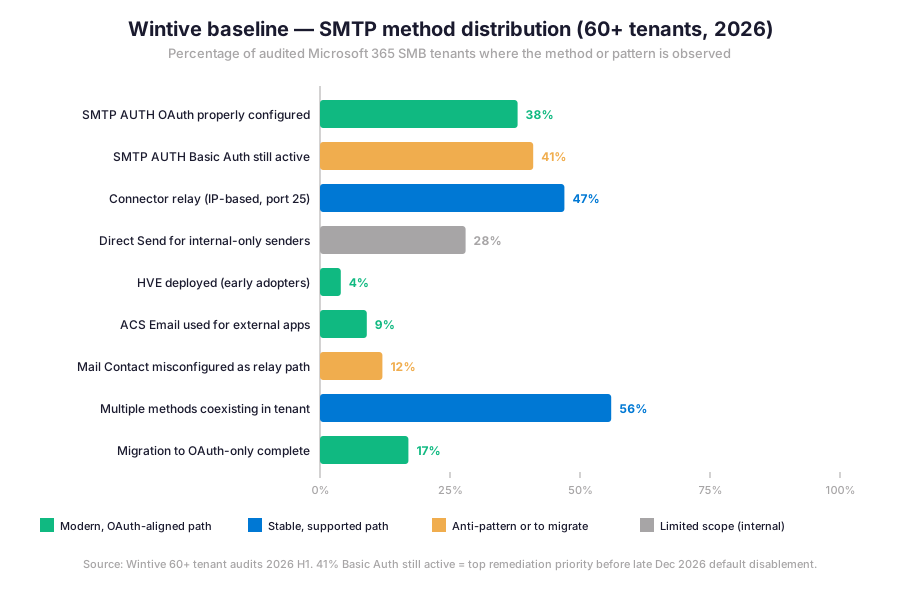
In the Wintive baseline, HVE adoption sits at 4% because the service only reached General Availability in March 2026, so most tenants are still in the evaluation phase. ACS Email adoption is 9%, driven primarily by tenants that previously used a third-party email API (SendGrid, Mailjet, Postmark) and migrated to ACS for Azure consolidation. Furthermore, only 17% of tenants have completed the OAuth-only migration end-to-end — the remaining 83% still have at least one path to phase out before late December 2026.
⚠ 5 SMB-specific Microsoft 365 SMTP relay pitfalls observed in audits
The five pitfalls below cover anti-patterns Wintive observes most often during tenant audits. Specifically, each entry Wintive consistently observes during SMB tenant audits. Each entry includes the symptom, the root cause, and the corrective action.
1 — Mail Contact misconfigured as an outbound relay path
Furthermore, the historical confusion that, in the Wintive audit catalogue, motivated this guide rewrite. A Mail Contact in Exchange Online is a recipient object — it appears in the Global Address List and receives mail addressed to its external SMTP address. A common mistake is to assume that creating a Mail Contact authorizes outbound traffic from that address, which is not the case. The fix is to identify the actual sender (app, MFP, script) and route it through one of the five real relay methods.
2 — Static IP shared across multiple organizations on the same connector
Specifically, Connector relay authorizes any traffic from the configured IP, with no further sender verification. Therefore, sharing the static IP with another tenant or with a generic ISP NAT pool exposes the tenant to spoofed mail relayed under its accepted domain. The fix is a dedicated public IP for the relay and a strict SPF policy that lists only the controlled IPs, with a soft-fail or hard-fail mechanism on the From domain.
3 — SPF record not updated after connector relay setup
Specifically, a connector accepts the relay traffic, but external recipients see the message originating from the connector IP. If that IP is not listed in the From domain SPF record, the message fails SPF and lands in Junk or is rejected silently. The fix is to add the connector public IP to SPF using the ip4: mechanism alongside include:spf.protection.outlook.com, then publish DKIM and align DMARC for the From domain.
4 — HVE used for external recipients (no longer supported since June 2025)
Specifically, early HVE Public Preview tenants briefly had access to external sending, which Microsoft retired in June 2025. Tenants that adopted HVE during that window and still send externally now silently fail or get throttled. The fix is to migrate the external portion of the workload to Azure Communication Services Email and keep HVE for the internal-only portion.
5 — Basic Auth disablement timeline misread as the original April 2026 cutoff
Specifically, Microsoft has revised the Basic Auth deprecation date several times in the Wintive observation window. Many SMB blogs and vendor advisories still reference the original April 2026 cutoff. As of January 2026, the actual disablement is late December 2026 by default, with the final removal in H2 2027. The fix is to plan against the revised timeline but treat any sender currently on Basic Auth as already on borrowed time — the technical risk profile has not changed even if the deadline moved.
Tenant audit — $97
Find every Basic Auth sender before the December 2026 cutoff
The Automated Tenant Health Check audits SMTP AUTH activity, identifies every Basic Auth sender, classifies each against the five-method matrix, and outputs a ready-to-execute migration plan. Two emails of direct support within 48 hours are included.
❓ Microsoft 365 SMTP relay FAQ
Yes. As of January 2026, Microsoft revised the SMTP AUTH Basic authentication deprecation timeline. The behavior remains unchanged through December 2026. Late December 2026, SMTP AUTH Basic authentication is disabled by default on existing tenants, and the final removal date will be announced in H2 2027. New tenants created after December 2026 cannot use Basic authentication at all.
Direct Send accepts traffic from any source on port 25 to the tenant MX endpoint without authentication, but only delivers to internal recipients within the same tenant. Connector relay also uses port 25 to the tenant MX endpoint without authentication, but the inbound connector authorizes a specific static public IP, which allows external recipients in addition to internal ones. Therefore, Connector relay needs an explicit setup and a dedicated IP, while Direct Send is zero-setup but internal-only.
Microsoft announced General Availability of High Volume Email or HVE for March 2026. HVE has been in Public Preview since 2024. Since June 2025, HVE supports internal recipients only, which is a tightening of the original Public Preview scope. HVE retains a Basic authentication option on its dedicated endpoint smtp-hve.office365.com until September 2028, which makes it the practical migration target for legacy LOB applications that cannot move to OAuth in the December 2026 window.
More on the Microsoft 365 SMTP relay migration
Yes, but only with OAuth 2.0 instead of Basic authentication. The endpoint smtp.office365.com on port 587 continues to accept SMTP AUTH submission indefinitely — only the Basic authentication method is being retired. Any application that can implement the OAuth client credentials flow against Microsoft Entra ID and pass the token via the XOAUTH2 SASL mechanism continues to work after the cutoff. The 550 5.7.30 NDR appears only when Basic authentication is attempted after disablement.
A Mail Contact in Exchange Online is a recipient object pointing to an external SMTP address. It is designed to receive mail addressed to that external address, not to authorize outbound traffic. Therefore, creating a Mail Contact does not enable SMTP relay for any application or device. The actual relay path is one of the five real methods: SMTP AUTH OAuth, Connector relay, Direct Send, HVE, or ACS Email. Mail Contacts complement these methods by providing GAL visibility for external partners, but they are not themselves a relay mechanism.
📚 Related Microsoft 365 reading
Furthermore, the four guides below extend the Microsoft 365 SMTP relay perimeter into the surrounding email infrastructure. Read them in order if the tenant is mid-migration, or pick the one that matches the next operational gap.
- Microsoft 365 custom domain setup — verify the domain, configure MX, SPF, DKIM, and DMARC, then validate before any SMTP relay is configured against it.
- Microsoft 365 email deliverability forensics — trace why a relayed message lands in Junk, fails SPF, or gets rejected outright. Direct successor when Connector relay is set up but deliverability degrades.
- Exchange Online transport rules — layer policy on top of relay traffic: route, modify, redirect, or reject based on sender, recipient, content, or attachment.
- Exchange Online admin tips — 12 admin productivity wins covering EWS deprecation, Copilot Outlook, certificate-based authentication, and cross-cmdlet workflows.