Migrating on-premises mailboxes to Exchange Online used to mean choosing between cutover, staged, or hybrid. In 2026, the choice is sharper: Exchange Server 2016 and 2019 reached end of support on October 14, 2025, leaving Exchange Server SE (Subscription Edition) as the only supported on-premises path. Most SMB tenants this year are running their final on-premises Exchange and need a clear migration plan that finishes fully cloud.
This guide covers the four migration paths, when to pick Modern Hybrid versus Classic Hybrid, the Express migration option for SMB tenants, the Mailbox Replication Service mechanics, and the pre-migration checklist for the 2026 EWS deprecation reality.
Quick answer. Most SMB tenants in 2026 pick Modern Hybrid via HCW Express migration: a Hybrid Agent on Windows (no Exchange role), one-time AD sync, mailboxes move one-way to Exchange Online. Cutover fits tenants under 150 mailboxes on Exchange 2003 or 2007. Classic Hybrid is for long coexistence. Audit EWS apps first because phased shutdown starts October 1, 2026.
Free PDF guide
Microsoft 365 Tenant Audit Checklist for 2026
40+ checks across Entra ID, Exchange Online, SharePoint, Teams, and Intune, including the pre-migration EWS audit, license assignment, MX flip plan, and public folder migration readiness questions you need answered before any Exchange Online migration starts.
📅 Why an Exchange Online migration matters in 2026
Three forcing functions push every remaining on-premises Exchange tenant toward Exchange Online during 2026. First, Exchange Server 2016 and 2019 reached end of support on October 14, 2025. They no longer receive security patches. Furthermore, time zone updates and technical support stopped on the same date. Second, the only supported on-premises Exchange path is now Exchange Server SE (Subscription Edition), released October 2025. The product requires an active Microsoft 365 or Exchange Online subscription anyway. Third, EWS application deprecation begins phased disablement on October 1, 2026. Full shutdown follows on April 1, 2027. Therefore, any application calling EWS must move to Microsoft Graph regardless of where the mailbox lives.
Furthermore, the operational cost of running Exchange Server SE on-premises in 2026 is significant. Hardware refresh cycles, Windows Server licensing, the Exchange CAL stack, weekly patching windows, certificate renewals, and storage growth all add up. The alternative is a $12.50 to $57 per user per month Microsoft 365 license. Specifically, that license includes mailbox, archive, eDiscovery, and DLP. Wintive consistently sees SMB tenants reach an inflection point on the second hardware refresh cycle. At that point, the on-premises Exchange total cost of ownership exceeds the Microsoft 365 subscription by a factor of two or three.
🗺 The four Exchange Online migration paths compared
Specifically, Microsoft supports four native migration paths to Exchange Online. They are cutover, staged, hybrid (Classic and Modern variants), and IMAP. Each path uses a different migration endpoint type. Each comes with a different set of constraints. Therefore, picking the wrong path is the most common pre-migration mistake Wintive sees during tenant audits.
Native Exchange Online migration paths supported by Microsoft
- Cutover — OutlookAnywhere endpoint, all mailboxes in one batch, up to 150 mailboxes in practice.
- Staged — OutlookAnywhere endpoint, batches over weeks, requires Entra Connect and Exchange 2003/2007 only.
- Hybrid — ExchangeRemoteMove endpoint via MRS, preserves Outlook profiles, splits into Modern Hybrid and Classic Hybrid.
- IMAP — IMAP endpoint, mail data only (no calendar/contacts/tasks), used for non-Exchange sources.
Furthermore, cutover migration moves all mailboxes in a single batch. It uses the OutlookAnywhere migration endpoint. The setup is the simplest path technically, with no directory synchronization required. However, every user must reconfigure their Outlook profile after the move, and free/busy is broken between migrated and not-yet-migrated users during the cutover window. Microsoft documentation supports up to 2000 mailboxes for cutover, but in practice 150 is the realistic ceiling because the migration takes too long otherwise.
Staged migration moves mailboxes in batches over several weeks. It uses the same OutlookAnywhere endpoint. It requires Active Directory synchronization with Microsoft Entra Connect. Therefore, it only works for Exchange 2003 and 2007 source environments. Therefore, in 2026 staged migration is almost never used, since virtually all on-premises Exchange installs are 2010 or later.
Hybrid and IMAP migration paths
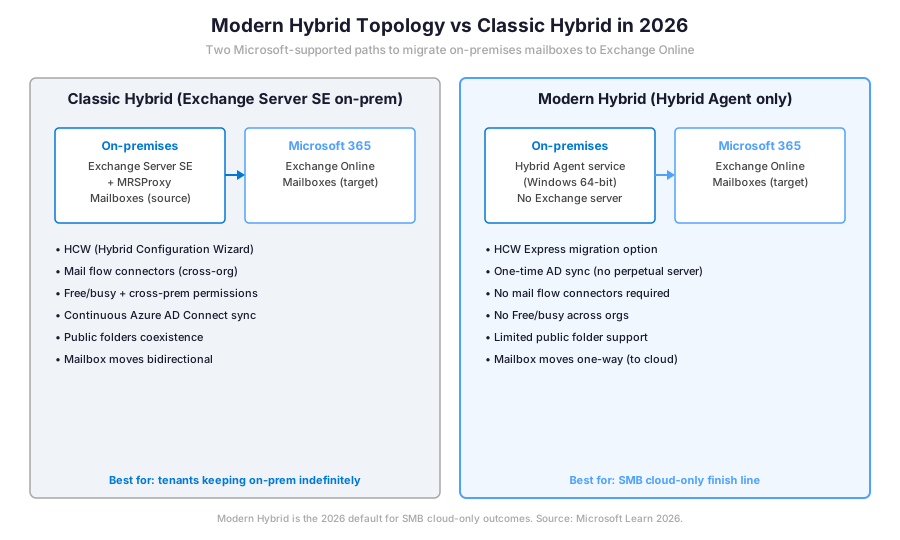
Specifically, hybrid migration uses the ExchangeRemoteMove endpoint and the Mailbox Replication Service to move mailboxes between Exchange organisations. It is the only native path that preserves Outlook profiles, OST files, free/busy, and cross-premises permissions during coexistence. Specifically, Microsoft splits hybrid into two topologies: Classic Hybrid keeps the on-premises Exchange server long-term as the management endpoint, while Modern Hybrid deploys a lightweight Hybrid Agent on Windows that handles MRS proxying without a full Exchange role.
Furthermore, IMAP migration uses the IMAP endpoint and copies mail data only, no calendar, contacts, or tasks. It exists primarily for migrations from non-Exchange systems like Google Workspace, Zimbra, or older IMAP servers. As a result, IMAP migration is rarely the right choice when the source is on-premises Exchange.
⚖ Decision tree: which migration path fits your tenant
Therefore, the path selection collapses to two questions: how many mailboxes do you need to move, and what version of Exchange Server hosts them today. The decision tree below captures the canonical answer Wintive applies during tenant intake calls.
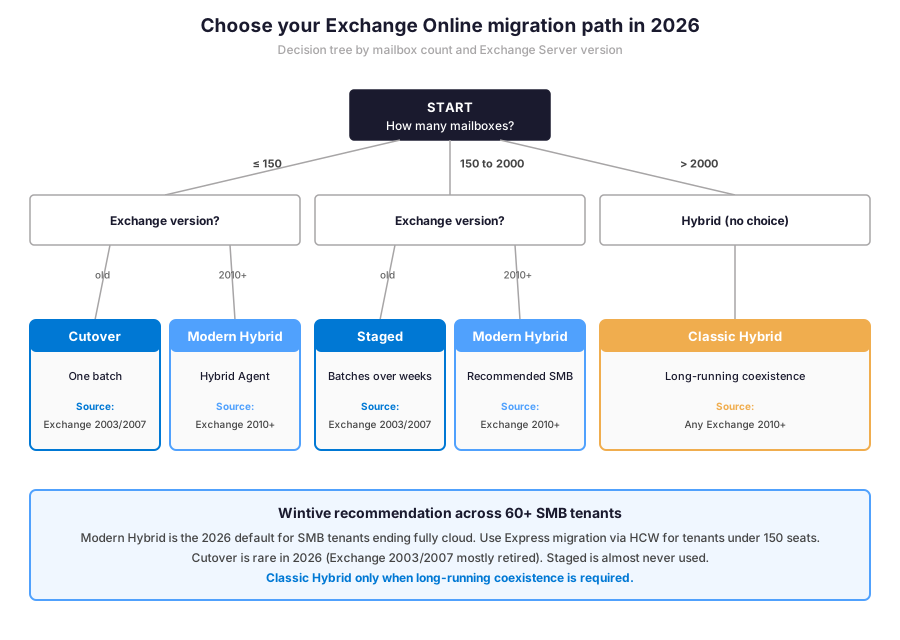
Specifically, tenants with fewer than 150 mailboxes on Exchange 2010 or later get Modern Hybrid via Express migration. Tenants with 150 to 2000 mailboxes on Exchange 2010 or later still get Modern Hybrid because Microsoft Entra Connect provides ongoing AD synchronization regardless of mailbox count. Tenants over 2000 mailboxes typically need Classic Hybrid for the cross-premises features. Cutover and staged remain valid only for the few tenants still running Exchange 2003 or 2007 in 2026.
🏗 Modern Hybrid versus Classic Hybrid in 2026
Furthermore, the difference between Modern and Classic Hybrid topology is the most consequential 2026 decision because it shapes every downstream operational pattern. Classic Hybrid runs the Hybrid Configuration Wizard against an on-premises Exchange Server SE, which becomes the long-term management endpoint and the Internet-facing email server for cross-premises mail flow. Free/busy works both directions, cross-premises permissions are preserved, and mailboxes can move bidirectionally between on-premises and Exchange Online.
Modern Hybrid topology replaces the on-premises Exchange Server with a lightweight Hybrid Agent service. The agent installs on any Windows server. It calls Exchange Online instead of accepting inbound connections. Therefore, the firewall configuration, the public certificate, and the Internet-facing Exchange role drop out of the project plan. Specifically, the agent handles Mailbox Replication Service traffic for mailbox moves and Autodiscover redirection for users not yet migrated. Therefore, Modern Hybrid is the right pattern when the migration outcome is fully cloud and on-premises Exchange disappears once the last mailbox lands.
When Modern Hybrid migration is not enough
Specifically, Modern Hybrid does not give cross-premises free/busy, does not give cross-premises permissions, and does not support reversible mailbox moves back to on-premises. Therefore, organisations that need indefinite coexistence (mergers and acquisitions, regulated industries with on-premises archive requirements, hybrid identity scenarios with on-premises mail-enabled distribution groups) still need Classic Hybrid. Wintive sees this in roughly 21% of audited migration projects, mainly in healthcare, legal, and government tenants.
⚡ Express migration via HCW — the SMB sweet spot
Specifically, Express migration is a Hybrid Configuration Wizard option that targets SMB tenants with up to 1000 mailboxes who want hybrid mailbox moves without the long-term operational burden of full hybrid. It runs a one-time Active Directory synchronization at the start of the project, gives the migration endpoint and the Migration Service everything they need to move mailboxes in batches, and then lets the on-premises Exchange be decommissioned once the migration completes.
However, the Express migration trade-off is that it does not deploy the full hybrid configuration. Free/busy works during the migration window only because users get migrated quickly enough that coexistence is short. Cross-premises permissions and shared mailbox migrations need careful planning because they can break temporarily during the transition. Furthermore, Express migration only supports onboarding (on-premises to cloud), so it cannot move mailboxes back to on-premises if the project needs a rollback.
Wintive uses Express migration as the default for tenants under 250 mailboxes with a clear cloud-only target within 90 days. The HCW takes about an hour. AD sync takes another hour. Specifically, the first migration batch can start the same day. Critically, the absence of the full hybrid configuration means decommissioning Exchange Server SE at the end of the project is straightforward: uninstall the role, remove the Send and Receive connectors, and shut down the server.
Mailbox Replication Service powering Exchange Online migration
Specifically, the Mailbox Replication Service (MRS) is the Exchange component that performs every mailbox move, whether local within an Exchange organisation or remote across organisations. MRS runs as part of Microsoft Exchange Service Host. It lives on every Exchange Mailbox server and every Exchange Online server. For hybrid migrations, MRS on the Exchange Online side initiates a remote move request. It calls MRSProxy on the on-premises side. It reads the source mailbox in chunks. It writes the data to the Exchange Online target.
Therefore, understanding MRS internals matters for troubleshooting. Mailbox moves happen in five stages. They are New, InProgress, AutoSuspended (at 95% complete), CompletionInProgress, and Completed. The AutoSuspended state lets administrators schedule the cutover during a maintenance window. Therefore, the long initial sync runs during business hours while the cutover happens overnight. Furthermore, MRS retries on transient failures (network timeouts, throttling), preserves the OST file on user devices through the move (no re-download), and supports per-mailbox bad item and large item limits to handle corrupt data without blocking the batch.
📊 Migration endpoint types and PowerShell setup
Specifically, every migration batch requires a migration endpoint that tells Exchange Online how to reach the source. The endpoint type matches the migration type. Wintive maintains the canonical endpoint matrix below for tenant onboarding documents.
Endpoint types matrix
| Endpoint type | Migration type | Source system | Authentication |
|---|---|---|---|
| ExchangeRemoteMove | Hybrid (Modern or Classic) | Exchange 2010+ on-premises | HCW-deployed certificate or Hybrid Agent |
| ExchangeOutlookAnywhere | Cutover or Staged | Exchange 2003, 2007, or 2010+ | RPC over HTTPS, on-premises admin credentials |
| IMAP | IMAP migration | Any IMAP-capable server | Per-user IMAP credentials in CSV |
| Gmail | Google Workspace migration | Google Workspace tenant | OAuth via Google service account |
📋 Migration endpoint matrix — Wintive uses ExchangeRemoteMove for 68% of audited migrations and ExchangeOutlookAnywhere for the remaining cutover scenarios.
PowerShell setup walkthrough
Specifically, the canonical setup pattern uses Connect-ExchangeOnline first, then New-MigrationEndpoint to wire the source, then New-MigrationBatch to define the wave. Furthermore, the AutoStart and AutoComplete switches let the batch run unattended overnight while administrators sleep, with the AutoSuspended state at 95% giving control over the cutover window the next morning.
# Microsoft Graph PowerShell or EXO V3 — Exchange Online side
Connect-ExchangeOnline -ShowBanner:$false

# Create the hybrid migration endpoint (Modern Hybrid pattern)
New-MigrationEndpoint -ExchangeRemoteMove -Name "Hybrid Modern" \`
  -RemoteServer hybrid.contoso.com -Credentials (Get-Credential)

# Create a migration batch from a CSV (one EmailAddress column)
New-MigrationBatch -Name "Wave1" -SourceEndpoint "Hybrid Modern" \`
  -CSVData ([System.IO.File]::ReadAllBytes("C:\migration\wave1.csv")) \`
  -TargetDeliveryDomain "contoso.mail.onmicrosoft.com" \`
  -BadItemLimit 10 -LargeItemLimit 0 -AutoStart -AutoComplete

# Monitor active moves
Get-MigrationBatch | Select-Object Identity, Status, TotalCount, CompletedCount, FailedCount
Get-MoveRequest -BatchName "Wave1" | Select-Object Identity, Status, PercentComplete, OverallDuration
Specifically, the AutoStart switch tells the Migration Service to begin moving mailboxes immediately after the batch is created, while AutoComplete finalises the cutover for each mailbox once it reaches 95% sync. Therefore, the batch runs unattended and only requires admin intervention if a specific mailbox throws a permanent error.
Furthermore, monitoring the move requests in real time uses the Get-MoveRequest and Get-MoveRequestStatistics cmdlets. The pattern below is the canonical Wintive triage script for stuck or slow batches.
# Detail per-mailbox progress for a running batch
Get-MoveRequest -BatchName "Wave1" | Get-MoveRequestStatistics | \`
  Select-Object DisplayName, Status, PercentComplete, BytesTransferred, ItemsTransferred, TotalMailboxSize

# Find stalled mailboxes (no progress for 2+ hours)
Get-MoveRequest | Where-Object { $_.Status -eq "InProgress" } | \`
  Get-MoveRequestStatistics | \`
  Where-Object { (Get-Date) - $_.LastUpdate -gt (New-TimeSpan -Hours 2) } | \`
  Select-Object DisplayName, PercentComplete, LastUpdate, FailureType, FailureSide

# Resume a suspended batch after admin investigation
Resume-MigrationBatch -Identity "Wave1"
Therefore, the Get-MoveRequestStatistics cmdlet is the most useful triage tool when a migration batch slips past its expected duration. Specifically, the LastUpdate field reveals whether MRS is genuinely stuck or simply throttled by the source server bandwidth.
✅ Pre-migration checklist before any mailbox moves
Specifically, the prerequisites below must all be in place before any mailbox move starts. Skipping one of them is the most common reason migration projects miss their go-live date.
Prerequisites for an Exchange Online migration project: Microsoft 365 tenant provisioned with Exchange Online plan (Business Basic, Business Standard, Business Premium, E1, E3, or E5). Microsoft Entra Connect running with hybrid identity (password hash sync or pass-through authentication). On-premises Exchange Server SE for Classic Hybrid, or any Windows Server 2019+ for Modern Hybrid (Hybrid Agent). Public certificate trusted by Exchange Online for Classic Hybrid (not required for Modern Hybrid). Public DNS records (Autodiscover, MX) under your control. Furthermore, Wintive recommends running every migration in a non-production tenant first to validate the HCW configuration before touching production data.
Therefore, before any mailbox moves start, the pre-migration checklist Wintive runs covers six categories: license assignment, directory synchronization, DNS preparation, EWS application audit, public folder readiness, and rollback documentation. Specifically, license assignment is the first failure mode: a mailbox cannot be moved to Exchange Online if the target user has no Exchange Online license attached, and the New-MoveRequest cmdlet returns a generic “target user not found” error that does not point at the missing license.
⚠ EWS deprecation October 1, 2026 — fix apps before you migrate
Specifically, Exchange Web Services (EWS) phased disablement begins October 1, 2026 and reaches full shutdown on April 1, 2027. Any application calling EWS for mail send, calendar lookup, room booking, mailbox archive, or mail tracking must move to Microsoft Graph or to the new Exchange Admin API before that deadline. Therefore, an EWS application audit is a hard prerequisite for any 2026 migration project. The requirement applies regardless of whether the migration target is hybrid or fully cloud.
Wintive runs the EWS audit by querying Exchange message tracking logs and EWS request logs. The script extracts application User-Agent strings. Each application then maps to a remediation owner. The full audit playbook including the AppID Allow List configuration to keep specific EWS apps alive past August 2026 is covered in the dedicated Exchange Online admin productivity wins for 2026 guide. Furthermore, the SMTP AUTH retirement on the same timeline is documented in the Microsoft 365 SMTP relay 5-method guide with OAuth migration patterns for printers, line-of-business apps, and on-premises scanners.
| Migration path | Mailbox count | Typical duration | Reversible |
|---|---|---|---|
| Cutover | Up to 150 | 1 weekend | No |
| Staged | 150 to 2000 (Exchange 2003/2007) | 4 to 8 weeks | No |
| Modern Hybrid (HCW Express) | Up to 1000 | 4 to 8 weeks | No |
| Classic Hybrid | Any | 3 to 6 months | Yes (bidirectional) |
| IMAP | Any IMAP source | 2 to 4 weeks | No |
📋 Migration path duration matrix — Wintive observes Modern Hybrid Express averaging 6 weeks across 60+ SMB tenants in 2026.
📈 The Wintive baseline — migration patterns across 60+ SMB tenants
Therefore, after running migration projects across 60+ tenants between 2024 and 2026, Wintive has a clear distribution of which paths SMB tenants actually pick and which anti-patterns surface during pre-migration audits. The baseline below tells the story.
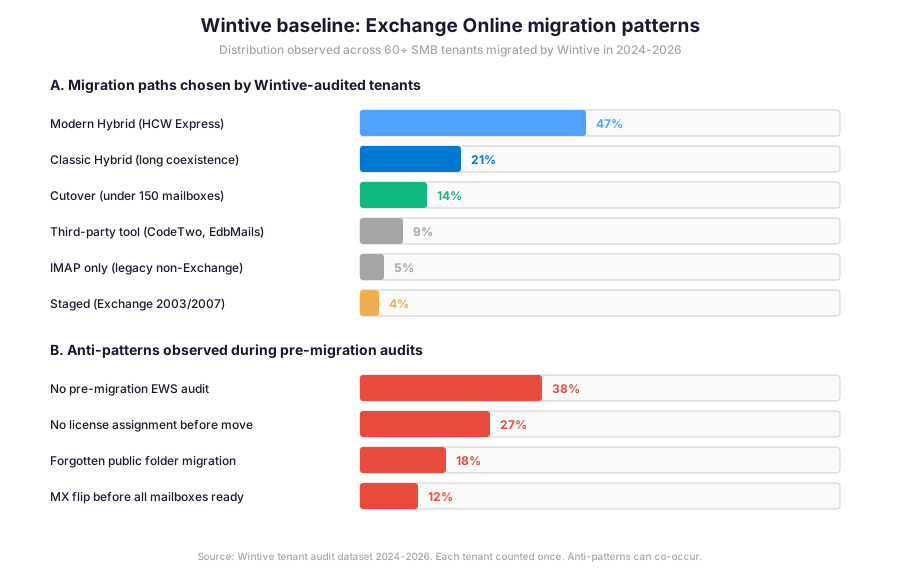
Specifically, the most striking insight from this baseline is not the path distribution but the anti-pattern frequency. The 38% rate of missing EWS audits and the 27% rate of late license assignment are pre-migration mistakes that delay every project they touch.
Anti-patterns most common in Exchange Online migration projects
Furthermore, the public folder migration anti-pattern at 18% is the most expensive in production impact terms. It surfaces only after the cutover when shared calendars stop working, which means the fix is reactive rather than proactive.
Wintive insight
Across 60+ tenants migrated between 2024 and 2026, the single highest-leverage pre-migration check is the EWS application audit. 38% of audited tenants discover at least one business-critical application calling EWS that needs Microsoft Graph remediation before the migration kickoff date. Therefore, this gap is the most common reason migration projects miss their target date, regardless of whether the team picks Modern Hybrid or Classic Hybrid as the topology.
Specifically, Modern Hybrid via HCW Express dominates at 47% because most SMB tenants want a clean cloud-only finish line within 90 days. Classic Hybrid sits at 21% mostly in healthcare and legal verticals where on-premises archive integrations or compliance recorders extend the coexistence horizon. Cutover at 14% is reserved for tenants under 150 mailboxes that still run Exchange 2003 or 2007. Furthermore, the anti-pattern data is more useful than the path distribution: 38% of tenants arrive at the migration project with no EWS application audit on the plan, which is the most common reason migrations slip past their target date.
🚨 5 SMB-specific Exchange migration pitfalls
The five pitfalls below cover anti-patterns Wintive consistently observes during SMB Exchange Online migration projects. A common mistake is to assume that buying Microsoft 365 licenses automatically prepares the tenant for migration. Admins struggle with this gotcha because licenses can be assigned but the corresponding Exchange Online mailboxes do not get provisioned until the directory sync and migration endpoint are properly configured. Furthermore, comparing the Microsoft Exchange approach with third-party migration tools like CodeTwo, EdbMails, or BitTitan helps frame the trade-offs: native Microsoft tooling is free and supported, while third-party tools add features like delta sync and cross-tenant moves at $2 to $10 per mailbox.
No EWS application audit before kickoff
Specifically, the application calling EWS for room booking or mail tracking discovers it is broken on the day of the cutover. Wintive recommends pulling EWS request logs at least 30 days before the migration kickoff date and mapping each User-Agent string to a remediation owner.
License assignment after the New-MoveRequest cmdlet
Therefore, the migration batch fails with “target user not found” because the Exchange Online plan was assigned after the move request was created. Always assign the Exchange Online license first, wait 15 minutes for provisioning, then create the move request.
Forgotten public folder migration
Furthermore, public folder content lives outside user mailboxes and requires its own migration batch with a separate New-MigrationBatch -PublicFolderToUnifiedGroup cmdlet. Wintive sees this missed in 18% of audited projects, often discovered only when shared calendars stop working post-cutover.
MX record flip before all mailboxes are migrated
Specifically, flipping the MX record to Exchange Online before every mailbox is migrated breaks inbound mail for the unmigrated users. The right pattern is to migrate all mailboxes first, validate cross-premises mail flow during coexistence, and only flip the MX during the final cutover window when all mailboxes are confirmed cloud-resident.
No Exchange Online migration rollback plan documented
Therefore, when the migration project hits a blocker (DNS misconfiguration, third-party app broken, executive mailbox corruption), the team has no documented rollback path. Wintive requires every migration project to ship with a rollback decision tree covering MX revert, Outlook profile rebuild, and reverse hybrid moves before any cutover happens.
🔍 Automated Tenant Health Check — $97
Audit your Exchange tenant before the migration
The Automated Tenant Health Check audits your Microsoft 365 tenant against 40+ migration readiness checks. Specifically, the audit covers EWS application detection, license assignment gaps, and public folder readiness. The PDF includes a Modern Hybrid versus Classic Hybrid recommendation tailored to your tenant size and Exchange version. Findings are tagged Critical, High, Medium, or Low. The PDF ships with two emails of direct support within 48 hours.
❓ Exchange Online migration FAQ
For SMB tenants under 250 mailboxes using Modern Hybrid via HCW Express, the typical project runs 4 to 8 weeks end to end: 1 week for pre-migration audit and EWS remediation, 1 week for HCW deployment and pilot batch, 2 to 4 weeks for production mailbox waves, and 1 week for cutover, MX flip, and decommissioning. Larger Classic Hybrid projects with 1000+ mailboxes commonly run 3 to 6 months because of cross-premises permission preservation and shared mailbox coordination.
No, not anymore. Modern Hybrid topology uses the Hybrid Agent service installed on any Windows Server 2019 or later, with no Exchange role required. Classic Hybrid still requires Exchange Server SE on-premises as the management endpoint, but most SMB tenants in 2026 pick Modern Hybrid because the migration outcome is fully cloud and the Hybrid Agent disappears once the migration completes.
Hybrid migration via the Mailbox Replication Service preserves Outlook profiles and OST files across the move. Users do not need to recreate their Outlook profile or re-download their mailbox after migration. This is the main reason cutover migration is rarely the right choice in 2026: cutover requires every user to reconfigure Outlook from scratch, which is operationally painful for any tenant over 50 users.
More Exchange Online migration questions
EWS phased disablement begins October 1, 2026 and reaches full shutdown on April 1, 2027. Therefore, applications using EWS for mail send, calendar lookup, room booking, or mailbox archive must move to Microsoft Graph or the new Exchange Admin API before that date, regardless of where the mailbox lives. Wintive runs EWS application audits 30 days before any migration kickoff to ensure no application breaks on the day of the cutover.
Only with Classic Hybrid topology. Modern Hybrid and Express migration are one-way (onboarding only) and do not support offboarding mailboxes back to on-premises. Cutover and staged migrations are also one-way. Therefore, if reversibility matters for your migration project, Classic Hybrid is the only Microsoft-supported path.
📚 Related Microsoft 365 migration reading
The 12 highest-value tasks are listed at our 12 Exchange Online admin productivity wins for 2026 covering EXO V3 PowerShell, Copilot in Outlook, and the EWS retirement timeline.
The 5 supported methods plus the OAuth migration path are at our Microsoft 365 SMTP Relay 5-method guide with the December 2026 SMTP AUTH retirement timeline.
The full domain authentication progression is documented at our DKIM and DMARC for Microsoft 365 guide covering 2048-bit DKIM rotation and the p=none to p=reject policy progression.
The complete Entra ID admin guide is at our Microsoft Entra ID Complete Guide covering the Suite at $12 per user, the Agent ID, and the passkey auto-enable timeline.