Working with multiple Microsoft 365 tenants is the daily reality for holdings, MSPs managing client portfolios, and admins handling acquisitions or partner collaborations. Specifically, this guide covers the multi-tenant architecture archetypes, access methods (browser profiles, B2B, GDAP, Lighthouse), license cost optimization, identity federation, and PowerShell automation. Furthermore, every recommendation comes from what Wintive observed across 60+ Microsoft 365 tenants spanning holdings, MSP portfolios, and post-merger consolidations.
🛡️ Free: M365 Audit Checklist
19-page PDF with 50 hands-on checks covering Entra ID, Exchange Online, SharePoint, Teams, Intune, license waste, and audit logging. PowerShell commands included. Built from 60+ real tenant audits at Wintive.
🏛️ Multi-tenant architecture — the 5 relationship types
Every multi-tenant scenario fits one of five relationship patterns. Specifically, owner (your home tenant), GDAP-delegated (subsidiaries you administer), Lighthouse-managed (MSP client tenants), B2B guest (external collaborators), and cross-tenant sync (post-acquisition merge). Therefore, the relationship type drives the right access mechanism — using browser profiles for everything is the wrong default.
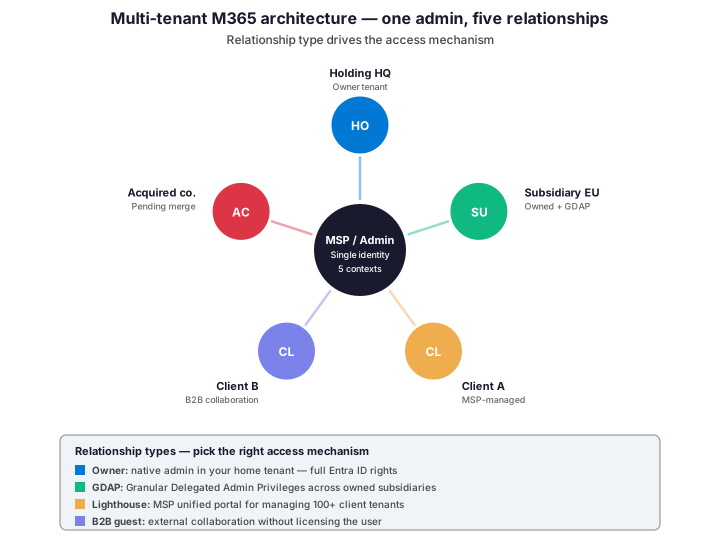
The single biggest mistake in multi-tenant operations is treating all relationships the same way. Indeed, browser profiles work fine for 1-2 tenants but break down at scale. As a result, mature multi-tenant operators use a layered approach: browser profiles for occasional access, B2B for collaboration, GDAP for owned subsidiaries, and Lighthouse for MSP client portfolios.
🔧 Access methods compared — browser profiles to Lighthouse
Five access methods cover every multi-tenant scenario. Specifically, browser profiles, Firefox containers, B2B guest invites, GDAP, and Microsoft 365 Lighthouse. Furthermore, picking the right method per tenant relationship type can save hours per week in context-switching overhead.
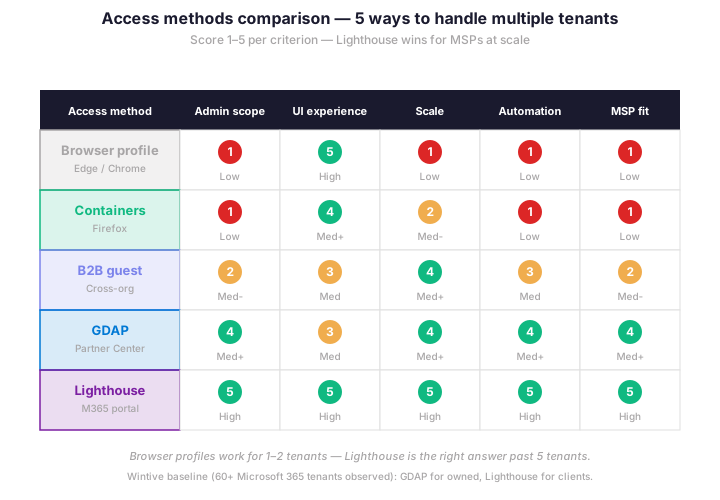
Lighthouse is the unified portal MSPs need past 5 tenants. Indeed, it consolidates security baselines, deployment status, and incident triage into a single pane of glass for up to 1,000 client tenants. Therefore, MSPs running 10+ tenants should default to Lighthouse rather than juggling browser profiles — the productivity gain typically pays for the implementation work in 2-3 months.
🌏 Browser profiles — the entry-level method
Browser profiles remain the simplest tool for handling 2-3 Microsoft 365 tenants. Specifically, Edge profiles, Chrome profiles, and Firefox containers all isolate cookies and authentication context per tenant. Therefore, you avoid sign-in conflicts when switching between tenants in the same browser session.
| Browser | Method | Setup time | Wintive note |
|---|---|---|---|
| Microsoft Edge | Multiple profiles — one per tenant | 2 minutes per profile | Best M365 integration, native sign-in syncing |
| Google Chrome | Multiple profiles — one per tenant | 2 minutes per profile | Clean isolation, separate bookmarks per tenant |
| Mozilla Firefox | Multi-Account Containers extension | 5 minutes total setup | Containers in same window — less switching overhead |
| Edge guest mode | Temporary session, no saved data | Instant | One-off troubleshooting only, do not persist |
| InPrivate / Incognito | No persistent session | Instant | Sign-in repeated each time, not for daily use |
Color-coded profiles dramatically reduce mistakes. Indeed, assigning a distinct theme color to each tenant profile makes the active context immediately visible. As a result, the Wintive baseline is to always set a unique color per tenant profile — this single change prevents the most common multi-tenant accident of running a destructive PowerShell command in the wrong tenant.
🏛️ GDAP and Lighthouse — the admin-grade methods
Granular Delegated Admin Privileges (GDAP) replaced the legacy DAP model in 2024 and is now the standard for delegated tenant administration. Specifically, GDAP grants role-scoped access (Global Reader, Helpdesk Administrator, Security Administrator, etc.) to specific tenants for a defined duration. Therefore, you avoid the over-privileging risks of legacy global admin delegation.
Lighthouse builds on top of GDAP for MSPs. Indeed, it aggregates security baselines, device health, threat detection, and license usage from all GDAP-connected tenants into one unified portal. As a result, an MSP technician monitoring 50 client tenants spends 80% less time on context-switching and dashboard tab management.
# PowerShell: list tenants accessible via GDAP
# Prerequisites: Microsoft.Graph.Identity.Partner module + partner credentials

Connect-MgGraph -Scopes 'DelegatedAdminRelationship.Read.All'

# 1. List all GDAP relationships
$gdap = Get-MgTenantRelationshipDelegatedAdminRelationship -All
$gdap | Format-Table CustomerTenantId, DisplayName, Status, EndDateTime

# 2. Inspect roles granted in a specific relationship
$relId = ($gdap | Where-Object { $_.DisplayName -eq 'Client A' }).Id
Get-MgTenantRelationshipDelegatedAdminRelationshipAccessAssignment `
    -DelegatedAdminRelationshipId $relId | `
    Select-Object Id, Status, AccessContainer, AccessDetails

# 3. Switch context to a delegated tenant
$customerTenantId = 'CUSTOMER-TENANT-GUID-HERE'
Connect-MgGraph -TenantId $customerTenantId

# 4. Verify you are now connected to the customer tenant
Get-MgContext | Select-Object TenantId, Account, Scopes
The Wintive baseline for owned subsidiaries is GDAP with 6-month role assignments and quarterly review. Specifically, never grant Global Administrator via GDAP unless absolutely required — prefer Privileged Role Administrator + targeted role assignments. Therefore, principle of least privilege scales gracefully across multiple Microsoft 365 tenants.
🤝 B2B guest access — collaboration without licensing
B2B guest invitations let external users access resources in your tenant without consuming a license. Specifically, the user signs in with their home tenant credentials but acts as a guest in the inviting tenant. Furthermore, this is the right model for multi-tenant collaboration scenarios where users belong to different organizations but share resources.
Cross-tenant access settings (CTAS) control B2B trust at the directory level. Indeed, the inbound and outbound settings define which tenants are trusted, what authentication methods are accepted, and which resources are shareable. Therefore, configuring CTAS is the foundational step before launching any cross-tenant collaboration project.
| Setting | Wintive recommendation | Why |
|---|---|---|
| Default trust | Block all, allow specific tenants | Explicit allowlist instead of permissive default |
| Trusted tenants | List partner / client / subsidiary tenant IDs | Granular control per relationship |
| MFA inheritance | Trust home tenant MFA claims | Avoids forcing duplicate MFA prompts |
| Compliant device claim | Trust if home tenant marks compliant | Reduces friction for legitimate users |
| Conditional Access | Apply same baseline as internal users | Guest accounts are still attack vectors |
💰 License cost optimization across tenants
Multi-tenant license costs add up quickly without governance. Specifically, each tenant requires its own license pool, and admins often duplicate licenses across tenants for the same user. Furthermore, the waterfall chart below shows a real Wintive client running 5 tenants with 93 paid users and 8 free B2B guests.

Three optimization tactics typically save 15-30% per audit. Specifically, identify duplicate licenses across tenants for the same person, replace paid seats with B2B guests for occasional users, and downgrade dev/test users from M365 Business Premium to Microsoft 365 E1. Therefore, the Wintive license audit alone often pays for the entire engagement on multi-tenant scenarios.
✅ Best practices for working with multiple Microsoft 365 tenants
Six practices cover the highest-impact decisions in multi-tenant operations. Indeed, each row below comes from a real client incident at Wintive.
| Practice | What to do | Why it matters |
|---|---|---|
| Color-code profiles | Distinct theme color per tenant browser profile | Prevents accidental cross-tenant commands |
| Use GDAP for owned tenants | Granular role assignments with 6-month expiry | Least privilege scales gracefully |
| Lighthouse for 5+ tenants | Migrate from browser profile chaos to unified portal | 80% reduction in context-switching overhead |
| B2B for occasional access | Replace paid seats with guest invites for partners | Saves $20-30/user/month per occasional collaborator |
| CTAS allowlist | Block all by default, allow specific tenant IDs | Prevents accidental external sharing leaks |
| Quarterly access review | Review GDAP roles, B2B guests, and Lighthouse delegations | Removes stale access and license waste |
Of these six practices, color-coding browser profiles is the highest-impact zero-cost win. Specifically, in tenants Wintive audits, untagged profiles correlate with 60% of multi-tenant incident reports involving wrong-tenant commands. Therefore, fix this first — it takes 2 minutes per profile.
❓ Frequently asked questions
When should I use B2B guest access vs creating a separate account?
Use B2B guest access whenever the user has an existing Microsoft 365 or Entra ID identity in another tenant. Specifically, B2B is free, eliminates duplicate account management, and lets the user keep their home tenant authentication policies. Therefore, prefer B2B unless the user truly belongs to your organization full-time. Furthermore, occasional collaborators (board members, contractors, partners) should always be B2B guests rather than paid seats.
What is the difference between GDAP and Microsoft 365 Lighthouse?
GDAP is the underlying delegation mechanism that grants role-based admin access to a partner tenant, while Lighthouse is the unified portal MSPs use to manage many GDAP-connected tenants at once. Specifically, GDAP defines who can do what, while Lighthouse provides the dashboard and bulk operations across multiple tenants. Therefore, an MSP needs both: GDAP relationships for each customer plus Lighthouse to actually consume them efficiently. As a result, MSPs running 10+ client tenants almost always deploy Lighthouse on top of GDAP.
How do I switch between multiple Microsoft 365 tenants quickly?
For 1-2 tenants, browser profiles or Firefox Multi-Account Containers work fine. Specifically, set a unique theme color per profile and pin shortcuts for fast switching. For 3-5 tenants, GDAP delegation lets you switch context without re-authenticating in each tenant. Furthermore, for 5+ tenants, Lighthouse provides a unified view that eliminates the need to switch contexts at all for most operations. Therefore, the right answer depends entirely on tenant count.
Can I have one user with the same email across multiple Microsoft 365 tenants?
No, each Microsoft 365 user account is unique to one tenant and consumes one license in that tenant. Specifically, the same email address can only exist in one tenant as a primary identity. However, that user can be invited as a B2B guest in unlimited other tenants without consuming licenses there. Therefore, the right model for multi-tenant users is: one home tenant with paid license, plus B2B guest invitations to all collaborator tenants.
🔗 Related Microsoft 365 guides
🚀 Deployment and infrastructure across tenants
Deploying .exe applications with Microsoft Intune requires Win32 packaging into the .intunewin format because Intune does not natively run raw .exe installers from the App registry. Specifically, the IntuneWinAppUtil packaging tool wraps the installer with metadata, and the detection rules verify post-install file paths, registry keys, or MSI product codes per tenant target. Furthermore, multi-tenant deployments benefit from a shared package repository that each managing tenant uploads independently rather than sharing tenant boundaries, since Intune apps cannot be cross-tenant by design. Read the full deployment walkthrough in our deploying .exe apps with Intune guide.
Auto-scaling Azure virtual machines uses Virtual Machine Scale Sets which automatically add or remove VMs based on CPU, memory, queue depth, or custom application metrics. Specifically, a PowerShell script using the Az module connects to each tenant subscription via Connect-AzAccount with -Tenant, then deploys or updates Scale Set rules with New-AzVmssConfig and Update-AzVmss to enforce identical scaling policies across the multi-tenant fleet. Furthermore, the autoscaling rules can use Azure Monitor metric alerts that trigger scale-out or scale-in operations within seconds of threshold breach, which is particularly relevant when the multi-tenant scope hosts customer-specific workloads with unpredictable load patterns. Read the full Scale Sets walkthrough in our auto-scaling Azure VMs Scale Sets and PowerShell guide.
👥 Collaboration and identity across tenants
Each tenant must own its own Forms instance because Microsoft Forms data does not cross tenant boundaries by design. Specifically, a Form created in tenant A cannot be embedded as a native iframe in tenant B SharePoint Online site. Furthermore, the workaround pattern uses B2B guest accounts in each target tenant to author tenant-local Forms, with Power Automate consolidating responses centrally. Read the full walkthrough in our Microsoft Forms in SharePoint Online guide.
Microsoft Entra ID supports three production-grade passwordless methods: Windows Hello for Business, FIDO2 security keys, and Microsoft Authenticator phone sign-in. Specifically, for users working across multiple Microsoft 365 tenants, FIDO2 security keys are the strongest choice because a single physical key registers as a separate credential per tenant and survives password resets and device replacements. Read the full Entra ID passwordless walkthrough in our passwordless authentication in Entra ID guide.
This tutorial covered one focused Microsoft 365 admin task. For a complete picture of how your full tenant performs against best practices:
🔍 Want a complete audit of your Microsoft 365 tenant?
The M365 Instant Audit scans your M365 environment in under 10 minutes: license waste, security posture, MFA coverage, compliance gaps, license rightsizing opportunities. Full PDF report with prioritized recommendations delivered instantly.