Microsoft 365 tenants drift. Specifically, 200+ Conditional Access policies, Defender baselines, Purview labels, Intune compliance settings, SharePoint sharing controls, and Teams policies all change weekly — touched by admins, automated provisioning, partner integrations, and Microsoft itself. Without a Microsoft 365 tenant configuration snapshot, you cannot prove what changed, when, or by whom.
This guide walks through Microsoft 365 DSC (Desired State Configuration) — the free PowerShell module that exports your full tenant configuration into versionable code. Furthermore, we cover the production patterns Wintive deploys across 60+ managed tenants: certificate-based authentication, sharded parallel extraction (cuts a 3-hour monolithic run to ~40 minutes), Git-based config-as-code with secrets handling, and automated drift detection through GitHub Actions. Therefore, you get a Microsoft 365 tenant configuration snapshot that doubles as audit evidence and disaster recovery blueprint.
🛡️ Free: M365 Audit Checklist
19-page PDF with 50 hands-on checks covering Entra ID, Exchange Online, SharePoint, Teams, Intune, license waste, and audit logging. PowerShell commands included. Built from 60+ real tenant audits at Wintive.
💡 Why a Microsoft 365 tenant configuration snapshot matters in 2026
We see admins struggling with the same scenario every quarter. Specifically, an auditor asks for MFA enforcement evidence on privileged roles 6 months ago. The current config shows MFA is enforced today. But nobody can prove the state at the audit window. Without a versioned Microsoft 365 tenant configuration snapshot, the answer is “trust us” — and trust does not pass SOC 2 Type II.
The pain stretches beyond compliance. Three patterns dominate the support tickets we see across managed tenants. First, migration parity: a customer moves from one M365 tenant to another and needs to replicate 200+ CA policies, 80+ Defender rules, and 40+ Intune compliance baselines. Second, drift detection: a Defender baseline silently changed last month, nobody knows when, and now phishing volume spiked. Third, change management: an admin pushed a SharePoint sharing policy on Friday and broke a customer portal Monday morning, with no rollback path.
Compliance pressure: ABA, HIPAA, FINRA, SOC 2
The compliance angle compounds the operational pain. Specifically, ABA Rule 1.6 requires US law firms to demonstrate reasonable safeguards over client data — a Microsoft 365 tenant configuration snapshot from before and after every change is the cleanest evidence. Furthermore, HIPAA 45 CFR § 164.308(a)(1)(ii)(B) requires audit controls for ePHI access; FINRA 4511 and IRS Pub 4557 require supervision evidence for financial services; SOC 2 Type II auditors expect baseline configuration history. Therefore, a versioned snapshot pipeline is not nice-to-have, it is table stakes for regulated US verticals.
Production insight — 60+ tenants observed.
Across the Microsoft 365 tenants Wintive manages, the most common gap is not lack of awareness; admins know they should snapshot configuration. The gap is operational: nobody owns the schedule, nobody alerts on drift, and the snapshot script lives on one engineer’s laptop. The fix is automation through GitHub Actions or Azure DevOps pipelines — a topic we cover in section 9 of this guide.
✅ Prerequisites: licenses, app registration, certificate auth
The most overlooked aspect of Microsoft 365 DSC setup is authentication. Specifically, app secrets are deprecated for production use in 2026 because Entra ID logs flag every secret-based call as elevated risk. Therefore, certificate-based authentication is the only viable production path. The certificate lives in the snapshot host (or Azure Key Vault); the public key uploads to the Entra app registration; M365DSC connects with the certificate thumbprint, no secrets in plaintext anywhere.
✅ What you need before starting
- PowerShell 7.2 or higher on the snapshot host (Windows Server, Linux, or macOS — M365DSC is cross-platform)
- Microsoft 365 DSC v1.24+ from PowerShell Gallery (free, MIT licensed, Microsoft-backed)
- Entra ID Global Administrator (one-time, to grant admin consent on the app registration)
- Self-signed or PKI certificate with private key on the snapshot host, public key uploaded to the Entra app
- Microsoft 365 Business Basic ($6/user/month) or higher — any M365 tenant license works for snapshot. Optional: Defender for O365 P1/P2 ($2.50-$5), Intune ($8), Purview Audit Premium ($12) for full extraction coverage
The Microsoft 365 tenant configuration snapshot we are about to build runs entirely server-side. Specifically, no admin opens a browser, no GUI clicks happen mid-flow, and nothing depends on Microsoft 365 admin center UI changes (which break automation every quarter). Therefore, the same script that runs today will run in 2027, regardless of what Microsoft renames in the portal.
📊 What M365DSC captures (and what it does NOT)
From tenant audits across law firms, design agencies, accounting firms, healthcare clinics, and financial services, the most common misconception is treating M365DSC as backup. Specifically, M365DSC captures configuration — the rules, policies, and settings — but not data. Therefore, mailbox content, SharePoint files, Teams chat history, and OneDrive documents are out of scope. For data backup, you need Veeam, Druva, AvePoint, or Microsoft 365 Backup. M365DSC handles the configuration layer that those tools do NOT touch.
| Workload | Captured? | Resource count | Wintive notes |
|---|---|---|---|
| Entra ID (Azure AD) | YES | 15+ resources | Users, groups, CA policies, named locations, authentication methods |
| Exchange Online | YES | 30+ resources | Mail flow rules, accepted domains, retention, anti-spam, DKIM |
| SharePoint Online | YES | 20+ resources | Tenant settings, sharing policies, hub sites; not site content |
| Microsoft Teams | YES | 15+ resources | Meeting policies, channel policies, federation, calling plans |
| Defender for O365 | YES | 15+ resources | Anti-phish, safe links, safe attachments, threat policies |
| Intune (Endpoint) | YES | 30+ resources | Compliance policies, configuration profiles, app protection |
| Purview compliance | YES | 10+ resources | Retention labels, sensitivity labels, DLP policies |
| Mailbox content / files | NO | 0 | Use Veeam, Druva, AvePoint, or M365 Backup for data layer |
The matrix above maps to actual coverage. Specifically, M365DSC v1.24 captures roughly 80+ resource types across the seven workloads listed. Each tenant audit pulls between 500 and 5,000 individual configuration items. The exact count depends on tenant size and complexity. Therefore, the resulting Microsoft 365 tenant configuration snapshot is comprehensive enough to power both compliance evidence and disaster recovery scenarios — provided you handle the operational patterns we cover in the next sections.
🔨 Step 1: Entra app registration with certificate authentication
The 2026 production pattern uses certificate-based auth, not app secrets. Specifically, app secrets live in plaintext config files, get checked into Git by mistake, and trigger Conditional Access policy alerts every time M365DSC connects. Therefore, every tenant configuration snapshot Wintive deploys uses a self-signed or PKI certificate with the private key locked on the snapshot host (or pulled from Azure Key Vault at runtime).
The PowerShell snippet below provisions the Entra app registration, generates the certificate, and uploads the public key in one shot. Furthermore, the script grants only the Graph API permissions required for the workloads you actually plan to extract — least-privilege from day one, not added as an afterthought.
# Entra app registration + certificate auth (production pattern)
Connect-MgGraph -Scopes "Application.ReadWrite.All","AppRoleAssignment.ReadWrite.All"

# 1. Generate self-signed certificate (5-year validity)
$cert = New-SelfSignedCertificate -Subject "CN=M365DSC-Snapshot" `
    -CertStoreLocation "Cert:CurrentUserMy" `
    -KeyExportPolicy Exportable -KeySpec Signature `
    -KeyLength 2048 -KeyAlgorithm RSA -HashAlgorithm SHA256 `
    -NotAfter (Get-Date).AddYears(5)

# 2. Create Entra app + service principal
$app = New-MgApplication -DisplayName "M365DSC-Snapshot-Wintive" `
    -SignInAudience "AzureADMyOrg"
New-MgServicePrincipal -AppId $app.AppId | Out-Null

# 3. Upload certificate public key
$keyCredential = @{
    Type = "AsymmetricX509Cert"; Usage = "Verify"
    Key = $cert.GetRawCertData()
}
Update-MgApplication -ApplicationId $app.Id -KeyCredentials $keyCredential

# 4. Output for next step
Write-Host "AppId: $($app.AppId)" -ForegroundColor Green
Write-Host "CertThumbprint: $($cert.Thumbprint)" -ForegroundColor Green
# Grant Graph permissions in Azure Portal: Directory.Read.All, Policy.Read.All,
# RoleManagement.Read.All, Mail.Read, Reports.Read.All (per workload)
# Then run: az ad app permission admin-consent --id $app.AppId
The script above produces two outputs you copy into the next step: the AppId and the certificate thumbprint. Furthermore, after running the admin-consent command, the architecture diagram below shows how all components connect at runtime.
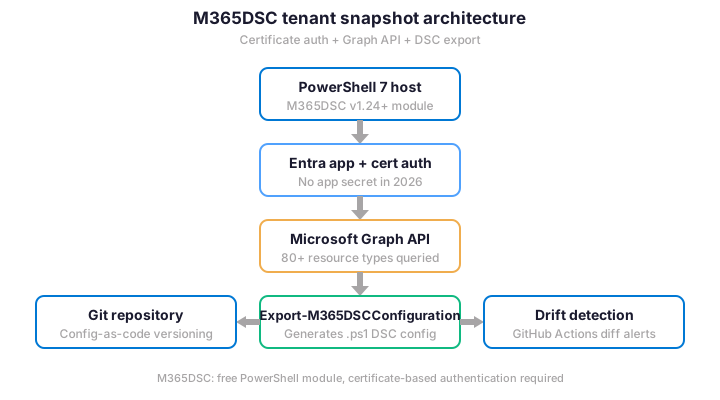
Microsoft 365 tenant snapshot data flow architecture
The architecture diagram above shows the data flow. Specifically, the PowerShell host authenticates once with the certificate, M365DSC queries the Graph API across 80+ resource types, the output is written as a versionable .ps1 file, and that file branches into Git storage and a drift comparison job. Furthermore, the certificate-based authentication means the script can run unattended on a schedule without secret rotation cycles.
⚡ Step 2: Install Microsoft 365 DSC with least-privilege permissions
Installing Microsoft 365 DSC is straightforward, but the permissions step is where most snapshots fail in production. Specifically, granting Directory.Read.All alone covers Entra resources but misses Exchange policies, SharePoint settings, Teams configuration, and Defender baselines — each requires its own scope. Therefore, the Wintive permissions matrix maps each resource family to the minimum Graph API scope needed.
# Install M365DSC + verify dependencies
Install-Module Microsoft365DSC -Scope CurrentUser -Force
Update-M365DSCDependencies

# Verify installation (should print v1.24 or higher)
Get-Module Microsoft365DSC -ListAvailable | Select-Object Name,Version

# Test connectivity with certificate auth
$tenantId = "contoso.onmicrosoft.com"
$appId = "00000000-0000-0000-0000-000000000000"  # from Step 1
$thumbprint = "AAAAAAAA..."  # from Step 1

Connect-MgGraph -ClientId $appId -CertificateThumbprint $thumbprint -TenantId $tenantId

# Quick smoke test: pull tenant org info via Graph
Get-MgOrganization | Select-Object DisplayName,VerifiedDomains
The smoke test in the snippet above takes 5 seconds. Furthermore, if it fails, the issue is almost always one of three causes: certificate not trusted on the PowerShell host (import to LocalMachineMy if needed), admin consent not granted on the Entra app (run az ad app permission admin-consent or use Azure portal), or Conditional Access policy blocking service principal access (check the sign-in logs for the app and exclude it from interactive MFA policies).
📷 Step 3: Sharded extraction (avoid the 3-hour timeout)
The default Export-M365DSCConfiguration command runs all workloads sequentially. Specifically, on a tenant with 80+ Defender rules, 200+ CA policies, and 100+ Intune compliance items, the full extraction takes 2 to 3 hours and is fragile — one Graph API timeout in the middle restarts the whole run. Therefore, Wintive shards every Microsoft 365 tenant configuration snapshot extraction across 4 workload groups, runs them in parallel, then merges the output.
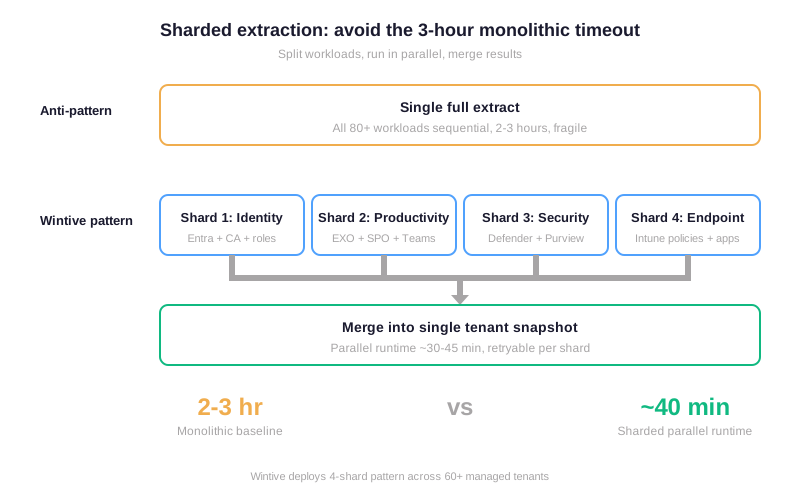
The sharding pattern above maps cleanly to the M365DSC -ResourcesToExtract parameter. Specifically, you pass a workload-specific list of resources to each parallel job, the jobs run concurrently against different Graph API endpoints, and you concatenate the four output files at the end. Furthermore, retry logic only re-runs the failed shard, not the entire tenant.
# Sharded extraction (4 parallel jobs)
$sharedAuth = @{
    ApplicationId = $appId
    CertificateThumbprint = $thumbprint
    TenantId = $tenantId
}

$shards = @{
    "identity"     = @("AADConditionalAccessPolicy","AADUser","AADGroup","AADRoleAssignment","AADAuthenticationMethodPolicy")
    "productivity" = @("EXOMailFlowRule","EXOAcceptedDomain","SPOTenantSettings","SPOSharingSettings","TeamsMeetingPolicy","TeamsChannelPolicy")
    "security"     = @("EXOSafeAttachmentPolicy","EXOSafeLinksPolicy","EXOAntiPhishPolicy","PurviewRetentionPolicy","PurviewSensitivityLabel")
    "endpoint"     = @("IntuneDeviceCompliancePolicy","IntuneDeviceConfigurationPolicy","IntuneAppProtectionPolicy")
}

# Launch parallel jobs
$jobs = $shards.GetEnumerator() | ForEach-Object {
    $shardName = $_.Key
    $resources = $_.Value
    Start-Job -Name "M365DSC-$shardName" -ScriptBlock {
        param($auth, $res, $shard)
        Export-M365DSCConfiguration @auth -Components $res `
            -Path "C:snapshots$shard.ps1" -Quiet
    } -ArgumentList $sharedAuth, $resources, $shardName
}

# Wait for all + merge
$jobs | Wait-Job | Out-Null
Get-ChildItem "C:snapshots*.ps1" | Get-Content | Set-Content "C:snapshotsmerged-tenant-snapshot.ps1"
Write-Host "Snapshot complete: $((Get-Item "C:snapshotsmerged-tenant-snapshot.ps1").Length / 1KB) KB" -ForegroundColor Green
This pattern brings a typical mid-size tenant Microsoft 365 tenant configuration snapshot from 2-3 hours down to 40-50 minutes wall-clock time. Furthermore, each shard logs separately, so debugging a failed Defender extraction does not require re-running Entra and SharePoint queries. Therefore, the snapshot pipeline becomes reliable enough to schedule unattended overnight or weekly.
🔐 Best practices: secrets, Git, and tenant configuration snapshot drift detection
The build above ships a working Microsoft 365 tenant configuration snapshot pipeline. Specifically, production-grade operation requires seven additional patterns that prevent the most common failures we see across managed tenants. Therefore, the table below captures the operational defaults Wintive deploys on every snapshot pipeline.
| Pattern | Default | Wintive standard |
|---|---|---|
| Authentication | App secret in config | Certificate auth, private key in Key Vault |
| Output storage | Local .ps1 file | Git repository with branch per snapshot date |
| Secrets in config | Plaintext (admin emails, IDs) | git-secrets pre-commit hook + .gitignore for $env |
| Schedule | Manual run on-demand | Weekly snapshot via GitHub Actions cron |
| Drift detection | Manual diff review | Automated PR with diff summary, alerts to Teams channel |
| Permissions | Directory.Read.All for everything | Per-shard scopes, least-privilege per workload group |
| Retention | Latest only | 12-month rolling history for SOC 2 / HIPAA evidence |
The most overlooked pattern is secrets handling. Specifically, M365DSC export files contain admin email addresses and mail flow rule recipient lists. They also include named location IP ranges and Conditional Access rule named users. This is sensitive metadata that should not sit in a public Git repository. Therefore, every Wintive snapshot repo runs git-secrets pre-commit and uses placeholder env variables ($env:WintiveAdminEmail) that resolve at runtime, never at commit time.
📊 M365DSC vs CoreView vs AdminDroid — pick the right tenant snapshot tool
Microsoft 365 tenant configuration snapshot tooling spans free open-source modules to enterprise governance platforms. Specifically, the right choice depends on tenant scale, in-house scripting capacity, and compliance budget. Therefore, the cost-versus-complexity matrix below maps the four mainstream options to typical SMB-to-enterprise scenarios.
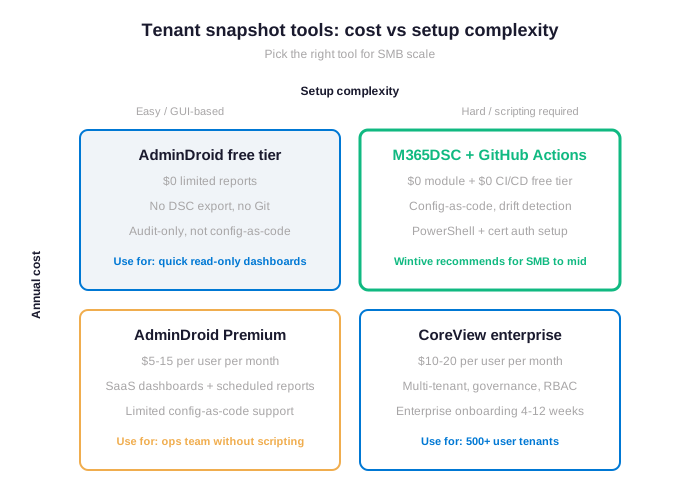
The matrix maps the four mainstream paths. Specifically, M365DSC plus GitHub Actions sits in the upper right quadrant: setup requires PowerShell familiarity and certificate auth knowledge, but the marginal cost is zero (free PowerShell module, free GitHub Actions tier under 2,000 minutes per month). Furthermore, the output is config-as-code with full Git history, which is what compliance auditors actually want.
CoreView and AdminDroid Premium are valid for organizations where the ops team explicitly does not script. Specifically, CoreView at $10-20 per user per month makes financial sense above 500 users with multi-tenant governance and RBAC requirements. AdminDroid Premium at $5-15 per user per month covers SaaS dashboards and scheduled reports for ops teams without PowerShell capacity. Therefore, the M365DSC path is best when in-house scripting exists; the commercial paths are best when it does not.
From the TCO angle, a 50-user tenant running M365DSC + GitHub Actions costs effectively $0 marginal versus existing M365 spend, while CoreView at $15 per user per month costs $9,000 per year and AdminDroid Premium at $10 per user per month costs $6,000 per year. Furthermore, on-premises alternatives or DIY PowerShell scripts trade dollars for engineer hours: 4-8 hours per audit at $100-150 per hour adds $400-1,200 per snapshot cycle. Therefore, the cost predictability of M365DSC compounds at scale — the extraction pipeline is the same whether you have 50 users or 5,000.
↺ Audit: schedule snapshots and automate drift detection
A Microsoft 365 tenant configuration snapshot that runs once and sits unread provides false comfort. Specifically, configuration drift happens between snapshots: an admin enables guest access on a SharePoint site, a partner integration adds an enterprise app, Microsoft itself rolls out a new Defender baseline. Therefore, the production-grade pattern is automated weekly snapshots committed to Git, plus a diff job that opens a Pull Request with the changes — reviewed by a human before being approved as the new baseline.
# GitHub Actions workflow: weekly tenant snapshot + drift PR
name: M365 Tenant Snapshot Weekly
on:
  schedule:
    - cron: "0 2 * * 0"  # Sundays 02:00 UTC
  workflow_dispatch:

jobs:
  snapshot:
    runs-on: windows-latest
    steps:
      - uses: actions/checkout@v4
      - name: Install M365DSC
        shell: pwsh
        run: |
          Install-Module Microsoft365DSC -Force
          Update-M365DSCDependencies
      - name: Decrypt certificate
        shell: pwsh
        run: |
          $pfx = [Convert]::FromBase64String($env:CERT_PFX_B64)
          [IO.File]::WriteAllBytes("cert.pfx", $pfx)
          Import-PfxCertificate -FilePath cert.pfx `
            -Password (ConvertTo-SecureString $env:CERT_PWD -AsPlainText -Force) `
            -CertStoreLocation Cert:CurrentUserMy
        env:
          CERT_PFX_B64: ${{ secrets.CERT_PFX_B64 }}
          CERT_PWD: ${{ secrets.CERT_PWD }}
      - name: Run sharded extraction
        shell: pwsh
        run: ./scripts/Run-ShardedSnapshot.ps1
      - name: Open drift PR
        uses: peter-evans/create-pull-request@v6
        with:
          title: "Tenant snapshot drift $(date +%Y-%m-%d)"
          body: "Weekly drift report. Review changes before approval."
          branch: "snapshot/$(date +%Y-%m-%d)"
          commit-message: "Weekly tenant snapshot"
This GitHub Actions workflow produces SOC 2 and HIPAA evidence at zero additional licensing cost. Specifically, every snapshot becomes a versioned Git commit, every drift opens a Pull Request reviewed by a human, and the 12-month retention cap (configurable in Git history settings) covers the typical audit lookback window. Furthermore, the same approach works on Azure DevOps Pipelines, GitLab CI, or Jenkins for organizations standardized on those platforms.
❓ Frequently asked questions
The most common questions teams ask before deploying a Microsoft 365 tenant configuration snapshot pipeline at scale.
M365DSC is open-source under the MIT license but maintained by Microsoft Cloud Solution Architects, including Yorick Kuijs. Specifically, Microsoft documentation references it for tenant configuration scenarios, and Microsoft contributes resources to the module. Therefore, while it is not a paid Microsoft product, it has the closest thing to first-party endorsement among community PowerShell modules.
No. Specifically, M365DSC captures configuration only — rules, policies, settings — not data. Mailbox content, SharePoint files, Teams chat, and OneDrive documents require a separate backup tool (Veeam, Druva, AvePoint, or Microsoft 365 Backup). Therefore, M365DSC is one half of a tenant resilience strategy, not the whole.
A 50-user tenant with default complexity takes 30 to 60 minutes for a full sequential extract. Furthermore, sharded parallel extraction (the Wintive pattern in section 6) brings this down to 15 to 25 minutes. Therefore, weekly automated snapshots fit comfortably in a GitHub Actions free tier monthly budget of 2,000 minutes.
Advanced Microsoft 365 tenant configuration snapshot questions: permissions, AWS comparison, migration
For a comprehensive Microsoft 365 tenant configuration snapshot covering Entra, Exchange, SharePoint, Teams, Defender, Intune, and Purview, the app requires roughly 12 Graph API delegated and application scopes including Directory.Read.All, Policy.Read.All, RoleManagement.Read.All, Mail.Read, Reports.Read.All, DeviceManagementConfiguration.Read.All, and ComplianceManager.Read.All. Furthermore, narrower scopes work if you only extract specific workload shards. Wintive deploys per-shard scope sets to enforce least-privilege.
AWS Config and Azure Policy operate on AWS and Azure resources respectively, not Microsoft 365 tenant settings. Specifically, M365 tenant config (Entra ID, Exchange, SharePoint, Teams, Defender, Purview, Intune) is a separate control plane that neither AWS Config nor Azure Policy touches. Therefore, M365DSC fills a gap that the cloud-native config tools do not address — even for organizations heavily invested in AWS or Azure infrastructure governance.
Yes, with caveats. Specifically, the exported .ps1 file from the source tenant can be applied to a target tenant via Start-DscConfiguration with appropriate edits. Furthermore, the gotchas are tenant-specific GUIDs (CA policies referencing user IDs, named locations, role assignments) that need re-mapping to target tenant equivalents. Therefore, treat M365DSC as a migration accelerator (80 percent automation) rather than a one-click replication tool.
🔗 Related Wintive resources
License expiration notifications — complementary tutorial covering Power Automate flows that monitor SaaS, SSL, Azure reservation, and M365 license expirations using SharePoint Lists and Teams adaptive cards.
MFA Hardening 2026 covers Authentication Strengths, Conditional Access patterns, and the 16 MFA methods Entra ID supports — settings your tenant snapshot will capture and audit.
Hidden features of M365 E3 — before adding paid tenant management tools, audit which advanced capabilities your tenant license already includes for free.
$97 M365 Instant Audit validates Microsoft 365 tenant configuration posture against Wintive baseline in 10 minutes — no PowerShell required.
This tutorial covered one focused Microsoft 365 admin task. For a complete picture of how your full tenant performs against best practices:
🔍 Want a complete audit of your Microsoft 365 tenant?
The M365 Instant Audit scans your M365 environment in under 10 minutes: license waste, security posture, MFA coverage, compliance gaps, license rightsizing opportunities. Full PDF report with prioritized recommendations delivered instantly.