Exchange Online email encryption in 2026 looks nothing like the OME-only world from a few years ago. Office 365 Message Encryption (OME) was deprecated July 1, 2023. Microsoft Purview Message Encryption (PME) replaced it. Specifically, PME now coexists with sensitivity labels, S/MIME, and the Azure Rights Management service in a single integrated stack. Most Microsoft 365 admins inherit a tenant where some flavour of encryption is already provisioned, but the configuration almost always needs review before it actually protects sensitive email.
This Exchange Online email encryption guide covers the three methods admins should know in 2026, the decision tree for picking the right method per use case, the mail flow rules to auto-encrypt outbound mail, the BYOK and DKE options for regulated tenants, and the pre-deployment checklist Wintive runs on every tenant audit.
Quick answer. Most SMB tenants in 2026 run Microsoft Purview Message Encryption (PME) as default, with sensitivity labels for granular auto-encryption and mail flow rules for keyword or external triggers. S/MIME stays reserved for regulated PKI teams. BYOK or DKE enters only when a regulator requires customer-held keys. Microsoft 365 Business Premium covers PME and labels at no extra cost.
Free PDF guide
Microsoft 365 Tenant Audit Checklist for 2026
40+ checks across Microsoft 365 covering email encryption configuration, sensitivity label readiness, S/MIME certificate distribution, and Azure RMS activation before any encryption rollout.
📅 Exchange Online email encryption in 2026
Specifically, three forcing functions push every Microsoft 365 admin to revisit email encryption in 2026. First, Office 365 Message Encryption (OME) was deprecated on July 1, 2023 and is being automatically replaced by Microsoft Purview Message Encryption (PME) across every tenant. Second, Microsoft Purview Information Protection (formerly Azure Information Protection) consolidated sensitivity labels, encryption, and DLP into one stack that admins now configure from the Microsoft Purview portal. Third, regulatory pressure on AI agents reading mailbox content (Microsoft 365 Copilot, third-party agents) is increasing, which makes encrypted email a meaningful boundary for what AI models can and cannot index.
Specifically, the operational cost of running unencrypted external email in 2026 is no longer just a compliance cost. Microsoft 365 Business Premium ($22 per user per month) and Microsoft 365 E3 ($36 per user per month) both include PME and sensitivity label encryption at no extra license cost, so the decision is purely about activation and configuration rather than budget approval. Therefore, leaving the tenant on default-no-encryption settings is harder to justify than ever before.
🔐 The three Microsoft 365 email encryption methods compared
Specifically, Microsoft 365 supports three native email encryption methods in 2026: Microsoft Purview Message Encryption (PME), sensitivity labels with encryption, and S/MIME. Each method uses a different encryption mechanism and a different recipient experience, so picking the wrong method is the most common pre-deployment mistake Wintive sees during tenant audits.
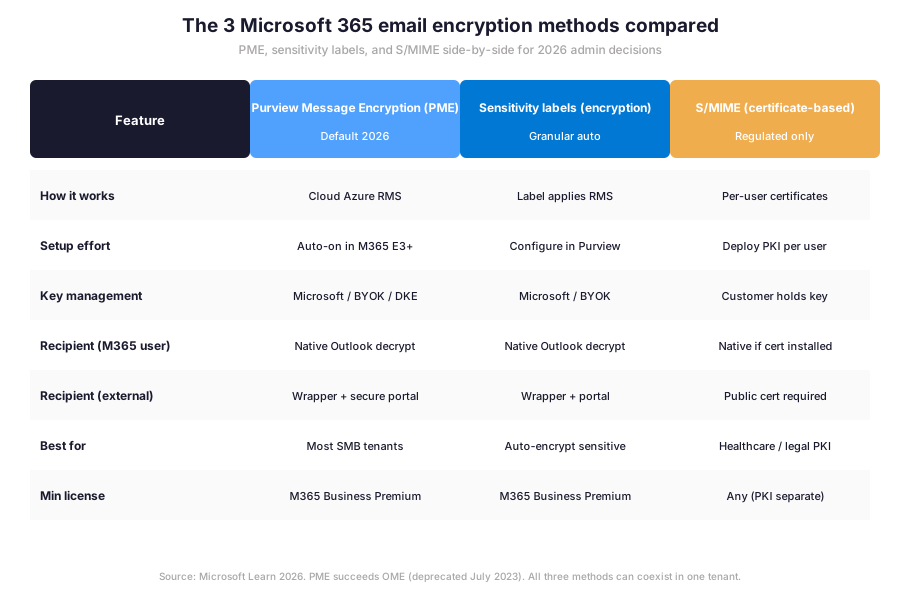
Specifically, before drilling into how each method works, the matrix above shows that PME and sensitivity labels share the same Azure RMS encryption stack underneath, which is why Wintive recommends layering them rather than picking one over the other.
How each Exchange Online email encryption method works
- Microsoft Purview Message Encryption (PME) — cloud-based encryption built on Azure Rights Management. Senders apply it manually in Outlook or via mail flow rules. Recipients inside Microsoft 365 read decrypted mail natively in Outlook. External recipients receive a wrapper mail and authenticate via the Microsoft Purview Message Encryption portal.
- Sensitivity labels with encryption — labels published from Microsoft Purview portal carry encryption rules that travel with the message. Auto-labelling policies apply labels based on sensitive information types (credit card numbers, health IDs, custom regex). The encryption layer underneath is Azure RMS, same as PME.
- S/MIME — certificate-based, asymmetric encryption where each user holds a private key and exchanges public certificates with correspondents. Outlook supports S/MIME natively. However, the PKI distribution and renewal is the operator burden. Therefore, S/MIME stays reserved for regulated teams that already run a PKI.
⚖ Decision tree: which Exchange Online encryption method per use case
Therefore, the method selection collapses to two questions: is the tenant in a regulated industry, and does the regulator or partner require customer-held encryption keys. The decision tree below captures the canonical answer Wintive applies during tenant intake calls.
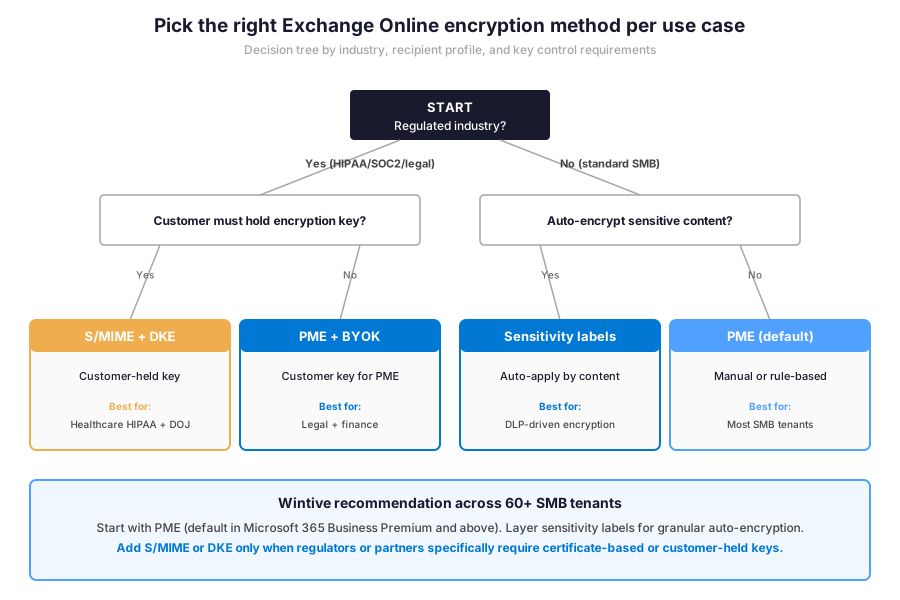
Specifically, tenants in standard SMB verticals (professional services, retail, manufacturing, technology, education) almost always start with PME plus mail flow rules to auto-encrypt outbound mail to external recipients. Tenants that handle structured sensitive data (HR, finance, legal) layer sensitivity labels on top to auto-encrypt by content type. Healthcare tenants under HIPAA and legal tenants with attorney-client privilege requirements typically pick S/MIME for partner-mandated workflows or DKE for content that must remain encrypted with customer-held keys even from Microsoft.
🛡 Microsoft Purview Message Encryption (PME) under the hood
Specifically, Microsoft Purview Message Encryption is a cloud service built on the Azure Rights Management (Azure RMS) cryptographic stack from Microsoft Purview Information Protection. When a sender encrypts a message, Exchange Online calls Azure RMS. Azure RMS wraps the message body and supported attachments in an encrypted envelope. The envelope carries a use license. This use license defines what the recipient can do with the message: read only, do not forward, do not print, or expire after N days. The cryptography is AES-256 symmetric for content plus RSA-2048 asymmetric for the use license.
Specifically, the recipient experience depends on whether the recipient has a Microsoft 365 mailbox. Recipients inside Microsoft 365 decrypt natively without portal interaction. The same applies to any Outlook client with Azure RMS support. Recipients on Outlook.com, Gmail, Yahoo, or any other email service receive a wrapper mail. The wrapper mail links to the Microsoft Purview Message Encryption portal. There they authenticate with a Microsoft, Google, or Yahoo account, or a one-time passcode delivered to their inbox.
PME prerequisites and verification
Importantly, the only prerequisite for PME is that Azure Rights Management must be activated for the tenant. In Microsoft 365 plans that include Azure Information Protection (Business Premium, E3, E5, EMS E3, EMS E5), activation happens automatically and admins do not need to take action. Therefore, the Exchange Online email encryption verification step is a single PowerShell call. Run Get-IRMConfiguration against Exchange Online. The AzureRMSLicensingEnabled property should return True. The Test-IRMConfiguration cmdlet with a sender and a recipient confirms that templates are acquired, encryption verifies, and IRM is enabled end-to-end.
# EXO V3 PowerShell — Verify Microsoft Purview Message Encryption is configured
Connect-ExchangeOnline -ShowBanner:$false

# Check that Azure RMS is activated for the tenant
Get-IRMConfiguration | Select-Object AzureRMSLicensingEnabled, ServiceLocation, RMSOnlineKeySharingLocation

# Test end-to-end encryption between two users in the tenant
Test-IRMConfiguration -Sender alice@contoso.com -Recipient bob@contoso.com

# If AzureRMSLicensingEnabled is False, enable it
Set-IRMConfiguration -AzureRMSLicensingEnabled $true

# List active mail flow rules that apply encryption
Get-TransportRule | Where-Object { $_.ApplyRightsProtectionTemplate -ne $null } | \`
  Select-Object Name, ApplyRightsProtectionTemplate, State, Mode
🏷 Sensitivity labels with encryption — the granular layer
Specifically, sensitivity labels are the recommended way to apply encryption granularly in 2026. A label is a named policy created in the Microsoft Purview portal that bundles encryption settings, content marking (header, footer, watermark), and access controls (do not forward, expiry, offline access window). Once published, users see labels in the Outlook ribbon and Office apps. Users can apply them manually. Furthermore, auto-labelling policies apply labels based on sensitive information types or trainable classifiers.
Furthermore, the typical SMB tenant deploys five sensitivity labels in 2026. The taxonomy: Public, Internal, Confidential, Confidential External, and Highly Confidential. Public and Internal carry no encryption (just content marking). Confidential applies do-not-forward to recipients inside the tenant. Confidential External applies encryption to specific external partner domains. Highly Confidential applies the most restrictive controls including offline access expiration and watermark. Therefore, the labelling taxonomy maps directly to the encryption taxonomy.
🔑 S/MIME for regulated teams — certificate-based workflows
Specifically, S/MIME (Secure/Multipurpose Internet Mail Extensions) is the certificate-based encryption standard supported natively by Outlook for Windows, Outlook for Mac, Outlook on the web, and Outlook Mobile. Unlike PME, S/MIME requires every sender and recipient to hold a personal X.509 certificate issued by a trusted Certificate Authority. The sender encrypts with the recipient’s public certificate, and the recipient decrypts with their matching private key. Therefore, S/MIME is the only Microsoft 365 native encryption method where the keys never leave the user’s device.
Furthermore, S/MIME is the right choice in two specific scenarios in 2026: regulated industries where certificate-based PKI is mandated by the regulator (US federal contractors, some healthcare providers, defense supply chain) and partner-driven scenarios where an external organisation requires S/MIME for inbound mail. Wintive sees S/MIME deployed in only 9% of audited tenants. The deployment is almost always for a specific user group rather than tenant-wide. The operational burden of certificate distribution, renewal, and revocation explains why S/MIME stays niche even after 30 years of standardisation.
Deploying S/MIME certificates via Microsoft Intune in 2026
Specifically, Microsoft Intune deploys S/MIME certificates to managed devices via SCEP or PKCS connectors. SCEP stands for Simple Certificate Enrollment Protocol. The connectors pair with Microsoft Certificate Services or a third-party PKI like DigiCert or GlobalSign. The Intune policy targets a security group. It distributes the certificate to the user’s certificate store. Furthermore, the policy configures Outlook to use it for signing and encryption. Furthermore, Intune handles certificate renewal automatically before expiration, which removes the most painful operational task from the admin’s plate.
📊 Mail flow rules to auto-encrypt outbound messages
Specifically, mail flow rules (also called transport rules) are the canonical way to apply encryption automatically based on conditions Exchange Online evaluates on every outbound message. The most common Wintive baseline rule encrypts all messages sent to external recipients containing a sensitive information type. Examples: credit card number, US tax ID, EU passport number, or custom keyword. The action New-TransportRule -ApplyRightsProtectionTemplate Encrypt applies PME to the message. Specifically, the encryption happens before the message leaves the tenant.
Furthermore, mail flow rules support combining conditions and exceptions. They allow admins to ship complex logic in a single rule. The pattern below encrypts every message addressed to external recipients when the body or subject contains the keyword Confidential or matches a sensitive information type, with an exception for messages addressed to a specific trusted partner that already runs S/MIME. Therefore, one well-tuned rule covers most outbound encryption scenarios without users needing to remember to apply protection manually.
| Pattern | Condition | Action | Best for |
|---|---|---|---|
| Keyword-based | Subject or body contains “Confidential” | Apply PME (Encrypt template) | User-driven flagging |
| Sensitive info type | Message contains credit card number, SSN, EU passport, etc. | Apply PME (Encrypt template) | DLP-driven encryption |
| External recipient + keyword | Recipient outside tenant AND keyword match | Apply PME with custom branding | SMB partner outbound |
| Specific user group | Sender in HR or Legal AAD group | Apply Do Not Forward (PME + IRM) | Privileged team correspondence |
| Inbound from partner | Inbound from partner.example.com | Apply sensitivity label “Confidential External” | Auto-classify partner mail |
📋 Mail flow rule patterns matrix — Wintive deploys patterns 1, 2, and 3 in 41% of audited tenants as the encryption baseline.
PowerShell pattern for Exchange Online email encryption rules
Specifically, the canonical PowerShell setup uses Connect-ExchangeOnline first, then New-TransportRule with the appropriate condition and action. Furthermore, the rule should ship in audit mode for two weeks before going to enforce mode, so admins can read the message trace logs and confirm the rule fires only on the intended messages.
# EXO V3 PowerShell — Auto-encrypt outbound mail with sensitive info or keyword Confidential
Connect-ExchangeOnline -ShowBanner:$false

# Pattern 2: Sensitive info type encryption (credit card or SSN)
New-TransportRule -Name "Auto-Encrypt-SensitiveInfo" \`
  -SentToScope NotInOrganization \`
  -MessageContainsDataClassifications @(
    @{Name='Credit Card Number';MinCount='1'},
    @{Name='U.S. Social Security Number (SSN)';MinCount='1'}
  ) \`
  -ApplyRightsProtectionTemplate "Encrypt" \`
  -Mode Audit

# Pattern 3: Keyword + external recipient with custom branding
New-TransportRule -Name "Auto-Encrypt-ConfidentialExternal" \`
  -SentToScope NotInOrganization \`
  -SubjectOrBodyContainsWords @('Confidential', 'CONFIDENTIAL', 'Sensitive') \`
  -ApplyRightsProtectionTemplate "Encrypt" \`
  -ApplyRightsProtectionCustomizationTemplate "Wintive Branded OME" \`
  -Mode Audit

# After two weeks of Audit mode, switch to Enforce
Set-TransportRule -Identity "Auto-Encrypt-SensitiveInfo" -Mode Enforce
Set-TransportRule -Identity "Auto-Encrypt-ConfidentialExternal" -Mode Enforce
Advanced Message Encryption AME branding expiration revocation
Specifically, Microsoft Purview Advanced Message Encryption (AME) is the optional add-on that lets administrators create multiple branding templates, expire encrypted messages after a configurable window, and revoke access to a specific message after sending. AME is included with Microsoft 365 E5 and Office 365 E5, and available as an add-on for E3 plans. Furthermore, AME is the right pick for organisations that already have PME working but need to meet compliance obligations like time-bounded access for legal discovery or contractor mail revocation when a contract ends.
🔐 BYOK and DKE — when you need to control the keys
Specifically, Bring Your Own Key (BYOK) and Double Key Encryption (DKE) are the two patterns Microsoft 365 supports for tenants that cannot leave encryption keys entirely with Microsoft. BYOK lets the customer generate the Azure Information Protection tenant root key in their own Azure Key Vault HSM. The customer grants Microsoft permission to use the key for encryption operations. Importantly, the customer can rotate or revoke the key at any time. DKE goes further. The encryption uses two keys: one held by Microsoft, one held by a customer-controlled service. Therefore, neither party alone can decrypt the content.
When to choose BYOK over DKE for Exchange Online encryption
Therefore, BYOK fits compliance regimes that require auditable customer key control without breaking the Microsoft ecosystem (financial services, regulated SaaS providers, EU GDPR-driven scenarios). DKE fits the narrowest set of use cases where content must remain encrypted from Microsoft itself, such as classified contracts, sealed legal documents, or merger and acquisition deal rooms. Wintive sees BYOK in 5% of audited tenants and DKE in 2%, almost always for a specific document set rather than tenant-wide.
Compliance prerequisites for Exchange Online encryption: Microsoft 365 Business Premium or higher (Entra ID P1 included). Azure Rights Management activated (automatic for most plans). Sensitivity label policy published from the Microsoft Purview portal. In HIPAA-aligned tenants, the BAA must be executed with Microsoft, audit logs retained for 6 years, and sensitivity labels mapped to ePHI categories. SOC 2 audits require encryption enabled by default, mail flow rules documented, and the key management process recorded. NIST 800-53 alignment expects AES-256 encryption (default in PME) with customer-held keys via BYOK or DKE for high-impact systems. Furthermore, every regulated tenant should pilot encryption with 5 to 10 users before tenant-wide rollout.
Specifically, before reviewing the Wintive baseline distribution observed across audited tenants, the license matrix below shows which Microsoft 365 plans include which Exchange Online email encryption features. Furthermore, this matrix lets admins confirm coverage without surprise license gaps and decide whether the Business Premium tier is sufficient or whether an E5 upgrade is warranted for advanced encryption features like AME and DKE.
| License plan | PME included | Sensitivity labels | AME (Advanced) | BYOK / DKE |
|---|---|---|---|---|
| Microsoft 365 Business Basic | No | No | No | No |
| Microsoft 365 Business Premium | Yes | Yes | No (add-on) | BYOK only |
| Microsoft 365 E3 | Yes | Yes | No (add-on) | BYOK only |
| Microsoft 365 E5 | Yes | Yes (advanced labels) | Yes | BYOK + DKE |
| EMS E3 / E5 | Yes (Information Protection) | Yes | No / Yes (E5) | BYOK / DKE (E5) |
📋 Exchange Online email encryption license matrix — Business Premium covers 92% of audited Wintive SMB tenants without needing E5.
📈 The Wintive baseline — encryption patterns across 60+ tenants
Therefore, after deploying email encryption across 60+ Microsoft 365 SMB tenants between 2024 and 2026, Wintive has a clear distribution of which methods admins actually deploy and which anti-patterns surface during pre-deployment audits. The baseline below tells the story.
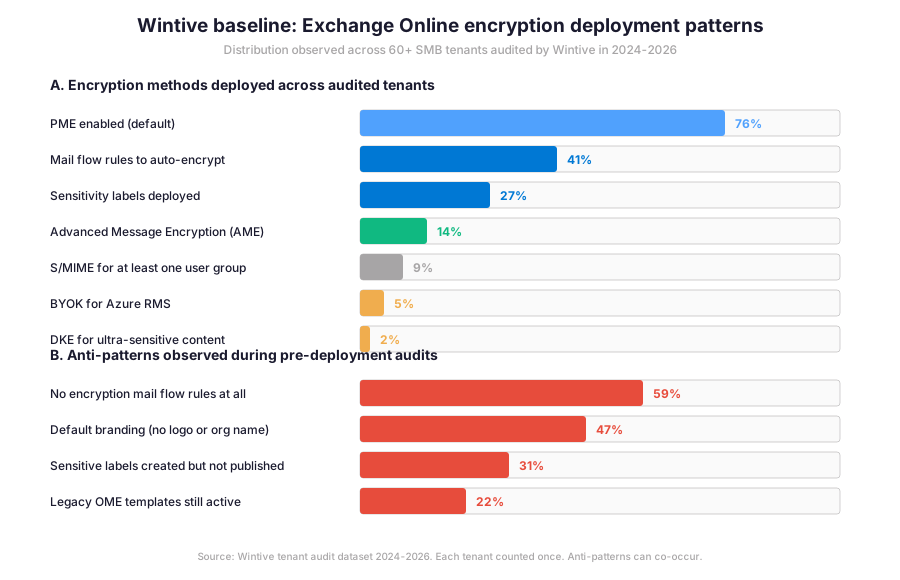
Specifically, the gap between Purview Message Encryption availability and mail flow rule deployment is the central operational story across the audited Wintive tenant set. Furthermore, the insight callout below distils what that 35-percentage-point gap means for daily admin practice and explains why the technical capability never converts to actual encrypted mail in more than half of the audited tenants during pre-deployment reviews.
Wintive insight
Across 60+ tenants, the standout finding is the gap between PME enabled (76%) and mail flow rules deployed (41%). PME being enabled means Azure RMS is activated and admins can encrypt manually. Mail flow rules being deployed means encryption actually happens automatically without user intervention. Therefore, more than half of audited tenants have the technical capability but never use it, which is the single most common Exchange Online encryption gap in 2026.
Furthermore, the anti-pattern column tells the operational truth: 59% of audited tenants have no encryption mail flow rules at all, 47% never customised the OME branding (recipient sees a generic Microsoft template), and 22% still have legacy OME templates active alongside PME, which can produce inconsistent recipient experiences during the AME-to-PME migration window.
🚨 5 SMB-specific email encryption pitfalls
The five Exchange Online email encryption pitfalls below cover anti-patterns Wintive consistently observes during SMB Exchange Online encryption deployments. A common mistake is assuming Microsoft 365 Business Premium activates encryption automatically. Admins struggle with this gotcha because the license includes the entitlement but the mail flow rules and label publishing must be configured manually before any message gets encrypted. Furthermore, comparing the Microsoft Purview approach with third-party gateways like Mimecast Secure Messaging or Virtru shows that the native Microsoft tooling is now feature-complete for most SMB use cases, while third-party tools add value for cross-tenant federation and specialised compliance regimes.
PME enabled but no mail flow rules deployed
Specifically, the most common gap. Azure RMS is activated, admins know PME exists, but no mail flow rule fires automatically on outbound mail. Wintive recommends a baseline rule. The rule auto-encrypts outbound mail to external recipients containing sensitive information types. It ships in audit mode for two weeks before enforcement.
Sensitivity labels created but never published
Therefore, labels exist in the Purview portal but no label policy targets users, so the labels never appear in Outlook. Wintive sees this in 31% of audits. The fix is publishing a Label Policy targeting an All Users group from the Microsoft Purview portal Information Protection section.
Default Microsoft branding on encrypted email portal
Furthermore, recipients of encrypted mail land on a portal showing generic Microsoft branding instead of the sender organisation logo. This trains recipients to suspect phishing and reduces trust in encrypted communications. Custom OME branding via Set-OMEConfiguration takes 15 minutes and meaningfully improves recipient confidence.
Legacy OME templates still active alongside PME
Specifically, mail flow rules created before 2023 may still use the legacy OME action Apply the previous version of OME. After PME GA, these rules deliver inconsistent recipient experiences. Wintive audits all transport rules and migrates legacy rules to Apply Office 365 Message Encryption and rights protection with the Encrypt template.
No encryption pilot before tenant-wide rollout
Therefore, encryption rules go to enforce mode tenant-wide on day one and unexpected mail starts getting encrypted, helpdesk tickets spike, and external recipients complain about portal authentication friction. Wintive ships every encryption deployment with a 5-to-10 user pilot for two weeks before tenant-wide enforcement.
Automated Tenant Health Check — $97
Audit your encryption configuration in 30 minutes
The Automated Tenant Health Check audits your Microsoft 365 tenant against the 40+ encryption readiness checks Wintive runs on every audit, including PME activation, sensitivity label publishing, mail flow rule coverage, OME branding configuration, and the BYOK or DKE eligibility for regulated content. Findings are tagged Critical, High, Medium, or Low and delivered as a PDF with two emails of direct support within 48 hours.
❓ Exchange Online email encryption FAQ
No. OME was deprecated on July 1, 2023 and replaced by Microsoft Purview Message Encryption (PME). Existing OME-encrypted mail can still be read, but new encryption mail flow rules should use the Apply Office 365 Message Encryption and rights protection action with the Encrypt template, which targets PME under the hood. Tenants with legacy OME mail flow rules should migrate them to the new action to avoid inconsistent recipient experiences.
Most SMB tenants do not. Microsoft 365 Business Premium ($22 per user per month), Microsoft 365 E3, and Microsoft 365 E5 all include PME and sensitivity label encryption at no extra license cost. Advanced Message Encryption (AME) with branding, expiration, and revocation requires Microsoft 365 E5 or an AME add-on for E3 plans. Furthermore, BYOK and DKE require additional Azure subscription costs for the Key Vault and Key Storage components.
Run Get-IRMConfiguration in Exchange Online PowerShell. The AzureRMSLicensingEnabled property should be True. Then run Test-IRMConfiguration with a sender and recipient pair from your tenant. The output should show PASS for Acquiring RMS Templates, Verifying encryption, Verifying decryption, and Verifying IRM is enabled, ending with OVERALL RESULT: PASS. If any test fails, the activation step in Microsoft Purview portal needs to run before mail flow rules can apply encryption.
More Exchange Online email encryption questions
Yes, and Wintive recommends doing both. PME provides the baseline encryption mechanism activated tenant-wide. Sensitivity labels add a granular control layer that auto-applies encryption based on content classification (sensitive info type, keyword, trainable classifier). Both methods use the same Azure Rights Management cryptographic stack underneath, so there is no conflict. The label policy lets users override or upgrade the encryption decision the mail flow rule made.
S/MIME makes sense in two scenarios in 2026: regulated industries where the regulator mandates certificate-based PKI (US federal contractors, some healthcare providers, defense supply chain) and partner-driven workflows where an external organisation requires S/MIME for inbound mail. For all other SMB tenants, PME plus sensitivity labels is the right default because it scales without per-user PKI overhead. Wintive deploys S/MIME in only 9% of audited tenants, almost always for a specific user group rather than tenant-wide.
📚 Related Microsoft 365 email security reading
The 12 highest-value tasks are listed at our 12 Exchange Online admin productivity wins for 2026 covering EXO V3 PowerShell, Copilot in Outlook, and the EWS retirement timeline.
The full migration path is at our Microsoft 365 SMTP Relay 5-method guide with the OAuth migration timeline before December 2026 SMTP AUTH retirement.
The complete domain authentication progression is at our Microsoft 365 Custom Domain Setup guide covering DKIM rotation and the p=none to p=reject DMARC policy progression.
The migration path matrix is at our Exchange Online Migration 2026 guide covering Modern Hybrid, Express migration, and the EWS deprecation timeline that affects encryption-enabled apps.
The complete Entra ID admin guide is at our Microsoft Entra ID Complete Guide covering the Suite at $12 per user, the Agent ID, and the conditional access integration with sensitivity labels.