Design studio AI governance sounds like a compliance chore until a client brief turns up in an AI answer it should never have reached. Therefore the question is no longer whether to govern, but how fast.
This guide is written for the founder and the creative lead, not the IT contractor. Specifically, it explains what your team already feeds AI, where it leaks, and how a Microsoft 365 audit locks it down.
🎯 About to roll out Copilot but unsure what it will expose?
Wintive gets US studios and agencies AI-ready without slowing the work. Specifically, the work covers sensitivity labels, access control, data-loss rules and an audit trail. Furthermore, it keeps client material inside your tenant, at a predictable monthly cost.
📅 Book a Free 30-Min Call | 💬 Chat on WhatsApp | See Our Plans →
This guide maps what creatives already paste into AI, the switch that makes assistants safe, and the gap between owning a tool and proving control. Furthermore, it shows what a Microsoft 365 audit puts in place and a ninety-day path to data you can safely point an assistant at.
🛡️ Why design studio AI governance is now an owner’s call
📌 TL;DR — design studio AI governance in 2026: Creatives already paste client briefs, assets and names into AI tools. Without sensitivity labels and access control, those tools surface work nobody locked down. As a result, a careless prompt becomes a breach. Therefore a Microsoft 365 audit that switches on each control is the fastest safe path to adoption.
The shift is recent and fast. Notably, assistants moved from novelty to daily habit inside a year, and they read whatever your tenant already overshares. The first leaked brief makes it very concrete.
The shortcut that quietly became a liability
A year ago, pasting a brief into a chatbot felt clever. However, the ground has shifted under that habit. Specifically, assistants now plug straight into your files, your email and your chat. Therefore they can surface anything a user could already reach, in one tidy answer.
This matters because the convenience hides the exposure. Specifically, a junior can summarise a confidential pitch in seconds. Furthermore, the same prompt can pull a contract or a salary list nobody meant to share. As a result, the shortcut that saved an hour can leak the very work a client trusted you with. In practice, the team that treats it casually is the one that gets the call from a furious client. Specifically, the client never hears about the saved hour. Furthermore, they only hear about the brief that escaped. Therefore the maths of the shortcut is brutally one-sided. As a result, the habit that feels efficient quietly carries the most risk.
🤖 What your team already pastes into Copilot
Start by being honest about what is already happening. Specifically, your people feed assistants client briefs, brand files and names every day. Furthermore, none of it is malicious; it is simply fast. As a result, the exposure is already live, whether or not you have a policy.
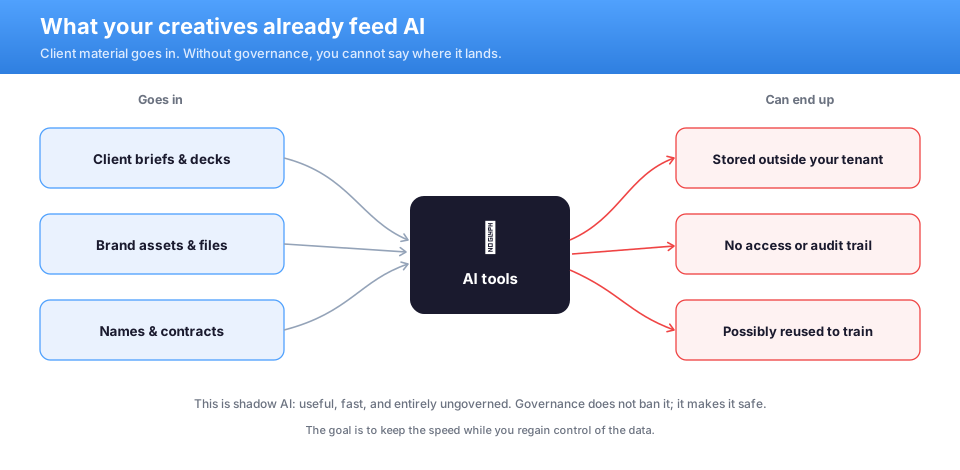
Read that flow as a map of risk, not a reason to ban the tools. However, do not pretend it is not happening. Specifically, banning assistants only pushes them onto personal accounts you cannot see. Furthermore, that is worse, not better. Therefore the goal is to keep the speed while you regain control of the data. As a result, governance is permission with guardrails, not prohibition. Specifically, a clear, sanctioned way to use assistants beats a blanket ban every time. Furthermore, people follow the path of least resistance. Therefore the safest move is to make the governed route the easy one.
Where client work actually leaks
The leak is rarely a dramatic hack. Specifically, it is mundane oversharing that the assistant simply reads back. Furthermore, a folder shared with the whole company becomes a folder the assistant will quote. Therefore the exposure was sitting in your tenant long before anyone typed a prompt.
This is why the fix starts with your own files, not the tool. Specifically, you tighten who can open what, then label the sensitive material. Furthermore, you add rules that stop confidential content leaving. As a result, the assistant inherits a clean, scoped view instead of the whole mess. In practice, the same cleanup also makes your team faster, because nobody hunts through a hundred shared folders. Specifically, nobody decided to expose that folder; it simply drifted open over years. Furthermore, an assistant has no sense of what was meant to stay private. Therefore it reads the loosest permission as an invitation. As a result, the cleanup is about intent, not blame.
🚦 The switch that makes Copilot safe or sorry
One thing decides whether enabling an assistant is smart or reckless. Specifically, it is whether your client data is governed before you switch it on. Furthermore, the button itself is neutral. As a result, the outcome depends entirely on the state of the data underneath it.
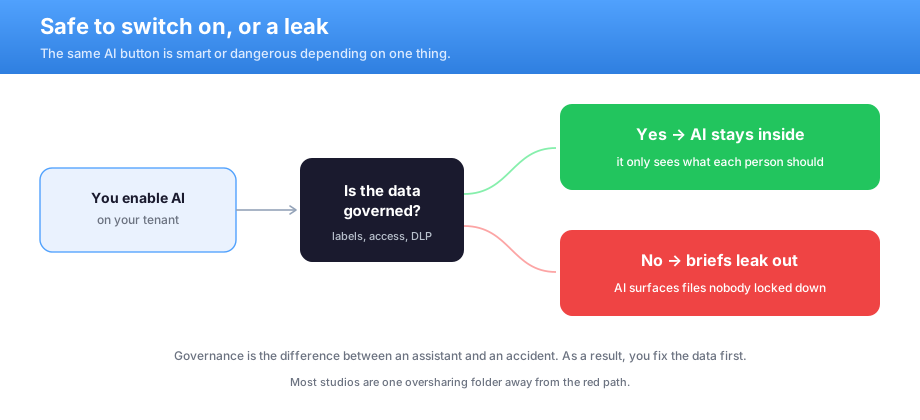
The two paths could not be further apart. Notably, governed data means the assistant only sees what each person already should. By contrast, ungoverned data means it surfaces files nobody ever locked down. Therefore the difference between an assistant and an accident is the work you do first. As a result, most studios sit one oversharing folder away from the wrong path. Specifically, the same rollout is a win or a headline depending on that one decision. Furthermore, the tool will not warn you which side you are on. Therefore the responsible order is data first, button second.
Sensitivity labels and design studio AI governance
For design studio AI governance, sensitivity labels do the heavy lifting. Specifically, Microsoft Purview lets you tag client work as confidential and keep it that way. Furthermore, Microsoft Entra ID decides who can open it in the first place. Therefore the assistant respects the same boundaries your people do. In practice, this single layer turns a loose tenant into one you can safely point a tool at. Specifically, a label travels with the file wherever it goes, including into a prompt. Furthermore, it tells the assistant what it may and may not surface. Therefore protection follows the work instead of the folder. As a result, a confidential pitch stays confidential even when someone moves it.
🧩 Owning the tools is not the same as control
Here is the trap that catches careful owners. Specifically, buying the licences feels like the job is done. Furthermore, the controls sit there, switched off and undocumented. As a result, a feature you pay for protects nothing until it is configured and proven.
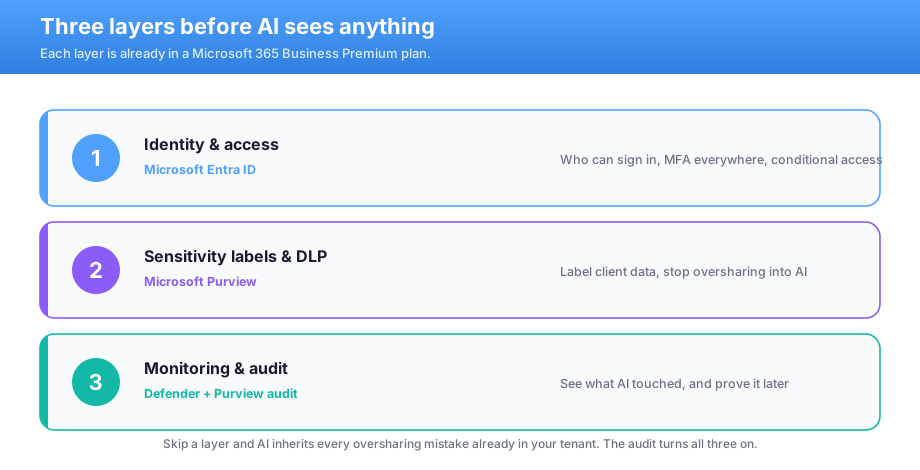
Think of control as three layers, not one. Specifically, you need identity and access, then labels and data-loss rules, then monitoring. However, only all three together make adoption safe. By contrast, one layer alone leaves an obvious gap. Therefore the real deliverable is a configured, documented stack, not a folder of unused licences.
What we see across the 60+ tenants we manage: most studios are closer to safe than they fear, but cannot prove it. Specifically, the common mistake is buying Business Premium and never enabling Purview. In practice, an unconfigured control can silently fail the moment an assistant reads a shared folder. Notably, the same gaps map to SOC 2 and NIST language that enterprise clients increasingly ask about. Therefore Wintive turns the half-on tenant into a documented one. Then adoption is safe by default.
Design studio AI governance wants proof, not a policy memo
This is the mindset shift at the heart of design studio AI governance. Specifically, a written policy that nobody enforces changes nothing. Furthermore, a control you cannot evidence is, to a client or an auditor, a control you do not have. Therefore the deliverable is configured settings and an audit trail, not a document. As a result, the studios that keep tidy proof adopt faster and explain themselves with confidence. Specifically, an auditor or a client wants to see the setting, not read your intentions. Furthermore, screenshots and a short report close the question faster than any promise. Therefore the evidence is the asset, and it keeps paying off at the next review.
🧰 The controls your Microsoft 365 plan already covers
The good news is that you are not starting from zero. Specifically, one business-grade Microsoft 365 plan already carries the controls you need. Furthermore, each maps cleanly to a real exposure. As a result, the audit is largely about switching them on and capturing the proof.
| The exposure | Microsoft 365 control | What it does |
|---|---|---|
| Loose file access | Microsoft Entra ID | Limits who can open client work |
| Confidential work untagged | Microsoft Purview | Labels and protects sensitive files |
| Data leaving quietly | Purview DLP | Stops confidential content walking out |
| Unmanaged laptops | Microsoft Intune | Encryption and remote wipe |
| No trail of what AI saw | Purview audit | Records access you can prove later |
Notice how little of this is new spend. Specifically, most studios already pay for the licences but use a fraction of them. Furthermore, the value sits in configuration, not in buying more software. Therefore the audit unlocks protection you have funded but never switched on. As a result, safe adoption costs far less than owners expect.
There is a growth angle here too, beyond the risk. Specifically, the same controls answer the security questionnaires enterprise clients now send. Furthermore, a regulated client will ask how their data is protected before they hand it over. As a result, the governance that makes AI safe also helps you win larger, stickier accounts.
📂 Oversharing is the real exposure
Most owners picture a hacker, but the real risk is quieter. Specifically, it is the everyday oversharing already sitting in your tenant. Furthermore, an assistant simply reads whatever is loosely shared and quotes it back. However, most teams have never audited who can open what.

The fix is straightforward and worth the afternoon. Specifically, you review broad shares and pull access back to the people who need it. Furthermore, you label the sensitive material so it stays protected wherever it travels. Therefore the assistant sees a scoped, safe view of your work. In practice, a single access cleanup removes most of the exposure before any AI feature is even enabled. Furthermore, that cleanup is invisible to clients but obvious to an assistant, which suddenly has far less to over-share. Therefore you shrink the risk surface before you ever flip a switch.
A pattern worth naming: the riskiest folder is almost always the one shared with everyone for convenience. Specifically, it was set up years ago and never revisited. Furthermore, an assistant treats it as fair game. Therefore the fastest risk cut is pulling those broad shares back before any rollout.
💸 Design studio AI governance and the cost of getting it wrong
Owners think in numbers, so here is the asymmetry. Specifically, one leaked brief is not a small mistake. It can mean a breached NDA, a lost flagship account and a dent in the reputation you sell. Furthermore, creative work is trust, and trust does not come back cheaply.
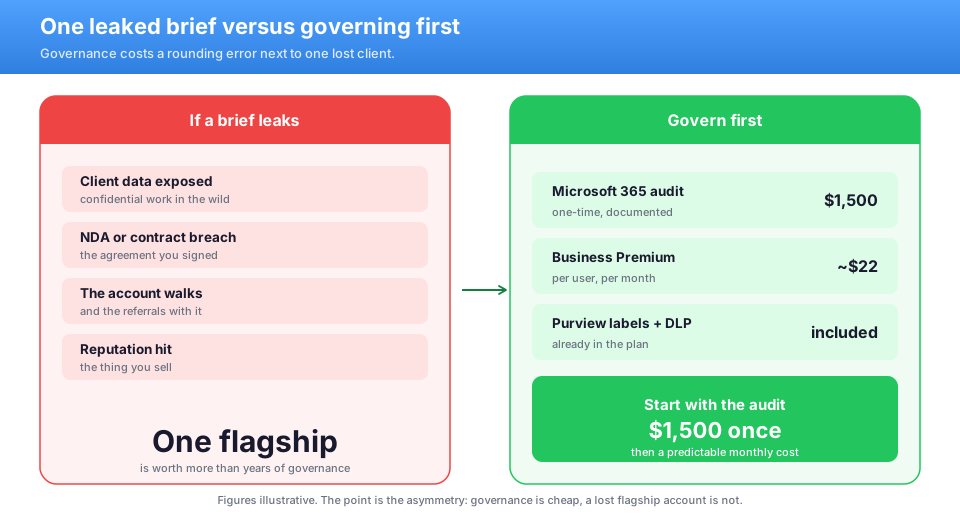
Set that against the cost of getting ready. Specifically, a one-time audit and Microsoft 365 Business Premium are a small, predictable amount per user, per month. Furthermore, there is no large CapEx and no on-prem hardware to run. By contrast, it is an OpEx line you can forecast. Therefore the total cost of ownership is tiny next to one client who walks because their work leaked. Specifically, the loss is rarely just the one project. Furthermore, a breached confidence travels through a tight industry quickly. Therefore one leak can quietly cost you the next three referrals too. By contrast, the preparation is a line you can plan for.
📊 How a Microsoft 365 audit delivers design studio AI governance
This is where everything comes together for design studio AI governance. Specifically, the audit scores how ready your data really is. Furthermore, it tightens access, applies labels, sets data-loss rules and turns on the audit trail. In practice, most studios start exposed, and that is entirely normal.
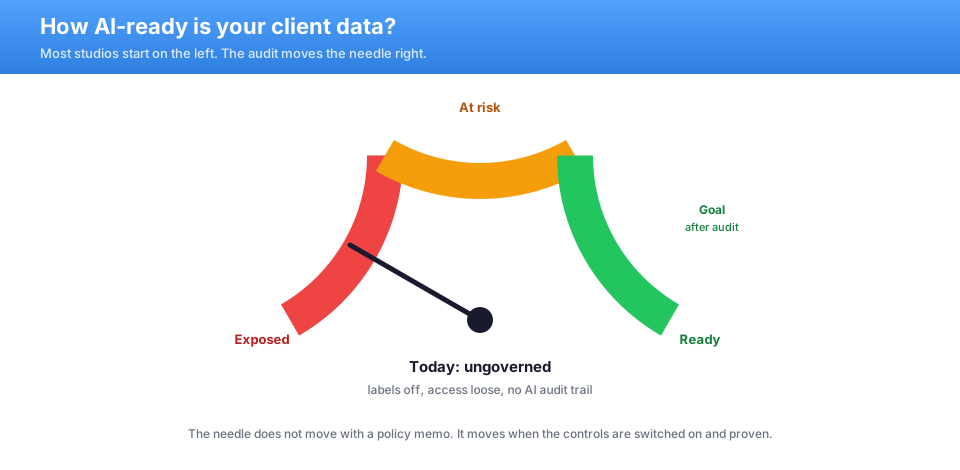
The value is not the starting score. By contrast, it is the documented, governed end state. Specifically, the audit fixes the dangerous gaps first and records each change. Furthermore, it hands you proof you can show a nervous client. Therefore you stop guessing about exposure, and you enable assistants with the data already under control.
| Before the audit | Owning the tools | After the audit |
|---|---|---|
| Who can open files? | Assumed, not checked | Scoped and documented |
| Is client work labelled? | Bought Purview, off | Confidential by default |
| Can data leave quietly? | No rules set | DLP blocks it |
| What did AI see? | No idea | A full audit trail |
Notably, the finished report is also a sales asset. In practice, a clean readiness picture reassures the enterprise client who asks how you guard their data. As a result, the same audit that makes AI safe also shortens your next sales cycle.
⚡ Faster, safer adoption is a documented one
Safety is only half the prize. Specifically, the studios that document the full control set adopt assistants faster and with less fear. Furthermore, the work pays for itself the first time a client asks how their data is handled. As a result, the audit can earn its keep well inside the year. Specifically, every client question about data security gets a faster, calmer answer. Furthermore, your team adopts assistants without the quiet fear of leaking something. Therefore the controls pay back in confidence as well as in deals. As a result, safe adoption becomes a habit rather than a worry.
Predictable control, not a yearly scramble
A leaked brief arrives as a crisis you cannot budget. However, a managed control set is the opposite. Specifically, you know the monthly figure before the year starts. Furthermore, it scales gently with your headcount, not with a disaster. Therefore the boring, predictable line is the one that protects both your client work and your time. Specifically, a yearly review keeps the labels and rules current as your work changes. Furthermore, nothing quietly drifts open between reviews. Therefore the next rollout is a quick check, not a fresh scramble.
🗓️ A ninety-day path to Copilot-ready data
You do not need to fix everything at once. Specifically, ninety days is enough to make assistants safe to switch on. Furthermore, the order matters more than the speed.
- Days 1–30: tighten file access and enforce sign-in, then book the audit.
- Through days 31–60: apply sensitivity labels and set data-loss rules.
- By day 90: turn on the audit trail, document each control, and enable the assistant.
By the end of the quarter, the picture looks different. Therefore your readiness moves from exposed to governed. As a result, you switch on assistants with the data already under control, not with crossed fingers. Specifically, you handle the cheapest, highest-impact controls in the first weeks. Furthermore, the sequence matters more than raw speed. As a result, your most sensitive work is protected well before the ninety days are up.
When you are already in good shape
Some studios are further along than they think. However, a quick check still pays off. Specifically, even a strong setup drifts as staff, clients and tools change. Furthermore, a yearly review keeps your controls current and your proof ready. As a result, you never scramble to lock things down the week a big client asks. Specifically, even a tidy tenant loosens as people join and projects pile up. Furthermore, a short annual check keeps your controls aligned with how clients expect their data handled. Therefore you never lock things down in a panic.
📚 More for US service firms
🎯 Get a productized Microsoft 365 audit before you enable AI
Full environment audit for a US studio or agency. Specifically, it covers access control, sensitivity labels, data-loss rules and managed devices. Furthermore, it covers an audit trail of what assistants can reach, mapped to the way enterprise clients ask. You get a written report with prioritized fixes and the proof to show, plus 14 days of email Q&A.
❓ Design studio AI governance: frequently asked questions
These are the questions US studio and agency owners ask us most before they switch on AI, gathered from real rollouts.
Common design studio AI governance questions
A ban rarely works and usually backfires. Specifically, people move to personal accounts you cannot see or control. Furthermore, that is far riskier than a governed rollout. The better path is to make the tools safe with labels, access control and data-loss rules.
Oversharing that already exists in your tenant. Assistants read whatever a user can reach, so a folder shared too widely becomes a folder the tool will quote. Furthermore, most teams have never audited those shares. Fixing access first removes most of the exposure.
Because owning a control is not the same as configuring and proving it. Specifically, Purview labels and data-loss rules ship in the plan but sit off by default. A licence you never switched on protects nothing the moment an assistant reads your files.
A few more answers for owners
A productized audit is fast. We review your environment, score readiness, apply the controls and deliver a written report with the proof attached, usually within days. You also get 14 days of email questions afterward.
Yes, the risks are identical. Assistants read whatever is overshared whichever suite you run, so the same access cleanup, labelling and rules apply. Therefore the audit maps your gaps and the fixes either way.
No, done well it speeds them up. Specifically, tighter shares and clear labels mean less hunting through messy folders. Furthermore, the assistant returns safer, more relevant answers. It is a predictable, forecastable setup, not a drag on the work.