Choosing Microsoft 365 for creative agencies is an owner decision in 2026, not an IT chore. Specifically, a US creative agency runs more software, hands more access to freelancers, and answers harder client security questions than a typical business of the same size. Therefore the platform you standardise on quietly decides a lot. It sets how fast you onboard contractors, how safely you hold client work, and whether you clear the security review that gates the big accounts. Furthermore, you make this call as the founder, not a CIO, so it has to be explained in plain business terms.
This guide walks an agency owner through the real decision: the stack sprawl that grows with headcount, the freelancer access problem, the client SOC 2 question, the licensing maths, and the five-year cost. Specifically, it shows where Microsoft 365 for creative agencies earns its keep and where it does not.
💼 Ready to run your creative agency on one platform your clients trust?
Wintive sets up Microsoft 365 Business Premium for US agencies. Specifically, the work covers identity, guest access for freelancers, sensitivity labels on client work and endpoint protection. Furthermore, the price stays flat per seat each month with no surprise add-on invoices.
📅 Book a Free 30-Min Call | 💬 Chat on WhatsApp | See Our Plans →
💼 Why Microsoft 365 for creative agencies is a 2026 owner decision
📌 TL;DR — the agency platform call (2026): A 30-person US creative agency typically runs 12 or more separate tools. It also lets freelancers into client data through agency logins. Specifically, that combination is exactly what enterprise clients now probe in a SOC 2 style security review before they sign. By contrast, standardising on Microsoft 365 Business Premium at $22 per seat each month changes the picture. One tenant then holds identity, guest access, sensitivity labels, endpoint protection and audit logging. As a result, the agency governs freelancer access cleanly and protects client intellectual property. It answers the security questionnaire from one place and trims a fragmented stack that costs roughly $80,000 more over five years.
What Microsoft 365 for creative agencies decides for the owner
There are roughly 114,000 advertising and creative agencies in the United States in 2026, and the market is highly fragmented, which means most of them are owner-led shops under 50 people. Specifically, that profile is the one most exposed to the platform decision. The owner signs every tool invoice and personally fields the client security questions. Therefore Microsoft 365 for creative agencies is not a back-office detail; it is the operating backbone the whole shop runs on.
Wintive frames the decision around four owner questions: what does the stack cost, how do we control freelancers, how do we protect client work, and can we pass a client security review. Furthermore, each answer points back to the same platform choice.
The stack problem: too many tools for the headcount
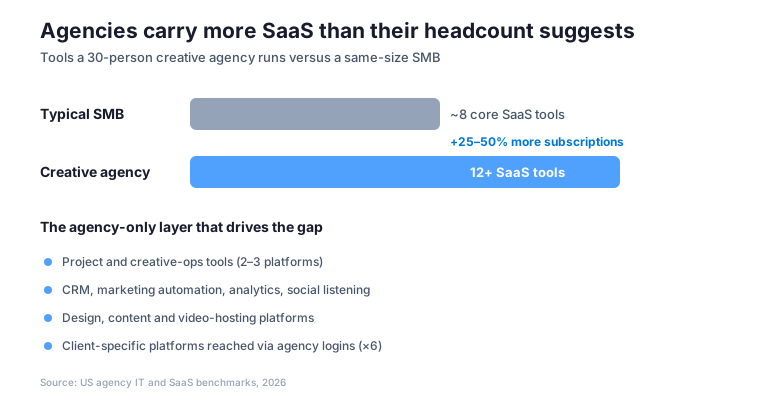
A 30-person agency rarely runs on one platform. Specifically, it stitches together email, project tools, a CRM and marketing automation. On top of that sit analytics, social listening, design apps, video hosting and client-specific platforms reached through agency logins. Industry IT benchmarks put the average agency at 25 to 50 percent more software subscriptions than a comparable business of the same headcount. Therefore the agency carries more cost, more logins and a wider attack surface than its size suggests.
Why Microsoft 365 for creative agencies beats bolt-on identity
Each extra subscription is its own admin console, its own bill and its own door into client data. Specifically, the common mistake Wintive sees is bolting a standalone identity layer such as Okta or JumpCloud on top of the sprawl without consolidating anything underneath. Furthermore, that adds a monthly per-seat line item while leaving the agency with the same dozen disconnected tools. By contrast, Microsoft 365 for creative agencies consolidates email, chat, video, storage, identity, endpoint protection and device management into one tenant. That is where the real cost and security wins come from.

🔐 Why clients now ask your studio the SOC 2 question
Larger clients no longer take agency security on trust. Specifically, through 2024 and 2025 the enforcement waves around GDPR and CCPA, plus rising SOC 2 expectations, moved security from a nice-to-have to table stakes for vendors. Furthermore, in 2026 more enterprise clients ask for a SOC 2 attestation or a completed security questionnaire as a precondition for signing. Therefore an agency without a defensible security posture quietly drops off the shortlist for its best accounts.
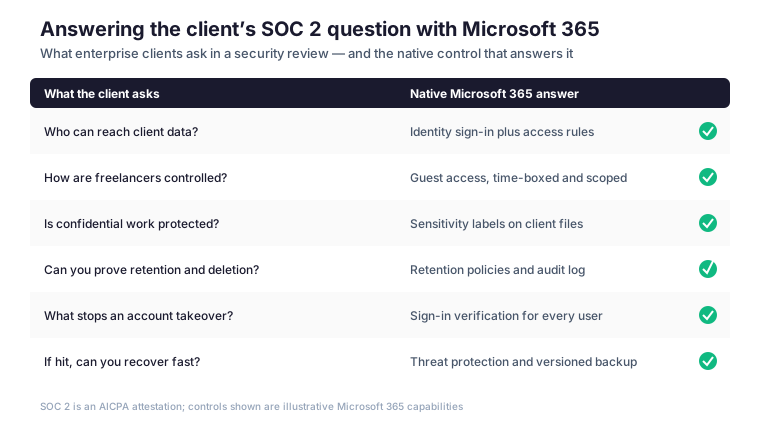
SOC 2 is an AICPA attestation built on five trust criteria, and confidentiality is the one creative work leans on most. Specifically, the client wants evidence that only the right people reach their files, that you remove access when work ends, and that you can prove retention and deletion. Furthermore, reviewers increasingly use the NIST Cybersecurity Framework as the shared language. Wintive maps each common questionnaire item to a native Microsoft 365 control so the agency answers from one place.
What a client security review actually checks
In practice the same three gaps show up again and again.
🔍 What we see across 60+ tenants we manage: the typical creative agency silently fails the first client security review on three points — freelancers on shared logins, client files with no sensitivity label, and no proof of access removal. Specifically, the common mistake is treating the security questionnaire as paperwork rather than as a control problem. Therefore Wintive fixes the controls first, and the questionnaire then answers itself.
👥 The freelancer access problem every shop carries
Most agencies run on contract talent for design, video and specialised production. Specifically, those freelancers usually reach client tools and files through the agency’s own credentials. That extends the access surface well beyond the payroll headcount. Furthermore, the gotcha is that a freelancer added for a two-week project often keeps standing access for months after the work ends. Therefore the real risk is not the freelancer; it is the access nobody removed.
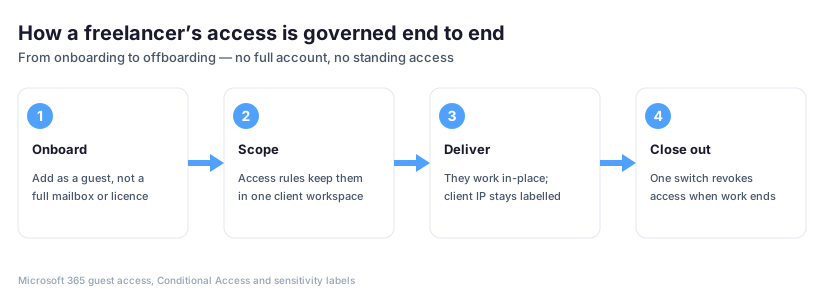
Wintive treats every freelancer as a guest, not a full account. Specifically, Microsoft Entra ID guest access lets a contractor into one client workspace without a paid mailbox or a standing licence. Furthermore, Conditional Access rules keep that guest on approved devices and inside the one project they were hired for. As a result, the agency gets the talent without handing over the keys to the whole shop.
🛡 Governing guest access without slowing the work
Owners worry that locking access down will slow delivery. Specifically, the opposite happens when you set up guest access well. Furthermore, a freelancer accepts one invitation, lands directly in the right client folder, and starts work without a new password to manage or a VPN to fight. Therefore governance and speed stop being a trade-off.
Wintive scopes each guest to a single SharePoint or Teams workspace. Conditional Access then verifies every sign-in, and an expiry date lapses access on the project end date by default. Specifically, that means the design contractor on the spring campaign never sees the retainer client’s folder next door. Furthermore, the agency keeps a clean audit log of who reached what, which is exactly the evidence a client review asks for.
| Access need | The risky shortcut | The Microsoft 365 way |
|---|---|---|
| Freelancer joins a project | Shared agency login passed around | Entra ID guest invite to one workspace |
| Limit what they can reach | Trust and hope | Conditional Access plus scoped permissions |
| Protect the client brief | Unlabelled files in a shared drive | Sensitivity labels that travel with the file |
| Project ends | Access left active for months | Guest expiry on the end date by default |
| Client asks who had access | No record | Audit log export in minutes |
🔖 Protecting client IP and confidential briefs
Creative work is intellectual property, and much of it arrives under a confidentiality clause. Specifically, unreleased campaigns, product images, brand strategy and customer data all sit in your shared drives long before they go public. Furthermore, the pitfall hits once someone downloads or forwards a file. An unprotected agency then loses control over where it travels. Therefore protection has to follow the file, not the folder.
How Microsoft 365 for creative agencies protects client files
Microsoft Purview sensitivity labels attach protection to the document itself. Specifically, you can lock a file labelled for one client so no one forwards it outside the project. You can also revoke access even after you share it. Furthermore, Wintive configures labels in plain business categories — client-confidential, internal, public — so the team applies them without thinking like security engineers. As a result, the agency can honestly tell a client that their brief is protected wherever it goes.

📅 Clean offboarding when a freelancer rolls off
Offboarding is where most agencies leak. Specifically, the project ends, the invoice is paid, and the freelancer’s access just sits there. Furthermore, a year later that dormant guest account is exactly the soft entry point an attacker uses. Therefore the day work ends has to be the day access ends.
Because Wintive sets a guest expiry at onboarding, most offboarding happens automatically. Specifically, access lapses on the agreed end date unless someone deliberately extends it. Furthermore, an owner can revoke a guest in one click and pull an audit log showing every file that guest touched. As a result, the agency answers the client question “who had access and when was it removed” with a single export rather than a guess.
💳 Licensing Microsoft 365 for creative agencies with a freelance team
Licensing is where agency owners overspend or under-protect. Specifically, the staff who run the agency need Microsoft 365 Business Premium. That plan carries Entra ID, Defender for Office 365, Defender for Business, Intune device management and Purview at around $22 per seat each month. Furthermore, freelancers do not need a paid licence at all, because Entra ID guest access is included for external collaborators. Therefore you license your core team properly and bring contractors in for free as guests.
The common mistake is buying Business Standard at a lower price and then bolting on separate security vendors. Specifically, Business Standard covers the Office apps and email but lacks the endpoint protection, device management and data loss prevention a client review expects. Therefore the apparent saving disappears the moment you add a third-party endpoint tool and a separate identity layer. By contrast, Business Premium folds those into one monthly per-seat line.
| Capability a client review expects | Bought separately | Included in Business Premium |
|---|---|---|
| Identity and sign-in verification | Okta or JumpCloud, per seat each month | Microsoft Entra ID |
| Endpoint protection on laptops | Standalone EDR subscription | Defender for Business |
| Email anti-phishing | Third-party email gateway | Defender for Office 365 |
| Device management | Separate MDM vendor | Microsoft Intune |
| Client-file protection | Add-on or none | Microsoft Purview sensitivity labels |
| Freelancer access | Shared logins | Entra ID guest access, no paid seat |
💰 What Microsoft 365 for creative agencies costs over five years
Owners feel the stack cost as a pile of monthly invoices, not a single number. Specifically, a fragmented agency runs separate tools for email, storage, video, endpoint protection and identity. Over five years it pays far more than the per-seat headline suggests, once every add-on and renewal is counted. Furthermore, the total cost of ownership includes the hours an owner spends reconciling vendors that a consolidated platform removes. Therefore the honest comparison is the five-year TCO, not this month’s bill.
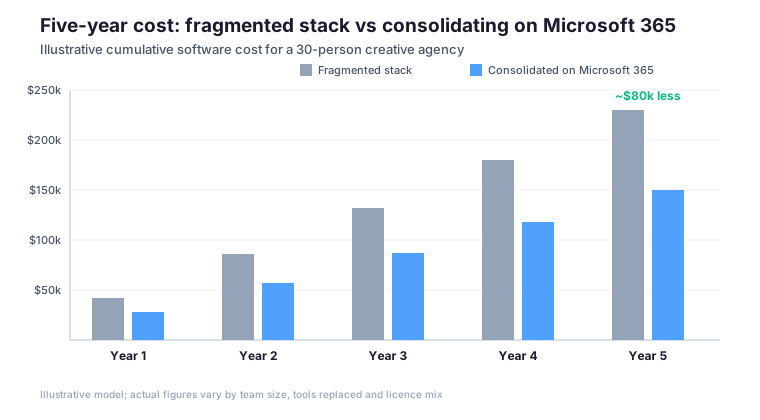
The model above is illustrative, and the gap widens every year the fragmented stack adds another tool. Specifically, consolidating onto Microsoft 365 for creative agencies trims roughly $80,000 over five years for a 30-person shop. It also removes the OPEX drag of managing many vendors. Furthermore, it converts a scatter of CapEx-style one-off tool purchases into one predictable OPEX line. Wintive builds this TCO model for each agency so the owner sees the real number before deciding.
⚖️ How the platform compares with Google Workspace
Many agencies start on Google Workspace because it is quick to adopt. Specifically, Workspace is strong for lightweight document collaboration, and for a small studio with no enterprise clients it can be enough. Furthermore, the limits show up exactly where the client security review bites. Granular sensitivity labelling, built-in endpoint protection and bundled device management are where Microsoft 365 for creative agencies pulls ahead. Therefore the choice tends to flip the moment an agency wins its first security-conscious enterprise account.
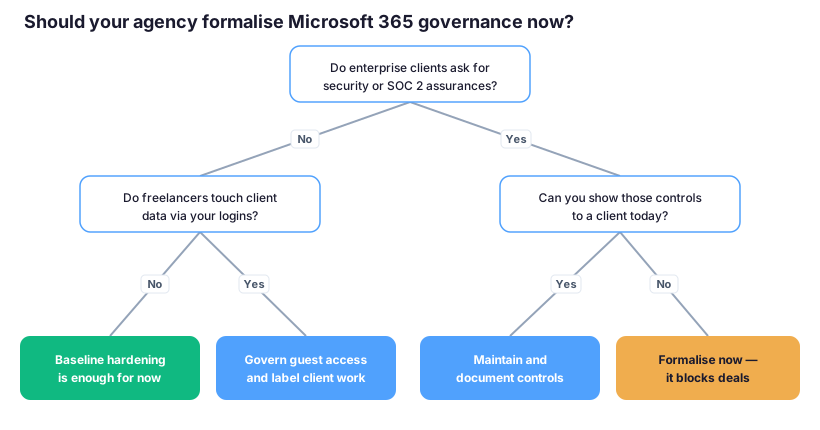
This is a decision tree, not a religious war. Specifically, if no client asks for assurances and no freelancer touches client data, baseline hardening on either platform is fine. By contrast, enterprise clients now demand SOC 2 evidence and freelancers sit in client folders. The consolidated controls in Business Premium then answer the review in one place. Wintive walks owners through the branch that fits their client base rather than selling a default.
🚨 Ransomware is now hitting studios as a soft entry point
Attackers have noticed that agencies hold the keys to bigger companies. Specifically, ransomware crews increasingly target agencies as a soft route into their larger clients’ environments. They use a forgotten freelancer account or an unprotected mailbox as the way in. Furthermore, a breach that exposes a client’s unreleased campaign is not just an IT incident; it is a lost account and a reputation hit. Therefore recovery and prevention belong in the platform decision, not in a separate afterthought.
Prevention and recovery in one platform
Business Premium includes Defender for Office 365 against phishing and Defender for Business on endpoints. It also adds versioned file history that lets the agency roll back after an incident. Specifically, the same identity controls that govern freelancers also block the account takeover that most attacks start with. Furthermore, Wintive pairs this with a tested backup so a bad day stays a bad day rather than becoming a closed agency. As a result, the agency can tell a nervous client it can both prevent and recover.
For a vertical-specific example of the same playbook, see how Wintive approaches Microsoft 365 for art galleries, where confidential collector data raises the same access and labelling questions.
📚 More for Creative Agencies
🎯 Get a productized Microsoft 365 audit tailored to your creative agency
Full Microsoft 365 environment audit for a US creative agency. It covers SaaS sprawl inventory, freelancer access review, client security-questionnaire readiness, a sensitivity-label plan and a five-year TCO model. Delivered as a written report with prioritized recommendations, plus 14 days of email Q&A after delivery.
❓ Microsoft 365 for creative agencies: frequently asked questions
These are the questions US agency owners ask us most, gathered from real Microsoft 365 rollouts.
Common questions from studio owners
Microsoft 365 Business Premium at around $22 per seat each month is the right plan for a creative agency with enterprise clients. Specifically, it bundles Entra ID, Defender for Office 365, Defender for Business, Intune device management and Purview sensitivity labels. Business Standard is cheaper but lacks the endpoint protection, device management and data loss prevention a client review expects. As a result, Business Premium is the plan that consolidates the agency stack and answers the security questionnaire.
No. Specifically, freelancers and contractors come in as guests through Microsoft Entra ID guest access, which is included for external collaborators and needs no paid seat. Furthermore, you scope each guest to one client workspace and set an expiry so access lapses when the project ends. Therefore you license your core staff on Business Premium and bring contractors in for free, without handing them a full account.
Specifically, each common questionnaire item maps to a native control: identity and Conditional Access answer who can reach data, Entra ID guest access answers how freelancers are controlled, Purview sensitivity labels answer how confidential work is protected, and the audit log answers retention and access removal. Furthermore, SOC 2 is an AICPA attestation built on confidentiality and security, and these controls give you the evidence. As a result, the agency answers the review from one platform rather than a scramble across vendors.
Cost, licensing and platform questions
Yes. Specifically, Microsoft Purview sensitivity labels attach protection to the file itself, so a client-confidential document can be blocked from forwarding outside the project and have its access revoked even after it was shared. Furthermore, Wintive sets the labels up in plain categories such as client-confidential, internal and public so the team applies them without security training. As a result, protection travels with the work instead of stopping at the folder.
In practice, Wintive runs the move in 30 to 60 days with no email interruption. Specifically, the first phase sets up identity, mailboxes and Teams, the second migrates the file library and client workspaces, and the last applies sensitivity labels, guest access and endpoint protection. Furthermore, the existing tools keep running until each phase is verified. As a result, the agency is governed and review-ready without a risky big-bang cutover.