Good event management file chaos control is a 2026 owner decision for a US event business. It is not a back-office afterthought. A growing team books more events. It hands files to more vendors. Specifically, it answers tougher client questions than its headcount suggests. Therefore the system you choose quietly decides three things. It sets how fast a coordinator finds a contract. It sets how safely you hold a signed BEO. Critically, it decides whether a client ever sees the wrong version.
🎯 Want every event run from one organised hub instead of five tools?
Wintive sets up the single hub for US event teams. Specifically, the work covers a clear folder structure and document versioning. It also covers protected contracts and scoped vendor access. Furthermore, it covers secure client delivery and a predictable monthly cost. Your heavy photos and video stay on the storage you already trust.
📅 Book a Free 30-Min Call | 💬 Chat on WhatsApp | See Our Plans →
This guide covers the real decision end to end. Specifically, it spans tool sprawl, storage, naming, version chaos, delivery, cost and migration. Notably, it also names the cases where one hub is the wrong fix for a team. Therefore you finish with a clear, costed plan for the whole year.
📂 Why event management file chaos is a 2026 owner decision
📌 TL;DR — the event file decision (2026): A US event team runs three to five disconnected tools. As a result, files scatter and client links leak. By contrast, one governed hub holds quotes, contracts, BEOs, floor plans, delivery and access. Heavy media stays on dedicated storage. Therefore a coordinator finds the right file fast, and a delivery becomes a tracked link.
What event management file chaos really decides
There are roughly 13,600 catering businesses alone in the United States in 2026. Notably, that is one slice of a far larger event-services sector. Most are owner-led teams under 50 people. Therefore the file system is not a detail. By contrast, it is the gap between a team that ships calmly and one that firefights every event.
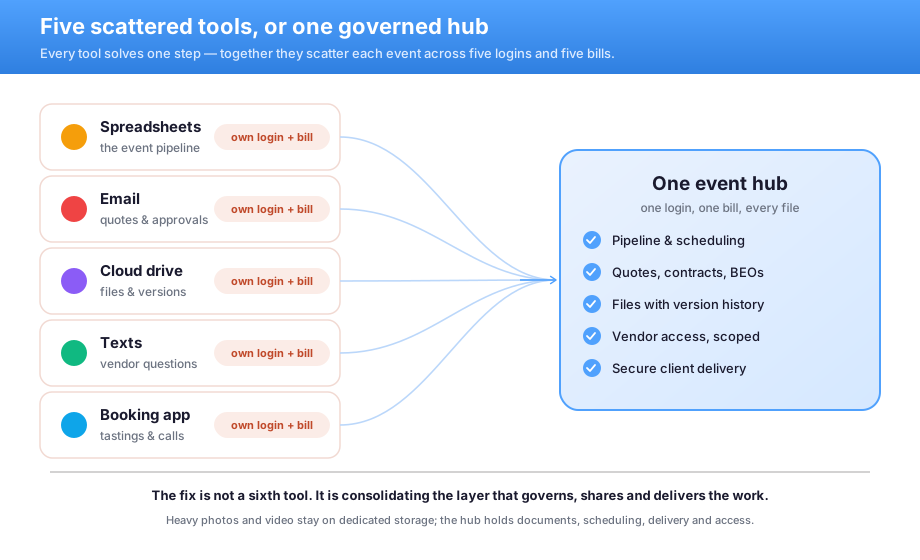
The instinct is to add another app for this week’s pain. However, the better move is the opposite. Specifically, you consolidate the layer that governs, shares and delivers your work. As a result, the team stops paying a tax on every single handoff.
Owners often ask where to even start. Specifically, the first move is not a new tool. It is a clear map of what you already own. Therefore Wintive begins every engagement with that inventory. As a result, the plan fits your team, not a generic template. Notably, that map alone often surfaces two tools nobody still needs.
🧩 The five-tool scramble from inquiry to invoice
An event team rarely runs on one tool. Specifically, it uses a drive for files and email for quotes. It uses a chat app for the day-of and a spreadsheet for the pipeline. Furthermore, it leans on texts for vendor questions. Each one solves a single step. As a result, the same event lives in five places, under five names.
The cost is not the subscriptions. By contrast, it is the chaos around them. “Final_BEO_v3_FINAL.pdf” is most teams’ reality. Notably, a coordinator who hunts for a contract is not selling. A planner who chases approvals across inboxes is not planning. Therefore the fix is one governed path, not a sixth tool bolted onto five.
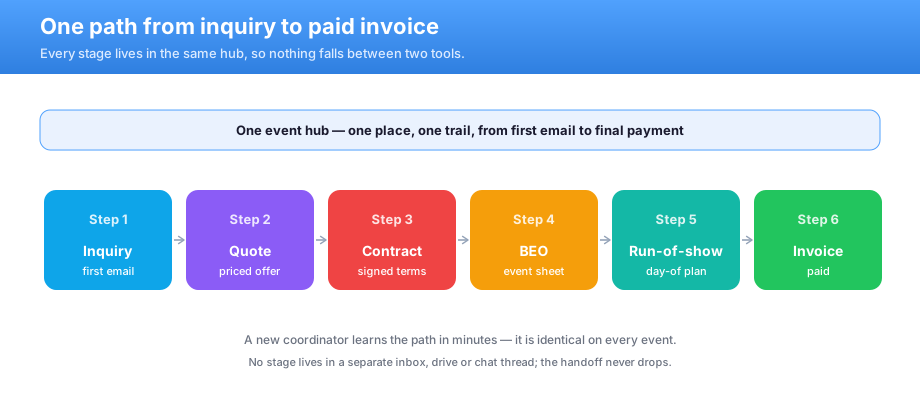
Each stage maps to a place a file already lives. Specifically, the inquiry feeds a quote and the quote feeds a contract. Then the contract feeds the BEO and the run-of-show. As a result, nobody invents a new habit. Notably, the path is the same on every event. Therefore a new coordinator learns it in minutes.
The hidden time cost of tool sprawl
What we see across the 60+ tenants we manage: most event teams cannot name the folder that holds the signed contract. They cannot say which vendor still has a live link to last season’s client list. Specifically, the common mistake is treating storage space as the problem. In practice, a forgotten guest link can silently fail the first client security review. Notably, that is the SOC 2 style check that enterprise clients now run. Therefore Wintive fixes the system first. Then the questionnaire answers itself.
There is also a hidden time cost. Notably, every manual transfer between tools risks grabbing the wrong file. Specifically, a planner who re-sends a quote at midnight is a risk, not a hero. Therefore removing steps removes mistakes. As a result, the team ships faster with fewer late scares.
🗄️ Where heavy media should actually live
A shared hub is not your media vault. However, pretending otherwise is how teams get burned. A cloud drive starts small. It fills fast once you add event photos and highlight video. By contrast, a single big shoot can run to terabytes. Therefore raw media belongs on dedicated storage, not a sync folder shared with everyone.
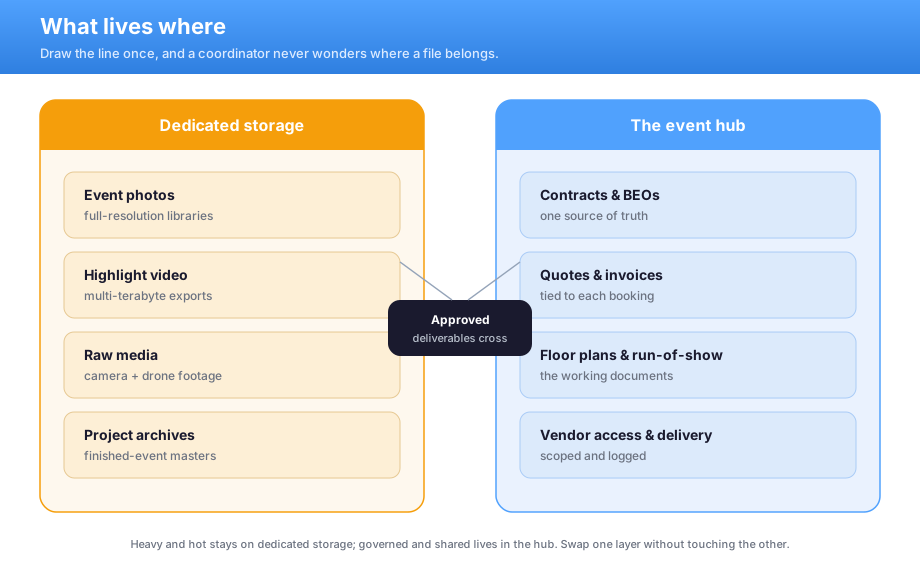
So what does the hub hold? Specifically, it holds the governed layer. That means quotes, contracts and BEOs. It means floor plans, run-of-show and approved deliverables. Furthermore, it means client delivery and access control. The heavy originals stay on a NAS or object storage. As a result, each system does the job it is good at.
The split that ends the storage argument
Teams argue about storage because they never agreed what goes where. However, the rule of thumb is simple. Heavy and hot lives on dedicated storage. By contrast, governed and shared lives in the hub. Specifically, event photos, highlight video and raw media stay local. Documents, schedules, delivery and access live in the hub.
🔎 A quick gut check: Specifically, ask your team to find last season’s signed contract in under a minute. However, if they open three apps and a text thread, the line is already drawn in the wrong place. Therefore the split below is not theory. As a result, it is the fastest win most teams ship in week one.
Drawing the line once removes a hundred small decisions. Specifically, a coordinator never wonders where a file belongs. The category answers it. As a result, the team stops duplicating media across systems. Notably, that duplication is where cost and confusion quietly build.
This split also future-proofs the team. Specifically, you can swap the storage layer without touching governance. As a result, a NAS upgrade never disrupts how the team shares or delivers. Therefore each layer evolves on its own clock. By contrast, a single all-in-one tool forces every change at once.
🗃️ Killing version chaos on your documents
Structure beats heroics every time. Specifically, one folder pattern and one naming standard end the guesswork. Furthermore, version history keeps every prior draft on the same file. As a result, you never invent a new name to mark a change. Therefore the “v3_FINAL” problem disappears by design.
| The chaos today | What one hub does instead |
|---|---|
| Final_BEO_v3_FINAL.pdf copies | One file with full version history |
| Which drive is the signed contract? | One folder, one source of truth |
| Renamed copies everywhere | A naming standard applied on upload |
| Notes lost in email threads | Comments attached to the file |
History also protects you from a bad overwrite. Specifically, any previous version restores in two clicks. You see who changed what, and when. As a result, a panicked afternoon becomes a thirty-second fix. Furthermore, the team keeps a clean trail with no manual effort.
Naming and finding anything fast
The slowest part of an event is often the search. Notably, a coordinator who cannot find a floor plan burns time the client pays for. However, a naming standard plus a few labels fixes it. As a result, the pile of files becomes a findable library. Furthermore, that same structure later drives retention and archive. Therefore the work pays twice.
- Name by date, client and event: 2026-05-12_acme_gala_contract.
- Tag each file with client, event and status.
- Keep signed contracts in one place, drafts in another.
- Let search, not memory, find last year’s run-of-show.
None of this needs a heavy platform on day one. Specifically, most teams get eighty percent of the benefit from naming and three labels. As a result, the library stays findable as it grows. Therefore a later move to a full system becomes an upgrade, not a rescue.

Good structure pays off at invoice time too. Specifically, finance can find every document tied to a client booking. Furthermore, an auditor sees a clean trail without a scramble. As a result, the same hub that speeds planning also calms the back office. Notably, that dual payoff is why naming is worth the discipline.
👥 Vendor access without handing over everything
Most events run on outside vendors. Specifically, a florist, a caterer and an AV crew each need one event, not the whole drive. Therefore Wintive brings each vendor in as a scoped guest. They reach one workspace. Furthermore, they sign in from approved devices. Their access expires on the event date.
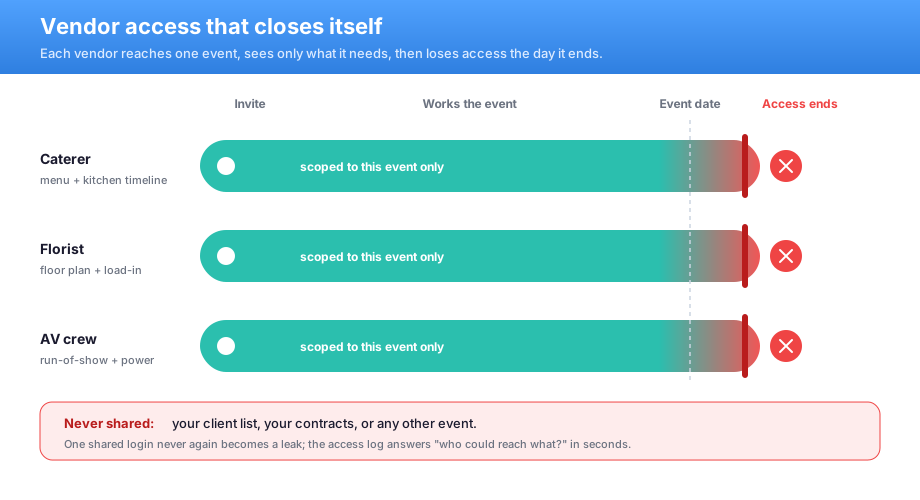
Each vendor sees only what the event needs. Specifically, the caterer reaches the menu and the timeline. The florist reaches the floor plan. By contrast, neither reaches your client list or your contracts. As a result, one shared login never again becomes a leak.
Protecting contracts and client data
A signed contract is the most sensitive thing a small team holds. Specifically, a sensitivity label attaches protection to the file itself. It does not just protect the folder. As a result, a labelled contract cannot be forwarded outside the event. Furthermore, you can revoke access even after you share it. Critically, that is exactly what a careful client wants to see.
| Access need | The risky shortcut | The governed answer |
|---|---|---|
| Vendor joins an event | Shared team login | Scoped guest invite to one workspace |
| Limit what they reach | Trust and hope | Conditional access plus scoped folders |
| Protect the client list | Open drive for all | Labelled, access stays internal |
| Event wraps | Access left active for months | Guest expiry on the event date |
Onboarding a vendor in fifteen minutes
Onboarding should be a checklist, not a favour from whoever holds the password. Specifically, a repeatable flow makes a new vendor useful the same morning. Furthermore, offboarding is just as clean. As a result, the team stops trading security for speed. Therefore the fast path and the safe path become the same path.
- Invite the vendor as a guest to the event workspace only.
- Apply approved-device sign-in.
- Share the timeline and plan, not the client list.
- Set an expiry on the event date.
When the event wraps, nothing lingers. Specifically, the guest access expires on schedule. The log shows what the vendor could reach, and when. As a result, the answer to “who had access?” is a thirty-second export. By contrast, the old way was an uncomfortable guess.
📤 Delivering to clients without WeTransfer roulette
Client delivery is where event teams quietly leak. Specifically, a public link forwards forever and survives the event. However, it tells you nothing about who opened it. By contrast, a governed share link can expire on a date. It can require a sign-in. Furthermore, it logs every open. As a result, the client gets the file and you keep the record.
Delivery records also settle disputes. Specifically, a client claims they never got the final invoice. However, the log shows the exact open, with a timestamp. Therefore the conversation ends in seconds, not a long email thread. As a result, the team looks organised at the exact moment it matters.

A clean delivery also protects the next booking. Specifically, a client who gets one tidy link trusts the team with a bigger event. By contrast, a messy handoff plants a quiet doubt. As a result, delivery is not just admin. Notably, it is the last impression that wins the repeat business. Specifically, a returning client is worth far more than a new lead. Therefore the delivery step quietly protects next year’s revenue.
💳 Pricing and five-year savings of one hub
Licensing is where owners quietly overspend. Specifically, the staff who run the events need Microsoft 365 Business Premium. It already carries Entra identity, Defender security and Purview labels. Furthermore, vendors join free as guests with no paid seat. As a result, you license the small core team. Therefore you bring vendors in at no licence cost.
| Line item | Fragmented stack | On one hub |
|---|---|---|
| Files + collaboration | Separate drive plan | Included in the plan |
| Client delivery | WeTransfer Pro | Secure share links, included |
| Approvals + chat | Separate apps | Included |
| Identity + access | Add-on vendors | Included |
Consolidation also changes the shape of the spend. Specifically, a pile of lumpy, renewing CapEx-style tools becomes one line. That line is a predictable per-user, per-month OpEx cost. As a result, the owner can forecast the five-year TCO accurately. By contrast, the old way spiked without warning.
What event management file chaos costs over five years
Owners feel cost as a stack of monthly invoices. However, they never see one figure. Specifically, a fragmented team pays for overlapping tools and the hours staff burn moving files. By contrast, consolidating the hub trims roughly $37,000 over five years for a twenty-five-person team. Therefore the honest comparison is the five-year total, not this month’s bill.
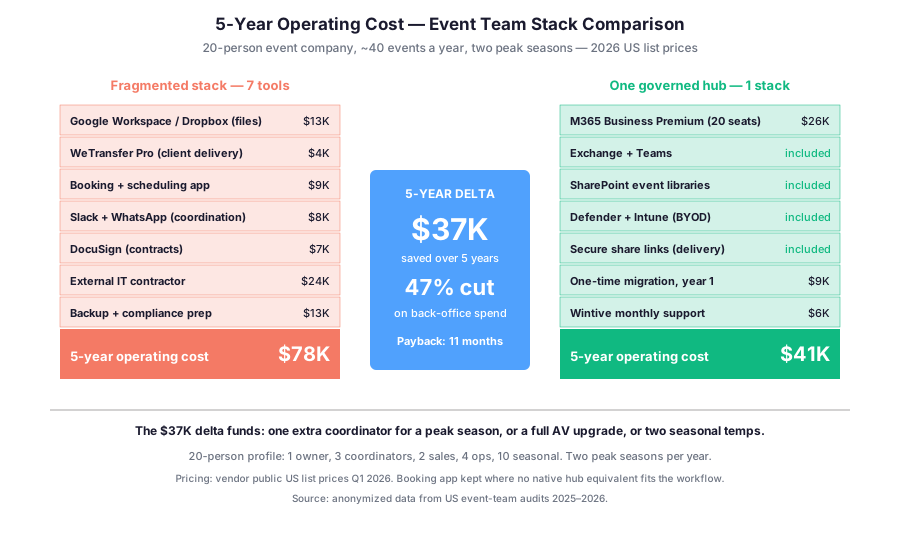
The model is illustrative. Notably, the gap widens with every extra tool. Specifically, Wintive builds this number for each team first, using your real seat count. As a result, the owner sees the true five-year picture. Therefore you decide with evidence, not vibes.
Scaling changes the maths as well. Specifically, a five-person team barely notices tool sprawl. However, at twenty or thirty people the overlap compounds fast. As a result, the consolidation savings grow with every new hire. Therefore the bigger the team, the stronger the case for one hub.
⚖️ How this compares with Dropbox and Google
Dropbox and Google Workspace are easy to start with. Specifically, for a solo planner either can be enough. Both sync large files well and need almost no setup. However, the limits appear at the governance line. By contrast, sensitivity labels, scoped guest access and full logs are where one governed hub pulls ahead.
| Need | Dropbox / Google | One governed hub |
|---|---|---|
| Sync large files | Strong | Strong |
| Labels on contracts | Limited | Native |
| Scoped guest access | Basic | Scoped plus device rules |
| Audit who opened a delivery | Limited | Full log |
The gap is not about sync speed. Specifically, both handle large files well day to day. However, it shows up at the first enterprise client. A client asks who opened a delivery. Notably, a label has to survive a forward. Therefore the platform choice tends to follow that contract, not your first event.
Cost is rarely the whole story for owners. Specifically, the daily friction of five tools wears a small team down. As a result, consolidation buys back focus as much as money. Therefore the calmer workflow is the benefit people actually feel. Notably, that calm is what keeps good coordinators from burning out. Specifically, retention of a trained coordinator saves a costly rehire. As a result, the hub pays back in people, not just in tools.
🗄️ Backup, recovery and the day a drive dies
A finished event is not done when it ships. Specifically, it has to be findable in two years. By contrast, retention rules keep contracts and approvals for the period the law requires. Then they clear on schedule. Furthermore, the same structure that powers search powers the archive. As a result, last season’s gala is one query away.
What we see after an incident: the teams that recover fast have version history and an off-site backup. Notably, they are not the ones with the biggest drive. Specifically, recovery is a process, not a product you buy the morning after. Therefore prevention and recovery belong in the file plan from day one. As a result, a bad day stays a bad day. By contrast, an unprepared team loses a season.
Recovery and prevention in event management file chaos
A team’s shared drive is a single point of failure. Specifically, ransomware crews target small teams as a soft route to bigger clients. Notably, the way in is often a forgotten guest account. However, one governed hub adds protection on every device. Furthermore, it adds version history that rolls back a bad day. As a result, Wintive pairs this with a tested, off-site backup.
Recovery also needs a rehearsal, not just a tool. Specifically, Wintive runs a restore test before any real incident. As a result, the first ransomware call stays calm. Therefore the backup is proven, not assumed. By contrast, an untested backup is just a hopeful guess.
🗓️ A ninety-day plan to end event management file chaos
You do not rip out five tools in a weekend. By contrast, you should not even try. Specifically, a staged ninety-day plan moves the team without stalling a live event. Furthermore, each phase delivers a visible win. As a result, coordinators stay on side. Therefore they do not mourn the tools they knew.
- Map every tool, drive and login, then agree what lives where (weeks 1–2).
- Stand up the folder structure, naming standard and labels (weeks 3–6).
- Move active events across and bring vendors in as guests (weeks 7–10).
- Switch delivery to secure links and retire the dead tools (weeks 11–13).
By the end, the team runs on one governed hub over its dedicated storage. Specifically, the old subscriptions lapse and the logins shrink. As a result, the team has one place to look. Therefore the savings and the calm arrive in the same quarter.
When one hub is the wrong fix for event management file chaos
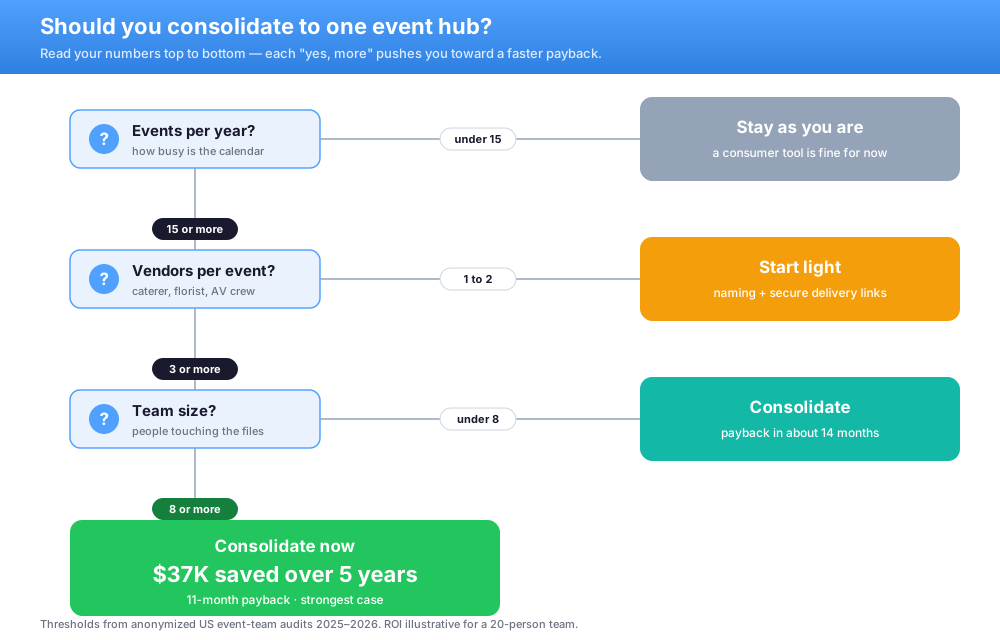
Honesty keeps trust, so here are the exceptions. Specifically, a true solo planner with one client rarely needs scoped guests or labels. However, a good consumer tool may serve them fine for now. By contrast, a team living inside one all-in-one event app gets less from a separate hub.
Some workloads a hub should never own. Notably, real-time edit of heavy raw video is one. Specifically, that wants a dedicated media server, not a sync folder. Therefore Wintive will tell you when the honest answer is a smaller change. As a result, the plan still makes sense a year later. Specifically, the right tool today should never become next year’s expensive regret.
📚 More for Small Teams
🎯 Get a productized Microsoft 365 audit tailored to your event team
Full environment audit for a US event business. Specifically, it covers a tool-sprawl inventory and a what-lives-where storage plan. Furthermore, it covers a naming and versioning standard, a vendor access review and a five-year cost model. You get a written report with prioritized recommendations, plus 14 days of email Q&A.
❓ Event management file chaos: frequently asked questions
These are the questions US SMB event owners and small teams ask us most, gathered from real rollouts.
Common event management file chaos questions
Not on its own. A shared plan is built for documents, not terabytes of raw video. Keep heavy media on dedicated storage. Use the hub for quotes, contracts, BEOs, delivery and access.
Move to one folder with a naming standard and version history. Every change keeps the same file name. Prior drafts stay one click away. The result is a single source of truth, not a pile of renamed copies.
Yes. Guest access lets a caterer or florist into one event with no paid seat. Approved-device rules keep them safe. An expiry removes access on the event date.
Cost and platform questions
Send a governed share link that expires, requires a sign-in and logs who opened it. Unlike a public link, it can be revoked. It leaves a trail. The client gets the file and you keep the record.
Core staff need one business plan at around $22 per seat each month. Vendors join free as guests. Most teams save roughly $37,000 over five years by dropping overlapping tools.
About ninety days for a typical team, in staged phases that never stall a live event. You map tools, stand up the structure, move active events, then switch delivery and retire old subscriptions.