Event company data security is no longer an IT footnote. It is an owner’s decision. Every wedding, gala and product launch you run leaves you holding a small mountain of guest and client information. Most of it sits in tools never built to protect it.
This guide is written for the founder, not the engineer. Specifically, it shows what a Microsoft 365 audit checks before a breach finds the gaps for you.
🎯 Worried a leaked guest list could cost you your next big client?
Wintive secures the information US event and hospitality teams already hold. Specifically, the work covers multi-factor sign-in, scoped guest access, managed laptops and protected contracts. Furthermore, it adds a clear access trail and a predictable monthly cost.
📅 Book a Free 30-Min Call | 💬 Chat on WhatsApp | See Our Plans →
This guide maps the information you hold, the five everyday ways it leaks, and the vendor risk that grows with every booking. Furthermore, it shows what an audit checks first, what a breach really costs, and the ninety-day order in which to fix each gap.
🎯 Why event company data security is now an owner’s decision
📌 TL;DR — event company data security in 2026: A US event business holds guest lists, deposits and VIP contacts. As a result, it is a soft, high-value target. By contrast, most teams guard it with shared logins and consumer apps. Therefore one audit closes the gaps a breach would hit first.
The numbers are blunt. Notably, roughly a third of these businesses have already reported a breach, and most were hit more than once in a year, per published breach research. However, the headline figure is rarely what ends a small firm.
The reputation math behind one leak
Picture the follow-up call after a flawless event. A corporate client asks how you store their attendee list. However, you cannot answer with confidence. As a result, the renewal stalls. In practice, enterprise buyers now send a short security questionnaire before they sign anything.
That questionnaire is where your answer becomes part of your sales pitch. Specifically, a clear reply wins the contract, and a vague one quietly loses it. Furthermore, the questions echo formal standards like SOC 2 and, where health details appear, HIPAA. Therefore the same controls that protect your guests also unlock larger clients. Notably, this is the moment most owners realise security is a revenue question, not a cost. Specifically, the teams that answer well tend to win the repeat bookings. Furthermore, they get referred to other corporate clients who ask the same questions. Therefore the upside is not only avoided loss. As a result, it is won work, and a reputation that quietly compounds with every clean event.
📂 What you are already holding
Start with an honest inventory. You hold far more than a calendar. Specifically, you keep guest lists with names, emails and plus-ones. You keep dietary and accessibility notes, which count as health details. Furthermore, you keep card details for deposits, private numbers for VIPs and the signed contracts that set your rates.
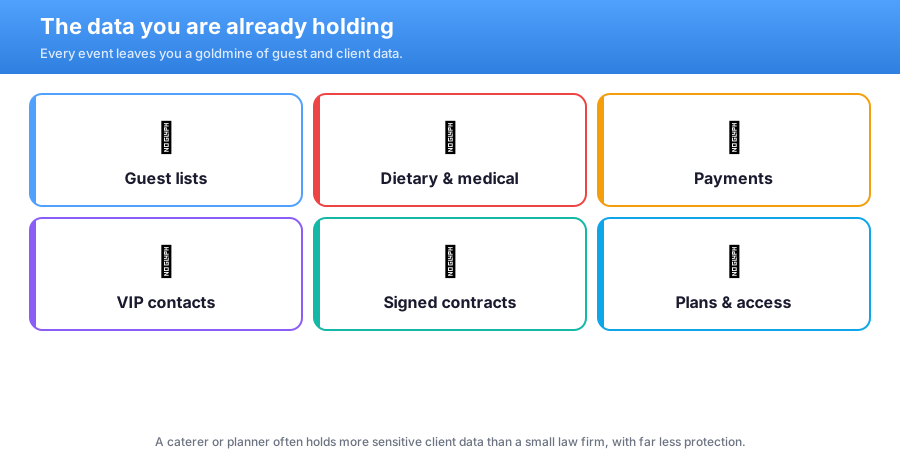
Each category carries its own weight. However, the dietary and medical notes deserve special care. By contrast with a plain name, a medical need is protected information in many states. Therefore a leak there is not merely embarrassing. As a result, it can trigger a reporting duty, a regulator letter and a fine, all at once.

Most owners underestimate this pile because it never sits in one place. Specifically, it is spread across an inbox, a personal drive, a booking tool and a group chat. Furthermore, no single person can say where the newest copy lives. Therefore the first job is simply to see it clearly. In practice, naming the data is half the battle. Furthermore, that single map is the first thing an auditor asks to see.
🔓 The five ways it quietly leaks
Most leaks are dull. They are not master hackers. In practice, they are everyday habits a busy team never closed. Specifically, five gaps cause the majority of incidents. Furthermore, each one is cheap to fix once you can actually see it.
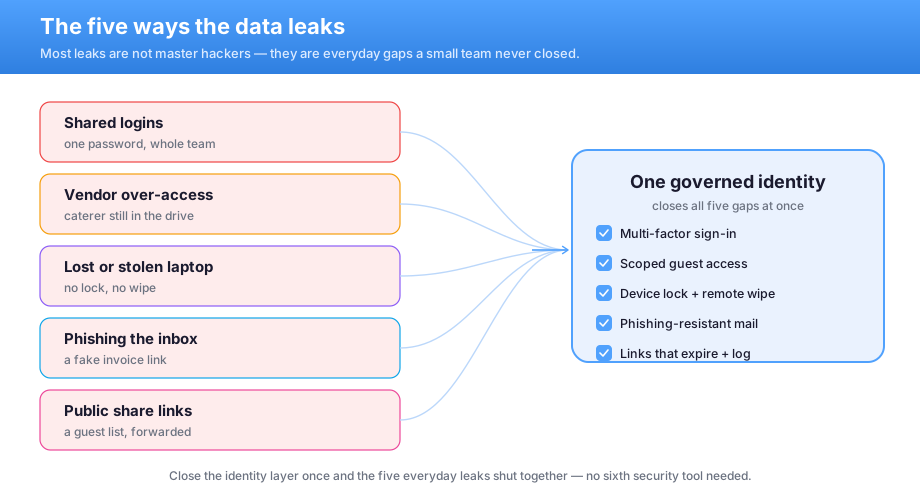
Look closely and a pattern appears. Every one of these five gaps is really an identity problem. Specifically, the wrong person can reach the records, from the wrong device, with no log kept. Therefore you do not need five separate security products. By contrast, you need one governed identity layer, and it closes all five at the same time.
What we see across the 60+ tenants we manage: most event teams cannot say which vendor still holds a live link to last season’s guest list. Specifically, the common mistake is buying more storage instead of closing access. In practice, a single forgotten share link can fail the first client security review. Notably, that review is the questionnaire enterprise clients now run as standard. Therefore Wintive fixes the access system first, and then the answers fall into place.
None of this requires a security analyst on staff. However, it does require a deliberate setup. As a result, the next sections walk these gaps in the exact order a Microsoft 365 audit checks them. Specifically, each gap below maps to one control on that audit.
🔑 Identity is the front door
Identity is where almost every attack starts. Therefore it is where your defence must start too. Specifically, Microsoft 365 Business Premium adds multi-factor sign-in for the whole team. Furthermore, Microsoft Entra ID decides who can reach what, and from where. In practice, a stolen password on its own stops being enough to get in. Furthermore, this matters more in events than in most trades. Specifically, your team signs in from venues, hotels and home, on phones and shared laptops. Therefore the old idea of a safe office network simply does not apply. As a result, the identity itself has to be the perimeter.
Multi-factor sign-in and event company data security
Multi-factor sign-in is the single highest-value fix for event company data security. However, it is often skipped because it feels like friction. By contrast, modern sign-in uses a quick phone tap or a passkey. Therefore the friction is seconds, not minutes.
Conditional access then adds quiet judgement on top. Specifically, it can allow a normal sign-in from your office but challenge a strange one from overseas at 3am. Furthermore, it can require a managed laptop for anything sensitive. As a result, the most common break-in route closes for the price of a setting, and your team barely notices the change. Notably, this is the control enterprise clients ask about by name. Therefore turning it on protects you and reassures them at the same time. In practice, it takes an afternoon to roll out across a small team.
🚪 Your vendors are the side door
Your own logins are only half the picture. Specifically, every event pulls in outside help. A caterer, a florist, an AV crew and freelance staff all touch your files. Furthermore, many keep their access long after the last guest leaves. As a result, your weakest link is often a password you do not control.
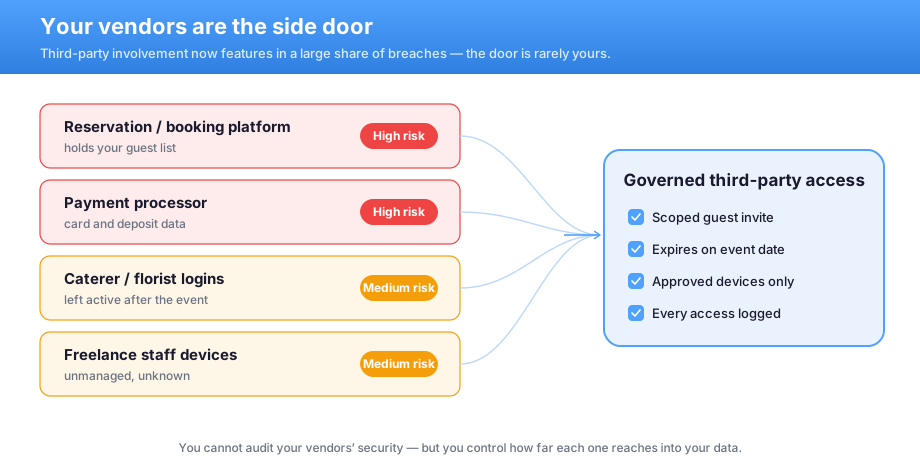
You cannot audit a partner’s security for them. However, you can control how far each one reaches into your records. Specifically, a scoped guest invite lets a caterer see one event and nothing else. Furthermore, an expiry date removes that access automatically on the event date. Therefore the side door closes on its own, with no awkward follow-up email.
| Outside party | Common risk | The governed fix |
|---|---|---|
| Reservation or booking platform | Holds your full guest list | Scope and review what it can export |
| Caterer or florist login | Left active after the event | A guest invite that expires by date |
| Freelance staff laptop | Unmanaged and unknown | Approved-device rules before access |
| Public share link | Forwarded beyond your control | Links that expire and log every open |
Notice the pattern in that table. In practice, none of the fixes ask the partner to do anything. By contrast, every control lives on your side of the line. Therefore you stay in charge, even when a supplier slips. Furthermore, every grant is logged, so you can always prove who reached what.
💻 The laptop that walks out the door
Devices are the next soft spot. Specifically, a planner’s laptop often holds the entire client history. Furthermore, a phone left in a taxi can expose the same records as a stolen server. However, few small teams lock or track these devices at all. As a result, one lost laptop quietly becomes one reportable breach.

This is solvable without a help desk. Specifically, Microsoft Intune enforces a screen lock, full encryption and a remote wipe. Furthermore, Microsoft Defender watches for malware and risky sign-ins in the background. Therefore a lost device becomes an inconvenience, not a headline. In practice, you wipe it from your phone on the train home and carry on with the day. Specifically, one policy covers phones, tablets and laptops together.
📄 The contract that must never leak
Some files are far more sensitive than others. Specifically, a signed contract reveals your rates, your terms and your client’s private details. However, most teams treat it like any other attachment. By contrast, a label can mark it as confidential and then follow it everywhere it goes. Furthermore, the same idea covers a deposit invoice or a celebrity rider. Specifically, you decide once how a file may be used. Therefore the rule travels with the document, not with the folder it happens to sit in.
Labels that travel with the file
Microsoft Purview adds sensitivity labels to your most important documents. Therefore a contract stays protected even when it is downloaded or forwarded by mistake. Specifically, the label can block printing or external sharing outright.
The record matters as much as the rule. Specifically, a label leaves a trail of who opened the file and when. Furthermore, that trail is exactly what a client questionnaire asks you to prove. As a result, the document quietly defends itself, wherever it lands, and you can show your work afterward. Notably, labels stop honest mistakes, not just attackers. As a result, a rushed forward to the wrong address simply fails. In practice, that one guardrail prevents the most common leak of all.
🛡️ What a Microsoft 365 audit reveals about event company data security
All of this comes together in one place. Specifically, a Microsoft 365 audit checks each layer against a clear standard. Furthermore, it scores exactly where you stand today. In practice, most event teams start mostly red, and that is completely normal.
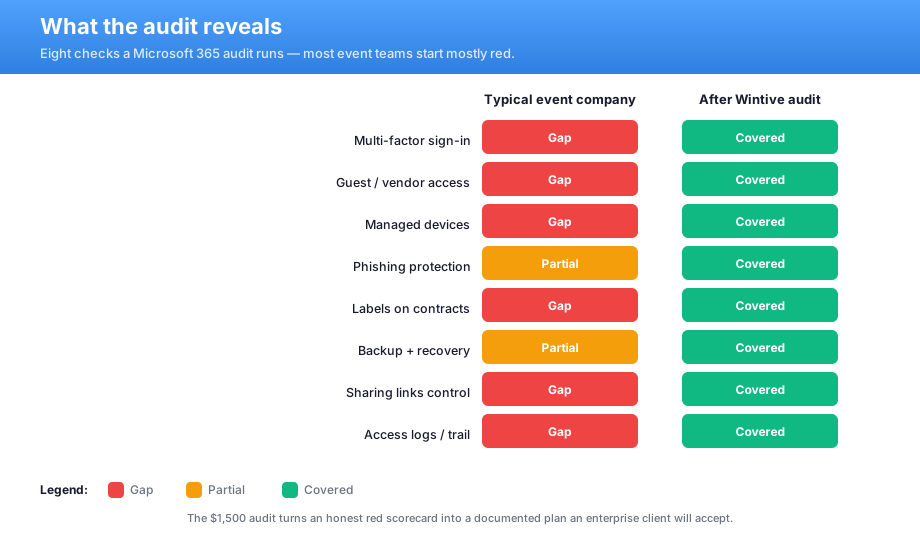
The value is not the red. By contrast, the value is the order. Specifically, the audit ranks the gaps by risk, so you fix the dangerous ones first. Furthermore, it turns a vague worry into a written plan with owners and dates. Therefore you stop guessing, and you start with the fix that actually matters most.
| What the audit checks | Why it matters | Typical first finding |
|---|---|---|
| Identity and multi-factor sign-in | The most common break-in route | Not enforced for every account |
| Guest and vendor access | Where third parties reach in | Old links still live after events |
| Managed devices | Lost hardware equals lost records | No remote lock or wipe in place |
| Labels and backup | Confidential files and recovery | No labels, untested restores |
Notably, the finished report is also a sales asset. In practice, you hand a client the summary and answer their questionnaire in minutes. As a result, the same audit that protects you quietly helps you win bigger work. Furthermore, the report names an owner and a date for every fix.
💸 Event company data security and the cost of doing nothing
Owners think in numbers, so here are the numbers. Specifically, a breach is never one cost. It is forensics, notification, fines, lost contracts and downtime, all stacked together. Furthermore, the sector average runs well into the millions. However, a small firm rarely sees the full figure. By contrast, it sees lost deposits, a stalled season and a damaged name. Therefore the real cost is the work that never comes back.
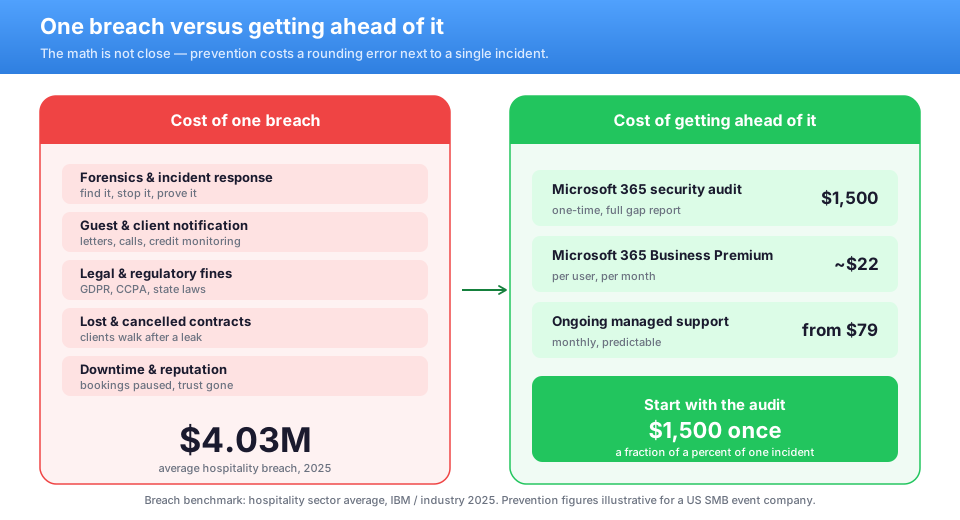
Prevention sits on the other side of that gap. Specifically, a one-time audit and Microsoft 365 Business Premium cost a small, predictable amount per user, per month. Furthermore, there is no large CapEx and no on-prem server to run and patch. By contrast, it is an OpEx line you can forecast a year ahead. Therefore the total cost of ownership is tiny next to a single incident.
Predictable beats a surprise invoice
A breach arrives as a surprise invoice you cannot budget. However, security as a monthly plan is the opposite of a surprise. Specifically, you know the figure before the year even starts.
That predictability is the real win for a small business. Specifically, the cost scales gently with your headcount, not with a disaster. Furthermore, it sits beside your other software as a steady line. As a result, the boring, forecastable number is the one that quietly protects your margin season after season. Specifically, you trade one unbudgeted catastrophe for a small, known line. Furthermore, that line scales gently as you add staff. Therefore the finance conversation gets easier, not harder, as you grow.
🗓️ A ninety-day plan to fix event company data security
You do not fix everything at once. Specifically, ninety days is enough to close the dangerous gaps in a sensible order. Furthermore, the sequence matters far more than the speed. Specifically, you close the cheapest, highest-risk gaps first. Therefore you are safer within the first week, not the last. In practice, momentum from early wins carries the rest of the plan.
- Days 1–30: turn on multi-factor sign-in for everyone, and book the audit.
- Through days 31–60: scope vendor access, add expiry dates, and enrol the team laptops.
- By day 90: label your contracts, confirm backups, and document the plan for clients.
By the end of the quarter, the picture changes completely. Therefore your scorecard moves from red to green. As a result, you can answer any client’s security question with a straight face.
When you are already in good shape
Some teams are further along than they think. However, a quick check still pays off. Specifically, even a strong setup drifts as staff and suppliers change. Furthermore, an annual review keeps the gaps from creeping back in. As a result, you confirm what works and tighten only what slipped. Furthermore, a yearly check keeps your client answers current. In practice, you never scramble to prove security the week a big contract lands.
📚 More for US service businesses
🎯 Get a productized Microsoft 365 audit built for your event business
Full environment audit for a US event and hospitality team. Specifically, it covers an identity and access review and a device check. Furthermore, it covers data labels, a vendor access review and a five-year cost model. You get a written report with prioritized fixes, plus 14 days of email Q&A.
❓ Event company data security: frequently asked questions
These are the questions US SMB event and hospitality owners ask us most, gathered from real rollouts with small teams.
Common event company data security questions
Yes, and more than you think. A guest list, dietary notes, deposit cards and VIP contacts are all sensitive. In several states, a medical or dietary need is protected information. Therefore your party file carries real, regulated risk. In several reviews, that single realisation is what moves an owner to act.
Multi-factor sign-in, without question. It closes the most common break-in route in a single afternoon. Add scoped guest access next, then managed devices. That order removes the biggest risks first and buys you breathing room. Furthermore, each step is reversible and low-drama for a small team.
Yes. A guest invite lets a caterer or florist into one event with no paid seat. Approved-device rules keep that access safe. Furthermore, an expiry date removes it automatically on the event date.
A few more answers for owners
A productized audit is fast. We review your environment, score each layer, and deliver a written plan, usually within days. You also get 14 days of email questions afterward, so nothing is left hanging.
The risks are identical. Guest data, vendor access and lost laptops do not care which suite you run. Therefore the same audit approach maps the gaps and the fixes either way.
Less than most owners expect. Business Premium is a small, predictable amount per user, per month, with no server to buy. A managed plan adds support on top. Both are forecastable OpEx, not a surprise.