🎯 Why Get-ExoMailbox replaces Get-Mailbox in 2026
In 2026, any PowerShell script still using Get-Mailbox against Exchange Online is either slow, unreliable, or both. Get-ExoMailbox is the REST-based replacement Microsoft shipped inside the ExchangeOnlineManagement module. Specifically, it is the default cmdlet for any SMB tenant administrator writing scripts in 2026.
🛡️ Free: M365 Tenant Security Audit Checklist
17-page PDF with 50 hands-on checks covering Entra ID, Exchange Online, SharePoint, Teams, Intune, license waste, and audit logging. PowerShell commands included. Built from 60+ real tenant audits at Wintive.
At Wintive, across 60+ tenant audits for SMBs with 50 to 500 employees, we regularly inherit PowerShell inventory scripts that take 5 to 10 minutes to enumerate mailboxes. In practice, swapping the core Get-Mailbox calls for Get-ExoMailbox cuts runtime by 3 to 4 times. Furthermore, it removes the Remote PowerShell session fragility that often breaks long-running audit scripts mid-way.
⚡ Performance: Get-ExoMailbox vs Get-Mailbox benchmark
Performance is the headline reason to migrate. Specifically, Get-ExoMailbox uses REST APIs over HTTPS similar to Microsoft Graph, while Get-Mailbox relies on Remote PowerShell (RPS) maintaining a persistent WinRM session with a domain controller. In practice, REST retrieves batch data far faster and degrades gracefully when the backend hiccups or changes domain controllers mid-session.
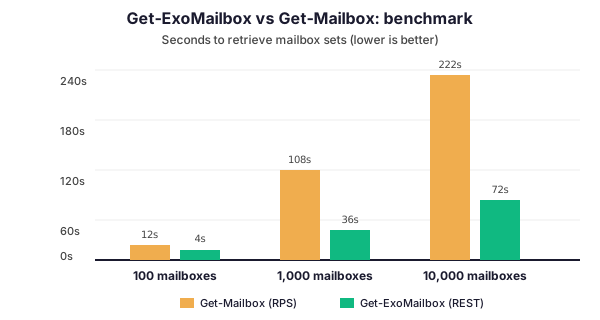
The numbers above reflect typical Wintive tenant audit runs for mailbox inventories. In particular, the gap widens dramatically past 1,000 mailboxes — exactly where SMB IT teams need reliable execution. As a result, any script that processes more than 10 mailboxes in a loop is a strong candidate for Get-ExoMailbox migration today.
Furthermore, in CI/CD scenarios where the same audit script runs nightly across thousands of mailboxes, the gap compounds. Specifically, a Wintive client with 4,500 mailboxes saw their nightly compliance scan drop from 47 minutes (Get-Mailbox) to 6 minutes (Get-ExoMailbox with property sets), which freed an entire automation runner for other workloads. Therefore, the savings are not just per-script but tenant-wide once you account for parallel pipelines and scheduled jobs.
🔧 Install the ExchangeOnlineManagement module
Before any Get-ExoMailbox call, you need the ExchangeOnlineManagement PowerShell module installed and connected. In practice, this is a 2-minute setup on any modern Windows or Linux machine running PowerShell 7.
# PowerShell: install and connect to Exchange Online
Install-Module -Name ExchangeOnlineManagement -Scope CurrentUser -Force

# Connect with modern auth (MFA handled automatically)
Connect-ExchangeOnline -UserPrincipalName admin@contoso.com -ShowBanner:$false

# Verify connection and version
Get-ConnectionInformation | Select-Object Name, State, ModuleVersion
Furthermore, the module now supports Ubuntu Linux and macOS in addition to Windows. As a result, CI/CD pipelines and scheduled automation runs no longer need a dedicated Windows box just for Exchange Online PowerShell. Moreover, modern authentication and MFA flows are handled automatically without needing legacy basic auth endpoints.
🎛️ The Properties parameter: the biggest gotcha
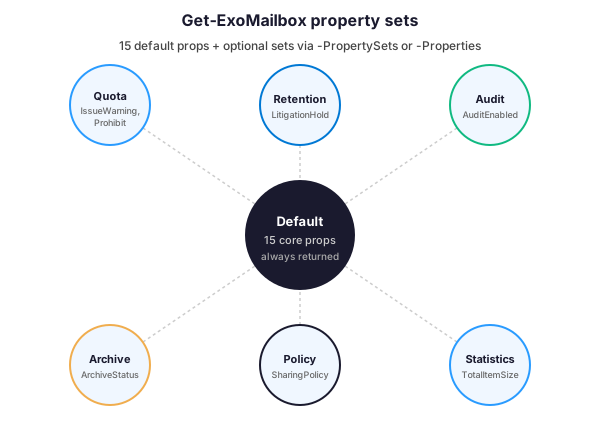
The single biggest surprise when migrating to Get-ExoMailbox is property filtering. Specifically, Get-ExoMailbox only returns 15 default properties per mailbox, unlike Get-Mailbox which returns every property. Importantly, this is deliberate — it is what makes REST calls 3-4x faster by only transporting the data you actually need.
The 15 default properties cover the essentials: DisplayName, PrimarySmtpAddress, UserPrincipalName, EmailAddresses, RecipientType, and notably ExternalDirectoryObjectId (the GUID pointer to the Microsoft Entra ID account). Every Exchange Online mailbox has this GUID, which makes it trivial to cross-reference mailboxes with Entra ID users in the same script.
📋 How to request property sets and individual properties
To retrieve properties outside the default 15, Get-ExoMailbox offers two parameters: -PropertySets for named groupings, and -Properties for individual attributes. For example, to see litigation hold status you need the Retention set; for mailbox size, the Statistics set.
# Request two property sets at once
Get-ExoMailbox -Identity user@contoso.com -PropertySets Retention, Quota

# Or request specific individual properties
Get-ExoMailbox -Identity user@contoso.com -Properties WhenCreated, LitigationHoldEnabled

# Combine both approaches
Get-ExoMailbox -Identity user@contoso.com `
  -PropertySets Statistics `
  -Properties WhenCreated, HiddenFromAddressListsEnabled
Consequently, your old Get-Mailbox scripts need auditing for property usage. Every property outside the default 15 must be explicitly requested, or your script will silently return empty values. Therefore, expect a migration pattern where you identify used properties, map them to the correct set or individual name, then update each call accordingly.
📊 Practical Wintive audit scripts with Get-ExoMailbox
The scripts below come directly from our standard SMB tenant audit workflow. Specifically, they demonstrate two of the most common Get-ExoMailbox patterns Wintive runs against every new client tenant.
📊 Audit: find mailboxes larger than 10 GB
Large mailboxes indicate users approaching quota limits, archiving gaps, or compliance exposure. In particular, this script flags every mailbox over 10 GB and exports the results for follow-up:
# PowerShell: audit mailboxes larger than 10 GB
$results = Get-ExoMailbox -ResultSize Unlimited -PropertySets Statistics |
  ForEach-Object {
    $stats = Get-ExoMailboxStatistics -Identity $_.UserPrincipalName
    $sizeGB = [math]::Round(($stats.TotalItemSize.Value.ToBytes() / 1GB), 2)
    if ($sizeGB -gt 10) {
      [PSCustomObject]@{
        DisplayName = $_.DisplayName
        UPN = $_.UserPrincipalName
        SizeGB = $sizeGB
        ItemCount = $stats.ItemCount
      }
    }
  }

$results | Sort-Object SizeGB -Descending |
  Export-Csv "large-mailboxes-audit.csv" -NoTypeInformation
⚠️ Audit: find external auto-forwarding rules
Rogue auto-forwarding is one of the most common data exfiltration vectors Wintive finds during tenant audits. Moreover, it is often invisible in the admin UI because the rule lives inside the user mailbox. The following script combines Get-ExoMailbox with Get-InboxRule to flag every external forward across the tenant:
# PowerShell: find all external auto-forwarding rules in the tenant
$domain = (Get-AcceptedDomain | Where-Object Default).DomainName

$findings = Get-ExoMailbox -ResultSize Unlimited |
  ForEach-Object {
    $rules = Get-InboxRule -Mailbox $_.UserPrincipalName -ErrorAction SilentlyContinue
    foreach ($rule in $rules) {
      if ($rule.ForwardTo -or $rule.ForwardAsAttachmentTo -or $rule.RedirectTo) {
        $targets = @($rule.ForwardTo) + @($rule.ForwardAsAttachmentTo) + @($rule.RedirectTo)
        foreach ($t in $targets) {
          if ($t -and $t -notmatch $domain) {
            [PSCustomObject]@{
              Mailbox = $_.UserPrincipalName
              RuleName = $rule.Name
              ExternalTarget = $t
              Enabled = $rule.Enabled
            }
          }
        }
      }
    }
  }

$findings | Export-Csv "external-forwarding-audit.csv" -NoTypeInformation
In our experience, running this script on a fresh SMB tenant typically surfaces 3 to 10 unexpected forwards — often legacy rules from former employees or misconfigured personal forwards. As a result, this script belongs in every quarterly tenant health review.
🧭 When to still use Get-Mailbox (and when not to)
Get-ExoMailbox is not the right choice in every scenario. In particular, there are two situations where Get-Mailbox remains valid or necessary:
| Dimension | Get-ExoMailbox | Get-Mailbox |
|---|---|---|
| Performance at scale | 5x to 10x faster | Slow above 1000 mailboxes |
| Property control | Granular property sets | Returns full object always |
| Transport protocol | REST over HTTPS | Remote PowerShell (RPS) |
| Authentication | Modern auth, MFA, certificate | RPS Basic auth (deprecated) |
| Environment supported | Exchange Online only | Exchange Online + on-premises |
| Recommended for | Audit scripts, automation, CI/CD | On-prem servers, single quick lookups |
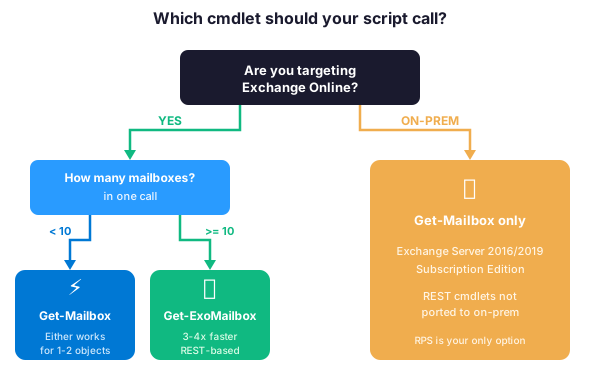
For on-premises Exchange Server deployments (2016, 2019, or Subscription Edition), Microsoft has not ported the REST-based cmdlets. Therefore, Remote PowerShell and Get-Mailbox remain the only option. Additionally, for simple one-off lookups against a single mailbox in the Exchange Online console, Get-Mailbox still works and the performance gap is negligible at that scale.
Furthermore, hybrid Exchange deployments add a small wrinkle. In particular, mailboxes that still live on the on-premises mailbox server require Get-Mailbox over Remote PowerShell against the local Exchange Management Shell, while mailboxes already migrated to Exchange Online require Get-ExoMailbox via the EXO v3 module. Therefore, audit scripts running against a hybrid topology often need both cmdlets in two distinct sessions, with results merged afterward by UPN.
In summary, the REST-based cmdlet is the default for any Exchange Online automation in 2026. Consequently, every audit script, scheduled task, or CI/CD automation pipeline that touches Exchange Online mailbox data should be running Get-ExoMailbox — not its slower, RPS-based predecessor.
❓ Get-ExoMailbox FAQ
Yes. In practice, Get-ExoMailbox uses REST APIs over HTTPS, while Get-Mailbox relies on Remote PowerShell with a persistent WinRM session. Specifically, for bulk operations over 1,000 mailboxes, the speed gain averages 3-4x based on Wintive tenant audit measurements. However, for a single-mailbox lookup the difference is negligible.
No. Microsoft has not ported the REST-based cmdlets to Exchange Server 2016, 2019, or Subscription Edition. Therefore, on-premises deployments still require Remote PowerShell and the classic Get-Mailbox cmdlet. As a result, hybrid environments need both modules depending on which server hosts the target mailbox.
The -Properties parameter requests individual named attributes (for example WhenCreated or LitigationHoldEnabled). In contrast, -PropertySets requests a grouped bundle like Retention, Quota, or Statistics that returns multiple related properties at once. For example, the Statistics set returns mailbox size, item count, and usage stats together. In practice, property sets are more efficient when you need several related attributes.
Yes, it still works, but Microsoft has deprecated its Remote PowerShell backend. Consequently, Get-Mailbox will eventually be removed when Microsoft retires legacy RPS endpoints. Therefore, any script you expect to run beyond 2026 should migrate to Get-ExoMailbox proactively rather than waiting for a forced cutover.
🔗 Keep exploring
Outlook OST file size limit: increase via registry, GPO or Outlook New
Need help migrating your Exchange Online scripts to Get-ExoMailbox and modern auth? Book a free 30-minute consultation with our Microsoft 365 experts.