SharePoint Online features in 2026 span seven pillars: document libraries, Microsoft Lists, pages, search, AI agents, Power Platform, and Brand Center. Specifically, the new SharePoint experience (March 2026) reorganizes the platform around Discover, Publish, and Build. Furthermore, AI-first capabilities now ship with site-level Copilot agents and a centralized Brand Center.
📋 TL;DR — SharePoint Online features in 2026
- 7 core pillars: Document Libraries, Microsoft Lists, Pages & Hub Sites, Search & Permissions, AI Agents (Copilot), Power Platform integration, Brand Center.
- New SharePoint experience (March 2026): the Discover / Publish / Build app bar replaces the legacy start page; admins toggle this at tenant level in the admin center.
- AI-first capabilities: per-site agents grounded in library content, Microsoft Lists as a knowledge source, Copilot Studio for custom agents, with an OpenAI fallback model.
- Deprecations to plan for: InfoPath Forms blocked May 18 2026, fully retired July 14 2026; SharePoint Alerts retire July 2026; Domain-Isolated Web Parts removed April 2026.
- Adoption gap: document libraries and lists are universal (above 90%); however, Default Approvers (18%), AI Agents (8%), and Brand Center (4%) remain underused in SMBs.
📥 Free PDF guide
Microsoft 365 Tenant Audit Checklist — 2026 edition
SharePoint, Exchange, Intune, and Defender. Furthermore, the checklist covers 22 audit checks with PowerShell snippets, built from 60+ SMB tenant audits.
🏛️ The seven SharePoint Online features at a glance
Every SharePoint Online deployment, whether a 25-seat SMB or a 5,000-seat enterprise, stands on the same seven feature pillars. Specifically, the diagram below maps each pillar to the central SharePoint Online hub. Moreover, it shows how the 2026 AI capabilities slot in alongside the legacy collaboration backbone.
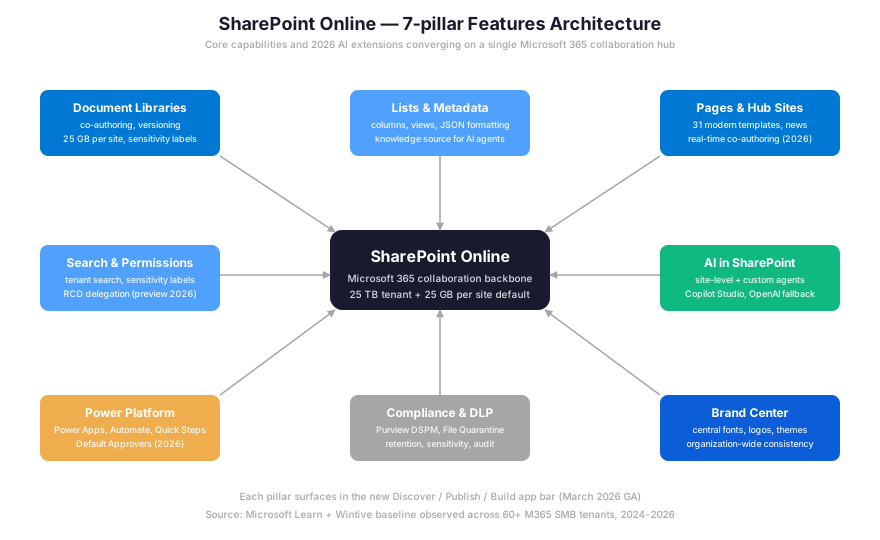
Two pillars (Document Libraries and Microsoft Lists) form the storage foundation. Furthermore, three pillars (Pages, Search, Brand Center) handle the publishing layer. Notably, two newer pillars (AI Agents and Power Platform integration) drive automation and conversational interfaces over the underlying content. Finally, compliance threads through everything via Purview DSPM and File Quarantine policies.
Pick the right SharePoint Online feature for your use case
Eight common business scenarios map cleanly to the seven SharePoint Online features. Specifically, the decision tree below answers “if I need X, which feature do I open first?” for the most frequent SMB requests our consulting team handles. Therefore, admins struggle less with the routine “which tool fits which job” question.
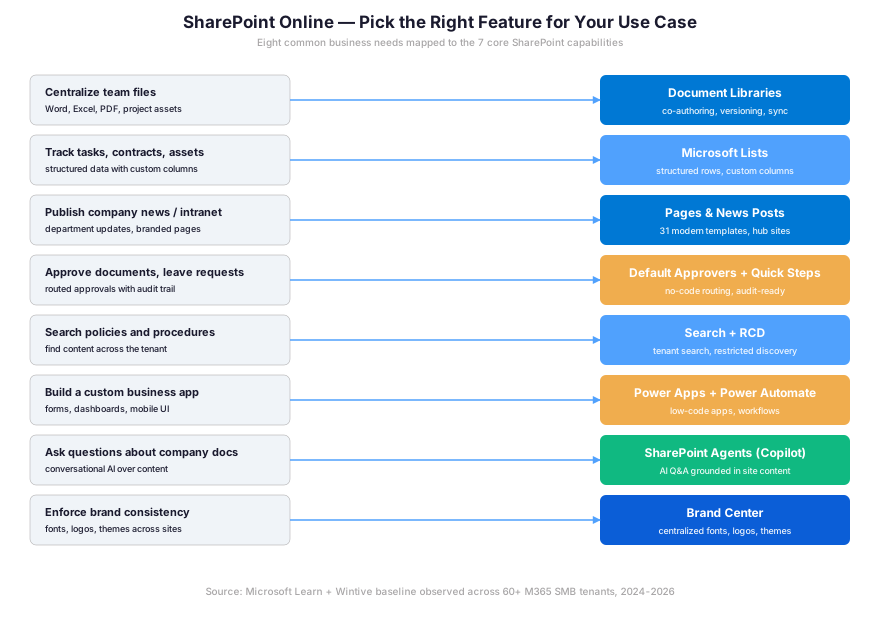
For deeper architectural detail and integration patterns, the official Microsoft documentation at learn.microsoft.com/sharepoint/introduction provides the canonical reference. However, our SMB-specific adoption data lives only in the Wintive baseline below.
📁 Document libraries: co-authoring, versioning, sensitivity labels
Document libraries dominate the SharePoint Online features adoption baseline. Specifically, in our audits across 60+ M365 tenants, 100% of organizations actively store files in at least one library. A library is a special list optimized for files. Notably, it adds built-in column types (Modified, Modified By, Checked Out To), version history, and a OneDrive sync target. Furthermore, every library inherits the parent site’s permission model by default.
📜 Prerequisites — configuring document library governance
- License: Microsoft 365 Business Standard or Business Premium (Premium adds sensitivity labels via Purview).
- Admin role: SharePoint Administrator (tenant-wide settings) or Site Owner (per-library settings).
- PowerShell module: Microsoft.Online.SharePoint.PowerShell (run
Install-Module Microsoft.Online.SharePoint.PowerShell -Force). - Tenant readiness: sensitivity labels published in Purview, retention policies defined per content type.
- Cost: baseline per user/month already covers libraries; advanced governance (DSPM, eDiscovery Premium) requires E5 or E5 Compliance add-on.
The 2026 governance standard combines three configurations. First, enable major-only versioning with a 50-version cap. Second, apply at least one sensitivity label at the library level. Third, require check-out for high-sensitivity content. Notably, libraries support up to 30 million items per library and 25 GB per file with the latest 2026 limits. Therefore, even high-volume engineering teams stay well below the technical ceiling.
PDF tools and OCR (rolled out Q1 2026)
Microsoft shipped four major PDF capabilities in early 2026. Specifically, the new tools cover inline annotation, basic editing (text replacement, page reordering), OCR for scanned documents, and watermark or password protection — all without leaving the browser. For document libraries that store legal contracts or HR records, the OCR layer makes scanned PDFs searchable. Furthermore, Copilot agents can now ground on and cite content from these PDFs.
Pre-rollout, the same operations required Adobe Acrobat or a desktop app and broke audit trails. With the native PDF tools, the version history captures every edit with the editor’s identity, which simplifies SOC 2 and ISO 27001 evidence collection. Indeed, this matters for predictable per-user cost: organizations no longer pay separate Acrobat seats for occasional PDF edits.
📝 Microsoft Lists: structured data and AI knowledge sources
Microsoft Lists is the structured-data sibling of document libraries. Where libraries store files, lists store rows. Specifically, custom column types include text, choice, person, lookup, calculated, hyperlink, multi-line text, location, and image. Furthermore, JSON column formatting allows conditional coloring and inline buttons. Therefore, citizen developers build polished list views without any TypeScript skill.
Late March 2026 introduced a major capability: Microsoft Lists as a knowledge source for custom agents in SharePoint and OneDrive. Specifically, with one list per agent and the appropriate Microsoft 365 Copilot license, conversational queries over structured business data become native. For example, tenants can now ask an agent “which contracts expire next quarter?” and get a cited answer pulled from a contract tracker list.
- Asset inventory — tracks hardware, software, and licenses with end-of-life dates.
- IT incident log — records tickets, severity, root cause, and resolution time.
- Employee onboarding tracker — checklist per new hire with assigned owners.
- Contract tracker — pairs naturally with a Copilot agent for renewal queries.
- Event registration — replaces the legacy InfoPath-based survey pattern.
However, lists carry a well-known gotcha: the 5,000-item view threshold. Specifically, beyond that, queries fail without an indexed column, and admins struggle to see why because the failure is silent. Therefore, plan for indexed columns on any list expected to grow past 3,000 rows. In fact, this gap is one of the most common mistakes Wintive observes during M365 audits.
🌐 Pages, news posts, and hub sites: the publishing layer
SharePoint pages and news posts let organizations publish internal communications. Specifically, the Build experience in the 2026 app bar is the new home for creating pages, lists, libraries, and AI agents. Notably, it ships from a single surface. Furthermore, Microsoft added 31 new modern templates in March 2026. The gallery improvements include better browsing, filtering, and search.
Hub sites group related team and communication sites under a shared navigation, theme, and search scope. For example, a typical mid-size SMB has one Home Site at the root. It then has three to five hub sites: Departments, Customer Resources, IT and Operations, HR, Compliance. Underneath sit dozens of associated team sites. However, hub site adoption sits at only 55% in our 60+ tenant baseline. The gap stems from tenants stuck on the legacy classic Publishing infrastructure.
Real-time co-authoring on pages (2026)
Following Word and PowerPoint, SharePoint pages now support real-time co-authoring in 2026. Specifically, multiple editors see each other’s cursors and changes. Therefore, this eliminates the legacy “page is locked by Jane Doe” friction. Indeed, that friction drove many SMB content teams off SharePoint and onto Confluence or Notion. In contrast, Confluence ships co-authoring as a paid add-on. SharePoint includes it in the base license.
🔍 Search, permissions, and Restricted Content Discovery
Tenant search returns results across all document libraries, lists, pages, and people that the requesting user has at least Read permission on. Specifically, the 2026 enhancement is Restricted Content Discovery (RCD), a feature in SharePoint Advanced Management. Furthermore, RCD lets admins flag a site as “discoverable only to its members” — even if other users technically have permission via a tenant-wide group.
Crucially for governance, SharePoint admins can now delegate RCD enable/disable to site admins with a justification field. Notably, this delegation is in public preview as of Q1 2026, off by default, and tenant-wide once enabled. Therefore, the PowerShell command below sets the conditional access policy on a sensitive site.
# Set Restricted Content Discovery on a sensitive site (2026 SP Advanced Management)
Connect-SPOService -Url https://contoso-admin.sharepoint.com

# Apply RCD to a single site
Set-SPOSite -Identity https://contoso.sharepoint.com/sites/Finance \
    -RestrictContentOrgWideSearch \$true

# Verify the configuration
Get-SPOSite -Identity https://contoso.sharepoint.com/sites/Finance |
    Select-Object Url, RestrictContentOrgWideSearch, RestrictedAccessControl
The same control surface in 2026 surfaces oversharing risks via Purview DSPM Data Risk Assessments, with item-level investigation and remediation. Furthermore, admins apply sensitivity labels in bulk, notify owners, or remove sharing links directly from the assessment view. Indeed, this is the targeted remediation path for the “Everyone except external users” sprawl problem most SMB tenants accumulate over years.
🧠 AI in SharePoint 2026: site agents, custom agents, OpenAI fallback
The most consequential 2026 change is AI in SharePoint, currently in public preview. Specifically, every site can now host a pre-configured agent that reasons across the site’s libraries and lists. Therefore, users ask “what is our remote work policy?” and the agent returns a cited answer drawn from the actual content, not a hallucinated summary.
💡 Wintive insight — the licensing trap of AI in SharePoint
Specifically, every user who interacts with a SharePoint Agent needs a Microsoft 365 Copilot license. The price sits at $30 per user/month. Furthermore, end users who only ask questions also need a license, not just creators. Therefore, in a 200-seat tenant, full rollout adds $72,000 per year. That number far exceeds most CapEx/OpEx projections we see in early SharePoint AI plans. In contrast, a tightly scoped pilot covering 20 power users keeps the bill predictable at $7,200 per year.
For more specialized workflows, organizations build custom agents via Copilot Studio. Common patterns include contract approvals tied to clause libraries, project-status agents grounded in tracker lists, and onboarding bots. Notably, the OpenAI fallback model option helps tenants in regions where Anthropic-backed Copilot is not yet enabled. They still access AI capabilities, with some feature variations.
The SharePoint Admin Agent, available with a Microsoft 365 Copilot license, performs three tasks no human admin has time for at scale. First, it runs tenant-wide permission analysis to detect oversharing. Second, it surfaces site lifecycle insights to identify inactive or ownerless sites. Third, it monitors storage trends. In our consulting practice, the Admin Agent typically surfaces 8 to 15 high-risk oversharing patterns per 100-site tenant within the first scan.
✅ Automation, Default Approvers, and Brand Center
The 2026 release added two no-code automation primitives. Specifically, Default Approvers let owners pre-assign approvers to a list or library. Therefore, every new item routes through the same chain without configuring a flow. Furthermore, Quick Steps are reusable mini-workflows attached to a list view. A button click triggers common operations: mark complete, assign reviewer, copy to archive.
For more complex routing — conditional branching, external system calls, scheduled triggers — Power Automate flows remain the right tool. Moreover, Power Apps complements the stack with low-code custom UIs that read and write back to SharePoint lists. Therefore, the Power Platform pillar shows up in the architecture diagram precisely because most mature SMB tenants use all three together.
| Automation tool | Best for | Skill level | 2026 status |
|---|---|---|---|
| Default Approvers | Single-step approval (leave, expense) | No-code (site owner) | GA Q1 2026 |
| Quick Steps | Repeatable list view actions | No-code (site owner) | GA Q1 2026 |
| Power Automate | Multi-step flows, external systems | Low-code (citizen dev) | GA, mature |
| Power Apps | Custom UI over lists | Low-code (citizen dev) | GA, mature |
| SPFx solutions | Custom web parts, navigation | Pro-code (TypeScript) | GA, evolving 2026 |
| Copilot Studio agents | Conversational AI workflows | Mixed | Public preview Q1-Q2 2026 |
Brand Center: organization-wide visual consistency
Brand Center reached general availability in early 2026. Specifically, it fixes the long-standing “every department picked their own colors” intranet sprawl problem. Furthermore, admins now manage organizational fonts, logos, and themes globally from one hub. New sites created by any user automatically inherit the brand, with no SPFx custom theme deployment required.
However, adoption is still very early. In our 60+ tenant baseline only 4% have configured Brand Center. The dominant blocker is awareness rather than complexity. Notably, most SMB admins simply do not know it exists yet. Therefore, for organizations with a defined brand guideline, Brand Center setup typically takes 30 to 90 minutes. It pays back the first time a marketing manager builds a self-service news page.
Plan SKUs for SharePoint Online features in 2026
Not every feature ships in every plan. Specifically, the table below pairs each major capability with the lowest-tier SKU that unlocks it. Therefore, admins can size licensing accurately before rolling out a new capability.
| Feature | Lowest plan | Indicative price | Notes |
|---|---|---|---|
| Document libraries, Lists, Pages | Microsoft 365 Business Basic | $6 per user/month | All foundation features included |
| Sensitivity labels (Purview) | Business Premium | $22 per user/month | E5 adds DSPM and auto-labeling |
| SharePoint Advanced Management (RCD) | SAM add-on | $3 per user/month | Bundled in E5 |
| SharePoint Agents (site-level) | Microsoft 365 Copilot | $30 per user/month | Per user that interacts with the agent |
| Brand Center | Business Standard | $12.50 per user/month | No additional license required |
⚠️ Lifecycle endings to plan in 2026
Microsoft confirmed three deprecations in 2026 that every SharePoint admin should track. None of them block the new SharePoint experience or AI agents. However, each requires migration planning if your tenant still uses the legacy capability.
- InfoPath Forms Service — Microsoft blocks publishing new or updated forms after May 18, 2026; full retirement July 14, 2026. Existing forms keep working but cannot be modified. Migration paths: Power Apps, Power Automate forms, Microsoft Forms.
- SharePoint Alerts (legacy email alerts) — full retirement July 2026. The 2026 successor is Power Automate flows triggered “when an item is created or modified” with conditional notifications. Notably, SMBs typically have 30 to 200 alerts to migrate, often forgotten on dormant lists.
- Domain-Isolated Web Parts — Microsoft removed these in April 2026 for all existing tenants. Custom SPFx solutions relying on iframe-isolated web parts must be rebuilt with the standard SPFx model.
Audit InfoPath usage with PowerShell
To audit InfoPath usage in your tenant, run the script below. Specifically, it enumerates all sites with InfoPath form libraries and counts the form templates per library. Therefore, tenants with non-zero counts have remediation work ahead of the May 2026 deadline.
# Audit InfoPath usage across SharePoint Online (run before May 18, 2026)
Connect-SPOService -Url https://contoso-admin.sharepoint.com

# Enumerate every site collection
\$sites = Get-SPOSite -Limit All

foreach (\$site in \$sites) {
    \$ctx = \$null
    try {
        \$ctx = New-Object Microsoft.SharePoint.Client.ClientContext(\$site.Url)
        \$lists = \$ctx.Web.Lists
        \$ctx.Load(\$lists)
        \$ctx.ExecuteQuery()
        foreach (\$list in \$lists) {
            if (\$list.BaseTemplate -eq 115) {
                # 115 = Form Library (InfoPath)
                Write-Output "InfoPath form library found: \$(\$site.Url)/\$(\$list.Title) (\$(\$list.ItemCount) items)"
            }
        }
    } catch {
        Write-Warning "Cannot access \$(\$site.Url): \$_"
    }
}
The script focuses on form library template ID 115 (the canonical InfoPath signature). For tenants exceeding 1,000 site collections, expect a 5 to 15 minute scan time. Furthermore, output the result to a CSV and triage forms by usage. Specifically, high-traffic forms migrate to Power Apps, single-use forms migrate to Microsoft Forms, and dormant forms get archived or deleted before retirement.
📊 Wintive baseline: feature adoption across 60+ M365 SMB tenants
Theory and feature lists matter, but adoption tells the real story. Specifically, the chart below summarizes how often each major SharePoint Online feature shows up in active use across the 60+ Microsoft 365 SMB tenants Wintive audited between 2024 and 2026. Therefore, you can benchmark your tenant against peer data rather than internal assumptions.
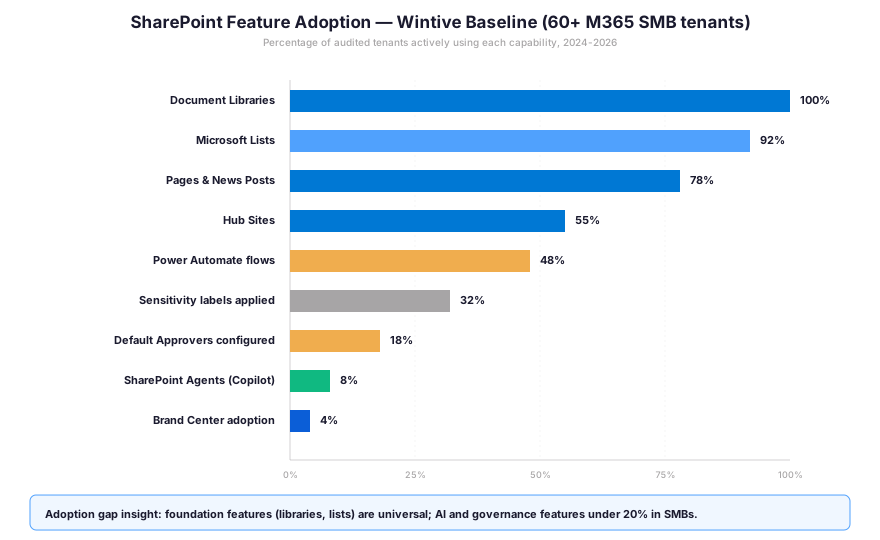
The pattern is striking: foundation features sit near 100% adoption, while AI and governance features remain under 20%. Specifically, this gap signals the biggest near-term opportunity for SMB tenants: roll out Default Approvers, sensitivity labels, and Brand Center before chasing custom Copilot agents.
💡 Wintive insight — from 60+ tenant audits
Specifically, the biggest gap is not in the new AI capabilities; rather, it sits in the governance basics. Furthermore, only 32% of audited tenants have applied any sensitivity label, and merely 18% have configured Default Approvers. Therefore, closing the governance gap before chasing AI agents typically returns far more value per dollar.
🎯 Common pitfalls observed in SharePoint feature roll-outs
Three patterns repeat across nearly every audit. Specifically, each maps to a feature that is technically enabled but operationally unowned. Therefore, each costs the organization measurable productivity over time. Notably, these are the most common mistakes Wintive encounters during M365 audits.
- Permissions sprawl from “Everyone except external users” — the default sharing scope on libraries makes every document visible tenant-wide. Furthermore, combined with Copilot grounding in 2026, this becomes a data exfiltration risk. Indeed, an agent will cite content from HR or Finance to any user who asks. Restricted Content Discovery (RCD) is the targeted remediation.
- Unpurged dormant team sites — 30 to 50% of an average tenant’s sites have not seen activity in over 12 months. Specifically, they consume storage quota, complicate search, and obscure the truly active sites. Therefore, the Site lifecycle insights tile in the SharePoint Admin Agent flags these automatically.
- List view threshold exceeded silently — lists that grew past the 5,000-item threshold without indexed columns return empty queries. Notably, the failure mode is invisible to the site owner because no error message surfaces. In fact, Wintive routinely finds tenant-critical lists that have silently failed for months because no one saw the gotcha.
🔍 Automated Tenant Health Check
See exactly which SharePoint features your tenant is missing — in 30 minutes
A 30-minute automated audit of your Microsoft 365 tenant. Specifically, the PDF report ranks SharePoint, Exchange, Intune, and Defender configuration against the Wintive 60-tenant baseline. Furthermore, you receive two emails of direct support within 48 hours.
❓ Frequently asked questions about SharePoint Online features
SharePoint Online in 2026 covers seven core feature pillars: document libraries, Microsoft Lists, pages and hub sites, search and permissions (with Restricted Content Discovery), AI Agents (Copilot-grounded), Power Platform automation (Default Approvers, Quick Steps, Power Automate), and Brand Center for organization-wide visual consistency.
A SharePoint Administrator opens the SharePoint Admin Center, goes to Settings, selects “New SharePoint experience” in the list of available settings, checks the box in the panel, and saves. The experience is available to all customers from March 3, 2026, with a per-user toggle to switch back during the preview phase.
SharePoint Agents require a Microsoft 365 Copilot license per user, both for creators and for end users who interact with agents. The site-level pre-configured agents and custom Copilot Studio agents share the same licensing requirement. The OpenAI fallback model is available where Anthropic-backed Copilot is not yet enabled, with some feature variations.
Microsoft blocks publishing new or updated InfoPath forms in SharePoint Online after May 18, 2026. Full retirement of InfoPath Forms Service occurs July 14, 2026. Existing forms remain usable in read-only mode but cannot be modified. Migration paths include Power Apps, Power Automate forms, and Microsoft Forms.
Yes. SharePoint Advanced Management in 2026 lets SharePoint admins delegate Restricted Content Discovery (RCD) control to site admins, who can enable or disable RCD with a justification. Delegation is off by default and can be enabled tenant-wide. The feature is in public preview as of Q1 2026.
🔗 Related Microsoft 365 reading
If this guide unlocked something, you may also enjoy these deeper dives into adjacent SharePoint and Microsoft 365 topics.
Read our guide on 6 tips that will make you a OneDrive pro for selective sync, Files On-Demand, and storage clean-up patterns that consistently free 30 to 50 GB per user.
Read our analysis: SharePoint Online: A Cost-Effective Solution. Specifically, it covers per-user pricing, predictable TCO versus on-prem SharePoint Server, and the breakeven point for SMBs.