Most small businesses assume Microsoft 365 already protects everything, so small business data backup rarely makes the priority list. The files sync, the email sits in the cloud, and nothing seems to vanish. That comfort hides a real gap: Microsoft keeps its own service running, yet it does not promise to keep your data forever. A deleted folder, a ransomware hit, or a staff member who leaves can quietly erase work you assumed was permanent, and the loss usually surfaces at the worst moment. Our team at Wintive has helped dozens of US small businesses close exactly this gap before it cost them a client or a deadline. This guide explains the risk in plain terms, then shows you how to fix it for good.
💾 Not sure what is actually backed up in your Microsoft 365?
Wintive helps US small businesses protect the data Microsoft leaves exposed. Specifically, we map what is at risk, set up an automatic off-site copy, and test that it restores. As a result, one bad day stops being a crisis and becomes a quick recovery.
📅 Book a Free 30-Min Call | 💬 Chat on WhatsApp | See Our Plans →
This guide follows your files from creation to recovery. First, it clears up what Microsoft does and does not protect. Then it covers how data disappears, what one bad day truly costs, and a simple plan that keeps you covered.
🛡 Why small business data backup is non-negotiable in 2026
📌 TL;DR — small business data backup protects the files Microsoft will not. The risk is rarely a dramatic hack. Instead, it is everyday deletion, ransomware, or a departing employee. A second, automatic copy kept off-site restores in hours.
The myth that quietly puts you at risk
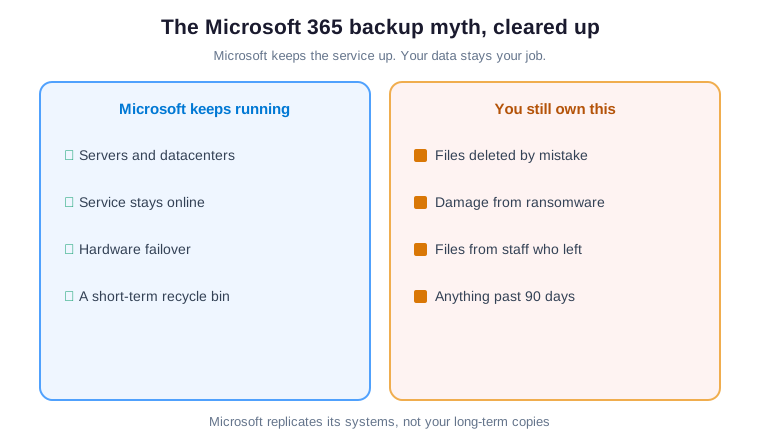
Most owners assume the cloud is the backup. In reality, Microsoft replicates its own infrastructure for uptime, not your long-term history. As a result, the moment someone deletes or overwrites a file, a countdown begins. Notably, once the default window passes, that copy is gone for good.
This is the gap that quietly grows under every busy team. Furthermore, it stays invisible because nothing breaks from day to day. By contrast, the problem only appears when someone urgently needs a file that no longer exists. That is the worst possible moment to learn how backups really work.
What Microsoft actually promises
Microsoft promises a reliable, available service, and it delivers that well. By contrast, protecting your content against your own mistakes is shared responsibility, and your share is the data itself. Furthermore, the built-in recycle bin and version history only reach back days, not years.
Read the fine print and the split is clear. Microsoft keeps the platform running, while you stay responsible for keeping copies of what matters. Therefore a real backup lives outside that short native window, under your control. In short, the cloud is not the same thing as a backup.
Where your files really live
Your business runs across more places than most owners picture. Email sits in mailboxes, documents live in shared sites, and chats hold decisions and files. In addition, individual drives store the work people forget to move anywhere central. Each of these is data you would struggle to recreate from memory.
That spread is what makes loss so easy to miss. Furthermore, no single screen shows you everything at once. As a result, a gap in one place can sit unnoticed for months. That is exactly what small business data backup is meant to protect.
Picture trying to rebuild a year of contracts from memory and old emails. In practice, that is exactly what loss without a backup demands. Furthermore, the missing pieces are never the ones you expect. As a result, broad coverage beats clever guesswork every time.
Email, files, sites and chats
Email is the obvious target, yet it is rarely the riskiest. Shared sites and team drives hold the contracts, designs and records your clients depend on. Moreover, chat threads quietly store attachments that no one saved elsewhere.
A backup worth having reaches all of it, not just the inbox. By contrast, protecting email alone leaves your most valuable work exposed. Therefore the first job is to map every place data actually lives. Only then can you protect it with confidence.
💥 How files disappear on an ordinary day

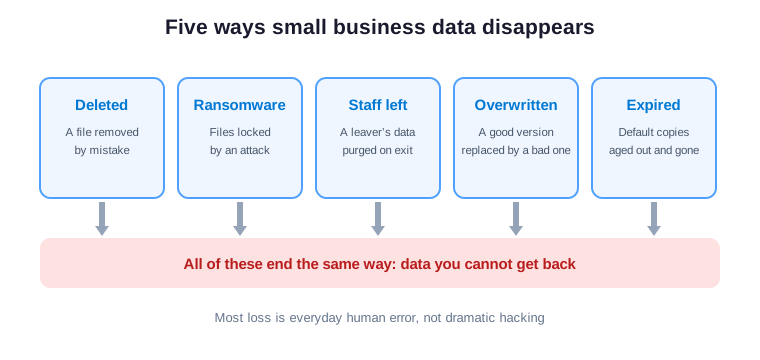
Data loss rarely looks like a movie scene. Instead, someone empties a folder, a sync goes wrong, or an attachment is overwritten. Furthermore, a single ransomware email can lock years of files in minutes.
The common thread is that nothing warns you in advance. As a result, the loss stays invisible until the file is suddenly needed. By contrast, a backup quietly captures a copy before any of that happens. That copy is the difference between a shrug and a disaster.
Human error beats hackers
Headlines focus on hackers, but the numbers tell a quieter story. Most loss starts with an honest mistake by a busy person. Specifically, a wrong click, a hasty delete, or a bad overwrite does the damage.
The lesson is not to trust people less. Instead, it is to keep a copy that survives the inevitable slip. As a result, the best protection is forgiving, not fearful. By contrast, blaming staff never gets a single file back.
⏳ The 90-day trap inside Microsoft 365
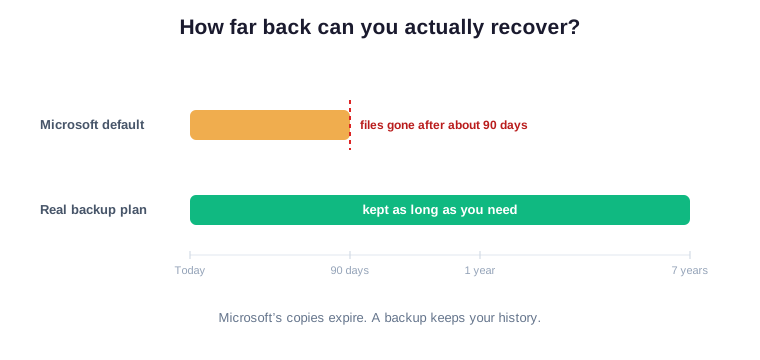
Microsoft does keep deleted items for a while, which reassures people. However, that window is short, and it varies by content type. Specifically, once the default retention passes, the recycle bin empties itself. Therefore relying on it is a gamble you only lose once.
Many owners discover this limit at the worst possible time. Furthermore, the missing file is often the one that mattered most. This is the gap a small business data backup is built to close. By contrast, an independent copy never expires on Microsoft’s schedule.
Why default copies expire
Those built-in copies exist to undo recent slips, not to archive your history. In addition, they live inside the same account that a mistake or an attacker can reach. As a result, they are a convenience, not a safety net.
A real backup behaves differently on purpose. Specifically, it keeps an independent copy for as long as you choose, well beyond any default window. Moreover, it sits apart from the account it protects. Therefore it survives the very events that erase the originals.
✅ What good small business data backup looks like
A backup is only useful if it covers the right things and survives the wrong ones. In practice, that means an automatic, off-site copy of every place your work lives. Moreover, it means keeping enough history to recover from a problem you spot late.
Good protection is also quiet and consistent. Specifically, it runs on a schedule rather than on someone remembering. As a result, coverage does not depend on a good week or a calm month. The table below shows what a complete plan includes.
| What to protect | Why it matters | If you skip it |
|---|---|---|
| Email and calendars | Client threads and commitments | History of past staff vanishes |
| Shared sites and drives | Contracts, designs and records | Core work is unrecoverable |
| Team chats and files | Decisions and stray attachments | Quiet gaps appear later |
| Personal drives | Work people never moved | Knowledge leaves with staff |
What a small business data backup should cover
Start with the assumption that any single item could vanish tomorrow. Therefore the backup should reach email, sites, drives and chats without you remembering each one. Furthermore, it should run on a schedule, not on willpower.
Coverage you do not have to think about is the real goal. By contrast, a plan that depends on manual effort fails on the busy days. As a result, automation is not a luxury here, it is the point. In short, set it once and let it run.
It also pays to think about how much history you keep. Specifically, some problems hide for weeks before anyone notices. Therefore a few months of history is far safer than a few days. In short, depth of history matters as much as breadth of coverage.
Three copies, two places, one off-site
A simple rule keeps backups honest. Keep three copies of important data, on two kinds of storage, with one copy off-site. As a result, no single failure, theft or attack can take everything at once.
This rule sounds technical, but the idea is plain. Specifically, spreading copies removes any single point of failure. By contrast, one copy in one place is not a backup, it is a hope. Therefore distance and duplication are what make a copy trustworthy.
💸 What one bad day really costs
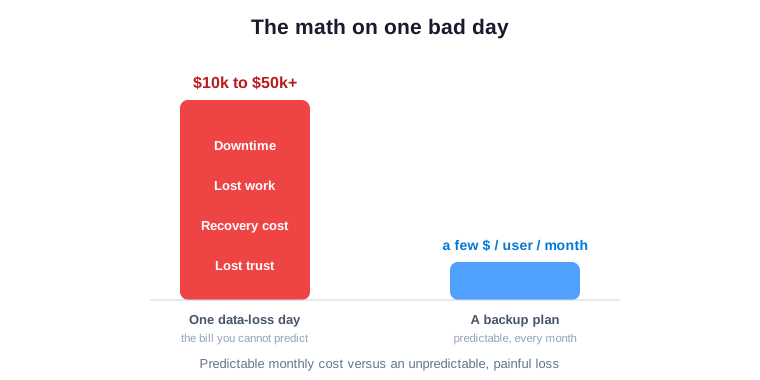
Owners underestimate loss because they only picture the missing file. In reality, the bill includes downtime, redone work, lost trust, and sometimes a fine. Moreover, the team stops earning while it scrambles to rebuild.
The numbers add up faster than most expect. Specifically, a day offline can erase weeks of margin for a small team. As a result, the cost of prevention looks tiny next to the cost of recovery. The chart below puts the two paths side by side.
Downtime is the hidden bill
A lost file is annoying, but a stalled business is expensive. Specifically, every hour offline is payroll spent with nothing produced. Furthermore, clients notice when work and replies suddenly stop.
Recovery speed is therefore worth more than it first appears. By contrast, a slow restore extends every one of those costs. As a result, fast recovery is the quiet value a good backup delivers. In short, you are buying back time, not just files.
Consider a single team blocked for one working day. Specifically, salaries are still paid while almost nothing ships. Moreover, the missed deadlines ripple into the following week. As a result, the true cost of downtime is always larger than the invoice suggests.
🔁 A copy only counts if it restores

Plenty of businesses think they are protected, right up to the moment they try to recover. However, a backup that has never been tested is just a hope. Specifically, broken jobs, missing items and slow restores only show up under pressure.
The restore, not the backup, is the real test of any small business data backup. By contrast, a copy you cannot retrieve quickly is barely a copy at all. As a result, a tested restore is what turns a promise into protection. In short, prove it before you need it.
Test the restore before you need it
Set a simple habit of restoring a sample file every quarter. In addition, time how long a full recovery would actually take, then write it down. As a result, you turn a vague promise into a known, repeatable result.
Testing also surfaces problems while they are still cheap to fix. Specifically, a missed mailbox or a slow job is easy to correct in calm conditions. By contrast, discovering it mid-crisis is expensive and stressful. Therefore a quarterly test is cheap insurance on your insurance.
Keep the test simple so it actually happens. For example, restore one document and one mailbox item, then note the time. In addition, repeat it on a fixed date each quarter. As a result, testing becomes a habit rather than a heroic event.
🔍 A small business data backup audit, step by step
An audit replaces guesswork with a clear picture of what is covered. First, it lists every place your data lives. Then it checks what is backed up, how far back it reaches, and how fast it restores.
The value is not the list, it is the certainty. Moreover, an audit shows exactly where you are exposed today. The scorecard below shows the before-and-after at a glance.
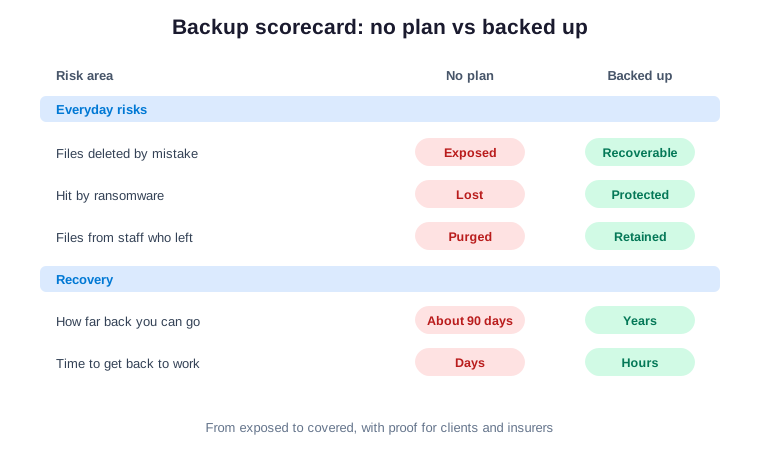
The pattern below is one we see in nearly every audit we run for small businesses. Specifically, the biggest gaps are rarely where owners expect them to be. As a result, the findings tend to surprise even careful, well-run teams. Therefore it pays to check rather than to assume you are covered.
Across the 60+ tenants we manage, we see the same common mistake in small business data backup every time. You back up email, yet shared sites and drives slip through. As a result, backups silently fail to capture the files that matter, and history reaches back days, not years. It all looks fine until a folder is gone and the deadline is today. Notably, the fixes map straight to the PCI, SOC 2 and NIST controls your clients and insurer already expect. Therefore the audit does more than find gaps. It hands you proof, and proof is what wins contracts and lowers premiums.
What a small business data backup audit checks first
The first question is always what would hurt most to lose. From there, the audit confirms coverage across email, sites, drives and chats. Furthermore, it measures how far back you can go and how quickly you can restore.
Next it looks for the quiet assumptions that cause real damage. Specifically, it flags anything protected by hope rather than by a copy. As a result, you leave with a ranked list, not a vague worry. In short, the audit turns guesswork into a plan.
📊 The math, in plain numbers
The case for a backup gets obvious once you compare the two paths. On one side sits a small, predictable monthly cost. On the other sits an unpredictable loss that arrives without warning.
Owners respond to numbers, not fear, and the numbers are stark. Specifically, prevention costs a few dollars per user, while recovery costs thousands. As a result, the trade-off is hard to argue with. The table makes it impossible to ignore.
| Your choice | What it takes | What you get |
|---|---|---|
| Back it up | A few dollars per user each month | Fast recovery and proof |
| Leave it to luck | Nothing, until one bad day | A scramble and a big bill |
What good small business data backup looks like in 2026
Strong protection in 2026 often uses tools you may already own. Specifically, Microsoft 365 Business Premium adds longer retention and stronger controls than Business Standard, at one per-user, per-month price. Moreover, most teams never need to stitch together a separate cloud backup on AWS or GCP.
For a healthcare practice or a financial services firm, that built-in proof maps neatly to the controls auditors expect. Framed as total cost of ownership, a backup is predictable OpEx that prevents a sudden CapEx hit after a loss. In addition, it aligns with the NIST Cybersecurity Framework that your clients increasingly cite. As a result, small business data backup is risk you can finally price.
📅 Your 90-day small business data backup plan
You do not need everything at once, which is the part owners miss. Instead, a 90-day plan turns a big worry into steady, visible progress. Specifically, you map the risk, turn on protection, then prove it works.
Each phase produces something you can show. Moreover, the work stays light enough to fit around real business. As a result, you reach full coverage without a disruptive project. The phases below keep it calm and easy to defend.
| Phase | What you do | What you get |
|---|---|---|
| Days 1 to 30: Map | List where data lives and what is covered | A clear picture of the gaps |
| Days 31 to 60: Protect | Turn on automatic, off-site backup | A second copy you control |
| Days 61 to 90: Prove | Test a restore and time it | Proof for clients and insurer |
Turning the plan into proof
By the end of the quarter, your data has a second home and a tested way back. In addition, you hold a simple record of what is covered and how fast it recovers.
That record is more valuable than it looks. Specifically, it is exactly the evidence clients and insurers ask for. As a result, a backup stops being a checkbox and becomes proof. By contrast, an untested setup reassures no one.
Treat that proof as a living document, not a one-time file. Furthermore, update it whenever your tools or team change. As a result, the evidence stays accurate the moment a client or insurer asks. In short, proof you maintain is proof you can trust.
❌ Where most teams get this wrong
The biggest mistake is assuming the cloud already handles it. The second is backing up email while leaving shared sites exposed. Furthermore, many teams set up a backup and never test the restore. Good small business data backup closes all of these at once.
It also helps to treat backup as one layer among several. For example, our guide to small business device security covers the laptops your files sit on, while small business email security stops the messages that often start the trouble. In addition, small business cyber insurance expects exactly the proof a tested backup provides.
Quick wins this week
You can make real progress before any audit begins. First, confirm whether anything outside email is actually backed up. Then pick one important folder and try to restore a copy.
Those two checks tell you almost everything. As a result, you will know within an hour whether you are protected or exposed. Moreover, the answer often surprises people. Either way, you now know where to start.
📚 More for US small businesses
These guides go deeper on the pieces around your backup. Together, they cover the devices your files live on, the email that often starts the trouble, the insurance that expects proof, and the built-in tools that handle short-term recovery.
🔒 Find every file a bad day could erase
It is a full Microsoft 365 audit for a US small business. Specifically, it maps every place your data lives, checks what is backed up, and measures how far back and how fast you can recover. Furthermore, it turns the gaps into a ranked, written plan. As a result, you get a clear report with proof, plus 14 days of email Q&A.
❓ Small business data backup: frequently asked questions
These are the questions US small business owners ask us most about protecting their files.
Small business data backup and Microsoft 365
It is a second, independent copy of your business files, kept off-site and ready to restore. Specifically, it covers email, shared sites, drives and chats. As a result, you can recover from deletion, ransomware or a departing employee, even after Microsoft’s own copies have expired.
Not in the way most owners assume. Microsoft keeps its service running and holds deleted items for a short window. However, once that window passes, those copies are gone. Therefore a separate backup is what protects your long-term history.
Usually around 30 to 90 days, depending on the content and your settings. After that, the default copies are removed automatically. A real backup keeps your history for as long as you choose.
Cost, ransomware and proof
Yes, when it is automatic and stored off-site. Specifically, an independent copy lets you restore clean files instead of paying a ransom. By contrast, copies that live in the same account can be locked along with everything else.
Usually a few dollars per user each month, billed predictably. By contrast, a single data-loss day can cost tens of thousands once downtime and rebuilt work are counted. As a result, the backup almost always pays for itself the first time you need it.
Test it. Restore a sample file every quarter and time a full recovery. In addition, keep a short record of what is covered. That simple proof is what reassures clients and satisfies insurers.