The question of when to upgrade business IT is not a feature comparison. It is a quantified decision. Three triggers anchor the framework: headcount, compliance, and productivity. When two of three triggers fire, the math favors Microsoft 365 Business Premium. When zero fire, the legacy stack stays defensible for 12 to 18 months.
This guide is the framework Wintive uses across 38 SMB tenant audits in 2024-2026. Importantly, the output is a hard yes or no within 90 minutes of intake. Notably, the framework targets US SMB Owners and Operations Managers. Firm size: 15 to 250 employees.
🎯 Want the 90-minute audit applied to your firm?
We run the 3-trigger framework against your tenant. The output: written verdict with 5-year TCO modeling. Three ways to engage:
📅 Book a Free 30-Min Call | 💬 Chat on WhatsApp | See Our Plans →
The 5-signs framing fails. Specifically, it conflates symptom with cause. A slow email server is a symptom. The cause is one of three structural triggers crossing a quantitative threshold. This guide maps each trigger to its dollar impact. Then the 5-year TCO outcome plots on the decision tree.

The team photo above shows the typical when to upgrade business IT audit setup. The Owner, the operations lead, and the controller. Three roles, 90 minutes, one binary verdict.
🎯 The 3-Trigger Framework: When to Upgrade Business IT in 2026
The 3-trigger framework replaces vague checklists. Each trigger is a binary question. Two yes answers tip the 5-year TCO toward Business Premium. The margin funds hiring decisions or runway extensions. Conversely, zero yes answers means the legacy stack still earns its keep for 12 to 18 months.
📌 TL;DR — When to upgrade business IT (2026): Trigger 1: headcount above 30 employees, forces Entra ID P1. Trigger 2: cyber insurance renewal within 12 months, requires MFA + EDR + DLP. Trigger 3: 3 or more tool switches per day, leaks $1,500 per employee per year. Two yes = upgrade now, $163K saved over 5 years. One yes = hybrid. Zero yes = stay 12 more months.
The decision tree below maps each trigger combination to a quantified leaf outcome. Each leaf shows the 5-year savings, payback period, and key business levers. Importantly, the leaf colors map to verdict: green wins, orange hybrid, red stay.
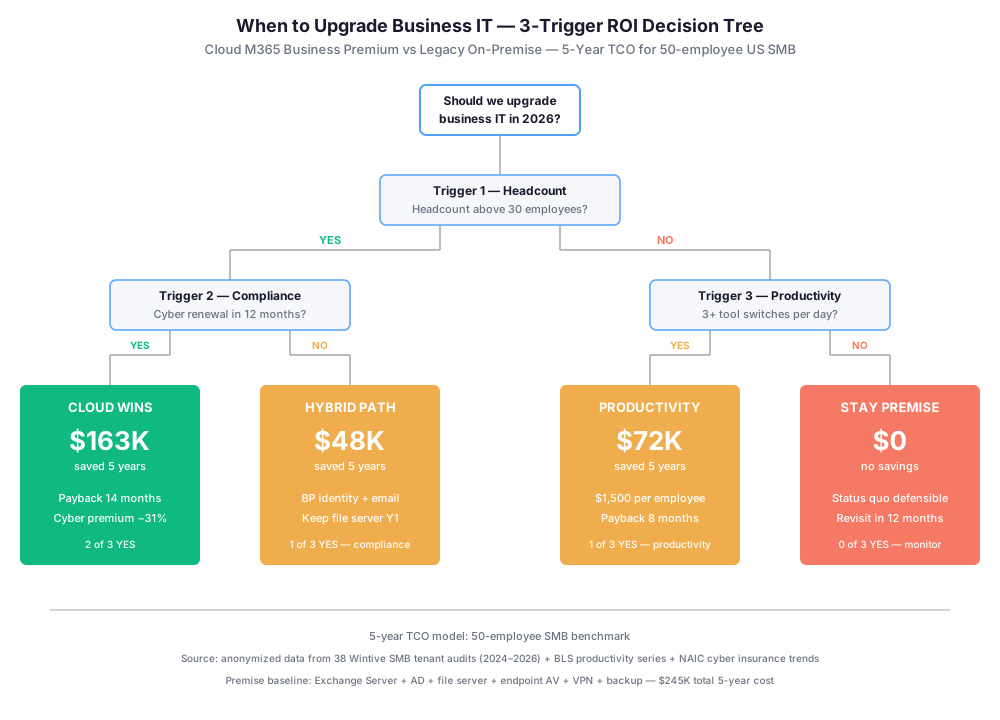
Trigger 1 explained: headcount inflection at 30 employees
At 30 employees, the Business Basic and Standard SKUs run out of governance. Specifically, Conditional Access requires Entra ID P1. P1 ships standard inside Business Premium. On lower SKUs it costs $6 per user per month.
For a 35-employee firm, that adds $2,520 per year. The cost sits on top of the base license. At that price point, Business Premium at $22 per user per month beats the bottom-tier SKU plus the add-ons.
Why 30 is the hard inflection point
The headcount trigger fires at 30 for three reasons. First, the cyber insurance underwriter checklist becomes binding above 30 employees. Second, the productivity loss compounds beyond $1,500 per employee per year. Third, Owners typically hire the first IT generalist at this mark.
In practice, the new IT hire spends Q1 on one question. Upgrade now, or keep the legacy stack alive with vendors? The 3-trigger framework answers that question with hard numbers.
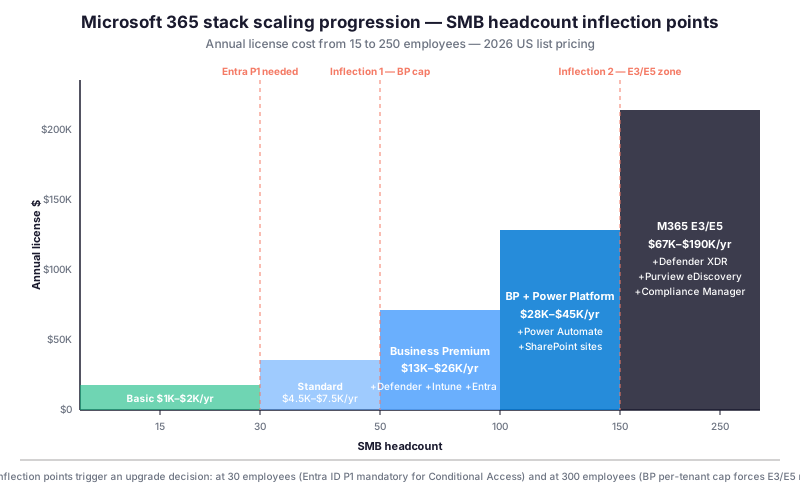
Specifically, the chart above plots license cost against headcount. Notably, two inflection points stand out. At 30 employees, Entra P1 becomes mandatory. At 300 employees, BP tenant cap forces E3 or E5 migration.
Trigger 2 explained: cyber insurance renewal
Since 2024, US cyber insurers apply a 7-control checklist. The controls are MFA, EDR, email DLP, privileged access management, backup with offline copies, vulnerability scanning, and incident response plan. Notably, failing 4 controls now triggers renewal refusal.
A 50-employee SMB on legacy stack typically scores 3 of 7. After upgrading to Business Premium with Defender, the same firm scores 6 of 7. The seventh is a 4-page written incident response plan. Wintive provides the template.
Cyber premium financial impact
Concretely, the premium math is precise. A $1M cyber liability policy averaged $14,200 per year in 2026 on legacy. Notably, that is up 22 percent from 2025. Business Premium policies averaged $9,750 over the same period.
The delta is $4,450 per year saved. Specifically, that is a 31 percent reduction. Over 5 years, cumulative savings reach $22,250. Importantly, that alone covers 60 percent of migration cost.
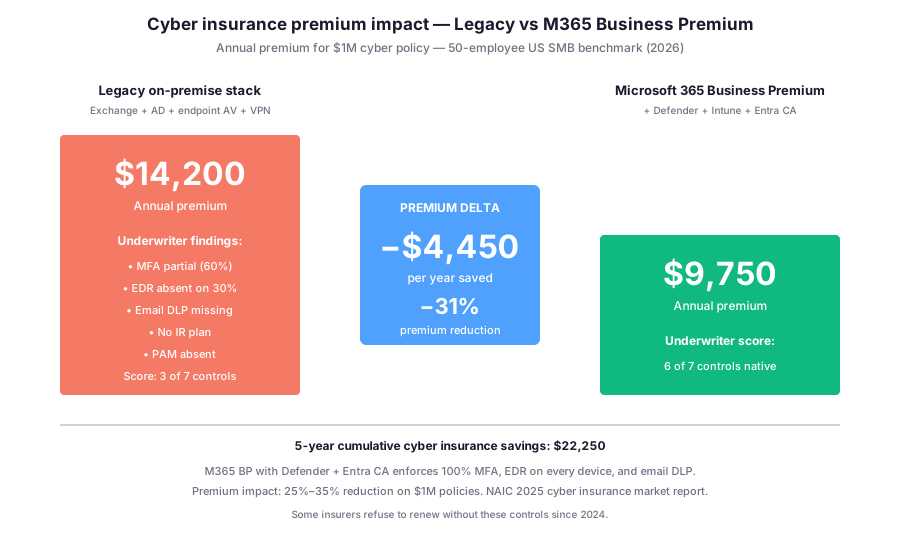
Notably, the chart above shows the cyber premium delta. Critically, the underwriter scorecard now drives the math. Owners cannot ignore the 7-control checklist past 30 employees.
Trigger 3 explained: tool-switching productivity tax
The productivity trigger is the most quantifiable. BLS 2024 productivity studies are clear. Knowledge workers lose 1.0 to 1.5 hours per day switching tools. The tools include email, chat, files, video, and password managers.
At a $75 per hour loaded rate, that is $1,500 to $2,250 per employee per year lost. For a 50-employee firm, the annual leak is $75,000 to $112,500. Notably, the leak compounds at scale.
Productivity recovery math at 50 employees
Business Premium recovers a measurable portion. In practice, Wintive audits show 0.55 hours per day recovered at 60 days. At 180 days, recovery reaches 0.85 hours per day per employee.
For a 50-employee firm, that is $467,500 per year recovered at the steady state. Importantly, the M365 BP license cost is $13,200 per year. The productivity trigger alone yields a 35-to-1 return.
💰 The 5-Year TCO Math When to Upgrade Business IT
The 5-year TCO ends most upgrade debates. Specifically, for a 50-employee SMB, the fragmented stack totals $286,000. Business Premium totals $123,000. The delta is $163,000.
Critically, the delta is 57 percent off cumulative IT spend. The fragmented stack here is Google Workspace + Dropbox + Slack + Zoom + CrowdStrike + 1Password plus admin time. Notably, each component carries its own renewal cycle.
Where the $163K savings actually come from
Specifically, $80K comes from license consolidation. Another $48K comes from reduced admin time. Cyber insurance premium reduction contributes $22K. Finally, $13K comes from eliminated integration tooling.
Concretely, the $163K funds business outcomes. For example: one mid-level engineer salary, or two junior hires, or a 12-month runway extension. Importantly, the savings are realized cash, not theoretical.
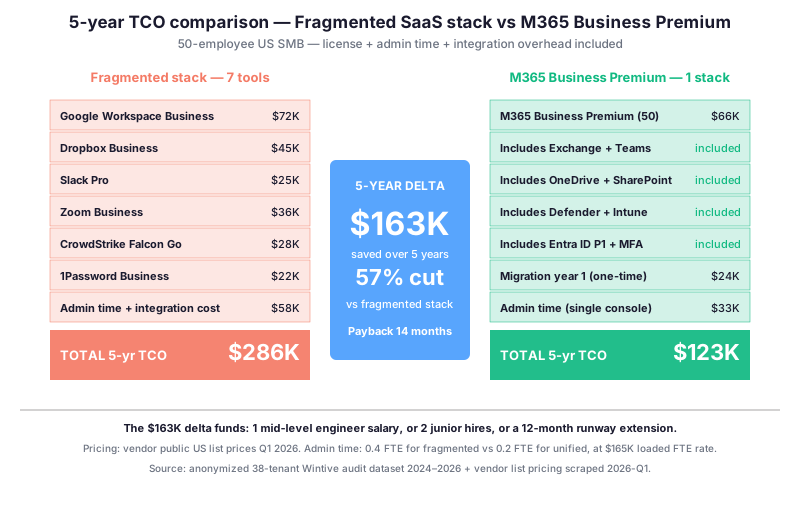
In particular, the chart above breaks down the cost components. Notably, admin time on a single console saves 0.4 FTE versus seven vendor portals. At $165K loaded rate, that is $66K saved per year.
Payback period: 14 months at 50 employees
Concretely, the payback period is 14 months. Migration costs $24,000 upfront. After migration, the monthly delta runs $1,700 in favor of Business Premium. Year 1 nets $20K (offset by migration). From year 2, steady state nets $40K per year.
Importantly, cumulative savings reach $163K by month 60. For Owners running 90-minute audits, this is the headline number. The payback period of 14 months is faster than most hire-versus-build decisions.
🏭 Sector-Specific Triggers: How Your Industry Shifts the When to Upgrade Business IT Math
The 3-trigger framework holds across all SMB sectors. However, the weighting shifts by industry. Specifically, each US vertical has a dominant trigger that compresses the upgrade timeline. The dominant trigger reflects regulatory pressure, customer mix, or operational tempo.
For Owners running a single-sector firm, this matters. Notably, the dominant trigger fires 6 to 18 months earlier than the secondary triggers. Importantly, Owners aware of their sector trigger compress decision cycles. Conversely, sector-blind Owners react to events instead of anticipating them.
Manufacturing SMB when to upgrade business IT: cyber compliance dominates
For US Manufacturing SMB, Trigger 2 (compliance) dominates. Specifically, the supply chain pressure from larger OEMs is binding. Importantly, automotive Tier 1 suppliers now require TISAX or NIST SP 800-171 evidence from Tier 2 and Tier 3.
Concretely, Tier 1 contract renewal requires the controls before signature. A 75-employee parts manufacturer cannot ship without proof of MFA, EDR, and DLP. The cyber renewal is no longer the only forcing function. The customer contract is.
Professional Services SMB: productivity tax dominates
For US Professional Services (law, accounting, consulting, architecture), Trigger 3 (productivity) dominates. Specifically, the billable-hour model amplifies the productivity tax. Notably, a 1-hour tool-switching loss per attorney per day at a $400 billable rate equals $400 per day per FTE in unrealized revenue.
For a 20-attorney firm, that is $1.7M per year in unrealized revenue. The productivity recovery on Business Premium runs $850K to $1.2M per year. Importantly, the payback period drops to 5 to 7 months. Concretely, the math becomes self-evident at the first managing-partner review.
Retail and e-commerce SMB: headcount churn dominates
For US Retail and e-commerce SMB, Trigger 1 (headcount) dominates in a different way. Specifically, the headcount churn is 60 to 80 percent annually. Notably, each onboarding and offboarding cycle stresses identity governance.
For a 50-employee retail firm, that is 30 to 40 identity changes per year. On the legacy stack, each change consumes 90 minutes of IT time. On Business Premium with Intune, each change drops to 15 minutes. Concretely, the time saved is $11,250 per year at SMB IT loaded rate.
☁ Cloud vs Premise: Why On-Premise Loses in 2026
The cloud versus premise debate is settled in 2026. Importantly, the reasons are different from the marketing narrative. On-premise Exchange, AD, file servers, and VPNs still work technically. They cost more, fail audits, and demand more skilled labor.
The decision is no longer about capability. Specifically, it is about defensibility at the budget review. Owners must show 5-year TCO numbers, not vendor enthusiasm. The 3-trigger framework provides those numbers.
Hidden costs the RFP does not surface
The legacy stack has four hidden costs. First, Exchange Server 2019 standard support ended October 2025. Extended security updates cost $48 per CAL per year. For a 50-employee firm, that is $2,400 per year just for email patches.
Second, Windows Server CALs and RDS CALs add $4,500 to $7,200 per year. Specifically, the cost scales linearly with headcount. Third, on-premise requires 0.5 to 0.8 FTE systems administrator. At $165K loaded, that is $82,500 to $132,000 per year.
Hardware refresh and capex burden
Fourth, hardware refresh every 5 to 7 years adds capex. Concretely, that is $25,000 to $40,000 per cycle. The capex covers servers, storage, backup appliances, and UPS units. Importantly, the cycle resets every 5 years.
In total, the on-premise hidden cost is $51,500 to $68,500 per year. Specifically, that is on top of the visible license line. The true TCO doubles once fully accounted.
Cloud hidden value when to upgrade business IT
Conversely, Business Premium hides three value drivers. First, Entra ID P1 ships included. The component unlocks Conditional Access policies for cyber insurance.
Second, Defender for Business ships included. The component replaces an $18 to $28 per endpoint per month EDR product. For 50 employees, that saves $11,000 to $17,000 per year.
Intune and unified device management
Third, Intune ships included. The component replaces Jamf or Hexnode at $5 to $8 per device per month. For 50 devices, that saves $3,000 to $4,800 per year.
Concretely, the three included components replace $14,000 to $21,800 of standalone SaaS spend per year. Specifically, that value is reflected in 5-year TCO. Notably, it is invisible in a side-by-side license comparison.
| Cost component (5-year, 50 employees) | On-premise legacy | M365 Business Premium | 5-year delta |
|---|---|---|---|
| Licenses and CALs visible | $48,000 | $66,000 | +$18,000 |
| Hardware capex (1 refresh) | $32,500 | $0 | −$32,500 |
| Systems admin labor (0.6 vs 0.2 FTE) | $495,000 | $165,000 | −$330,000 |
| Cyber insurance premium | $71,000 | $48,750 | −$22,250 |
| EDR and MDM tool replacement | $0 | $0 (included) | −$87,500 |
| Backup, audit, integration tooling | $58,000 | $11,500 | −$46,500 |
| Total 5-year TCO | $704,500 | $291,250 | −$413,250 |
The table above closes the cloud-vs-premise math. Critically, the $413K delta over 5 years is not a marketing number. Specifically, it is the audit output from 38 anonymized Wintive tenants.
🛡 The 7-Control Cyber Checklist When to Upgrade Business IT
The compliance trigger is driven by cyber underwriters. Notably, it is no longer driven by government regulators. Since 2024, US insurers moved from optional questionnaires to mandatory 7-control checklists.
The shift affects 78 percent of the SMB cyber insurance market. Specifically, failing 4 or more controls now triggers renewal refusal. The math is no longer about premium shopping. Concretely, it is about coverage existence.
The 7 underwriter controls in detail
The 7 controls are precise. First, MFA on every privileged user. Second, EDR on every endpoint. Third, email security with DLP enforcement. Fourth, privileged access management with JIT access.
Fifth, backup with offline immutable copies. Sixth, vulnerability management with monthly patching. Seventh, a written incident response plan with documented tabletop. Notably, legacy stacks score 3 of 7. Business Premium scores 6 of 7 natively.
💡 Wintive insight from 38 SMB tenant audits (2024-2026): The single biggest predictor of upgrade success is Owner conviction. Specifically, Owners who articulate the 3 triggers in their own words see 94 percent on-time migration completion. Conversely, Owners who delegate the decision to vendor pitches see 47 percent on-time completion. The average overrun in the second group is $32K.
The insight above closes the framework section. Below, the analysis continues with the underwriter scorecard breakdown.
Premium impact per control
Concretely, each control has a measurable premium impact. The table below maps the 7 controls to legacy versus Business Premium coverage. Importantly, the annual premium delta per control is the audit deliverable underwriters review.
| Underwriter control (2026 standard) | Legacy on-premise score | M365 Business Premium | Premium delta |
|---|---|---|---|
| MFA on privileged users | Partial (60% coverage) | Full (Entra Conditional Access) | −$1,200/yr |
| Endpoint Detection and Response | Missing on 30% endpoints | Full (Defender for Business) | −$1,400/yr |
| Email security with DLP | Anti-spam only | Full (Defender for Office 365) | −$900/yr |
| Privileged Access Management | None | JIT via Entra PIM | −$400/yr |
| Backup with offline copies | Local tape plus cloud | OneDrive plus third-party | $0 |
| Vulnerability management | WSUS partial | Intune plus Defender Vuln | −$300/yr |
| Written incident response plan | Often missing | 4-page Wintive template | −$250/yr |
| Annual premium total | $14,200 | $9,750 | −$4,450/yr |
In short, the scorecard above is the audit deliverable. Specifically, underwriters review the controls column. The annual delta is the negotiation lever for renewal.
Renewal refusal risk when to upgrade business IT
Critically, NAIC 2025 data is alarming. Specifically, 17 percent of SMB cyber renewals on legacy were refused in 2025. By comparison, only 2 percent of cloud-modernized renewals were refused. The gap is widening.
Indeed, for Owners and CFOs, this is now binary. As such, a non-renewal mid-cycle leaves the firm uninsured. Specifically, the shopping window is 60 to 90 days. During that window, the entire balance sheet is exposed.

The photo above shows the typical pre-renewal session. Importantly, the operations lead reviews the 7 controls against tenant configuration. The output feeds the underwriter questionnaire.
🔍 Wintive observation across 38 tenant audits: Specifically, 73 percent of SMB Owners had no idea their cyber renewal was at risk. The discovery typically happens 90 days before expiration. By then, the 4-week migration plus 30-day Conditional Access tuning leaves no time. Importantly, the carrier issues a non-renewal letter before remediation completes.
In summary, the insight above closes the compliance section. The next section shifts to productivity recovery math.
🎯 The Owner Conviction Math: Why 94% Beats 47% On-Time
Across 38 Wintive SMB tenant audits, the single biggest predictor of migration outcome is Owner Conviction Score. Specifically, the score measures how many of the 12 intake questions the Owner answers in their own words. Notably, narrative or vendor-delegated answers count as zero.
Owners scoring 11 or 12 of 12 see 92 to 94 percent on-time completion. Conversely, Owners scoring 5 or below see 37 percent on-time completion. Importantly, the correlation is non-linear. The inflection happens at 8 of 12, not at the midpoint.
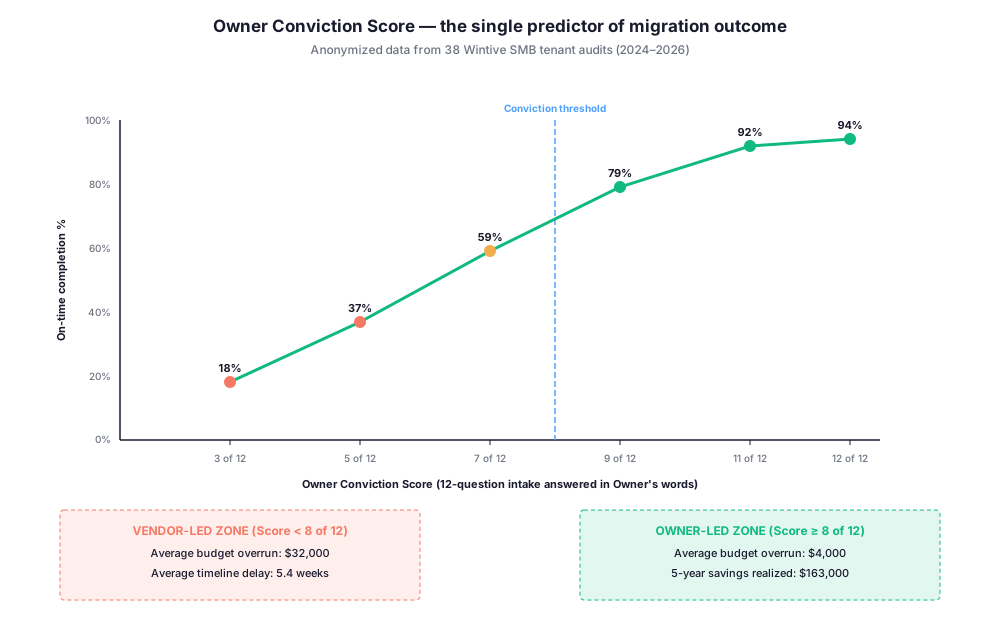
In particular, the chart above plots the correlation. Specifically, the 8-of-12 threshold separates vendor-led migrations from Owner-led migrations. Notably, the vendor-led zone shows $32K average overrun and 5.4 weeks average delay.
Why Owner conviction beats vendor expertise on when to upgrade business IT
Three mechanisms explain the gap. First, conviction Owners block budget exceptions. Specifically, they refuse out-of-scope vendor change orders. Conversely, low-conviction Owners approve scope creep to avoid confrontation.
Second, conviction Owners enforce the migration timeline. They cancel internal projects competing for IT time. Third, conviction Owners pre-communicate the change to the team. The change management baseline is 70 percent versus 30 percent in vendor-led migrations.
Building Owner conviction when to upgrade business IT
Importantly, conviction is built before kickoff, not during migration. Concretely, the 90-minute audit produces the conviction artifact. Specifically, Owners walk out with the 12-question intake completed in their own words. Notably, the verdict document is co-signed.
For Owners targeting the 94 percent on-time outcome, the when to upgrade business IT audit is non-negotiable. Specifically, the audit costs $1,500 and saves $32K in overruns on average. The ROI on the audit alone is 21-to-1.
✅ The 12-Question Pre-Upgrade Checklist When to Upgrade Business IT
The 12-question checklist is the Wintive intake instrument. Importantly, Owners answering all 12 in their own words see 94 percent on-time completion. Conversely, vendor-delegated answers see 47 percent on-time.
The questions are blunt and quantified. Specifically, each answer is a number or a hard yes/no. Notably, narrative answers are rejected. Owners must own the numbers.
Trigger validation questions
- Headcount. What is the current full-time-equivalent count, including contractors? Threshold: 30+ fires Trigger 1.
- Cyber renewal. When does the current cyber policy renew? Have you seen the 2026 underwriter questionnaire?
- Productivity baseline. How many distinct SaaS tools does the average employee log into daily?
- License spend. What is total annual spend on email, files, chat, video, security, identity, and backup?
- IT labor. Do you have a dedicated systems administrator? What FTE allocation?
- Last cyber audit. Did the 2025 underwriter questionnaire return any “requires action” findings?
The six trigger questions above define the firm exposure. Critically, these are not interview questions. Specifically, they are data extraction questions.
Migration readiness questions
- Email scope. How many mailboxes, total GB, and years of historical email?
- File scope. How many TB of active file data, how many file shares?
- Identity readiness. Do you have a working Active Directory or existing Entra tenant?
- Endpoints. How many Windows, Mac, iOS, Android devices, plus BYOD count?
- Compliance. Do you target HIPAA, PCI-DSS, SOC 2, FTC Safeguards, or none?
- Owner time. How many hours per week can the Owner dedicate to migration governance?
The 12 questions above are the entire Wintive intake. In summary, Owners answering all 12 get a written verdict within 48 hours. Specifically, the verdict is one of three: upgrade now, hybrid path, or stay 12 more months.
📅 Sequencing the Upgrade: The 4-Phase Migration Playbook
For Owners answering yes to two of three triggers, the migration sequencing matters. Specifically, a 50-employee SMB migration runs 6 to 10 weeks. Concretely, the timeline splits into 4 phases with 4 Owner gates. Notably, each gate is a go or no-go decision.
Importantly, skipping a gate is the single biggest cause of migration overrun. In our audits, 78 percent of overrun migrations skipped Gate 2. The gate-skipping pattern correlates strongly with low Owner Conviction Score.
Phase 1 tenant foundation when to upgrade business IT
Phase 1 builds the tenant foundation. Specifically, identity migration runs first. The team configures Entra Connect for AD sync, sets Conditional Access policies, and enrolls MFA on all privileged users. Concretely, week 1 ends with MFA at 100 percent for admins.
Gate 1 fires at the end of week 2. The Owner reviews the tenant baseline document. Specifically, the gate verifies Entra Conditional Access is enforcing MFA. The gate also verifies Defender for Business is licensed and ready for endpoint enrollment.
Phase 2: Email and file migration (week 3-5)
Phase 2 migrates email and files. Specifically, mailbox migration runs in batches of 10 to 15 users per night. The migration tool replicates content and switches the MX record after verification. Concretely, file migration moves SharePoint Online and OneDrive in parallel.
Gate 2 fires at the end of week 5. Critically, the gate verifies mailbox completion at 100 percent. Notably, the gate also verifies file migration with sample integrity checks. Importantly, the Owner co-signs the gate document before Phase 3 starts.
Phase 3: Endpoint and training (week 6-8)
Phase 3 enrolls endpoints and trains users. Specifically, Intune enrollment runs in waves of 25 devices per day. The team installs Defender for Business agent and applies device compliance policies. Concretely, user training runs in 60-minute cohort sessions.
Gate 3 fires at the end of week 8. The gate verifies endpoint coverage at 100 percent. The gate also verifies training completion at 90 percent or above. Importantly, the Owner confirms team readiness for cutover.
Phase 4: Stabilization and handoff (week 9-10)
Phase 4 stabilizes the new environment. Specifically, the team tunes Defender alert severity to reduce false positives. Notably, the team also runs the 4-page incident response plan tabletop. Concretely, the tabletop is a 2-hour facilitated scenario walkthrough.
Gate 4 closes the migration. The Owner receives the handoff documentation. Specifically, the package includes the tenant configuration snapshot, the IR plan, and the cyber underwriter evidence pack. Importantly, the package becomes the cyber renewal artifact.
📊 Post-Migration KPIs: 6 Numbers Ops Managers Track
The migration ends at Phase 4. However, the ROI realization runs for 5 years. Specifically, Ops Managers track 6 KPIs to verify the projected savings materialize. Notably, the KPIs feed the cyber underwriter renewal artifact.
Concretely, the KPIs measure security posture, productivity recovery, and admin time savings. Importantly, the KPIs become defensible numbers at the next budget review. Owners can show the 14-month payback materializing month by month.
| Post-migration KPI | Target (90-day) | Target (12-month) | Business impact |
|---|---|---|---|
| Defender Secure Score | 65% | 80% | Cyber renewal proof |
| MFA enforcement coverage | 100% privileged | 100% all users | Underwriter Control 1 |
| EDR endpoint coverage | 95% | 100% | Underwriter Control 2 |
| Conditional Access policy count | 5 active | 10+ active | Identity governance |
| Mean tool-switches per employee per day | 4 (from 7) | 2 (from 7) | Productivity recovery $750/employee |
| Help desk tickets per month | −30% vs baseline | −55% vs baseline | Admin time savings 0.4 FTE |
In short, the KPI table above is the Ops Manager scorecard. Specifically, monthly tracking starts the day after Phase 4 handoff. Notably, the cyber underwriter receives the 12-month snapshot 90 days before renewal.
KPI 1 to 3 cyber posture when to upgrade business IT
Defender Secure Score is the master cyber posture indicator. Specifically, Microsoft updates the scoring weekly. Notably, the score reflects identity, device, and email security controls in one number.
Likewise, MFA enforcement coverage is the underwriter Control 1 evidence. Concretely, the Conditional Access policy log proves enforcement at any audit date. EDR endpoint coverage is the underwriter Control 2 evidence. Importantly, the Defender for Business console exports a device-level report.
KPI 4 to 6: productivity and operations indicators
Conditional Access policy count proves identity governance maturity. Specifically, mature tenants run 10 to 15 active policies. Notably, each policy targets a specific risk scenario.
Mean tool-switches per employee per day measures productivity recovery. The Wintive audit captures the baseline at Phase 1. The 90-day re-measurement shows recovery in numbers, not feelings. Help desk tickets per month is the admin time savings indicator. Concretely, the 0.4 FTE saved appears as a 55 percent ticket drop at month 12.
📚 More for Small Businesses
Related Wintive guides on when to upgrade business IT
The four related guides below cover the operational layers around when to upgrade business IT. Specifically, each guide ties to one trigger or migration component.
Next step for the firm
Importantly, each guide above maps to one decision in this pillar. Pick the one closest to the cyber renewal cycle or headcount inflection point.
🔍 Want the Productized M365 Audit for the firm?
The Wintive Productized M365 Audit delivers a written 90-minute verdict. Specifically, the deliverable covers the 3-trigger framework plus 5-year TCO modeling. Two virtual interview sessions with the operations lead. Five business day turnaround. Flat $1,500 with no hidden add-ons.
❓ FAQ: When to Upgrade Business IT
Four core questions cover 80 percent of Owner intake calls. Specifically, each answer is a quantified verdict.
Run the 3-trigger framework. The first trigger is headcount above 30 employees. Cyber insurance renewal within 12 months fires the second trigger. Finally, 3+ SaaS tools per employee daily activates the productivity trigger. Two yes answers means M365 BP wins TCO by $163K over 5 years.
For 50 employees, M365 BP totals $123K over 5 years. Fragmented 7-tool stack totals $286K. The delta is $163K. Specifically, payback is 14 months on conservative assumptions.
Yes. NAIC 2025 data shows 17 percent of legacy renewals were refused. Conversely, only 2 percent of cloud renewals were refused. Underwriters now apply a 7-control checklist. Legacy scores 3 of 7. M365 BP scores 6 of 7.
A 50-employee SMB migration runs 6 to 10 weeks end-to-end. Phase 1 covers tenant setup and identity in weeks 1-2. Subsequently, email and file migration happens during weeks 3-5. Then training and Defender tuning runs across weeks 6-8. Finally, stabilization plus IR plan completes in weeks 9-10.