Picture this. An employee leaves a laptop in a cab. Or someone lifts a bag from a cafe table. On that laptop sits your client list, your email, your files and a browser full of saved logins. For most US small businesses, that single moment is the whole of their small business device security exposure. And almost nobody is ready for it.
The device itself is cheap to replace. The data on it is not. As a result, controlling your devices is one of the highest-value moves you can make. However, most owners never get to it. The tools to fix this already sit inside Microsoft 365.
🔒 Not sure what is on the laptops your team carries home?
Wintive helps US small businesses lock down the laptops, phones and tablets that hold company data. Specifically, it enrolls every device, enforces encryption and a screen lock, and wipes anything lost. As a result, a lost laptop becomes a shrug, not a breach.
📅 Book a Free 30-Min Call | 💬 Chat on WhatsApp | See Our Plans →
This guide treats every device as a door into your business. First, it shows exactly what a lost laptop really exposes. Then it covers personal phones and the real dollar cost. Finally, it lays out a simple routine that closes the gap for good.
🔒 Your biggest small business device security gap is a lost laptop
📌 TL;DR — weak small business device security means laptops and phones hold your data with no lock and no way to wipe them. The threat is rarely a hacker. It is a device that walks out the door. The fix is to enroll every device, using the Microsoft 365 you already own.
Why a lost laptop is your real exposure
Hackers grab the headlines. Lost hardware causes the quiet breaches. A laptop left in a car is a common, real-world event. As a result, the data on it is exposed in seconds. In practice, that one device often holds more than your whole server room did a decade ago. The laptop is small, but the data is your whole business. As a result, losing it is losing a copy of everything. In practice, strong small business device security treats that copy as the asset to protect.
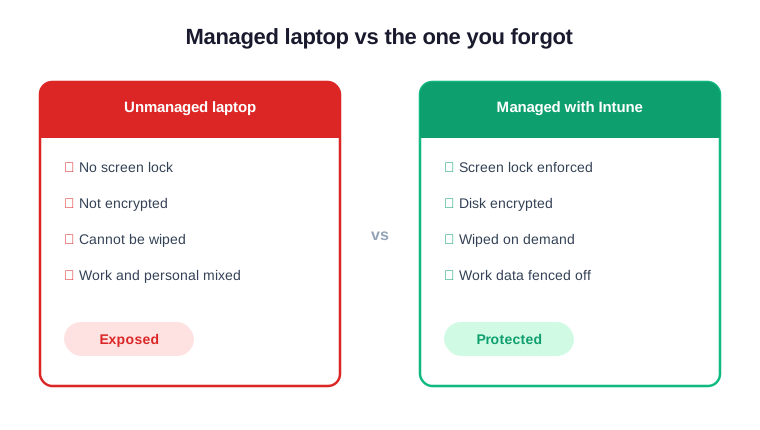
So think about a single work laptop. It holds cached email and downloaded files. By contrast, it rarely holds a screen lock you can trust. Notably, it almost never holds disk encryption you set on purpose. That gap is the whole risk. Close it and a lost laptop means nothing. By contrast, leave it open and a lost laptop means everything. Notably, the difference is a few settings you can push in minutes.
💻 You secure the office, not the laptops that leave it
Most security spending stays at the office. You buy a good firewall and lock the front door. Yet your data left the building hours ago. As a result, it now rides home in a backpack every night. In practice, the perimeter you protect is half empty. The walls are strong, but the data already left through the door. As a result, the firewall guards an empty room. Meanwhile, your real assets ride home every night.
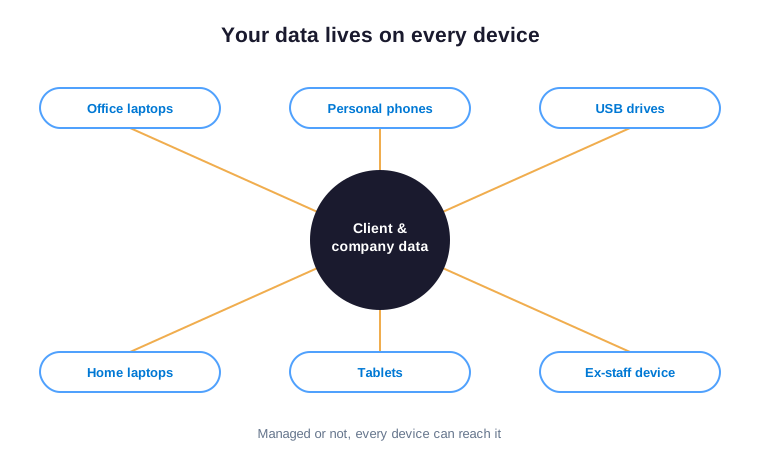
Why the office is locked but the laptop is not
The office feels like the thing to protect. It is visible and physical. By contrast, a laptop is small and always moving. As a result, it slips out of every security plan. Furthermore, nobody is ever sure who is responsible for it. So the laptop falls between roles. The owner assumes IT handles it. By contrast, there is often no IT to handle anything. As a result, the device just drifts, unmanaged and unseen.
The laptops that never get enrolled
New hires often bring their own machine. Old laptops get handed around the team. In practice, none of them ever get set up properly. As a result, they hold company data with zero controls. Critically, you cannot protect a machine you do not even know exists. This is where small business device security usually breaks first. The device list lives in someones head, not a system. As a result, the gaps stay invisible until one of them walks out.
📍 When a laptop goes missing, so does your data
Here is the part owners underrate. A lost laptop is not just lost hardware. It is a lost copy of your business. Specifically, it carries client names, contracts, emails and saved passwords. As a result, whoever finds it can open all of it. By contrast, a managed laptop hands them nothing at all. The screen stays locked. The drive stays encrypted. As a result, a finder gets a brick, not your business. In practice, that single difference decides whether a loss becomes a breach.

So picture what one missing laptop reaches. It opens your inbox and your shared files. It signs into apps that never logged out. As a result, a single device exposes far more than the screen in front of it. In practice, that is why a lost laptop is a data event, not an IT errand.
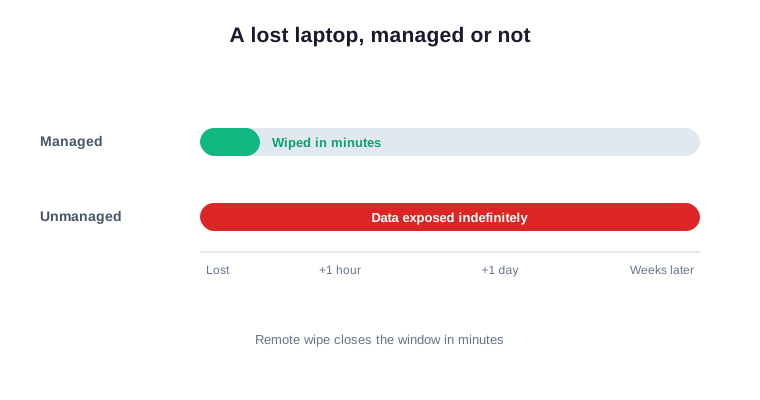
How small business device security limits a lost-laptop breach
Good device control shrinks the damage to almost nothing. The moment a laptop is reported gone, you wipe it remotely. As a result, the data disappears before anyone digs in. This is the same discipline that backs up a small business cyber insurance claim and helps you judge when to upgrade your business IT. In practice, it turns a crisis into a quick task. A wipe takes minutes, not lawyers. As a result, you spend the afternoon issuing a new laptop, not calling clients. Furthermore, you can prove the data never left your control.
They don’t hack the laptop, they just open it
Most thieves are not hackers at all. They simply open a laptop that has no lock. Notably, an unencrypted drive gives up its files to anyone. In short, the only barrier is a screen lock and encryption you never switched on. Furthermore, both are free and already built in. You are not buying new software here. You are switching on what you already own. As a result, the fix costs time, not budget. In practice, that is the easiest security win a small team gets.
📱 Personal phones are company doors you don’t control
Phones are the real blind spot. Your team reads work email on personal phones every single day. As a result, company data sits on devices you have never seen. Worse still, you cannot wipe them when someone leaves. In practice, every personal phone is an unlocked side door. Nobody decided to put company data there. It simply arrived, one email app at a time. As a result, the phones multiply faster than any policy. Critically, small business device security has to cover them too, not just the laptops.
The phone that never had a PIN
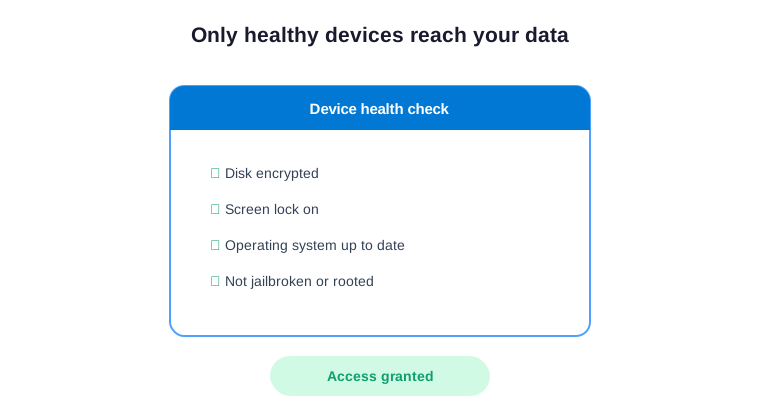
Think about a typical staff phone. It opens work email with one tap. By contrast, it may have no PIN and no work protection. As a result, a lost phone leaks your inbox in seconds. Critically, you can require a PIN and fence off work data without ever touching their personal apps. The staff member keeps their photos and messages private. By contrast, the company data gets a lock and a remote wipe. As a result, both sides win in the end.
💸 What weak small business device security costs you
A lost device feels minor until the bill arrives. When exposed data is misused, the costs mirror any breach. Specifically, you face notification duties, lost trust and possible fines. By contrast, the cause here is mundane: a laptop nobody locked. As a result, the story is embarrassing and the cost is very real. No owner wants to explain a lost laptop to a client. Yet it happens all the time. Specifically, it happens to firms that never enrolled a single device.
| What it costs you | Why it hurts | How long it lasts |
|---|---|---|
| Breach notification | Exposed personal data triggers reporting | Legal and admin time |
| Lost client trust | Clients hear their data was on a lost laptop | Months of damage |
| Regulatory fines | Weak safeguards break privacy rules | One-off but steep |
| Replacement scramble | You rebuild access and devices fast | Days of lost work |
Why the bill outlives the lost laptop
The laptop is replaced in a day. The breach it caused is not. As a result, you may face a regulator notice or a client exit. Meanwhile, legal and admin hours pile up. Furthermore, the reputation hit lingers long after the device is forgotten. In practice, one unlocked laptop can shadow a whole year. This is why small business device security belongs in your risk plan. It is far cheaper than a breach notice. Furthermore, it is far cheaper than a lost client. In short, prevention always beats the cleanup.
🧾 Everything a leaver keeps, and the rules
A departing employee often keeps more than you realize. Specifically, their personal phone still holds work email and files. Their home laptop may still sync company data. As a result, an uncontrolled device is also a compliance gap. It is a rule you are quietly breaking.
| What is at risk | The rule that applies | Why it matters |
|---|---|---|
| Card data on a device | PCI DSS | Fines and lost processing |
| Customer personal data | US state privacy laws | Notices and penalties |
| Health or financial records | HIPAA or GLBA | Heavy sector penalties |
Card data and the cost of PCI
PCI DSS expects you to control devices that touch card data. Notably, its latest version leans hard on device and access controls. An unmanaged laptop with that data breaks the rule outright. As a result, weak control raises both your risk and your fees. In practice, device management is part of staying compliant.
Privacy law and personal records
Customer names, emails and numbers fall under US state privacy laws. In practice, regulators expect you to limit where that data sits. A device you cannot wipe fails that test. By contrast, an enrolled device passes it cleanly. Furthermore, it shows regulators that you took reasonable care.
👁 An unmanaged laptop is invisible until it’s gone
A managed device shows up on a dashboard. An unmanaged one shows up nowhere. As a result, you cannot prove it is safe, because you cannot even see it. By contrast, a stolen credit card sets off alarms fast. In practice, a missing laptop can sit unnoticed for weeks. That silence is the real danger. A loud attack gets a fast response. By contrast, a quiet laptop just gets forgotten. As a result, the damage is done long before anyone notices.

The five-minute enrollment habit
The fix is a short, fixed routine. Every new device gets enrolled before it touches company data. Specifically, you push a screen lock, encryption and a compliance check in minutes. Furthermore, the same step lets you wipe it later if needed. In practice, five minutes at setup closes the gap for good.
🔍 What a small business device security audit reveals
An audit turns guesswork into a clear list. It shows every device that can reach your data. Furthermore, it flags the ones with no lock, no encryption or no owner. It also shows where you fall short of the rules. As a result, you see the whole estate in one place, instead of hoping nothing slipped.
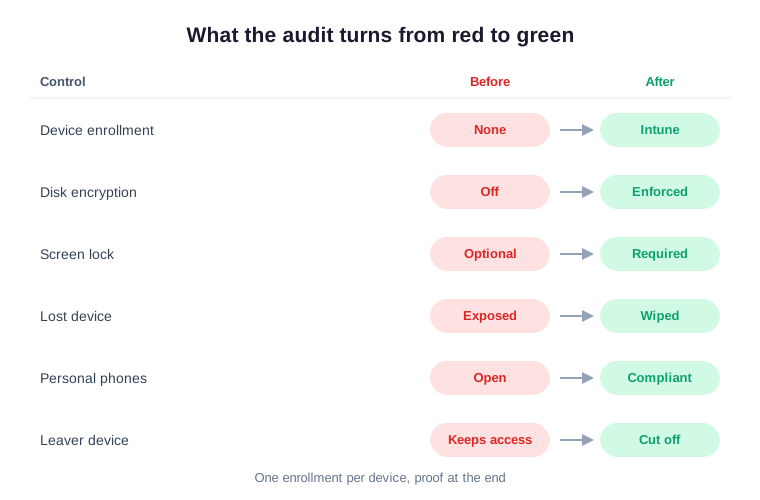
The value is in the before-and-after. Specifically, a list of red unknowns becomes a short, ranked plan. Each device turns green with a clear owner and policy. As a result, you fix what matters first and prove the rest is handled. Notably, that order keeps the work fast and easy to defend.
Across the 60+ tenants we manage, we see the same common mistake in small business every time. Nobody owns the device list. Personal phones drift on for years. Old laptops silently fail to get enrolled. It all works fine until one device walks out the door. Notably, the controls that fix this map straight to the PCI, SOC 2 and NIST language your insurer and clients already speak. Therefore the audit does more than find gaps. It hands you proof, and proof is what wins the contract and lowers the premium.
What a small business device security audit checks first
The first question is always simple. Which devices can reach the client data and the card data? From there, the review covers laptops, phones, tablets and any leftover home machines. It checks encryption, screen locks and remote-wipe readiness. As a result, each device becomes a clear yes or no you can act on this week. No guesswork is left. A device is either enrolled or it is not. Furthermore, each gap comes with a named owner and a due date. As a result, the list turns straight into action.
💵 The math: minutes to enroll vs a breach
Set the two options side by side. One is five minutes to enroll a device. The other is the full cost of a breach you could have stopped. As a result, the comparison is not close. By contrast, the cheap option is also the one that protects you. In practice, the choice makes itself.
| Your choice | What it takes | What you get |
|---|---|---|
| Enroll the device | Five minutes at setup | Locked, encrypted, wipeable |
| Skip it | Nothing, until one goes missing | Breach-level risk and fees |
The gap could not be wider. One path costs minutes and a little discipline. By contrast, the other risks your data, your contracts and your name. In short, you only pay it when it is far too late.
What good looks like in 2026
Strong control in 2026 uses what you may already own. Specifically, Microsoft 365 Business Premium includes Intune for full device management. It comes at one per-user, per-month price. Moreover, Business Standard skips Intune, so the device piece is the upgrade reason. As a result, most teams never need a separate tool such as Jamf, Okta or Duo.
This helps the budget as much as the risk. Specifically, one bundle lowers your total cost of ownership, or TCO. Furthermore, it keeps spending as steady, predictable OpEx instead of a large CapEx outlay. The same controls protect a healthcare practice or a financial services firm. In practice, they protect any US small business just as well. Notably, they line up with the NIST Cybersecurity Framework. After all, that is the language your insurer speaks. Done this way, small business device security pays for itself. It lowers risk and steadies cost at once. In short, good control is also good budgeting.
🗺 Your 90-day small business device security plan
You do not need to fix everything at once. In practice, a simple plan over one quarter does the job. It turns a messy estate into a clean, repeatable routine. Moreover, it never disrupts the team. Specifically, each phase gives you something concrete to show.
| Phase | What you do | What you get |
|---|---|---|
| Days 1 to 30: Find | List every device that reaches your data | A clear inventory and ranked gaps |
| Days 31 to 60: Fix | Enroll devices, enforce locks and encryption | A far smaller attack surface |
| Days 61 to 90: Prove | Turn on compliance and remote wipe | Proof for insurer and clients |
By the end of the quarter, every device is enrolled and known. As a result, you can prove a lost laptop is a wipe, not a breach. Furthermore, the routine runs in the background from then on. In short, you stay protected without extra effort or cost.
That is the real win. It is not a panic after a laptop goes missing. By contrast, it is a calm, repeatable standard. So start with the question from the top of this guide. Then let an audit turn it into a short, fundable plan. Strong small business device security is within reach for any US operator. It needs minutes, not a big budget. Furthermore, it protects the data your clients trust you with.
📚 More for US owners and operators
🔒 Find every device that could walk out with your data
It is a full Microsoft 365 audit for a US small business. Specifically, it maps every laptop, phone and tablet that can reach your data. Furthermore, it sets device enrollment, encryption, screen locks and remote wipe, and turns on the proof. As a result, you get a written report with ranked fixes and proof, plus 14 days of email Q&A.
❓ Small business device security: frequently asked questions
These are the questions US small business owners ask us most about laptops, phones and access.
Common small business device security questions
It means keeping the laptops, phones and tablets that hold your data locked, encrypted and wipeable. You enroll each device, enforce a screen lock, and can wipe anything that goes missing.
Your data now travels on devices outside the office. A lost laptop or phone can expose your client list and email. As a result, the device is often the easiest way in.
Yes. Microsoft 365 Business Premium includes Intune, which enrolls devices, enforces encryption and locks, and wipes lost ones. Business Standard does not, so it is the usual reason to upgrade.
Enroll it in advance, enforce disk encryption and a screen lock, then wipe it remotely the moment it is reported gone. Done right, the loss is a wipe, not a breach.
Yes. You can require a PIN and protect work email and files only, leaving personal apps and photos untouched. The staff member keeps their phone; you protect the company data.