Picture a Tuesday afternoon. Your bookkeeper opens a message from a supplier you actually use. It asks them to pay an overdue invoice to a new bank account. It looks real, so they pay it. That single message is the front line of your small business email security, and the money is already gone.
The attacker never broke into anything. They simply sent a convincing message. As a result, the inbox is now your most exposed entry point. However, this is also the most fixable risk you have. The tools to stop it already sit inside Microsoft 365.
📧 Worried one fake invoice could slip past your team?
Wintive helps US small businesses lock down email against phishing, spoofing and invoice fraud. Specifically, it turns on advanced filtering, verifies your senders, and enforces sign-in so a stolen password is not enough. As a result, the convincing fakes get stopped before anyone can act on them.
📅 Book a Free 30-Min Call | 💬 Chat on WhatsApp | See Our Plans →
This guide follows the money and the message. First, it shows how a modern phishing attack actually works. Then it covers invoice fraud, spoofing and spam, the real cost, and a simple routine that locks your inbox down for good.
📧 Your small business email security gap is one convincing message
📌 TL;DR — weak small business email security lets a convincing message slip through to your team. The danger is rarely a virus. Instead, it is a fake invoice or a stolen login. The fix is to filter, verify your senders, and enforce sign-in, using the Microsoft 365 you may already own.
Why one message can cost you thousands
Most attacks now skip your firewall entirely. They arrive as a normal-looking message instead. As a result, one click or one payment can cost you thousands. By contrast, the message itself looks completely ordinary. That is exactly what makes it dangerous.
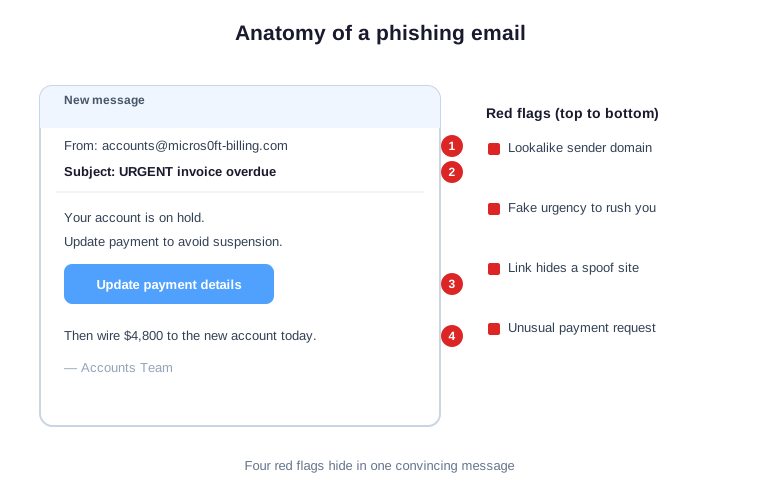
So look closely at a single phishing message. The sender address is almost right. The subject screams urgency. Notably, the link points somewhere it should not. Each detail is small, yet together they cost real money.
So the lesson is simple. You cannot rely on people to spot every fake. As a result, the real defense is technical, working before the message is ever opened. In practice, that is exactly what good filtering does.
🎣 Phishing graduated from typos to targeted
Old phishing was easy to spot. It had bad spelling and a foreign prince. Today, the messages are clean and specific. As a result, they name your supplier and copy your tone. In practice, the obvious clues are mostly gone.
This shift is why old advice no longer works. Spotting typos will not save you now. By contrast, modern fakes are clean and well researched. Therefore the protection has to be automatic, not manual.
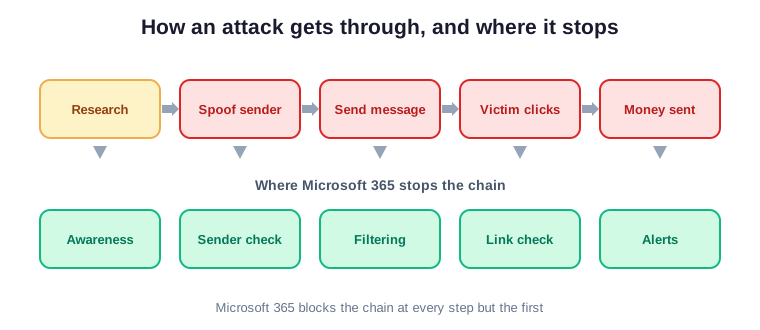
The message that looks exactly right
A targeted message is built from research. The attacker reads your website and your team page. By contrast, the result looks like a real internal request. As a result, it references real names and real projects. Critically, that realism is the whole weapon.
The attacker spends real effort on a worthwhile target. They study your suppliers and your billing cycle. As a result, the message lands at a believable moment. Notably, that patience is what separates targeted fraud from spam.
Why people click, and it is not their fault
Busy people trust familiar names. A message from the boss gets a fast reply. In practice, urgency switches off careful checking. As a result, blaming staff misses the point entirely. Furthermore, the fix is better filtering, not more lectures.
Training still helps, yet it is the last layer, not the first. People will always have a bad day. As a result, the system must catch what a tired human misses. In short, technology carries the load so your team does not have to.
💸 The fake invoice that drains your account
This is where phishing turns into real losses. This is the scam known as invoice fraud. Specifically, a fake supplier message changes the bank details on an invoice. As a result, your team pays the real amount to the wrong account. In practice, the money moves before anyone suspects a thing.
This is the costliest failure of small business email security by far. Specifically, the FBI ranks invoice fraud among the top causes of cyber loss. As a result, a single tricked payment can dwarf a year of ransomware noise. In practice, the quiet scams hurt the most.
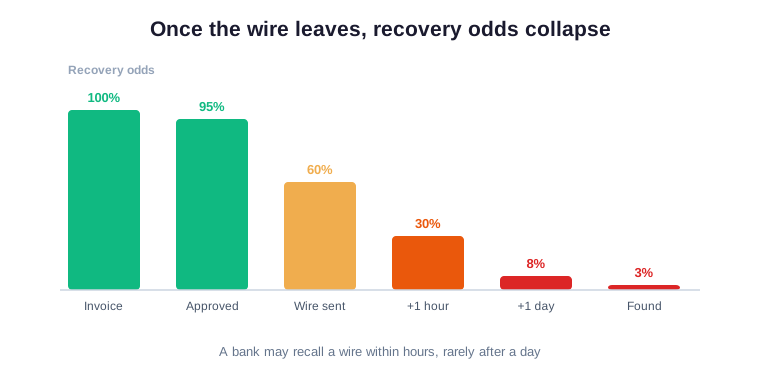
So picture the timeline of one wire. The invoice looks normal and gets approved. The payment goes out the same afternoon. As a result, the fraud is often spotted days later. By then, the window to claw the money back has nearly closed.
So timing is everything once a wire goes out. The first hour offers your only real chance. Therefore the goal is to stop the message, not chase the money. By contrast, recovery after the fact almost never works.
How small business email security stops invoice fraud
Strong email defenses break this scam early. Advanced filtering flags the spoofed supplier before it lands. As a result, the fake invoice never reaches your bookkeeper. This is the same discipline behind small business cyber insurance and the call on when to upgrade your business IT. In practice, prevention is far cheaper than recovery.
Filtering is only the first layer here. Verified senders and enforced sign-in back it up. As a result, even a convincing fake hits several walls at once. Notably, layered defense turns a likely loss into a non-event.
When the wire is gone, it is gone
A wire transfer is not a card payment. There is no easy chargeback to reverse it. Notably, banks can sometimes recall a wire within hours. By contrast, after a day the odds collapse. In short, speed of detection decides whether you ever see that money again.
This is why alerts matter as much as filters. A flagged sign-in or a new forwarding rule is an early warning. As a result, you can freeze an account before the wire clears. In practice, minutes often decide the outcome.
🪪 A spoofed domain turns your name into bait
Attackers do not always target you. Sometimes they pretend to be you instead. Specifically, they send invoices to your clients using your name. As a result, your customers get scammed in your brand. In practice, your reputation takes the hit even when your own systems are fine.
That makes spoofing a shared problem, not just yours. Your clients lose money, and they blame your brand. By contrast, proper sender records protect everyone who trusts your name. Critically, this is reputation insurance you configure once.
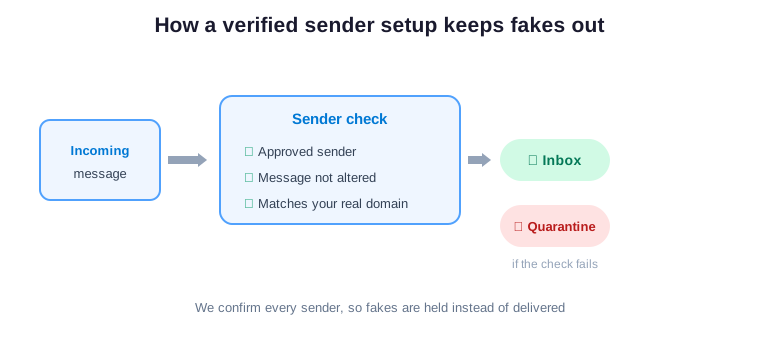
Why anyone can pretend to be you
Plain email carries no built-in proof of sender. Without the right setup, anyone can forge your address. As a result, a stranger can email your clients as you. By contrast, a verified sender setup vouches for every message you send. Critically, it lets the receiving mail systems reject the fakes automatically.
So strong small business email security protects outward as well as inward. It guards your clients from fakes sent in your name. Furthermore, it guards your own inbox from the fakes sent to you. As a result, one setup defends both directions at once.
📉 What weak small business email security costs you
A successful email scam is expensive in many ways. First there is the stolen money itself. Specifically, fraud losses often run into tens of thousands. Furthermore, you may owe notification costs if data leaked. As a result, the bill reaches far past the original wire.
Insurers now look closely at this exact risk. A weak setup can raise your premium or sink a claim. By contrast, documented controls do the opposite. In practice, the savings on cover can offset the cost of the fix.
| What it costs you | Why it hurts | How long it lasts |
|---|---|---|
| Stolen funds | A wire to a fraud account rarely returns | Immediate and often permanent |
| Client trust | Customers were scammed in your name | Months of damage |
| Breach notification | Leaked data triggers reporting duties | Legal and admin time |
| Downtime | Accounts get locked during cleanup | Days of lost work |
Why the loss outlives the wire
The wire leaves in seconds. The fallout does not. As a result, clients question every invoice you send next. Meanwhile, your team spends days resetting accounts. Furthermore, your bank and insurer both want answers. In practice, one message can disrupt a whole month.
Recovery work is invisible but expensive. Someone resets passwords, reviews logs and rebuilds trust. As a result, your most senior people lose days to cleanup. Meanwhile, real work simply waits.
📨 Your real messages keep landing in spam
Weak email setup hurts you even without an attack. Without sender records, your own messages look suspicious. As a result, quotes and invoices land in client spam folders. By contrast, a verified domain reaches the inbox reliably. In practice, deliverability is part of the same fix.
Most owners never connect spam complaints to security. Yet the same records solve both problems. As a result, fixing your sender setup lifts delivery and blocks spoofing together. Notably, you get two wins from one change.
| Each check | What it confirms | What it stops |
|---|---|---|
| Approved senders | Only your real systems can send as you | Strangers spoofing your name |
| Tamper seal | The message arrived exactly as sent | Forged or altered content |
| Reject rule | Inboxes drop anything that fails | Fakes reaching your clients |
The records that prove you are you
These checks work together as one setup. The first names the systems allowed to send as you. The second seals each message so tampering shows. As a result, the third tells inboxes to reject anything that fails. Critically, together they protect both your clients and your delivery.
Setting these records is a one-time job for an expert. It takes hours, not weeks. As a result, the payoff lasts for years with little upkeep. In short, it is among the highest-return tasks on your list.
Lost replies are lost revenue
A quote in a spam folder is a lost deal. The client never even sees it. As a result, you lose business you already earned. By contrast, reliable delivery quietly protects your pipeline. In practice, fixing this often pays for itself in a month.
This is the quiet side of small business email security. It is not dramatic, yet it protects revenue every day. By contrast, a single lost contract can cost more than a year of tooling. Therefore deliverability earns its place in the plan.
🔑 Passwords alone no longer protect the inbox
Many breaches start with a stolen password, not malware. Staff reuse passwords across many sites. As a result, one leaked password can open your email. By contrast, two-step sign-in blocks that login cold. In practice, a password on its own is no longer a real lock.
Attackers buy stolen passwords in bulk and test them fast. One match opens the inbox. As a result, the password you set years ago may already be for sale. By contrast, a second factor blocks the login even then.
The login that travels the world overnight
A stolen password gets sold and tested fast. Suddenly someone signs in from another country. As a result, they read your mail and set quiet forwarding rules. Notably, you may not notice for weeks. Critically, two-step sign-in stops the login before any of that starts.
This single control is the backbone of small business email security. It costs nothing extra in Business Premium. As a result, turning it on removes the most common path in. In practice, no other change buys you more safety per minute.
🔎 What a small business email security audit reveals
An audit replaces guesswork with a clear picture. It checks your filtering, your sender records and your sign-in. Furthermore, it finds the forwarding rules an attacker may have left behind. It also shows where real mail is going to spam. As a result, you see every gap in one place.
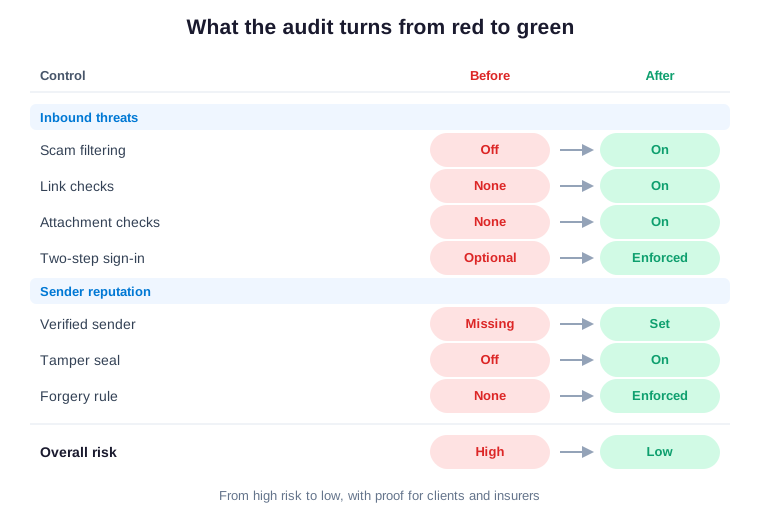
The value sits in the before-and-after. Specifically, a column of red unknowns becomes a short, ranked plan. Each control flips to green with an owner and a date. As a result, you fix the riskiest gaps first and prove the rest. Notably, that order keeps the work fast and easy to defend.
The ranking also keeps the budget sane. You spend first where the risk is highest. As a result, the early wins are cheap and obvious. Meanwhile, the smaller items can wait without real danger.
Across the 60+ tenants we manage, we see the same common mistake in small business email security every time. Filtering sits at default. Sender verification is half set up. The result is mail that silently fails checks and lands in spam. It all looks fine until a fake invoice gets paid. Notably, the fixes map straight to the PCI, SOC 2 and NIST controls your clients and insurer already expect. Therefore the audit does more than find gaps. It hands you proof, and proof is what wins contracts and lowers premiums.
What a small business email security audit checks first
The first question is always direct. Could a spoofed supplier reach your team right now? From there, the review covers your filtering, your verified sender setup and your sign-in. It also checks for sneaky mailbox forwarding rules. As a result, each gap becomes a clear fix you can act on this week.
Speed matters because the threat does not wait. So a small business email security audit is built to move fast. It surfaces the worst gaps in days, not months. As a result, you start closing them while the review is still warm.
🧮 The math: a filter versus a fraudulent wire
Put the numbers next to each other. Advanced email protection costs a few dollars per user each month. By contrast, a single fraud loss can erase a year of that. As a result, the protection is trivial against the downside. In practice, the math is not close.
Owners often delay because nothing has gone wrong yet. That is the trap. By contrast, the cost arrives all at once, on a day you did not pick. In short, prevention is cheap precisely because the failure is not.
| Your choice | What it takes | What you get |
|---|---|---|
| Turn on protection | A few dollars per user monthly | Filtering, verified senders, two-step sign-in |
| Leave it default | Nothing, until one wire goes out | Fraud losses and spam delivery |
The gap could hardly be wider. One path is a small, steady line item. By contrast, the other is an unpredictable five-figure hit. In short, you only pay it once it is far too late.
There is also the hidden cost of distraction. A fraud event pulls your whole team off the work that earns money. As a result, the loss is never just the wire. Furthermore, momentum is hard to rebuild after a scare.
What good looks like in 2026
Strong email defense in 2026 often uses what you may already own. Specifically, Microsoft 365 Business Premium adds advanced email protection on top of your mailbox. It arrives at one per-user, per-month price. Moreover, Business Standard lacks that layer, so it is the upgrade reason. As a result, most teams never need to bolt on a separate sign-in tool such as Okta or Duo.
This suits the budget as well as the risk. Specifically, one bundle lowers your total cost of ownership, or TCO. Furthermore, it keeps spending as steady, predictable OpEx rather than a lumpy CapEx outlay. The same controls protect a healthcare practice or a financial services firm. In practice, they protect any US small business just as well. Notably, they line up with the NIST Cybersecurity Framework. After all, that is the language your insurer speaks.
Framed that way, small business email security is a business asset. It lowers risk, premiums and friction with clients at once. As a result, spending here returns more than it costs. Notably, that is rare for any security line item.
🗺 Your 90-day small business email security plan
You do not need to fix everything overnight. In practice, a simple plan across one quarter does the job. It turns a leaky inbox into a verified, filtered one. Moreover, it never slows the team down. Specifically, each phase gives you something concrete to show.
A phased plan also keeps the team calm. Nobody faces a single overwhelming project. By contrast, each month ends with a visible, finished step. In practice, steady progress beats a rushed overhaul every time.
| Phase | What you do | What you get |
|---|---|---|
| Days 1 to 30: Find | Audit filtering, sender records and sign-in | A clear list of ranked gaps |
| Days 31 to 60: Fix | Turn on filtering, verified senders and two-step sign-in | A far smaller attack surface |
| Days 61 to 90: Prove | Watch the reports and tighten the rules | Proof for clients and insurer |
Turning the plan into proof
By the end of the quarter, your senders are verified and your filtering is live. As a result, a spoofed invoice gets stopped before payroll ever sees it. Furthermore, the monitoring keeps working in the background. In short, you stay protected without extra effort.
By the end, small business email security stops being a worry. It becomes a quiet standard that simply runs. As a result, you spend your attention on customers, not on fraud. Notably, that calm is the real return on the work.
That is the real win. It is not a frantic call after a fraudulent wire. By contrast, it is a calm, verified standard. So start with the question from the top of this guide. Then let an audit turn it into a short, fundable plan.
📚 More for US owners and operators
🔒 Find every gap a fake invoice could slip through
It is a full Microsoft 365 audit for a US small business. Specifically, it reviews your filtering, your verified sender setup and your sign-in. Furthermore, it hunts for the hidden forwarding rules attackers leave behind, and turns on the proof. As a result, you get a written report with ranked fixes and proof, plus 14 days of email Q&A.
❓ Small business email security: frequently asked questions
These are the questions US small business owners ask us most about phishing, fraud and the inbox.
Common small business email security questions
It means protecting your inbox from phishing, spoofing and fraud. You filter inbound threats, verify your senders so fakes get blocked, and switch on two-step sign-in.
An attacker sends a convincing message, often a fake invoice with new bank details. Your team pays the real amount to the wrong account. The money is then usually gone for good.
Yes. Microsoft 365 Business Premium adds advanced email protection that filters phishing, scans links and checks attachments. Business Standard lacks that layer, so it is the usual reason to upgrade.
It is a set of checks that prove your mail is really yours. It names your approved senders, seals each message against tampering, and tells inboxes to reject the fakes.
Usually your sender verification is missing or incomplete. Without it, receivers treat your mail as suspicious. Once it is set up properly, delivery improves quickly.