

Strong CMMC readiness turns a contract requirement into a calm, checkable project. The best part: for most small contractors, most of the work is already done inside the Microsoft 365 you pay for.
However, most readiness guides are written to sell a platform or an open-ended consulting engagement. This one is different. Specifically, it shows what your existing Microsoft 365 already covers, when you genuinely need GCC High, and how to turn readiness into a concrete plan.
Notably, you do not need a compliance team to follow it. The decisions are written in plain language, and the heavy lifting is configuration and evidence, not new software.
In short, treat this as a map to a ready tenant. By the end you will know your cloud, your gaps, your budget, and the order to close them in.
Not sure where your business stands on CMMC readiness?
Wintive gets US small defense contractors audit-ready on the Microsoft 365 they already own. We confirm your cloud, map the controls to your tenant, close the gaps, and build the evidence an assessor will ask to see. The price is a flat monthly fee per user, with no long contract and no setup cost.
📅 Book a Free 30-Min Call | 💬 Chat on WhatsApp | See Our Plans →
🧭 CMMC readiness: the short answer
CMMC readiness means getting your tenant and your evidence to the point where you could pass a CMMC assessment. For most small contractors that work happens inside Microsoft 365: identity, encryption, logging, and threat protection are already there. The big decision is whether you need GCC High, the government cloud, which depends on whether you handle Controlled Unclassified Information. Map your controls to the tenant, close the real gaps, and gather the evidence, then you are ready.
First, the plain version. CMMC readiness is the state of being able to demonstrate every required control, with the evidence to back it up. It is preparation, not the assessment itself.
Notably, readiness is mostly about what you already own. Microsoft 365 holds a large share of the controls, so the job is turning them on, scoping them correctly, and proving they run.
Crucially, readiness is also a decision about your cloud. Whether you stay on commercial Microsoft 365 or move to GCC High shapes the cost, the timeline, and the whole project.
Above all, readiness is something you can prove, not just claim. Because the controls live in tools you already run, you can show an assessor live settings and real logs rather than promises. As a result, contractors who prepare steadily walk in with evidence in hand and little left to explain on the day.
🔎 What CMMC readiness actually means
So, what are we really talking about? CMMC readiness is the gap between your tenant today and the controls your contract requires. The Department of Defense sets those controls, and you can read the program on the official DoD CMMC site.
Importantly, readiness is not a certificate. It is the work before an assessment: confirming your level, mapping controls, closing gaps, and building the evidence an assessor will ask to see.
Above all, readiness is measurable. You can score where you stand against each control, so the vague worry of an audit becomes a concrete, trackable list.
Therefore, think of readiness as a project with a finish line you can see. You know the controls, you know your tenant, and the work is closing the distance between them.
In short, CMMC readiness is preparation you can plan and budget. The contractors who treat it as a steady project, not an emergency, reach the line calmly and spend far less doing it.
Notably, readiness also pays off commercially, not just technically. A contractor who can show a current, mapped set of controls answers a prime’s security questions in days, not weeks. As a result, readiness becomes a reason to win work, because it signals that you take the contract, and its data, seriously.
🌐 Commercial Microsoft 365 or GCC High
Next, the decision that shapes your whole CMMC readiness project. Which cloud you need comes down to one question about your data.
Specifically, if you only handle Federal Contract Information, commercial Microsoft 365 is usually fine. If you handle Controlled Unclassified Information, you almost always need Microsoft 365 GCC High, the government cloud built for data-residency and ITAR rules.
Notably, this single choice drives the cost and timeline more than anything else. The flowchart shows how the data decides the cloud.
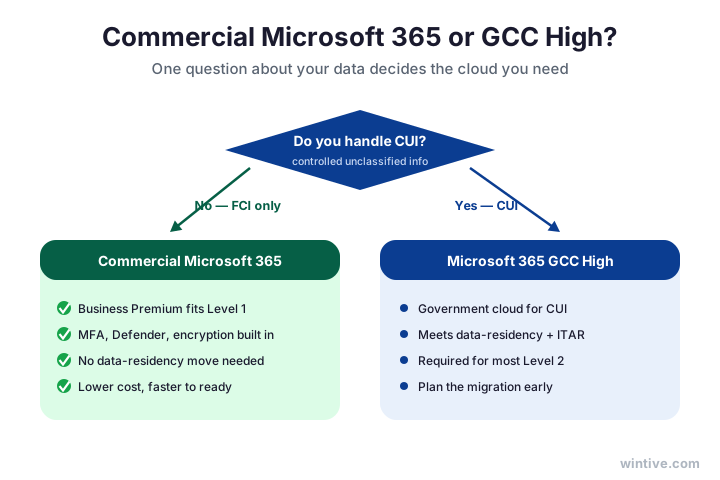
Therefore, confirm what data you actually handle before you buy anything. Many contractors assume they need GCC High when their contract only involves Federal Contract Information.
In short, get the cloud decision right first, because it is the most expensive one to reverse. A clear answer here makes every later readiness step simpler and cheaper to plan.
Notably, the two clouds are not a quality gap, they are a data-residency gap. Commercial Microsoft 365 runs the same security controls; GCC High simply meets the stricter rules for where controlled data is stored and who can touch it. As a result, most Level 1 contractors lose nothing by staying on commercial and saving the migration.
💼 What your Microsoft 365 plan already covers
So, how much of CMMC readiness do you already own? More than most contractors expect, because the controls live in the plan you already pay for.
Specifically, Microsoft 365 Business Premium covers most Level 1 safeguards out of the box: multi-factor sign-in, conditional access, Defender, and encryption. The E3 and E5 plans add deeper identity and advanced security.
Importantly, for Level 1 you rarely need to buy anything new. The chart shows roughly what each plan covers.
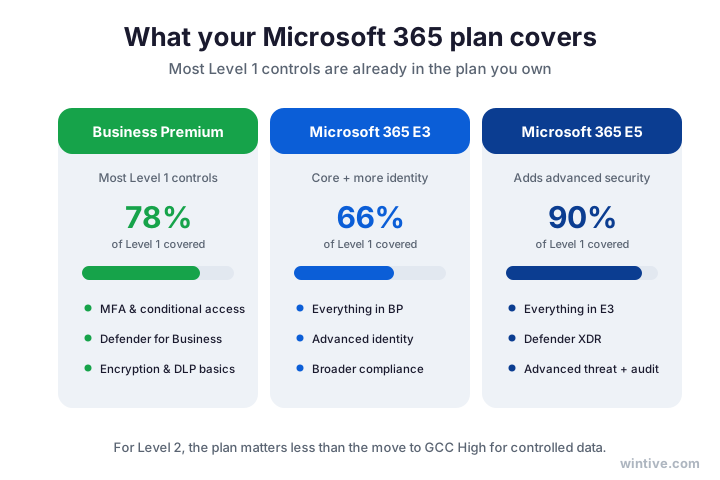
Therefore, take stock of the plan you hold before pricing add-ons. Counting what is already included often shows you are far closer to ready than the vendors suggest.
In short, your licence is your first readiness tool. Use what you own, scope it correctly, and you turn a shopping list into a configuration job you can mostly do in place.
Notably, the smart move is to read your licence before you read a vendor’s pitch. Many small contractors already hold Business Premium and never enabled half of what it includes. As a result, an afternoon spent turning on and scoping existing features often closes more of the gap than any new product would.
🔁 The CMMC readiness workflow
Next, how the work actually flows. CMMC readiness follows a clear cycle, and treating it as a loop keeps your tenant current rather than slipping back.
Specifically, you scope what is in play, map each control to Microsoft 365, find the gaps, close them, gather the evidence, then keep it all current. The ring shows the six stages.
Importantly, the cycle never fully stops. Settings drift and rules evolve, so a periodic pass keeps a ready tenant ready.
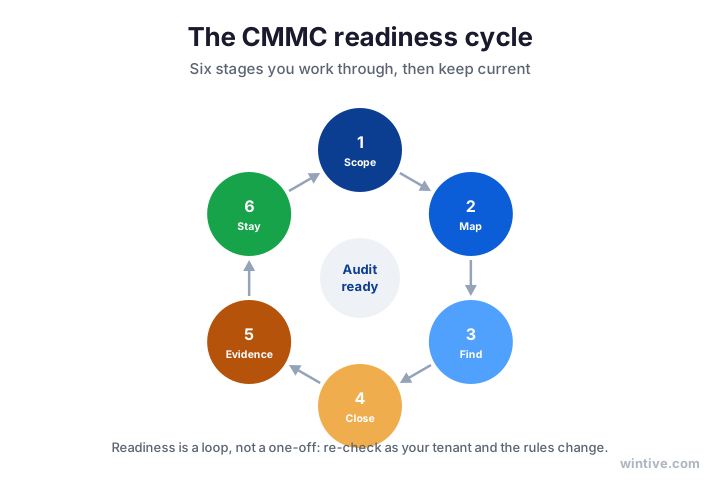
Therefore, work the cycle in order rather than jumping to the gaps. A clean scope and a control-to-tenant map make the gap list short and the evidence easy to gather.
In short, the workflow turns a daunting standard into a routine. Each stage feeds the next, so steady progress around the loop is what gets and keeps you ready.
Notably, the loop also makes the work shareable. Each stage is a clear task you can assign, track, and hand over, so readiness does not depend on one person holding it all in their head. As a result, a small team can run the cycle together and keep the tenant ready even as staff and contracts change.
🟢 Map your controls to the tenant
Here is the part the platform vendors skip entirely. The fastest route to CMMC readiness is mapping each control to where it already lives in Microsoft 365.
Specifically, identity and access map to Entra ID, encryption and data protection to Purview, threat alerts to Defender, and device control to Intune. So a large share of the controls is one setting or one export away.
However, the gaps that remain are usually written policies and evidence, not missing tools. That is good news, because policies are cheaper to write than platforms are to buy.
🟢 Where each control already lives
Wintive insight. The costliest readiness mistake we see is a small contractor buying a standalone compliance platform before anyone has checked what Microsoft 365 already covers. For Level 1, Business Premium handles most of the safeguards out of the box, and the evidence, sign-in logs, conditional access, encryption status, audit logs, exports straight from the tenant. The real gaps are almost always policy documents, a named owner for each control, and a tidy place to keep the proof. A focused readiness review of the tenant closes most of those for a fraction of a new platform, and it is exactly what our Master Audit delivers.
In short, map before you buy. Counting what your tenant already satisfies turns CMMC readiness from a shopping spree into a short, focused list of real gaps to close.
Therefore, build the map once and reuse it forever. A simple table of each control, where it lives in Microsoft 365, and the evidence to export becomes your readiness backbone. As a result, the next assessment, renewal, or new contract starts from a living document instead of a blank page.
🏛️ When you actually need GCC High
So, when is GCC High genuinely required for CMMC readiness? Less often than the fear suggests, but the trigger is real.
Specifically, you need GCC High when you handle Controlled Unclassified Information, when your contract names ITAR or export-controlled data, or when a prime demands US-only data residency. If none of those apply, commercial Microsoft 365 is fine.
Importantly, the move is a one-way migration with real cost and months of work, so it is worth confirming before you commit. The panel shows the triggers and what the move involves.
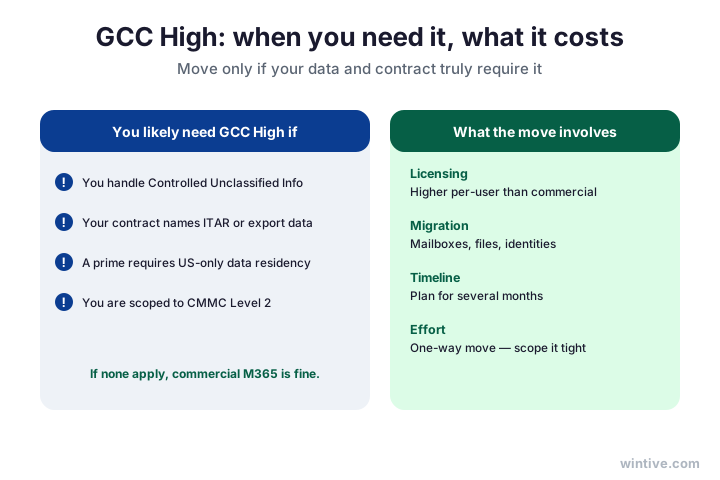
Therefore, treat GCC High as a decision to verify, not assume. Plenty of small contractors qualify for commercial Microsoft 365 and reach readiness without ever migrating.
In short, only move if your data and contract require it. When they do, plan the migration early so it does not become the bottleneck in your readiness timeline.
Notably, the cost of GCC High is as much about effort as licensing. Migrating mailboxes, files, and identities is a one-way project, so the planning matters more than the price tag. As a result, contractors who confirm the trigger early and scope the move tightly avoid both the surprise bill and the scramble near a deadline.
📊 Score your CMMC readiness
Next, a simple way to see where you stand. Scoring your CMMC readiness by area turns a wall of controls into a quick read.
Specifically, mark each control area red, amber, or green: ready, in progress, or a real gap. Most identity and protection areas come out green because Microsoft 365 already covers them.
Notably, the amber and red areas are usually policies, evidence, and incident response. The scorecard shows a typical small-contractor read.
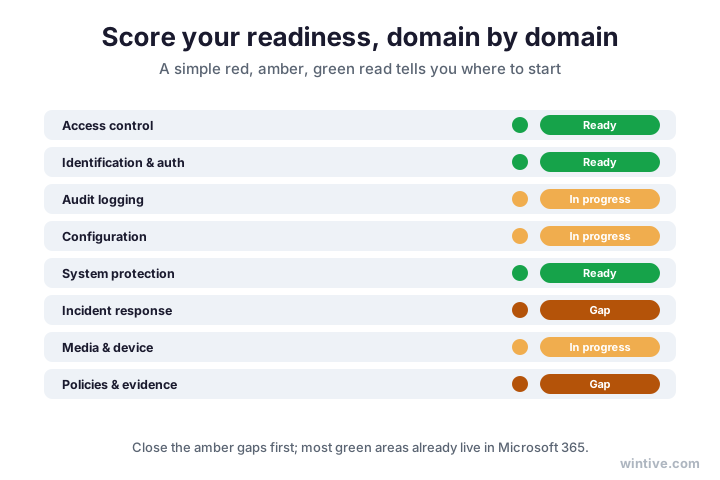
Therefore, work the red and amber areas first, in that order. A simple traffic-light read keeps the project focused on what is genuinely missing.
In short, a scorecard is the fastest planning tool you have. It shows where you are ready, where you are close, and where the real work is, all on one page.
Therefore, refresh the scorecard each quarter, not just before an assessment. Controls drift, staff change, and new recommendations appear, so a regular read catches a slipping area before it becomes a finding. As a result, the same one-page view that planned your readiness also keeps it honest over time.
🪤 Common CMMC readiness mistakes
Meanwhile, a few mistakes slow small contractors down again and again. First, many assume they need GCC High when their contract only involves Federal Contract Information.
Furthermore, some buy a compliance platform before checking what Microsoft 365 already covers, then pay twice. Others treat readiness as a one-time push and let the tenant drift afterwards.
Finally, a frequent trap is gathering evidence without writing the policies behind it. An assessor wants both, so evidence with no policy reads as a gap.

Therefore, confirm your cloud, use what you own, pair every control with a policy, and keep the tenant current. As a result, you avoid the four most common readiness traps in one move.
In short, the pattern behind every mistake is the same: treating readiness as a purchase instead of a project. Map first, buy last, and keep the loop turning.
Above all, do not wait for certainty before you start. The rules will keep evolving, but the underlying controls are stable, so the readiness work you do now keeps its value. As a result, the contractors who begin early adjust to detail changes calmly, while the ones who wait face the whole project under deadline pressure.
🗓️ Your first 30 days to ready
Finally, here is how to begin without boiling the ocean. In the first month you can move from worry to a clear, costed readiness plan.
Specifically, confirm your level and your cloud, scope where sensitive information lives, then map your controls to Microsoft 365 and score each area. Log the gaps with an owner and a date.
Notably, the goal of month one is clarity, not certification. You will not be assessed in thirty days, and that is fine. Aim to know your cloud, your gaps, and your budget.
Therefore, end the month with a one-page picture: your cloud decision, a short gap list with owners, and a realistic budget. That single page turns a vague worry into a plan you can fund and defend.
In short, a focused first month does most of the heavy lifting. With your cloud confirmed and your gaps mapped to the tenant, the rest of CMMC readiness becomes steady execution rather than guesswork.
Therefore, share that one-page plan with whoever signs the cheques. A costed, time-boxed readiness plan is far easier to approve than a vague worry, and it gives you the green light to actually start. As a result, month one ends not with anxiety but with a funded, ordered list of work the team can pick up.
👤 Who needs CMMC readiness, and when
Of course, not every business needs CMMC readiness yet. So decide by your contracts, not by fear.
Specifically, if you sell or hope to sell to the Department of Defense, expect a CMMC requirement in the contract terms. The requirement flows down the supply chain, so even a small subcontractor two tiers down can be in scope.
Notably, the timing is set by the contract, and the rules are rolling out in phases. The safest move is to be ready before a bid asks for it.
Importantly, readiness is not all-or-nothing across the supply chain. A prime may flow down only the controls that touch its data, so part of your tenant can be in scope while the rest is not. As a result, a clear scope keeps your readiness work focused on what the contract actually requires.
📌 When your CMMC readiness clock starts
In short, let the contract decide. The moment a prospect or a prime mentions CMMC, the readiness clock has started, and early preparation gives you a head start no scramble can match.
Therefore, watch your pipeline, not just your current work. A single new defense opportunity can make readiness urgent overnight, and the ready contractors win the work the unprepared cannot bid for.
In short, the requirement is contract-driven, so your pipeline sets your timeline. The contractors who reach readiness ahead of a bid keep winning work that the unprepared simply cannot pursue, because there is no time to get ready once the questionnaire lands.
🛠️ Do it yourself, or bring in help
So, should a small contractor reach readiness alone? For Level 1, many can. The controls are basic and most live in settings you already own.
However, Level 2 is harder, because the 110 controls, the evidence package, and the GCC High decision carry real consequences. A mistake there can mean a failed assessment or a costly migration.
Specifically, a good readiness partner does not just hand you a tool. They map the controls to your tenant, tell you honestly what you already cover, and scope only the real gaps.
Above all, judge any partner by how plainly they explain what you already have. The goal is an honest readiness picture and a clean evidence package, not a glossy report.
In short, match the route to your level and your time. A lean Level 1 shop can self-assess, while a Level 2 contractor usually gains from a guided readiness review that turns the tenant into a ready evidence set.
Above all, the goal is the same either way: an honest readiness picture and a clean set of evidence. Whether you self-assess or bring in help, judge the result by how easily an assessor could verify it. As a result, the right partner makes themselves dispensable, leaving a tenant and a team that can stay ready alone.
✅ Your CMMC readiness recap
Condensed, here is the CMMC readiness plan to keep on hand.
- Confirm your level and whether you handle controlled information.
- Decide your cloud: commercial Microsoft 365 or GCC High.
- Map every control to where it lives in Microsoft 365.
- Score each area red, amber, or green.
- Close the amber and red gaps first.
- Pair every control with a written policy and evidence.
- Plan any GCC High migration early, if you truly need it.
- Keep the cycle turning so a ready tenant stays ready.
Notably, none of this needs a big budget; it needs a method. The contractors who reach readiness calmly are the ones who map first, buy last, and keep the loop turning, quarter after quarter, long after the first assessment is behind them.

Ultimately, at Wintive we get US small contractors audit-ready on the Microsoft 365 they already run, as part of our managed security services. So we confirm your cloud, map the controls to your tenant, close the gaps, and build the evidence. As a result, you reach CMMC readiness with a plan you can defend, not an open-ended consulting bill. To get started, contact us for a free consultation. It is quick, and we do the rest.
📚 More for Growing Businesses
🔒 See exactly where your Microsoft 365 stands for CMMC readiness
The M365 Master Audit is a full Microsoft 365 security audit for a US small contractor. Specifically it reviews your identity, email, device, and data controls, maps them to the CMMC and NIST 800-171 requirements, builds the evidence, and ranks the fixes by real risk. As a result you get a written report, a clear action plan, and the proof to show an assessor.
❓ Frequently Asked Questions
It is the state of being able to demonstrate every control a CMMC assessment requires, with the evidence to back it up. For most small contractors that work happens inside Microsoft 365, by mapping controls, closing gaps, and gathering proof.
Often yes. If you only handle Federal Contract Information, commercial Microsoft 365 usually covers Level 1. You only need GCC High when you handle Controlled Unclassified Information or a contract names ITAR or data-residency rules.
It covers most Level 1 safeguards out of the box: multi-factor sign-in, conditional access, Defender, and encryption. The remaining gaps are usually written policies and evidence rather than new tools you have to buy.
When you handle Controlled Unclassified Information, when your contract involves ITAR or export-controlled data, or when a prime requires US-only data residency. If none of those apply, commercial Microsoft 365 is usually enough.
It varies with your level and your cloud. Level 1 readiness can take a few weeks, mostly your own time. Level 2, and especially a move to GCC High, runs into months, so starting early keeps the timeline calm.
Confirm your level and cloud, scope where sensitive information lives, then map your controls to Microsoft 365 and score each area. That first pass turns readiness from a worry into a short, costed list of gaps.
🧭 Your next step
Want to know exactly where your business stands on CMMC readiness? First, book a short call. Then we confirm your cloud, map the controls to your Microsoft 365, close the gaps, and build the evidence. To start, contact Wintive. It is quick, and we do the rest.