

An Office 365 security audit is the fastest way to see whether your Microsoft 365 tenant is actually safe. Most small businesses assume the defaults protect them. In reality, the defaults leave gaps that an attacker finds in minutes.
However, most guides on this topic are thin or sell a tool. This one is different. Specifically, it walks you through the seven areas an audit checks, what good looks like in each, and how to turn the findings into a clear plan. As a result, you finish knowing exactly where you stand and what to fix first.
Notably, you do not need to be deeply technical to follow along. Each section explains what to check and why it matters in plain terms. Therefore, you can run the checklist yourself, or hand it to a specialist and know exactly what they should cover.
Not sure your Microsoft 365 is actually secure?
Wintive runs a full Office 365 security audit for US small businesses on the Microsoft 365 you already own. We check identity, email, data, devices, licensing, and monitoring, then hand you a ranked plan. The price is a flat fee, with no long contract and no setup cost.
📅 Book a Free 30-Min Call | 💬 Chat on WhatsApp | See Our Plans →
🧭 Office 365 security audit: the short answer
An Office 365 security audit reviews seven areas: identity, email, data sharing, devices, licensing, monitoring, and your Secure Score. Most of the controls already live in the Microsoft 365 you pay for. So the real work is checking each area, ranking the gaps by risk, and fixing the worst ones first. In short, you are closer to secure than the defaults suggest, but only once someone has actually looked.
First, the plain version. A security audit is not a product you buy. Instead, it is a structured review of how your tenant is configured against known good practice. Therefore, anyone can follow it, with or without a deep technical background.
Notably, the goal is a decision, not a report. You want a short list of what to fix, ranked by real risk. Therefore, a good audit ends with an action plan, not a data dump. As a result, you leave with next steps, not homework.
Importantly, this is not a one-time chore either. Threats move, staff change, and settings drift. So the smartest owners repeat the audit on a schedule and watch the gaps in between.
In practice, that is where this guide earns its keep. It turns a vague worry into a concrete checklist you can work through. As a result, you stop guessing and start fixing what matters.
🔎 What an Office 365 security audit actually checks
So, what does an audit cover? Broadly, it inspects the controls that protect your accounts, your email, your files, and your devices. For a lighter, risk-ranked review you can run first, see our Microsoft 365 security assessment guide. Microsoft groups much of this guidance in its Microsoft 365 security documentation.
Importantly, the audit is about configuration, not new software. You already own the tools. Therefore, the question is whether they are switched on, scoped correctly, and watched.
Above all, the audit is risk-led. A missing multi-factor prompt matters more than a cosmetic setting. As a result, the findings are ranked, so you spend your time where the danger is.
Crucially, the audit also looks for drift. Settings that were safe a year ago may not be today. So part of the job is checking that yesterday’s good config still holds.

Therefore, do not picture a scary, weeks-long project. In reality, most of the work is a careful walk through settings your team touches daily. As a result, the findings feel familiar, not foreign.
Notably, the audit also gives you a shared language with your clients. When a prospect asks how you protect their data, you can answer with specifics. Therefore, the same review that lowers risk also helps you win trust.
🗺️ The seven domains of an Office 365 security audit
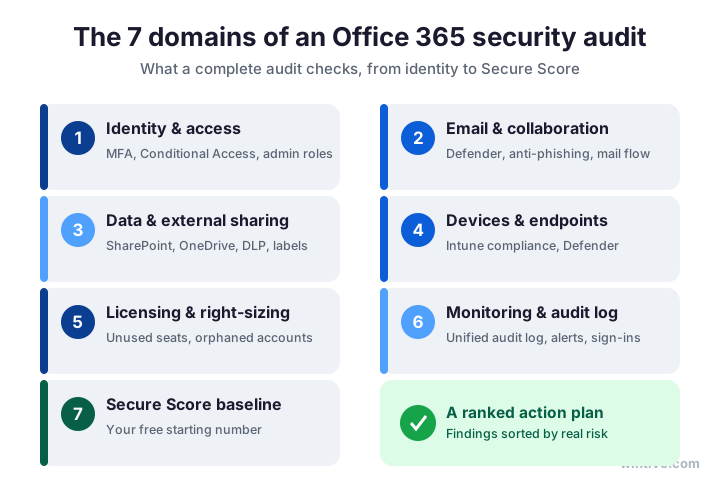
Next, the shape of the work. A complete audit splits into seven domains. Together, they cover every place a small tenant tends to leak. For the settings behind each one, see our Microsoft 365 security best practices guide.
Specifically, you check identity, email, data and sharing, devices, licensing, monitoring, and your Secure Score baseline. Each domain has a handful of high-impact controls. Therefore, you do not need to boil the ocean to get safer fast.
Crucially, the order matters. Identity comes first because most breaches start with a stolen sign-in. The chart lays out all seven at a glance.
Notably, the domains overlap in practice. A weak admin account, for example, threatens email, files, and devices at once. Therefore, fixing one strong control often closes several gaps together.
In short, treat the seven as a map, not a wishlist. You will not perfect every domain on day one. As a result, the ranking tells you where to start and what can wait.
Importantly, each domain answers a simple question. Who can get in, what can they reach, and would you even notice? Therefore, keep those three questions in mind as you work, and the technical detail falls into place.
🔐 1. Identity and access
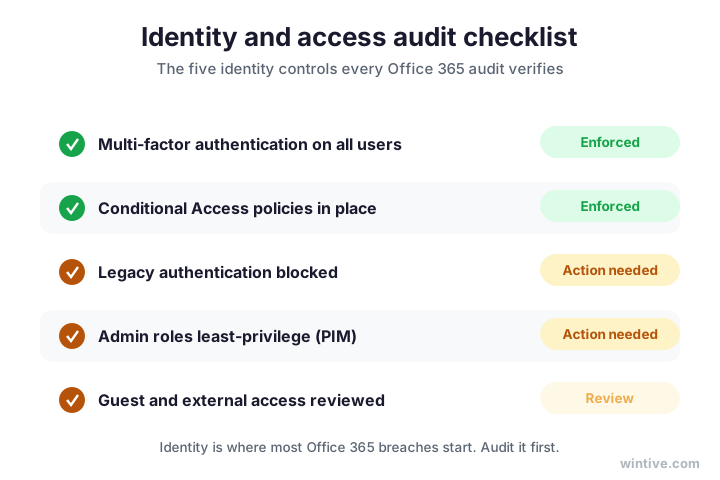
First, identity. This is the single most important domain, so start here. Above all, confirm that multi-factor authentication is enforced for every user, not just admins.
Then, check Conditional Access, blocked legacy authentication, and least-privilege admin roles. Notably, standing global admins are a common and serious finding. Therefore, move them behind just-in-time access.
Finally, review guest and external accounts. Often, old guests keep access long after a project ends. As a result, a quick review here removes real exposure in minutes. The checklist shows what good looks like.
Importantly, legacy authentication deserves special attention. It quietly bypasses multi-factor prompts, so attackers love it. Therefore, blocking it is one of the highest-impact fixes you can make.
In practice, most small tenants pass two of these checks and fail three. So do not be discouraged by red marks. As a result, a focused week on identity usually lifts your protection sharply.
📧 2. Email and collaboration security
Next, email, because that is where most attacks land. Specifically, check that Microsoft Defender for Office 365 is configured, with anti-phishing and safe links switched on.
Then, hunt for risky mail rules. Often, attackers add a quiet forwarding rule to exfiltrate mail. Therefore, an audit reviews transport and inbox rules for anything that sends mail outside the company.
Also, confirm mailbox auditing is on. Without it, you cannot prove what happened after an incident. As a result, this one setting decides whether a breach is a footnote or a mystery.
Finally, review external email warnings and impersonation protection. Notably, a spoofed invoice is a classic small-business trap. Therefore, a visible warning banner is cheap insurance that pays off fast.
In practice, the quickest win here is the forwarding-rule sweep. Specifically, you list every rule that sends mail outside the company and confirm each one is wanted. As a result, you often catch a problem the very first time you look.
Above all, do not rely on the default filters alone. They are good, but tuned settings are better, and a quick policy review closes the gap. Therefore, an hour on email policy usually beats a week of cleanup later.
📂 3. Data and external sharing
Now, your files. SharePoint and OneDrive make sharing easy, which is exactly the risk. So, the audit checks how broadly content can be shared outside the company.
Specifically, review external sharing settings, anonymous links, and guest access to sites. Then, confirm that sensitive data is covered by basic data loss prevention and sensitivity labels.
Importantly, you are not trying to lock everything down. Instead, you are matching access to need. As a result, the business keeps moving while the obvious leaks close.
Notably, anonymous links are the usual culprit. They live on long after they are needed, with no owner and no expiry. Therefore, an audit flags them and sets a sensible default going forward.
In practice, a sharing report tells the story fast. Specifically, it lists which files are open to anyone with the link. As a result, you can close the riskiest ones in an afternoon, not a quarter.
Above all, set defaults that protect people automatically. For example, links can expire and default to named recipients. Therefore, the next careless share is safe before anyone has to think about it.
💻 4. Devices and endpoints
Next, the devices that touch your data. Specifically, the audit checks whether laptops and phones are enrolled and meeting a compliance baseline in Microsoft Intune.
Then, confirm that Defender for Endpoint is active and reporting. Notably, an unmanaged personal laptop with saved credentials is a quiet back door. Therefore, device compliance is part of any honest security review.
Above all, aim for coverage, not perfection. Even a simple compliance policy beats none. As a result, you raise the floor for every user at once.
Finally, check that lost devices can be wiped remotely. People misplace phones, and that is normal. Therefore, the ability to wipe company data from a distance turns a scare into a non-event.
In practice, start with a light compliance policy and tighten it later. Specifically, require a screen lock, encryption, and an up-to-date system. As a result, you cover the basics on day one without blocking anyone’s work.
Notably, personal phones reading company mail are the common blind spot. They rarely meet any baseline at all. Therefore, an audit checks mobile access and brings it under the same simple rules.
🧾 5. Licensing and right-sizing
Here is the domain most guides skip, and it is pure Wintive. Specifically, unused and over-assigned licences are a security problem, not just a billing one.
Crucially, every orphaned account and shared mailbox with a sign-in is attack surface. Therefore, the audit lists dormant users, ex-staff still licensed, and accounts nobody owns. Then, you disable or reclaim them.
Notably, this almost always pays for the audit by itself. You cut waste and shrink the attack surface in one pass. As a result, security and the budget improve together.
Moreover, right-sizing surfaces mismatched plans. Some users hold a heavy licence they never use, while others lack a control they need. Therefore, matching plans to roles tightens security and trims the bill.
Wintive insight. Across the small-business tenants we audit, the most common surprise is not a missing firewall. It is the count of licensed accounts nobody recognises. Ex-employees, test accounts, and shared mailboxes with interactive sign-in sit there for months. Each one is a way in. A single right-sizing pass usually removes more real risk than a new security product, and it lowers the bill at the same time.
Therefore, treat the licence list as a security report, not just an invoice. Each unknown name is a question worth answering. As a result, the cleanup protects you and frees money for the fixes that matter.
📊 6. Monitoring and the unified audit log
Next, can you see what is happening? Specifically, confirm the unified audit log is switched on. Surprisingly, many tenants leave it off, so there is no trail when something goes wrong.
Then, review alert policies and sign-in logs for risky behaviour. Notably, repeated failed logins and impossible-travel sign-ins are early warnings. For how to set this up with the native tools, see our Microsoft 365 security monitoring guide.
Above all, monitoring is what turns a breach into a near miss. Without it, you learn about an incident from a customer. The flow shows how raw activity becomes an alert you can act on.
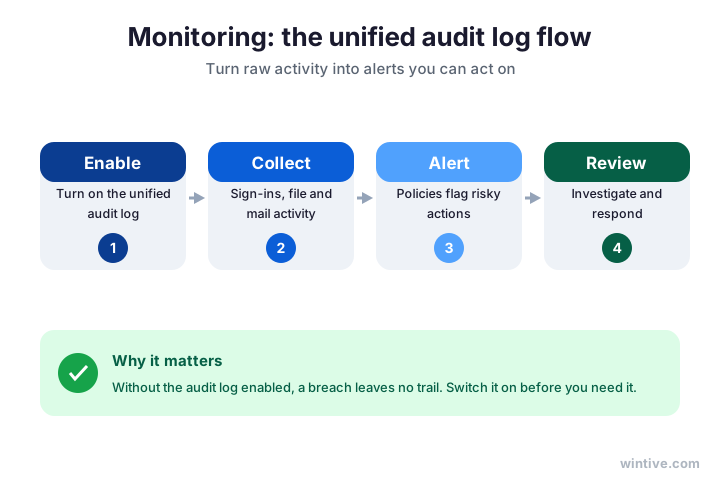
Importantly, the log only helps if it is on before trouble starts. It does not record the past retroactively. Therefore, switching it on today is one of the cheapest wins in the whole audit.
In practice, you do not need a security team to benefit. A handful of well-chosen alert policies covers the common cases. As a result, even a lean business gets early warning of the attacks that matter.
🎯 Read your Microsoft Secure Score first
Before the deep dive, get your baseline. Specifically, your Microsoft Secure Score gives your tenant a single number and a list of recommended actions. So, it is the fastest way to see roughly where you stand.
However, the score is a starting point, not the answer. A number does not tell you which gap to close first for your business. Therefore, treat Secure Score as the map and the audit as the route.
Crucially, read the score next to real risk. A cheap, high-impact fix beats a hard one that moves the number more. The gauge shows how to turn the score into action.
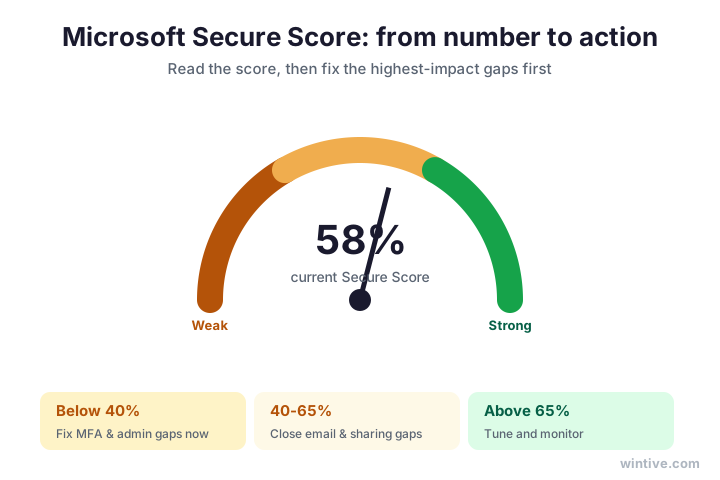
Notably, do not chase a perfect score. Some recommended actions will not fit your business, and forcing them creates friction. Therefore, accept the trade-offs you understand and document the ones you skip.
In short, Secure Score is the warm-up, not the workout. It points you at the obvious gaps in minutes. As a result, the full audit then handles the judgement calls a number cannot make.
🛠️ Manual versus automated Office 365 security audit
So, should you run this by hand? You can, and the free tools are real. Specifically, Secure Score and open-source scripts will surface plenty.
However, manual work is slow and technical, and it is easy to miss a setting. Therefore, the honest trade-off is time and certainty against cost. The comparison lays it out.
In short, do it yourself if you have the hours and the skills. Otherwise, an automated audit checks every domain the same way and hands you a ranked list in minutes. As a result, you skip the manual hours and still get the clarity.
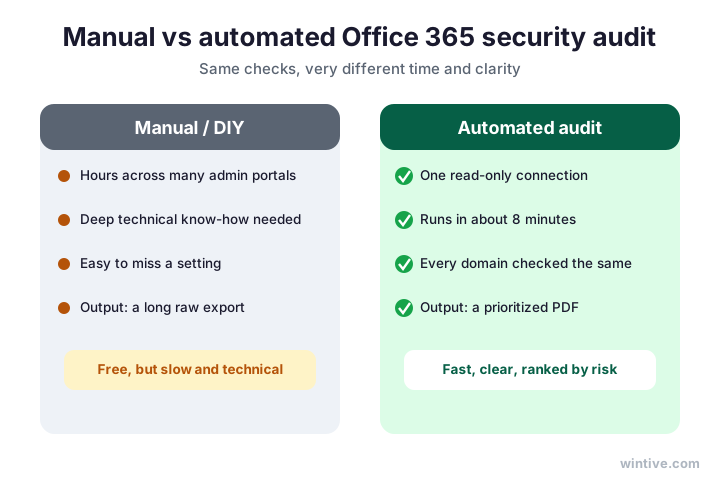
Therefore, match the method to your team. A lean business rarely has spare hours for portal archaeology. As a result, a fast, repeatable audit usually wins.
Notably, the free scan also has a hidden cost. It hands you raw findings with no priorities, so you still have to decide what matters. Therefore, the value is not the scan itself but the ranked plan that should follow it.
💷 What an Office 365 security audit costs
Of course, you want the numbers. Broadly, a do-it-yourself audit costs only your time, while a done-for-you audit is a fixed, predictable fee.
Notably, the hidden cost of doing nothing is the largest of all. One business email compromise can dwarf any audit. Therefore, the cheapest path is to find the gaps before someone else does.
So, who needs one? Any small business that keeps client data, handles payments, or faces a security questionnaire. The table sets out the rough picture.
| Approach | Rough cost | What you get |
|---|---|---|
| Do it yourself | Your time, days | A manual pass, if you have the skills |
| Automated audit | Low, fixed | Every domain checked, ranked in minutes |
| Done-for-you audit | A fixed fee | Findings, a plan, and the fixes |
Importantly, the trigger is usually a customer, not a regulator. A single enterprise prospect can ask for proof overnight. Therefore, treat the first security questionnaire as a green light to audit, not a burden.
In short, the question is rarely whether you can afford an audit. Instead, it is whether you can afford the breach you have not found yet. As a result, most owners decide the maths is simple.
🚀 Where to start your Office 365 security audit
So, where do you actually begin? First, do not try to fix everything at once. Instead, pick the handful of changes that cut the most risk for the least effort.
To start, turn on multi-factor authentication for every account today. Notably, this single step blocks the large majority of account attacks. Therefore, it is the highest-value hour you will spend all week.
Next, switch on the unified audit log. Specifically, it records activity from this moment on, so the sooner it runs, the more you see later. As a result, you buy yourself a safety net for free.
Then, pull your licence list and your guest list. Often, both contain names nobody recognises. Therefore, a quick cleanup here removes real exposure and trims the bill in one pass.
After that, read your Secure Score for the obvious wins. However, do not chase the number for its own sake. Instead, pick the cheap, high-impact actions and leave the rest for the full audit.
Finally, write down what you found and what you fixed. In short, a one-page record turns a scramble into a plan. As a result, the next audit starts from clarity, not from scratch.
🪤 Common Office 365 security audit mistakes
Before the checklist, learn from others. A few mistakes show up again and again, and each one is easy to avoid once you know it.
First, many owners treat the audit as a one-off. However, settings drift and staff change, so a single pass goes stale fast. Therefore, the firms that stay safe repeat the audit and watch the gaps between rounds.
Second, some chase a perfect Secure Score instead of real risk. Notably, the number can rise while a serious gap stays open. Therefore, always rank fixes by impact, not by points.
Third, teams often forget the accounts at the edges. Specifically, shared mailboxes, service accounts, and old guests slip through. As a result, the audit must cover every identity, not just the obvious staff logins.
Finally, plenty of businesses run the free scan and stop there. However, raw findings with no priorities rarely turn into fixes. Therefore, the audit only pays off when it ends in a short, ranked action plan.
In short, the biggest mistake is treating security as a project with an end date. Instead, it is a habit. As a result, the owners who win bake the audit into how they run the business, not into a one-time scramble.
✅ Your Office 365 security audit checklist
Condensed, here is the checklist to keep on hand. Work through it in order, and tick each item honestly.
- Enforce multi-factor authentication for every user.
- Turn on Conditional Access and block legacy sign-in.
- Remove standing admins and review guest access.
- Configure Defender for Office 365 and check mail rules.
- Tighten external sharing in SharePoint and OneDrive.
- Enrol devices and apply an Intune compliance policy.
- Reclaim unused licences and orphaned accounts.
- Switch on the unified audit log and review alerts.
Therefore, print this and run it. An attacker will check the same items, so flattering yourself helps no one. As a result, an honest first pass shows you exactly how far you have to go.

Ultimately, the goal is not a perfect tenant. It is a known one. Therefore, once you have worked through this audit, you can say exactly how safe your Microsoft 365 is, and prove it. As a result, security stops being a worry and becomes something you can show.
📚 More for Growing Businesses
🔒 See exactly where your Office 365 security stands
The M365 Master Audit is a full, done-for-you Office 365 security audit for a US small business. Specifically, it reviews every domain in this guide, maps the findings to the controls auditors and clients expect, ranks the fixes by real risk, and hands you the plan. As a result, you get findings, a roadmap, and the evidence to show you are secure.
❓ Frequently Asked Questions
It is a structured review of how your Microsoft 365 tenant is configured across identity, email, data sharing, devices, licensing, and monitoring. You work through each area, rank the gaps by risk, and fix the most dangerous first.
By hand, a thorough pass takes days and real technical skill. An automated audit checks every domain the same way and returns a ranked list in minutes, which is why most small teams prefer it.
Yes. Microsoft Secure Score and open-source scripts will surface plenty for free. The trade-off is time and the risk of missing a setting, so many owners hand it to a specialist instead.
Unused and orphaned licensed accounts, plus missing multi-factor authentication. Both are quick to fix and both remove real attack surface, which is why an audit ranks them near the top.
At least once a year, and again after any big change such as a migration, a new app, or staff turnover. Continuous monitoring then catches drift between full audits.
Yes. Most controls live in Entra ID, Purview, and Defender, which you already pay for. The audit confirms they are switched on, scoped correctly, and actually watched.
🧭 Your next step
Want to know exactly where your tenant stands? First, book a short call. Then we run the audit, rank the gaps, and hand you a clear plan. To start, contact Wintive. It is quick, and we do the rest.