

Your Microsoft Secure Score is the single number Microsoft gives your tenant to show how secure it is. It sits in the admin portal, and most owners have never looked at it. Yet it is the fastest way to see where you stand.
However, the number on its own can mislead you. A high score can still hide a real gap, and a low one can look scarier than it is. So this guide explains what the score means, what counts as good, and the quick wins that raise it fast. As a result, you turn a vague percentage into a clear plan.
Notably, you do not need to be technical to use it. The portal does the measuring, and the actions are written in plain language. Therefore, an owner or manager can read the score and decide what to do next.
Not sure what your Microsoft Secure Score is telling you?
Wintive reads your Microsoft Secure Score, runs a full Office 365 security audit, and hands you a plan ranked by real risk. We close the high-impact gaps on the Microsoft 365 you already own. The price is a flat fee, with no long contract and no setup cost.
📅 Book a Free 30-Min Call | 💬 Chat on WhatsApp | See Our Plans →
🧭 Microsoft Secure Score: the short answer
Microsoft Secure Score is a percentage that rates how well your Microsoft 365 tenant follows security best practice. It scores three areas: identity, data and apps, and devices. There is no official pass mark, but most small businesses start in the 40 to 60 percent band and climb from there. The fastest gains come from a few high-impact actions, led by multi-factor authentication. In short, treat the score as a map, then fix the real risks behind it.
First, the plain version. Microsoft Secure Score reads your settings and compares them to recommended actions. Then it gives you a percentage and a list of things to improve.
Notably, the score is relative, not absolute. It measures how far you have gone, not whether you are safe enough for your business. Therefore, the goal is steady progress, not a perfect number.
Crucially, the score is also a starting point for a decision. It points at gaps, but it does not rank them by your real risk. As a result, you still need judgement to decide what to fix first.
In short, think of the score as a regular health check for your whole tenant. It will not fix anything by itself, and it was never meant to. Yet it tells you, in one quick glance, where to point your effort first and what you can safely leave for later.
🔎 What is Microsoft Secure Score, in plain English
So, what is it really? Microsoft Secure Score is a built-in tool in the Microsoft 365 admin and Defender portals. Microsoft explains the mechanics in its official Secure Score documentation.
Importantly, the score is made of recommended actions. Each action you complete adds points, and your percentage is the points you have earned against the total on offer.
Above all, it is free and already on. You do not buy it or install it. Therefore, checking your Microsoft Secure Score costs nothing but a few minutes.

In practice, that is what makes it so useful as a starting point. It gathers dozens of settings into one place. As a result, you get a fast read on your security without a full audit first.
Notably, that speed is exactly why owners like it. You get a useful read before committing to a deeper review. As a result, the score is the natural first step, not the last.
🎯 What is a good Microsoft Secure Score?
Now the question everyone asks. There is no official pass mark, and Microsoft does not publish one. So a good score is one that keeps improving and has no high-risk gaps left open.
Notably, the comparison number can flatter or scare you. It compares you to similar tenants, which is interesting but not a target. Therefore, judge yourself against your own last score, not against an average.
In practice, most small businesses begin in the 40 to 60 percent range. A focused month of quick wins often lifts that into the 60s or 70s. The chart shows sensible bands to aim for.
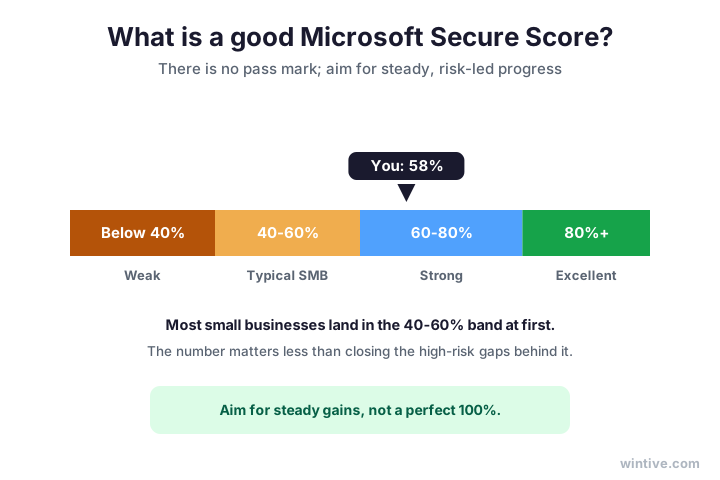
Crucially, do not fixate on hitting 100 percent. Some actions will never fit your business, and chasing them wastes time. As a result, a steady climb with the real risks closed beats a vanity number every time.
In practice, the comparison band also moves as peers improve. So a flat score can quietly fall behind the average. Therefore, keep climbing even when your number looks fine.
🧩 The three Microsoft Secure Score categories
Next, where the points come from. Microsoft Secure Score splits into three areas, and knowing them tells you where the easy wins hide.
Specifically, the first is identity, which covers sign-in, multi-factor, and admin roles. The second is data and apps, which covers sharing, mail, and information protection. The third is device, which covers Intune and endpoint protection.
Importantly, identity usually holds the most points and the fastest gains. Therefore, start there before the harder device work. The chart shows roughly how the points split.
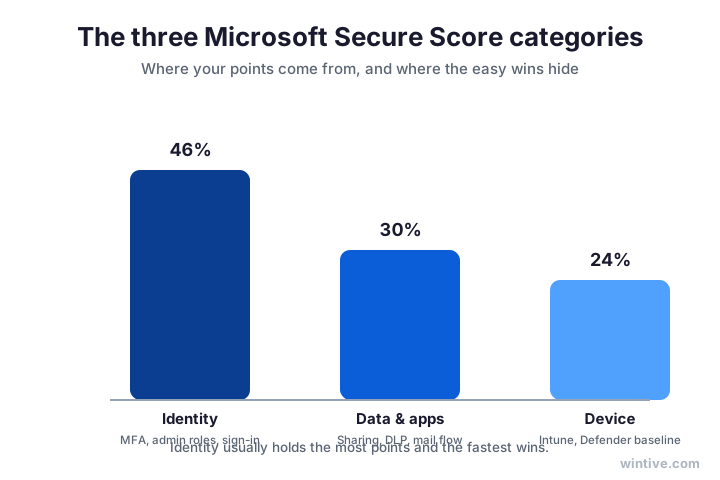
As a result, you can plan the work in order. Close the cheap identity gaps first, then move to data, then to devices. So the score rises quickly at the start, which keeps the project motivating.
Notably, the device category is often the slowest to lift. It needs enrolment and policies, which take longer than a toggle. Therefore, leave it until the quick identity wins are banked.
📈 How to improve your Microsoft Secure Score
So, how do you actually raise it? You work the recommended actions, but not in a random order. Instead, you do the high-impact, low-effort ones first.
Specifically, the biggest single win is enforcing multi-factor authentication for everyone. Then comes blocking legacy authentication, trimming standing admins, and turning on the audit log.
Notably, these are the same fixes a real security audit would flag. Therefore, raising your Microsoft Secure Score and getting genuinely safer are usually the same job. The chart ranks the quick wins.
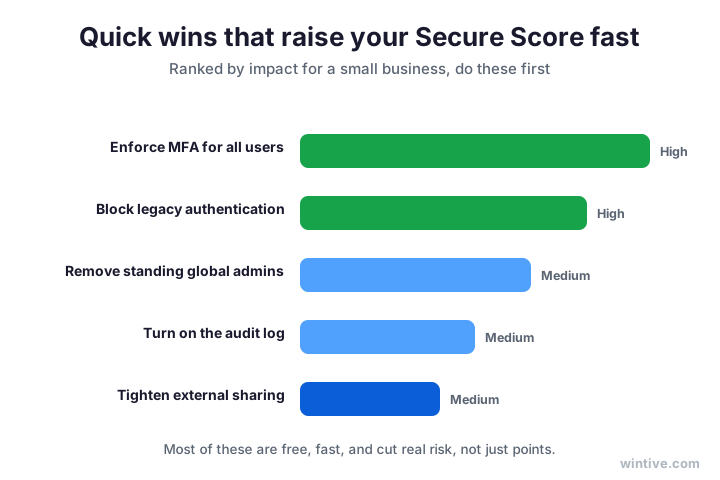
In practice, most teams gain double digits in a week from these alone. None of them needs new software. As a result, the first push is cheap, fast, and well worth the hour.
Above all, treat the first push as a habit, not a one-off. Schedule the next review before you close the portal. As a result, the gains stick instead of slowly unwinding.
📊 Read the score by risk, not points
Here is the part most guides miss. Points and risk are not the same thing. So the smart move is to weigh each action by impact and effort, not by the points it adds.
Specifically, a high-impact, low-effort action belongs at the top, whatever its points. Meanwhile, a fiddly change worth a few points can wait or be skipped.
Crucially, a higher percentage can still hide a serious gap. Therefore, never let the number alone decide. The matrix shows how to sort the work.
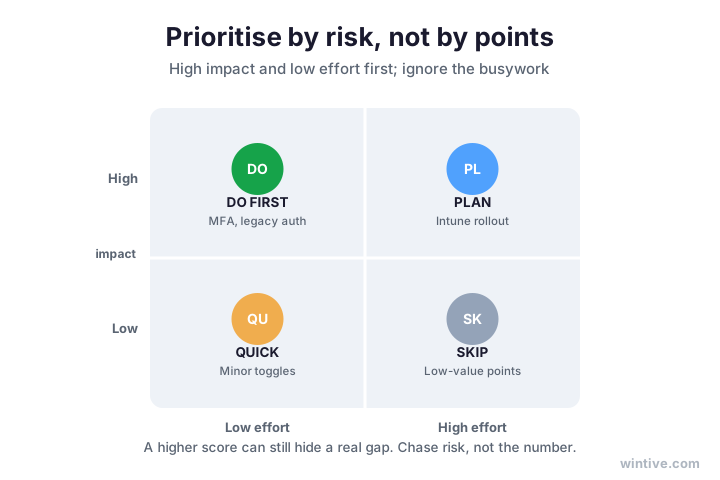
As a result, you spend your time where it removes real danger. So your tenant gets safer even when the headline number moves slowly. In short, chase the risk, and the score follows.
In short, the matrix keeps you honest. It stops you from cherry-picking easy points while a real gap stays open. Therefore, it is the single most useful lens for the whole list.
🚫 Why you should not chase a perfect score
Next, a warning. A perfect Microsoft Secure Score is the wrong goal, and Microsoft agrees. Some recommended actions simply will not fit your business.
Specifically, you can mark an action as risk-accepted, planned, or handled by a third party. Then it stops dragging on your score without being ignored.
Importantly, forcing every action can break things and annoy staff. Therefore, the right score is the highest one you can reach without harming how the business runs.
Wintive insight. The Microsoft Secure Score mistake we see most is treating it as a race to 100 percent. Teams enforce every recommendation, break a workflow, and roll the change back, losing both the points and the trust of their staff. A better approach is to close the high-risk actions, mark the rest as risk-accepted or planned with a note, and review them each quarter. The number that matters is the one you can defend, not the one that looks tidy on a slide.
Therefore, write a short note next to each action you skip. Say why it does not fit and when you will revisit it. As a result, an auditor or a client sees a considered decision, not a gap you missed.
In short, a defensible score beats a perfect one. It shows judgement, which is what a serious buyer is really checking for. So aim for the highest score you can stand behind, and document the rest.
🚀 Your first hour: where to start
So, what should you do in the first hour? First, do not try to fix everything. Instead, get the lay of the land and bank one or two quick wins.
To start, open the portal and read your Microsoft Secure Score and its trend. Notably, the trend matters more than the single number. Therefore, note whether it has been rising or drifting down.
Next, look at the identity category first. Specifically, check whether multi-factor authentication is enforced for everyone. If it is not, that is your first and biggest win.
Then, skim the top recommended actions. However, ignore the point values for a moment. Instead, mark the ones that look cheap and high-impact.
After that, complete one safe action end to end. For example, block legacy authentication for a test group first. As a result, you learn the workflow without risking the whole company.
Finally, write down your starting score and what you changed. In short, an hour of looking and one safe fix sets the whole project up. Therefore, you leave with momentum, not a backlog.
🔄 How the score changes over time
Next, remember that the score is a moving target. It is not a test you pass once and forget. Instead, it shifts as your settings, your staff, and Microsoft’s recommendations change.
Specifically, Microsoft adds new recommended actions as threats evolve. So a score that was strong last year can slip without you touching a thing. Therefore, a falling number is often a signal, not a mistake.
Importantly, staff changes move the score too. A new admin, a new app, or a forgotten guest can all nudge it down. As a result, a quick monthly glance catches drift before it becomes a gap.
Above all, watch the direction, not just the figure. A steady climb means your habits are working. So treat the trend line as the real scorecard, and the percentage as today’s snapshot.
In practice, a simple monthly reminder is enough. You open the portal, read the trend, and note anything new. As a result, you catch a slipping score in minutes instead of discovering it during an incident.
Therefore, build the check into a routine you already have. Tie it to payroll, or to a monthly review. So the score stays current without becoming yet another task to remember.
🔢 Microsoft Secure Score is a number, not a decision
So, where does the score stop being enough? The moment you need to decide what to fix first. A number cannot weigh your business risk for you.
Specifically, the score does not know which data is sensitive, which user is a target, or which gap a client cares about. Therefore, it points the way, but it does not make the call.
Crucially, that is where a real audit takes over. It reads the same tenant, then ranks the findings by your actual risk. The split below shows the difference.
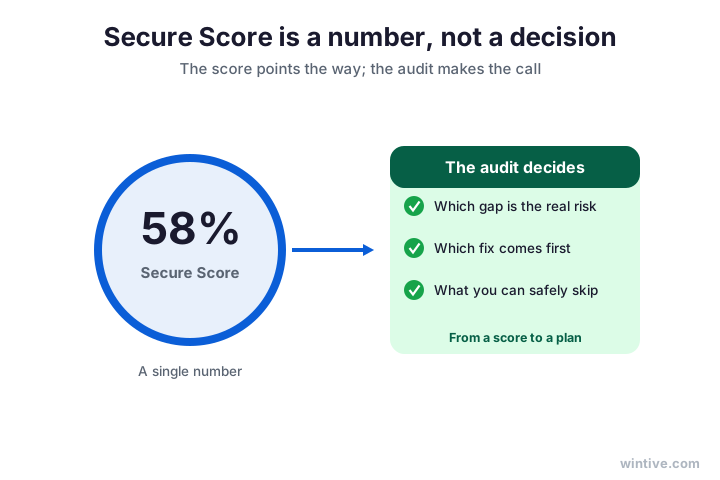
Therefore, use the two together. Read your Microsoft Secure Score for the quick wins, then run a full Office 365 security audit for the judgement calls. As a result, you get both speed and certainty.
📋 What each Microsoft Secure Score band means
To make this concrete, here is how to read the bands. Treat them as a guide, not a grade, because the right target depends on your business.
Specifically, the table maps each band to what it usually means and what to do next. So you can place yourself and pick a sensible move in seconds.
| Score band | What it usually means | What to do next |
|---|---|---|
| Below 40% | Key basics like MFA are missing | Enforce MFA and block legacy auth now |
| 40 to 60% | A typical starting point for an SMB | Work the ranked quick wins this month |
| 60 to 80% | Solid; the obvious gaps are closed | Tune settings and start monitoring |
| Above 80% | Strong; mostly fine-tuning left | Hold the line and review quarterly |
However, remember the bands are rough. A business in the 50s with MFA on can be safer than one in the 70s without it. As a result, always read the band next to the actions behind it.
Therefore, use the band to start a conversation, not to end one. It tells you roughly where you are and what to do next. As a result, it is a guide for action, not a grade to frame.
🪤 Common Microsoft Secure Score mistakes
Before you start, learn from others. A few mistakes trip up small businesses again and again.
First, many chase points instead of risk, as we saw. Second, some enforce every action at once and break a workflow. Therefore, change things in small, tested steps.
Third, plenty check the score once and never again. However, settings drift and new actions appear. As a result, the score only helps if you review it on a schedule.
Finally, some treat the score as the whole security plan. In truth, it is one helpful signal among several. Therefore, pair it with a real audit and basic monitoring, and it becomes far more useful.
In short, the pattern behind every mistake is the same. People treat the number as the goal instead of the means. Therefore, keep the real aim in view, and the score stays useful.
🗺️ Where to find your Microsoft Secure Score
Finally, the practical bit. Your Microsoft Secure Score lives in the Microsoft Defender portal, under the Secure Score section.
Specifically, you need a role that can read security settings, such as Global Reader or Security Reader. Then you can view the score, the breakdown, and every recommended action.
Notably, you do not need to be a full admin to look. Therefore, an owner or manager can check the headline number safely, then hand the detail to whoever does the fixes.

In short, the portal does the measuring for you. Your job is to read it well and act on the right parts. As a result, a five-minute look each month keeps your security honest.
Notably, you can also export the score and its history. So you can show progress to a client or an insurer. As a result, the same dashboard that guides your work also proves it.
🧠 How to read your recommended actions
Next, a closer look at the action list itself. Each recommended action shows the points on offer, the effort, and the impact. So the list is doing a lot of the thinking for you.
Specifically, sort the list by impact first, then scan the effort column. Often, the best actions are high impact and low effort, and they jump out fast. Therefore, you can build your shortlist in minutes.
Importantly, read what each action actually changes before you apply it. Some affect every user, and a careless toggle can cause support calls. As a result, a quick read now saves a scramble later.
Notably, many actions include a test or pilot option. So you can roll a change to a small group first. Therefore, you confirm it is safe before it reaches the whole company.
Above all, do not action blindly for points. A change you do not understand is a risk, not a win. As a result, the rule is simple: understand it, test it, then apply it.
🤝 Read the score yourself, or get help
So, should you do this alone? You can, and many owners do. The portal is readable, and the quick wins are within reach of a capable in-house person.
However, the judgement calls are where it gets harder. Deciding which gap is the real risk, and applying fixes without breaking workflows, takes experience. Therefore, some businesses bring in help for that part.
Specifically, a good partner reads your score, ranks the actions by your real risk, and applies the fixes safely. Then they hand you the evidence and a plan you can show clients.
In practice, the choice comes down to time and confidence. If you have both, do it yourself. Otherwise, a done-for-you audit gets you a safe, ranked result faster.
Above all, do not let the score sit untouched because the list looks long. Either way, the worst option is to look once and never act. As a result, pick a path and start this week.
✅ Your Microsoft Secure Score action plan
Condensed, here is the plan to keep on hand. Work through it in order, and review it each quarter.
- Open the Defender portal and read your current score.
- Note your band and your three category breakdowns.
- Enforce multi-factor authentication for every user.
- Block legacy authentication and trim standing admins.
- Turn on the unified audit log for visibility.
- Sort the rest by impact and effort, not by points.
- Mark unfit actions as risk-accepted or planned, with a note.
- Re-check the score and the trend every quarter.
Ultimately, the goal is not a perfect Microsoft Secure Score. It is a tenant whose real risks are closed and whose number you can defend. As a result, security becomes something you can show, not just hope for.
Above all, keep the rhythm going after the first push. A score that is read every quarter and acted on stays healthy, while one that is checked once quietly slides back as settings drift.
📚 More for Growing Businesses
🔒 Turn your Microsoft Secure Score into a ranked plan
The M365 Master Audit is a full, done-for-you Office 365 security audit for a US small business. Specifically, it reads your Microsoft Secure Score, reviews every domain behind it, ranks the fixes by real risk, and hands you the plan and the evidence. As a result, you get findings, a roadmap, and proof you are secure.
❓ Frequently Asked Questions
There is no official pass mark. Most small businesses start in the 40 to 60 percent band, and a focused month often lifts that into the 60s or 70s. A good score is one that keeps improving with no high-risk gaps left open.
Start with the high-impact, low-effort actions: enforce multi-factor authentication for everyone, block legacy authentication, trim standing admins, and turn on the audit log. Most teams gain double digits in a week.
It lives in the Microsoft Defender portal, under the Secure Score section. A Global Reader or Security Reader role can view the score, the category breakdown, and every recommended action.
No. Some recommended actions will not fit your business, and forcing them can break workflows. Mark those as risk-accepted, close the high-risk ones, and aim for the highest score you can defend.
Not on its own. A high percentage can still hide a serious gap, because the score does not weigh your business risk. Use it for quick wins, then audit for the judgement calls.
At least once a quarter, and after any big change such as a migration or new app. Settings drift and new actions appear, so a regular check keeps the score honest.
🧭 Your next step
Want to turn your Microsoft Secure Score into a ranked plan? First, book a short call. Then we read your score, run the full audit, and show you what to fix first. To start, contact Wintive. It is quick, and we do the rest.