

A SOC 2 controls list is simply the set of safeguards an auditor will check before signing your report. Get the list right and the whole audit becomes predictable. Get it wrong and you waste money proving things no client asked for.
However, most versions of this list online are dense spreadsheets written for auditors. This SOC 2 controls list is different. Specifically, it groups the controls into plain-English families, shows what each one means, and reveals how many already live in the Microsoft 365 you own. It is written for a busy owner, not an auditor, so there is no jargon to wade through. As a result, you finish with a list you can actually act on.
Want a SOC 2 controls list built around your actual business?
Wintive builds and fills your SOC 2 controls list on the Microsoft 365 you already own. We map each control to a tool in your tenant, find the gaps, and document the evidence an auditor will ask for. The price is a flat monthly fee per user, with no long contract and no setup cost.
📅 Book a Free 30-Min Call | 💬 Chat on WhatsApp | See Our Plans →
🧭 SOC 2 controls list: the short answer
A SOC 2 controls list is the group of security safeguards an auditor tests against the Trust Services Criteria. There is no fixed number of them; you scope the list to your business and its risks. Almost every control falls into one of nine plain families, from access and encryption to vendor checks and backups. Most of the technical ones already live in your Microsoft 365, so the real work is the policies and the evidence around them. In short, the list is shorter and closer to done than the vendors suggest.
Crucially, a control is not paperwork for its own sake. Instead, each one is a safeguard you promise to run and can prove you run. Therefore, the list is really a set of habits, not a pile of documents.
Notably, the list is also yours to shape. You choose which criteria apply and scope the controls to your real risks. Therefore, two businesses can have very different lists and both pass. As a result, copying someone else’s list wholesale usually wastes effort.
In practice, that is why this guide groups the controls into families. It turns a long, scary spreadsheet into a handful of clear areas. As a result, you can work through them one group at a time.
🔎 What a SOC 2 controls list actually is
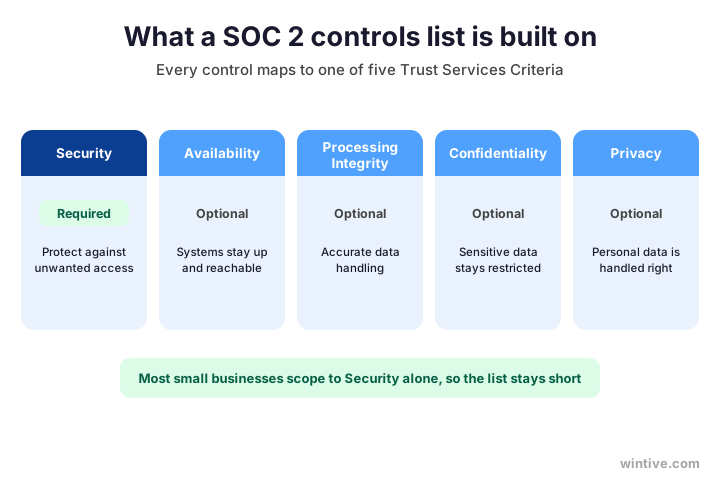
First, the plain-English version. A SOC 2 controls list is the collection of safeguards your auditor reviews, each one mapped to the Trust Services Criteria the standard is built on. So the list is not random; every item ties back to one of five criteria.
Importantly, only the first criterion, Security, is required for every report. The other four are optional and you add them when a client asks. In fact, Microsoft documents how its own cloud meets the standard in its SOC 2 compliance overview.
Notably, this is your biggest lever on the size of the list. A tight scope keeps it short and the audit cheap. The chart shows the five criteria your controls map back to.
Therefore, decide your scope before you build the list. The criteria you leave out matter as much as the ones you keep. As a result, scoping first is the single cheapest decision you will make.
Notably, most small B2B firms safely scope to Security alone for their first report. Clients rarely ask for more at the start, and you can always add a criterion later. Therefore, starting narrow is not cutting corners; it is matching the list to what buyers actually want today.
🔢 How many SOC 2 controls are there?
Next, the question everyone asks. There is no official number of SOC 2 controls. The standard sets out criteria and points of focus, then leaves the exact controls for you and your auditor to define.
Importantly, that is good news for a small business. Because you scope the list to your own risks, you are never forced to implement controls that do not fit. Therefore, a lean firm can have a much shorter list than a large enterprise.
Notably, anyone quoting a precise count is really describing their own template. The chart explains why the number flexes with your scope, your size, and your risks.
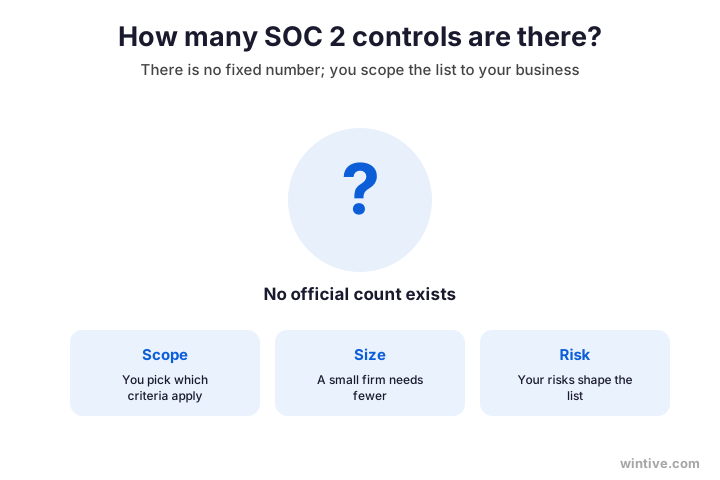
As a result, do not chase a magic number. Aim instead for a list that genuinely covers your risks and your chosen criteria. So the right length is simply whatever your scope honestly requires.
Importantly, this also means you cannot fail by having too few controls, only by missing ones your risks demand. An auditor judges coverage, not quantity. Therefore, focus on whether each real risk is addressed, and let the count land wherever it lands.
🗂️ The nine families on the SOC 2 controls list
Here is the heart of it. Almost every SOC 2 control falls into one of nine plain families. Therefore, instead of memorising a hundred line items, you can think in nine clear groups.
Importantly, grouping the list this way makes it manageable. You tackle one family at a time and track your progress as you go. Therefore, a long list stops feeling overwhelming. As a result, the work becomes a series of small, finishable jobs.
Specifically, the families run from access control and encryption to vendor checks, incident response, and tested backups. The chart lays out all nine at a glance.
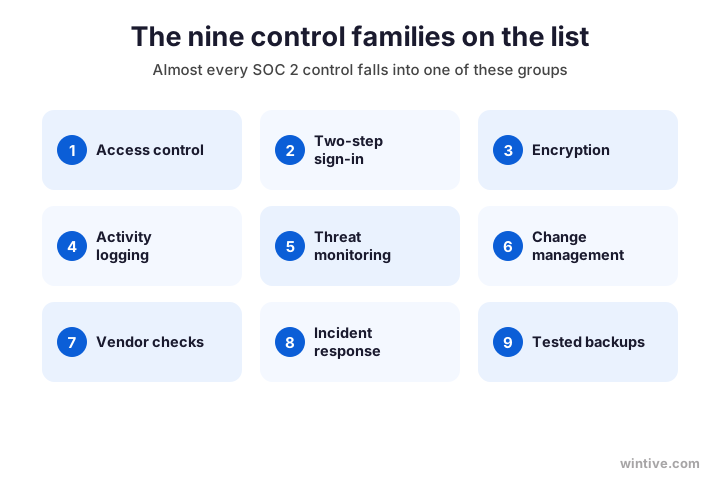
Notably, none of these families is exotic. Each one is a normal part of running a secure business. As a result, the list feels far less daunting once you see it as nine familiar areas.
Therefore, work through the families in order of risk, not alphabetically. Start where a slip would hurt most, usually access and sign-in, then move down. As a result, you are protected in the ways that matter long before the list is fully complete.
🧩 What a single control looks like
Of course, a family is made of individual controls, so it helps to see what one looks like. A single control has three plain parts: a short promise, the routine behind it, and the evidence that proves it.
Importantly, the evidence part is where small businesses slip. It is easy to do the right thing and never record it. However, an auditor can only sign off on what you can show. Therefore, capturing evidence is as important as the control itself.
Specifically, a control might read: only approved staff can access customer data. The routine is your sign-in rules, and the evidence is the access records. The chart breaks a control into its three parts.
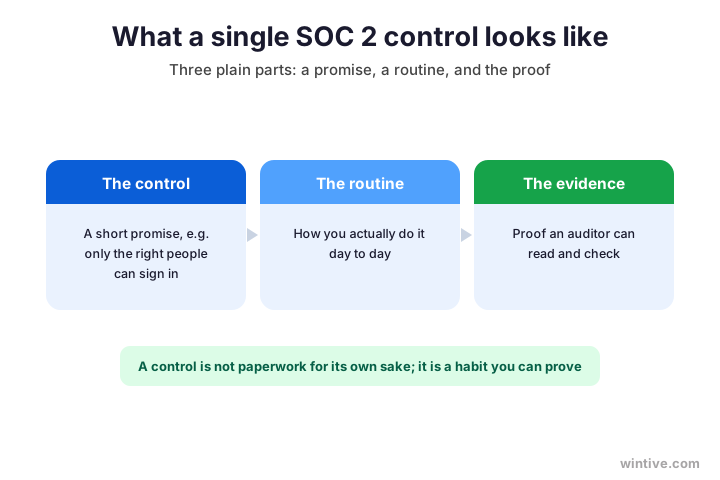
Therefore, write every control as something you can prove, not just something you do. The proof is what the auditor signs. As a result, building evidence into your routines saves a frantic scramble later.
Importantly, good evidence is usually a by-product of good tools. Microsoft 365 already records sign-ins, changes, and alerts on its own. Therefore, much of your proof is being generated automatically, whether you realise it or not. As a result, the job is often to collect evidence, not to create it.
📋 The SOC 2 controls list, family by family
Now, the list itself. Below is a practical SOC 2 controls list for a small business, grouped by family with an example control for each. So you can read straight down it and see where you stand.
Importantly, treat this as a starting point, not gospel. Your auditor and your risks will add or trim items. Therefore, use it to get moving, then tailor it. As a result, you skip the blank-page problem entirely.
| Control family | Example control | Where it lives |
|---|---|---|
| Access control | Only approved staff reach customer data | Microsoft Entra ID |
| Two-step sign-in | Every account uses a second factor | Microsoft Entra ID |
| Encryption | Data is encrypted at rest and in transit | Microsoft Purview |
| Activity logging | Key actions are recorded and kept | Microsoft 365 audit log |
| Threat monitoring | Threats are detected and reviewed | Microsoft Defender |
| Vendor checks | Key suppliers are reviewed for security | Your own policy |
| Incident response | A written plan covers a breach | Your own policy |
| Tested backups | Backups exist and are restored-tested | Your own routine |
As a result, most of the technical rows already point at Microsoft 365, while the policy rows are yours to write. So the list is part configuration and part documentation, not a mountain of new tools.
Importantly, read the right-hand column closely, because it is where the savings hide. Every row that points at a tool you already own is a control you are not paying twice for. Therefore, a real controls list is as much about what you can skip buying as what you must do.
🟢 Where the SOC 2 controls list lives in Microsoft 365
This is the part the software vendors skip. If you run Microsoft 365, most of the technical controls on the list already exist in your tenant. Therefore, you are not starting from zero, and you may not need an expensive new platform.
Notably, this is the message vendors would rather you missed. They sell a layer on top of tools you already pay for. Therefore, the honest first move is to map your list to your own tenant. As a result, you often find the gap is small.
Specifically, access, encryption, logging, and threat monitoring all map straight to Entra ID, Purview, and Defender. The chart shows the list mapped to the Microsoft 365 tools you already own.
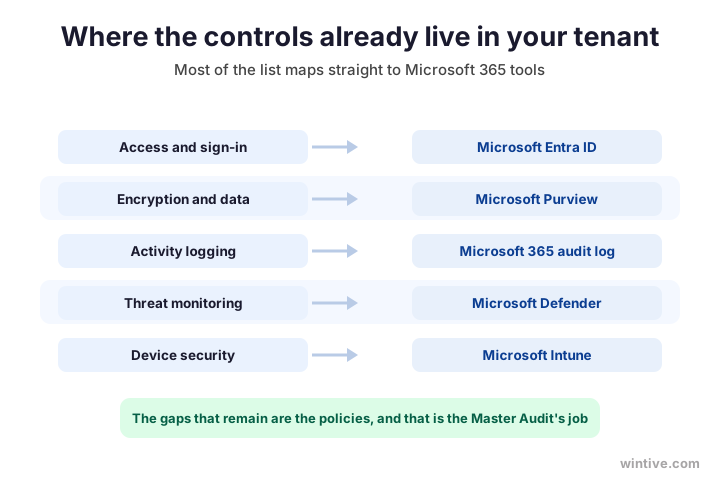
Therefore, the smart first step is to measure what your tenant already satisfies. As a result, you spend only on the genuine gaps, not on tools that duplicate Microsoft 365.
Notably, this mapping is also the fastest way to silence a long security questionnaire. When a buyer asks how you handle access or encryption, you point at a named Microsoft tool and its records. Therefore, the answers are concrete, not vague promises. As a result, your tenant becomes your strongest sales evidence.
⚖️ What is easy and what takes real work
Meanwhile, not every item on the list is equal. The technical controls are mostly handled for you by Microsoft 365, while the policies and paperwork take genuine effort. Therefore, knowing which is which helps you plan.
Importantly, the hard part is rarely technical. Writing security policies, reviewing vendors, and documenting an incident plan are where small businesses spend the most time. Therefore, budget your effort there, not on tooling you already own.
Specifically, sign-in, encryption, logging, and monitoring are mostly switches in your tenant, while policies and reviews are work you do. The chart splits the list into the two camps.
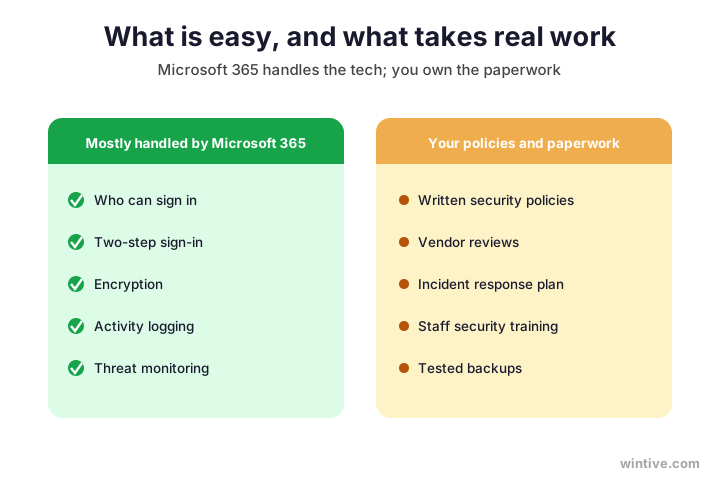
Notably, one step quietly saves the most money, and it is worth flagging before you start.
Wintive insight. Across the SMB tenants we audit, the costliest mistake is buying a compliance-automation platform to build a controls list that Microsoft 365 already covers most of. Teams pay thousands a year for software that duplicates Entra ID, Purview, and Defender, then still write the policies by hand. A focused audit of the tenant maps the list, closes the real gaps, and documents the evidence for a fraction of that, and it is exactly what our Master Audit delivers.
Therefore, split your effort the way the chart does. Let Microsoft 365 carry the technical load, and spend your own time on the policies only you can write. As a result, the list gets done faster and your budget goes to the work that genuinely needs a human.
🔐 Privacy and the optional criteria
Of course, some businesses need more than Security. If you handle personal data or face strict clients, you may add Privacy, Confidentiality, or the other optional criteria to your list. So the list grows to match what you actually do.
Importantly, only add an optional criterion when a client or a law requires it. Each one adds controls, cost, and evidence to gather. Therefore, resist the urge to chase all five for show. As a result, your list stays lean and your audit stays affordable.
Notably, privacy controls in particular lean on tools you may already own. Microsoft Purview handles much of how personal data is found, labelled, and protected. Therefore, even the optional criteria are often closer to done than they look.

Therefore, treat the optional criteria as modules you bolt on, not a default. Start with Security, then add Privacy or Confidentiality the moment a contract calls for it. As a result, your list grows in step with your business instead of ballooning up front.
🛠️ How to build your own controls list
So, how do you turn this into your list? Happily, it follows a simple order that keeps the work focused and cheap.
Importantly, the order matters because it stops you over-building. You scope first, so you never write controls for criteria you do not need. Therefore, the list stays as small as your business allows. As a result, every control you keep actually earns its place.
Specifically, you scope the criteria, map your controls to Microsoft 365, write the policies for the gaps, then gather the evidence. The table lays out that build in four clear steps.
| Step | What you do | The outcome |
|---|---|---|
| 1. Scope | Pick the criteria that apply | A short, honest list |
| 2. Map | Match controls to Microsoft 365 | A view of what is done |
| 3. Write | Add policies for the gaps | The paperwork covered |
| 4. Prove | Gather the evidence | A list an auditor accepts |
As a result, by the end you have a list that fits your business and points at real evidence. So the audit becomes a review of work already done, not a scramble.
Importantly, you do not have to walk these steps alone. The mapping step in particular goes far faster with someone who knows where each control lives in Microsoft 365. Therefore, a guided first pass can compress weeks of guesswork into days. As a result, many small firms reach a usable list far sooner than they expect.
🔗 How the list maps to other standards
Meanwhile, your SOC 2 controls list rarely lives alone. If a client also asks about ISO 27001, NIST, or HIPAA, the good news is that most controls overlap heavily. Therefore, the work you do once covers a surprising amount of the others.
Importantly, this overlap is a quiet money-saver. The same access, encryption, and monitoring controls satisfy several frameworks at once. Therefore, building one solid list sets you up for the next request, not just this one. As a result, each new standard costs far less than the first.
Notably, the trick is to map once and reuse. A single control can point at SOC 2, ISO 27001, and more, with the evidence shared across them. Therefore, treat your list as a foundation, not a one-off, and build it as if other standards will follow. As a result, you answer the next security questionnaire in hours rather than weeks, and what feels like a big effort now quietly pays for itself the second time a buyer raises the bar.
🪤 Common mistakes with the controls list
Meanwhile, a few mistakes trip up small businesses again and again. First, many copy a giant generic list and try to implement every line, including controls no client asked for. Therefore, they burn time and budget on items outside their scope.
Furthermore, others build the controls but never capture the evidence. However, an auditor signs off on proof, not good intentions. Therefore, record the evidence as you go, not in a panic before the audit.
Notably, the worst trap is buying software to manage a list your Microsoft 365 already covers. That doubles your spend for little gain. Therefore, map your tenant first, then decide what, if anything, you still need to buy.
📄 Do you need an Excel or PDF template?
Finally, many owners search for a SOC 2 controls list in Excel or PDF to download. A template can help you start, but it is only ever a generic skeleton. So treat any download as a prompt, not your real list.
Importantly, a spreadsheet cannot tell you which controls your own tenant already satisfies. Only a look at your Microsoft 365 can do that. Therefore, the useful version of the list is one mapped to your actual setup. As a result, a tailored list beats any blank template.
Notably, that mapping is exactly what turns a generic list into evidence. A populated list shows an auditor what you do and where to find the proof. Therefore, aim for a filled-in list, not just a downloaded one.

Importantly, if you do start from a template, gut it hard. Delete every row that does not apply to your business and rewrite the rest in your own words. Therefore, the download becomes a prompt, not a crutch. As a result, you avoid the classic trap of a tidy spreadsheet full of controls you never actually run.
✅ Your SOC 2 controls list recap
Condensed, here is the SOC 2 controls list to keep on hand for your next audit conversation.
- A control is a safeguard you promise to run and can prove.
- There is no fixed number; you scope the list to your risks.
- Almost every control fits into one of nine plain families.
- Only the Security criterion is required; the rest are optional.
- Most technical controls already live in your Microsoft 365.
- The policies and evidence are the real work, not the tools.
- Map your tenant first, then buy only what you truly need.
- A tailored, populated list beats any generic download.
Ultimately, at Wintive we build and fill your SOC 2 controls list on the Microsoft 365 you already run, as part of our managed security services. Moreover, we map each control, close the gaps, and hand you the evidence an auditor wants. To get started, contact us for a free consultation. It is quick, and we do the rest.
📚 More for compliance-minded SMBs
Therefore, these published Wintive guides go deeper on the topics a SOC 2 controls list raises next. So bookmark the ones that fit your business.
🔒 Get your SOC 2 controls list mapped to your Microsoft 365
The M365 Master Audit is a full Microsoft 365 security audit for a US small business. Specifically it reviews your identity, email, device, and data controls, maps them to the SOC 2 criteria, finds every gap, and ranks the fixes by real risk. As a result you get a written report, a populated controls list, and the evidence to show auditors and clients.
❓ Frequently Asked Questions
It is the set of security safeguards an auditor reviews for your SOC 2 report, each mapped to the Trust Services Criteria. The controls cover areas like access, encryption, logging, monitoring, vendors, incidents, and backups.
There is no fixed number. The standard sets criteria and points of focus, then leaves the exact controls to you and your auditor. A small business scoped to Security alone needs far fewer than a large enterprise.
Almost every control fits into nine plain families: access control, two-step sign-in, encryption, activity logging, threat monitoring, change management, vendor checks, incident response, and tested backups.
Most of the technical ones. Access, two-step sign-in, encryption, activity logging, and threat monitoring all map straight to Entra ID, Purview, and Defender. The gaps that remain are usually policies and evidence rather than new tools.
Plenty of generic templates exist, but they are only a skeleton. A spreadsheet cannot tell you which controls your own tenant already satisfies, so the useful list is one mapped to your actual Microsoft 365 setup.
Often not. Compliance-automation platforms suit larger, engineering-heavy firms. A typical SMB can map the list to Microsoft 365 and document the gaps, which is what our Master Audit does.
🧭 Your next step
Want a SOC 2 controls list built around your own Microsoft 365? First, book a short call. Then we map each control to your tenant, find the gaps, and hand you a populated list with the evidence. There is no obligation, and the first conversation costs you nothing. To start, contact Wintive. It is quick, and we do the rest.