

Looking for a SOC 2 report example so you can finally see what one actually looks like? Whether you are about to receive your first report or sizing up a vendor’s, knowing the layout makes the whole document far less intimidating. So a clear SOC 2 report example saves you wading through pages of auditor language.
However, most versions of a SOC 2 report example are either confidential or buried in jargon. This guide is different. Specifically, it walks through what a SOC 2 report example contains, section by section, what the auditor’s opinion means, how to read one, and how to judge the exceptions inside. It also shows how a Type 1 example differs from a Type 2, and where a sample PDF helps. As a result, you can open any real report and know exactly where to look.
Want a SOC 2 report your clients will read and trust?
Wintive gets US small businesses SOC 2 ready on the Microsoft 365 they already own, so the controls section of your report comes back clean. We map your controls, close the gaps, and document the evidence an auditor tests. The price is a flat monthly fee per user, with no long contract and no setup cost.
📅 Book a Free 30-Min Call | 💬 Chat on WhatsApp | See Our Plans →
🧭 SOC 2 report example: the short answer
A SOC 2 report example has five clear sections: the independent auditor’s opinion, management’s assertion, a description of your system, the controls with their tests and results, and any optional extra information. Crucially, the auditor’s opinion at the front is the first thing to read, and a clean one is called unqualified. The bulk of the document is the controls section, where each control is listed with how it was tested and whether there were any exceptions. So once you know that shape, a real report is easy to navigate.
Crucially, a SOC 2 report example is not a marketing document. It is a structured, audited record, so it follows the same shape every time. Therefore, once you have seen one layout, you can read any of them.
Notably, you will rarely find a full, real SOC 2 report example online, because they are shared under agreement. Therefore, this guide gives you the structure and the meaning instead, which is what you actually need. As a result, you can recognise the parts in any report a vendor sends you.
In practice, most people only need to read three things closely: the opinion, the scope, and the exceptions. So knowing where those sit in a SOC 2 report example is most of the battle, and this guide points you straight to each of them.
📑 What a SOC 2 report example looks like
First, the overall shape. A SOC 2 report example is organised into five sections that always appear in the same order. So you can flip to the part you need without reading cover to cover.
Importantly, the five sections build on each other. The opinion comes first, then your own assertion, then how your system works, then the detailed controls, and finally any extras. In fact, Microsoft documents how its own cloud meets the standard in its SOC 2 compliance overview.
Specifically, the chart lays out the five sections of a SOC 2 report example in order, so you know what each one is for.
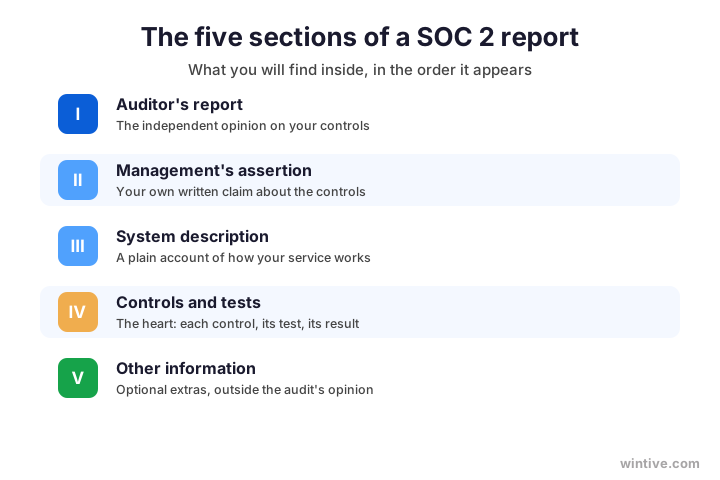
Therefore, keep that map in mind and the document stops feeling dense. Each section has one job, and you can jump straight to it. As a result, a SOC 2 report example becomes a reference, not a wall of text.
Notably, the longest section by far is the controls one. The first three sections are short, while the controls and tests can run for many pages. As a result, most of the weight of any report sits in that single section.
Therefore, do not be put off by a thick document. The page count almost always comes from the controls table, not from dense prose. As a result, a long SOC 2 report example is usually a sign of thorough testing, not of trouble.
🔎 The auditor’s opinion, explained
Next, the part to read first. The auditor’s opinion sits at the front of the report and sums up the whole thing in a few lines. So it is the single most important page to understand.
Importantly, there are four possible opinions, and you want the cleanest one. An unqualified opinion means the controls worked as described; a qualified one notes an exception; an adverse one is bad news; and a disclaimer means the auditor could not conclude. Therefore, check this before anything else.
Specifically, the chart shows what each of the four opinions means, so a single word in the report never confuses you.
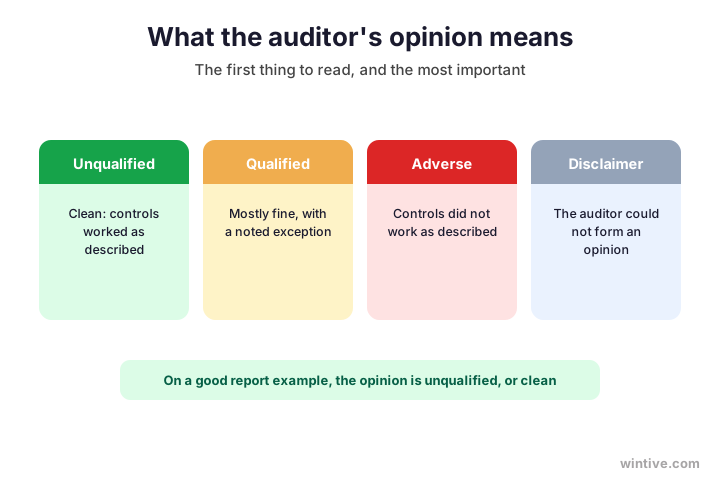
As a result, the opinion tells you in seconds whether to relax or to dig deeper. A clean, unqualified opinion is the green light most buyers look for. So always start a report there, not at the back.
Notably, an opinion is about the controls, not your company’s worth. Even strong businesses can pick up a qualified opinion over one slip. As a result, read the reason behind any qualification rather than panicking at the word.
Therefore, treat the opinion as a headline and the rest of the report as the story behind it. A clean headline still rewards a careful read of the detail. As a result, the opinion tells you where to start, not where to stop.
📊 The controls section in a report example
Now, the heart of the document. In a SOC 2 report example, the controls section is where most of the pages live. So this is where a careful reader spends the most time.
Importantly, it is laid out as a table. Each row is a control, the test the auditor performed on it, and the result. Therefore, you can scan straight down the result column to see whether anything was flagged.
Specifically, the chart shows how the controls section of a SOC 2 report example is structured, control by control.
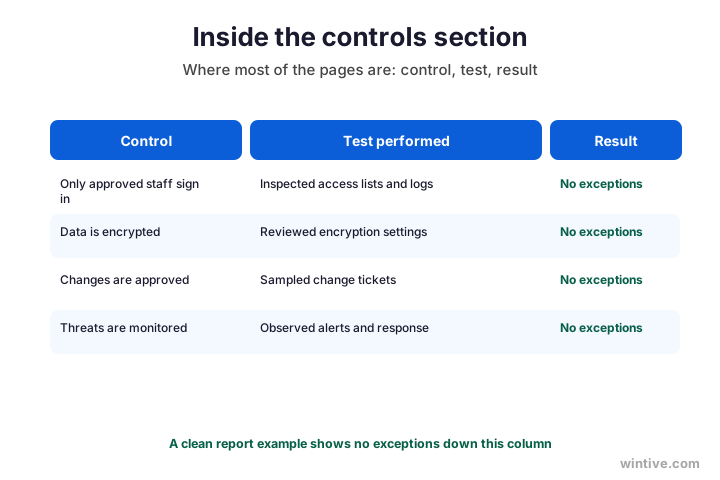
As a result, a clean report shows no exceptions running down that result column. That single column tells you most of what you need. So in any SOC 2 report example, the result column is where your eye should go.
Notably, this is also the section your own work shapes most. Strong, well-run controls produce a clean result column, while neglected ones fill it with exceptions an auditor has no choice but to record. As a result, the effort you put in before the audit shows up right here, in black and white.
Therefore, when you study a SOC 2 report example, spend your time in this section. The opinion summarises it, but the controls table is the evidence. As a result, a reader who understands this one table understands the whole report.
🔢 A Type 1 versus a Type 2 example
Meanwhile, not every report looks the same, because there are two types. A Type 1 example shows your controls as designed on one day, while a Type 2 example shows them operating over months. So the type changes what you see.
Importantly, the visible difference is the test results. A Type 1 has no results over time, while a Type 2 fills the controls section with tests run across the whole period. Therefore, a Type 2 report is longer, and it is the one most enterprise clients prefer.
Specifically, the chart contrasts a Type 1 example with a Type 2 example so the difference is obvious.
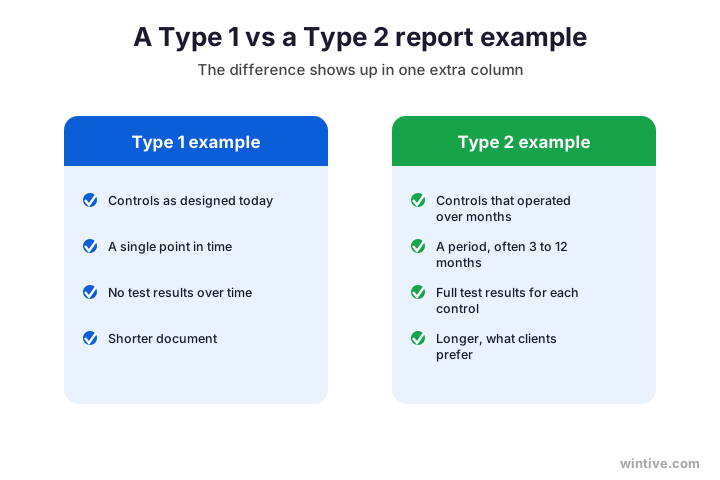
As a result, always check the type before you judge a report. A short report is not weak; it may simply be a Type 1. So read the type label first, then set your expectations for the rest.
Notably, many companies start with a Type 1 and move to a Type 2 later. The two reports look related, with the Type 2 adding the results column. As a result, seeing both side by side makes the progression clear.
Therefore, if a vendor offers only a Type 1, ask when their Type 2 is due. It is a fair question, not a slight. As a result, you learn whether they are early in their journey or simply between cycles.
📖 How to read a SOC 2 report example
Of course, reading a report is a skill, and it is quicker than it looks. When a vendor hands you a SOC 2 report example, five fast checks tell you almost everything. So you do not need to read every page.
Importantly, you read it in a set order: the opinion, the scope, the dates, the exceptions, and the type. Therefore, you reach a confident view in minutes, not hours. As a result, you can clear a vendor’s report in a single sitting.
Specifically, the chart lays out the five checks to run when you read a SOC 2 report example.
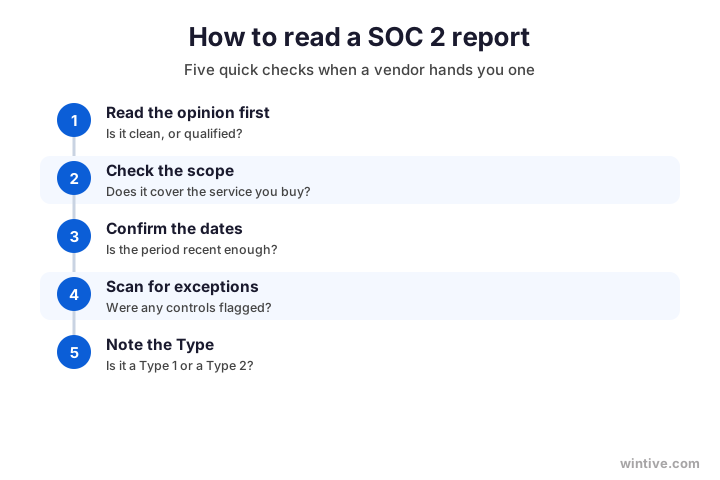
Therefore, do those five checks in order and you rarely need more. The opinion and exceptions carry most of the weight, while the scope, dates, and type round out the picture in seconds.
Wintive insight. When we review a client’s own report, the difference between a clean example and a messy one almost always traces back to the controls section, and to how well their Microsoft 365 was run between audits. Teams whose access, encryption, and monitoring kept working get a result column full of no exceptions. The ones who let things drift collect qualifications they then have to explain to every buyer. Our Master Audit keeps that result column clean, which is exactly what makes a report example worth showing off.
Therefore, treat these five checks as your default routine for any report. With practice they take a minute or two. As a result, what feels daunting on your first SOC 2 report example becomes second nature by your third.
⚠️ How to judge an exception
Meanwhile, the word that worries people most is exception. An exception simply means a control did not work perfectly during a test. So a few of them are normal, and not every one is a problem.
Importantly, context decides how much an exception matters. A one-off that was fixed, on a control you do not rely on, is usually fine. A repeated failure, on a control central to your service, with no fix described, is a real flag. Therefore, read the detail, not just the count.
Specifically, the chart shows how to tell a minor exception from one worth questioning.
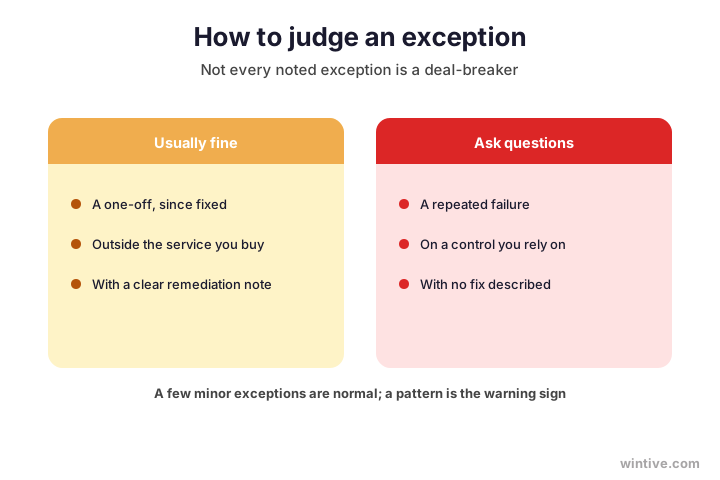
As a result, do not reject a report over a single noted exception. Judge the pattern and the response instead. So a report with one explained exception can still be perfectly trustworthy.
Notably, a good report makes exceptions easy to judge, because it explains each one. A report that hides or downplays them is the bigger concern. As a result, clear remediation notes are themselves a sign of a mature, honest company.
Therefore, when you see an exception, read its remediation note before you react. A clear fix turns a worry into a non-issue. As a result, the way a company writes up its exceptions tells you almost as much as the exceptions themselves.
👥 Reading one as a buyer
Of course, many people read a report not to write one, but to vet a vendor. If you are evaluating a supplier, the report is your evidence that they protect your data. So you read it with a buyer’s eye.
Importantly, as a buyer you care most about scope and exceptions. Does the report cover the service you actually use, and were any important controls flagged? Therefore, those two questions answer most of your due diligence.
Notably, you also want the report to be recent. If its period ended long ago, ask for a current one or a bridge letter to cover the gap. A report that expired a year ago tells you little about a vendor’s security today, so the dates are not a detail to skip.

As a result, vetting a vendor’s report takes minutes once you know where to look. Scope, dates, and exceptions tell you most of the story. So you can clear a supplier with confidence instead of guessing.
Notably, if a vendor hesitates to share their report, treat that as information too. A confident company hands over a current report under a simple agreement. As a result, the ease of getting the document is itself a small signal about the vendor.
📄 Finding a SOC 2 report example PDF
Meanwhile, many people search for a SOC 2 report example PDF to download and study. Real reports are confidential, so a full public PDF is rare and usually anonymised. So treat any download as a teaching aid, not a real one.
Importantly, a sample or template PDF still helps you learn the layout. It shows the five sections and the controls table so you recognise them later. Therefore, use a SOC 2 report example PDF to study the shape, then read the real thing with this guide.
| What you will find | What it is good for |
|---|---|
| A vendor’s anonymised sample | Seeing the real section order |
| An auditor’s template PDF | Learning the controls table layout |
| This guide’s section map | Knowing what each part means |
| A real report under agreement | The only fully trustworthy version |
As a result, a sample PDF is a study tool, never the genuine article. The only report that counts for a deal is a real one, shared under agreement. So learn from the example, then ask the vendor for the real document.
Notably, be wary of any site offering a full, named company’s report as a free download. A genuine report is rarely public, so a leaked one is a red flag about that source. As a result, stick to anonymised samples and templates when you study the format.
🟢 What makes a report example strong
Now, what separates an impressive report from a weak one? The answer is almost entirely in the controls section and the opinion. So a strong report is one with a clean opinion and a result column free of exceptions.
Importantly, that strength is earned before the audit, not during it. When your controls genuinely work all year, the auditor has little to flag. Therefore, a clean report example is a by-product of well-run security, not clever writing, and no amount of polish at the end can fake a result column full of exceptions.
Specifically, the table contrasts the signs of a strong report with the signs of a weak one.
| Sign | Strong report | Weak report |
|---|---|---|
| The opinion | Unqualified and clean | Qualified or worse |
| The result column | No exceptions | Repeated exceptions |
| The scope | Covers the real service | Narrow or unclear |
| The dates | Recent and current | Old and expired |
As a result, you can size up a report in moments by checking those four signs. They separate a report you can trust from one that needs questions. So strength is visible long before you read every page.
Notably, the surest route to the strong column is keeping your controls healthy between audits. That is far easier on a well-managed Microsoft 365. As a result, your tenant quietly decides how your report example reads.
Therefore, if you are preparing your own report, aim for these four signs from the start. Work backwards from the strong column and build your controls to match. As a result, the report you receive is one you will be proud to hand to any client.
🪤 Common mistakes reading a report
Finally, a few mistakes trip up first-time readers again and again. First, many skip straight to the controls and miss the opinion, which frames everything. Therefore, always read the opinion before the detail.
Furthermore, others panic at the word exception without reading the context. A single explained exception is rarely a problem. Therefore, judge the pattern and the fix, not the mere presence of the word.
Notably, some forget to check the dates and trust an expired report. A report only speaks for its period. Therefore, confirm the dates and ask for a bridge letter if there is a gap.

As a result, avoiding those three slips makes you a sharp reader of any report. You start at the opinion, weigh exceptions fairly, and watch the dates. So a document that once felt opaque becomes quick to judge.
Notably, the more reports you read, the faster these habits become. Your first SOC 2 report example takes patience; your tenth takes minutes. As a result, a little practice turns report reading from a chore into a quick, confident routine.
✅ Your SOC 2 report example recap
Condensed, here is how to read a SOC 2 report example, to keep on hand for the next report you open.
- A report has five sections, always in the same order.
- Read the auditor’s opinion first; unqualified is clean.
- The controls section is the heart, laid out as a table.
- Scan the result column for any noted exceptions.
- Check the scope, the dates, and the report type.
- A few explained exceptions are normal, not a red flag.
- Only a real report is shared, and only under agreement.
- A clean report is a by-product of well-run controls.
Ultimately, at Wintive we keep US small businesses SOC 2 ready on the Microsoft 365 they already run, so the controls section of your own report comes back clean. Moreover, we map your controls, close the gaps, and document the evidence an auditor tests. To get started, contact us for a free consultation. It is quick, and we do the rest.
📚 More for compliance-minded SMBs
Therefore, these published Wintive guides go deeper on the topics a SOC 2 report example raises next. So bookmark the ones that fit your business.
🔒 Get the controls section of your report clean the first time
The M365 Master Audit is a full Microsoft 365 security audit for a US small business. Specifically it reviews your identity, email, device, and data controls, maps them to the SOC 2 criteria, finds every gap, and ranks the fixes by real risk. As a result the controls an auditor tests come back with no exceptions, and your report reads the way clients want.
❓ Frequently Asked Questions
It has five sections in a fixed order: the auditor’s opinion, management’s assertion, a system description, the controls with their tests and results, and any optional extra information. The controls section is by far the longest part.
Full real reports are confidential and shared only under agreement, so a public SOC 2 report example PDF is usually an anonymised sample or an auditor’s template. Use one to learn the layout, then read the real report with a guide.
It is the auditor’s overall conclusion, at the front of the report. An unqualified opinion is clean; a qualified one notes an exception; an adverse one is bad; a disclaimer means the auditor could not conclude. Read it first.
An exception means a control did not work perfectly during a test. Some are normal. A one-off that was fixed is usually fine, while a repeated failure on a key control, with no remediation, is a real warning sign.
A Type 1 example shows controls as designed at one point in time, with no test results over a period. By contrast, a Type 2 example shows them operating over months, so its controls section is full of test results and it is longer.
Read the auditor’s opinion first, then check the scope, the dates, the exceptions, and the report type. Those five checks tell you almost everything you need to judge a report in minutes rather than hours.
🧭 Your next step
Want your own SOC 2 report to read like a clean example? First, book a short call. Then we audit your Microsoft 365, close the gaps, and keep your controls strong so the result column comes back free of exceptions. There is no obligation, and the first conversation costs you nothing. To start, contact Wintive. It is quick, and we do the rest.