

Running a small business in the US means your day stops when your technology stops. Email goes down, a laptop will not start, a payment system freezes, and suddenly nobody can work. Managed IT support services exist to make those moments rare and short. Specifically a provider watches over your systems, fixes problems fast, and keeps everything patched and protected for one predictable monthly fee. In practice it turns IT from a recurring emergency into a quiet utility you stop thinking about.
This guide explains what managed IT support services include, how they protect your business, and what they cost. It is written for owners and managers, not IT staff. If your business runs on Microsoft 365, much of this support is configuration and oversight you have already paid for and are probably underusing.
Tired of IT problems stopping your team?
Wintive runs managed IT support for US small businesses on the Microsoft 365 you already own. We monitor, patch, secure, and support every user and device for a flat monthly fee per seat. Moreover there is no long contract and no setup cost.
📅 Book a Free 30-Min Call | 💬 Chat on WhatsApp | See Our Plans →
🛠️ What managed IT support services actually cover
📌 TL;DR — managed IT support services (2026): A provider takes over the day-to-day running of your technology for a flat monthly fee. That covers a help desk for your team, remote and on-site fixes, round-the-clock monitoring, security, and updates. Most owners buy it to stop downtime and protect the business without hiring IT staff. On Microsoft 365, much of it is oversight of tools you already own.
Managed IT support services bundle every routine technology task into one ongoing service. Instead of calling a different person each time something breaks, you have one team responsible for keeping your systems running. Importantly the work is proactive, not just reactive. The provider prevents problems, watches for warning signs, and answers your staff when they need help.
The table below maps the main areas of managed IT support to the business risk each one removes, and to where Microsoft 365 already helps. Notably you rarely need new software for this. You need someone to run, secure, and document what you already have.
| Support area | The business risk it removes | Where Microsoft 365 helps |
|---|---|---|
| Help desk | Staff stuck and unable to work | Teams, Outlook, and account fixes |
| Monitoring | Small faults becoming outages | Health alerts across devices |
| Updates & patching | Known security holes left open | Automatic updates via Intune |
| Security | Breaches, ransomware, denied claims | MFA, Defender, and audit logs |
| Backup & recovery | Lost files and stalled operations | Retention and recovery in Purview |
| Onboarding & offboarding | Orphan accounts and access leaks | Identity control in Entra ID |
🤝 Why small businesses outsource IT support
In practice, most small businesses cannot justify a full-time IT hire. One person is expensive, takes holidays, and cannot cover every skill from networking to security. Managed IT support services solve that by giving you a whole team for less than the cost of a single salary. Therefore you get broader expertise and you get it around the clock.
There is a second reason owners outsource. In practice doing IT in-house pulls your best people away from real work. A manager who spends an afternoon fighting a printer is not serving customers. Managed IT support services hand that burden to specialists, so your team stays focused on the business. Moreover the cost is fixed, which makes budgeting simple.
There is also a simple scale advantage. A managed IT support service spreads the cost of senior expertise, security tools, and round-the-clock cover across many small clients, so each one pays a fraction of the true cost. Naturally, buying all of that alone would be out of reach for most small firms. Consequently you get enterprise-grade protection on a small-business budget.
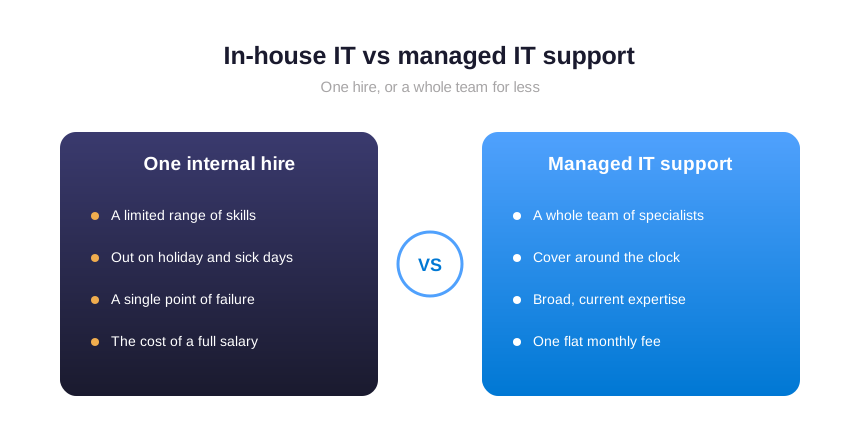
Outsourcing also removes a hidden risk: key-person dependency. When one employee holds every password and knows how everything is wired, their departure becomes a crisis. A managed provider documents your setup and keeps it in order. Therefore the knowledge stays with your business, not in one person’s head.
📞 The proactive help desk at the core of IT support services
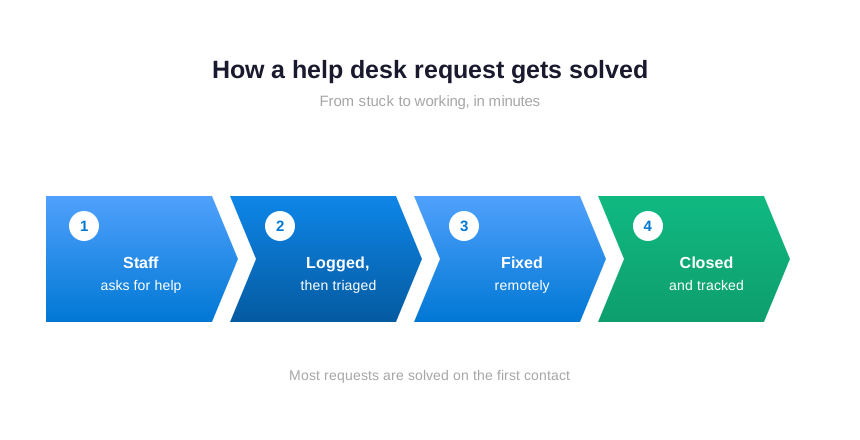
The part of managed IT support services your staff feel every day is the help desk. When a laptop misbehaves or a file will not open, they message or call, and someone fixes it. A good help desk answers quickly and solves most issues on the first contact. Consequently your people lose minutes, not hours.
Critically, speed matters more than it sounds. A delay of even thirty minutes per person, a few times a week, quietly adds up to days of lost output each month. Specifically a responsive help desk pays for itself by keeping everyone working. Furthermore it removes the frustration that builds when technology gets in the way.
Behind the friendly first response sits real discipline. Every request is logged, tracked, and closed, so nothing falls through the cracks. Notably, the team spots patterns and fixes them at the root. In practice a recurring issue is solved once, rather than patched again and again for every employee who hits it.
🌐 Remote and on-site support, working together
In fact, a technician fixes most IT problems remotely today. A technician connects securely to the device, sees what you see, and resolves it without anyone travelling. Remote IT support is fast, which is exactly why it handles the large majority of requests within minutes. Therefore your team waits less and works more.
However, some jobs still need hands on hardware. A failed router, a new office, or a stack of laptops to set up calls for an on-site visit. A complete managed IT support service covers both. Importantly the two work as one: remote support for speed, on-site for the physical jobs, with the same team tracking everything in one place.
🕑 Round-the-clock monitoring that prevents problems
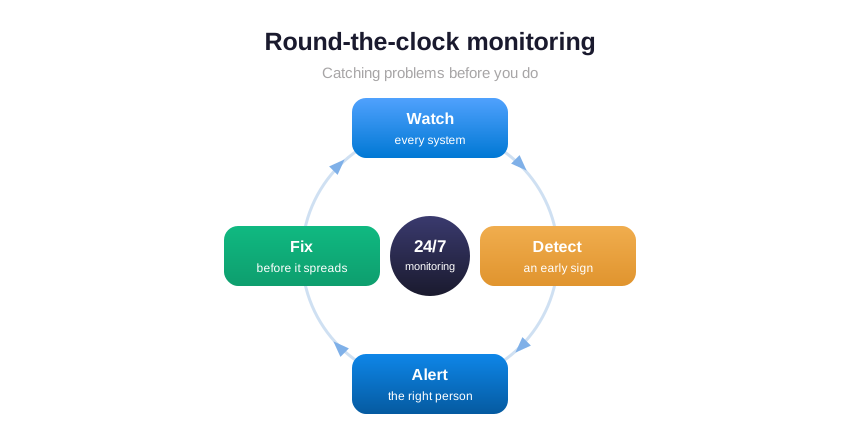
The best IT support is the kind you never notice, because problems get caught before they reach you. Monitoring watches your systems day and night and raises an alert the moment something drifts. A disk filling up, a backup that failed, a server running hot: each is a warning the provider acts on early. Consequently a quiet fix replaces a loud outage.
This is the difference between modern managed IT support services and the old break-fix habit of waiting for things to fail. With 24/7 monitoring, most issues are handled outside business hours, before your team logs in. Moreover mornings start with working systems instead of a queue of complaints. Furthermore the data builds a clear picture of what needs replacing and when.
🔄 Updates and patching that close the door on attacks
Moreover, outdated software is one of the easiest ways into a business. Every program your team uses gets security fixes from its maker, and those fixes only help once they are installed. Left undone, a known weakness sits open for months, waiting. Therefore patching every device on a schedule is one of the most valuable things managed IT support services do, even though nobody notices it.
The hard part is not knowing that updates matter; it is doing them consistently across every laptop, phone, and server without disrupting work. A provider automates this, rolls updates out quietly in the background, and confirms they actually applied. In practice that turns a chore everyone postpones into a routine that simply happens. Furthermore the most common path attackers use is closed before they can try it.
🔒 Security is now part of managed IT support
A decade ago, IT support meant keeping machines running. Today it has to keep them safe too. Small businesses are now the favourite target of online crime, because attackers know they are easier to breach than large firms. Therefore security can no longer be a separate purchase. It belongs inside everyday IT support, the same foundation that small business cyber security consulting builds on.

In practice this means a few protections running at all times. Every login is verified with a second step, every device is encrypted, and updates close known weaknesses quickly. Moreover backups sit ready so a ransomware demand becomes an inconvenience rather than a disaster. In short, none of this is exotic. It is the baseline that clients, insurers, and federal CISA guidance for small businesses now expect you to meet.
💡 What we see across 60+ businesses: the firms that avoid a serious incident are rarely the ones with the most tools. They are the ones whose IT support quietly keeps the basics switched on and proven — multi-factor login, working backups, and fast updates. Indeed, most breaches walk through a door that simple support would have closed.
📦 How managed IT support services handle backup and recovery
Even with strong prevention, things occasionally go wrong. A laptop is lost, a file is deleted, or ransomware locks a system overnight. What separates a minor event from a real disaster is whether you can recover quickly. Therefore backup and recovery sit at the heart of any serious managed IT support service. The system copies your data automatically, keeps it away from the device, and tests it so it truly restores when you need it.
Importantly, the point is not simply having backups; it is recovery time. For example, a business that can be back on its feet within an hour treats an incident as a footnote. One that cannot may lose days of work, and a few customers with it. In practice your provider agrees recovery targets with you, then proves the backups work on a schedule. In practice a bad day stays small and contained.
⚖️ Business IT support versus the break-fix habit
It helps to know what you are replacing. The old model is break-fix: you call someone when something breaks, and you pay by the hour to fix it. On the surface it looks cheaper, because you only pay when you have a problem. In reality it rewards your provider when things go wrong and leaves you exposed between visits.
Business IT support delivered as a managed service flips that around. You pay a flat fee, so the provider is paid to keep problems from happening at all. Specifically their incentive matches yours: fewer issues, less downtime, smoother operations. Furthermore predictable monthly costs are far easier to plan around than surprise invoices after every breakdown.
👥 Co-managed IT support for businesses with their own staff
Not every business wants to hand over everything. Some have an internal person or a small team who handle the basics but need backup for the rest. Co-managed IT support fills that gap. The provider takes on monitoring, security, after-hours cover, and the deep specialist work, while your own people keep the day-to-day relationships.

This model works well as a company grows. Your in-house staff are never alone, never the single point of failure, and never stuck when something falls outside their experience. Notably you keep the speed of having someone on-site, with the depth of a full team behind them.
🔑 Onboarding and offboarding without the gaps
Every time someone joins or leaves, your technology has to change with them. A new hire needs accounts, a laptop, and the right access on day one. Equally, someone who leaves needs that access removed the same day. Done by hand, these steps get rushed or forgotten, and forgotten access is exactly how data walks out the door.
A managed IT support service makes both routine. The provider sets up new starters from a checklist, granting only the access their role needs. It switches leavers off cleanly, closes their accounts, and keeps their files. Importantly this is a security control as much as a convenience. Closing accounts promptly removes one of the most common and most avoidable ways a small business gets breached.
🏢 Managed IT support tailored to your industry
Good IT support understands your business, not just your computers. An accounting firm has strict rules about client records and busy-season deadlines. An engineering company runs heavy design software and large files. A medical practice must protect patient data under HIPAA. Therefore the right provider shapes the service around how you actually work, even a nonprofit on a tight budget.
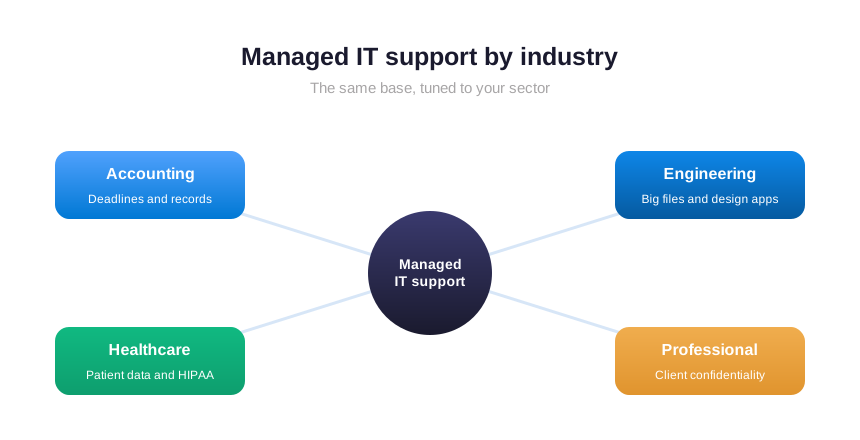
What stays the same across industries is the foundation. Reliable email, protected files, fast support, and solid security matter to every business. In practice the specialist layer sits on top of that base. A provider who knows your sector simply applies the right rules, deadlines, and safeguards without you having to explain them.
💰 How much do managed IT support services cost
Most providers price managed IT support services per user, per month. You pay a flat rate for each person you cover, and that rate includes the help desk, monitoring, security, and updates. Consequently your bill scales cleanly as you hire or shrink, with no surprises. For a small business, this is usually a fraction of one IT salary.
Flat-rate pricing matters for more than budgeting. Because the fee does not rise when you call, your team never hesitates to ask for help. In practice that means small issues get fixed early instead of festering. Moreover the provider has every reason to prevent problems, since extra work eats their margin, not your wallet.
What a flat fee should and should not include is worth checking. Good plans cover the help desk, monitoring, security, updates, and onboarding as standard. Larger projects, such as a full office move or a new phone system, are usually quoted separately, and that is fair. In practice the clearer a provider is about scope up front, the fewer billing surprises you meet later.
💡 The cheapest way to judge a quote: compare it to the cost of one bad day. A single outage that stops ten people for an afternoon already rivals a month of managed support. The right question is not whether support is an expense, but whether you can afford the downtime it prevents.
📞 Vendor management as part of managed IT support services
Technology rarely comes from one place. You have an internet provider, a phone system, accounting software, and a handful of other suppliers. When something breaks, working out who to call and chasing them for answers eats your time. Vendor management hands that job to your provider. They deal with the suppliers, sit on the support calls, and turn the technical back-and-forth into plain answers for you.
This matters more than it first appears. A single problem often crosses two vendors, each blaming the other, while your business waits. With managed IT support services in the middle, one team owns the outcome and pushes it to a fix. Consequently you stop being the messenger between companies and get back to running your business.
🛡️ How managed IT support reduces business risk
Every business now runs on technology, which means every business carries technology risk. A breach, a long outage, or lost data can cost you customers, contracts, and trust. Managed IT support services lower that risk on every front at once. Specifically it keeps systems patched, backed up, monitored, and secured, so the common causes of disaster are closed off.
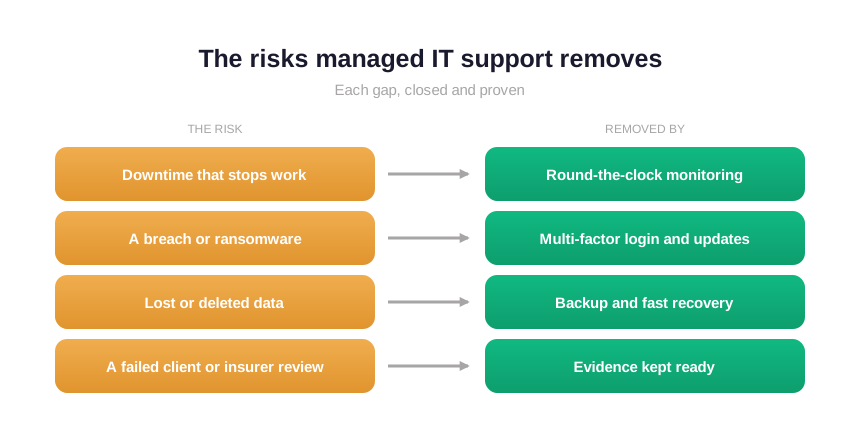
Risk also has a paperwork side that owners often miss. Clients send security questionnaires before they sign, and insurers ask for proof of controls before they pay. A managed provider keeps that evidence ready as a matter of course. Importantly a questionnaire or a renewal becomes a quick form, not a scramble that holds up a deal.
⚠️ Where small businesses get IT support wrong
Most IT failures come from a few predictable habits rather than bad luck. Knowing them in advance is half the battle, because each one is simple to fix once you can see it clearly.
- Waiting for things to break instead of preventing problems with monitoring.
- Relying on one employee who holds every password and all the knowledge.
- Treating security as separate from support, so basic protections lapse.
- Choosing the cheapest hourly help, then paying far more in downtime.
- Keeping no record of fixes, so the same issue returns again and again.
☁️ How Wintive delivers managed IT support on Microsoft 365
Wintive runs managed IT support services for US small businesses on the Microsoft 365 you already own. We handle the help desk, monitoring, updates, and security from one place, and we document every control so you can prove it. In addition you get the support and the protection without hiring an internal IT team or buying another platform.
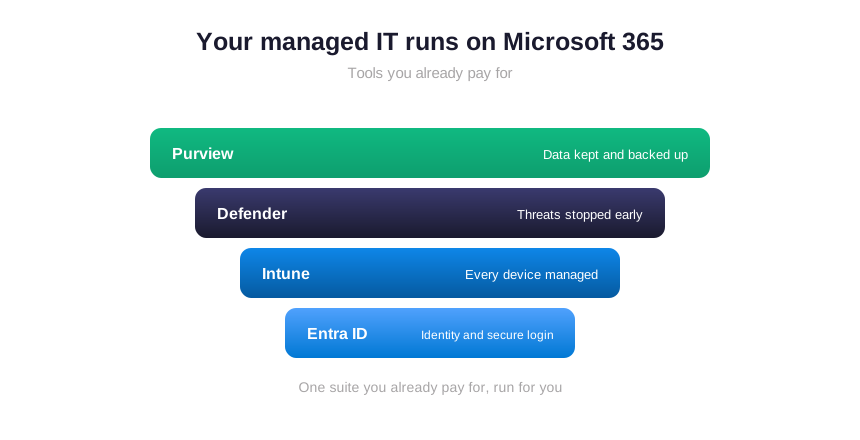
The advantage of building on Microsoft 365 is simple: you are already paying for the tools, and you are likely using a fraction of them. Identity, device management, threat protection, and backup all live inside the suite. In practice our job is to switch them on, tune them for how you work, and keep them running, for one flat monthly fee per user.
🧮 Switching Providers: What the First Quarter Looks Like
How managed IT support services handle the first 90 days
Switching providers feels risky, so most owners put it off for months. In practice, a clean onboarding removes that fear quickly. First, the new team audits your network, your devices, and every user account. Then they document what they find and flag the gaps that threaten uptime. Within two weeks, the team closes the urgent holes. As a result, you see real value before the first invoice clears. From that first week, managed IT support services earn trust by fixing what hurts most.
Good managed IT support services never rip everything out on day one. Instead, they stabilize the environment first and modernize on a schedule you approve. Meanwhile, your staff keep working without interruption. Because downtime costs more than any upgrade, they stage the rollout around your busiest hours. Therefore, the transition stays almost invisible to the floor. Your people notice faster logins, not a disruptive overhaul.
What you should measure after the move
Numbers tell you whether the switch worked, so track them from week one. For example, watch how fast tickets get resolved and how often work stalls. Still, raw speed is not the whole story. The deeper win is fewer incidents over time, because proactive monitoring catches faults early. Managed IT support services should also shrink your reporting, since the system gathers the evidence automatically. In short, the right partner turns reliability into a habit rather than a scramble.
Finally, review the relationship every quarter, not once a year. A strong provider brings a roadmap, not just a bill. Together you rank the next projects by risk and payback. That way, the support stays aligned with where the business is heading. Ultimately, the goal is steady uptime and a network you can stop worrying about. When that happens, the technology fades and the real work takes over again.
None of this requires a giant budget. Rather, it requires a partner who treats your uptime as their own. Once you set the cadence, each quarter gets easier than the last. And because the gains compound, your risk keeps falling while your output climbs.
📚 More for US small businesses
🛠️ Want your IT handled, monitored, and protected?
Wintive runs your managed IT support on the Microsoft 365 you already own. Specifically we cover the help desk, monitoring, updates, and security, and we keep the evidence ready for clients and insurers. Specifically you get one calm point of contact, not a queue of problems.
❓ Managed IT support services: frequently asked questions
They are an ongoing service where a provider runs your technology for a flat monthly fee. That covers a help desk, remote and on-site fixes, round-the-clock monitoring, security, and updates. The goal is to prevent problems, rather than only reacting when something breaks.
A typical plan includes help desk support, device monitoring, software updates and patching, security controls such as multi-factor login and backups, plus user onboarding and offboarding. Most providers price it per user per month, so the cost is predictable as your team changes.
Flat-rate means you pay a fixed monthly fee per user instead of paying by the hour. Because the price does not rise when you call, your team asks for help early. It also makes the provider responsible for preventing problems, not profiting from them.
Co-managed support means a provider works alongside your own IT person or team rather than replacing them. The provider adds monitoring, security, after-hours cover, and specialist depth, while your staff keep the day-to-day relationships. It suits growing businesses that want backup.
They keep your systems patched, backed up, monitored, and secured, which closes the common causes of breaches and outages. They also keep proof of those controls ready for client security questionnaires and insurance renewals. The result is less downtime, fewer incidents, and smoother deals.