

Managed security services for small business are now a basic cost of staying open. The reason is simple. Attackers automate, so a ten-person firm gets probed like a large one. However the small firm has nobody watching alerts at 7pm on a Friday. A managed security service fills that gap. A provider runs your protection daily, for a flat monthly fee. That replaces a hire you cannot yet justify.
For most US small businesses, this protection needs no new tools. Instead it runs on the Microsoft 365 you already pay for. You switch it on correctly and watch it. Therefore this guide stays practical. It explains what managed security services for small business cover, how they differ from a regular IT provider, what they cost, and how to choose one.
Want your business protected around the clock without hiring a security team?
Wintive runs managed security for small US businesses, end to end, on the Microsoft 365 you already own. We lock down identity. Then we watch every sign-in. From there, we protect laptops and phones, automate backups, and respond fast when something looks wrong. The price is a flat monthly rate, with no long contract and no setup fee.
📅 Book a Free 30-Min Call | 💬 Chat on WhatsApp | See Our Plans →
🔒 Why managed security services matter for a small business now
📌 TL;DR — managed security services (2026): A managed security service runs the day-to-day protection of a small business for a flat monthly fee per user. It covers six core jobs, from identity and email to backup, monitoring, and compliance. For most small firms these jobs already live inside Microsoft 365, so the work is configuration and constant watching, not new software. The fee is a fraction of what a single breach costs.
For years, small firms assumed they were too small to target. Today that assumption is an expensive mistake. Attackers automate at scale. Specifically a bot scans thousands of inboxes and sign-in pages at once. To that bot, a ten-person company looks like a large one. Managed security services for small business exist because the threat no longer scales down.
The deeper problem is timing. Most small firms handle security in spare moments. Others lean on one busy person who also fixes laptops. However attacks do not keep office hours. The malicious login at 2am or the wire-fraud email on a holiday weekend both arrive when nobody is watching.
In short a managed service removes that blind spot. Someone watches the alerts every hour of every day. As a result a problem at midnight gets contained fast, not discovered on Monday. For a wider baseline, the CISA cybersecurity best practices are a solid starting point.
🧩 What managed security services for small business include, job by job
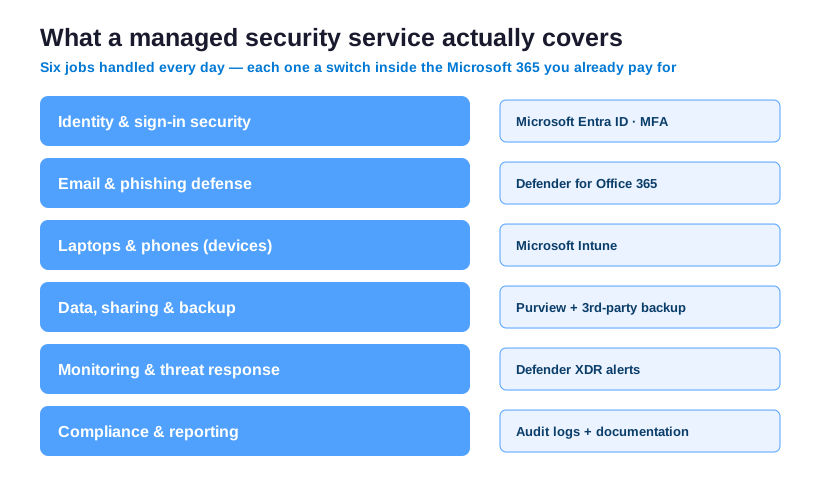
It helps to see managed security as a set of standing jobs. It is not a product you install once. Specifically each job maps to a control inside Microsoft 365. Moreover each one closes a way that small firms actually get breached. The table below lines them up.
| Security job | What it stops | Where it lives in Microsoft 365 |
|---|---|---|
| Identity and sign-in | Stolen passwords and account takeover | Microsoft Entra ID, with MFA and conditional access |
| Email and phishing | The most common way attackers get in | Microsoft Defender for Office 365 |
| Devices | Lost laptops and unmanaged phones | Microsoft Intune and Defender |
| Data and backup | Ransomware and accidental loss | Purview controls plus third-party backup |
| Monitoring and response | Quiet intruders moving through your files | Defender XDR alerts, watched daily |
| Compliance and proof | Failing a client or insurer review | Audit logs and written documentation |
These jobs work as layers. First identity sits on the outside. Email and device defense guard the middle. Finally backup is the floor you land on when something slips through. Therefore an attacker must beat all of them in turn.
Crucially a good provider does not bolt on extra software for each job. Instead they configure what Microsoft 365 already includes. Then they own the work of keeping it current and watching it. That part is exactly what a busy owner cannot sustain alone.
🛡️ MSP vs MSSP vs co-managed IT: which one you need
Before you shop, learn what you are buying. In fact three different services get sold under similar names. First a managed service provider, or MSP, keeps your IT running through everyday managed IT support services. That means helpdesk, setup, updates, and accounts. For an MSP, security is usually a light add-on. By contrast a managed security service provider, or MSSP, makes security the whole job.
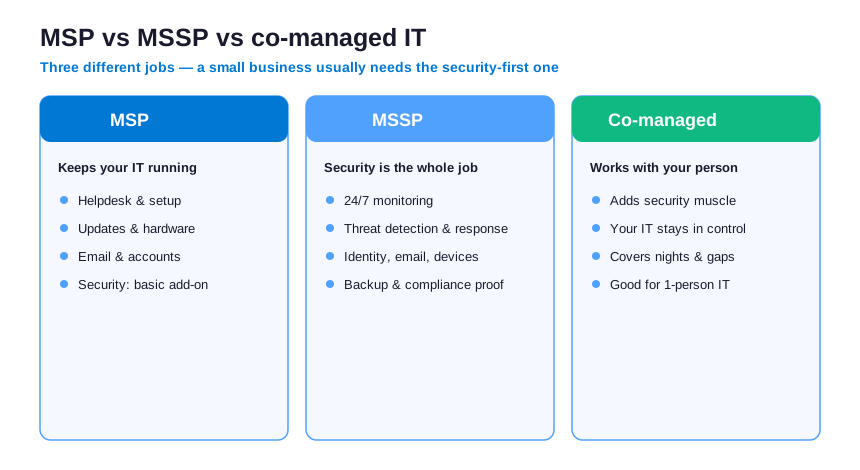
Meanwhile co-managed IT sits between the two. Specifically it works alongside a person you already have. It adds security muscle and after-hours cover, without taking over. For a one-person IT setup, that fit often works best.
So which one suits a small business? Usually, the answer is an MSSP or a co-managed plan. The real gap is rarely setup. Instead it is the daily watching and the fast response when something breaks.
☁️ Your managed security runs on the Microsoft 365 you already pay for
Here is the part that saves real money. If you run Microsoft 365, you already pay for most of this security. For example identity protection comes through Microsoft Entra. Email defense comes through Defender for Office 365. Device management comes through Intune. Yet the licenses mostly sit unused.
A managed security service turns those features on. Then it runs them properly. Specifically it enforces multi-factor sign-in and blocks risky logins. In addition it tunes phishing filters and applies a policy to every device. None of this needs a separate security product. That is exactly how enterprise vendors overcharge a small firm.
So the takeaway is simple. You do not need a bigger toolbox. Instead you need the tools you own configured by an expert. Then you need someone watching, who notices the moment a setting drifts.
📡 What managed security services for small business monitor around the clock
Monitoring is the core of any managed security service. But what does it actually catch? In practice it watches three things at once. First it tracks every sign-in for odd location or timing. Second it scans inbound mail for phishing and payment scams. Third, it flags any device that behaves strangely.
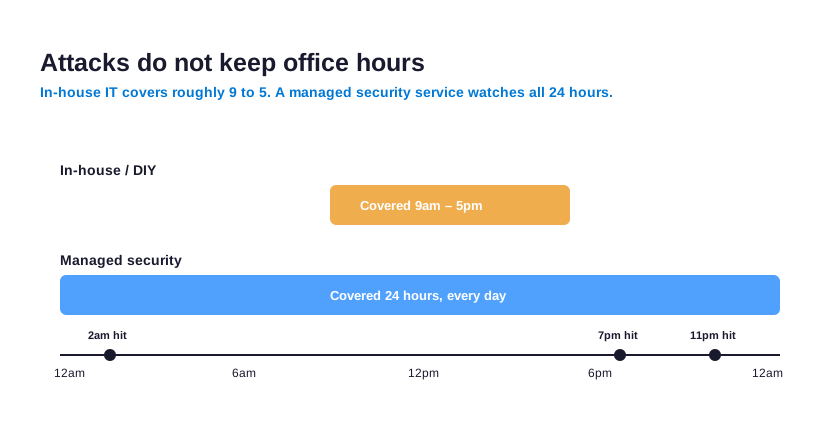
In fact good security monitoring does not just collect alerts. Instead it separates real threats from noise. For example one failed login means little. However fifty failed logins from a new country mean an attack. Therefore the value is judgment, not volume. Managed security services bring that judgment every hour, which a busy owner cannot.
🔎 Finding weak spots first: vulnerability management
Attackers look for weak spots first. So a managed service looks for them too, before anyone else does. This job is vulnerability management. In plain terms, it means finding and fixing the gaps that let attackers in. For a small business, the common gaps are short and predictable.
- Accounts without multi-factor, usually the busy owners and finance staff.
- Old software and devices that never received the latest update.
- Files shared too widely, often public by accident.
- Ex-staff accounts left active long after they leave.
- Risky sign-in settings that nobody has reviewed.
In practice a provider closes these on a schedule, not once. Therefore the list stays short over time. In fact most fixes cost nothing but attention. That is the quiet advantage of managed security services for small business. Specifically the weak spots get found before an attacker finds them.
💸 Managed security services for small business: what they cost
Generally cost is the first question every owner asks. So here is a straight answer. Usually, managed security for a small business is priced per user. It is a flat monthly fee, often between $50 and $150 per user. Of course the exact figure depends on what is included. A full outsourced security operations center costs more. However most small firms do not need that tier on day one.
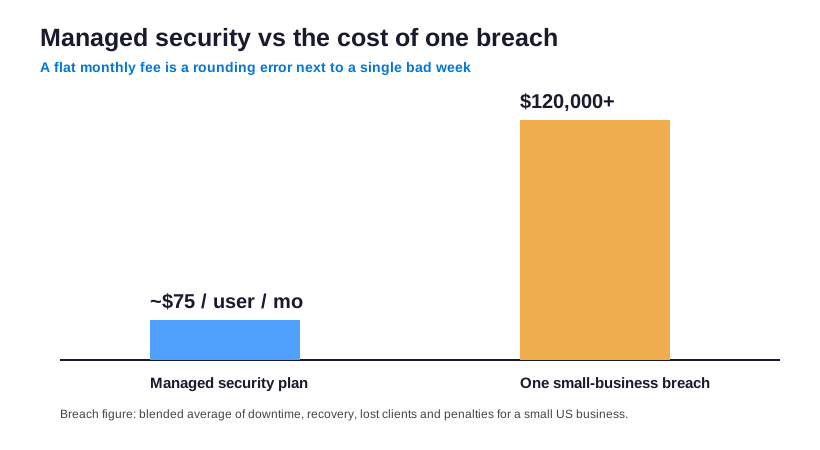
Conversely look at the other side of the ledger. A single breach at a small US firm routinely passes $100,000. That figure includes downtime, lost clients, recovery, and any penalties. Therefore the monthly fee is a rounding error. It sits next to the cost of one bad week.
So the spending that makes sense is small and predictable. Be wary of any quote built around expensive hardware. Similarly per-incident charges are another red flag. For a Microsoft 365 business, the value is configuration and monitoring, not a box in a closet.
🛰️ When a small business needs managed detection and response
At some point, an owner hears the term managed detection and response, or MDR. So what is it, and do you need it? In short MDR adds a faster, deeper layer on top of monitoring. Specifically it does not just spot a threat. It actively contains and removes it, often within minutes.

For many small firms, the core plan is enough at first. However MDR makes sense as you grow or hold sensitive data. For example a firm handling client records gains real value from fast incident response. Therefore treat MDR as the next step, not the starting point. A good provider helps you add it only when your risk demands it.
🚨 SOC as a service: a security team without the headcount
You will also hear about SOC as a service, sometimes written SOCaaS. In plain terms, it means renting a full security operations center by the month. Specifically that means a team, the tools, and the process, all as one subscription. Therefore you get enterprise-grade monitoring without hiring anyone.
However most small firms do not need a dedicated SOC on day one. For example the core managed plan already covers daily monitoring and response. By contrast SOC as a service suits firms with strict rules or constant attacks. As a result a good provider treats it as an upgrade, not a default. In short you add the SOC only when your risk truly calls for it.
📜 Managed security services for small business that prove value to insurers
Increasingly, clients and insurers ask small firms to prove their security. For example a new contract may require multi-factor and a written policy. Similarly a cyber-insurance renewal now asks hard questions before it pays out. Therefore proof matters almost as much as the protection itself. This is where a managed plan quietly earns its fee.
- Who can open which files, and that the list gets reviewed.
- That multi-factor sign-in is on for every account.
- That data is backed up, and that a restore has been tested.
- Who signed in, from where, and exactly when.
- That a written response plan already exists.
In practice a good provider keeps these logs and records for you. As a result you answer a security questionnaire in hours, not weeks. Moreover the same controls that satisfy an insurer also lift your real security posture. In short managed security services turn protection into something you can show, not just claim.
✅ How to choose the best MSSP for your small business
Overall choosing a provider is less about brand names. Instead it is about fit. Above all, the best MSSP for a small business works inside the tools you own. Also it prices clearly. Moreover it can prove what it does. So use this short checklist when you compare options.
- Confirm they work natively in Microsoft 365, not around it with extra products.
- Ask for flat, per-user pricing, with no setup fee and no long lock-in.
- Require multi-factor and conditional access on every account, not as an upsell.
- Check that monitoring is genuinely around the clock, not office hours with voicemail.
- Make sure backups are included, and that a restore is actually tested.
- Ask how they document protection, so you can answer a client or insurer fast.
- Get a named contact and a written plan for the day something goes wrong.
If a provider cannot answer those points plainly, keep looking. Managed security services should make your protection clearer. They should never make it harder to understand.
🚩 Red flags and the real risks of the wrong provider
Certainly every managed relationship carries its own risks. So naming them up front protects you. Above all, watch for one pattern. Generally you hand over control and get silence back. Therefore look for these signs before you sign.
- Vague scope, where nobody can name which accounts, devices, and data are covered.
- Hours that do not match the threat, where nights and weekends fall to voicemail.
- Lock-in that holds your tenant or admin access hostage if you decide to leave.
- Expensive add-ons pushed for jobs your Microsoft 365 plan already handles.
- No reporting, so you cannot see what was done or prove it to anyone.
The fix is straightforward. First choose a provider who keeps you in control of your tenant. Next make sure they cover the hours attacks happen. Finally insist they show their work every month. The right managed security services reduce your risk. They never become a new one.
📊 Outsourcing vs doing it all in-house
Clearly many owners ask whether they could just do this themselves. You can, and for a while it works. Of course the setup is not the problem. A capable person handles that once. However security is a daily, never-finished job. Therefore it competes with everything else that person must do.
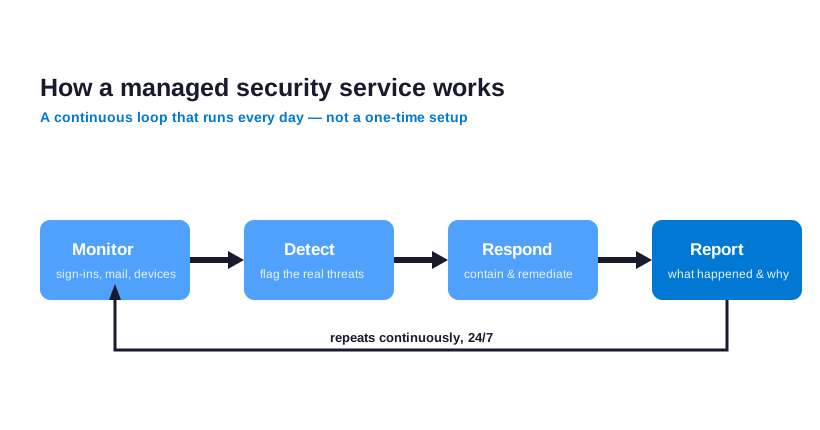
A managed service runs that loop without distraction. Specifically it monitors, detects, responds, and reports. Then it begins again, every single day. That includes the days your one technical person is away.
In-house can still make sense one day. Specifically it fits once you can hire a dedicated security person and keep them. As a result a managed service buys the same cover for a fraction of a salary. So most small firms land there.
🌐 Managed network security for a remote small team
The office network is wherever your people happen to work. For example a laptop on home wifi is now part of your network. Therefore the old firewall-in-the-closet model no longer fits a small business. Instead managed network security follows the user and the device. In practice that means a few specific controls.
- Every device gets a security policy through Microsoft Intune.
- Conditional access checks each connection before it trusts it.
- Network security monitoring watches for odd or blocked traffic.
- Company data stays inside managed apps, not personal ones.
As a result a remote team stays as protected as one sitting in a single office. Moreover you avoid buying and maintaining separate network hardware. Ultimately the protection travels with the work, which is exactly what a modern small business needs.
🧯 Where small businesses get managed security wrong
Notably a few mistakes show up again and again. Fortunately, most cost nothing but attention to fix. So knowing them helps you get more from any provider. It also helps you spot a gap before it bites.
- Buying tools instead of cover, then leaving them unconfigured and unwatched.
- Assuming the Microsoft 365 plan backs up data on its own, which it does not.
- Leaving multi-factor off for the busy people who need it most.
- Treating security as a one-time project rather than a standing job someone owns.
- Choosing on price alone, then finding the cheap plan covers only office hours.
🎓 Security awareness training: your strongest last line of defense
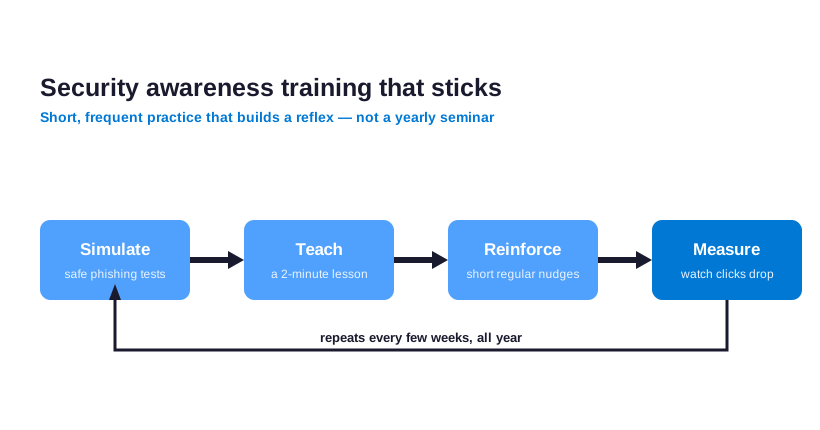
Technology stops most attacks, but never all of them. For example a convincing email can still fool a tired employee at 5pm. Therefore security awareness training matters as much as the settings behind the system. A good managed service builds that human layer in from the start.
💡 The training that actually sticks: Short and frequent beats long and rare. A two-minute phishing reminder every few weeks keeps a team sharper than one annual seminar that everyone forgets by lunch. The goal is a reflex, not a certificate.
In practice this means simple, regular reminders, not a once-a-year lecture. For instance short phishing tests keep the whole team alert. Similarly one clear rule for payment requests stops most wire fraud. As a result security awareness training turns your staff into a layer of defense, instead of the weak point. Ultimately the technology and the people have to pull in the same direction.
🤝 How Wintive delivers managed security services for small business
Wintive runs managed security for small US firms. We work on the Microsoft 365 they already own. First we lock down identity and sign-in. Then we tune email defense, apply device policy, and automate backup. Finally we watch the whole thing, so a problem at 2am gets handled, not discovered weeks later.
💡 What we see across 60+ tenants we manage: The breach almost never starts with a genius hacker. Instead it starts with one tired person clicking one convincing email at the end of a long day. From there, the attacker moves quietly through files nobody locked down. Specifically the firms that stay safe are not the ones with the most tools. They are the ones where someone owns the email, the devices, and the backups every single day.
Everything is a flat monthly fee per user. There is no long contract and no setup charge. Moreover you keep control of your own tenant. You get clear monthly reporting, and a named contact when something looks wrong. That is what managed security services for small business should be: constant, documented, and yours.
🧮 Switching to a Provider: What the First Quarter Looks Like
How managed security services for small business start
Hiring a provider feels risky, so most owners put it off for months. In practice, a clean onboarding removes that fear quickly. First, the team audits your network, your devices, and every user account. Then they document what they find and rank the gaps that put data at risk. Within two weeks, the urgent holes get a plan. As a result, you see real value before the first invoice clears. From that first week, managed security services for small business earn trust by fixing what hurts most.
Good managed security services for small business never rip everything out on day one. Instead, the team stabilizes the basics first and hardens on a schedule you approve. Meanwhile, your staff keep working without interruption. Because downtime costs more than any fix, the rollout is paced around your busiest weeks. Therefore, the transition stays almost invisible to users. They simply notice faster, safer logins over time.
Across the small businesses we onboard, the first month almost always surfaces the same surprise: accounts with no second login step. Notably, managed security services for small business close that gap first, because it is the cheapest fix with the biggest payoff.
What you should measure after the move
Numbers tell you whether the work paid off, so track them from week one. For example, watch how fast incidents get contained and how often staff report phishing. Still, raw speed is not the whole story. The deeper win is fewer incidents over time, because proactive monitoring catches threats early. Good managed security services for small business also shrink your audit prep, since the evidence is gathered as you go. In short, the right partner turns protection into a habit rather than a scramble.
Finally, review the relationship every quarter, not once a year. A strong provider brings a roadmap, not just a report. Together you rank the next projects by risk and payback. That way, the program stays aligned with where the business is heading. Ultimately, the goal is steady protection and a network you can stop worrying about.
📚 More for US small businesses
Ready to put your security on autopilot and stop watching the alerts yourself?
Wintive runs your Microsoft 365 the way a small business needs it. Identity stays locked down. Email and devices stay protected. Backups run automatically, and threats get watched around the clock. The price is one flat monthly fee per user. No long contract. No surprise bills.
❓ Managed security services for small business: frequently asked questions
Most charge a flat monthly fee per user, often $50 to $150. A full security operations center costs more, yet most small firms do not need it at first.
An MSP keeps your IT running, with security as a small add-on. An MSSP makes security the whole job: monitoring, response, and compliance. Small firms usually need the MSSP focus.
A full managed SOC is the priciest tier, and more than most small firms need early. Managed detection and response is a cheaper middle step. Start small, then add a SOC if your risk grows.
Usually yes. The risk does not scale down, because attackers automate. A small team rarely watches alerts daily. A managed service buys that constant cover for far less than a hire.
The main risks are vague scope, off-hours gaps, and lock-in. Avoid them by keeping control of your own tenant, demanding cover around the clock, and requiring clear monthly reports.