

Overall endpoint security for small business is no longer a nice-to-have. In practice every laptop, phone, and tablet that touches company data is a door into the business. Attackers know small firms rarely watch those doors, so they go after them first. The good news is that strong protection no longer needs a big team or a big budget.
In practice for most small businesses the tools already sit inside Microsoft 365. Defender for Business and Intune turn every device into a managed, monitored endpoint. Overall so the real work is configuration and constant watching, not buying more software. This guide covers what endpoint security protects, how it runs on Microsoft 365, and how to pick a provider that does it right.
Specifically endpoint security can sound deeply technical, yet most of the real decisions are about priorities and habits, not products. Notably this guide is written for the owner or office manager who wears the IT hat, not for a security engineer. It keeps the jargon light and the focus practical, so by the end you know which protections matter, which ones you already pay for, and the right questions to ask any provider before you sign.
Want every laptop and phone protected around the clock without hiring a security team?
Wintive runs managed endpoint security for small US businesses, end to end, on the Microsoft 365 you already own. Of course we harden every laptop and phone. Then we watch them around the clock. From there, we block malware, control risky devices, and respond fast when something looks wrong. The price is a flat monthly rate, with no long contract and no setup fee.
📅 Book a Free 30-Min Call | 💬 Chat on WhatsApp | See Our Plans →
🔒 Why endpoint security matters for a small business in 2026
📌 TL;DR — endpoint security for small business (2026): Endpoint security protects every laptop, phone, and tablet that connects to company data. For a small business it usually runs on Microsoft 365 through Defender for Business and Intune, so the cost is configuration and monitoring, not new software. It blocks malware and ransomware, controls risky devices, and watches for threats around the clock. The monthly fee is a fraction of what one breach costs.
Clearly small businesses hold the same valuable data as large ones, yet they guard far fewer doors. Specifically a single unpatched laptop or one reused password can hand an attacker the whole network. Specifically ransomware crews now scan for exactly these soft targets. Therefore endpoint security has become the front line, not the back office.
Similarly the shift to remote and hybrid work made this harder. In short devices now leave the office, join home Wi-Fi, and connect from anywhere. Each one needs the same protection it had behind the office firewall. Endpoint security closes that gap by enforcing the rules on the device itself, wherever it sits.
In fact the numbers make the case on their own. Similarly small firms are now a favourite ransomware target precisely because their defences tend to be thinner. Yet the fix is rarely costly. Most of what stops these attacks already ships inside the Microsoft 365 licences a business pays for each month. The work is switching it on and keeping watch.
🧩 What endpoint security for small business actually covers
Ultimately good endpoint security is a stack of jobs working together, not a single app. Clearly first it stops known and unknown malware before it runs. Next it controls which devices and USB drives can connect. From there it watches behaviour for signs of an attack and responds fast. Finally it keeps every device patched and encrypted, so a lost laptop is never a lost database.
Meanwhile the table below maps these core jobs to where they already live inside Microsoft 365. In fact most small firms pay for these tools and simply leave them switched off.
| Endpoint security job | Where it lives in Microsoft 365 |
|---|---|
| Next-gen antivirus and ransomware blocking | Microsoft Defender for Business |
| Endpoint detection and response (EDR) | Microsoft Defender for Business |
| Device encryption (BitLocker and FileVault) | Microsoft Intune |
| Patch and update enforcement | Microsoft Intune |
| USB and removable device control | Intune and Defender |
| Remote wipe of a lost device | Microsoft Intune |
| Around-the-clock threat monitoring | Defender plus a managed provider |
🛡️ Antivirus vs endpoint protection vs EDR: the real difference
Of course these three terms get mixed up, yet they describe different layers. Ultimately antivirus matches files against a list of known threats. Endpoint protection then adds a firewall, web filtering, and device rules on top. By contrast endpoint detection and response, or EDR, records what happens on the device and catches attacks that slip past the first two layers.
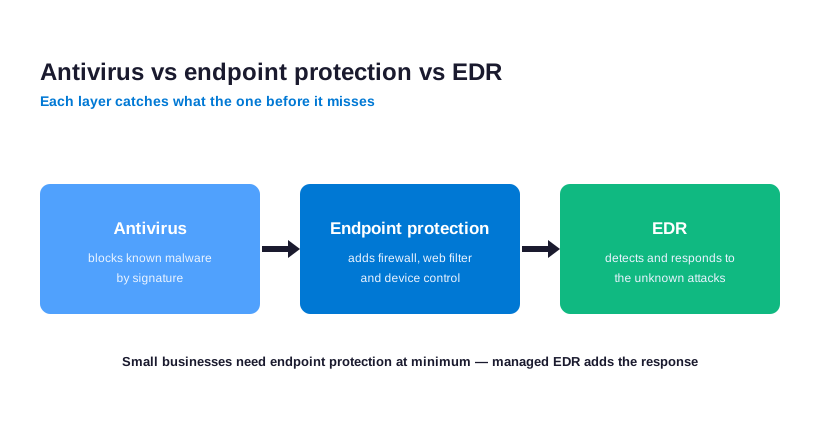
For a small business, by contrast, the answer is not one or the other. Modern endpoint security, by contrast, blends all three into a single agent. The diagram shows how each layer catches what the one before it misses.
In short the practical takeaway is to stop shopping by label. Meanwhile what matters is that all three layers are present, switched on, and watched. A single modern agent that handles antivirus, firewall, and EDR together is far easier to run than three separate products bolted onto each other.
☁️ Your endpoint security runs on Microsoft 365 Defender for Business
Notably if the business runs Microsoft 365 Business Premium then enterprise-grade endpoint security is already included. Microsoft Defender for Business brings next-gen antivirus, EDR, and automated investigation to every Windows, Mac, iOS, and Android device. Intune then adds device management, so you can enforce encryption, push updates, and wipe a lost phone remotely.

Overall this matters most for cost. In practice instead of buying a separate endpoint product, a small firm simply activates what it already owns. As a result you get one console, one bill, and one set of rules across email, identity, and devices. That is the exact angle we use for every client.
In practice there is a licensing nuance worth knowing. Defender for Business comes standalone or inside Business Premium, which also bundles Intune and advanced email protection. Overall for most small firms Business Premium is the better value, since it covers identity, email, and endpoints under one subscription instead of three.
🦠 Next-gen antivirus: stopping malware and ransomware
Specifically traditional antivirus only catches threats it has seen before. Notably attackers dodge it by tweaking their code every single day. Next-gen antivirus instead watches what a file actually does. If a program starts encrypting files or injecting into memory it gets stopped, even when it is brand new.
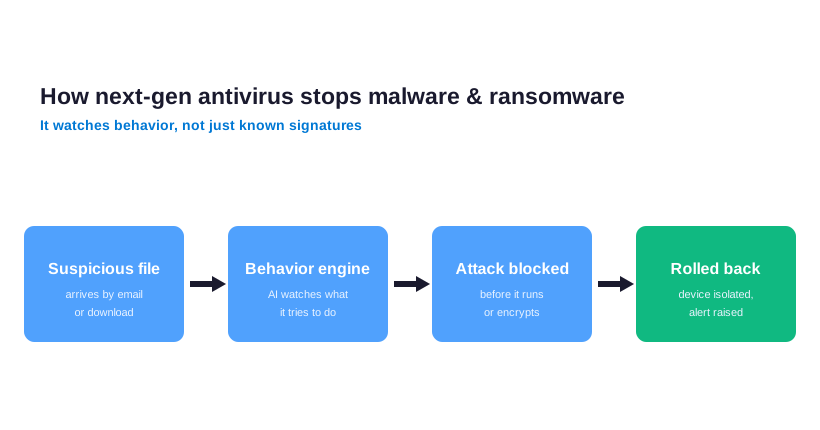
Clearly this behaviour-based approach is what blocks modern ransomware. Specifically it can halt an attack mid-stream and roll the changes back. Of course for a small business that single difference is the line between a quiet afternoon and a week of downtime.
Next-gen antivirus also leans on the cloud. Specifically when one device anywhere sees a brand-new threat, the signal is shared, so every other protected machine is guarded within minutes. For a small business that means the same threat intelligence as a large enterprise, at no extra effort.
📡 EDR: endpoint detection and response for a small team
Similarly endpoint detection and response records every meaningful action on a device, then flags the ones that look like an attack. In short think of it as a security camera for each laptop. When something suspicious happens an analyst can see the full story and contain the device in seconds.
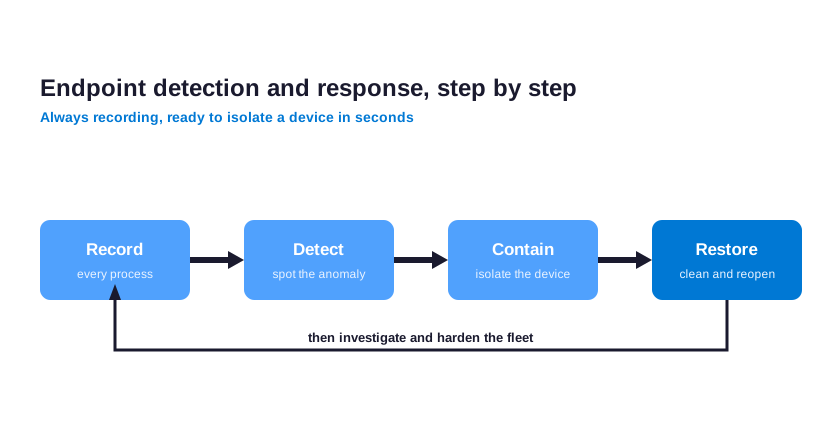
In fact most small firms have no one to read those alerts at 2am. Similarly that is why managed EDR exists. A provider watches the feed around the clock and acts, so the business gets the protection of a real security team without the headcount.
Ultimately the recorded history is what makes EDR powerful after an incident too. Clearly if something does get through, an analyst can rewind and see exactly how it started, which devices it touched, and whether any data left. That answer turns a panicked guess into a clear, contained response.
🚨 Threat detection and response around the clock
Meanwhile attacks do not wait for office hours. In practice most breaches begin late at night or over a weekend, when no one is watching the screens. In fact threat detection and response closes that window by monitoring every endpoint continuously and acting the moment a threat appears. The faster the response, the smaller the damage.

Of course the job blends automation and people. Ultimately software flags the signal, then an analyst confirms it and responds. For a small business this is the gap between catching an intrusion in minutes and hearing about it weeks later from a customer. Around-the-clock cover is what turns endpoint security from a checkbox into real protection.
Speed, however, is the whole point. Industry data, meanwhile, shows the cost of a breach climbs sharply the longer it goes undetected. Catching and isolating a compromised laptop within the hour usually keeps an incident small and quiet. Letting it run for days is how a minor intrusion becomes a reportable data breach.
🔌 Device control: locking down USB and removable media
In short not every threat arrives over the internet. A USB stick dropped in a parking lot or a personal drive plugged into a work laptop can carry malware straight past the firewall. Meanwhile device control decides which USB drives, printers, and removable media are even allowed to connect in the first place.
Notably inside Microsoft 365 this is a simple Intune policy. In practice you can block all removable storage, allow only encrypted drives, or permit a short approved list. For a small business handling client files, that one rule quietly shuts a door most attackers count on staying open.
Overall the same policy helps with honest mistakes, not just attackers. Overall an employee copying a client database onto a personal USB drive to work from home is a real and common risk. Device control either blocks that copy outright or forces it onto an encrypted drive, so the data stays protected if the stick is lost.
📜 Data loss prevention for sensitive business data
In practice stopping attackers is only half the job. Notably endpoint security also keeps sensitive data from walking out the door, whether by mistake or on purpose. Data loss prevention scans for things like card numbers, health records, and signed contracts, then blocks them from being copied, emailed, or uploaded where they should not go.
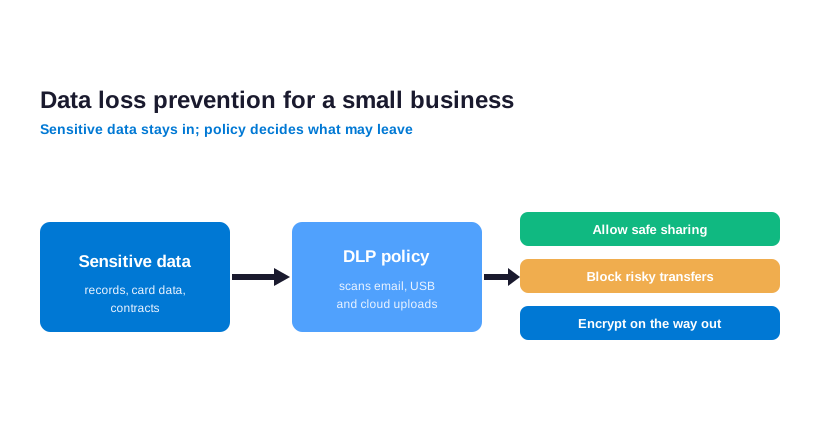
Specifically for a small business this matters for both trust and compliance. Specifically a single rule can stop an employee from sending a spreadsheet of customer data to a personal account. Of course the diagram shows how the policy classifies, monitors, and blocks sensitive data right at the endpoint.
Clearly data loss prevention is also a quiet compliance win. Specifically frameworks for healthcare, finance, and client work all expect a business to control where sensitive records can go. A policy on the endpoint provides exactly that evidence, without forcing staff to think about classification on every file they touch.
📱 Securing mobile devices: Android, iOS and BYOD
Similarly phones are endpoints too, and they hold just as much company data as laptops. Email, files, and chat all live on them. In short yet most small businesses let staff use personal phones with no rules at all. That is a quiet but serious gap in any endpoint security plan.
Intune handles this without taking over the personal device. Similarly it creates a managed work area on the phone, so company email and files stay encrypted and can be wiped, while personal photos and apps are left untouched. Both Android and iOS are covered, which keeps a mixed BYOD fleet secure.
In fact lost and stolen phones are the everyday version of this risk. A handset left in a taxi holds inboxes, shared files, and saved passwords. Clearly because Intune can wipe just the work area on demand, that lost phone becomes a minor inconvenience rather than a data breach. The personal side of the device is never touched, which keeps staff comfortable with the rules.
🌐 Firewall and network security for remote endpoints
When the team works from home the office firewall protects nobody. In fact each laptop now sits on a home network next to smart TVs and other untrusted devices. Endpoint security answers this by enforcing a firewall on the device itself and routing risky traffic safely.
Microsoft Defender and Intune manage that local firewall centrally, so every endpoint follows the same rules whether it is in the office or a coffee shop. Ultimately moreover web filtering blocks known malicious sites before a single click can do damage. The protection simply travels with the device.
This device-first model is why a VPN alone is no longer enough. A VPN only protects traffic back to the office, and many cloud apps never route through it. By contrast enforcing the firewall, encryption, and filtering on the endpoint itself protects the device on every network it joins, office or not.
✅ What the best endpoint security for small business looks like
With so many products on the market, the best endpoint security for a small business is rarely the one with the longest feature list. Meanwhile it is the one that gets fully deployed, watched, and kept up to date. A powerful tool sitting half-configured protects no one, however good its marketing looks.
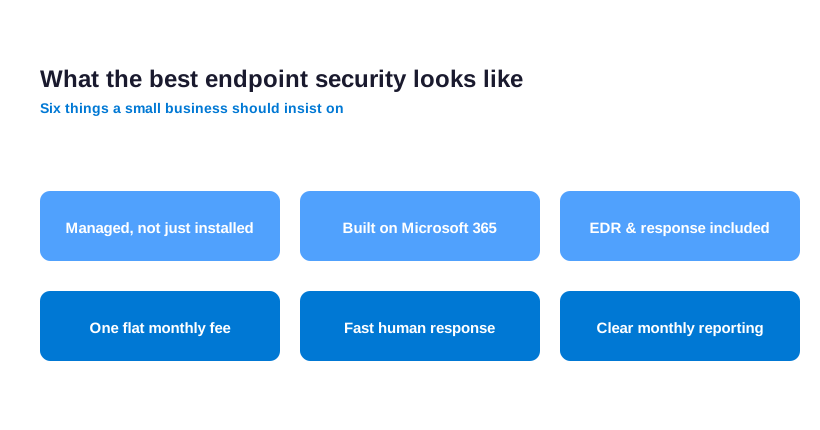
A few traits separate the strong options from the rest. In practice it should cover every operating system, run from one console, and include real EDR rather than basic antivirus. Critically it should be managed, so alerts actually get answered. The checklist below sums up what to look for before you commit.
One more test is honesty about scope. A good provider will tell you plainly what their plan does not cover and where a human still has to step in. Overall endpoint security that overpromises a fully hands-off result usually hides the gaps until an incident finally exposes them.
🎓 Endpoint security for small business: best practices you need
Good endpoint security depends as much on habits as on software. A handful of basics block the large majority of attacks, and they cost nothing but discipline. Federal guidance such as the CISA cyber hygiene guidance lists the same essentials year after year.
- Turn on multi-factor authentication for every account, with no exceptions.
- Keep every device patched, and let security updates install automatically.
- Encrypt every laptop and phone, so a lost device is never a lost database.
- Give each person only the access they need, and remove ex-staff accounts fast.
- Back up business data, then test that the restore actually works.
None of these basics is advanced, and none needs new spending. Notably done consistently, they block the large majority of attacks a small business will ever face. Endpoint security software then handles the smaller share that slips past good habits. The two work together, and neither is much use without the other.
⚖️ Cutting false positives and alert fatigue
A security tool that cries wolf is almost as dangerous as none at all. Of course when endpoint security floods a small team with alerts, the real threat gets lost in the noise. This is alert fatigue, and it is exactly how serious incidents slip through unnoticed.
Two things fix it. Specifically first tuning the rules so normal business activity stops triggering warnings. Next having someone whose job is to triage what is left. A managed service does both, which is why its alerts mean something when they finally arrive.
There is a human cost to alert fatigue as well. In short when a small team learns that warnings are usually noise, they stop reading them entirely. The one alert that finally matters then gets dismissed with all the rest. Tuned, triaged alerts keep that trust intact, so a real warning still gets the fast reaction it needs.
📊 Fully managed vs doing endpoint security in-house
A small business can run endpoint security two ways. Similarly the do-it-yourself route means buying the tools and managing them in-house. Fully managed means a provider deploys, watches, and responds for a monthly fee. Both can work, yet they demand very different things from the business.
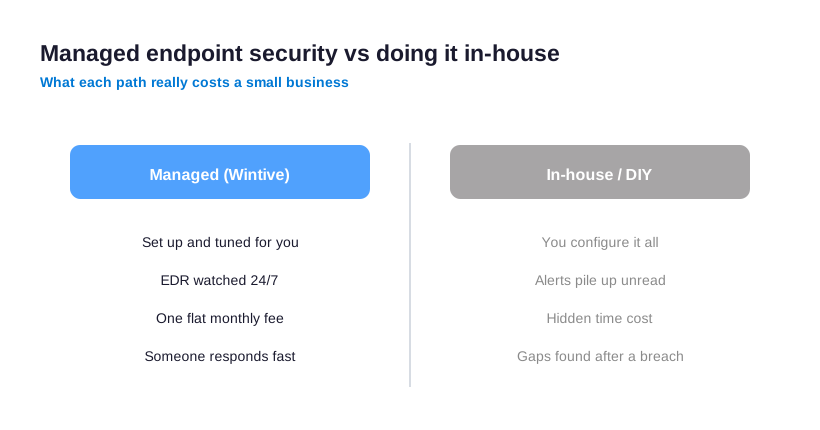
DIY looks cheaper until you count the hours and the missed alerts. Clearly someone has to configure policies, read every warning, and stay current as threats change. By contrast a managed service spreads that cost and never sleeps. The comparison below lays out the real trade-off.
For most small businesses the deciding factor is simply who has the time. In fact if there is no one in-house to own security as a daily job, managed is not just easier, it is safer. The tools are only as good as the attention behind them, and attention is the thing a busy small team rarely has to spare.
🧯 Where endpoint security for small business goes wrong
Most endpoint security failures are not exotic. Ultimately they come from a few predictable mistakes that leave an obvious gap. Knowing them is the quickest way to avoid them.
- Buying a tool, then leaving it half-configured and unwatched.
- Protecting laptops but ignoring the phones that hold the same data.
- Assuming the built-in antivirus is enough, with no EDR or monitoring.
- Letting ex-staff devices keep their access long after they leave.
- Choosing on price alone, then finding no one answers the alerts.
🤝 How Wintive delivers endpoint security for small business
Wintive sets up and runs endpoint security on the Microsoft 365 a small business already owns. Instead, we deploy Defender for Business across every device, enforce encryption and updates through Intune, and lock down USB and mobile access. Then we watch the alerts around the clock, so nothing sits unread.
💡 What we see across 60+ small business tenants: the gap is almost never the tool. Defender for Business is already paid for and genuinely capable. The gap is that no one finished the setup or watches the alerts. Fixing those two things beats buying anything new.
The result is one flat monthly fee per user, with no long contract and no setup fee. Meanwhile you get enterprise-grade protection on the licences you already pay for, plus a team that answers when something looks wrong. That is endpoint security a small business can actually keep up.
Most clients start with a quick audit of their current devices and Microsoft 365 setup. In practice from there we close the obvious gaps first, then move to full monitoring. It is a calm, staged rollout, not a rip-and-replace.
Throughout, the aim is protection a small team can live with day to day. Overall security that fights the way people work gets switched off within a week. So we tune the rules to stay quiet when things are normal and loud only when they are not, which is what keeps the protection switched on for good.
📚 More for US small businesses
Ready to put every device on autopilot and stop watching the alerts yourself?
Wintive runs your Microsoft 365 endpoints the way a small business needs it. Notably devices stay hardened and encrypted. Defender watches them around the clock, and threats get answered fast. The price is one flat monthly fee per user. No long contract. No surprise bills.
❓ Endpoint security for small business: frequently asked questions
If you run Microsoft 365 Business Premium it is already included through Defender for Business. A managed provider then adds monitoring for a flat monthly fee, often $20 to $60 per device. Standalone tools cost more and still need someone to watch them.
For most small firms yes. It includes next-gen antivirus, EDR, and automated investigation across Windows, Mac, and mobile. The missing piece is usually someone to finish the setup and watch the alerts, which is where a managed service comes in.
Antivirus only blocks known malware. Endpoint security is the full stack: antivirus, a firewall, device control, EDR, and monitoring on every device. Modern tools combine all of it into one agent.
Yes. The rules live on the device itself, so a laptop is protected on home Wi-Fi exactly as it is in the office. Intune and Defender manage that firewall and encryption from one console, wherever the device sits.
It should. Phones hold company email and files, so they are endpoints too. Intune secures both Android and iOS by creating a managed work area that can be wiped without touching personal data.