

Cloud security for small business is no longer a question of buying a firewall and locking a server room. For most US small businesses, the office files, the email, and the shared drives already live in the cloud, almost always in Microsoft 365. Therefore the real job is configuring and proving the controls that protect that cloud, not adding more hardware. This guide turns the broad idea of cloud security into the specific settings a small business owner can switch on. It also shows where each one lives in Microsoft 365.
Most of what matters here costs nothing extra, because the controls already ship with your subscription. Specifically, it is multi-factor sign-in, conditional access, encryption, backup, and a short list of habits that keep attackers out. The sections below move from the real threats to the practical checklist that closes the gaps. As a result, you can see exactly what to do first.
🛡 Not sure your cloud setup is actually secure?
Wintive checks your Microsoft 365 tenant against the controls that matter for a US small business. We find the gaps, rank them by real risk, and fix what counts first. Across 60+ M365 tenants, the same handful of gaps recur, so you get a hardened setup and the proof clients and insurers ask for.
📅 Book a Free 30-Min Call | 💬 Chat on WhatsApp | See Our Plans →
The rest of this guide follows the order a security audit would. First, why the cloud changes the rules. Then the threats, the controls one by one, and the checklist. Finally, what good cloud security costs against the price of a single breach.
🔒 Why cloud security for small business is different now
Short answer: Cloud security for a small business means protecting the data and identities in services like Microsoft 365, rather than a server in the office. The core controls are multi-factor sign-in, conditional access, encryption, monitored anti-malware, and a real backup. HIPAA-style hardware is not the point; configuration is. On Microsoft 365, a business plan already includes most of these controls. You only need to switch them on, enforce them, and document them.
The shift is simple but easy to miss. In practice, your data is no longer behind the office wall; it is in Microsoft 365, reached from laptops and phones anywhere. As a result, the old perimeter is gone, and the new perimeter is identity. Whoever can sign in can reach the data, so the lock that matters most is the one on the login.
This is also where the cloud helps you. Microsoft runs the physical security, the data-center hardware, and the platform patching, which a small business could never match on its own. However, that split is shared, not total. Microsoft secures the cloud itself. However, you own who gets in, how devices are trusted, and whether you back up your data. Cloud security for small business is mostly about holding up your half of that bargain.
🎯 The threats that actually hit small businesses
You are not too small to target. Notably, attackers prefer them, because they hold real money and data but rarely have a security team. Most attacks are automated and opportunistic, so being small is not cover; it is an opening.
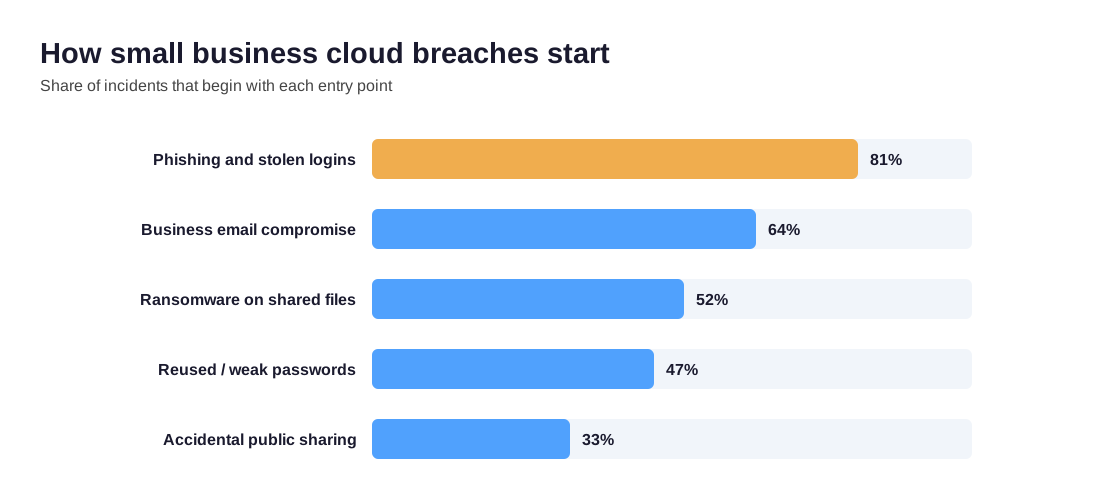
These threats are consistent. Specifically, the common ones are phishing emails that steal a login and business email compromise that redirects an invoice. In addition, ransomware encrypts shared files, and attackers reuse stolen passwords from an old breach. By contrast with the movies, almost none of this involves clever hacking. Instead, someone signs in with a password they should not have. Therefore identity sits at the center of cloud security for small business.
Critically, the damage is rarely just downtime. A breach can mean drained accounts, lost files, a privacy notification to customers, and a failed insurance claim. Therefore the goal is not perfection; it is removing the easy paths in, which is exactly what the controls below do.
☁️ Your cloud is already Microsoft 365
For most small businesses, cloud security is really Microsoft 365 security, because that is where the email, files, and accounts live. Understanding one idea makes the rest simple: the shared responsibility model. In short, security is split between Microsoft and you, and most breaches happen on the customer side of that line.
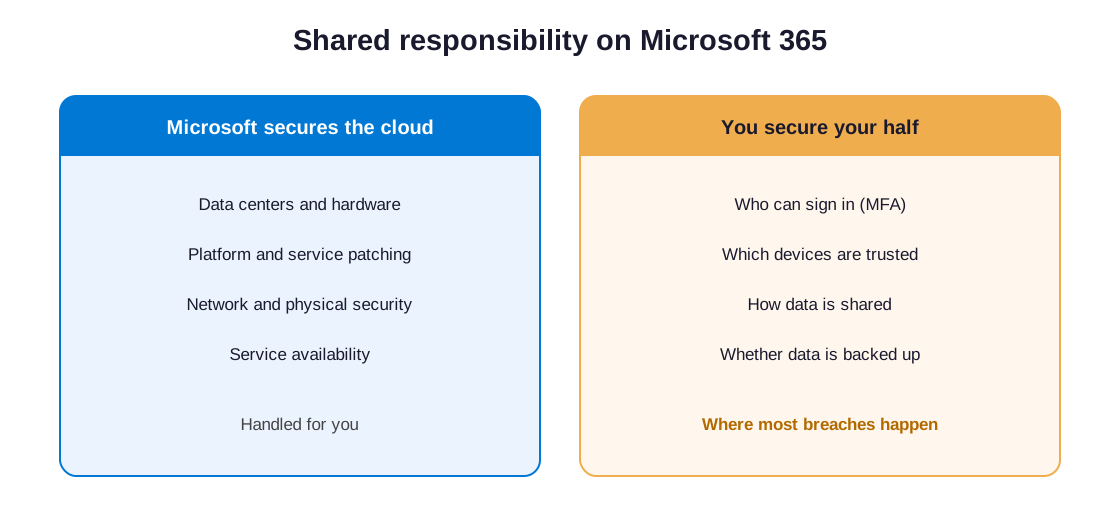
Microsoft secures the data centers, the servers, and the platform itself. As a result, you never patch a mail server or guard a building. However, you own the part attackers actually target. Specifically, you decide who can sign in and whether multi-factor is on. In addition, you control which devices you trust, how you share data, and whether you back anything up. Cloud security for small business is the discipline of getting your half right.
This is good news for a small budget. Notably, a business plan already includes the tools to do this well. The list runs from Entra ID for identity to Microsoft Defender for threats and Purview for audit logs. Therefore the work is configuration and habit, not a shopping spree.
🧱 Cloud security for small business: best practices
Translated into settings, cloud security best practices for a small business come down to a short, repeatable list. None of it is exotic, and most of it is free with the plan you already pay for. The difference between secure and exposed is whether you switch on each control and check it.
| Control | What it does for a small business | Where it lives on Microsoft 365 |
|---|---|---|
| Multi-factor sign-in | Stops a stolen password from being enough to get in | Microsoft Entra ID, enforced for everyone |
| Conditional access | Blocks risky logins and unmanaged devices | Entra ID Conditional Access policies |
| Encryption | Protects data in transit and on lost devices | TLS, BitLocker, and service encryption |
| Anti-malware and email filtering | Catches phishing and malware before staff click | Microsoft Defender for Office 365 |
| Audit logging | Shows who did what, for response and proof | Microsoft Purview audit log |
| Backup | Recovers files after ransomware or deletion | Third-party backup for Microsoft 365 |
By contrast with a long product wishlist, this list is the whole game for most small businesses. As a result, a business that enforces these six controls stays ahead of most of its peers. It also stays ahead of what most attackers bother to beat.
🔑 Identity first: MFA and conditional access
Start with multi-factor, then add conditional access
If you do only one thing, enforce multi-factor sign-in on every account. Specifically, that means a second step beyond the password, usually a prompt on a phone, so a stolen password alone is useless. Microsoft reports that multi-factor blocks the overwhelming majority of account-takeover attacks, and every business plan includes it.
Conditional access is the next layer, and it is where a small business starts to look like a hardened one. In practice, conditional access checks the sign-in before it lets anyone through. Specifically, it can require multi-factor, demand a healthy device, and block regions you never operate in. As a result, even a correct password from the wrong place or an unknown laptop gets stopped.
Notably, these two controls together close the single most common path into a small business. However, they only work when multi-factor is mandatory for everyone, owners included, with no quiet exceptions. Finally, give each person their own account, because shared logins make both security and audit logging meaningless.
📧 Email, the most common way in
Email is where most attacks begin, so it deserves its own attention inside any cloud security plan. Specifically, a single convincing phishing message can hand over a password, reroute a payment, or drop malware on a laptop. Therefore filtering and verification matter as much as the lock on the login.
Microsoft Defender for Office 365 screens inbound mail for malicious links and attachments before staff ever see them. In addition, three behind-the-scenes records, known as SPF, DKIM, and DMARC, stop criminals from forging your domain to scam your own customers and suppliers. As a result, the messages that reach the inbox are cleaner, and the ones that pretend to be you are far easier to block.
However, no filter catches everything, so the last layer is people. Notably, brief, regular training that teaches staff to pause on urgent payment requests removes most of the remaining risk. Finally, encrypted email for sensitive messages keeps client data private even if a message goes astray.
💾 The backup gap nobody warns you about
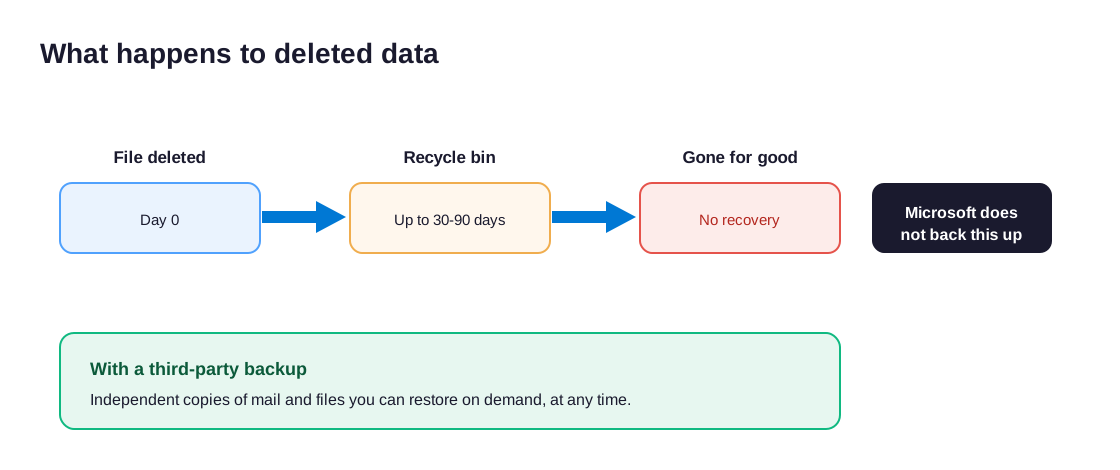
Here is the part that surprises most owners: Microsoft does not back up your data for you. Specifically, Microsoft keeps the service running and replicated, but under its shared responsibility model, protecting your actual files and email is your job. As a result, ransomware or an accidental deletion can outrun your safety net. Notably, the standard recycle bin and short retention window may not save you.
Why the recycle bin is not a backup
This catches small businesses out constantly. By contrast with an on-premises server that someone backed up to tape, a cloud tenant feels safe by default, and it is not. Critically, deleted items and mailboxes age out, often within thirty to ninety days, and after that the data is simply gone.
Therefore a proper third-party backup for Microsoft 365 is not optional for a serious business. In practice, it keeps independent copies of mail, files, and SharePoint that you can restore on demand, no matter what happened in the tenant. Finally, a backup only counts if you have tested a restore, so prove it works before you need it.
🛡️ Cloud security for small business: choosing a provider
At some point most owners ask whether to hire help, and the honest answer is that it depends on time, not size. Specifically, the controls above are not hard, but someone has to own them, keep them current, and watch the alerts. When nobody has time for that, a provider earns its fee.

The layers above work together, as the chart shows.
Across the 60+ M365 tenants Wintive manages, the pattern is the same: small businesses rarely lack tools, they lack the time to configure and watch them. The plan already includes multi-factor, conditional access, Defender, and audit logging. What is missing is someone who switches them on, enforces them, and reviews them every month.
When you compare cloud security providers for small business, look past the brand names. Specifically, ask whether they work in your actual platform, Microsoft 365, rather than selling a separate stack you do not need. In addition, ask how they prove the work: a real provider hands you a report, a prioritized fix list, and the evidence an insurer will accept.
By contrast, be wary of anyone pushing expensive appliances at a business whose entire operation runs in the cloud. Finally, the best engagements stay small and focused. Specifically, a one-time audit finds the gaps, then either you handle a fix list in-house or a plan keeps the controls honest.
📱 Phones, laptops, and the BYOD problem
Cloud data does not stay on office computers. In practice, staff read email and open files on personal phones, home laptops, and tablets, so every one of those devices is now a door into your cloud. Therefore device security is a core part of cloud security for small business, not a separate topic.

Start with the basics on every device that touches company data. Specifically, require a screen lock, keep the operating system updated, and turn on disk encryption so a lost phone or laptop cannot leak your files. In addition, Microsoft Defender extends to Windows, Mac, Android, and iOS, so the same protection that guards email can watch the devices too.
Personal devices need a clear rule, because most small teams use them. By contrast with a managed company laptop, a personal phone mixes work and life, so you cannot wipe the whole thing. However, Microsoft Intune can enforce a passcode, separate the work data, and remove only the company part when someone leaves. As a result, you protect the business without taking over an employee’s phone. The US Cybersecurity and Infrastructure Security Agency offers practical steps to secure devices and accounts. Notably, the short list is the same: update, encrypt, and lock every device.
🔐 Controlling access and stopping unauthorized sign-ins
Access control sits at the core of cloud security for small business. It keeps people away from data they should not reach. Most breaches, after all, are just sign-ins that should never have happened. Therefore access deserves real attention. In practice, two ideas do most of the work, and Microsoft 365 builds in both.
The first idea is least privilege, a cornerstone of cloud security for small business. Specifically, each person gets only the access their job needs. As a result, one stolen account cannot reach everything. In addition, you remove access the day someone changes role or leaves.
This is identity and access management in plain terms. Specifically, you grant, review, and remove access on a schedule. However, most small teams never review it, so old permissions pile up. By contrast, a quick quarterly check takes an hour. Therefore a short review closes the gaps that attackers count on.
Least privilege and regular access reviews
These controls work in layers, and the layers matter as much as any single setting. Specifically, identity sits on the outside, access checks come next, and device and email defense guard the core. As a result, an attacker has to defeat several layers in turn, not just one.
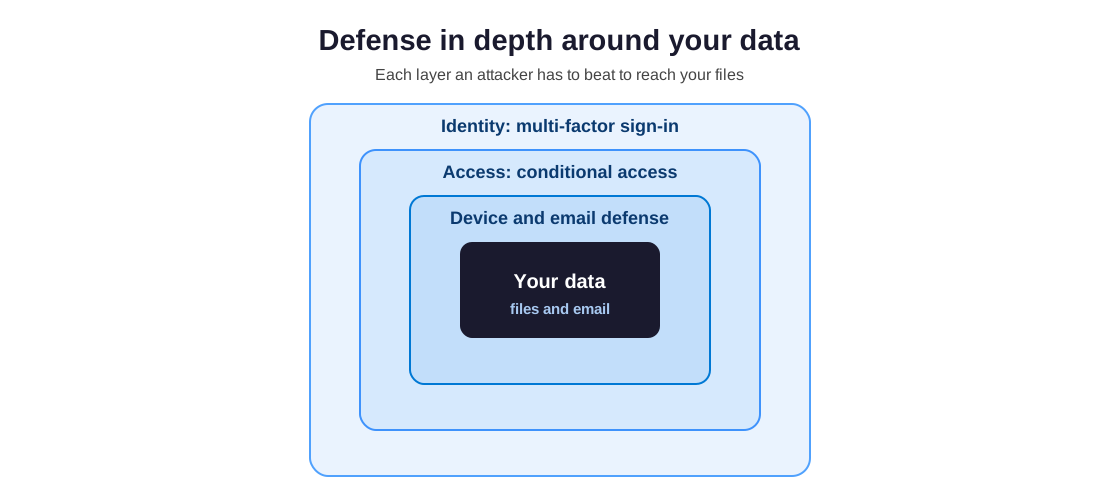
The second idea replaces the old office firewall. By contrast with a box on the wall, your defense now lives in the cloud. Specifically, conditional access blocks unauthorized sign-ins by location, device, and risk. As a result, it guards data reached from anywhere.
Done together, these controls turn cloud security for small business from hope into proof. Notably, you can show exactly who reaches what. Finally, write the policy down, so the next person inherits a rule, not a guess.
📋 The cloud security for small business checklist
Pulling it together, here is a cloud security checklist for small business you can work through and hand to an auditor or insurer. Each item is something to switch on, and then to document.
- Enforce multi-factor sign-in on every account, owners included, with no exceptions.
- Turn on conditional access to block risky logins and unmanaged devices.
- Give every person a unique account and remove ex-staff the day they leave.
- Switch on Microsoft Defender email filtering and set up SPF, DKIM, and DMARC.
- Confirm encryption on devices with BitLocker and keep it on.
- Add a third-party Microsoft 365 backup and test a restore.
- Turn on the audit log and review sign-ins on a schedule.
- Limit external sharing so files are not public by default.
- Train staff to spot phishing and urgent payment scams.
- Write down what you did, so you can prove it to insurers and clients.
Worked through in order, the checklist doubles as your evidence file. Specifically, each ticked item should point to a setting an auditor can see or a record they can read. After all, in a review, what you cannot show counts as not done.
⚠️ Cloud security for small business: common challenges
Knowing the usual obstacles helps you plan around them. Notably, small businesses tend to hit the same few cloud security challenges, and none of them require a big team to solve.
The first challenge is visibility. Specifically, owners rarely know who can reach what, because access piles up as people join, change roles, and leave. The second challenge is time, since no one owns the security tasks day to day. By contrast, the third is a mindset gap: many teams assume the cloud provider handles everything, which leaves their own half unguarded.
Therefore the fix is structure, not spend. In practice, a short monthly review of accounts, sign-ins, and sharing settles most of it, and a single owner for that review settles the rest. As a result, the challenges shrink from vague worries into a routine that takes an hour.
💸 What cloud security for small business costs
The reassuring part is that the controls for cloud security for small business are cheap, and most are already paid for. Specifically, multi-factor, conditional access, encryption, and audit logging come with a standard business plan. Therefore the real cost is the time to configure them and the discipline to review them.
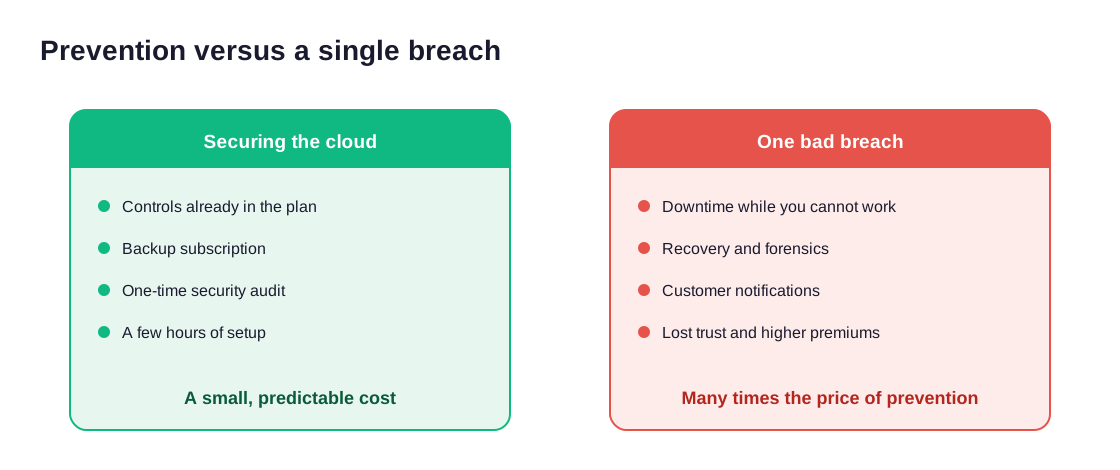
A breach is the expensive option. Notably, the bill is rarely just the ransom; it is downtime while you cannot work, recovery and forensics, customer notifications, lost trust, and higher insurance premiums afterward. By contrast, a backup subscription and a security review cost a tiny fraction of one bad week.
Therefore the spending that makes sense is small and targeted. In practice, businesses meet it in one of three ways. They handle it in-house when someone owns it, buy a one-time audit that checks the setup and returns a fix list, or fold it into a managed plan that configures, watches, and proves the controls over time. As a result, the right choice depends less on the size of the business than on who has time to keep the controls honest between reviews.
🚩 Where small businesses get cloud security wrong
The mistakes that lead to a breach are remarkably consistent, and almost all of them are configuration or habit rather than missing tools. Critically, knowing the common ones is half the defense.
The recurring gaps are easy to name, and most teams recognize themselves in at least one. In addition, many owners assume Microsoft handles all of it, which is the single most expensive misunderstanding in cloud security for small business.
- Multi-factor left off for some accounts, usually the busy owner.
- Shared logins that hide who actually did what.
- No backup, because the cloud simply felt safe.
- Ex-staff accounts left active long after they leave.
- Files shared publicly by accident, with no review.
- Sign-in logs that no one ever opens.
Notably, none of these needs a big budget to fix. As a result, the reason they persist is not cost; it is that nobody is accountable for checking them, which is exactly what a scheduled review or an outside audit is for.
💰 What a Microsoft 365 security audit covers
When a small business wants certainty on cloud security for small business rather than guesswork, a focused Microsoft 365 security audit is the fastest way to get it. Specifically, it checks your real configuration against the controls that matter and tells you exactly what to fix first.
In practice, an audit reviews identity and multi-factor, conditional access, email and malware protection, device encryption, external sharing, audit logging, and your backup. As a result, you get a written report, a plan ranked by real risk, and the evidence an insurer or client will accept. Therefore, instead of hoping your cloud is secure, you can show that it is.
📚 More for US small businesses
🔒 See exactly where your cloud is exposed
It is a full Microsoft 365 security audit for a US small business. Specifically, it reviews your identity, email, device, and data controls, finds every gap, and ranks the fixes by real risk. As a result, you get a written report with a clear action plan and the evidence to show insurers and clients, at a flat, predictable cost of $1,500.
❓ Cloud security for small business: frequently asked questions
Yes, when you configure it correctly. The provider secures the data centers and platform, which you could never match alone. However, you still control who signs in, which devices you trust, and whether you back up data. Most breaches happen on that customer side.
Multi-factor sign-in, by a wide margin. It adds a second step beyond the password, so a stolen password alone cannot get an attacker in. Every Microsoft 365 business plan includes it, and it blocks most account-takeover attacks.
No. Microsoft keeps the service running and replicated, but protecting your files and email is your job under shared responsibility. Deleted items age out, often within thirty to ninety days. A serious business needs a separate third-party backup and tests a restore.
Less than most owners expect, because the core controls already ship with a business plan. The real cost is the time to configure and review them. An audit or a backup subscription costs a fraction of a single breach.
It depends on time, not size. The controls are not hard, but someone has to own and watch them. If you have the time, do it in-house. If not, a provider that works in Microsoft 365 is worth the fee.