

HIPAA network security is the set of controls that protect patient data on the systems a practice uses every day. Specifically, that means data both in motion and at rest. For most practices, that network is no longer a server humming in a back office. Instead, it is Microsoft 365 in the cloud, the internet line in the waiting room, and the laptops staff carry between the clinic and home. Specifically, this guide turns the HIPAA Security Rule into the network controls an auditor expects. In addition, it shows where each one lives inside a Microsoft 365 tenant.
Notably, most of what the rule asks for here is not exotic hardware. It is access control, encryption in transit, audit logging, and a written policy that matches what you actually do. Therefore the sections below move from the regulation to the practical settings. In short, they cover firewalls, wireless, remote access, and segmentation, so you can see what to switch on and what to document.
Not sure your network would pass a HIPAA audit? Wintive checks your Microsoft 365 setup against the HIPAA Security Rule and tells you exactly what to fix, at a flat fee.
- We check access control, encryption, audit logging, remote access, and your signed BAA against the rules.
- You get one report and a prioritized plan to close the gaps.
📅 Book a Free 30-Min Call | 💬 Chat on WhatsApp | See Our Plans →
The rest of this guide follows the order an auditor thinks in. First, what the rule actually requires. Then the individual controls, one at a time. Finally, how those controls map onto Microsoft 365 and what it costs to have the work checked and proven.
🔍 Does HIPAA require network security?
Short answer: Yes. The HIPAA Security Rule requires technical safeguards that protect electronic patient data on your network, including access control, audit controls, integrity, and transmission security. In practice, HIPAA never names products, so a firewall, encrypted Wi-Fi, and secure remote access are how practices meet those requirements. On Microsoft 365, most of this is delivered through Entra ID Conditional Access, multi-factor sign-in, TLS encryption, and Microsoft Purview audit logging.
Yes. In practice, every covered practice has to address HIPAA network security. However, the trigger is simple: the Security Rule applies the moment you create, store, or transmit electronic patient data. The rule does not care whether that data sits on a local server or in Microsoft 365. It follows the data, not the building.

The Security Rule is deliberately technology-neutral. It states the outcome it wants, namely the confidentiality, integrity, and availability of patient data, and leaves the method to you. As a result, two practices can both be compliant with very different equipment. By contrast, that flexibility is also why an auditor asks to see your reasoning and your records. Notably, the boxes on your wall are not the point.
🛡️ What the HIPAA Security Rule requires on your network
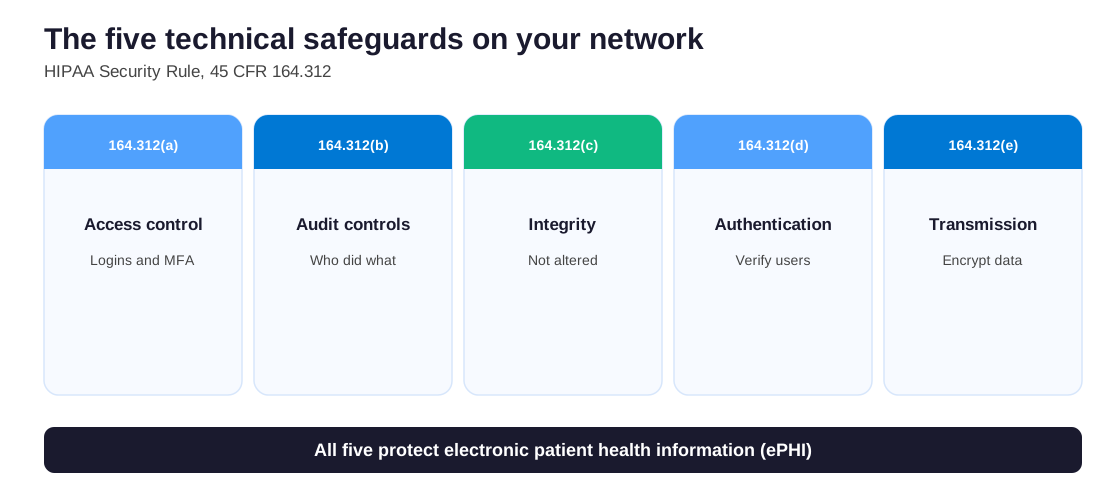
The network controls all trace back to one place: the technical safeguards of the HIPAA Security Rule, at 45 CFR 164.312. Specifically, five standards matter for a network, and each maps to a setting you can check.
Access control (164.312(a)) means only the right people reach patient data, through unique logins and a second sign-in step. Audit controls (164.312(b)) require you to record who did what. Integrity (164.312(c)) keeps data from being altered or destroyed. Authentication (164.312(d)) confirms a user is who they claim to be. Finally, transmission security (164.312(e)) protects data while it travels, which in plain terms means encryption.
Critically, some standards are marked required and others addressable. Addressable does not mean optional. Therefore, you either implement the safeguard or document a reasoned alternative that meets the same goal. However, an auditor treats an undocumented gap as a finding, so the safe path is to implement and record.
Across the 60+ M365 tenants Wintive manages, the network failures are almost never missing hardware. Instead, they are controls the plan already includes but nobody switched on: multi-factor sign-in left off, audit logging never enabled, guest sharing wide open. The fix is setup, not capital spend.
🏛️ Recognized standards and frameworks
HIPAA states what to achieve but not how, so practices lean on recognized security frameworks to fill in the detail. Two are worth knowing. Specifically, the NIST Cybersecurity Framework gives a plain structure for identifying, protecting, detecting, responding, and recovering. The HHS 405(d) program publishes the Health Industry Cybersecurity Practices, written specifically for healthcare practices of every size.
Notably, there is a concrete reason to follow one. There is also a legal benefit. Under a 2021 update to the HITECH Act, a practice that can show recognized security practices for the prior twelve months gets credit for them. As a result, regulators must take that into account, which can reduce penalties and shorten an investigation. In other words, mapping your HIPAA network security controls to a known framework is not box-ticking. Instead, it is leverage if anything ever goes wrong.
For the source text itself, the HHS Security Rule guidance lays out the safeguards in full. The NIST framework then turns them into practical controls a small practice can run.
📋 HIPAA network security requirements, control by control
Translated into settings, the HIPAA network security requirements come down to a short, practical list. However, none of it is unusual for a well-run small business. By contrast, the difference is that a practice has to prove each item, not just own it.
| Requirement | What it means in practice | Where it lives on Microsoft 365 |
|---|---|---|
| Access control | Unique logins and a mandatory second sign-in step | Entra ID multi-factor and Conditional Access |
| Transmission security | Encryption for data in transit and at rest | TLS, BitLocker, and service encryption |
| Audit controls | A record of who accessed what, kept and reviewable | Microsoft Purview audit log |
| Malware defense | Endpoint and email protection that is monitored | Microsoft Defender |
| Remote access | Verified device and identity before data is reached | Conditional Access and device compliance |
By contrast with a generic office, the bar is not having a firewall. It is having a firewall that denies by default, logs its traffic, and gets reviewed. That shift, from owning a control to operating and evidencing it, is what most network security findings come back to.
🔥 Does HIPAA require a firewall?
HIPAA never names a firewall. Notably, though, a firewall is the standard way to satisfy access control and integrity at the network edge. As a result, in practice every compliant practice runs one. However, the real question an auditor asks is how it is configured.
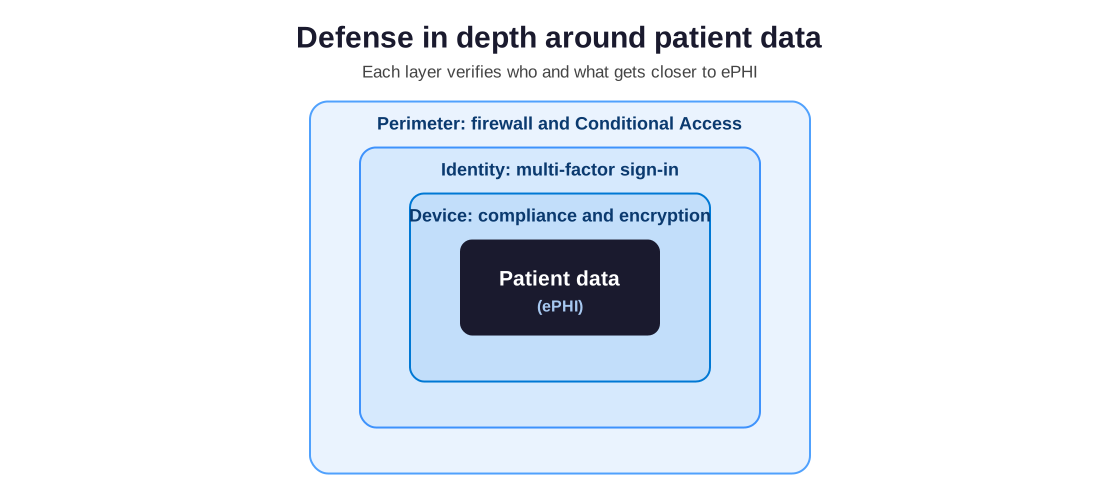
A defensible firewall denies inbound traffic by default. It allows only the connections the practice needs. The firewall logs what it blocks and permits, and runs current firmware. For a practice whose systems live in Microsoft 365, the boundary has moved. Therefore, the cloud provider runs its own network protection. Instead, your effective firewall becomes Entra Conditional Access and Microsoft Defender, deciding which devices and locations may reach the data. Either way the principle is identical: default-deny, allow by exception, and keep the records.
📶 Securing a HIPAA wireless network
A practice wireless network carries patient data the moment a clinician opens a chart on a tablet, so it sits squarely inside HIPAA network security. Critically, the requirement is not a specific brand of access point. It is encryption, sign-in, and separation.
Specifically, the staff network should use WPA2 or WPA3 with enterprise sign-in. As a result, each person signs in with their own credentials rather than a shared password taped to the wall. By contrast, the guest and waiting-room network must be a separate network entirely, with no route to clinical systems. Patients and reps get internet, and nothing more.
A few myths waste a practice’s time here. Hiding the network name is not security, and filtering by device address is trivially bypassed. By contrast, strong encryption and per-user sign-in do the real work. Finally, treat printers, cameras, and connected medical devices as their own group, because a forgotten device on the clinical Wi-Fi is a common, quiet gap.
🔐 HIPAA network security: encryption and transmission
Within HIPAA network security, transmission security covers data on the move. Therefore, it answers a question practices ask constantly: what does HIPAA require for the internet? Specifically, the short version is encryption, end to end.
In practice, that means TLS for anything traveling over the internet. It also means encrypted email for patient information, and encryption at rest on every device and server. Microsoft 365 handles most of this by default. Connections use TLS, mailboxes and files are encrypted at rest, and BitLocker protects Windows devices.
Encryption is technically an addressable safeguard rather than a strictly required one. However, declining to encrypt patient data is almost impossible to justify to an auditor today, so for every practical purpose it is mandatory. Critically, the gap is rarely the encryption itself. It is unencrypted email leaving the practice, or a personal device with no disk encryption holding downloaded records. As a result, closing those two paths resolves most transmission findings.
🌐 HIPAA-compliant remote access
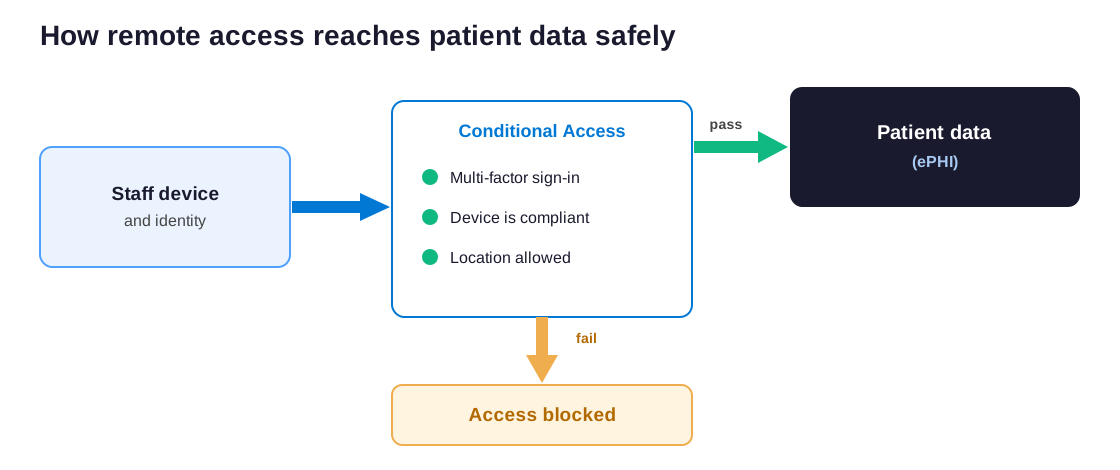
Remote access used to mean a VPN tunnel back to the office. For a practice running on Microsoft 365, that model has changed. Staff reach data directly in the cloud from wherever they are, so the control moves from the tunnel to the identity and the device.
The modern, defensible approach is conditional access. Before anyone reaches patient data, the system checks who they are with multi-factor sign-in. Furthermore, it confirms the device is known and healthy, and can block risky locations outright. As a result, a stolen password alone gets nobody in. Critically, the second factor and the device check still stand in the way.
A few rules keep remote access compliant. Sessions should time out, so an unattended laptop in a coffee shop does not stay signed in. Personal devices that touch patient data need disk encryption and a screen lock at minimum. Finally, downloading records onto an unmanaged home computer should be blocked rather than trusted. After all, data that leaves your controls is data you can no longer protect.
Across our audits, remote work is where good intentions and real controls drift apart. A practice tells us every laptop is encrypted and locked. By contrast, the sign-in log shows logins from personal devices with no compliance check at all. A single conditional access policy is what closes that gap for good.
When a VPN still makes sense
Conditional access covers most practices, but a VPN has not disappeared. Specifically, some systems still live in the office: an on-premises server, a legacy practice-management system, or imaging hardware. In that case, remote staff need a secure tunnel to reach them. In that case, the VPN should require multi-factor sign-in and log its connections. It must also avoid split tunneling. That flaw lets office traffic and the open internet share one session.
By contrast, a practice whose systems live entirely in Microsoft 365 gains little from a VPN. Here, conditional access already verifies the user and the device, so the tunnel mostly adds friction. Finally, the honest answer is that the two are not rivals. Many practices run both: a VPN for the few on-premises systems, and conditional access for everything in the cloud. The test is simple. Wherever patient data lives, something has to verify the person and the device before they reach it.
🧩 Network segmentation for a practice
As a pillar of HIPAA network security, segmentation keeps apart the parts of your network that do not need to talk. Therefore, a problem in one place cannot spread to patient data. However, a flat network is the setup auditors most dislike. In practice, that is one space shared by the guest Wi-Fi, the reception PC, and the clinical system.
In practice, segmentation splits the network into zones. Specifically, those zones are clinical systems, staff devices, guests, and connected equipment such as cameras. By contrast, each zone gets only the access it genuinely needs. Therefore, if a guest laptop or an aging camera is compromised, it has no path to patient records.
For an office with its own hardware, this is done with VLANs and firewall rules. For a Microsoft 365 practice, the equivalent is conditional access and device compliance, which segment by identity and device health rather than by cable. The goal is the same either way: patient data sits behind its own door, and only verified people and devices hold the key.
🔗 HIPAA network security on Microsoft 365
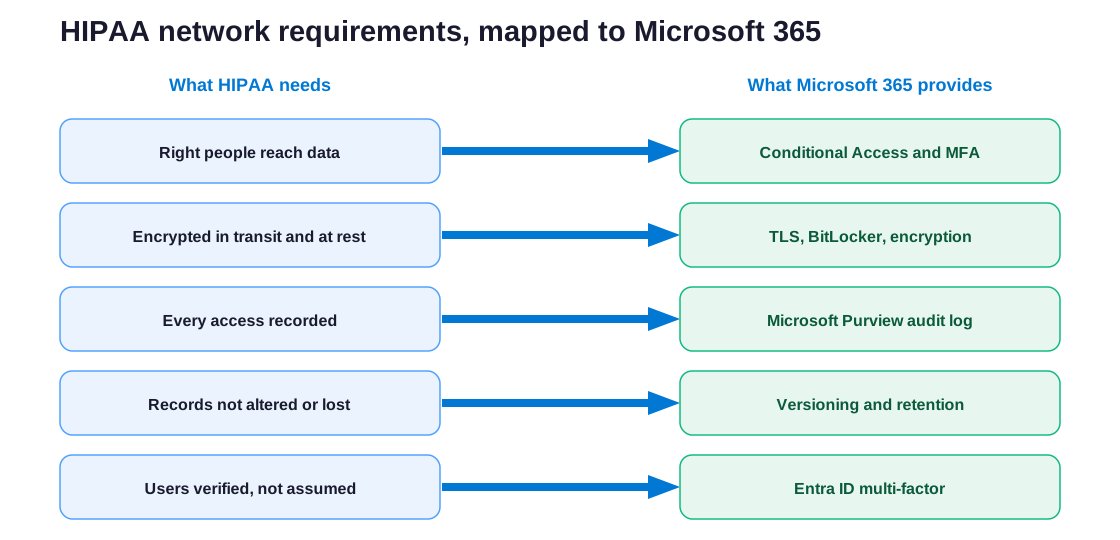
For a small practice, one fact about HIPAA network security matters most. Specifically, if you run Microsoft 365, you already own almost every control the rule asks for. Critically, the work is turning them on and proving it, not buying new tools.
Map the requirements onto the platform and the picture is clear. Each network safeguard lines up with a setting that is already part of a business or enterprise plan.
What that still leaves you to do
Owning the controls is not the same as meeting them. Specifically, Conditional Access policies have to be written, multi-factor sign-in enforced for everyone, audit logging switched on and retained, and Defender configured and watched. Notably, you also need a signed Business Associate Agreement with Microsoft. It comes with business and enterprise plans, but it only takes effect once you accept it in the admin center.
Once those are in place, your Microsoft 365 tenant meets the network security requirements, and the audit log can prove it. As a result, the same platform that runs the practice also becomes the evidence file an auditor asks to see.
✅ A HIPAA network security checklist
Pulling the requirements together, here is the HIPAA network security checklist a practice can work through and hand to an auditor. Each item is something to switch on, and then to document.
| Network safeguard | HIPAA Security Rule | Microsoft 365 control |
|---|---|---|
| Only the right people reach data | Access control, 164.312(a) | Entra ID multi-factor and Conditional Access |
| Data is encrypted in transit and at rest | Transmission security, 164.312(e) | TLS, BitLocker, and service encryption |
| Every access is recorded | Audit controls, 164.312(b) | Microsoft Purview audit log |
| Records are not altered or lost | Integrity, 164.312(c) | Versioning, retention, and recycle bin |
| Users are verified, not assumed | Authentication, 164.312(d) | Entra ID multi-factor sign-in |
- Enforce multi-factor sign-in on every account, with no exceptions for owners or admins.
- Write Conditional Access policies that check device health and block risky locations.
- Confirm encryption in transit and at rest, and stop unencrypted email leaving the practice.
- Turn on the audit log, set a retention period, and review it on a schedule.
- Separate the guest and waiting-room Wi-Fi from clinical systems entirely.
- Segment connected devices, cameras, and printers away from patient data.
- Keep firewall and router firmware current, with default-deny rules and logging.
- Sign the Business Associate Agreement with Microsoft and any IT vendor.
- Run a written risk analysis, and refresh it at least once a year.
Worked through in order, the list doubles as the evidence file. Specifically, each ticked item should point to a setting an auditor can see or a document they can read. After all, in a HIPAA review, what you cannot show counts as not done.
📝 Your HIPAA network security policy
A HIPAA network security policy is the written record of how your practice protects patient data. Moreover, it is a requirement in its own right, not paperwork for its own sake. Auditors ask for it because controls without documentation are impossible to verify.

A useful policy is short and specific. Specifically, it names who is responsible and lists the controls you rely on, from multi-factor sign-in to encryption and audit logging. Furthermore, it states how often you review them. Critically, it has to describe what the practice actually does. A downloaded template that promises controls you never configured is worse than no policy, because it documents a gap.
In practice, the policy and the setup should be written together and reviewed together. By contrast, a policy that lives in a drawer while the tenant drifts is a finding waiting to happen. When you change a major system or add a vendor, update the policy in the same breath. That way, the document an auditor reads and the tenant an auditor inspects tell the same story.
🚩 The network gaps that fail an audit most often
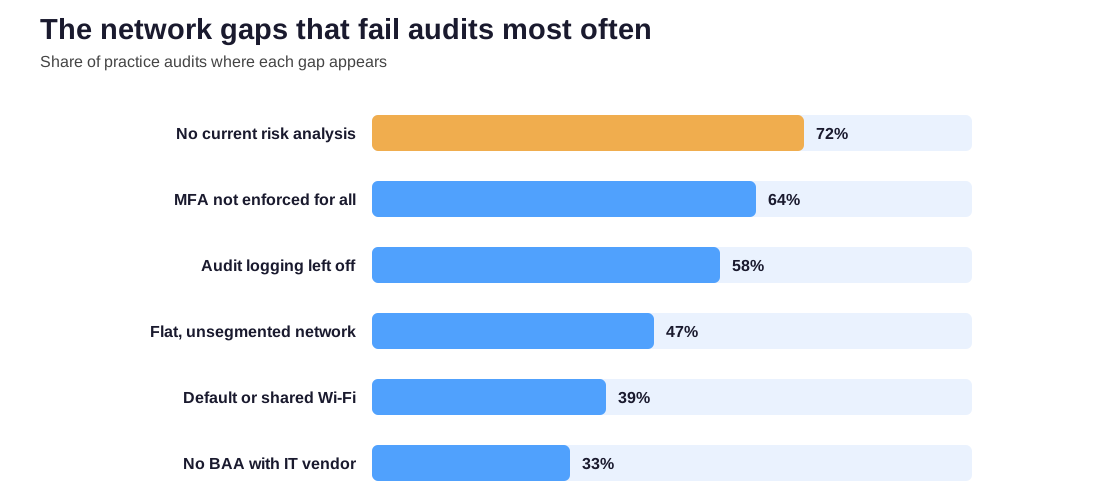
The HIPAA network security gaps that fail audits are remarkably consistent, and almost all of them are setup or paperwork rather than missing equipment.
The recurring findings are easy to list. Specifically, they run a flat network with no segmentation. They leave multi-factor sign-in off and rely on default or shared Wi-Fi passwords. They never turn on audit logging, skip firmware updates, and lack a Business Associate Agreement with the IT vendor. Notably, the most cited finding is the absence of a current risk analysis. Critically, that written assessment ties every other control together.
Notably, none of these needs a large budget to fix. A risk analysis takes an afternoon. Turning on multi-factor sign-in and audit logging takes minutes. The reason they persist is not cost. It is that nobody is accountable for checking them, which is exactly what a scheduled review or an outside audit is for.
💰 What HIPAA network security costs
Because most of the controls already ship with Microsoft 365, the cost of HIPAA network security is rarely the tools. It is the time to configure them correctly, the discipline to review them, and the work to document what you did.
In-house, one-time audit, or managed
Practices generally meet that in one of three ways. Some handle it in-house, which works when one person owns it and stays current. Others buy a one-time audit that checks the setup against the Security Rule and hands back a prioritized fix list. Finally, some fold it into a managed plan, where the controls are configured, monitored, and evidenced on an ongoing basis. However, the right choice depends less on the size of the practice. As a result, what matters is who has time to keep the controls honest between audits.
Whichever route a practice chooses, the goal is the same. You want a network where every HIPAA control is on, documented, and provable when someone asks. By contrast, the practices that sleep well at night are rarely the ones with the most expensive firewall. Instead, they are the ones who can open the Microsoft 365 admin center. They can show the Conditional Access policy. They can also point to the audit log that backs it up. That combination, the control plus the evidence, turns a defensible setup into one that passes review. Ultimately, that is exactly what a focused audit is built to confirm.
📚 More for US medical practices
The four guides below go deeper on the parts of this page that most often need a walkthrough. Specifically, they cover four areas. First, the full HIPAA picture for a practice. Next, the audit checklist. Then locking patient email. Finally, video visits and staff chat.
Related Wintive guides for US medical practices
🔍 Want your network checked against the rule, with proof at the end?
The M365 Master Audit delivers a written report. Specifically, it maps your Microsoft 365 setup against the HIPAA Security Rule and confirms each network control is in place. That means access control, multi-factor sign-in, encryption in transit, audit logging, conditional access for remote work, and your signed BAA. You also get a prioritized plan to close every gap, at a flat, predictable cost of $1,500, with no hidden add-ons.
❓ Frequently Asked Questions
HIPAA groups its safeguards into three types: administrative, physical, and technical. Administrative safeguards are policies and training, physical safeguards protect facilities and devices, and technical safeguards cover your network, including access control, audit logging, and encryption. HIPAA network security findings almost always sit in the technical group.
The Security Rule does not single out the internet, but its transmission security standard covers any patient data that travels over it. In practice that means encryption: TLS for web and email connections, and encrypted messages whenever they carry patient information. Microsoft 365 applies TLS to its connections by default.
HIPAA never names a firewall, so technically it is an addressable safeguard rather than a strict requirement. In practice, a firewall is the standard way to meet access control and integrity at the network edge, and every compliant practice runs one. What matters to an auditor is that it denies by default, logs traffic, and stays patched.
A compliant wireless network uses WPA2 or WPA3 with enterprise sign-in, so each user signs in one by one. It keeps the guest and waiting-room network fully separate from clinical systems. Connected devices sit in their own group, too. Hiding the network name or filtering by device address does not count as security.
No. Microsoft 365 gives you the network controls and will sign a Business Associate Agreement, but compliance depends on configuring those controls and documenting them. The platform supplies multi-factor sign-in, Conditional Access, encryption, and audit logging, and switching them on and proving it is your responsibility.