

For a medical practice, the most dangerous tool in the building is the one everyone uses all day: email. A message to the wrong address, a stolen password, or a record in clear text can turn a quiet Tuesday into a reportable breach. However, a HIPAA compliant email setup keeps your practice protected and audit-ready.
This guide is written for the people who carry the risk: the practice owner, the office manager, and the physician who signs the checks. In plain terms, it answers the questions that actually matter. Is your current email already compliant, or only assumed to be? What does one slip really cost? And should you handle this yourself or hand it to a team that does it every day?
🩺 Want your practice email HIPAA-ready without hiring a tech team?
- One message to the wrong recipient can expose patient data.
- An unencrypted email can be read in transit, outside the practice.
Wintive configures and runs Microsoft 365 email for small US healthcare practices end to end, at a flat monthly rate with no long contract and no setup fee.
📅 Book a Free 30-Min Call | 💬 Chat on WhatsApp | See Our Plans →
This is the same walkthrough Wintive gives practice owners before taking over their Microsoft 365, explained in plain business terms. Notably, a well-run office handles email risk quietly in the background every day, instead of discovering a problem during an audit.
🎯 The Three Risks Every Medical Practice Faces in 2026
In short, a medical practice carries three email risks at once. First, a leak from a wrong recipient or stolen password. Then comes downtime from a phished account or ransomware. Finally, there are HIPAA penalties for undocumented protection. Critically, one HIPAA compliant email setup closes all three.
Where a HIPAA compliant email setup actually starts
When an owner looks at where the real exposure sits, it almost always traces back to the inbox. Therefore, the starting point is not a new product; it is turning on the protections your existing email already supports. Specifically, that means three things. First, a second lock on every login. Then encryption for messages that leave the practice. Finally, a rule that notices when a record is about to be sent out. In practice, most breaches happen because those three were simply never switched on.
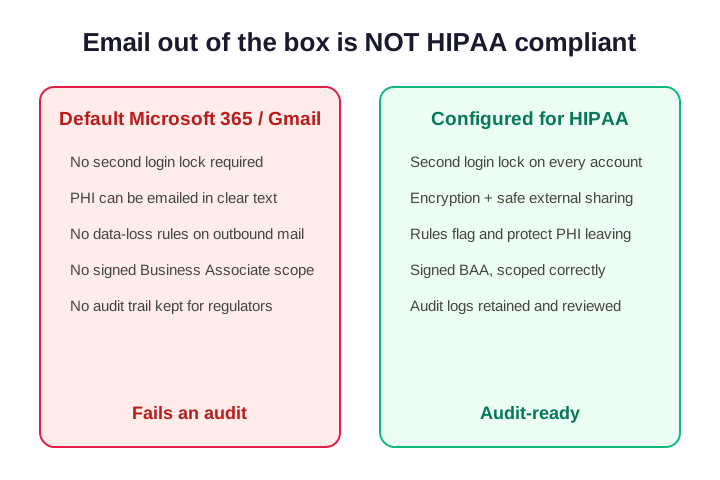
Notice the gap between the two columns. Furthermore, every item on the left is a default that quietly fails an audit. By contrast, every item on the right is something a managed setup turns on and documents for you. That gap, not the software you bought, is what regulators actually find when they look.
What one wrong-recipient mistake really costs
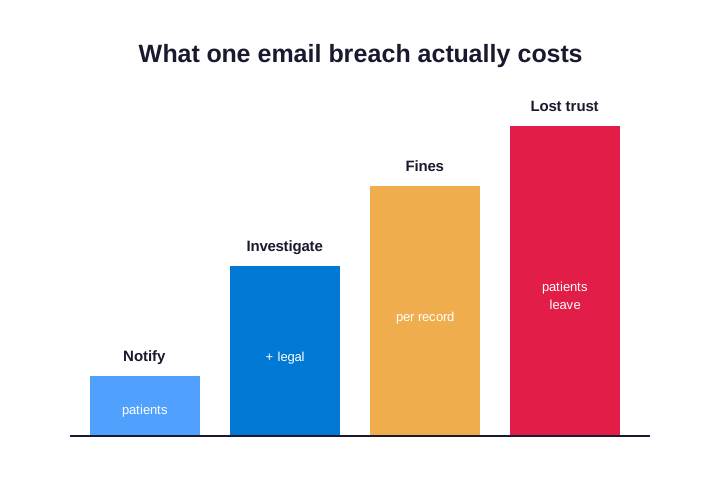
Here is the part owners underestimate. Specifically, the cost of a breach almost never comes from the leak itself. Instead, it stacks up from four directions. First, notifying every affected patient. Then paying specialists during the crisis, plus fines assessed per record exposed. Finally, the quiet loss of patients who never come back. Added together, one misdirected message can cost a small practice more than a full year of running things properly. Moreover, the law does not care that it was an honest typo.
🛡️ Why Inboxes Are the Number One Way Patient Data Leaks
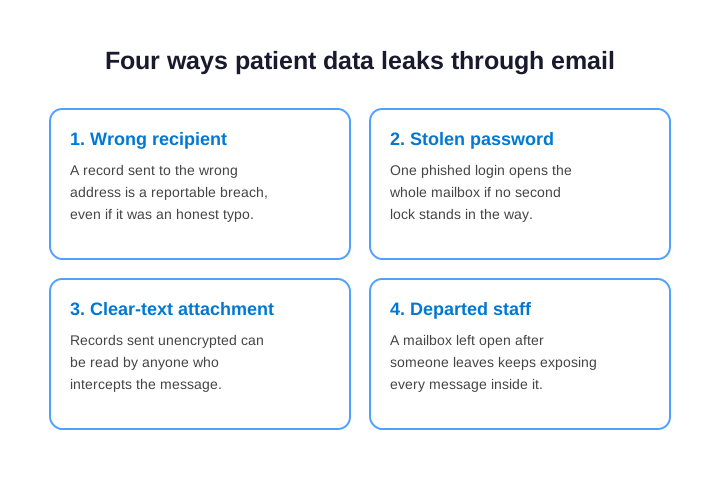
Each of these four paths looks harmless on an ordinary day. However, they share one root cause: nobody is actively watching the email. As a result, a wrong address, a reused password, an unencrypted attachment, or a forgotten mailbox quietly becomes the open door an attacker or an auditor eventually finds first.
Why a busy practice is the easy target
Many owners assume a small office is too minor to target. In reality, the opposite is true. Attackers know that hospitals run security teams while small practices rarely do, so the small practice is the softer door. Furthermore, most attacks are automated and pick targets by weakness, not by size. Therefore, a practice with nobody truly managing its email is, to an attacker, an open invitation that takes almost no effort to walk through.
💡 What we see across the 60+ tenants we manage: the breach almost never starts with a brilliant hacker. Instead, it starts with one tired staff member clicking one convincing email at the end of a long day. From there, the attacker moves quietly through a mailbox that nobody locked down, because nobody was watching. Specifically, the practices that stay safe are not the ones with the fanciest tools. They are the ones where someone is responsible for the email every single day. That responsibility is exactly what Wintive provides.
In other words, the gap is rarely the technology. Instead, it is ownership. Therefore, the practices that sleep at night are simply the ones that handed the daily watching of their email to a team whose entire job is to do exactly that, every working day.
HIPAA compliant email for therapists and small practices
Solo therapists carry the same legal duty as a hospital, with none of the IT staff. Specifically, HIPAA compliant email for therapists has to protect session notes, intake forms and billing details sent every day. However, most counseling practices still run on a free inbox that was never built for patient data. As a result, a single forwarded note can become a reportable breach. In practice, the fix is the same Microsoft 365 setup a large clinic uses, sized for one or two people.
📋 Does Microsoft 365 Give You HIPAA Compliant Email by Default?
This is where a dangerous assumption creeps in. Specifically, Microsoft 365 and Google Workspace can both be run in a compliant way, but neither is compliant the moment you buy it. Out of the box, the second login lock is optional, outbound encryption is off, and nothing stops a record from leaving in plain text. Therefore, paying for a major platform is not the same as being protected. The platform gives you the capability; someone still has to switch it on and prove it.
What a HIPAA compliant email service must do
Strip away the marketing and the requirement is simple. Specifically, a HIPAA compliant email service has to control who can open each mailbox, protect the messages that carry patient data, and keep a provable record that both are in place. Furthermore, it has to stay that way as staff join and leave. In practice, the gap is almost never the platform itself; it is the configuration and the upkeep around it.
| What HIPAA expects of your email | What that looks like, handled for you |
|---|---|
| Only the right people open each mailbox | Access tied to role, reviewed, and removed at exit |
| Patient data stays protected when it leaves | Encryption applied automatically to outbound mail |
| A stolen password is never enough on its own | A second login lock on every account |
| You can prove all of the above on request | Audit logs kept, reviewed, and ready for a regulator |
Is Outlook HIPAA compliant on its own?
Outlook is the app, not the safeguard. Specifically, Outlook and Exchange Online can be run in a HIPAA compliant way. However, they are not compliant the second you open them. The Exchange Online service supports compliance only once encryption, access rules and a Microsoft agreement are in place. As a result, Outlook is safe when configured correctly and a risk on defaults. Notably, most provider roundups skip this, because they would rather sell you a separate inbox.
🔌 The Business Associate Agreement Trap Most Practices Miss
Here is the mistake that catches almost every small practice, and it is an expensive one. Microsoft and Google will both sign a HIPAA agreement with you, called a Business Associate Agreement, or BAA. Owners see that signature and assume the job is done. Unfortunately, that signature only covers the vendor side. Specifically, it promises the vendor protects its own servers. It does not switch on a single protection inside your own mailboxes.
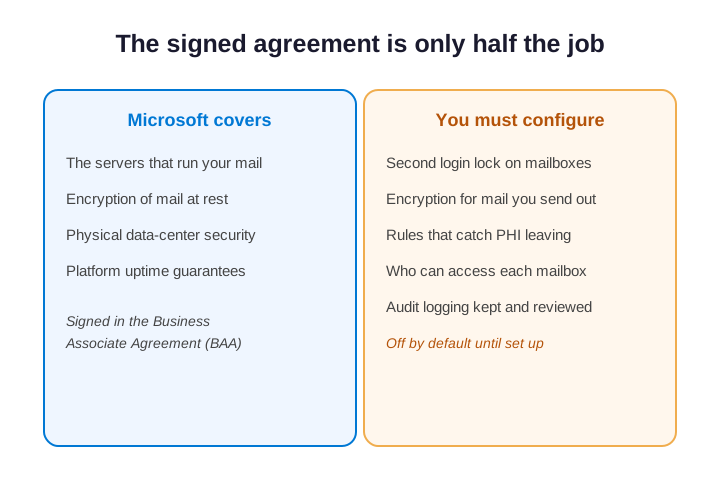
Think of it like a bank vault. Specifically, the vendor builds the vault and guarantees the walls, but if you leave the door open, the vendor is not responsible for what walks out. Therefore, a practice can hold a signed agreement and a wide-open inbox at the same time, and still fail an audit on the day it matters most.
Why a signed BAA is only the first step
The agreement and the configuration are two separate jobs. Specifically, the BAA is paperwork that defines responsibility; the protections are settings that someone has to turn on and maintain. In practice, owners who lean on the signature alone almost always have no second login lock, no outbound encryption, and no tested record of either. As a result, the promise was real, but it protected nothing on their side when an attacker arrived.
🔍 The single most common gap we find: a practice proudly shows us the signed agreement, certain the job is done. Then we look inside the mailboxes and find logins with no second lock, patient data emailed in clear text, and no audit log anyone has ever checked. Specifically, the agreement was genuine, yet it covered nothing the practice itself controlled. Closing that exact gap, turning a signed promise into protections that are actually switched on and documented, is the core of what Wintive delivers for every healthcare client.
Covered entity or business associate: which are you?
HIPAA splits the world into two roles, and email rules apply to both. Specifically, a covered entity is a provider, clinic or health plan that handles patient data directly. By contrast, a business associate is a vendor that handles that data for you, such as a billing or IT partner. Critically, both must protect email that carries patient information, and both can be fined when it leaks. As a result, knowing which one you are tells you exactly which agreements you need on file.
🧩 What HIPAA Compliant Email Actually Requires
Of course, you do not need to know how any of this works. You only need the outcomes in place and provable. Specifically, here is what a healthcare-focused email setup actually delivers, in plain terms. Furthermore, each item below is a worry it takes off your desk and a line you can point to during an audit.
The five rules HIPAA compliant email must follow
- A second login lock on every mailbox, so a stolen password alone never opens patient data.
- Encryption for messages that leave the practice, so records cannot be read if they are intercepted.
- A rule that catches patient data before anyone sends it to the wrong place.
- Access tied to each role, granted on the first day and removed the moment someone leaves.
- Audit logs that someone keeps, reviews, and can hand a regulator on request.
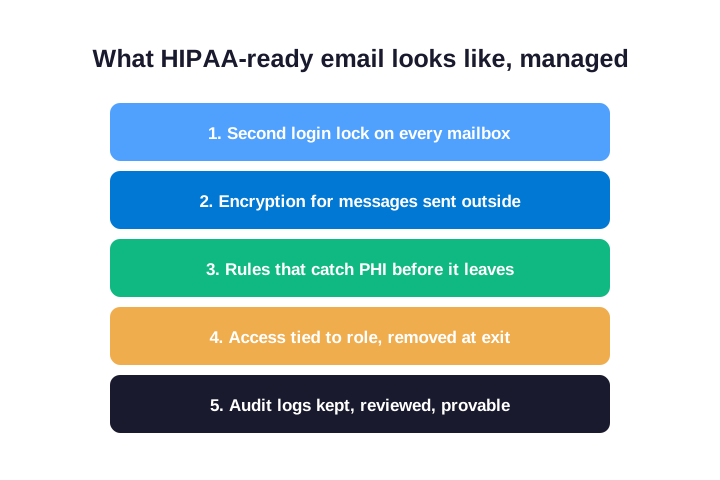
Together, these turn ordinary email from a liability into a defensible, audit-ready system. Notice that not one of them asks anything technical of you. Therefore, the entire job of a managed setup is to make the configuration someone else daily problem, while the peace of mind stays firmly yours.
🔐 Which Microsoft 365 Plan You Actually Need
Naturally, owners ask which Microsoft 365 plan they need. Specifically, the honest answer is that the plan name matters less than what gets switched on inside it, though the plan does set the ceiling. For most small practices, Microsoft 365 Business Premium is the right foundation, because it bundles the second login lock, encryption, and data-loss controls a HIPAA-ready inbox relies on. Larger or higher-risk practices sometimes move up to the Microsoft 365 E3 or E5 plans for deeper protection. Furthermore, the wrong plan quietly costs you twice: once for features you never use, and once for protections you assumed came included.
Business Premium versus the cheaper plans
The temptation is to save a few dollars per user with a basic plan. In practice, that is a false economy. Specifically, the cheaper Business Basic and Standard plans leave out the device and data-loss controls that make an inbox defensible. As a result, you end up bolting on extras or going without. Therefore, Business Premium usually wins on total cost of ownership, because it folds the security you would otherwise buy separately into one predictable per-user fee.
| Microsoft 365 plan | Email protection for a practice |
|---|---|
| Business Basic or Standard | Misses the device and data-loss controls a regulated inbox needs |
| Business Premium | The right foundation: second lock, encryption, data-loss rules, device control |
| Enterprise E3 or E5 | Deeper protection for larger or higher-risk practices |
💼 Should You Manage HIPAA Compliant Email Yourself or Outsource?
Before weighing the two options, it helps to see what is actually at stake. Specifically, the chart below breaks down what a single email breach costs a small practice, from notifying patients to fines and lost trust. That number is the real benchmark against any monthly fee.
At some point every growing practice asks the same question. Should we handle email security in-house, or hand it to an outside team? On the surface, doing it yourself feels like control. In practice, the math rarely works for a small office, and the risk runs higher than it looks. Specifically, one in-house hire who understands both technology and healthcare rules is expensive and hard to find. Worse, that person becomes a single point of failure the moment they are on holiday or out sick.
Why outsourcing usually wins for a small practice
Outsourcing flips that equation. For a predictable monthly cost, you get a whole team instead of one person. Furthermore, there is no hiring process, no benefits, and no gap when someone is away. Furthermore, an outside team has configured this across many practices, so they have seen the failure before yours appears. And if you already employ someone technical, a co-managed arrangement lets them keep the day-to-day while specialists carry the heavy security and compliance work. As a result, you trade a fragile single hire for steady, expert coverage.
In short, the question is rarely whether you can manage HIPAA compliant email yourself. Instead, it is whether one person can do it reliably, every single day, while also running everything else in the practice. Therefore, most small offices find that a managed team is both safer and cheaper than the alternative.
💰 What HIPAA Compliant Email Costs a Small Practice
The best part for a budget-minded owner is how the cost behaves. Specifically, a managed email setup is priced for each user, every month, so the price scales with your team and stays predictable. There is no surprise project bill when something breaks, because preventing the break is the entire point. In plain terms, it is an operating cost (OpEx) you can plan for, not a capital expense (CapEx) that lands all at once. Furthermore, weigh the total cost of ownership (TCO) across a year. As a result, that predictable monthly fee almost always beats the cost of a single breach or one day of downtime.
Predictable per-user pricing versus one breach
Put the two numbers side by side. Specifically, a year of properly managed email costs a small, fixed amount you can budget to the dollar. By contrast, one reportable breach brings notification costs, investigation fees, fines per record, and lost patients, none of which you can predict in advance. Therefore, the real question is not whether protection is worth the monthly fee. The question is whether you would rather pay a little now or a great deal during a crisis.
⚠️ The Email Mistakes That Quietly Fail an Audit
Across many practices, the same avoidable mistakes show up again and again. Specifically, none of them look dangerous on the day they happen, which is exactly why they are dangerous. Furthermore, each one silently fails in the background until the worst possible moment, when an attacker or an auditor finds it first.

The four mistakes we see most often
- Relying on the signed agreement alone, while the protections inside the mailboxes were never switched on.
- Leaving logins with no second lock, so one phished password opens an entire mailbox of records.
- Emailing patient data in clear text, with no encryption and no rule to catch it leaving.
- Forgetting to close mailboxes when staff leave, so old accounts keep exposing every message inside.
Furthermore, every one of these is cheap to fix before an incident and ruinously expensive afterward. Therefore, the real value of a managed setup is someone whose job is to catch these quietly, on an ordinary Tuesday, long before they become the reason your practice makes the news.
✅ The Practice Owner Checklist Before You Trust a Provider
Crucially, not every IT provider understands healthcare, and the difference matters enormously. So before you hand anyone your email, run them through this short checklist. Specifically, it is the same set of questions Wintive encourages owners to ask, and the answers tell you quickly whether a provider truly grasps the stakes inside a medical practice.
Questions to ask before you sign
- Will you turn on and document a second login lock on every mailbox?
- How do you encrypt the messages we send outside the practice?
- What stops a staff member from sending patient data to the wrong person?
- How fast do you close a mailbox when someone leaves?
- Can you hand us an audit-ready record of all of this on request?
If a provider answers those five clearly and confidently, you are talking to the right kind of partner. Therefore, use this list as your filter. Specifically, it separates the providers who understand healthcare from the ones who simply add it to a website. Wintive built its Managed Plans around exactly these answers, because they are the questions every practice owner deserves a straight reply to.
Comparing HIPAA compliant email providers and services
Before you sign with any vendor, it helps to know what separates a real solution from a label. Specifically, credible HIPAA compliant email providers will sign a business associate agreement without hesitation. By contrast, a service that dodges that question, or charges extra for it, is telling you something. Furthermore, the strongest option is often the Microsoft 365 you may already own, set up correctly. As a result, the choice is less about finding a new provider and more about configuring the right one.
📚 More for Healthcare Practices
The four related guides below go deeper on the security layers around a HIPAA compliant email setup. They cover SOC 2 vendor checks, small-business email security, the wider healthcare IT stack, and a cyber-insurance renewal.
Related Wintive guides for your practice
🩺 Want a complete audit of your practice email against HIPAA?
The M365 Master Audit delivers a written report. Specifically, it maps your Microsoft 365 and email configuration against the HIPAA Security Rule. That means the second login lock, outbound encryption, data-loss rules, mailbox access, and audit logging. You also get a prioritized plan to close every gap, flat $1,500, with no hidden add-ons.
❓ Frequently Asked Questions
Gmail can be made HIPAA-ready, but only on a paid Google Workspace plan with a signed Business Associate Agreement and the right settings turned on. The free version never qualifies. Most small practices already run Microsoft 365, so configuring the email they own is usually faster and cheaper.
No. Microsoft 365 can run HIPAA-ready email, but the second login lock, outbound encryption, and data-loss rules stay off until someone turns them on and documents them. The signed agreement covers Microsoft servers, not your own configuration.
Three things: only the right people can open each mailbox, patient data stays protected when it leaves, and you can prove both with audit logs. A managed plan configures and maintains all three as staff come and go.
It is priced per user, per month, so the cost scales with your team and stays predictable. Across a year, that flat fee almost always costs far less than one breach, which brings fines, notification costs, and lost patients.
Yes. Sending patient data in clear text is a common way practices fail an audit. Encryption protects the message if someone intercepts or misdirects it, and a managed setup applies it automatically so staff never have to remember.
Your next step
Each of the four guides above pairs with one decision in this article. Therefore, pick the one closest to your next audit or renewal, and start there. If patient data and HIPAA keep you up at night, that is exactly the worry a HIPAA compliant email setup is built to remove.