

A data breach at a small medical practice never stays small. Picture the front desk one morning: the schedule will not load, billing is frozen, and patient records sit behind a ransom note while patients wait and staff stand idle. And under federal law, that single bad morning can turn into a year of letters, audits, and fines. Managed IT services for healthcare exist to make sure that morning never arrives, and to keep your practice running, protected, and HIPAA-ready without you needing to understand a single line of the technology underneath. See the HIPAA Security Rule for the official guidance.
It is written for the people who carry the risk: the practice owner, the office manager, and the physician partner who signs the checks. In plain terms, it answers what actually keeps you up at night. What does one breach really cost? Why are small practices targeted more, not less? And should you hire someone, or hand the whole problem to a team that does this every day?
🩺 Want your practice protected and HIPAA-ready without hiring a tech team?
Wintive runs Microsoft 365 for small US healthcare practices end to end. We secure patient data, protect every device, automate backups, and document every HIPAA safeguard, at a flat monthly rate with no long contract and no setup fee.
📅 Book a Free 30-Min Call | 💬 Chat on WhatsApp | See Our Plans →
This is the same briefing Wintive gives owners before we take over their Microsoft 365, written in plain business language with no jargon. A well-run practice handles all three pressures quietly in the background, day after day, instead of treating each one as a separate emergency that drains time, money, and trust.
🎯 The Three Risks Every Small Medical Practice Faces in 2026
In short, a small healthcare practice carries three risks at the same time. First, downtime: a single ransomware hit can freeze your schedule, records, and billing for days, and every closed hour is lost revenue. Second, a breach of patient data: medical records are the most valuable files on the black market, so attackers target these practices on purpose. Third, HIPAA penalties: regulators expect documented protection, and being too small to be a target is not a defense. Managed IT services for healthcare cover all three, because the same protections that stop downtime also satisfy what HIPAA asks for.
Where the real exposure actually sits
When a practice owner reviews where the real exposure sits, three things stand out. First, downtime is the risk you feel immediately. As a result, a frozen schedule means cancelled appointments, idle staff, and patients who go elsewhere. Second, a breach is the risk that follows you. Once patient data leaks, you owe notifications, you may owe fines, and you owe an explanation to every patient affected. Third, the compliance risk sits underneath both, because the law expects you to have prevented the first two.
Importantly, these three are not separate projects. In practice, they are one problem wearing three hats. Specifically, the same locked-down email that stops a phishing attack also protects patient data. The same automatic backup that recovers you from ransomware also proves to a regulator that you took recovery seriously. Therefore, the smart move is not to chase each risk on its own. Instead, you put one properly managed system in place and let it cover all three at once.
What one bad incident actually costs a small practice
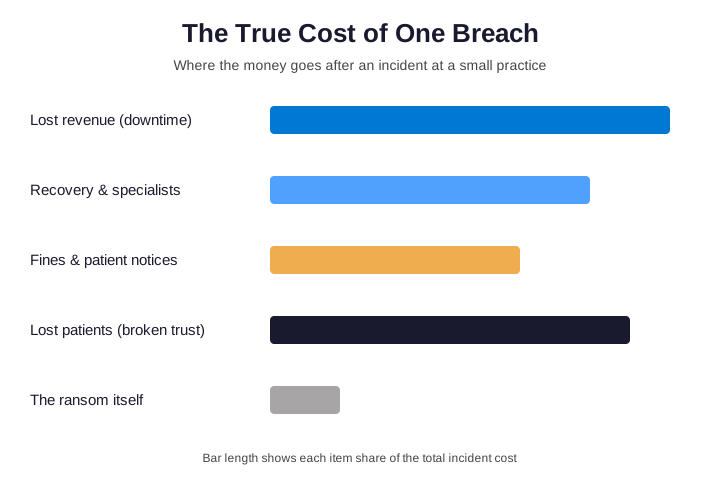
Notably, the number that surprises owners is not the ransom. In fact, the ransom is usually the smallest line on the bill. Specifically, the real cost stacks up from four directions. First, lost revenue from every day the practice cannot bill or see patients. Second, the cost of getting back online, which often means paying specialists by the hour during a crisis. Third, the legal and notification cost, because the law requires you to tell affected patients and, above a threshold, the government. Fourth, the quiet cost that never shows on an invoice: patients who lose trust and never come back. Added together, one serious incident can cost a ten-person practice more than a full year of doing IT properly.
🛡️ Why Clinics Are the Number One Target
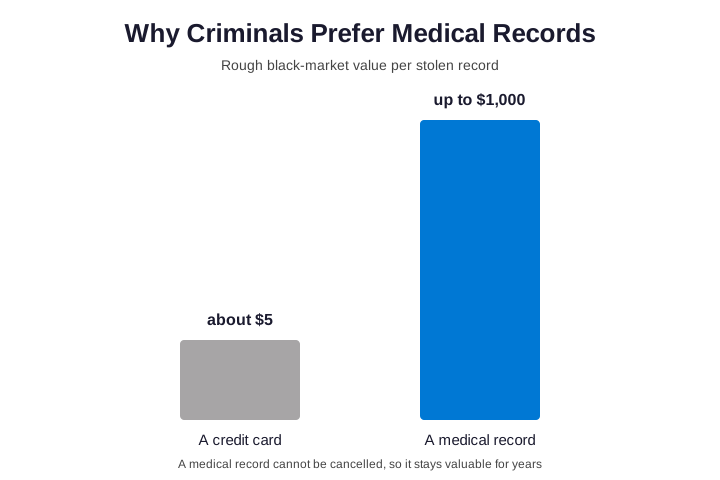
Attackers hit healthcare harder than any other industry, and the reason is simple economics. For comparison, a stolen credit card is worth a few dollars, and it stops working the moment the bank cancels it. By contrast, a medical record is worth far more, and no one can cancel it. Specifically, it holds a name, a date of birth, an insurance number, and a medical history — everything a criminal needs to commit fraud for years. Therefore, attackers go where the valuable files are, and those files sit in practices like yours.
Why being small makes you a bigger target
Many owners assume that being small is protection. In reality, it is the opposite. Attackers know that large hospitals run security teams, and small practices usually do not. So the small practice is the easier door. Furthermore, automated attacks do not pick targets by prestige. They pick by weakness. And a practice with no one truly managing its email and devices is, to an attacker, an open weakness.
💡 What we see across 60+ tenants we manage: The breach almost never starts with a genius hacker. Instead, it starts with one tired staff member clicking one convincing email at the end of a long day. From there, the attacker quietly moves through files that were never locked down, because nobody was watching. Specifically, the practices that stay safe are not the ones with the most technology. They are the ones where someone is actually responsible for the email, the devices, and the backups every single day. That responsibility is exactly what Wintive provides.
In other words, the gap is rarely the technology. Instead, it is ownership. Therefore, the practices that sleep at night are simply the ones that handed the daily watching to a team whose entire job is to do exactly that.
This is the part that matters for a decision-maker. You do not need to become a security expert. However, you do need someone whose job is to close that open door before an attacker finds it. Therefore, that is the entire purpose of managed IT services for healthcare: to put a responsible team between your patient data and the people trying to steal it.
📋 HIPAA Is a Business Risk, Not a Technical Checkbox
To begin with, most owners think of HIPAA as paperwork. In truth, HIPAA is a financial risk with teeth. Specifically, the rule expects every practice that holds patient data to protect it, to control who can see it, and to be able to prove both. When something goes wrong, the government does not ask whether you meant well. It asks what protections you had in place, and it asks you to show the evidence. If you cannot, the penalties climb quickly, and they climb per violation, per year.
Crucially, HIPAA does not care how small you are. The same core expectations apply to a two-dentist office and to a hospital. Furthermore, HIPAA expects you to limit who can open patient files. It expects you to add a second lock to logins so a stolen password is not enough. It expects you to keep records safe and recoverable. And it expects you to notice and report when something goes wrong. None of that is optional, and none of it disappears because you have ten staff instead of a thousand.
What the rules expect, and how managed IT services for healthcare deliver it
| What HIPAA expects (plain English) | What a managed plan handles for you | Why it matters to the owner |
|---|---|---|
| Only the right people open patient files | Access set by role and reviewed regularly | A leaver or a hacked account cannot roam your records |
| A stolen password is not enough to get in | A second login step on every account | The most common breach route is closed |
| Patient data stays safe and recoverable | Encryption plus automatic off-site backups | Ransomware does not end your practice |
| You can prove who saw what, and when | Activity logged and kept | You answer a regulator in hours, not weeks |
| You notice and respond when something breaks | Continuous monitoring and a written response plan | A small problem stays small |
| Old records are disposed of properly | Automatic retention and clean deletion rules | You are not holding risk you no longer need |
Notice the pattern in that table. Specifically, every expectation on the left is a business outcome, not a technical task. And every item on the right is something you should never have to do yourself. Therefore, that is the whole point of handing it over. You keep the responsibility, because the law puts it on you. But the daily work of meeting it moves to a team that does this for a living.
🔌 The Compliance Trap Most Practices Miss
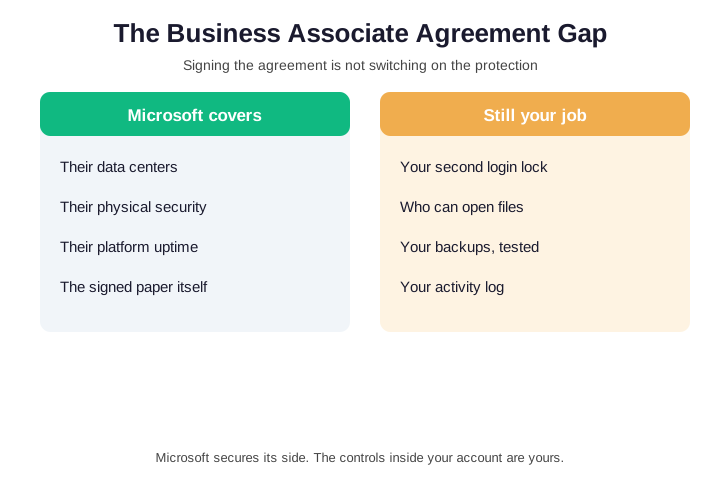
In practice, here is the mistake that catches almost every small practice, and it is an expensive one. Notably, Microsoft will sign a HIPAA agreement with you, called a Business Associate Agreement, or BAA. Owners see that signature and assume it covers them. Unfortunately, that signature only covers the Microsoft side. Specifically, it promises that Microsoft protects its own systems. It does not switch on a single protection inside your own account.
Why managed IT services for healthcare beat a signed agreement alone
Think of it like a bank vault. The bank builds a strong vault and guarantees the walls. But if you leave the vault door open, the bank is not responsible for what walks out. Specifically, Microsoft built the vault. Switching on the locks — the second login step, the limits on who can open files, the backups, the activity log — is your responsibility. And out of the box, most of those locks are off. So a practice can hold a signed agreement and a wide-open account at once, and still fail an audit.
🔍 The single most common mistake we find: A practice proudly shows us the signed Microsoft agreement, believing the job is finished. Then we look inside the account and find no second login step, files shared far too widely, and no backup anyone has ever tested. The agreement was real, but it protected nothing on their side. These gaps silently fail for months, until an attacker or an auditor finds them. Closing that exact gap — turning the signed promise into protections that are actually switched on and documented — is the core of what Wintive delivers.
This is why we use Microsoft 365, so we are fine is one of the most dangerous sentences in a small practice. Microsoft 365 can absolutely be run in a HIPAA-safe way. But you have to set it up that way, keep it that way as staff come and go, and document it so you can prove it. Left on its defaults, it is a vault with the door propped open.
🧩 What Managed IT Services for Healthcare Actually Cover
Of course, you do not need to understand how any of this works. Instead, you only need the outcomes handled, and handled well. Specifically, here is what a healthcare-focused managed plan actually does for you, in plain terms. Each item below is a worry it takes off your desk.

What managed IT services for healthcare actually cover
- Your Microsoft 365 is run for you. We manage accounts, email, files, and settings every day, instead of leaving them on defaults.
- Patient data is locked down. Files stay encrypted, and the system stops sensitive records from leaving by accident or by attack.
- Every device is protected. We secure and monitor each laptop and phone that touches records, and we can wipe any device instantly if lost or stolen.
- Logins have a second lock. A stolen password alone cannot open your practice, which closes the most common way in.
- Backups run automatically. If hardware dies or ransomware strikes, your records come back fast, and the recovery has been tested in advance.
- Someone is always watching. We catch problems early, before they grow into an outage or a breach, and a written plan is ready for when they appear.
- Your compliance is documented. We write the protections down and keep them current, so a patient or a regulator who asks how their data is protected gets a real answer.
Together, these turn Microsoft 365 from a liability into a defensible, audit-ready setup. Notice that not one of them asks anything technical of you. That is by design. Therefore, the job of a managed plan is to make the technology somebody else daily problem, while the peace of mind stays yours.
🔐 Which Plan Your Practice Actually Needs
Naturally, owners often ask which Microsoft 365 plan they should be on. Specifically, the honest answer is that the plan name matters less than what you switch on inside it. That said, the plan does set the ceiling on what is possible. For most small practices, Microsoft 365 Business Premium is the right foundation, because it bundles the security and device controls a HIPAA-ready setup relies on. Larger or higher-risk practices sometimes move up to the Microsoft 365 E3 or E5 plans for deeper protection. Furthermore, the wrong plan quietly costs you twice: once for features you never use, and once for protections you thought came bundled but did not.
This is also where the comparison with other tools matters. A practice running on Google Workspace can become compliant too, but the path is different, and most small practices already live in Microsoft 365 through Word, Outlook, and Teams. Therefore, the practical move is rarely to switch suites. Instead, it is to take the Microsoft 365 you already pay for and actually configure it for healthcare. Specifically, Wintive maps the plan you are on to the protections HIPAA expects, and tells you plainly when an upgrade earns its cost and when it does not.
Managed IT services for healthcare: plan choice versus configuration
| Practice situation | Sensible Microsoft 365 foundation | What still has to be switched on |
|---|---|---|
| Small practice, standard patient records | Microsoft 365 Business Premium | Second login lock, file limits, backups, logging |
| Larger or higher-risk practice | Microsoft 365 E3 or E5 | The same controls, plus deeper monitoring |
| Already on Google Workspace | Keep it, or move: decide on cost, not hype | Equivalent controls, configured for HIPAA |
💼 Hire In-House or Outsource? The Real Math
At some point, every growing practice asks the same question. Should we hire someone to handle IT, or should we outsource it to a managed IT support services provider? On the surface, hiring feels like control. In practice, the math rarely works for a small practice, and the risk is higher than it looks.
How managed IT services for healthcare beat one in-house hire
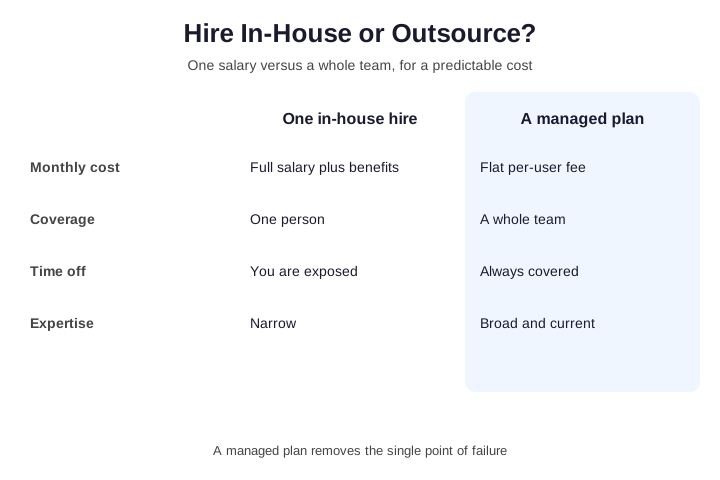
To start, consider what one in-house hire really means. In particular, a person who knows both technology and healthcare rules is expensive and hard to find. Specifically, you pay a full salary plus benefits. Moreover, they take holidays and sick days, and when they are out, your protection is out with them. And one person cannot realistically cover security, devices, backups, and compliance well, all at once. Therefore, you are paying a premium for a single point of failure.
Outsourcing flips that equation. For a predictable monthly cost, you get a whole team instead of one person. Furthermore, there is no hiring process, no benefits, and no gap when someone is on holiday. In addition, you also get people who do this across many practices, so they have seen the problem before yours appears. And if your practice already has someone technical, you do not have to replace them. Specifically, a co-managed arrangement lets them keep control of the day-to-day while Wintive carries the heavy security and compliance work behind them.
💰 What It Costs: Predictable, Per-User Pricing
The best part for a budget-minded owner is how the cost behaves. Managed IT for healthcare costs a predictable amount for each user, every month. So the cost scales with your team and stays predictable. Specifically, there is no surprise project bill when something breaks, because preventing the break is the entire point. In plain terms, it is an operating cost you can plan for, not a capital one that lands all at once. When you weigh the total cost of ownership across a year, the predictable monthly fee almost always beats the cost of one emergency.
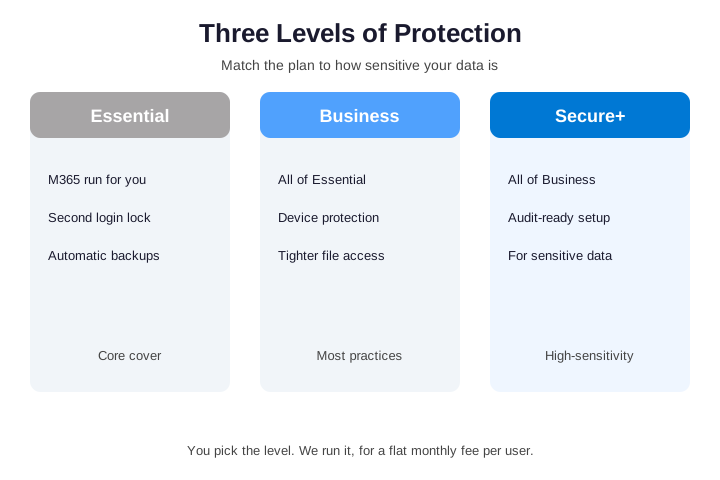
How managed IT services for healthcare are priced
Our Managed Plans come in three tiers, so you match the level of protection to your risk. First, the Essential tier covers the core: your Microsoft 365 run for you, the second login lock, and automatic backups. Next, the Business tier adds stronger device protection and tighter control over who can open what. Furthermore, the Secure+ tier suits practices that handle sensitive records every day and want the hardened, audit-ready setup that stands up cleanly to a regulator. You choose the level, and Wintive runs it.
Whatever tier you pick, compare it against the real alternative. Specifically, one serious breach, or even one full day with the practice frozen, costs more than a year of any of these plans. Therefore, the question is not whether protection is worth the monthly cost. The question is whether you would rather pay a small, predictable amount now or a large, unpredictable amount during a crisis.
⚠️ The Mistakes That Quietly Sink Small Practices
Over many practices, the same avoidable mistakes show up again and again. Specifically, none of them look dangerous on the day they happen. That is exactly why they are dangerous. Each one silently fails in the background until the worst possible moment.
The four mistakes we see most often
- Treating the signed agreement as the finish line. The most common mistake is assuming the Microsoft BAA protects your side. It does not, and that gap is invisible until an audit.
- A backup nobody has tested. The pitfall here is comforting yourself with a backup that has never been restored. An untested backup is a guess, not a safety net.
- Leaving former staff with access. The gotcha is the account that was never switched off. Months later, it is still an open door into patient records.
- Sharing files far too widely. Convenience wins, and soon the whole practice can open everything. Therefore, one clicked email can reach every record at once.
Furthermore, every one of these is cheap to fix before an incident and expensive to fix after. That is the real value of a managed plan: someone whose job is to catch these quietly, on an ordinary Tuesday, long before they become the reason your practice makes the news.
✅ The Practice Owner Checklist Before Choosing a Provider
Crucially, not every IT provider understands healthcare, and the difference matters enormously. So before you sign with anyone, run them through this short checklist. Specifically, it is the same set of questions Wintive encourages owners to ask, and the answers tell you quickly whether a provider truly gets the stakes in a medical practice.
Five questions before you buy managed IT services for healthcare
- Do they know healthcare rules? Ask how they handle HIPAA specifically, not security in general. A vague answer is a warning sign.
- Will they sign their own agreement? A provider handling patient data should sign a Business Associate Agreement with you without hesitation.
- Will they document the protections? You need written proof of what is switched on, because that is what an auditor and your own peace of mind both require.
- Is the price predictable? Look for a flat monthly fee per user, not a vague promise that turns into surprise bills the first time something breaks.
- Can they prove they do this for practices like yours? A provider who already runs healthcare practices has seen your problems before, and that experience is worth more than any sales pitch.

If a provider answers those five questions clearly and confidently, you are talking to the right kind of partner. Therefore, use this list as your filter. Specifically, it separates the providers who understand healthcare from the ones who simply add it to a website. Wintive built its Managed Plans around exactly these answers, because they are the questions every practice owner deserves a straight reply to.
📚 More for Healthcare Practices
The four guides below cover the operational layers a managed plan handles for a medical practice. They address four areas: stopping phishing email, recovering from ransomware with backups, locking down laptops and phones, and passing your cyber-insurance renewal.
Related Wintive guides for your practice
🩺 Ready to protect your practice and stop worrying about HIPAA?
Wintive runs your Microsoft 365 the way a healthcare practice needs it: patient data locked down, every device protected, backups automatic, and the HIPAA safeguards switched on and documented. One flat monthly fee per user. No long contract. No surprise bills.
❓ Frequently Asked Questions
Yes, but only once you turn on and document the protections inside your account. Microsoft’s Business Associate Agreement covers only its own systems. The second login step, the file-access limits, the backups, and the activity logs all fall to you. A managed plan configures and documents each one.
No. The agreement covers only the Microsoft side and switches on no protection inside your own account. Practices that lean on the signature alone still fail audits, because no one ever turned on the locks on their side.
They cost a flat amount per user, per month, so the price scales with your team and stays predictable. You get no surprise project bill, because preventing problems is the point. Across a year, that flat fee almost always beats the cost of one breach or one day of downtime.
For most small practices, outsourcing wins. One hire means a full salary plus benefits and a single point of failure when that person is sick or away. A managed plan gives you a whole team for a predictable fee, and it can work alongside an existing staff member.
With automatic, tested backups in place, you get your records back quickly instead of paying a ransom. A managed plan also limits how far an attack spreads and gives you a written response plan. A bad morning stays a bad morning, instead of becoming a closure.
Your next step
In short, the safest practices are simply the ones that handed the daily work to a team whose entire job is to do it. Therefore, if patient data and HIPAA keep you up at night, that is exactly the worry managed IT services for healthcare remove.