

A HIPAA audit checklist turns a vague worry into a list you can actually work through. Most practice owners know they are supposed to be compliant. Far fewer know what an auditor would really look for. This guide closes that gap. It covers what a HIPAA audit checks, the items on the checklist, how to run the check yourself, and what each requirement looks like inside Microsoft 365.
The approach here is practical rather than legal. You will see the five areas every review covers and the findings that fail practices most often. Each rule also maps to the setting that satisfies it. By the end you will know where you stand and what to fix first.
Not sure your practice would pass a HIPAA audit? Wintive checks your Microsoft 365 setup against the HIPAA Security Rule and tells you exactly what to fix, at a flat fee.
- We check your safeguards, BAA, guest access, retention, and audit logging against the rules.
- You get one report and a prioritized plan to close the gaps.
📅 Book a Free 30-Min Call | 💬 Chat on WhatsApp | See Our Plans →
The sections below move from the basics to the practical checks. First, whether an audit is even required. Then the checklist itself, area by area. Last, how to run it yourself and what it costs to get it wrong.
🔍 Does HIPAA require an audit?
Short answer: A HIPAA audit checklist covers five areas — administrative, physical, and technical safeguards, your Business Associate Agreement, and your written policies. The two findings that fail practices most often are a missing risk analysis and an unsigned BAA. On Microsoft 365, most technical items map to settings you already own: multi-factor sign-in, audit logging, encryption, and sharing limits.
Yes, in practice — though the word the law uses is not “audit.” The Security Rule requires a risk analysis, and that analysis sits at the center of any HIPAA audit checklist. A risk analysis captures, in writing, where patient data lives and what could go wrong with it. You update it as the practice changes. On top of that, the Office for Civil Rights enforces the law directly. It runs formal audits of selected practices, and it investigates after any reported breach.

So two kinds of review matter to you. The first is the self-check you run on a schedule. The second is the external one you want to be ready for. Helpfully, both work from the same list. The official HHS Security Rule guidance sets the requirements, and a practical checklist turns those requirements into steps you can tick off. Run it yourself first, and an external audit holds no surprises.
📋 What a HIPAA audit checklist checks
Every HIPAA audit checks the same three rules. The Privacy Rule governs who may see patient records and what patients can ask for. Next, the Security Rule covers how you protect electronic records, which is where most technical findings appear. Finally, the Breach Notification Rule sets out what you do, and whom you tell, when something goes wrong.
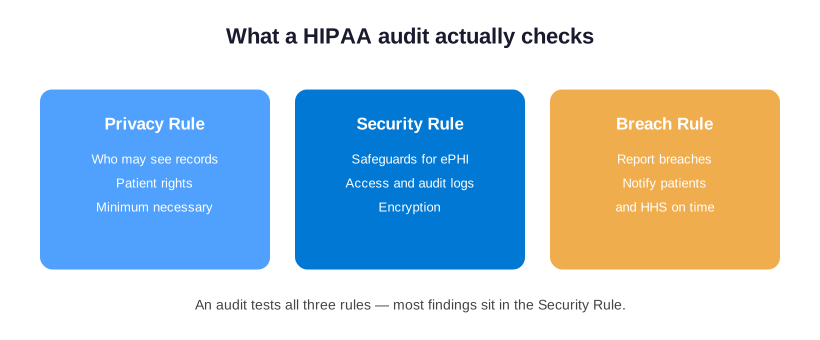
For a typical practice on Microsoft 365, the Security Rule is the one that turns into a real task list. It asks for safeguards you can point to: controlled sign-in, audit logs, encryption, and limits on sharing. The Privacy Rule is mostly about habits and paperwork. The Breach Rule only comes into play if you already have a problem. So while your HIPAA audit checklist covers all three, the bulk of the work, and the bulk of the risk, sits in the Security Rule.
📑 The HIPAA audit checklist: five areas
Underneath the three rules, an auditor groups the work into five areas. Every item on a HIPAA audit checklist falls into one of them, so it helps to know the map before you start.
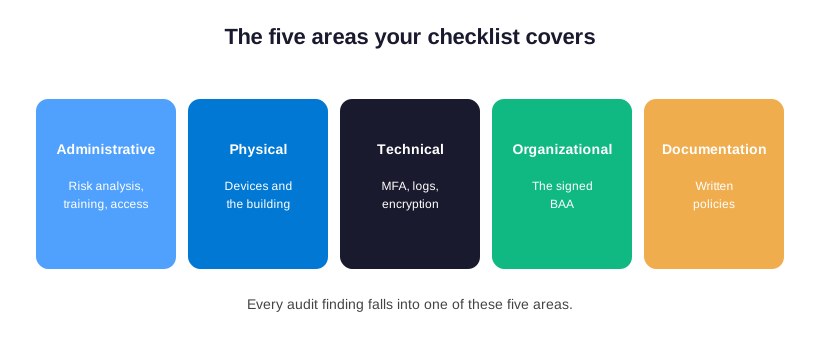
The five areas are administrative safeguards, physical safeguards, technical safeguards, the organizational requirement, and your documentation. Administrative safeguards are the people side: a current risk analysis, named responsibility, and staff training. Physical safeguards cover devices and the building — locked screens, controlled access, and a plan for lost laptops. Technical safeguards are the settings on your systems. The organizational requirement is the Business Associate Agreement you sign with every vendor that touches patient data. Documentation is the written proof that the other four exist.
📝 The HIPAA audit checklist, item by item
Across the 60+ tenants Wintive manages on Microsoft 365, the same two gaps surface in nearly every first HIPAA audit: no documented risk analysis, and a Business Associate Agreement nobody ever accepted. Neither is a technical failure. In short, both are paperwork a practice can close in a single afternoon.
| Checklist area | What an auditor asks for | Where it lives |
|---|---|---|
| Administrative | A current risk analysis, a named security contact, and staff training records | Your policies and calendar |
| Physical | Locked screens, controlled facility access, and a lost-device plan | The office and devices |
| Technical | Access control, audit logging, encryption, and sharing limits | Microsoft 365 settings |
| Organizational | A signed Business Associate Agreement with each vendor | Microsoft and your vendors |
| Documentation | Written policies that match what you actually do | Your policy folder |
First, the five areas are the map. The line items below are the HIPAA audit checklist itself, written the way an auditor reads it. Work through each one, and mark it pass, fail, or not applicable as you go.
Administrative checks
To begin with, these are the people-and-process items, and they are where an internal audit usually starts. Confirm a written risk analysis exists and was reviewed in the last year. Check that one person holds the role of security official. Verify that staff training happened and was logged. Then confirm you have a sanction policy for staff who break the rules. You also need a written process for granting and removing access as people join or leave.
Physical checks
Likewise, these cover the building and the hardware. Confirm screens lock automatically and face away from waiting areas. Check that servers, backups, and any on-site records sit behind a locked door. Then verify you keep an inventory of every device that can open patient data. Add a documented step for wiping a laptop or phone that is lost or retired.
Technical checks
This is the heart of a security or IT audit checklist, and the part Microsoft 365 covers directly. Confirm every user has a unique login, with no shared accounts. Check that you enforce a second sign-in step. Verify that you encrypt data at rest and in transit, that audit logging runs, and that sharing limits stop files leaking by link. Then confirm automatic logoff turns on, so an unattended screen does not stay open to records. Each of these maps to a setting you can check in minutes, which is why the technical area is often the fastest to close.
Organizational and documentation checks
The last two areas cover your vendors and your paperwork. Confirm you hold a signed Business Associate Agreement with Microsoft and with every other service that touches patient data, from billing to your email filter. Then make sure your written policies describe what you actually do, and that the risk analysis, training logs, and incident plan are dated and easy to find. In an audit, a control you cannot evidence counts as a control you do not have.
✅ How to run your HIPAA audit checklist
You do not need a consultant to start. A first pass through your HIPAA audit checklist follows five steps, and most practices can finish them in a focused afternoon.
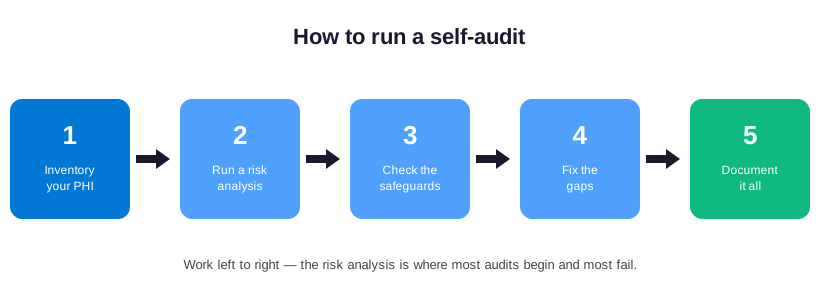
Start by listing where patient data lives: email, shared files, your records system, and any device that opens them. Next, run the risk analysis — for each place, ask what could expose the data and how likely that is. Then check the safeguards against the list above, one area at a time. After that, fix the gaps you found, starting with anything marked severe. Finally, write down what you did and the date you did it, because the documentation is itself a checklist item. Repeat the whole pass at least once a year, and any time you change a major system.
🚩 HIPAA audit checklist: findings that fail most often
After all, audits rarely fail on something exotic. The same handful of gaps appear again and again. One tops the list: a missing or stale risk analysis. The Office for Civil Rights has flagged it for years. So it helps to check the riskiest items on your HIPAA audit checklist first, before anyone else does.
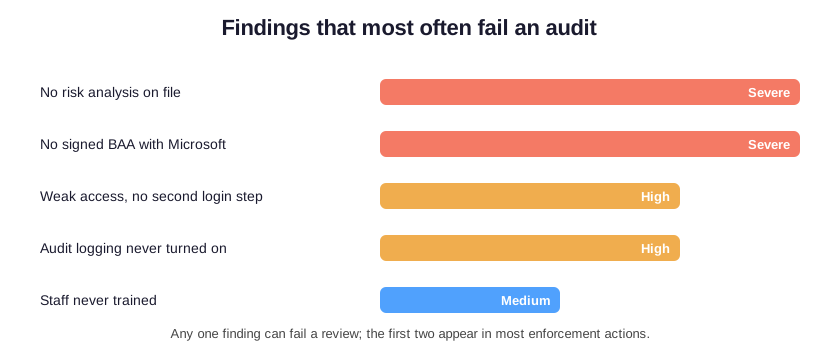
The two that carry the most weight are a risk analysis that was never done, or never updated, and a Business Associate Agreement that was never signed. Auditors treat both as serious, because both suggest the practice never set up the basics. After those come weak access control, where there is no second step at sign-in, and audit logging the practice never switched on. Lighter, but still flagged: staff nobody ever trained. Work down the list in that order and you remove the findings most likely to turn a review into a penalty.
🔗 The HIPAA audit checklist for Microsoft 365
This is where a generic list stops being useful and a Microsoft 365 one takes over. Most technical items do not need new software. They need settings switched on in the tenant you already pay for. Here is the part of the HIPAA audit checklist that maps directly to Microsoft 365, requirement by requirement.
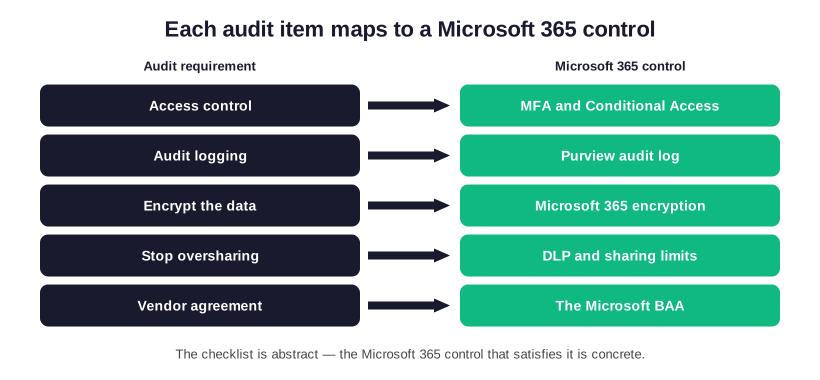
Access control means no shared logins and a second step at sign-in. In Microsoft 365 that is multi-factor authentication backed by Conditional Access. Audit logging means a record of who opened what, and the Microsoft Purview audit log keeps it. Microsoft 365 builds encryption into data at rest and in transit. So the task is simply to confirm it runs, not to add it. Stopping oversharing means no more accidental link-shared files. In practice, data loss prevention rules and tighter sharing defaults handle it. Finally, the Business Associate Agreement is one Microsoft will sign on any business or enterprise plan.
📜 HIPAA audit checklist: controls and log retention
In practice, most of the technical checklist is already sitting unused inside the plan a practice pays for every month. Across our audits, the fix is rarely a new tool. Instead, it is switching on the multi-factor sign-in, audit logging, and sharing limits that Microsoft 365 already includes.
One technical item deserves its own section, because it trips up so many practices: audit controls. The HIPAA Security Rule names them directly, at 45 CFR 164.312(b), and they are what an auditor checks first on the technical side. In plain terms, audit controls mean your systems keep a record of who did what with patient data. That record then has to survive long enough to be useful.
What an audit trail must capture
So what does a HIPAA audit trail need to record? At a minimum: who signed in and when, which records someone opened or changed, failed login attempts, and any change to security settings. In Microsoft 365, the Purview audit log captures sign-ins and file activity across email, SharePoint, OneDrive, and Teams, while Entra ID keeps the sign-in logs. The first task on your HIPAA audit checklist is to switch the audit log on, because some tenants leave it off by default.
How long to keep your logs
Then there is retention. HIPAA does not set a single number for log retention, but it does require you to keep your documentation and records of compliance for six years. Many practices apply that same six-year window to their audit logs to stay safe. By default, Microsoft 365 keeps audit data for a shorter period, often ninety days to a year. So longer retention may need a policy or a scheduled export. In short, turning the log on is step one, and keeping it long enough is step two.
| Common finding | Why it fails a review | The quick fix |
|---|---|---|
| No risk analysis | The Security Rule names it directly, so without it nothing else is provable | Run and date one this quarter |
| Unsigned BAA | Patient data sits with a vendor under no agreement | Accept Microsoft’s BAA and collect the rest |
| Weak sign-in | One stolen password exposes everything | Turn on multi-factor sign-in |
| No audit logging | You cannot show who opened which record | Enable the Microsoft 365 audit log |
| Untrained staff | People remain the most common cause of a breach | Run a short training once a year |
Switching the log on is not the end of it, though. Still, someone has to look at it, at least now and then. A quick monthly review turns a passive log into a real control. Look for unusual sign-ins, access from new locations, or someone opening records they have no reason to see. Also set a reminder to confirm the export still runs, because a log you assume someone is keeping is the one that turns out to be empty.
💰 What failing a HIPAA audit costs
Ultimately, the reason this matters is money and time, not just paperwork. HIPAA penalties run in tiers. The published civil penalties reach into the millions per year for willful neglect that goes uncorrected. Most small practices never see the top tier. Even so, the lower bands start in the thousands per violation. And a single missing safeguard can count as many violations at once.
| HIPAA requirement | Microsoft 365 control | Plan that includes it |
|---|---|---|
| Access control | Multi-factor sign-in with Conditional Access | Business Premium and above |
| Audit logging | Microsoft Purview audit log | Business Premium and above |
| Encryption | Built-in encryption at rest and in transit | Every paid plan |
| Stop oversharing | Data loss prevention and sharing limits | Business Premium and above |
| Vendor agreement | The Microsoft Business Associate Agreement | Every business or enterprise plan |
Then there is the breach itself. A healthcare data breach is the most expensive kind to clean up. Overall, the bill adds up across notification, lost hours, and lost patients. An audit finding, by contrast, is a warning you get to act on before any of that happens. That is the whole argument for working through a HIPAA audit checklist now rather than later. The self-audit is cheap, and every gap you close is one the regulator, or an attacker, will not get to find.
🔎 Self-audit versus an OCR audit
It helps to separate the two reviews that share this checklist. A self-audit is the one you run on yourself, on your own schedule, to find gaps before they matter. An OCR audit is the formal review the Office for Civil Rights runs, either on a sample of organizations or after a reported breach. The same HIPAA audit checklist drives both, but the stakes and the paperwork differ.
In a self-audit you are looking for honest answers, so the goal is to be tough on yourself. You note every gap, rank it, and fix the worst first. In an OCR audit, by contrast, you must produce evidence. That means dated risk analyses, signed agreements, policies, and proof the controls run. So the practical lesson is simple. Run the self-audit as if the regulator were already watching, and keep the evidence as you go. Then the official version becomes a formality rather than a scramble. A practice that reviews itself twice a year rarely struggles when an outside audit arrives.
📂 Preparing for an OCR audit
If a formal audit does land, preparation is mostly about evidence you already gathered. The Office for Civil Rights publishes its HIPAA Audit Protocol. It is the same set of audit areas its reviewers work from, across the Privacy, Security, and Breach Notification rules. The protocol is long — well over a hundred specific audit areas — but you do not need to memorize it. You need your evidence to answer it. To date, the agency has run two main audit programs, a pilot and a wider Phase 2 review, and it has signaled more enforcement ahead.
So what should you have ready? Keep these five things in one folder: your dated risk analysis, every signed Business Associate Agreement, your written policies, your staff training logs, and a recent export of your audit log. Together, those documents answer most of what an auditor asks. The practice that keeps them current is rarely the one caught off guard.
It also helps to know the shape of the process. An OCR review usually starts with a request for documents rather than a visit, so your first impression is the paperwork you send. As a result, the quality of your records often matters more than any single technical setting. That is why documentation sits on the checklist as its own area, not as an afterthought.
🏥 Notes for dental and medical offices
The checklist is the same for every practice, but a few items bite specific offices harder. A dental office often runs imaging and practice-management software that stores patient data outside Microsoft 365. So the BAA and the risk analysis must cover those vendors too, not just email and files. The question is not whether Microsoft 365 is covered. It is whether every system that touches a patient record is.
A medical office tends to have more staff turnover and more shared workstations. That makes access control and audit logging the items most likely to fail. Indeed, shared logins are the usual culprit. The fix is straightforward. Give each person a named account, add a second sign-in step, and keep the audit log on. In both settings the rule holds. The HIPAA audit checklist stays the same; only where you spend your time changes, following the data.
💵 How much does a HIPAA audit cost?
Of course, it depends on who runs it. A self-audit costs only your time, which is why every practice should run one first. A consultant-led audit varies widely. It can run from a few hundred dollars for a light questionnaire to many thousands for a deep on-site review with a long report. That gap usually reflects how much of the work is automated rather than done by hand, and how much support comes afterward.
For a practice on Microsoft 365, you can run most of the technical checking against the tenant directly, which keeps the price predictable. That is the model behind the Wintive M365 Master Audit: a fixed fee, the full HIPAA audit checklist run for you, and a documented report at the end. So rather than guess what an audit might cost, you start from a flat number and know exactly what you get.
📚 More for US medical practices
The four guides below go deeper on the parts of this page that most often need a walkthrough. Specifically, they cover four areas. First, the full HIPAA picture for a practice. Next, securing the network. Then the contract with Microsoft. Finally, the compliance tools and what they cost.
Related Wintive guides for US medical practices
🔍 Want the whole checklist run for you, with proof at the end?
The M365 Master Audit delivers a written report. Specifically, it maps your Microsoft 365 configuration against the HIPAA Security Rule and confirms each control is in place. That means access control, the second login lock, sharing and data-loss rules, audit logging, and your signed BAA. You also get a prioritized plan to close every gap, at a flat, predictable cost of $1,500, with no hidden add-ons.
❓ Frequently Asked Questions
Work through the five areas of a HIPAA audit checklist in order: administrative, physical, and technical safeguards, your Business Associate Agreement, and your documentation. Start with a written risk analysis, check each safeguard, fix the gaps, and record what you did and when. Most small practices can finish a first pass in an afternoon.
The findings that recur are a missing or outdated risk analysis, an unsigned Business Associate Agreement, weak access control with no second sign-in step, audit logging nobody enabled, and staff nobody trained. A missing risk analysis is the single most cited finding.
Practices usually mean the Privacy Rule, the Security Rule, the Breach Notification Rule, the Enforcement Rule, and the Omnibus Rule. For everyday work the first three matter most, and the Security Rule is where almost all technical audit findings appear.
At least once a year, and again whenever you change a major system, add a vendor, or move data to a new platform. The risk analysis in particular should be a living document, not a one-time exercise, so revisit it as the practice changes.
No. Microsoft 365 gives you the controls and will sign a Business Associate Agreement, but compliance depends on switching those controls on and documenting them. The platform supplies multi-factor sign-in, audit logging, encryption, and sharing limits, and configuring them correctly is your responsibility.