

A HIPAA business associate agreement is the contract that lets a healthcare practice share patient data with an outside vendor. Specifically, it puts that vendor on the hook, in writing, for protecting the data. For a small US practice, it is also one of the easiest things to get wrong. Many owners sign whatever a vendor sends, or skip it entirely, and then carry all of the risk if that vendor has a breach.
This guide explains what a HIPAA business associate agreement is, who needs one, and what it must contain. Furthermore, it shows which of your Microsoft 365 and other vendors require one, and how to get them signed. Wintive handles this for small practices at a flat fee, so the paperwork and the real setup finally match.
Not sure which of your vendors need a BAA? Wintive maps your Microsoft 365 setup and gets the right agreements signed and on file, at a flat fee.
- We identify every vendor that can touch patient data.
- We get each agreement signed, dated, and audit-ready.
📅 Book a Free 30-Min Call | 💬 Chat on WhatsApp | See Our Plans →
Below, each section moves from the basics to the practical steps, in the order a busy owner needs them. Specifically, it starts with what the agreement is, then who signs one, and finally how to get every vendor covered without missing what practices overlook most.
🩺 What a HIPAA business associate agreement is
In short: a HIPAA business associate agreement (BAA) is a written contract between a healthcare provider and any vendor that handles patient data. It requires the vendor to safeguard that data and report breaches. Without one, the provider keeps the liability.
What a BAA actually does
A BAA does three practical things. Specifically, it names what the vendor may do with the data, requires real safeguards, and sets breach-reporting duties. Furthermore, it forces the vendor to pass the same duties on to any subcontractor. As a result, responsibility follows the data wherever it travels. By contrast, a handshake or a generic terms page does none of this reliably.
The contract also protects the practice during an audit. Specifically, it is usually the first document a regulator asks to see. Notably, it shows you did your part before anything ever went wrong. In practice, that one signed contract often separates a manageable incident from a costly one.
Plenty of owners assume a vendor takes care of this automatically. By contrast, the duty to put the agreement in place sits with your practice, not the vendor. Specifically, you are the party a regulator holds responsible for the relationship. Furthermore, that responsibility does not transfer just because the vendor is large or well known. As a result, the safest practices keep a simple record of who has signed and when. Notably, that record is also the fastest way to answer a question during a review.
🧩 Who signs a HIPAA business associate agreement
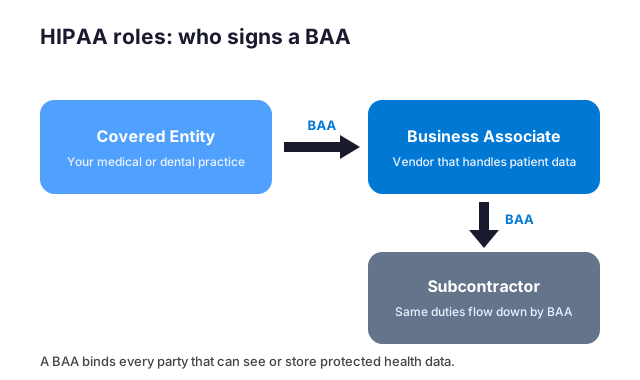
Every BAA has two sides: the covered entity that owns the patient relationship, and the vendor that helps deliver the service. Specifically, your practice is almost always the covered entity, and your vendors are the other side.
The two parties involved
A covered entity is the provider that treats patients and bills for care. Specifically, that is your dental, medical, or therapy practice. The other party is any outside firm that creates, stores, or transmits patient data on your behalf. Furthermore, that vendor often does not work in healthcare at all. As a result, many software and IT companies hold this role without ever thinking about it.
The relationship can also chain. Specifically, a vendor that hires its own supplier must put a BAA in place with them too. Notably, the duties flow all the way down the chain. By contrast, one missing link can quietly break the whole arrangement.
It also helps to name the roles out loud. Specifically, write down which party is the covered entity and which is the vendor for each tool you use. Furthermore, note where a vendor leans on its own suppliers, because those links need cover too. By contrast, leaving the roles vague is how a gap slips in unnoticed. As a result, a one-page map of these relationships makes every later decision easier. Therefore, it is worth sketching before you sign anything new.
✅ Who needs a HIPAA business associate agreement
You need a BAA whenever a vendor can see, store, or move your patients’ data. Specifically, that covers far more vendors than most owners expect. Furthermore, it applies even if the vendor never opens a single record, as long as it could. As a result, the safe question is not whether they look, but whether they can.
Real examples for a small practice
The list is longer than it sounds. Specifically, it includes your email and cloud provider, your billing service, and your IT support. Furthermore, it can include a shredding company, an answering service, or a marketing firm that handles patient lists. By contrast, a vendor with no path to patient data, such as a landscaper, does not need one.
When in doubt, map it out. Specifically, list every tool and outside party your practice uses. Then mark which ones could reach patient data. Notably, that short exercise usually surfaces two or three vendors with no agreement in place.
The exercise pays off twice. Specifically, it surfaces the vendors you forgot, and it confirms the ones you already cover. Furthermore, it gives you a short, defensible list to keep on file. By contrast, relying on memory leaves the gaps you cannot see. As a result, ten minutes with a pen often prevents the single most common audit finding. Notably, the same list makes onboarding a new vendor far quicker later on.

When a BAA is legally required
The trigger is data access, not a formal title. Specifically, the moment a vendor can reach patient data, the agreement is required before they begin work. Furthermore, it does not matter whether the vendor is paid, local, or a household name. As a result, a free tool that stores patient files still needs one.
Size does not change the rule either. Specifically, HIPAA does not scale down for a one-person practice. However, owners often assume small means exempt, which is a costly misread. Therefore, the safe default is simple: if a vendor could see patient data, get the agreement signed first. Notably, doing it up front is far easier than backfilling it later.
🔌 Which of your vendors need a BAA
Most small practices run on a handful of vendors, and several of them qualify. Specifically, the ones that touch email, files, billing, or support almost always need an agreement. Furthermore, the matrix below sorts the common cases so nothing slips through unnoticed.
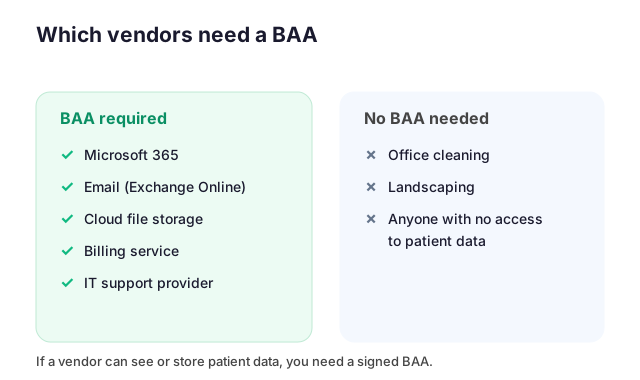
Microsoft 365 sits at the center for many practices. Specifically, email, file storage, and Teams can all hold patient data. Therefore, Microsoft must be covered, and so must anyone who manages that tenant for you. Notably, your IT provider takes on this role the moment it can reach your data.
The same logic applies to billing and storage. Specifically, a billing service handles claims full of patient detail. Furthermore, any cloud backup or storage tool keeps copies of that same data. As a result, each one needs its own signed agreement on file.
Who counts under a HIPAA business associate agreement
Some vendors hide in plain sight. Specifically, an answering service hears patient details, and a fax-to-email tool routes them. Furthermore, a website form or a review platform may quietly collect them too. By contrast, these rarely feel like data vendors, which is why they get missed under a HIPAA business associate agreement.
The fix is to trace the data, not the job title. Specifically, ask where patient information could travel, then follow each path to its vendor. Furthermore, write down every stop along the way. As a result, the list of who needs an agreement becomes obvious. Notably, this short exercise usually finds at least one vendor nobody had on the radar.
📋 What a HIPAA business associate agreement must contain
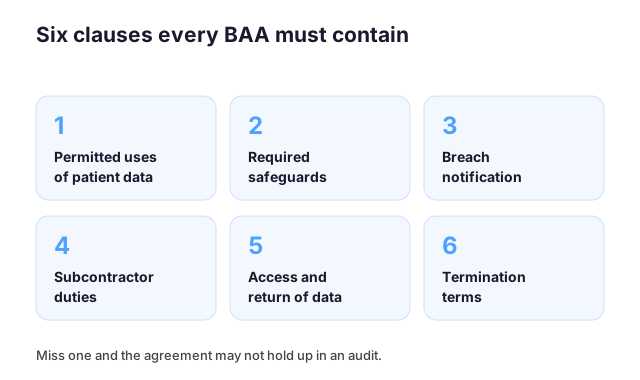
A valid agreement is far more than a signature on a letterhead. Specifically, HIPAA expects several clauses to appear, in plain and readable terms. Furthermore, leaving even one of them out can make the whole contract unreliable exactly when it matters most.
The six required clauses
Each clause does a specific job. Specifically, the contract must define permitted uses, require safeguards, and set breach-notice timing. Furthermore, it must bind subcontractors, grant access and return of data, and spell out termination. As a result, the table below is a quick way to check any agreement a vendor sends you.
A one-page template rarely covers all six. Specifically, a vague form may protect the vendor more than your practice. However, a thorough contract reads clearly and leaves little open to argument. Therefore, it is worth a careful read, or a quick review by someone who knows HIPAA.
🗂️ Where to get a compliant BAA template
You do not have to write a HIPAA business associate agreement from scratch. Specifically, the US Department of Health and Human Services publishes sample provisions you can adapt. Furthermore, most reputable vendors hand you their own agreement to sign. As a result, your job is usually to review and complete one, not to draft it.
Using the official HHS model
The HHS sample language covers the required clauses in plain terms. Specifically, it spells out permitted uses, safeguards, breach notice, and termination. Furthermore, it is free and widely accepted as a starting point. However, it is a template, not a finished contract. Therefore, you still fill in the parties, the dates, and any service-specific detail before it is signed.
| Clause | What it guarantees |
|---|---|
| Permitted uses | What the vendor may do with patient data |
| Safeguards | The vendor must protect the data it holds |
| Breach notice | You are told quickly if data is exposed |
| Subcontractors | The same duties pass to the vendor’s own suppliers |
| Access and return | You can retrieve your data, or have it destroyed |
| Termination | What happens to the data when the contract ends |
Treat any template as a floor, not a ceiling. Specifically, compare what a vendor sends against the six clauses above. By contrast, a form that omits breach timing or subcontractor duties is a real-world gotcha. As a result, a quick review by someone who knows HIPAA is time well spent.
When to have it reviewed
Most agreements are fine to sign as they are, but some deserve a second look. Specifically, have one reviewed when a vendor rewrites the standard terms or narrows its own duties. Furthermore, review any agreement that predates a major change to the service. However, a quick check costs far less than a breach.
A careful read protects more than the paperwork. Specifically, it confirms the vendor actually accepts breach-notice timing and subcontractor duties. By contrast, a vague clause can leave you exposed exactly when you rely on it. Therefore, when the wording looks unusual, ask someone who knows HIPAA before you sign. As a result, you keep the contract working in your favor.
🛠️ How to get a BAA with Microsoft 365
Microsoft makes this step easier than most. Specifically, like other major cloud platforms such as AWS, Microsoft will sign a business associate agreement for its eligible services. Furthermore, for most business plans, from Microsoft 365 Business Standard to Business Premium, that agreement is already part of the Microsoft terms you accept. As a result, you rarely have to chase a separate signature.
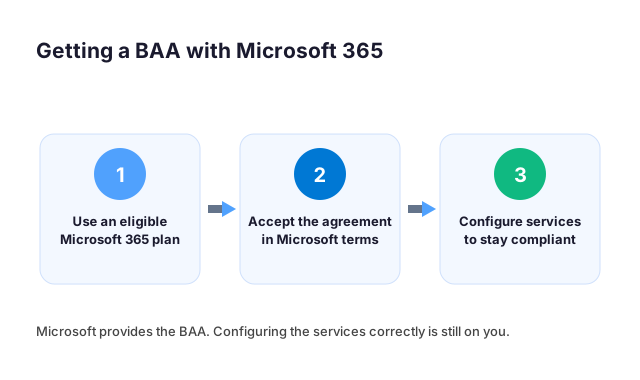
Still, the agreement is only half of the job. Specifically, Microsoft secures the cloud platform and signs the BAA. However, you remain responsible for configuring the safeguards inside your tenant. By contrast, an unconfigured tenant can stay non-compliant even with the BAA in place. Therefore, the signature and the setup have to match.
In practice, that means turning on the right controls. Specifically, that includes the second login lock, outbound encryption, and audit logging. Furthermore, it means limiting who can reach patient data. Notably, this is the work most small practices overlook once they assume the BAA alone makes them compliant.
Where Microsoft signs and where you do
It helps to draw a clear line. Specifically, Microsoft signs the agreement and protects the underlying platform. By contrast, you own every setting inside your own tenant. Furthermore, no provider configures your safeguards for you by default.
That split is where practices slip. Specifically, the agreement covers the platform, while the configuration covers your practice. However, many owners stop at the signature and never finish the setup. As a result, both halves have to be done for the cover to be real. Notably, the second login lock and encryption are the parts most often left half-done.
🔍 Common mistakes with a HIPAA business associate agreement
Even practices that sign agreements make the same handful of mistakes. Specifically, they sign without reading, miss a vendor entirely, or never update an old form. Furthermore, these gaps stay invisible until a breach or an audit puts them in the spotlight.
What BAA compliance really means
Being BAA compliant is not a badge you buy once. Specifically, it means every vendor with data access has a current, complete agreement on file. Furthermore, it means the signed terms match how the vendor actually handles your data. However, many owners struggle here, because a signed PDF feels like the finish line. By contrast, the agreement only works if it stays accurate over time.
| Scenario | With a signed BAA | Without a BAA |
|---|---|---|
| A vendor exposes patient data | Liability is shared and defined | Full liability lands on your practice |
| A regulator reviews your vendors | You show the signed agreement | The gap is itself a violation |
| The vendor uses a subcontractor | Duties pass down by contract | No coverage and no recourse |
A few pitfalls show up again and again. Specifically, the most overlooked is the vendor’s own subcontractor, who also needs to be covered. Furthermore, practices often forget to collect a new agreement when they switch tools. As a result, a real-world breach can land on a practice that thought it was fully covered.
The gaps owners miss most
Three gaps cause most of the trouble. Specifically, an expired agreement, an unsigned new vendor, and a subcontractor that no one checked. Furthermore, each one looks fine on the surface, which is exactly why it lingers for months.
A simple habit closes all three. Specifically, review who has signed once a year, and again whenever you switch a tool. By contrast, a set-and-forget folder slowly drifts out of date. As a result, a short annual check prevents the most common findings in an audit. Notably, the review takes far less time than explaining a gap to a regulator.
⚠️ What happens if you skip the BAA
Skipping the HIPAA business associate agreement does not save time; it just moves the risk onto you. Specifically, without one, your practice carries the full liability for a vendor’s mistake. Furthermore, the missing agreement is itself a HIPAA violation, separate from any breach.
Who carries the liability
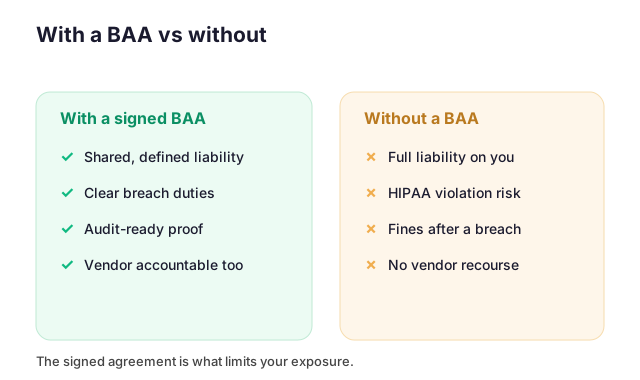
With a signed BAA, liability is shared and defined. By contrast, without one, it sits entirely with your practice. Specifically, if the vendor exposes patient data, you answer for it. Furthermore, you have no contract to fall back on and no recourse against the vendor. As a result, a single missing signature can turn a vendor’s error into your penalty.
The financial side is just as stark. Specifically, breach penalties scale with how careless the lapse looks, and a missing agreement looks careless. Furthermore, fines arrive on top of the cost of the breach itself. Therefore, the signature that takes minutes can prevent a bill that takes years to recover from.
🤝 How a HIPAA business associate agreement fits your compliance
A HIPAA business associate agreement is essential, but it is not the whole job. Specifically, it is one document inside a larger HIPAA program. Furthermore, the agreement sets expectations, while your configuration and evidence prove you meet them. As a result, the strongest practices treat it as the start of compliance, not the end.
Where a HIPAA business associate agreement fits next
Think of the agreement as the contract layer, sitting above the technical work. Specifically, it names duties, while encryption, access limits, and logging carry them out. Furthermore, a risk assessment confirms the whole picture holds together. By contrast, a BAA with no safeguards behind it is a promise no one keeps. Therefore, the agreement and the Microsoft 365 setup should be reviewed together.

This is where a flat-fee review pays off. Specifically, Wintive maps your Microsoft 365 against the HIPAA Security Rule and checks that every vendor agreement is in place. Across 60+ tenants, we have made this routine. Furthermore, you get one report, a prioritized plan, and proof you can show. As a result, the paperwork and the configuration finally line up, at a predictable cost, with the total cost of ownership, or TCO, easy to defend.
What a HIPAA business associate agreement does not cover
The agreement is powerful, but it has clear limits. Specifically, it does not configure your systems, train your staff, or write your policies. Furthermore, it cannot stop a breach on its own; it only assigns duties once one happens.
That is why it is one layer, not the whole defense. Specifically, the technical safeguards are what actually prevent an incident. By contrast, a HIPAA business associate agreement with nothing behind it is a promise with no backup. As a result, it works best beside encryption, access limits, and logging, never as a substitute for them. Therefore, treat the signature as the floor of your program, not the ceiling.
🧮 Putting a BAA in Place: What to Expect
Signing a HIPAA business associate agreement feels daunting, so many owners delay it. In practice, the process is faster than expected. First, you list every vendor that touches patient data. Then you request each one’s standard agreement and read the breach-notice terms. Within a week, most are signed and filed. As a result, you close the biggest gap auditors look for. Above all, a HIPAA business associate agreement turns a vague risk into a documented control.
Still, a signed form is only the start. Therefore, review each HIPAA business associate agreement once a year and whenever a vendor changes. Meanwhile, keep the signed copies where your team can find them fast. Because auditors ask for them first, quick access saves real stress. Ultimately, the goal is a short, current list you trust.
📚 More for healthcare practices
The four related guides below cover the layers around a BAA on Microsoft 365. They span the full compliance picture, secure email, the wider IT setup, and an outside security review.
Related Wintive guides
🔍 Want every vendor agreement checked and your Microsoft 365 mapped to HIPAA?
The M365 Master Audit delivers a written report. Specifically, it maps your Microsoft 365 configuration against the HIPAA Security Rule and confirms each HIPAA business associate agreement is in place. That means the second login lock, outbound encryption, data-loss rules, mailbox access, and audit logging. You also get a prioritized plan to close every gap, flat $1,500, with no hidden add-ons.
❓ Frequently Asked Questions
It is a written contract between a healthcare provider and any vendor that handles patient data on its behalf. The agreement requires the vendor to safeguard that data, report breaches, and pass the same duties to its own subcontractors.
The covered entity, which is your practice, and the business associate, which is the vendor. Any vendor that can create, store, or transmit patient data needs one, including your email, cloud, billing, and IT providers.
Yes. Microsoft offers a business associate agreement that covers eligible Microsoft 365 services, and for most plans it is already part of the Microsoft terms. You still configure the services correctly and keep the evidence.
A template is a fine starting point, and the official HHS model covers the required clauses. However, a one-page form may protect the vendor more than you, so check that all six required clauses are present before signing.
You carry the full liability if that vendor has a breach, and a missing agreement is itself a HIPAA violation that can bring fines. A signed BAA is what limits your exposure.
Your next step
In practice, the fastest start is a single audit that checks every HIPAA business associate agreement and maps your Microsoft 365 to the rules. Finally, you close the gaps it finds and keep the proof for your next review.