

Microsoft 365 E5 Security is the add-on that gives an E3 or Business Premium tenant the full enterprise security stack, without forcing you to buy the whole E5 plan. In other words, you bolt the Defender suite and advanced identity protection onto the plan you already run. Therefore, you get enterprise-grade defence at a fraction of the jump to full E5.
However, the name confuses a lot of admins. Specifically, people mix up Microsoft 365 E5 Security with full E5 and with E5 Compliance. So this guide clears that up first, then shows exactly what the add-on includes, which plans accept it, what it costs, and how to turn it on. By the end, you will know whether Microsoft 365 E5 Security is the right move for your tenant.
🛡️ Free: M365 Audit Checklist
19-page PDF with 50 hands-on checks covering Entra ID, Exchange Online, SharePoint, Teams, Intune, license waste, and audit logging. PowerShell commands included. Built from 60+ real tenant audits at Wintive.
🧭 Microsoft 365 E5 Security: the short answer
Microsoft 365 E5 Security is a paid add-on, not a standalone plan. It layers five enterprise security workloads onto an existing base: Defender for Endpoint Plan 2, Defender for Office 365 Plan 2, Defender for Identity, Defender for Cloud Apps, and Microsoft Entra ID P2. You can now add it to Microsoft 365 E3 or, newly, to Microsoft 365 Business Premium. In short, it brings E5-level security to a cheaper base plan, so you skip the cost of full E5 while still getting the complete Defender stack.
Critically, the key word is add-on. You do not replace your plan; you extend it. Therefore, your users keep the same apps, mail, and licences, and simply gain a deeper security layer underneath.
Notably, the add-on hides a lot of power behind a simple licence. You assign one extra SKU, and five enterprise tools light up across the tenant. Therefore, the buying decision is small, even though the security upgrade is large. As a result, it suits teams that want enterprise defence without an enterprise project.
In practice, this matters most for teams that want serious threat protection on a budget. Full Microsoft 365 E5 bundles security, compliance, voice, and analytics into one expensive licence. Microsoft 365 E5 Security, by contrast, carves out just the security half. So you pay for defence alone, and leave the rest behind.
🛡️ What Microsoft 365 E5 Security includes
First, look at exactly what you get. Microsoft 365 E5 Security bundles five workloads that normally sit only in full E5. Together, they form a complete extended detection and response stack, often shortened to XDR.
Moreover, you would normally pay for full E5 to get these five tools. The add-on unbundles them, so you reach the same security ceiling from a cheaper floor. Therefore, the value is obvious for any team that wants the Defender suite but not the rest of E5.
Specifically, the add-on includes Microsoft Defender for Endpoint Plan 2, Defender for Office 365 Plan 2, Defender for Identity, Defender for Cloud Apps, and Microsoft Entra ID P2. Each one guards a different part of your environment. The chart lists the full set.
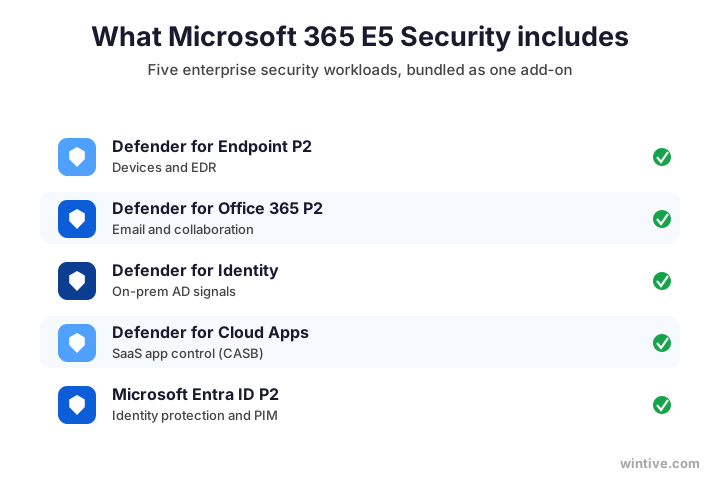
Therefore, do not let the five names intimidate you. You buy one add-on, and Microsoft wires the tools together for you. As a result, the complexity stays under the hood, while you simply get a stronger tenant.
🆚 E5 versus E5 Security: the key difference
Now to the confusion that fills forum threads. People constantly ask how Microsoft 365 E5 Security differs from full E5. The answer is simple. Full E5 is the complete plan, while E5 Security is only its security slice, sold as an add-on.
Importantly, this distinction saves real money. Many admins assume they must buy full E5 to get the Defender suite. In fact, the E5 Security add-on delivers that exact stack for far less. Therefore, knowing the difference is worth a large line on your invoice.
Specifically, full Microsoft 365 E5 wraps the apps, voice, advanced analytics, the security stack, and the compliance stack into one licence. E5 Security takes just the security stack out of that bundle. Meanwhile, E5 Compliance takes the compliance stack. Therefore, the two add-ons together roughly equal the security and compliance value of full E5. The chart sets them side by side.
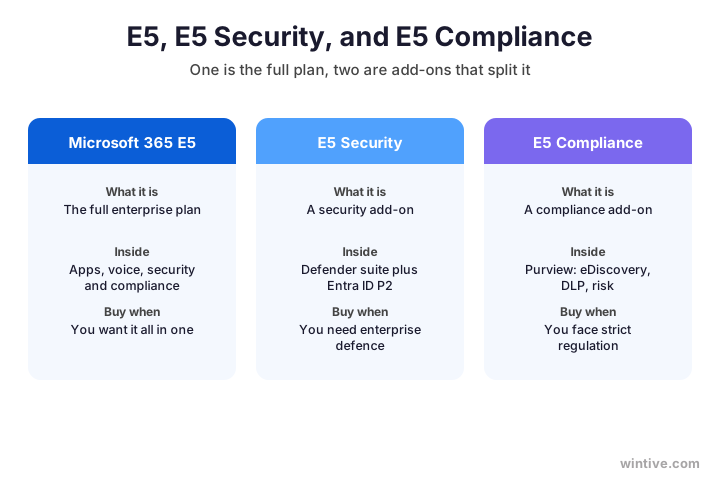
As a result, you can buy only the half you need. A team that wants defence but not advanced compliance picks E5 Security alone. So you avoid paying for tools you will never switch on.
🔎 The five Defender workloads, explained
Next, here is what each workload actually does. Defender for Endpoint Plan 2 protects laptops and servers with full detection and response, threat hunting, and automated remediation. Defender for Office 365 Plan 2 guards email and collaboration, and it adds attack simulation and automated investigation. Together, the endpoint and email tools alone justify the add-on for most firms. Together, they stop the two attacks that hit businesses hardest: malware on a device and phishing in an inbox. Therefore, even a small team gets immediate value from just those two workloads.
Furthermore, Defender for Identity watches your on-premises Active Directory for attacks like lateral movement. Defender for Cloud Apps acts as a broker over your SaaS apps, so you see and control shadow IT. Finally, Microsoft Entra ID P2 adds Privileged Identity Management, risk-based Conditional Access, and access reviews.
Therefore, the value is not five disconnected tools. Instead, they share signals and feed one investigation experience. As a result, an attack that starts on a laptop and moves to email and identity is visible as a single story, not five separate alerts.
🌐 How the XDR stack covers every surface
Importantly, modern attacks cross boundaries. They might land in an inbox, jump to a device, then pivot to an identity. Therefore, point defences miss them, because each tool only sees its own corner.
Specifically, the shared view is the real prize. A lone alert rarely tells the whole story, yet a connected timeline does. Therefore, your team spends less time correlating logs and more time stopping the attack. As a result, response gets faster exactly when speed matters most.
By contrast, Microsoft 365 E5 Security covers all the surfaces at once. Endpoints, email, on-premises identity, cloud apps, and cloud identity all report into the same engine. As a result, the security team chases one connected incident instead of stitching clues together by hand. The diagram maps the coverage.
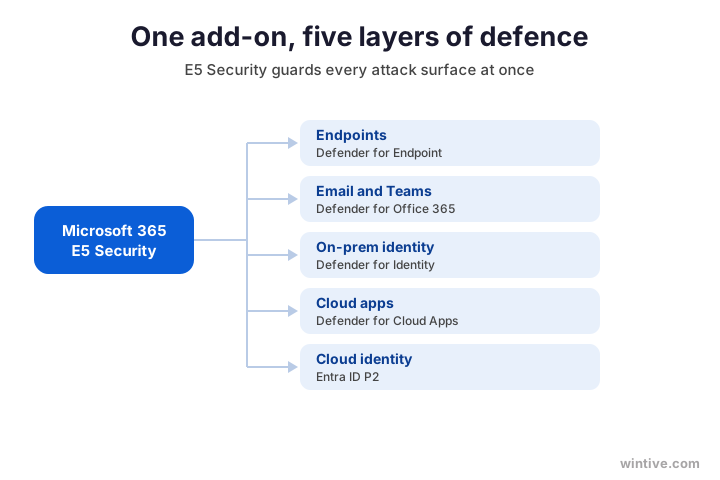
Therefore, the whole becomes far greater than its parts. Five tools that talk to each other beat five that work alone. As a result, E5 Security delivers a security-operations capability that used to need a dedicated team.
➕ Which plans you can add it to
Now the practical question. You cannot buy Microsoft 365 E5 Security on its own, because it is an add-on. Therefore, you attach it to a qualifying base plan. Historically, that meant Microsoft 365 E3.
Critically, you must hold a qualifying base before you buy. The add-on attaches to that base, so it cannot stand alone. Therefore, confirm your plan first, then layer the security on top. In practice, that check takes a minute and avoids a failed purchase.
Recently, however, Microsoft also made E5 Security available as an add-on to Microsoft 365 Business Premium. This is a real shift for smaller firms. Specifically, a business under 300 seats can now run Business Premium and bolt on the full E5 security stack. So enterprise defence is no longer locked behind enterprise plans. The chart shows the model.
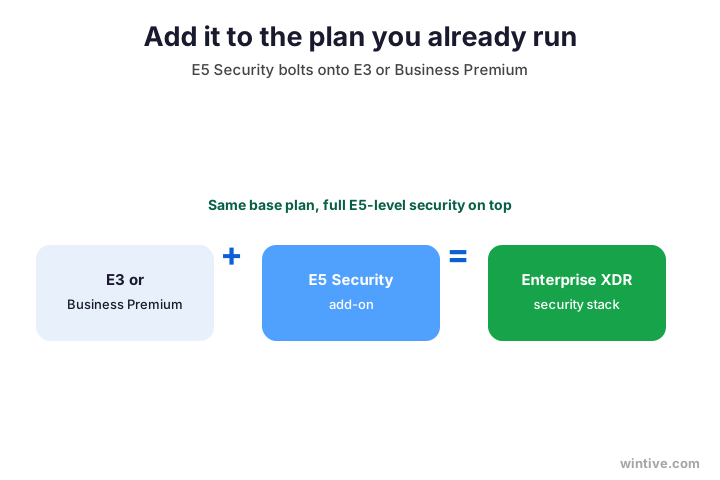
Therefore, if you weighed Business Premium against E3 for security, this changes the maths. We cover that base decision in our Business Premium vs E3 guide. In short, you can now start small and still reach E5-level protection.
In short, the base plan you pick still matters, since it sets your apps, your seat cap, and your starting protection. So choose it deliberately, then add the security stack with confidence.
💷 What Microsoft 365 E5 Security costs
Naturally, price drives the decision. Treat these as rough US list figures, since they change. Microsoft 365 E5 Security runs around 12 USD per user each month, on top of your base plan.
In addition, weigh the cost against a single breach. One serious incident dwarfs years of the add-on fee. Therefore, leaders who frame it as insurance rarely hesitate. As a result, the twelve dollars looks small next to the risk it removes.
Therefore, an E3 user plus the add-on lands well below the price of full E5. You gain the entire Defender stack while skipping the compliance, voice, and analytics that full E5 also charges for. The table compares the routes.
| Route | Roughly what you pay | What you get |
|---|---|---|
| Stay on E3 or Business Premium | Base price only | No advanced Defender stack |
| Base plus E5 Security | Base plus about 12 USD | Full Defender suite and Entra ID P2 |
| Move to full E5 | Highest per user | Security plus compliance, voice, analytics |
As a result, most teams that only need stronger defence choose the middle route. They keep a familiar base plan and add the security they were missing.
Therefore, run the numbers per user before you commit. A quick comparison of base plus add-on against full E5 usually settles the debate. As a result, you choose the cheaper route with evidence, not guesswork.
🧮 E5 Security or full E5: which to buy
So, how do you choose? The decision turns on one question. Do you need only advanced security, or do you also need advanced compliance?
Furthermore, most SMBs land on the security-only side of that question. They want strong defence, yet they rarely need advanced eDiscovery or insider-risk tooling. Therefore, the add-on fits them, and full E5 would waste half its value. In short, buy the half you will actually use.
Specifically, if you want the Defender stack and stronger identity protection, the add-on is enough. However, if you also face heavy regulation, with advanced eDiscovery, insider risk, and records management, then full E5 or the E5 Compliance add-on earns its place. The flow makes the call clear.
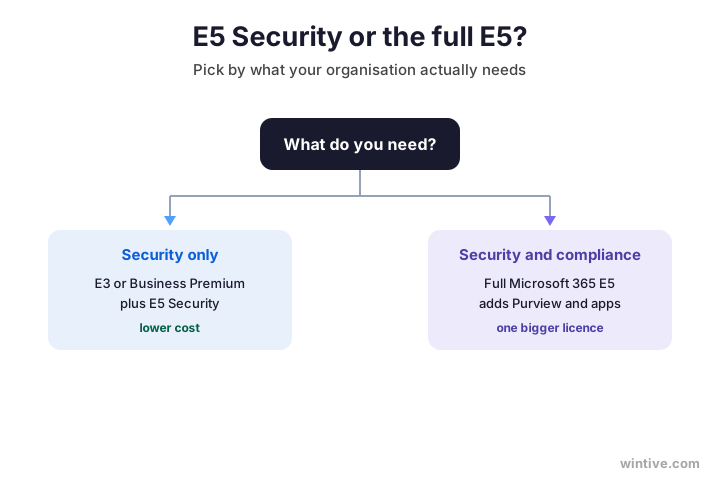
Therefore, be honest about your real obligations before you decide. Most teams discover they want defence far more than governance. As a result, the add-on route wins for them, and full E5 can wait.
Wintive insight. Across the tenants we audit, most SMBs overbuy by jumping straight to full Microsoft 365 E5 for the security alone. They then leave the compliance, voice, and analytics half of the licence completely unused. Adding E5 Security to E3 or Business Premium gives them the exact protection they wanted, often for a third less per user. We right-size this on almost every engagement.
📚 E5 Security versus E5 Compliance
Meanwhile, do not confuse the two add-ons. They are siblings, not rivals, and they cover different jobs. E5 Security handles threats, while E5 Compliance handles data governance.
Notably, you can add both over time if your needs grow. A firm might start with E5 Security, then layer E5 Compliance once regulation tightens. Therefore, the two add-ons let you build up gradually. As a result, you never pay for governance tools before you truly need them.
Specifically, E5 Compliance adds Microsoft Purview tools: advanced eDiscovery, insider risk management, communication compliance, advanced data-loss prevention, and records management. Therefore, a law firm or a bank often needs it, while a typical SMB does not. The table separates the two.
| Add-on | What it protects | Typical buyer |
|---|---|---|
| E5 Security | Devices, email, identity, apps | Any firm wanting strong defence |
| E5 Compliance | Data governance and legal risk | Regulated or litigation-heavy teams |
As a result, plenty of teams add E5 Security and leave E5 Compliance for later. If your duty is mainly to preserve mail, our Exchange Online Litigation Hold guide covers the simpler tool you may already own.
Therefore, name the two add-ons correctly in every quote and renewal. The labels look alike, yet they buy very different things. As a result, you never pay for compliance when you only meant to buy security.
👤 Who needs Microsoft 365 E5 Security
Of course, not every tenant needs this add-on. So decide by risk, not by habit. A firm that handles client data, runs remote staff, or has suffered a scare gains the most from the Defender stack.
However, even a small team should review its built-in tools first. Business Premium already includes solid baseline protection, so the gap may be smaller than it looks. Therefore, audit what you own before you buy more. As a result, you add the stack only where it closes a real hole.
However, a tiny, low-risk team on Business Premium may already have enough built-in protection. Therefore, weigh the threat you actually face. The table maps the add-on to common situations.
| Your situation | Is E5 Security worth it? |
|---|---|
| Client or regulated data, remote staff | Yes, the Defender stack pays for itself |
| Past phishing or malware incidents | Yes, you need detection and response |
| Very small, low-risk, few devices | Maybe not yet; review built-in tools first |
Therefore, the honest answer for many SMBs is a qualified yes. They need the endpoint and email defence today, even if the rest can wait. As a result, a targeted rollout to the riskiest users is a sensible first step.
🔧 How to buy and assign E5 Security
Once you decide, the rollout is straightforward. You buy the add-on, then assign it like any other licence. First, check what your tenant already owns, since you may hold part of the stack.
Furthermore, plan who gets the add-on before you start. High-risk roles like finance, IT, and leadership usually come first. Therefore, you can stage the rollout rather than licensing everyone at once. In practice, a phased assignment keeps both the budget and the change manageable.
# See which Microsoft 365 SKUs your tenant owns (Graph PowerShell)
Connect-MgGraph -Scopes "Organization.Read.All"
Get-MgSubscribedSku | Select-Object SkuPartNumber, ConsumedUnits, PrepaidUnits
Then assign the add-on to each user who needs it. The Microsoft 365 E5 Security SKU shows up as IDENTITY_THREAT_PROTECTION.
# Assign the Microsoft 365 E5 Security add-on to a user
Connect-MgGraph -Scopes "User.ReadWrite.All"
$sku = (Get-MgSubscribedSku | Where-Object SkuPartNumber -eq "IDENTITY_THREAT_PROTECTION").SkuId
Set-MgUserLicense -UserId user@yourdomain.com -AddLicenses @{SkuId=$sku} -RemoveLicenses @()
Finally, document who holds the add-on and why. A short record keeps your licensing tidy as people join and leave. Therefore, the next admin can see the plan at a glance, which saves confusion later.
⚙️ Turn it on after the licence lands
Critically, a licence is not protection on its own. The Defender tools only help once you configure them. Therefore, plan a short rollout rather than assuming the add-on works the moment you assign it.
Importantly, the configuration is where the protection actually lives. A perfectly licensed tenant with no policies stays exposed. Therefore, treat the setup as the project, not an afterthought. As a result, you turn a purchase into real, working defence.
Specifically, onboard devices into Defender for Endpoint, set policies in Defender for Office 365, and switch on Entra ID P2 features like Privileged Identity Management. Microsoft documents each step in its Microsoft Defender XDR documentation. After that, confirm the service plans are live.
# Confirm the E5 Security service plans are active
Get-MgSubscribedSku | Where-Object SkuPartNumber -eq "IDENTITY_THREAT_PROTECTION" |
  Select-Object -ExpandProperty ServicePlans |
  Where-Object ProvisioningStatus -eq "Success"
Therefore, treat the licence as step one and the configuration as the real work. As a result, you actually use the protection you paid for, rather than letting it sit idle.
🔐 E5 Security and Business Premium
Notably, the Business Premium option deserves its own note, because it changes the game for smaller firms. Business Premium already bundles Defender for Business and Entra ID P1. Adding E5 Security then upgrades that to the full enterprise Defender suite and Entra ID P2.
Furthermore, this combination closes the old SMB gap for good. Smaller firms used to accept weaker security because full E5 felt out of reach. Now they keep an affordable base and still run the enterprise Defender stack. Therefore, size no longer dictates how well a business can defend itself.
Therefore, an SMB no longer has to choose between an affordable plan and serious security. Instead, it runs Business Premium for the apps and base protection, then adds E5 Security for enterprise defence. As a result, a thirty-person firm can match the security posture of a large enterprise. To pick the right base first, see our Business Premium vs E3 comparison.
| On Business Premium | Built in alone | With E5 Security added |
|---|---|---|
| Endpoint protection | Defender for Business | Defender for Endpoint Plan 2 |
| Identity | Entra ID P1 | Entra ID P2 with PIM |
| Email defence | Defender for Office 365 P1 | Defender for Office 365 Plan 2 |
| Cloud app control | Limited | Defender for Cloud Apps |
🚤 Common Microsoft 365 E5 Security mistakes
Meanwhile, a few mistakes waste the investment. First, many teams buy full E5 when they only wanted the security half, then never use the rest. Therefore, they overpay for idle compliance and voice tools.
Moreover, a third mistake is licensing the wrong people. Some teams buy the add-on for everyone, including low-risk users who never touch sensitive data. Therefore, target the roles that actually face threats. As a result, you spend the budget where it removes the most risk.
Conversely, others buy the add-on and never configure it, so the Defender stack sits dark. However, the biggest trap is forgetting to manage devices, since endpoint protection needs healthy, patched machines. So pair E5 Security with solid update hygiene, which our Intune updates guide walks through.
✅ Microsoft 365 E5 Security checklist
Condensed, here is how to approach Microsoft 365 E5 Security with confidence.
- Remember it is an add-on, not a standalone plan.
- It adds five workloads: the Defender suite plus Entra ID P2.
- Attach it to Microsoft 365 E3 or Business Premium.
- Choose it over full E5 when you need security but not compliance.
- Budget roughly 12 USD per user, on top of the base plan.
- Do not confuse E5 Security with E5 Compliance.
- Assign the IDENTITY_THREAT_PROTECTION SKU, then configure it.
- Pair it with managed devices and patching to get the value.
Ultimately, at Wintive we right-size Microsoft 365 E5 Security for SMBs as part of our managed security services. Moreover, we assign it, configure the Defender stack, and tune the policies so it actually protects you. To get started, contact us for a free consultation. It is quick, and we do the rest.
📚 More for Microsoft 365 admins
Therefore, these published Wintive guides go deeper on the topics Microsoft 365 E5 Security touches next. So bookmark the ones that fit your tenant.
🔍 Want a complete audit of your Microsoft 365 tenant?
The M365 Instant Audit scans your environment in under 10 minutes: license waste, security posture, MFA coverage, compliance gaps, and rightsizing. A full PDF report with prioritized fixes arrives instantly.
❓ Frequently Asked Questions
It is a paid add-on that layers the full enterprise security stack onto a base plan. Specifically, it adds Defender for Endpoint Plan 2, Defender for Office 365 Plan 2, Defender for Identity, Defender for Cloud Apps, and Microsoft Entra ID P2.
Full Microsoft 365 E5 is the complete plan, with apps, voice, security, and compliance. E5 Security is only the security slice of E5, sold as an add-on you attach to E3 or Business Premium.
Yes. Microsoft now offers E5 Security as an add-on to Microsoft 365 Business Premium, as well as to E3. So a smaller firm under 300 seats can reach E5-level security without buying full E5.
It runs roughly 12 USD per user each month on top of your base plan, though prices change. An E3 user plus the add-on still costs well below full E5, because you skip the compliance and voice tools.
E5 Security covers threats, with the Defender suite and Entra ID P2. E5 Compliance covers data governance, with Purview tools like advanced eDiscovery and insider risk. They are separate add-ons for separate jobs.
Yes. The licence unlocks the tools, but they only protect you once you set them up. You onboard devices, set Defender policies, and switch on Entra ID P2 features such as Privileged Identity Management.
🧭 Your next step
Want Microsoft 365 E5 Security sized and set up properly? First, book a short call. Then we review your plan, your risks, and the tools you already own. Finally, we add and configure exactly what you need. To start, contact Wintive. It is quick, and we do the rest.