

Microsoft 365 Business Premium is Microsoft’s all-in-one plan for small and mid-sized businesses. Therefore, it bundles the full Office apps, email, and Teams with a complete security and device-management stack. In other words, it is productivity and protection in one licence. However, for most SMBs with laptops and client data, it is the plan to be on.
Furthermore, this guide explains what Business Premium actually includes, what it costs, and who it is for. We itemise the security stack, walk through pricing, compare it briefly to Standard and the enterprise plans, and show how to set it up. By the end, you will know whether Premium fits your team, and how to get the most from it.
🛡️ Free: M365 Audit Checklist
19-page PDF with 50 hands-on checks covering Entra ID, Exchange Online, SharePoint, Teams, Intune, license waste, and audit logging. PowerShell commands included. Built from 60+ real tenant audits at Wintive.
🧭 What Microsoft 365 Business Premium is
Microsoft 365 Business Premium is the top small-business plan from Microsoft. It includes everything in Business Standard: the Office desktop apps, email, Teams, and 1 TB of OneDrive. On top of that, it adds a security stack: Defender for Business, Microsoft Intune, Entra ID Plan 1, and data-loss prevention. It supports up to 300 users. In short, it is Office plus a managed security layer, sold as one per-user licence.
Specifically, here is the simplest way to picture it. Business Premium is a productivity suite with security built in. Notably, the productivity half is the same Office you already know. The security half is what turns it into a defended, managed environment. Therefore, you are not just buying apps. Finally, you are buying control over your devices and your data. In practice, that control is what turns a scare into a non-event. Critically, a lost laptop becomes a remote wipe, not a breach.
🎯 Who Business Premium is built for
In practice, Microsoft positions Premium as the plan for businesses that take security seriously. That is most of them now. As a result, any team with laptops, remote staff, or sensitive records needs more than email and Word. Premium gives them that, without the cost and complexity of an enterprise plan. In short, it is enterprise-grade security at a small-business price. Therefore, that balance is exactly why it exists. Notably, the same Defender engine protects Fortune 500 firms.
However, you simply get it sized and priced for a smaller team. In other words, you are not buying a watered-down version. Furthermore, you are buying the real thing, scaled to fit. That distinction matters when you compare quotes. Specifically, a cheaper plan with bolt-ons is not the same product. Microsoft built it for the gap between tiny shops and large enterprises. For example, a 40-person firm needs real security but not enterprise tooling. Notably, Premium fits that firm perfectly.
🎯 Why most SMBs land on Premium
Finally, there is a reason Microsoft pushes Business Premium for small firms. The threat landscape changed. Critically, attackers now target small companies, because they hold real data and run weak defenses. So the old plan, just email and Office, is no longer enough.
In practice, Premium answers that shift in one bundle. It assumes you have laptops, remote staff, and data worth stealing. Therefore, it ships with device management and threat protection by default. As a result, you do not have to assemble a security stack yourself. That assembly is where DIY setups fail. Therefore, pieces from different vendors leave seams, and attackers find them. A single integrated stack removes those seams. As a result, there is no gap between products to slip through.
That is why most SMBs end up here. However, they start on a cheaper plan, get a scare or a client demand, and move up. In practice, Premium has become the new baseline for a serious small business. Furthermore, starting there saves the painful detour. Moreover, moving later means redoing onboarding and retraining staff. Specifically, so picking Premium from the start is the calm path.
📦 What Business Premium includes
Notably, Microsoft 365 Business Premium is a big bundle. It helps to split it into two halves: the apps you use, and the security that protects them. The chart shows both.
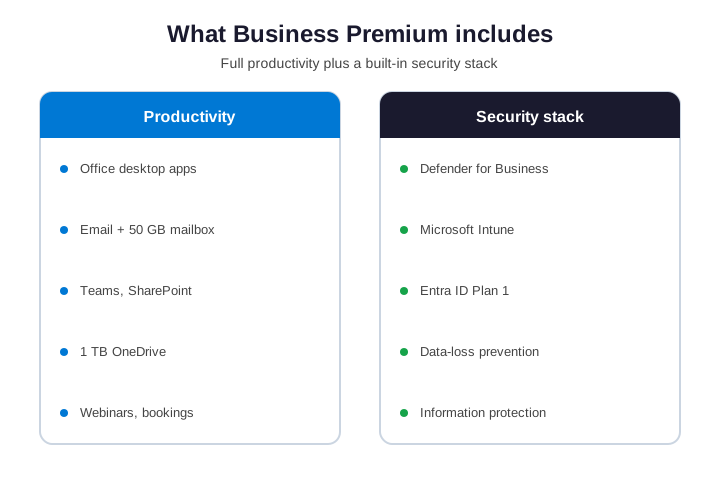
Finally, on the productivity side, you get the desktop Office apps: Word, Excel, PowerPoint, and Outlook. You get a 50 GB mailbox, 1 TB of OneDrive, and Exchange Online. Critically, Teams, SharePoint, webinars, and bookings are all there, though calling needs a separate Teams Phone add-on. So far, that matches Business Standard exactly. In other words, you lose nothing in daily work. In practice, the upgrade is purely additive. Therefore, the switch carries no risk to daily work. As a result, you gain protection and lose nothing.
Therefore, on the security side, Premium adds the tools Standard lacks. That includes Defender for Business, Microsoft Intune, Entra ID Plan 1, and data-loss prevention. However, it also adds information protection and self-service password reset. Each of these would be a separate purchase otherwise. Furthermore, bundled, they cost a fraction of the standalone price. In fact, the bundle is Microsoft’s whole pitch. Specifically, buy the suite, not the parts. The parts never quite fit together. Notably, a suite is designed to. The full list is in the table below.
📋 The full feature list
| Capability | In Business Premium |
|---|---|
| Office desktop apps | Yes |
| Email, 50 GB mailbox | Yes |
| Teams, SharePoint, 1 TB OneDrive | Yes |
| Defender for Business | Yes |
| Microsoft Intune | Yes |
| Entra ID Plan 1 + Conditional Access | Yes |
| Data-loss prevention and labels | Yes |
| User cap | 300 |
Finally, notice how the bottom of the list is all security. That is the part you do not get on cheaper plans. Critically, it is also the part that makes Premium worth the price for most teams. Strip the security away, and you are left with Standard. In practice, add it back, and you have a defended business. In practice, that is the whole story of Premium in one line. Everything else is detail.
🛡️ The Business Premium security stack
As a result, the security stack is the heart of Microsoft 365 Business Premium. So it is worth knowing what each tool actually does. Therefore, none of it is hard once it is set up, and a partner can do that for you. The tools are powerful but not fragile. However, once configured, they mostly run themselves. So the ongoing burden is light. Furthermore, a quarterly review is usually enough to keep them healthy. We bake that review into our managed service. Specifically, so the protection does not quietly drift over time. Settings rot if nobody watches them. A short, regular check keeps the stack honest.
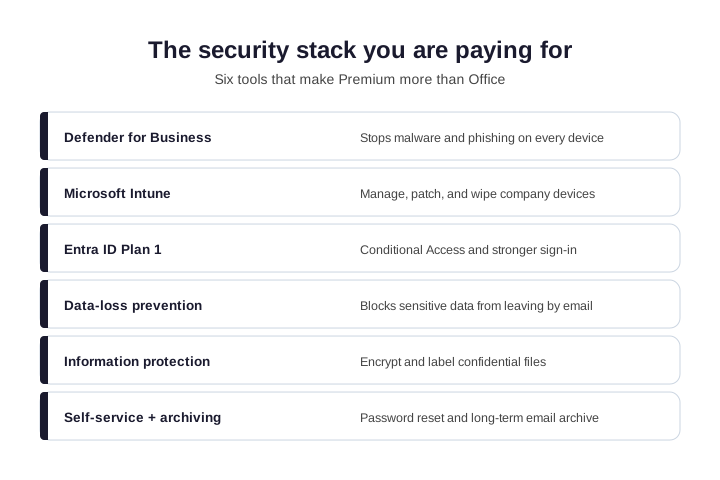
Defender for Business is enterprise-grade antivirus and threat protection for every device. Microsoft Intune manages those devices: it can push policies, patch them, and wipe a lost laptop remotely. Entra ID Plan 1 adds Conditional Access, so only trusted users and devices reach your data.
Data-loss prevention stops sensitive information from leaving by email, while Microsoft Defender for Office 365 blocks what comes in. Information protection lets you encrypt and label confidential files. Finally, self-service password reset and long-term email archiving round out the stack. Notably, together, these turn Office into a managed, audit-ready environment. Each tool is useful alone. Finally, combined, they cover identity, devices, and data at once. Notably, those are the three things attackers go after. Critically, Premium guards all three from one console.
💷 Business Premium pricing and real cost
In practice, business Premium is sold per user, per month, with an annual commitment for the best rate. There is one fee, and it includes the security stack. So the headline price looks higher than Standard, but it bundles tools you would otherwise buy separately.
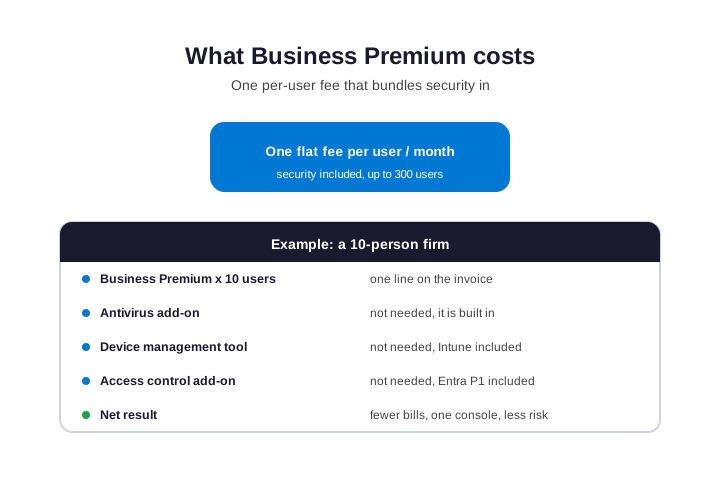
As a result, run the real math, and Premium usually wins. Buy Standard, then add a separate antivirus, a device-management tool, and an access-control add-on, and you pay more for a messier setup. Therefore, Premium folds all of that into one line. As a result, it is often the cheaper total for a team that needs security at all. However, tally your antivirus, your MDM, and your backup add-ons. The bundle usually undercuts the sum.
Furthermore, pricing does change over time, and exact figures depend on your region and reseller. Therefore, always confirm the current per-user rate before you commit. Specifically, a partner can also right-size your mix, so frontline or web-only staff are not on a full Premium licence they do not need. In short, you pay for protection only where it is needed. That alone often funds the upgrade for the rest of the team.
🆚 Premium vs Standard, E3, and E5
Notably, where does Premium sit? It is one rung up from Standard, and well below the enterprise plans. The ladder shows the lineup.
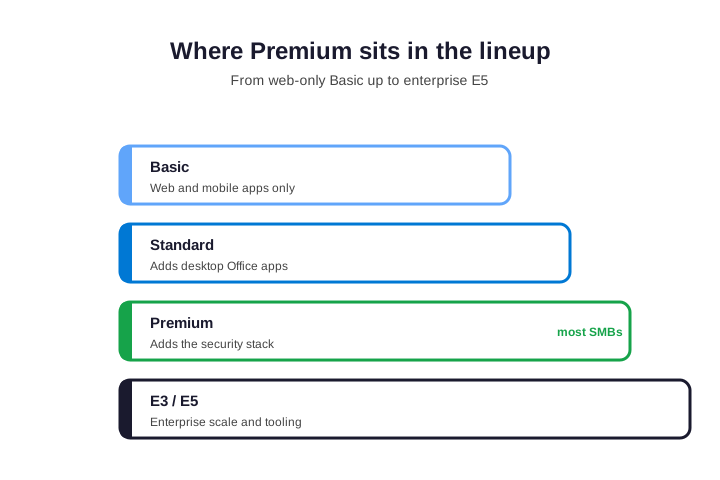
Finally, below Premium, Business Standard has the same apps but no security stack. If you are weighing those two, see our Business Standard vs Premium guide. Critically, below that, Business Basic is web and mobile only. So Basic suits frontline or shared-device staff. In practice, it is rarely the right home for a knowledge worker. They need the desktop apps and the security. As a result, so they belong on Premium, not Basic. Match the plan to the role, not the headcount. Therefore, a mixed team can run several plans at once. For example, office staff on Premium and a kiosk user on Basic. So you tune cost to role, not to the lowest common denominator.
However, above Premium sit E3 and E5. These are enterprise plans with no 300-user cap and deeper tooling. Furthermore, for most SMBs, they are overkill and overpriced. Premium gives you the security that matters without the enterprise bill. Specifically, so unless you are large or have strict compliance needs, Premium is the sweet spot. For example, E5 adds advanced analytics most SMBs never open. Therefore, paying for it is rarely worth it below enterprise scale. Notably, it gives you the controls that matter. It skips the enterprise features you would never touch.
👥 Who Business Premium is for
Finally, Premium is not for everyone. But it is the right fit for far more teams than realise it. Here is who should be on it.
Critically, choose Premium if you issue company laptops, because Intune is the only clean way to manage and wipe them. It fits if you hold client, legal, financial, or health data, since that data needs Defender and DLP. In practice, remote and hybrid teams need it too, because Conditional Access protects sign-ins from anywhere. In short, if a breach would hurt, Premium is the baseline. As a result, ask yourself one question. Could you survive a week with your data locked? If not, you need the stack.
👥 Who can stay on Standard
Therefore, some teams can skip it for now. A handful of freelancers on personal devices, with no sensitive data, may do fine on Standard. Even then, the moment they win a real client or hire staff, the calculus flips.
However, growth is the usual trigger. One new contract often forces the upgrade overnight. Furthermore, we have done emergency upgrades for exactly this reason. Planning ahead avoids that scramble.
Specifically, a calm migration beats a panicked one every time. So decide before the deadline forces your hand. Notably, deadlines remove your options. We have seen firms forced onto Premium in a single day. Finally, it works, but it is stressful and rarely the cheapest path. A little foresight keeps you in control of the timing and the price. In short, plan the move on your terms. Critically, do not let a breach or a deadline plan it for you. So plan for the team you are growing into. In practice, hiring, laptops, and clients all arrive faster than expected. The plan that fits today should still fit next year. As a result, risk arrives with your first real client. It is cheaper to be ready than to scramble.
Wintive insight. Across the SMB tenants we audit, the pattern is clear. Teams already pay for Premium-grade security, just spread across three or four separate tools. As a result, they overspend and still leave gaps between products. In practice, consolidating onto Business Premium is cheaper, simpler, and more secure than the patchwork it replaces.
🪤 The mistake: buying it and not using it
Therefore, the most common Premium mistake is not buying the wrong plan. It is buying the right plan and never switching the security on. However, a licence is not protection. Defender, Intune, and Conditional Access only help once configured.
Furthermore, we see it often. A firm upgrades to Premium, feels safer, and changes nothing. Specifically, the tools sit dormant. The laptops stay unmanaged. Notably, so the money is spent, but the risk is unchanged. That is the worst outcome of all. Finally, you pay for safety and get none. Whatever you do, finish the setup. Critically, the plan gives you the tools; you still have to turn them on. Think of it like a gym membership. In practice, buying it is not the same as using it. So we always finish with configuration, not just licensing. Otherwise the spend is wasted. As a result, we treat licensing and setup as one job, never two. A licence without configuration is just a receipt.
🔐 Does it include Intune and Defender?
Therefore, two questions come up constantly: does Premium include Intune, and does it include Defender? The answer to both is yes. They are core parts of the plan, not add-ons.
However, Microsoft Intune is included in full, so you can enrol, manage, and wipe devices at no extra cost. Defender for Business is included too, giving you device antivirus and threat protection. Furthermore, Entra ID Plan 1 and data-loss prevention are in the box as well. In other words, nothing here is an upsell. The security stack is the product. So when people ask what makes Premium special, this is the honest answer: it is these security tools. Everything above them is shared with Standard. The security layer is the entire reason to pay more.
📊 Business Premium and compliance
Security is not only about stopping attacks. It is also about proving you take data seriously. More clients now ask how you protect their information before they sign. Premium gives you a real answer.
With Defender, Intune, and data-loss prevention, you can show that devices are managed and data is controlled. That matters for legal, finance, and healthcare clients especially. Frameworks like HIPAA and most cyber-insurance forms expect exactly these controls. As a result, Premium often pays for itself the first time a client audit or an insurer asks.
Standard cannot make those claims, because it lacks the tools. So for any firm that handles regulated or sensitive data, Premium is not optional. It is the price of being trusted with that data at all. Increasingly, insurers ask too. Many cyber-insurance policies now require these exact controls to pay a claim. For example, a single signed NDA can now demand managed devices. As a result, the plan choice becomes a sales requirement, not just an IT one.
🧮 A real cost example
Numbers make the Microsoft 365 Business Premium case concrete. Take a ten-person firm with laptops and client records. On Standard, those laptops are unmanaged, and there is no central defense. On Premium, both are handled. First, check what your tenant actually owns today.
# See which Microsoft 365 licences your tenant owns (Graph PowerShell)
Connect-MgGraph -Scopes "Organization.Read.All"
Get-MgSubscribedSku | Select-Object SkuPartNumber, ConsumedUnits, PrepaidUnits
Run that, and the duplication usually shows up. Most tenants carry at least one redundant security tool. Premium lets you cancel it and consolidate. Many firms pay for Standard, then pay again for separate antivirus and a device tool. Add it up, and Premium would have been cheaper and simpler. We run this math with clients constantly. The result rarely surprises us anymore. Typically, the firm is already spending Premium money, just inefficiently. Consolidation frees budget and closes gaps at the same time. That is a rare win in IT. Usually you pay more to be safer; here you often pay less. We point this out because few buyers expect it. Security is normally a cost, not a saving. So the example almost always points the same way for an SMB with devices. Add up your current security spend first. Premium usually replaces most of it for less.
🚀 How to buy and set up Business Premium
Buying Microsoft 365 Business Premium is simple. You can get it from Microsoft directly, from a reseller, or through a partner who also configures it. Switching from another plan takes no migration and no downtime. First, assign the licence to your users.
# Assign the Business Premium licence to a user (Graph PowerShell)
Connect-MgGraph -Scopes "User.ReadWrite.All"
$sku = (Get-MgSubscribedSku | Where-Object SkuPartNumber -eq "SPB").SkuId
Set-MgUserLicense -UserId user@yourdomain.com -AddLicenses @{SkuId=$sku} -RemoveLicenses @()
Once the licence lands, the security tools are available but not yet active. That is normal, and it is the step most teams miss. They see the licence and assume they are protected. Therefore, we always verify the stack is live, not just owned. Confirm the security service plans are present before you start configuring. The check below lists them. If a plan is missing, the licence has not finished provisioning. In that case, wait a few minutes and check again. Provisioning is usually quick, but it is not instant. Patience here avoids a false alarm.
# Confirm the Premium security service plans are present
Get-MgSubscribedSku | Where-Object SkuPartNumber -eq "SPB" |
  Select-Object -ExpandProperty ServicePlans |
  Where-Object ProvisioningStatus -eq "Success"
🧰 Business Premium: first things to turn on
A Premium licence with default settings is not protection. To get the value, switch the stack on in order. The table lists the first moves.
| Turn on first | What it protects |
|---|---|
| Multi-factor authentication | Every account |
| Defender for Business | Devices against malware |
| Intune enrollment | Control and remote wipe |
| Conditional Access | Sign-ins from risky places |
| DLP policies | Sensitive data in email |
Microsoft documents each step in its Business Premium setup guide. Even so, most SMBs hand this part to a partner. The setup is one-time, and getting it right matters more than getting it fast. A rushed rollout leaves holes. A careful one becomes a quiet, reliable baseline.
✅ Quick checklist
Condensed, here is how to decide on Premium and get value from it. Keep this list handy when you renew or onboard. It turns a fuzzy choice into a quick, repeatable check that anyone on the team can run in a minute, with no licensing expertise required at all.
- Premium is Business Standard plus a full security stack.
- It includes Defender, Intune, Entra ID P1, and DLP, up to 300 users.
- Manage devices or hold sensitive data? Premium is the baseline.
- It usually costs less than Standard plus separate security tools.
- It is one rung below E3 and E5, which most SMBs do not need.
- Switching plans is instant, with no migration and no downtime.
- A licence is not protection: turn the security stack on.
- Right-size licences so nobody pays for a tier they do not use.
Ultimately, at Wintive we deploy and configure Microsoft 365 Business Premium for SMBs as part of our managed services. In addition, we right-size your licences so you never overpay. To get started, contact us for a free consultation. It is quick. We do the rest.
📚 More for Microsoft 365 buyers
These published Wintive guides go deeper on the topics Premium raises next. Therefore, bookmark the ones that fit your plan.
🔍 Want a complete audit of your Microsoft 365 tenant?
The M365 Instant Audit scans your environment in under 10 minutes: license waste, security posture, MFA coverage, compliance gaps, and rightsizing. A full PDF report with prioritized fixes arrives instantly.
❓ Frequently Asked Questions
It is the top small-business plan from Microsoft. It includes the full Office apps, email, and Teams, plus a security stack: Defender for Business, Intune, Entra ID Plan 1, and data-loss prevention. It supports up to 300 users.
Yes. Microsoft Intune is included in full, so you can enrol, manage, patch, and remotely wipe company devices at no extra cost. It is a core part of the plan, not an add-on.
Yes. Defender for Business is included, giving every device antivirus and threat protection. Entra ID Plan 1 and data-loss prevention are also part of the plan.
It is a per-user monthly fee, usually billed annually for the best rate. The fee bundles the security tools, so it is often cheaper than Standard plus separate add-ons. Confirm the current rate with your reseller.
Both share the same Office apps, email, and Teams. Premium adds the security stack that Standard lacks: Defender, Intune, Conditional Access, and DLP. In short, Premium is Standard plus security.
For most SMBs, yes. If you manage laptops or hold client data, the bundled security is worth far more than the small price gap. Only very small, low-risk teams should stay on Standard.
🧭 Your next step
Ready to move? First, book a short call. Then we look at your devices, your data, and your team. Finally, we set Premium up so the security actually works. To start, contact Wintive. It is quick. We do the rest.