

Microsoft 365 Business Standard vs Premium comes down to one thing: security. Therefore, both plans give you the same Office apps, email, and Teams. Premium then adds a full security and device-management stack on top. However, so the real question is not features. It is whether your team needs that protection.
Furthermore, this Microsoft 365 Business Standard vs Premium guide gives the short answer first, then the detail. We cover what both plans share, exactly what Premium adds, the price math, a side-by-side table, who should pick which, and how to upgrade. Specifically, by the end, the choice will be obvious for your team. There is no jargon, just plain trade-offs.
🛡️ Free: M365 Audit Checklist
19-page PDF with 50 hands-on checks covering Entra ID, Exchange Online, SharePoint, Teams, Intune, license waste, and audit logging. PowerShell commands included. Built from 60+ real tenant audits at Wintive.
🧭 Standard vs Premium: the short answer
Microsoft 365 Business Standard and Premium share the same core: Office apps, email, Teams, and 1 TB of OneDrive. Premium costs a little more each month. In return, it adds Defender for Business, Intune device management, Entra ID Plan 1, and data-loss prevention. In short, Premium is Standard plus a security stack. If you manage laptops or hold client data, pick Premium. If you only need email and Office, Standard is enough.
Notably, the Microsoft 365 Business Standard vs Premium choice has one rule we give clients. Standard makes your team productive. Finally, Premium keeps that team safe. Both run the same apps, so nobody notices a downgrade in daily work. Critically, the gap is entirely about protection and control. Therefore, the decision is a risk decision, not a feature decision. In practice, ask what a breach would cost you. Then the few dollars look small. As a result, security is the cheapest insurance you will ever buy. Skipping it is the expensive choice. Therefore, ask any firm that has paid a ransom. They would trade it for a coffee a month. Therefore, the framing matters more than the figure. In practice, leaders who see it as insurance never hesitate.
However, most small businesses we audit should be on Premium. They have laptops, client data, and no spare IT staff. Furthermore, Standard leaves those laptops unmanaged and that data exposed. Premium closes both gaps for a few dollars more per user. Specifically, the price gap is roughly a coffee per person per month. The protection gap is everything. Notably, one side keeps the lights on. The other keeps the doors locked. So unless money is very tight, Premium is the safer call.
🔎 What is Business Premium, really
Finally, business Premium is not a different product. It is Business Standard with a security and management layer added. Critically, so you do not learn new apps or move any data. You simply gain tools that work quietly in the background.
In practice, think of it as two halves. The first half is productivity, and it is identical to Standard. As a result, the second half is protection, and Standard does not have it. Microsoft sells them as one bundle because they belong together. Therefore, a productive team that is not protected is a risk, not a win. Speed without safety just helps you fail faster. However, Premium adds the brakes. A fast car with no brakes is not fast. Furthermore, it is dangerous. As a result, Premium pairs speed with safety. Moreover, your team never feels the brakes until they need them.
Specifically, that framing makes the choice simple. You are not comparing two app suites. Notably, you are deciding whether to add security to the same suite. For most firms with devices and data, the answer is yes. Finally, for a tiny, low-risk team, it can be no. But that team is rarer than people think. Critically, one laptop and one client file usually tip it. That is most businesses on day one. In practice, the exceptions are genuinely rare. However, they do exist, so we always check first. For example, a solo consultant on a locked-down Mac may be fine on Standard.
⚖️ What both plans share
As a result, start with the good news. The two plans are identical for daily work. Therefore, whatever you do in Standard, you do in Premium too. The chart shows the shared base.
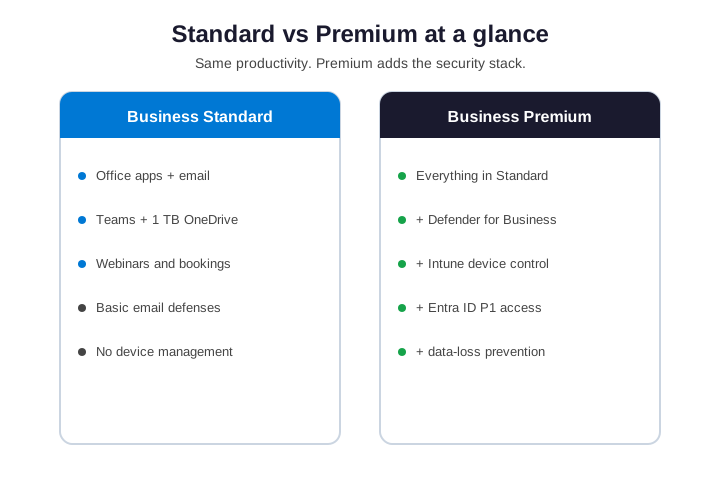
However, both include the desktop Office apps: Word, Excel, PowerPoint, and Outlook. Each user gets a 50 GB mailbox and 1 TB of OneDrive. Furthermore, Teams, SharePoint, and Exchange Online run on either plan. Webinars and bookings work the same way too. In other words, the productivity story is identical. Specifically, nobody loses an app by choosing one over the other. Your team works the same on day one. Notably, only the safety net behind them changes.
🛡️ What Business Premium adds: the security stack
Finally, now the real difference. Premium adds a stack of security and management tools that Standard simply does not have. Critically, this is the whole reason Premium exists. The list below is what you are paying the extra fee for.
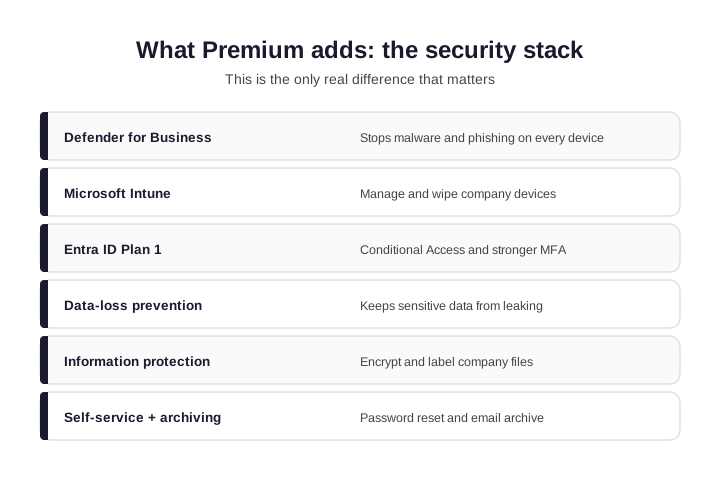
Defender for Business protects every device from malware and phishing. Microsoft Intune lets you manage and wipe company laptops and phones. Entra ID Plan 1 adds Conditional Access and stronger sign-in rules. Data-loss prevention stops sensitive files from leaking out by email. In practice, together, these turn a productivity suite into a managed, defended environment. Standard has none of them. That is not a flaw in Standard. As a result, it is simply a different job, aimed at productivity alone. Match the plan to the job. Therefore, do not pay for a job you do not have, and do not skip one you do.
However, why does this matter so much? Because a lost laptop or one clicked phishing link can sink a small firm. Furthermore, Standard cannot wipe that laptop or block that login. Premium can. Specifically, for most teams, that single capability is worth the upgrade on its own. One wiped laptop pays for years of the price gap. Notably, risk is cheap to cover and expensive to ignore. We have watched both outcomes up close. Finally, the covered firms sleep better. They also close deals faster. Critically, trust is a sales tool, not just an IT one. In addition, it shortens due diligence. As a result, deals with cautious clients close faster.
💷 Business Premium vs Standard: the price math
In practice, in the Microsoft 365 Business Standard vs Premium debate, people assume Premium is the expensive option. In practice, it is the cheaper path to security. As a result, buy Standard and add the security pieces separately, and you pay more for a messier setup. The chart makes the point.
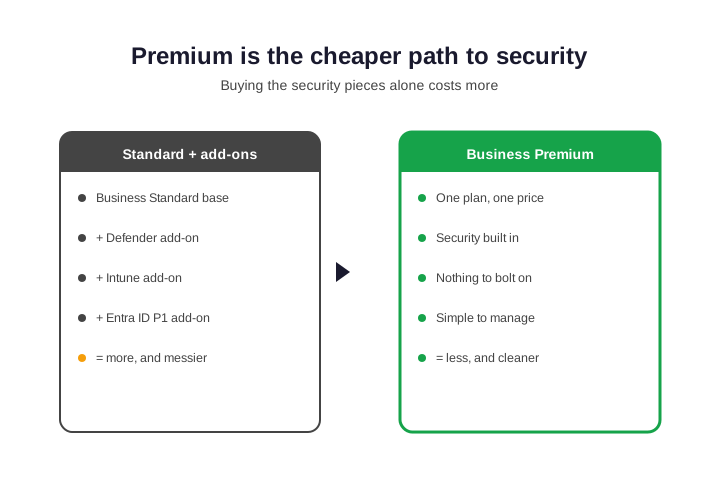
Therefore, Premium bundles Defender, Intune, and Entra ID P1 into one price. Bolting those onto Standard costs more per user, and you manage three separate add-ons. However, Premium also caps at 300 users, like Standard, so the same size limit applies. For an SMB, the bundle math almost always favors Premium. Furthermore, count the add-ons you would buy anyway. The bundle usually wins before you even price the risk. Then add the breach you avoided. Specifically, the gap stops looking like a cost at all. Reframed as insurance, it is trivial. Notably, reframed as a deal-winner, it is a bargain.
🔢 Standard vs Premium: side by side
Finally, here is the full Microsoft 365 Business Standard vs Premium comparison in one place. Scan the rows that matter to you.
| Capability | Business Standard | Business Premium |
|---|---|---|
| Office desktop apps | Yes | Yes |
| Email, Teams, 1 TB OneDrive | Yes | Yes |
| Webinars and bookings | Yes | Yes |
| Defender for Business | No | Yes |
| Intune device management | No | Yes |
| Entra ID P1 + Conditional Access | No | Yes |
| Data-loss prevention and labels | No | Yes |
| User cap | 300 | 300 |
Critically, notice the shape of the table. The top rows match. In practice, the bottom rows are all security. That pattern is the whole decision in one picture. As a result, productivity is a tie. Security is the tiebreaker. Therefore, read the table with that in mind. The shared rows are table stakes. However, the security rows are the actual question. Everything above them is noise for this decision. Furthermore, focus where the plans differ. In short, the security rows are the decision. Everything else is, therefore, just context.
🔐 Premium, compliance, and client trust
Specifically, security is not only about stopping attacks. It is also about proving you take data seriously. Notably, many clients now ask how you protect their information before they sign. Premium gives you a real answer.
Finally, with Defender, Intune, and data-loss prevention, you can show that devices are managed and data is controlled. That matters for legal, finance, and healthcare clients especially. Critically, Standard cannot make those claims, because it lacks the tools. So Premium is often what wins or keeps a cautious client. For example, a law firm will ask how their files are protected. As a result, a clear Premium answer can close the engagement on the spot.
In practice, there is a compliance angle too. Frameworks like HIPAA and basic cyber-insurance forms expect device management and access control. As a result, Premium covers those boxes out of the gate. As a result, the upgrade can pay for itself the first time a client audit or an insurer asks.
🧮 A real cost example
Therefore, numbers help. Take a ten-person firm with laptops and client records. However, on Standard, every laptop is unmanaged, and there is no central defense. To fix that, you would bolt on Defender and Intune per user. Furthermore, on Premium, it is already there. First, check what you actually own today.
# See which Microsoft 365 licences your tenant owns (Graph PowerShell)
Connect-MgGraph -Scopes "Organization.Read.All"
Get-MgSubscribedSku | Select-Object SkuPartNumber, ConsumedUnits, PrepaidUnits
Specifically, run that, and the waste usually jumps out. Often a team pays for Standard, then pays again for a separate antivirus and an MDM tool. Notably, add it up, and Premium would have been cheaper and simpler. So the cost example almost always points the same way for an SMB with devices. Finally, spreadsheets rarely lie here. The hidden tools you already pay for tip the balance. Critically, list every security tool on your invoice. Premium probably replaces most of them. In practice, consolidation is its own reward. Fewer vendors means fewer bills and fewer gaps. Moreover, one support line beats four. Consequently, problems get solved faster.
Wintive insight. Across the SMB tenants we audit, the costliest mistake is not picking the wrong plan. It is picking Standard to save a little, then paying twice for security add-ons that Premium already bundles. As a result, the bill is higher and the setup is messier. Most teams with laptops are simply cheaper, and safer, on Premium.
🪤 The mistake most teams make
As a result, the classic error is to buy Standard to save a few dollars, then bolt security on later. It feels cheaper. Therefore, it is not. You end up paying for separate tools, managing more consoles, and still missing pieces. Meanwhile, the gap sits open until something goes wrong.
However, the second mistake is the opposite: buying Premium and never turning the security on. A licence is not protection. Furthermore, Defender, Intune, and Conditional Access only help once you configure them. So whichever plan you pick, finish the job. Specifically, a half-configured tenant is a false sense of safety. Turn the tools on, then verify they work. Notably, a green dashboard is not the same as a tested defense. Confirm, do not assume. Finally, test a wipe on a spare device. Test a blocked sign-in. Then you know it works. As a result, you trade assumptions for evidence. Moreover, a tested control is the only one worth trusting.
👥 Who should choose Standard
Critically, Standard is the right call for some teams. It is not a bad plan. It is just a productivity plan, not a security plan.
In practice, Standard fits a team that is very small and low-risk. For example, a few freelancers who only need email and Office. As a result, it also fits when devices are personal and lightly used, and you hold no sensitive client data. And it works if a separate, managed security tool already covers you. Therefore, in those cases, Premium would be paying for protection you do not need yet. Be honest about that word, yet. However, risk tends to arrive with your first real client. Therefore, plan for the team you are becoming, not the one you were. In practice, that foresight costs very little today.
🔐 Who should choose Business Premium
Furthermore, in the Microsoft 365 Business Standard vs Premium choice, Premium is the right call for most small businesses. The moment you have company laptops or client data, the math shifts.
Specifically, pick Premium if you manage company devices, because Intune is the only way to control and wipe them. You also want it if you hold client, legal, financial, or health data, since that data needs Defender and DLP. Notably, remote staff seal the case, because Conditional Access guards sign-ins from anywhere. In short, if a breach would hurt, Premium is the floor, not a luxury. Finally, treat it as basic hygiene. You would not run a shop with the door unlocked.
🧭 How to decide in two questions
Critically, the Microsoft 365 Business Standard vs Premium call does not need a spreadsheet. Two questions settle the Microsoft 365 Business Standard vs Premium decision for almost every team.
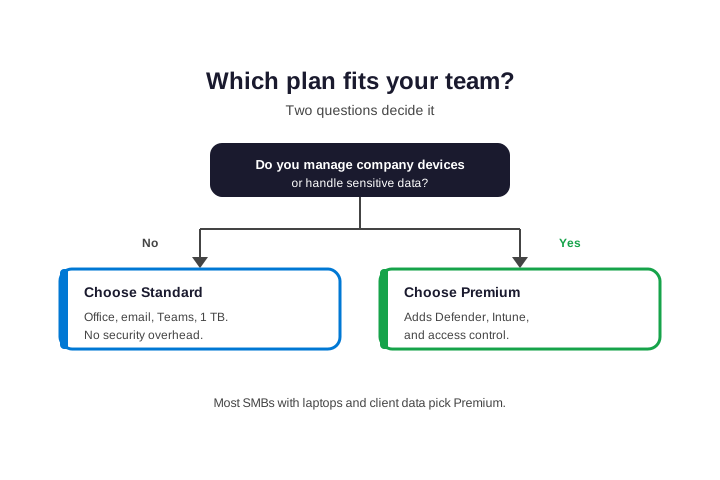
First, do you manage company devices? Second, do you handle sensitive data? In practice, if you answered yes to either, choose Premium. If you answered no to both, Standard is fine for now. As a result, as your team grows, revisit the questions. The answers tend to drift toward Premium over time. Therefore, Teams grow, devices multiply, and data piles up. Few firms ever downgrade from Premium. However, once the safety net is there, nobody wants to remove it. Growth only deepens the need. More people, more devices, more risk. The plan that fit at five rarely fits at fifty. As a result, we revisit the choice at every growth stage. Finally, upgrading is painless, so there is no reason to wait.
🏠 Standard vs Premium for remote teams
Remote work changes the math. When staff log in from home, cafes, and airports, the network is no longer a wall. Standard cannot tell a safe login from a risky one. Premium can.
With Premium, Conditional Access checks each sign-in. It can require MFA, block strange locations, and demand a healthy device. Intune then makes sure the laptop itself is encrypted and patched.
For a distributed team, that is the difference between hope and control. Hope is not a security strategy. Control is. Moreover, identity is the new perimeter, so protect the login above all. As a result, MFA and Conditional Access do more than any firewall now.
In short, the question is no longer where your team works, but whether each sign-in can be trusted. Premium is how you answer that with confidence. Ultimately, the plan you choose signals how seriously you take the data your clients hand you. Standard says you are productive; Premium says you are also safe to work with. For a growing SMB, that signal is worth far more than the small monthly difference. Remote work made that gap impossible to ignore. Premium closes it. In short, the office walls are gone, so the controls must move to identity. Therefore, Conditional Access is no longer optional for most teams.
So if even part of your team works remotely, lean hard toward Premium. The productivity tools are the same either way. The protection is not. Remote work is exactly the case Premium was built for.
🔁 Already on Standard? How to upgrade
Switching from Standard to Premium is painless. There is no migration and no downtime. You change the licence, and the new tools appear. Nobody loses a file or an email. First, assign the Premium licence to your users.
# Assign the Business Premium licence to a user (Graph PowerShell)
Connect-MgGraph -Scopes "User.ReadWrite.All"
$sku = (Get-MgSubscribedSku | Where-Object SkuPartNumber -eq "SPB").SkuId
Set-MgUserLicense -UserId user@yourdomain.com -AddLicenses @{SkuId=$sku} -RemoveLicenses @()
After the licence lands, the security tools are available but not yet active. That is normal. The plan gives you the tools; you still flip them on. So treat the upgrade as step one, not the finish line. The licence unlocks the tools. The setup is where the protection actually happens. Budget a little time for it, or hand it to a partner. Either way, do not skip it. An unconfigured licence is wasted money. Finish what you started.
🧰 After you switch to Business Premium
A Premium licence with default settings is not protection. To get the value, switch the stack on. The table lists the first moves, in order.
| Turn on first | What it protects |
|---|---|
| Defender for Business | Devices against malware |
| Intune enrollment | Control and remote wipe |
| Conditional Access | Sign-ins from risky places |
| Multi-factor auth | Every account |
| DLP policies | Sensitive data in email |
Confirm the security services are actually present on the tenant before you start. The check below lists your service plans, so you can see Defender and Intune are there.
# Confirm the Premium security service plans are present
Get-MgSubscribedSku | Where-Object SkuPartNumber -eq "SPB" |
  Select-Object -ExpandProperty ServicePlans |
  Where-Object ProvisioningStatus -eq "Success"
Microsoft documents each step in its Business Premium setup guide. Even so, most SMBs hand this part to a partner. The setup is one-time, and getting it right matters more than getting it fast. Rushing it leaves holes. A careful afternoon now saves a bad week later.
🧱 How Premium fits the wider Microsoft 365 lineup
It helps to see where these two plans sit. Below them is Business Basic, which is web and mobile only, with no desktop Office apps. Standard adds the desktop apps. Microsoft 365 Business Premium adds the security stack on top of Standard.
So the ladder is simple. Basic is for light, browser-based users. Standard is for people who want full Office on their machines. Premium is for teams that also need protection and device control. Most growing SMBs climb that ladder over time. Typically, they start on Standard and move to Premium as they hire and take on bigger clients. Consequently, planning for Premium early saves a scramble later.
If you are weighing Basic against Standard first, that is a separate decision. We cover it in its own guide. Once you are past that, the Standard-versus-Premium choice in this article is the one that follows. In practice, most teams settle Basic-versus-Standard quickly, then spend real thought here. Therefore, this is the decision worth getting right.
✅ Quick decision checklist
Condensed, here is how to choose and act with confidence.
- Both plans share Office, email, Teams, and 1 TB OneDrive.
- Premium adds Defender, Intune, Entra ID P1, and DLP.
- Manage devices or hold sensitive data? Choose Premium.
- Only need email and Office, very low risk? Standard is fine.
- Premium bundles security cheaper than Standard plus add-ons.
- Upgrading is instant: change the licence, no downtime.
- A licence is not protection: turn the security stack on.
- Revisit the choice as your team and risk grow.
Ultimately, at Wintive we help SMBs pick the right Microsoft 365 plan and set it up properly, as part of our managed services. In addition, we right-size licences so you never overpay. To get started, contact us for a free consultation. It is quick. We do the rest.
📚 More for Microsoft 365 buyers
These published Wintive guides go deeper on the topics this choice raises next. Therefore, bookmark the ones that fit your plan.
🔍 Want a complete audit of your Microsoft 365 tenant?
The M365 Instant Audit scans your environment in under 10 minutes: license waste, security posture, MFA coverage, compliance gaps, and rightsizing. A full PDF report with prioritized fixes arrives instantly.
❓ Frequently Asked Questions
Both share Office apps, email, Teams, and 1 TB of OneDrive. Premium adds a security stack: Defender for Business, Intune device management, Entra ID Plan 1, and data-loss prevention. In short, Premium is Standard plus security.
For most SMBs, yes. If you manage laptops or hold client data, the added Defender, Intune, and access control are worth far more than the small price gap. Premium also bundles them cheaper than buying each add-on on Standard.
Yes, and it is instant. You change the licence, with no migration and no downtime. The new security tools appear right away. You then turn them on, since a licence alone is not protection.
Premium costs a little more per user each month. However, it bundles security tools that would cost more bought separately on Standard. So for a team that needs protection, Premium is usually the cheaper total.
Very small, low-risk teams that only need email and Office, use personal devices lightly, and hold no sensitive data. For them, Premium would pay for protection they do not yet need.
Standard has basic email defenses, but no device management, no Defender for Business, no Conditional Access, and no data-loss prevention. Those four are exactly what Premium adds.
🧭 Your next step
Still unsure about Microsoft 365 Business Standard vs Premium? First, book a short call. Then we look at your devices, your data, and your team. Finally, we recommend the right plan and set it up. To start, contact Wintive. It is quick. We do the rest.