

Choosing between Microsoft 365 Business Basic vs Standard comes down to one question. Do your people need the installable desktop Office apps? So if web and mobile Office is enough, then Basic fits. In addition, both plans share the same email, the same 1 TB of storage, and the same Teams. Therefore the Basic vs Standard decision is narrower than most comparison pages suggest. Get it right across a team, because the savings add up every month.
This guide is written for the person who assigns the licenses, so it stays hands-on. Specifically, it covers the feature delta, current pricing, and the PowerShell to switch plans. In fact, admins ask those questions far more often than marketing pages answer them. We also flag the security gap that neither plan closes. As a result, you will know which users belong on Basic and which belong on Standard. Finally, it shows when to skip straight to Microsoft 365 Business Premium.
🛡 Free: M365 Audit Checklist
A 19-page PDF with 50 hands-on checks. It covers Entra ID, Exchange, SharePoint, Teams and Intune, so no core area is missed. In addition, PowerShell commands are included. Specifically, it was built from 60+ real tenant audits at Wintive.
🔑 Business Basic vs Standard: the one real difference
Strip away the feature lists, and the choice reduces to a single fork. Basic gives you Office in the browser, while Standard adds the installable desktop apps. Moreover, you can install those on up to five computers per person. Otherwise the plans are identical, because email, storage, Teams and SharePoint work the same on both.
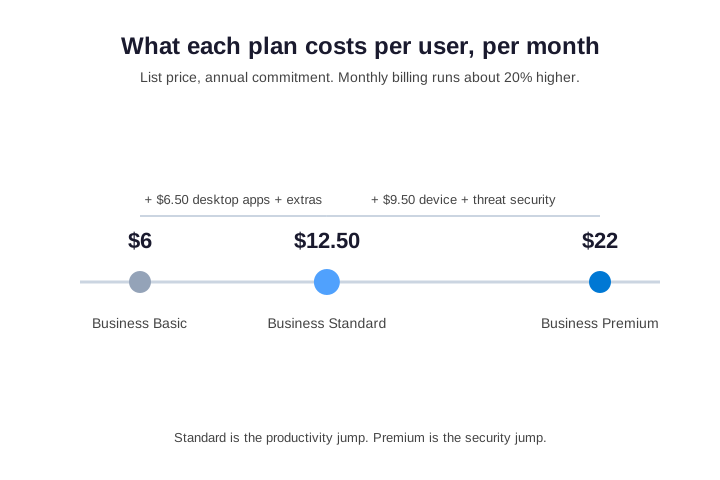
Quick answer. On Microsoft 365 Business Basic vs Standard, Business Basic costs $6 per user, while Standard costs $12.50. In addition, both share the same email, 1 TB OneDrive, Teams and SharePoint. Specifically, the only real difference is the desktop Office apps. Notably, Standard installs them, while Basic does not. Standard also adds Bookings, Clipchamp, Loop and webinars. Notably, neither plan includes device management or advanced security. Therefore that layer is Business Premium at $22. In short, pick Basic for web-only staff, Standard for office workers, and Premium when you need Intune or conditional access.
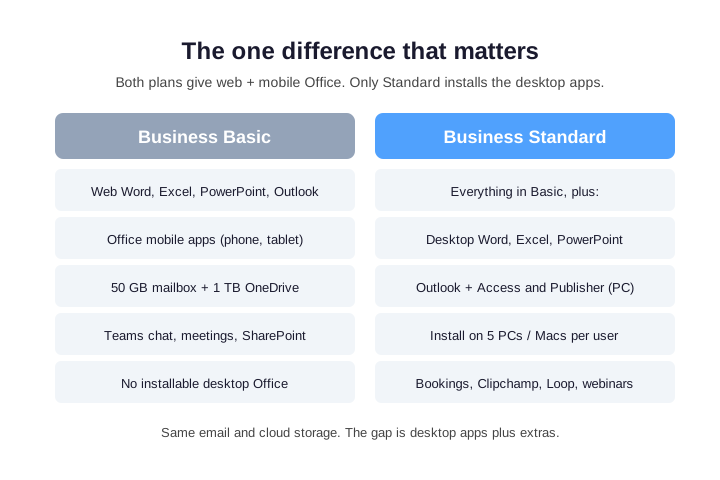
However, that distinction is not cosmetic. The web apps handle everyday editing well, yet they cannot match the desktop apps offline or on large spreadsheets. For example, Power Pivot and the Windows-only Access and Publisher need the installed apps. So if your team lives in a browser, Basic is enough; by contrast, document-heavy users need Standard.
📊 Microsoft 365 Business Basic vs Standard: feature comparison
The Microsoft 365 Business Basic vs Standard comparison below maps the two plans against the features small businesses weigh, so read it as a layer cake. Specifically, Standard is simply Basic plus the desktop apps and a few extras. Therefore nothing is removed when you step down to Basic, because only the installed apps and those extras disappear.
| Feature | Business Basic | Business Standard |
|---|---|---|
| Price (annual, per user/mo) | $6.00 | $12.50 |
| Web + mobile Office apps | Yes | Yes |
| Desktop Office apps (5 devices) | No | Yes |
| Business email, 50 GB mailbox | Yes | Yes |
| OneDrive cloud storage | 1 TB | 1 TB |
| Teams, SharePoint, Exchange | Yes | Yes |
| Microsoft Bookings | No | Yes |
| Webinars + registration | No | Yes |
| Clipchamp, Loop, Forms | No | Yes |
| Maximum users | 300 | 300 |
| Device + threat security | No | No (Premium) |
Two rows decide everything. First, the desktop apps row is the reason to pay for Standard; second, the security row is why both plans point toward Premium. We return to that gap below.
💲 Pricing: what Basic and Standard cost
At list price, Business Basic is $6.00 per user per month, while Business Standard is $12.50 on an annual commitment. Therefore the gap is $6.50 per user, or $78 a year, and that money buys the desktop apps and extras. For example, a ten-person team spends $780 a year on it, so the Basic vs Standard choice carries a real budget line.
There is a cheaper tier below Basic, too. Specifically, the Microsoft 365 Frontline plans (F1 and F3) target deskless and kiosk staff. They run roughly $2 to $8 per user per month. For example, a warehouse or retail floor rarely needs more than Teams and email. Therefore, for those workers, even Basic can be more than you need.
Monthly billing costs about 20% more
Monthly billing costs more. Specifically, Microsoft charges about 20% extra for the freedom to cancel. Month-to-month, Basic runs about $7.20 and Standard about $15.00. Over a year, that flexibility costs a ten-person team several hundred dollars. Therefore commit annually for the seats you trust. Meanwhile, keep a few monthly seats for genuine churn. Prices shift, so confirm current numbers on Microsoft’s compare business plans page.
🤝 Basic vs Standard: what is identical
Most of what a small business relies on is identical, which is exactly why the Microsoft 365 Business Basic vs Standard choice is narrow. Both plans include a 50 GB mailbox on Exchange Online with your own domain, while each also gives 1 TB of OneDrive per user. In addition, the full Teams stack ships on both, for chat, meetings and calling. Similarly, both provide SharePoint sites, Planner basics and web Office; notably, both cap at 300 users.
Email and storage are the same
If your main worry is professional email, either plan covers it, because you get the same 50 GB mailbox on both. Moreover, shared mailboxes and distribution lists cost no extra license, and you also get the same 1 TB of personal storage. For more on mailbox limits, see our small business compliance checklist. Therefore email alone never justifies Standard.
Teams and collaboration are the same
Collaboration is identical too. That surprises people who assume the cheaper plan is stripped down. In practice, both plans give the same Teams meetings, chat and calling. They also share the same SharePoint libraries and OneDrive controls. Standard does add webinar registration on top. However, the core meeting experience is the same on Basic. So a chat-and-meet user gains nothing from Standard.
➕ What Business Standard adds beyond desktop Office
The desktop apps get the headlines. However, Standard also unlocks services that Basic lacks. These are the quiet reasons teams upgrade. Specifically, any one of them can justify the extra $6.50.
Microsoft Bookings handles customer self-scheduling, and clinics and consultancies use it daily. For example, Clipchamp covers quick video editing, Loop adds shared workspaces, and Forms builds surveys. In addition, Standard enables Teams webinars with registration and reporting. Meanwhile, Outlook on the desktop adds offline mail, richer rules and add-ins.
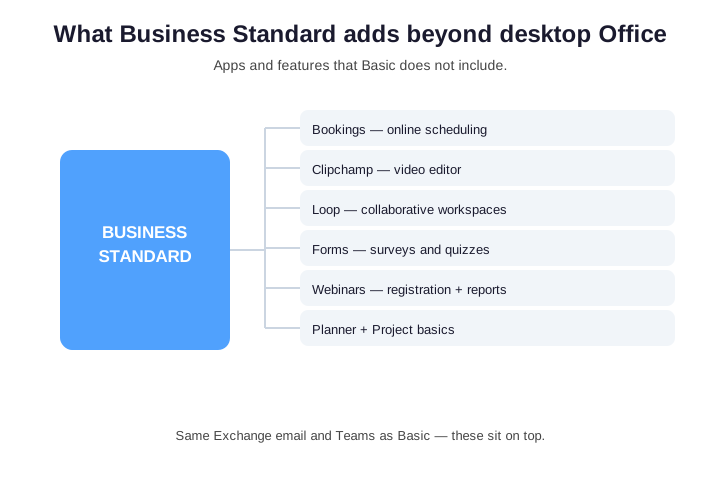
None of these touch your email or files. Instead, they sit on top of the shared foundation. The flip side is real. Specifically, if nobody needs them and nobody needs installed apps, Standard is shelfware.
🛡️ The security gap in Basic vs Standard
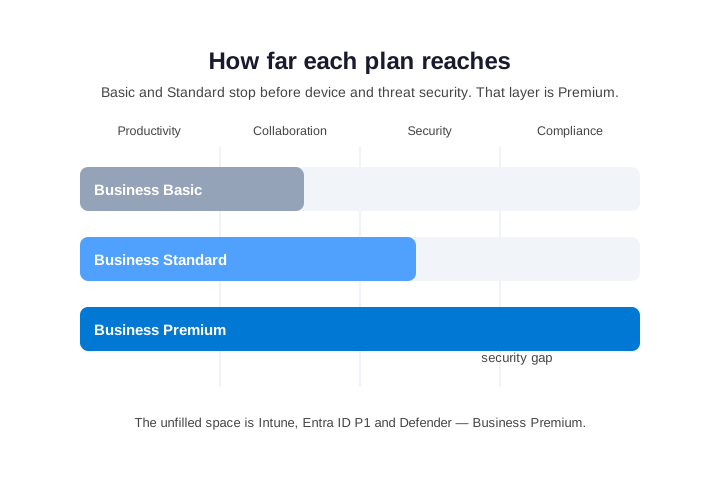
Here is what most Microsoft 365 Business Basic vs Standard comparisons skip. Specifically, neither plan includes real security or device management. Both give MFA and baseline Exchange protections. However, neither ships Microsoft Intune for managing laptops and phones. Conditional access through Entra ID Plan 1 is also absent. Defender for Office 365 safe links and attachments are missing too. As a result, the controls that stop account takeover live one tier up. That tier is Business Premium at $22.
That matters, because the Basic vs Standard price gap can distract you, and a $6.50 productivity choice should not crowd out security. For most small businesses with client data, the shape is clear. Specifically, use Basic or Standard for apps, while Premium covers protected access. Therefore we wrap that mix into one bill in our managed Microsoft 365 plans.
What Premium adds that neither plan has
It helps to know what you are missing. Notably, each control maps to a real attack. Intune enforces device compliance and can wipe a lost laptop. Therefore an unmanaged phone cannot quietly sync company data. Entra ID Plan 1 brings conditional access. As a result, stolen passwords alone cannot sign in from risky devices. Defender for Office 365 adds Safe Links and Safe Attachments. For example, it detonates malicious files before a user clicks.
Two more controls round out Premium. First, Defender for Business protects the laptops and phones themselves, not just email. Second, Azure Information Protection labels and encrypts sensitive files. As a result, a leaked document stays unreadable outside the company. Notably, none of this is available as an add-on to Basic or Standard.
Wintive insight. Across the small business tenants we audit, the most common waste is not the wrong plan. Instead, it is the same plan for everyone. For example, office staff get Standard they barely install. Meanwhile, frontline and web-only users sit on Standard when Basic would do. Specifically, mixing the two plans trims the Microsoft bill by 20 to 35%. As a result, you lose no capability at all.
🤖 Teams and Copilot: what is and is not included
Two recent changes confuse the Basic vs Standard comparison. First, Microsoft now sells Teams separately in some regions. Specifically, the EEA and Switzerland have no-Teams versions of both plans. In the United States, however, Teams still ships inside both plans. Therefore check which variant you are buying, because the SKU name says so.
Second, Copilot is an add-on, not a plan feature. Microsoft 365 Copilot costs about $30 per user per month. It sits on top of Basic or Standard once a base license exists. Meanwhile, the free Copilot Chat tier is broadly available. As a result, Copilot does not change the Basic vs Standard math. Instead, it is a separate line item on either plan.
Copilot Chat also gained lightweight agents recently. Specifically, small teams can build simple agents without a per-user license. However, the full Microsoft 365 Copilot still needs the paid add-on. Therefore weigh the free tier first before you buy seats.
🖥️ How desktop and web Office actually differ
The apps are the whole reason to weigh Microsoft 365 Business Basic vs Standard, so it helps to know where the web versions fall short. For everyday writing and simple sheets, the browser apps are fine; in fact, most users would not notice a difference. However, the gaps show up at the edges, and notably that is where power users live.
Where the web apps stop
Offline work is the first wall. Without a connection, web Office stops; the desktop apps keep working. Excel on the web also drops the heavier features. For example, Power Pivot and many older macros need the desktop app. Access and Publisher are desktop-only and Windows-only. In addition, advanced mail merge needs the installed client. Therefore any role that depends on these will outgrow Basic.
Platform matters as well. On a Mac, Standard installs Word, Excel, PowerPoint and Outlook, but not Access or Publisher. For example, a design studio on Macs still gets the core apps. However, the Windows-only tools stay Windows-only. Therefore check the operating system before you promise a feature.
⌨️ Check which plan a user is on with PowerShell
Before you change anything, confirm who has what. The Microsoft Graph PowerShell SDK reports license assignments in seconds; however, it hides a naming quirk worth knowing. Specifically, the plan part numbers do not match the friendly names. Basic is O365_BUSINESS_ESSENTIALS, while Standard is the confusing O365_BUSINESS_PREMIUM, and Premium is SPB. Therefore mix them up, and you assign the wrong plan.
# Microsoft Graph PowerShell SDK — list every license/plan in the tenant
Connect-MgGraph -Scopes "Organization.Read.All","User.Read.All"

Get-MgSubscribedSku | Select-Object SkuPartNumber, SkuId,
  @{N='Used'; E={$_.ConsumedUnits}},
  @{N='Owned'; E={$_.PrepaidUnits.Enabled}} | Format-Table -AutoSize

# Friendly-name map (the part numbers do NOT match the plan names):
#   O365_BUSINESS_ESSENTIALS = Business Basic
#   O365_BUSINESS_PREMIUM    = Business Standard   <-- legacy name, not Premium!
#   SPB                      = Business Premium
The output lists every plan in the tenant, with seats used and owned. So before you act, translate each part number with the Basic vs Standard map below.
| Plan | License part number | Friendly name in admin center |
|---|---|---|
| Business Basic | O365_BUSINESS_ESSENTIALS | Microsoft 365 Business Basic |
| Business Standard | O365_BUSINESS_PREMIUM | Microsoft 365 Business Standard |
| Business Premium | SPB | Microsoft 365 Business Premium |
Check a single user
To inspect one person, query the license detail directly. Then map the part number to the friendly name using the comment above. For example, a result of O365_BUSINESS_PREMIUM means the user is on Standard, despite the word Premium. Therefore always translate the part number before you act.
# Which plan is one user actually on?
Get-MgUserLicenseDetail -UserId jane@contoso.com |
  Select-Object SkuPartNumber, SkuId
🔁 Basic vs Standard: switch a user safely
Upgrading or downgrading a user is a license swap, not a migration. Specifically, the mailbox, files, chats and SharePoint access stay put, because the data lives in the same services regardless of plan. So only the apps and features change. Therefore add the new license and remove the old one in one command, and the user is never unlicensed in between.
# Swap Basic -> Standard in one step (add new, remove old)
$basic    = (Get-MgSubscribedSku | Where-Object SkuPartNumber -eq 'O365_BUSINESS_ESSENTIALS').SkuId
$standard = (Get-MgSubscribedSku | Where-Object SkuPartNumber -eq 'O365_BUSINESS_PREMIUM').SkuId

Set-MgUserLicense -UserId jane@contoso.com `
  -AddLicenses @{SkuId = $standard} -RemoveLicenses @($basic)
Do it in that order, add then remove. As a result, the mailbox never slips into a grace period. The desktop apps activate at the next sign-in. Meanwhile, nothing in the files or mail is affected. Downgrading works the same way in reverse. However, installed apps drop to reduced-functionality mode once Standard is gone.
Verify and bulk-apply the change
After the swap, re-run the single-user check from earlier. Confirm the new part number shows as Standard. Then ask the user to restart Office so the license registers. For a few people, this takes minutes. For a bulk change, wrap the same command in a loop over a CSV. In every case, no mailbox move is involved. As a result, plan changes on Microsoft 365 stay low-risk.
🧮 Mixing Basic and Standard licenses to cut cost
On Microsoft 365 Business Basic vs Standard, you do not have to put everyone on the same plan; in fact, most small businesses should not. A single tenant can run any mix of Basic, Standard and Premium, billed per user. Therefore the trick is matching the plan to how each person works, because buying the most expensive plan for everyone wastes money.
A practical Basic vs Standard split looks like this. Deskless and shared-device staff go on Basic. Office workers who build documents go on Standard. Anyone with a managed laptop or privileged access goes on Premium. For example, three Basic seats, six Standard and one Premium costs $115.50 a month. By contrast, putting everyone on Standard costs $125. Notably, the mixed plan also covers security that flat Standard misses.
The frontline case makes this concrete. For example, a 40-person retailer might keep 30 store staff on Basic. Meanwhile, ten head-office users take Standard, and the owner takes Premium. As a result, the monthly bill drops by hundreds against an all-Standard tenant. Specifically, the savings fund the security the business actually needed.
Report every user’s plan
To find your current spread, report every user against their plan. Then sort by tier so the over-licensing stands out.
# Tenant report: who is on Basic vs Standard vs Premium
$map = @{ 'O365_BUSINESS_ESSENTIALS'='Basic'; 'O365_BUSINESS_PREMIUM'='Standard'; 'SPB'='Premium' }
$skus = Get-MgSubscribedSku

Get-MgUser -All -Property DisplayName,UserPrincipalName,AssignedLicenses |
  ForEach-Object {
    foreach ($l in $_.AssignedLicenses) {
      $part = ($skus | Where-Object SkuId -eq $l.SkuId).SkuPartNumber
      if ($map[$part]) { [pscustomobject]@{ User=$_.UserPrincipalName; Plan=$map[$part] } }
    }
  } | Sort-Object Plan | Format-Table -AutoSize
We costed this out in our managed IT services pricing guide. Specifically, right-sizing plans is usually the fastest Microsoft saving available.
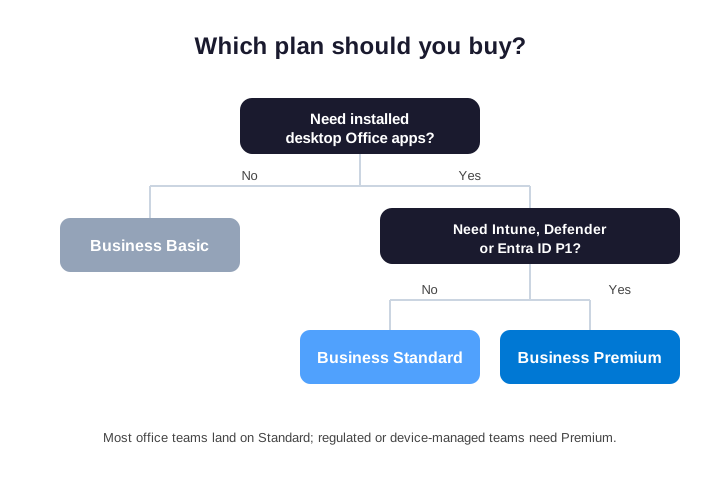
🪜 Basic vs Standard vs Premium: the full ladder
The security gap pushes many teams toward Premium. Therefore it helps to see the three plans as one ladder. Each rung adds to the one below. In short, you pay for height.
- Business Basic ($6): web and mobile Office, business email, Teams, SharePoint and 1 TB storage. Best for web-only, frontline and shared-device staff.
- Business Standard ($12.50): everything in Basic plus the desktop Office apps, Bookings, Clipchamp, Loop, Forms and webinars. Best for everyday office workers who create documents.
- Business Premium ($22): everything in Standard plus Intune, Entra ID P1 conditional access, and Defender for Office and Business. Best for managed devices, privileged accounts and regulated data.
Read top to bottom. The question is never just Basic vs Standard. Instead, it is how far up the ladder each person needs to climb. Therefore pay for the rung that matches the role, and no higher.
| Capability | Basic | Standard | Premium |
|---|---|---|---|
| Price per user / month | $6.00 | $12.50 | $22.00 |
| Desktop Office apps | No | Yes | Yes |
| Bookings, webinars, Loop | No | Yes | Yes |
| Intune device management | No | No | Yes |
| Conditional access (Entra ID P1) | No | No | Yes |
| Defender for Office 365 | No | No | Yes |
One reassurance is worth stating. Moving up or down the ladder later is painless. Specifically, every plan shares the same underlying services. As a result, you can promote a user the day the role changes, with no migration. So you are never locked in.
👤 Who should choose Business Basic
Business Basic fits more often than its low price suggests, and the clearest case is anyone who lives in a browser. For example, frontline and retail staff mostly check email and Teams, while shared-device workers sign in and out of a front-desk PC. Similarly, seasonal and contract staff are not worth an annual commitment. For these roles the web apps cover the occasional edit, so paying for installed apps they never open is waste.
Basic also suits very small nonprofits and lean startups. After all, it still includes professional email on your own domain. It adds the full Teams stack and 1 TB of storage per person. The only real question is whether anyone needs offline or heavy spreadsheets. Specifically, that is the one thing Basic cannot do. If the answer is no, then Microsoft 365 Business Basic is the cheaper, correct choice. For example, many small nonprofits run happily on Basic for years.
👥 Who should choose Business Standard
Business Standard is the default for everyday office workers, and anyone who builds documents all day belongs on it. For example, an accountant lives in desktop Excel and a writer in Word, while teams that travel need offline access on the road. Specifically, the installed apps bring Power Pivot, advanced PivotTables and complex mail merge; in addition, they work without a connection.
Standard also earns its price through services, not apps alone. For example, a clinic that books appointments uses Bookings daily. A marketing team runs Teams webinars with registration. Project leads lean on Loop and Planner. Therefore, for a document-heavy or client-facing role, Standard is the safer floor. In practice, the right plan follows the workflow, not the company size.
| Role | Recommended plan |
|---|---|
| Frontline, shared-device or web-only staff | Basic |
| Daily document creators and offline users | Standard |
| Client scheduling, webinars and video | Standard |
| Managed laptops, admins and sensitive data | Premium |
⚠️ Common Basic vs Standard mistakes to avoid
A few avoidable errors show up again and again. Therefore watch for these before you commit a single seat:
- Putting everyone on Standard. The most expensive mistake is uniform licensing; mix Basic and Standard by role and the savings are immediate.
- Ignoring the security gap. Neither plan manages devices or enforces conditional access, so do not mistake a productivity choice for a security one.
- Paying monthly out of habit. Month-to-month billing costs about 20% more, so commit annually for stable seats.
- Forgetting the 300-user cap. Both plans stop at 300 users, so fast-growing teams should plan the enterprise path early.
- Assuming Basic has no email. Basic includes the same 50 GB mailbox and custom domain as Standard; only the desktop apps differ.
- Counting on Publisher. Publisher reaches end of support in October 2026, so do not pick Standard for that app alone.
Avoid those six, and the Basic vs Standard decision becomes simple. Specifically, match the plan to the role, commit annually, and treat security as its own tier. As a result, the bill matches the work instead of the org chart.
✅ The bottom line on Basic vs Standard
Strip the Microsoft 365 Business Basic vs Standard choice back to the test that matters. No installed apps and browser-only work means Basic at $6, while daily documents or offline needs mean Standard at $12.50. By contrast, managed devices or sensitive data mean Premium at $22. Therefore, for most ten-person businesses, the cheapest correct answer is a blend.
Whichever way you split it, revisit the mix every few months. People change roles, projects end, and seasonal staff leave. As a result, a plan that fit in January is often wrong by summer. A quick quarterly review keeps the bill matched to the work. Specifically, it stops you paying for Standard seats that became Basic-shaped. If you would rather not audit licenses by hand, our team runs it as a managed service.
📚 More for Growing Businesses
🔍 Want to know exactly which licenses you are wasting?
The M365 Instant Audit scans your tenant in under 10 minutes. It checks license waste, plan right-sizing, MFA coverage, security posture and compliance gaps. As a result, you get a full PDF report with prioritized fixes, delivered instantly.
❓ Frequently Asked Questions
It depends on desktop apps. Specifically, Basic at $6 suits browser and mobile work. Standard at $12.50 suits people who need installed Office or offline editing. Email, storage and Teams are identical. Therefore many businesses mix both plans by role.
In Microsoft 365 Business Basic vs Standard, the core difference is the desktop Office apps. Only Standard installs them, on up to five devices. In addition, Standard adds Bookings, Clipchamp, Loop, Forms and webinars. Both share the same 50 GB email, 1 TB OneDrive, Teams and SharePoint.
No, because Business Basic includes only the web and mobile Office apps. For desktop Word, Excel, PowerPoint and Outlook, you need Standard or Premium. Therefore this is the single most important factor when choosing a plan.
Yes. Switching is a license change, not a migration. As a result, your mailbox, files, chats and sites stay untouched. Add the Standard license and remove the Basic license in one step. Then the desktop apps activate at the next sign-in.
No. Neither plan includes Intune, Entra ID Plan 1 or Defender for Office 365. Specifically, those controls require Business Premium at $22 per user. Therefore, if managed devices matter, compare Premium, not Basic vs Standard.