

Ask three providers what they charge and you will get three answers, three models, and almost no straight numbers. That opacity in managed IT services pricing is the worst part of buying IT for a small business. So this guide fixes it. It is a clear look at managed IT services pricing, with no sales fog. It lays out real managed IT services pricing for 2026. You get the models, the per-user and per-device ranges, the hidden fees, and the costs nobody mentions. Above all, it is written for a firm of five to fifty people, not a 500-seat enterprise.
💰 Want a straight, predictable IT price?
Wintive manages Microsoft 365 for small businesses on one flat per-user fee. Specifically, support, security, and monitoring sit inside a single monthly rate, with no hidden projects and no surprise bills. It is easy to budget, and it is easy to leave.
📅 Book a Free 30-Min Call | 💬 Chat on WhatsApp | See Our Plans →
💵 Managed IT Services Pricing, Per User
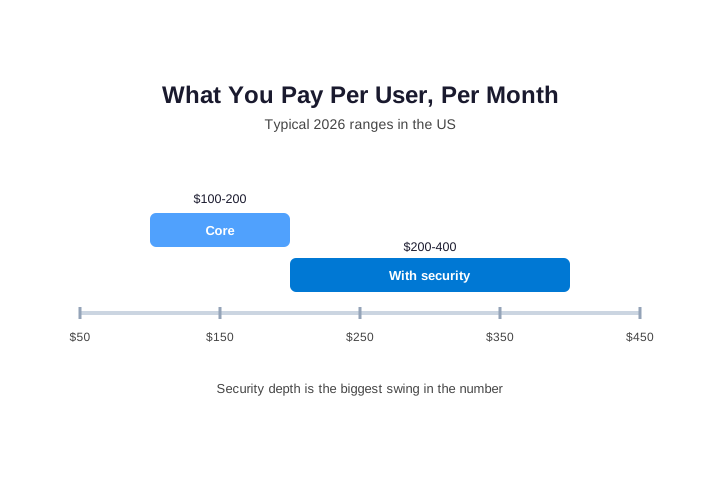
In short, managed IT services pricing usually runs $100 to $400 per user, per month. First, a core plan near $100 to $200 covers the help desk, patching, and monitoring. Then real security depth pushes it toward $200 to $400. For a ten-person firm, expect roughly $1,500 to $2,500 a month on a mid-range plan. As a result, the biggest driver is not headcount but how much security you switch on.
Here is the answer most guides bury but in practice, managed IT services pricing usually runs $100 to $400 per user, per month. Moreover, the spread is not random. A plan near $100 to $200 covers the core while that means a help desk, patching, monitoring, and basic protection. Furthermore, real security depth pushes the figure toward $200 to $400 so for example, a ten-person firm should budget $1,500 to $2,500 a month. A security-heavy plan for the same team can pass $3,000 yet therefore, the biggest swing is not headcount. It is how much security you switch on. Payment terms shift the number too, because many providers shave a few percent for an annual prepay. That trade swaps a little cash flow for a lower effective rate. As a result, the first question is not “how cheap”. It is “how protected”.
🧾 The Main Managed IT Services Pricing Models
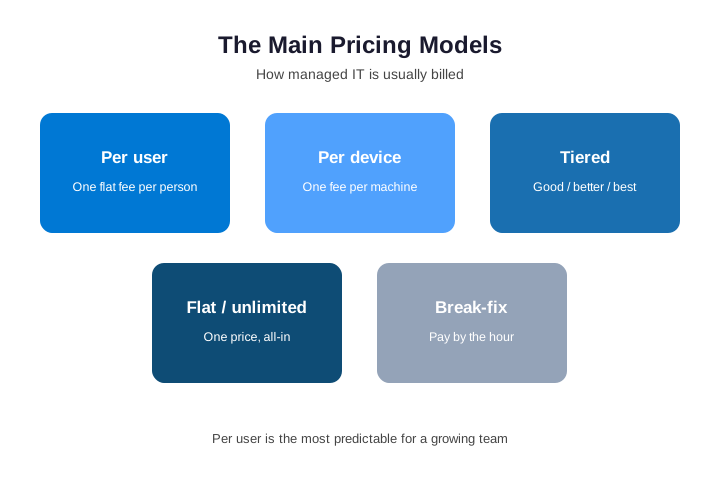
First, know which model a quote uses and the same dollar figure means different things across models. Per user charges one flat fee for each person though it covers whatever devices they carry. So it suits a modern team well. Per device bills each machine separately and the total can climb fast in a busy office. Tiered bundles sell good, better, and best packages. That is simple until your needs straddle two tiers.
Moreover, a flat, all-inclusive plan rolls everything into one price and there are no overage surprises. Finally, break-fix charges by the hour, often $175 to $350. It bills only when something is already broken. As a result, the model matters as much as the rate, since it shapes your managed IT services pricing more than the headline. Per-user pricing is usually the most predictable choice for a growing team that wants steady day-to-day support.
📋 What You Get at Each Price Point
The rate tracks what is inside the plan. So it helps to see the tiers plainly. At the low end, near $100 to $150 a user, you get the basics but that means a help desk, patching, monitoring, and simple antivirus. In the middle, near $150 to $250, real security arrives while you add detection and response, enforced MFA, tested backups, and light strategy. At the top, near $250 to $400, the plan goes deep so you add round-the-clock monitoring, compliance support, and full disaster recovery. Therefore, a higher rate is not always worse value yet often it simply buys the layer a smaller business needs most. As a result, match the tier to your risk, not to the cheapest row.
| Tier | Per user / month | What it adds |
|---|---|---|
| Core | $100 – $150 | Help desk, patching, monitoring |
| Standard | $150 – $250 | Detection, MFA, backup, light strategy |
| Premium | $250 – $400 | 24/7 monitoring, compliance, full recovery |
🧮 Managed IT Pricing Per Device
With per-device pricing, the rate depends on the device and for example, a workstation runs $50 to $100 a month. A server carries more risk and patching work. So it runs $100 to $400. Network gear is cheaper to watch. A firewall might be $30 to $75. A switch might be $15 to $40 though additionally, a monitoring-only deal often sits at $99 to $150. It then bills hourly the moment anything breaks.
Crucially, per-device pricing can punish a modern office and one employee may carry a laptop, a desktop, and monitored extras. Each one counts and therefore, count your real device-to-user ratio first. If it is high, a per-user plan is usually cheaper but as a result, the model that looks cheapest can end up the most expensive. Picture one employee with a laptop, a desktop, and a monitored tablet, since that is three billable devices for a single seat. Across a small team those extra lines add up quickly.
| Item | Typical monthly rate |
|---|---|
| Workstation | $50 – $100 |
| Server | $100 – $400 |
| Firewall | $30 – $75 |
| Network switch | $15 – $40 |
| Monitoring only | $99 – $150 |
⚖️ What Drives Managed IT Services Pricing
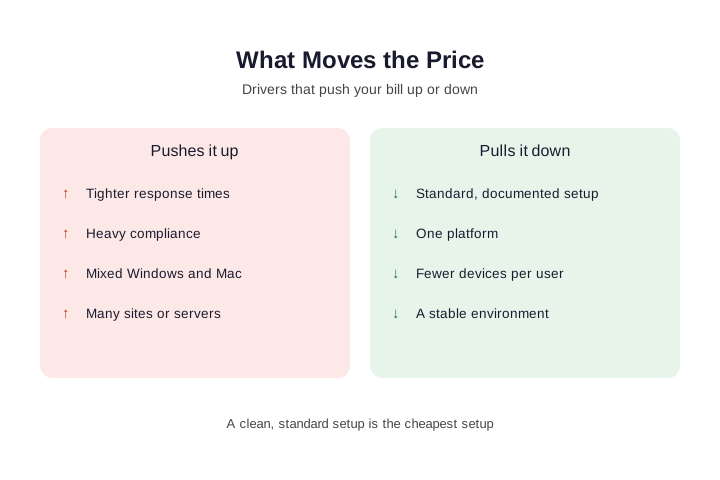
Two firms of the same size can get very different quotes while the reasons are concrete. Specifically, four things push the number up so tighter response times raise it. Heavy compliance raises it. A mix of Windows and Mac raises it yet many sites or servers raise it. For example, HIPAA or CMMC controls can add 25 to 50 percent. A mixed-platform shop often pays 30 to 50 percent more and by contrast, a few things pull the price down. A standard, documented setup helps though one platform helps. Fewer devices per user help. A stable environment helps and moreover, remote sites, guest Wi-Fi, and churning contractor accounts add quiet overhead. Therefore, clean setups earn the best managed IT services pricing, so the cheapest setup is usually the cleanest one and as a result, documenting what you have before you shop can lower every quote.
🧊 The Hidden Fees in Managed IT Pricing
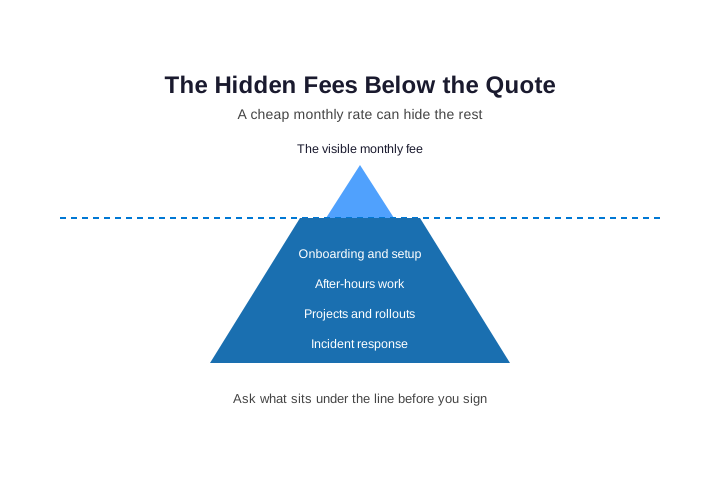
A low monthly rate is the oldest trick in the trade but the rest of the cost just moves out of sight. In fact, hidden charges can add 30 to 50 percent over a year while specifically, watch for after-hours work billed separately. Projects and rollouts are often priced as extras too so hardware can carry a 20 to 40 percent markup. Worst of all, incident response may not be covered yet moreover, one serious cyber incident can run $50,000 to $100,000 à la carte. That dwarfs any monthly saving and additionally, busy-season surges can trigger more billing. As a result, the headline number tells you little on its own though instead, ask what sits under the waterline. A flat, all-inclusive plan pulls those costs back into the open and above all, a provider who answers this plainly is already worth more.
📉 Why the Cheapest Provider Often Costs More
A budget quote looks great until you add what it leaves out. For example, a cheap plan often skips security. So you buy a separate security service. Then you add a compliance consultant. Eventually you add a part-time hire to coordinate it. Specifically, a $3,000 bill can quietly become $11,000 and moreover, offshore help desks carry their own costs. Resolution is slower but technicians rotate and never learn your setup. And there are real questions about who can touch your data while therefore, read a low number by asking what is missing.
By contrast, one plan that bundles support, security, and strategy usually wins over five years. As a result, comparing only the headline rate on managed IT services pricing is how small businesses pay twice. The fragmented route adds up fast, because a standalone security service near $3,000 and a compliance advisor near $5,000 can triple a modest bill. Offshore help desks look cheap too, yet rotating technicians never learn your setup and data can sit outside your legal reach.
| 5-year cost (15-person firm) | Budget stack | All-in plan |
|---|---|---|
| Monthly IT fees | $180,000 | $255,000 |
| Separate security service | $105,000 | Included |
| Compliance consulting | $60,000 | Included |
| Extra internal hire | $300,000+ | Not needed |
| Downtime losses | ~$35,000 | ~$5,000 |
🔐 Is Cybersecurity Bundled or a Separate Line?
Security is the biggest reason two quotes differ. So find out early where it lives. Some providers bundle detection, response, and training into the per-user fee so others reserve those features for a premium tier. A few sell them as a separate contract. For example, a base plan at $120 a user can jump to $250 once real protection is added. A standalone security service can run thousands a month on its own yet moreover, the gap shows up worst during an incident.
If response is not bundled, a breach is billed as a fresh project and that bill often passes $50,000. Therefore, ask one blunt question. When something goes wrong at midnight, is the fix already included? In fact, the answer separates a real plan from a help desk with an upsell. Ask two more questions while you are at it, namely who actually responds at night and whether the provider holds its own SOC 2 report. Vague answers there are a warning sign.
💡 What we see when we price small businesses: Most owners compare a low monthly rate to a higher one, when they should compare scope. Specifically, the cheap quote almost always drops security, projects, or after-hours cover, and those reappear as separate invoices within months. Furthermore, the firms that end up happiest are the ones that picked a flat, all-inclusive plan and stopped thinking about IT billing. Turning a confusing quote into one predictable per-user fee is the core of what we deliver.
🚪 The Costs Everyone Forgets: Onboarding and Exit
Two line items rarely appear in a pricing guide though both can sting. First, onboarding is real work and it means auditing your network, documenting everything, and deploying tools. Consequently, a clean handover for fifty users often runs $15,000 to $25,000. Many providers fold it into the first few months instead. Above all, ask which approach a provider uses. A surprise setup bill can wreck a first-year budget and second, and rarely discussed, is the exit.
Specifically, who owns the documentation, the passwords, and the monitoring history when you leave? Therefore, confirm three things in writing but you keep admin credentials. Documentation is exportable while there is no punitive offboarding fee. As a result, the questions about leaving reveal how you will be treated while you stay. By the end of onboarding you should hold real assets, such as a network diagram, a password vault, and a written runbook. If those never appear, the documentation was never truly yours.
📊 A Real Small-Business Monthly Example
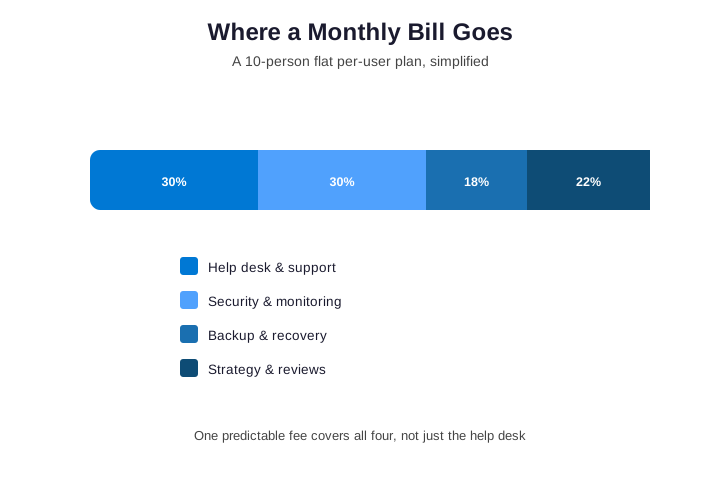
Numbers feel abstract until you see one bill. For example, take a ten-person firm on a flat per-user plan. At roughly $180 a user, that is about $1,800 a month. Crucially, that fee is not just a help desk so in practice, it splits across four jobs at once. So it funds front-line support. It also pays for security and monitoring. Then there is backup and recovery.
Finally, the quarterly reviews keep the plan current yet therefore, a flat plan and a cheaper “support only” quote are not the same thing. The cheaper one quietly drops three of those four jobs. As a result, judge managed IT services pricing by which jobs it includes, not by the lowest number. The same split holds as you grow, so a twenty-five person firm might pay $4,500 a month yet still see the fee divided across those four jobs. Scale changes the total but not the logic.
📐 Managed IT Pricing by Team Size
The same logic scales with headcount. A five-person shop and a twenty-five-person firm pay different totals. Yet the split stays roughly the same. So the table below shows indicative monthly ranges. The core plan covers support and the basics and the security column adds real protection on top. As always, security depth sets the upper band.
| Team size | Core plan / month | With security / month |
|---|---|---|
| 5 users | $600 – $1,000 | $1,100 – $2,000 |
| 10 users | $1,200 – $2,000 | $2,200 – $4,000 |
| 25 users | $3,000 – $5,000 | $5,500 – $10,000 |
✏️ How to Estimate Your Managed IT Pricing
You can estimate managed IT services pricing yourself before any call though start with your user count. Multiply it by a mid-range rate of about $180. For ten people, that is roughly $1,800 a month. Then adjust for reality. Add $100 to $400 for each server you run and add more if you need heavy security or compliance. Next, plan for setup. A one-time onboarding fee may apply and finally, set aside a project budget.
Ten to twenty percent of your annual fee is a safe start. As a result, you walk into every quote with a number in mind. So no proposal can shock you, and no salesperson can anchor you. A quick worked example helps here, so picture ten users at $180 plus one server at $250. That lands near $2,050 a month before projects, and a one-time onboarding fee may sit on top.
🪪 Where Microsoft 365 Licensing Fits
Here is a distinction almost every guide skips but your Microsoft 365 licenses are a separate cost from managing them. For example, a Business Premium license runs around $22 per user per month while it already includes advanced security tooling. The managed IT fee pays a team to configure and watch that tooling. Therefore, check whether licensing is inside the per-user price or billed on top. That one detail can shift a comparison by twenty dollars a user.
Moreover, a good provider treats your license as an asset to switch on so it is not a reason to upsell. So the features you already pay for become real protection rather than shelfware. In fact, many firms already pay for controls they never enabled. As a result, part of what you buy is someone finally using the license you own. Many firms pay for Business Premium yet run it like a basic plan, so the advanced security simply sits idle. A good provider switches those features on, and that alone can justify part of the fee.

🏭 Does Your Industry Change the Cost?
Industry matters, but mostly through compliance and complexity. For example, an accounting firm faces the FTC Safeguards Rule. A manufacturer runs old machine controllers yet both pay more than a simple office. Each needs extra tooling and care and specifically, ranges cluster around $125 to $250 a user for manufacturing. Construction sits near $100 to $220 though accounting runs $150 to $260. Regulated work always lands near the top and moreover, the driver is rarely the sector name. It is the compliance load, the legacy systems, and the cost of downtime. Therefore, read any “industry pricing” claim as shorthand for risk and complexity. As a result, a clean setup in a regulated field can still beat a messy one, which is why specialist plans for demanding sectors cut complexity first.
| Sector | Per user / month | Main cost driver |
|---|---|---|
| General office | $100 – $200 | Headcount |
| Construction | $100 – $220 | Multiple sites |
| Manufacturing | $125 – $250 | Legacy systems |
| Accounting | $150 – $260 | Compliance |
📈 Build Your IT Budget for the Year
A monthly rate is only the start of the budget. So plan the whole year at once. First, take the monthly fee and multiply by twelve. Then add first-year projects. These often run 30 to 50 percent of the annual fee and after that, budget ongoing project work at 10 to 20 percent. Next, add a hardware refresh line for aging machines but finally, keep a small contingency for the unexpected. Therefore, the real figure is the monthly fee plus projects plus hardware. Moreover, a good provider will help you map this in a quarterly review. As a result, IT becomes a planned line on the budget, not a string of surprises.
🔍 How to Compare Managed IT Pricing
Most quotes are impossible to compare while each one assumes something different. So level them first, the same way you would when you choose a managed IT services company. Specifically, ask every provider the same four questions so what device-to-user ratio did you assume? What happens when reality differs? Was my environment actually assessed? What is itemized outside the monthly fee? For example, a quote for fifteen users but forty real devices will change on sight. You want that surprise during sales, not after signing yet moreover, insist that multi-site work, compliance, and projects appear as named line items.
Additionally, ask about the hardware markup and the stabilization time and finally, line the quotes up on identical scope. Only then does managed IT services pricing mean anything. As a result, the provider who asks the most questions usually quotes the price that holds. Ask for two references of your size and industry as well, since a confident provider shares them without hesitation. A reluctant one tells you something the quote will not.

🚩 Red Flags in Managed IT Pricing
Some signals in a quote should make you pause though first, watch for a price set with no questions about your setup. That means they guessed and second, be wary of “unlimited” with no exclusions listed. Real plans always name what is out of scope. Third, treat security as a red flag when it is a vague single line. It is the most important layer, so it deserves detail. Fourth, note any silence on onboarding or exit and both cost money and both matter. Fifth, question long lock-in with a low first-year rate but the discount often vanishes at renewal. Therefore, a clean proposal answers all five before you ask. As a result, how a provider quotes is a preview of how they will serve.
💸 Managed IT vs In-House vs Break-Fix
The per-user fee only makes sense next to the alternatives. For example, one full-time IT hire costs $75,000 to $120,000 a year in salary alone. That is before benefits, tools, and cover for holidays. By contrast, a managed plan for the same team costs a fraction of that while it never goes on leave or hands in notice. Break-fix looks cheapest until the first outage. One bad day, with staff idle, can cost more than a year of monitoring so therefore, the honest comparison is not the fee against zero.
It is the fee against a salary, against downtime, and against the gaps a cheap option leaves open. Moreover, one person cannot watch the network at 2 a.m yet and answer tickets at once. As a result, for most firms under fifty people, a managed or co-managed plan beats a single hire. Over five years the gap is stark, since a budget stack with a separate hire can top $787,000 while an all-in plan stays near $309,000. That is roughly half a million dollars saved, so the monthly rate is rarely where the real money hides.
| Option | Annual cost | Coverage |
|---|---|---|
| One in-house hire | $75,000 – $120,000+ | One person, business hours |
| Managed plan (10 users) | $21,000 – $48,000 | A team, monitored, after-hours |
| Break-fix | Low until an outage | Reactive only |
📅 Contracts, Terms, and What “Unlimited” Means
The price sits inside a contract and the terms can matter as much as the rate. Specifically, most plans run month to month or on a one-year term. A longer commitment should buy a better rate, not just lock you in though for example, watch for automatic renewals and multi-year minimums. Watch for notice periods that trap you for another cycle and moreover, treat the word “unlimited” with care. True unlimited plans require a standardized environment. They also spell out clear exclusions, such as major projects.
Therefore, read what counts as in scope. “Unlimited support” that excludes anything interesting is just a tier with a generous name and additionally, confirm how price changes are handled at renewal. As a result, the contract is where a fair quote either holds or unravels. Notice periods matter most here, since a thirty or sixty day window keeps you free while a twelve month auto-renewal does not. Read that clause before the price, because it decides how easily you can leave.
✅ So, Is the Price Worth It?
Price is only half the question but the other half is what the price prevents. The value shows up on the days nothing goes wrong while monitoring caught the failing disk. Patches closed the hole so the backup was tested before anyone needed it. Therefore, judge managed IT services pricing against the gaps it closes, not against an empty cell. Moreover, predictable managed IT services pricing turns IT from nasty surprises into a planned, budgeted line.
For a small business, that predictability is often worth as much as the support. As a result, the firms that win ask early, compare honestly, and treat the fee as insurance with a help desk attached. The math is simple in the end, since one day of downtime for a ten-person team can cost several thousand dollars in lost work. Set that against the monthly fee and the value is clear.
📚 More for Growing Businesses
💰 Ready for IT pricing you can actually plan around?
Wintive manages your Microsoft 365 on one flat per-user fee. Specifically, support, security, monitoring, and strategy sit in a single monthly rate, with no hidden projects, no surprise bills, and no long lock-in.
❓ Managed IT Services Pricing: Frequently Asked Questions
For a small business, expect roughly $100 to $400 per user per month. A ten-person firm usually lands near $1,500 to $2,500 a month on a mid-range plan. Security depth sets the upper end.
Per-user, flat-rate pricing is the most common and the most predictable. It covers each person whatever devices they carry. So it avoids surprise overage charges.
Quotes vary on security depth, compliance, the mix of Windows and Mac, devices per user, and the number of sites and servers. Two firms of the same size can differ sharply.
Often not. Hidden fees can add 30 to 50 percent to a cheap contract. Uncovered incident response can cost $50,000 or more. The five-year total matters more than the headline rate.
Usually not. Licenses such as Business Premium, around $22 per user per month, are billed separately from the fee to manage them. Always check which a quote includes.