

Exchange Online Litigation Hold is the simplest way to preserve every email in a mailbox for legal or compliance reasons. Once it is on, nothing can be permanently deleted, even by the user. Therefore, it is the safety net that protects you when lawyers, auditors, or regulators come asking.
However, the feature hides a few traps. Specifically, it needs the right licence, it is not a backup, and it behaves in surprising ways when you delete an account. So this guide walks through Exchange Online Litigation Hold end to end: what it preserves, what it costs, how to turn it on with PowerShell, and the mistakes that catch most admins.
🛡️ Free: M365 Audit Checklist
19-page PDF with 50 hands-on checks covering Entra ID, Exchange Online, SharePoint, Teams, Intune, license waste, and audit logging. PowerShell commands included. Built from 60+ real tenant audits at Wintive.
🧭 Exchange Online Litigation Hold: the short answer
Exchange Online Litigation Hold preserves all mailbox content, including deleted items and earlier versions of edited items, for a set period or indefinitely. It needs an Exchange Online Plan 2 licence, which Microsoft 365 E3 and E5 include. You turn it on per mailbox with Set-Mailbox -LitigationHoldEnabled $true, and the held items live in the hidden Recoverable Items folder. In short, it is a one-switch legal hold that stops anyone from permanently erasing mail while a case or audit is open.
Critically, a litigation hold is about preservation, not productivity. When you place a mailbox on hold, Exchange keeps every message the user receives, sends, deletes, or edits. Therefore, even a deliberate purge cannot remove the evidence.
Notably, the hold is invisible to the user. They keep working, deleting, and cleaning up as usual. Therefore, you protect the evidence without changing how anyone uses their inbox. As a result, a litigation hold adds zero friction to daily work.
In practice, organisations use it whenever data must be defensibly retained. For example, a lawsuit, a regulatory audit, or an internal investigation all demand it. So think of Exchange Online Litigation Hold as a switch you flip the moment preservation becomes a legal duty, then leave on until the matter closes.
🔒 What Exchange Online Litigation Hold preserves
First, understand exactly what it keeps. A litigation hold preserves all mailbox content, including deleted items and the original versions of modified items. Therefore, if a user edits an email and then deletes it, Exchange keeps both the original and the deletion.
Furthermore, the protection is automatic and complete. You do not pick which messages to keep, because the hold covers everything in scope. Therefore, there is no risk of missing a crucial email. In short, it is preservation without judgement calls.
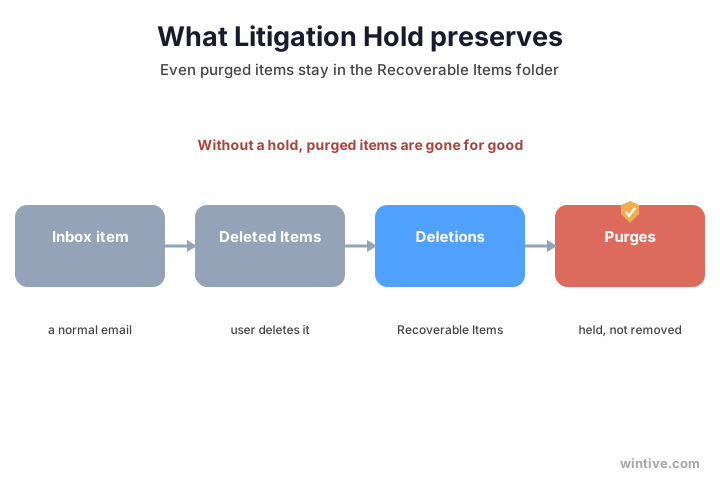
Moreover, the hold also covers the user’s archive mailbox, if the user has one. So it protects the whole mailbox footprint, not just the primary inbox. Notably, an eDiscovery search returns held items, which is how legal teams actually retrieve them later. The chart shows where deleted items end up.
Therefore, think of a held mailbox as a sealed vault for email. Once the hold is on, it keeps a complete and tamper-proof record of everything. As a result, you can answer a future legal request with real confidence rather than hope.
🗂️ Where held items live: Recoverable Items
Next, follow the mechanics. When a user deletes an item, it moves to the Deletions subfolder of the hidden Recoverable Items folder. When they purge it, or a retention policy expires, it moves to the Purges subfolder, and Exchange marks it for permanent removal. Importantly, this is also why a hold survives a determined user. Even pressing Shift and Delete only moves an item deeper into Recoverable Items. Therefore, the content stays retrievable for legal teams. As a result, no insider can quietly erase their tracks.
However, a litigation hold changes the ending. With a hold in place, the hold preserves items in the Purges subfolder for its duration instead of letting the Managed Folder Assistant erase them. Therefore, an indefinite hold means Exchange never purges those items at all.
Specifically, this all happens invisibly to the user. They still delete and clean up as normal, and their mailbox looks the same. Meanwhile, Exchange quietly retains a hidden copy of everything in the background. As a result, you preserve evidence without disrupting anyone’s daily work.
💳 Licensing: which plan you need
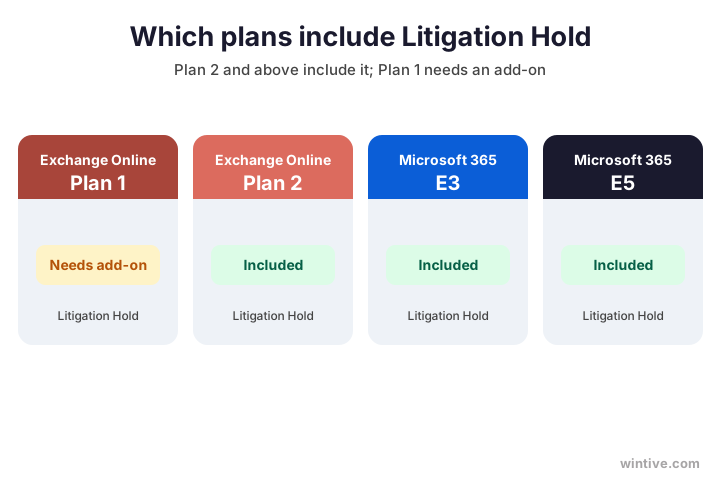
Importantly, Litigation Hold is not in every plan. It requires Exchange Online Plan 2, which Microsoft 365 and Office 365 E3 and E5 include. Therefore, most enterprise tenants already have it. For how those plans differ, see our Business Premium vs E3 comparison.
Specifically, the licence must sit on the mailbox you want to hold, not just somewhere in the tenant. So a mixed estate needs a quick audit before you start. Therefore, list every at-risk mailbox and confirm its plan first. As a result, no hold silently fails for want of a licence.
However, Exchange Online Plan 1 does not include Litigation Hold on its own. To get it on Plan 1, you add the Exchange Online Archiving licence, or you move the user up to Plan 2. So before you plan a hold, check the licence on every mailbox you intend to cover. The chart maps the plans.
Therefore, sort the licences before you sort the holds. A five-minute check now prevents a failed hold during a real case later. In short, the licence is the foundation that every hold quietly sits on, so get it right first.
🆚 Litigation Hold vs retention and eDiscovery
Of course, a litigation hold is not the only way to preserve data. Microsoft offers three tools that overlap, and choosing the wrong one causes confusion. Therefore, it helps to see them side by side.
Moreover, the three tools are not mutually exclusive. Many organisations run a litigation hold for a specific case while a retention policy governs everything else. Therefore, you layer them by purpose. In practice, the litigation hold is the blunt, reliable instrument, and retention is the precise one.
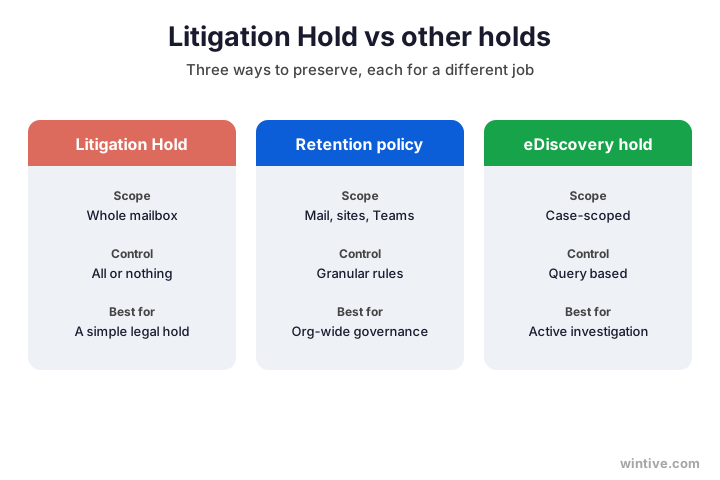
Specifically, a litigation hold is mailbox-wide and all-or-nothing, which makes it simple for a blanket legal hold. A Microsoft Purview retention policy is granular and spans mail, sites, and Teams, so it suits org-wide governance. An eDiscovery hold is case-scoped and query-based, which fits an active investigation. The chart compares the three.
In addition, note that the old In-Place Hold is retired. So for new preservation needs, choose a litigation hold or a Purview policy, never the legacy option.
💥 Delete a held mailbox: the inactive mailbox
Now the trap that catches the most admins. What happens to a held mailbox when you delete the user account? Reassuringly, the data is not lost. Instead, the mailbox becomes an inactive mailbox.
Notably, the inactive mailbox is fully searchable and costs nothing to keep. So you can hold a leaver’s mail for years without paying for a licence. Therefore, offboarding no longer means choosing between cost and compliance. As a result, you keep what you must, for as long as the hold demands.
Critically, this only works if the hold was in place before you deleted the account. With the hold, Exchange preserves the mailbox as an inactive mailbox for the hold duration, available to eDiscovery, and it needs no licence. Without a hold, Exchange soft-deletes the mailbox, and it disappears in about 30 days. The chart shows both paths.
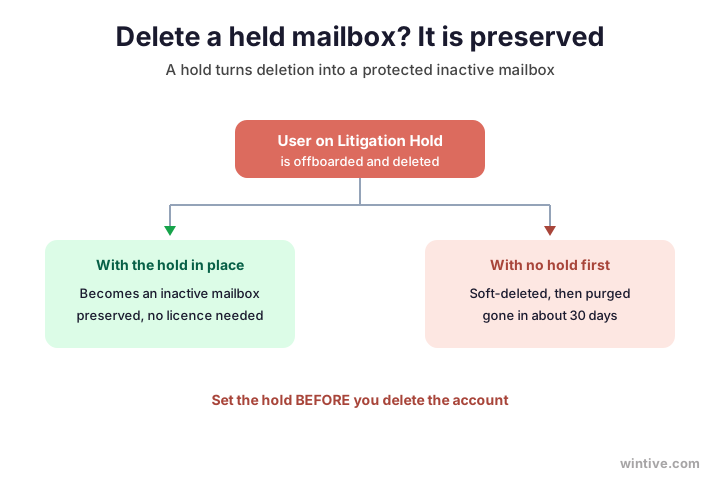
Therefore, the rule is simple but vital: place the hold before you offboard anyone whose mail might be needed. As a result, you never lose a departing employee’s records to a routine deletion.
Furthermore, you can list and search inactive mailboxes long after the person has gone. So a request that arrives years later still finds the mail it needs. As a result, a hold placed today quietly protects you well into the future.
🧮 How to enable Exchange Online Litigation Hold
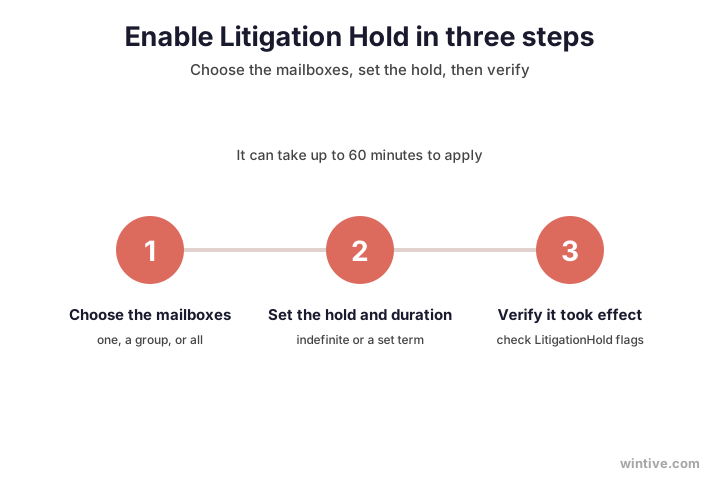
So, how do you turn it on? You can use the Exchange admin centre or PowerShell. However, PowerShell is faster and scales to many mailboxes at once. First, connect, then set the hold on one mailbox.
Reassuringly, the admin centre offers the same control through a few clicks. You open the mailbox, choose Mailbox features, and enable the hold there. However, for more than a handful of mailboxes, PowerShell wins on speed. Therefore, learn the cmdlet once and reuse it everywhere.
# Place one mailbox on Litigation Hold (Exchange Online PowerShell)
Connect-ExchangeOnline
Set-Mailbox user@yourdomain.com -LitigationHoldEnabled $true -LitigationHoldDuration 2555
Specifically, that command holds the mailbox and keeps items for 2555 days, roughly seven years. Notably, the hold can take up to 60 minutes to take effect. Therefore, do not panic if it does not show as active straight away. Microsoft documents every option in its Litigation Hold guide.
🏢 Putting every mailbox on hold
Sometimes your policy requires you to preserve all mail. In that case, you can place every user mailbox on hold with a single pipeline. However, there are caveats you must plan for first.
Specifically, an organisation-wide hold is a serious commitment. It touches every mailbox and keeps growing, so it is not a casual switch. Therefore, weigh it against a targeted hold on the mailboxes that actually carry risk. In practice, fewer, well-chosen holds are easier to manage than a blanket one.
# Place every user mailbox on an indefinite Litigation Hold
Get-Mailbox -ResultSize Unlimited -Filter "RecipientTypeDetails -eq 'UserMailbox'" |
  Set-Mailbox -LitigationHoldEnabled $true
Critically, this only holds mailboxes that exist when you run it. Therefore, the hold skips any new mailbox, so you must rerun the command, often as a scheduled task. In addition, a blanket hold grows mailbox sizes over time, so plan for the extra storage.
Wintive insight. Across the tenants we audit, the most common litigation-hold mistake is an org-wide hold set once and forgotten. New hires never get the hold, so a year later the very people involved in a dispute are the ones with no preserved mail. Either schedule the command to rerun, or use a Microsoft Purview retention policy that applies automatically to every new mailbox.
🔍 Verify and audit who is on hold
Importantly, never assume a hold worked. You should confirm it on every mailbox and record which ones it covers. Therefore, a quick audit is part of the job, not an optional extra.
Specifically, verification matters most right after offboarding. That is when a missing hold does the most damage, yet nobody is watching. Therefore, make the check a fixed step in your leaver process. As a result, you catch a gap while it is still harmless.
In practice, one command lists the hold status and duration across the whole organisation. Run it after any change, and keep the output as evidence.
# Check who is on Litigation Hold and for how long
Get-Mailbox -ResultSize Unlimited -Filter "RecipientTypeDetails -eq 'UserMailbox'" |
  Format-List Name, LitigationHoldEnabled, LitigationHoldDuration
Specifically, a value of Unlimited in the duration column means Exchange holds the mailbox indefinitely. As a result, you can prove exactly which mailboxes you hold and for how long, which is precisely what an auditor wants to see.
⏱️ Hold duration: indefinite or fixed
Next, decide how long to hold. You have two choices, and they behave differently. Therefore, pick the one that matches your legal obligation.
Furthermore, a fixed duration quietly expires items over time. An indefinite hold never does, which is safer but heavier on storage. Therefore, match the mode to the obligation rather than guessing. In practice, open litigation calls for indefinite, while a retention rule suits a fixed term.
Specifically, an indefinite hold keeps everything until you remove the hold by hand, which suits open-ended litigation. A fixed duration keeps each item for a set number of days, starting from the date it first arrived. So a seven-year retention rule maps cleanly to a duration of 2555 days. The table sums up the two modes.
| Hold type | How you set it | What happens |
|---|---|---|
| Indefinite | Omit the duration | LitigationHoldDuration shows Unlimited; nothing is ever purged |
| Fixed term | Add -LitigationHoldDuration in days | Items are held that many days from their original date |
Therefore, write the chosen duration into a short hold policy. A documented term removes guesswork when staff change or a case drags on. As a result, anyone can see why each mailbox is held the way it is, which is exactly what an audit expects.
📦 Storage impact and monitoring
However, preservation has a cost. Held items pile up in the Recoverable Items folder, which has a default size of 30 GB. Therefore, a busy mailbox on a long hold can fill that quota faster than you expect.
Specifically, the danger is a folder that fills silently. When the Recoverable Items quota is reached, new deletions can start to fail for the user. Therefore, weekly monitoring is not optional on heavily held mailboxes. As a result, you act before a full folder ever disrupts someone’s work.
Reassuringly, the Recoverable Items folder has its own quota, separate from the mailbox limit, and it is generous by default. Even so, Microsoft recommends checking it weekly so it never hits the ceiling. Specifically, you monitor it with the Get-MailboxFolderStatistics cmdlet. As a result, you catch a swelling folder before it blocks new deletions.
🚤 Common Exchange Online Litigation Hold mistakes
Meanwhile, a handful of mistakes undo all the good work. First, many admins treat a litigation hold as a backup. However, it is not one, and we cover that distinction below. Second, some delete a leaver before placing the hold, which loses the very mail they needed.
Moreover, a subtle error is assuming a tenant-wide hold covers new staff. It does not, so each new hire starts unprotected. Therefore, automate the hold, or use a retention policy that applies on its own. In short, the gaps are always at the edges, with new and departing people.
Furthermore, others set a hold and never monitor the storage, so deletions silently fail when the folder fills. Finally, a few forget that Plan 1 lacks the feature, then wonder why the command errors. Therefore, check the licence, set the hold early, and monitor the folder. As a result, the hold actually does its job when it matters.
👥 Who needs a litigation hold
Of course, not every mailbox needs a hold. So apply it by risk, not by default. Specifically, hold mailboxes that face legal or regulatory exposure, such as finance, HR, and the leadership team.
However, resist the urge to hold everyone forever. A hold on a low-risk mailbox just burns storage for no benefit. Therefore, target the roles and cases where preservation is a genuine duty. As a result, your compliance stays both defensible and affordable.
In addition, place a hold the moment litigation is even anticipated, since the duty to preserve starts early. Likewise, hold the mailbox of any key person you are about to offboard. The table lists the scenarios where a hold earns its keep.
| Scenario | Why a hold helps |
|---|---|
| Active or likely litigation | The legal duty to preserve has begun |
| Regulated industry | Rules require mail kept for years |
| Offboarding a key person | Their records survive the account deletion |
| Finance, HR, leadership | High-risk roles whose mail is often requested |
Therefore, review the held list each quarter as roles change. People move teams, cases close, and new risks appear. As a result, the right mailboxes stay covered while you free the rest, which keeps the whole programme lean.
💾 Litigation Hold is not a backup
Critically, this point deserves its own section, because the confusion is everywhere. A litigation hold preserves data so no one can permanently delete it. However, it does not give you a point-in-time restore of a mailbox.
Furthermore, the two failures they guard against are completely different. A hold answers a lawyer, while a backup answers a crash. Therefore, owning one does not cover the other. In short, treat preservation and recovery as separate, equally necessary jobs.
Specifically, a hold protects against deletion, not against corruption, ransomware, or a need to roll a mailbox back to last Tuesday. Therefore, you still need a proper backup for disaster recovery. So treat the two as partners, not substitutes. The table makes the difference clear.
| Aspect | Litigation Hold | A real backup |
|---|---|---|
| Purpose | Preserve mail for legal needs | Restore after data loss |
| Protects against | Permanent deletion | Corruption, ransomware, mistakes |
| Restore | Search via eDiscovery | Point-in-time recovery |
As a result, never tell leadership that a litigation hold makes the tenant backed up. In short, it preserves evidence, while a backup brings data back.
Ultimately, the cleanest setup pairs a litigation hold with a real backup. The hold satisfies the lawyers, and the backup satisfies disaster recovery. Therefore, you cover both risks without stretching one tool to do a job it was never built for.
🔁 Removing a hold safely
Finally, holds do not last forever. When a case closes, you remove the hold so normal deletion resumes. However, do this only when the legal duty has genuinely ended.
Specifically, lifting a hold is irreversible for anything it was protecting. Once you remove it, Exchange can finally erase purged items for good. Therefore, get written confirmation from legal before you disable it. As a result, you never destroy records that a case still relies on.
Specifically, you disable the hold with Set-Mailbox and the LitigationHoldEnabled parameter set to false. After that, items in the Purges folder become eligible for permanent removal again. Therefore, confirm with your legal team before you lift any hold. As a result, you never destroy evidence that is still needed.
✅ Exchange Online Litigation Hold checklist
Condensed, here is how to run Exchange Online Litigation Hold with confidence.
- Confirm each mailbox has Plan 2, E3, or E5 before you start.
- Enable the hold with Set-Mailbox -LitigationHoldEnabled $true.
- Choose indefinite for open cases, or a duration in days.
- Place the hold before you offboard or delete anyone.
- Remember held mailboxes become inactive mailboxes, not lost.
- Monitor the Recoverable Items folder weekly for size.
- Treat the hold as preservation, and keep a separate backup.
- Remove the hold only once legal confirms the case is closed.
Ultimately, at Wintive we set up and manage Exchange Online Litigation Hold for SMBs as part of our compliance and managed services. Moreover, we right-size the licences, document every hold, and keep a real backup alongside. To get started, contact us for a free consultation. It is quick, and we do the rest.
📚 More for Exchange admins
Therefore, these published Wintive guides go deeper on the topics a litigation hold touches next. So bookmark the ones that fit your tenant.
🔍 Want a complete audit of your Microsoft 365 tenant?
The M365 Instant Audit scans your environment in under 10 minutes: license waste, security posture, MFA coverage, compliance gaps, and rightsizing. A full PDF report with prioritized fixes arrives instantly.
❓ Frequently Asked Questions
It preserves all mailbox content, including deleted items and original versions of edited items, so nothing can be permanently removed while the hold is on. Held items sit in the hidden Recoverable Items folder, and you retrieve them through eDiscovery.
Exchange Online Plan 2, which Microsoft 365 and Office 365 E3 and E5 include. Plan 1 does not include it on its own; you add the Exchange Online Archiving licence or move the user to Plan 2.
If you set the hold before deletion, the mailbox becomes an inactive mailbox. It keeps its contents for the hold duration, stays available to eDiscovery, and needs no licence. Without a hold, the mailbox disappears in about 30 days.
No. A hold preserves mail so no one can delete it, but it does not provide point-in-time restore. It protects against deletion, not corruption or ransomware, so you still need a separate backup for disaster recovery.
Connect with Connect-ExchangeOnline, then run Set-Mailbox user@yourdomain.com -LitigationHoldEnabled $true. Add -LitigationHoldDuration with a number of days for a fixed term, or omit it to hold indefinitely.
A litigation hold can take up to 60 minutes to apply after you enable it. Held items also expand the Recoverable Items folder, so monitor that folder weekly with Get-MailboxFolderStatistics.
🧭 Your next step
Need Exchange Online Litigation Hold set up properly? First, book a short call. Then we check your licences, your at-risk mailboxes, and your retention duties. Finally, we configure the holds and document them. To start, contact Wintive. It is quick, and we do the rest.