

The Exchange Online Plan 1 vs Plan 2 choice comes down to one thing: how much storage and compliance you really need. Both plans give every user a cloud mailbox, calendar, and the same spam and malware filtering. So for a lot of small teams, Plan 1 is already plenty. Still, the moment you need unlimited archiving, data loss prevention, or a legal hold, Plan 2 becomes the obvious pick.
We license these mailboxes for small businesses every week, so this guide skips the marketing and shows the real differences. First you will see the features side by side. Then we will compare mailbox size, archiving, compliance, and price. Finally you will get a simple rule for choosing, plus the commands to check and switch a plan. Because the wrong choice either wastes money or blocks compliance, it pays to get this right once.
🛡️ Free: M365 Audit Checklist
19-page PDF with 50 hands-on checks covering Entra ID, Exchange Online, SharePoint, Teams, Intune, license waste, and audit logging. PowerShell commands included. Built from 60+ real tenant audits at Wintive.
🧭 Exchange Online Plan 1 vs Plan 2: the short answer
In the Exchange Online Plan 1 vs Plan 2 decision, Plan 1 gives a 50 GB mailbox and the email basics for about $4 per user. Plan 2 doubles the mailbox to 100 GB and adds unlimited archiving, data loss prevention, and litigation hold for about $8. So pick Plan 1 for straightforward email, and Plan 2 when compliance, archiving, or legal hold matters. You can always upgrade later without losing data.
Think of Plan 1 as the solid email tier. It covers the mailbox, the calendar, contacts, shared mailboxes, and Microsoft’s built-in protection. Meanwhile Plan 2 is the compliance tier. It keeps everything in Plan 1, then layers on storage and governance for teams that must retain and search their data.
Because the plans share a foundation, the upgrade path is painless. You swap one licence for the other, and the mailbox keeps its contents. So you are never locked in, and you never pay for features you do not yet use. Next, let us put the two tiers next to each other.
It helps to know what both tiers share before you compare. Each includes Outlook on the web, mobile access, shared mailboxes, distribution groups, and resource calendars. Each also runs on the same uptime guarantee, so reliability never depends on the plan. As a result, the choice is never about quality of email; it is only about storage and compliance.
📋 Plan 1 vs Plan 2: the feature comparison
The fastest way to decide is to see the features together. The chart below marks what each tier includes, and the table spells out the detail. Notably, the gaps cluster around storage and compliance, not everyday email.
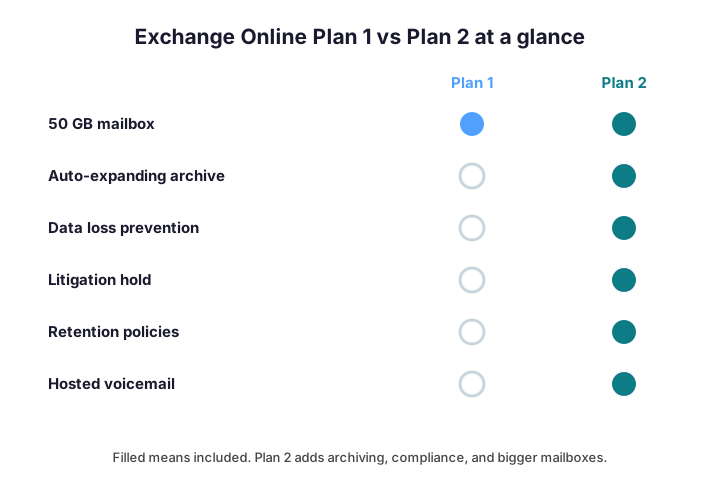
Read the matrix from the top, and a pattern appears. Both tiers handle mail, calendars, and protection equally well. From the archive row down, however, Plan 2 pulls clearly ahead. So if those lower rows do not apply to you, the extra spend is hard to justify.
| Feature | Plan 1 | Plan 2 |
|---|---|---|
| Primary mailbox | 50 GB | 100 GB |
| Archive mailbox | Fixed, limited | Auto-expanding (unlimited) |
| Data loss prevention (DLP) | No | Yes |
| Litigation & in-place hold | No | Yes |
| Retention & eDiscovery hold | Basic | Advanced |
| Anti-spam & anti-malware (EOP) | Yes | Yes |
| Shared mailboxes | Yes | Yes |
| List price (per user/month) | ~ $4 | ~ $8 |
One point deserves emphasis here, because it saves money. The everyday experience is identical on both tiers. Users open the same Outlook, get the same filtering, and enjoy the same uptime. So nobody on Plan 1 feels second-class day to day. Therefore you upgrade for capability behind the scenes, never for a nicer inbox.
Keep that table handy while you read the rest. Each row below gets its own short section, so you understand not just what differs, but why it matters. First up is the difference everyone notices: mailbox size.
📦 Mailbox size: 50 GB versus 100 GB
Storage is the headline difference. Plan 1 gives each user a 50 GB primary mailbox, while Plan 2 doubles that to 100 GB. For most people, 50 GB lasts years, so do not over-buy on size alone.
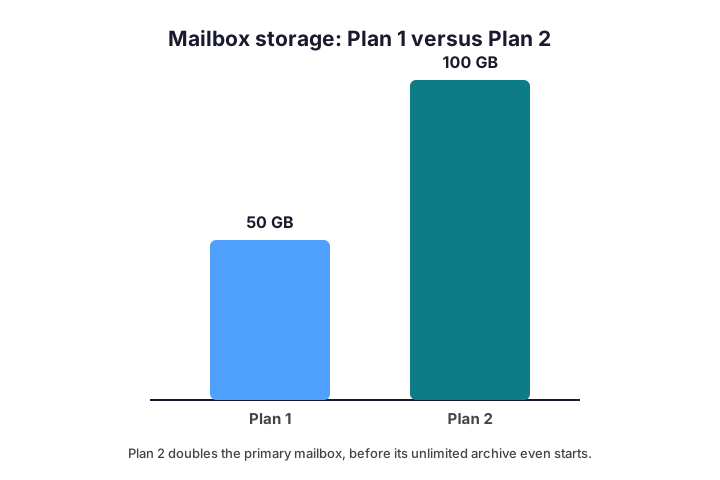
Heavy email users tell a different story, though. A salesperson with years of attachments, or a director who never deletes, can fill 50 GB faster than you expect. When that happens on Plan 1, the mailbox simply stops receiving mail. So if a few users push the limit, Plan 2 buys breathing room and avoids those awkward, full-mailbox calls.
Keep the primary mailbox separate from the archive in your head. The 50 GB or 100 GB figure is the primary store, where live mail sits. The archive is extra space for older items, and it works very differently between the tiers. So a user can be fine on a 50 GB primary while still needing the larger archive that only Plan 2 provides.
It also helps to know what “full” actually does. Once a Plan 1 mailbox fills, new mail bounces back to the sender. So the user looks unreachable, even though the account works. Because that surprises people at the worst moment, watch storage trends rather than waiting for the bounce.
🗄️ Archiving: where Plan 2 pulls ahead
Archiving is the quiet feature that decides many upgrades. Plan 1 includes an archive mailbox, yet it is fixed and limited. Plan 2 unlocks the auto-expanding archive, which grows as needed and is effectively unlimited.
Why does that matter? Because regulated industries must keep mail for years, not months. With Plan 2, old messages move to the archive automatically, so the primary mailbox stays fast and tidy. Meanwhile users still search everything from one place. The command below switches the auto-expanding archive on for a Plan 2 mailbox.
# Turn on the auto-expanding archive (Plan 2 only)
Enable-Mailbox -Identity "user@contoso.com" -AutoExpandingArchive
Get-Mailbox "user@contoso.com" | Select ArchiveStatus, AutoExpandingArchiveEnabled
The mechanics are worth knowing, since they explain the value. When a Plan 2 archive nears its limit, Microsoft adds storage automatically in large increments, scaling well into the terabytes. So users never manage quotas, and admins never field “archive full” tickets. Meanwhile search still spans the whole mailbox, so nothing feels hidden away.
On Plan 1, by contrast, you eventually run out of room and start deleting. For a law firm or an accountant, that is a real risk, not a minor annoyance. So whenever long-term retention is a rule rather than a wish, Plan 2 earns its place.
🛡️ Compliance: DLP, holds, and retention
Compliance is the second big divide, and it is where Plan 2 truly separates itself. Plan 1 covers little of it, while Plan 2 brings the governance tools regulated teams need. The chart below shows how far apart the two tiers sit.
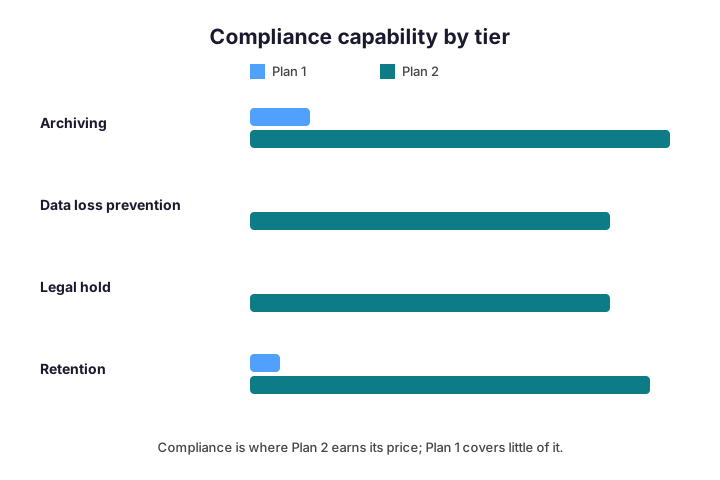
Three features carry the weight here. Data loss prevention scans outbound mail and blocks sensitive data, such as card numbers. Litigation hold preserves a mailbox unchanged during a dispute. Retention and eDiscovery hold let you keep and search content across the tenant. So if any of those words appear in your contracts, you are really shopping for Plan 2.
A quick example makes DLP concrete. Suppose a staffer tries to email a spreadsheet full of card numbers to a personal address. With Plan 2, a DLP rule can warn the sender, block the message, or alert an admin. So the leak never leaves the building. On Plan 1, that same email simply sends, and you find out later, if at all.
Holds and retention deserve a plain explanation too. A litigation hold freezes a mailbox, so nothing can be deleted while a dispute runs. Retention policies do the opposite job, keeping or removing content on a schedule you set. Then eDiscovery lets a compliance officer search across mailboxes for a case. Because Plan 2 bundles all three, regulated teams get their toolkit in one licence.
Plan 1 is not careless, to be clear. Both tiers include Exchange Online Protection, which filters spam and malware for everyone. Yet protection and compliance are different jobs. Therefore a team can be perfectly secure on Plan 1 and still need Plan 2 for the paperwork.
💸 Pricing: what each plan costs
Price usually settles the argument. Plan 1 lists at roughly $4 per user each month, while Plan 2 lists at about $8. So Plan 2 costs around double, and that gap adds up fast across a whole team.
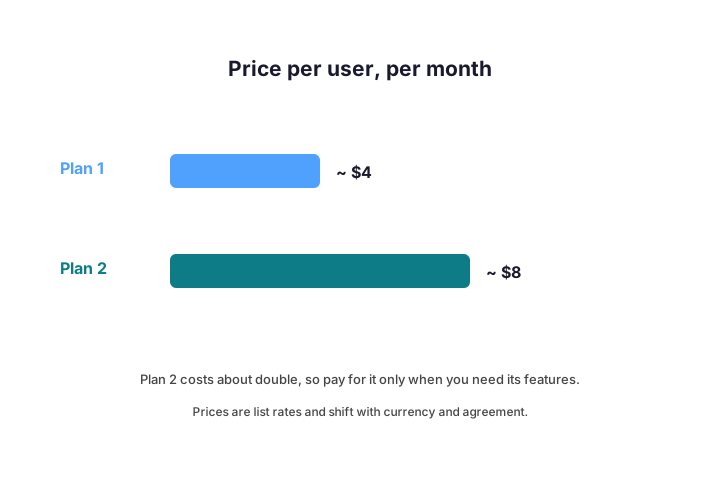
Run the maths on your own headcount before you decide. For twenty users, the difference is about $80 a month, or near $1,000 a year. For most email-first teams, that money is better spent elsewhere. Still, for the handful of users who need archiving or holds, you can mix plans and license only those people on Plan 2.
| What you get | Plan 1 | Plan 2 |
|---|---|---|
| Best for | Email-first teams | Compliance-heavy teams |
| Mailbox headroom | Good | Excellent |
| Long-term archiving | Limited | Unlimited |
| Legal & compliance | Minimal | Full |
| Monthly cost | Lower | About double |
Think about the billing term as well. Most SMBs pay monthly, yet an annual commitment usually trims the rate. So if your headcount is stable, a yearly term on Plan 1 squeezes the cost down further. Because the saving compounds across users, it is worth a quick conversation before you sign.
One reminder on prices, though. The figures above are list rates, so your agreement, currency, and partner can move them. Therefore treat the numbers as a guide, and confirm the live price before you buy.
🤔 Which plan should you choose?
Here is the simple rule we give clients. Start on Plan 1, and move to Plan 2 only when a real need appears. So let the requirement drive the spend, not the other way round.
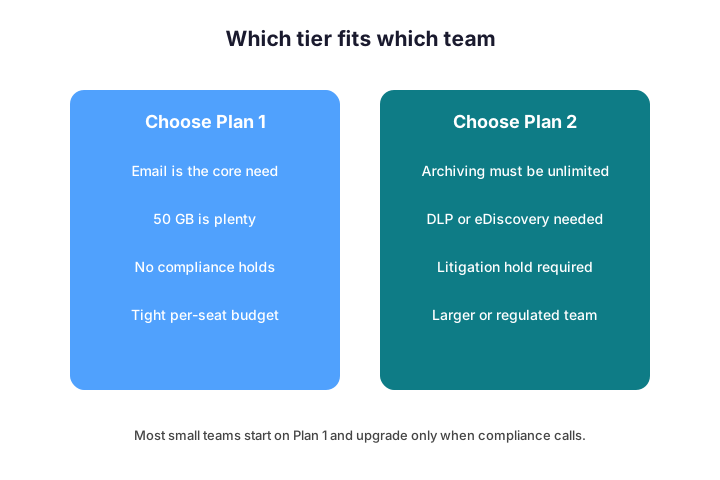
Use this quick test to place yourself:
- Mostly everyday email, under 50 GB per user? Plan 1 fits.
- Need to keep mail for years without deleting? Choose Plan 2.
- Bound by DLP, legal hold, or eDiscovery? Plan 2 is required.
- Only a few power users hit the limits? Mix plans per user.
- Tight budget and no compliance rules? Plan 1, comfortably.
Notice that headcount rarely decides this. A two-person firm under regulation needs Plan 2, while a fifty-person shop with plain email is happy on Plan 1. So judge the requirement, not the size of the company.
The mixed approach deserves a closer look, because it wins so often. In a typical office, a few people hold sensitive records while most just send normal mail. So you put the records-keepers on Plan 2 and everyone else on Plan 1. As a result, you satisfy the regulator and the finance director at the same time. That balance is usually the cheapest compliant answer.
🏢 Plan 1 vs Plan 2 for a small business
Most small businesses we onboard land on Plan 1, and they stay there happily. Their email rarely fills 50 GB, and few face strict retention rules. So the lower price wins, and nobody misses the extras.
A clear minority does need Plan 2, however. Law firms, clinics, finance teams, and anyone under a regulator usually require holds and unlimited archiving. For them, Plan 2 is not a luxury but a compliance baseline. So the honest answer to “which is better” is simple: better depends entirely on your obligations.
When a team is split, mixing plans is the smart move. License the compliance-bound users on Plan 2 and everyone else on Plan 1. As a result, you meet the rules without overpaying for the whole company. That blend is how most SMBs get the best of both.
Picture a fifteen-person firm as a quick example. The two partners face client-records rules, so they sit on Plan 2. The other thirteen people just send normal email, so Plan 1 covers them. Consequently the firm stays fully compliant while paying the premium on only two seats. So a little planning turns a blunt decision into a tidy, cheaper one.
⚖️ When Plan 1 is enough
Plan 1 covers far more teams than the upgrade pitch suggests. If your people mainly send and receive normal email, 50 GB is generous. Because the spam and malware filtering is identical, you lose nothing on day-to-day safety.
Plan 1 also suits anyone watching the budget closely. A startup, a trade business, or a small shop rarely needs litigation hold. So paying double for features that sit unused makes little sense. In those cases, Plan 1 is not a compromise; it is simply the right tool.
Downgrading is just as easy if you over-bought. Should an audit show Plan 2 sitting idle on most seats, you move them back to Plan 1. Because the mailbox data stays put, the only change is the monthly bill. So treat your first choice as reversible, and review it once a year rather than worrying about it now.
Wintive insight. In the audits we run, the most common Exchange waste is the opposite of skimping. Teams buy Plan 2 for everyone, then use its compliance features on nobody. As a result, they pay double for storage they never touch. So before you standardise on Plan 2, check who genuinely needs it; usually it is a short list.
🔐 When you genuinely need Plan 2
Some teams must run Plan 2, and the signs are easy to spot. If a regulator can ask for your email history, you need unlimited archiving and holds. Likewise, if you handle sensitive data, DLP stops it leaking by accident.
Watch the practical signals too, not just the legal ones. Mailboxes that keep hitting the 50 GB ceiling are telling you something. Users who refuse to delete anything are another hint. So when storage pressure and compliance both point the same way, Plan 2 stops being optional and becomes the baseline.
Certain industries reach for Plan 2 almost by default. Law firms keep matter files for years, so unlimited archiving is non-negotiable. Clinics and finance teams handle protected data, which makes DLP and holds a baseline. Even a small agency under a client contract may inherit those duties. So if your sector is regulated, treat Plan 2 as the starting point, then trim where you safely can.
There is one more trigger worth naming. Sometimes a client or insurer demands proof that you retain and can produce email. Because Plan 1 cannot guarantee that, the contract itself forces the upgrade. So check your client agreements, not just the law.
🔁 How to check and switch a plan
Switching between the two tiers is refreshingly simple. You change the licence on a user, and the mailbox keeps every message. So an upgrade or downgrade is a licensing task, not a migration.
Start by checking who is on what today. The command below lists each mailbox and its current plan, so you can spot waste or gaps.
# See which Exchange plan each mailbox is on (Exchange Online PowerShell)
Get-EXOMailbox -ResultSize Unlimited |
  Select DisplayName, PrimarySmtpAddress, @{N='Plan';E={(Get-MailboxPlan -Identity $_.MailboxPlan).DisplayName}} |
  Sort Plan | Format-Table -AutoSize
Once you know the picture, assign or change licences from the admin center or by script. The snippet below lists your available SKUs so you can target the right one. After the licence updates, the new features appear within minutes.
# Assign or switch a user's plan via licensing (Microsoft Graph PowerShell)
Connect-MgGraph -Scopes "User.ReadWrite.All","Organization.Read.All"
# Find the SKU, then set the licence on the user
Get-MgSubscribedSku | Select SkuPartNumber, SkuId, ConsumedUnits
Best of all, there is no downtime and no migration. Because both tiers run on the same Exchange Online service, a switch is purely a licensing change. So the user keeps emailing while the plan flips underneath them. Therefore you can right-size confidently, knowing a wrong guess is cheap to correct.
🧩 Where these plans fit in Microsoft 365
Many buyers meet these plans inside a bigger bundle, so it helps to know the map. Microsoft 365 Business plans include a Plan 1-level mailbox with extra apps and security. Office 365 E3 and E5, by contrast, include the full Plan 2 feature set.
So you do not always buy Plan 2 on its own. If a user already has E3, they have Plan 2 features built in. Meanwhile a Business Standard user has Plan 1-level email, and may need a standalone Plan 2 add-on for compliance. For the wider plan picture, see our guide to Microsoft 365 Business Basic vs Standard.
Because bundles hide the detail, audit what each user truly has before you buy more. Microsoft’s own Exchange Online service description lists every feature by plan, so it is the definitive reference when a row is unclear.
Double-buying is the trap to avoid here. A user with E3 already owns Plan 2 features, so adding a standalone Plan 2 on top wastes money outright. Likewise, stacking a Business plan with a separate mailbox licence usually duplicates what you have. So before any purchase, list each user’s current entitlement and buy only the gap.
🪑 What about the cheaper Kiosk plan?
One question comes up often, so it is worth answering here. Below Plan 1 sits a frontline option, sold today as a Kiosk or F-series mailbox. It costs less, yet it trades away a lot to get there.
The frontline mailbox is small and web-first, so it suits staff who rarely use email. Shift workers, floor teams, or shared-station users fit the profile well. Still, it lacks the full desktop Outlook rights and the headroom of Plan 1. So treat it as a tier below this comparison, not as a third contender for knowledge workers.
For anyone at a desk all day, Plan 1 remains the floor. The Kiosk saving is real only when the mailbox barely gets used. Therefore most offices land on Plan 1 or Plan 2, and reserve the frontline licence for genuine shift roles.
Mixing all three is perfectly normal, by the way. A warehouse might run frontline mailboxes, the office on Plan 1, and compliance staff on Plan 2. So you match each role to the lightest licence that still does the job.
✅ Your plan-selection checklist
Work down this list before you commit a single licence. Each line maps to a real difference between the tiers, so it keeps the decision honest.
- Estimate real mailbox size per user, not the average.
- List any retention or legal-hold obligation you carry.
- Check whether DLP or eDiscovery appears in your contracts.
- Count how many users actually need the extras.
- Compare the per-user gap across your whole headcount.
- Decide whether to mix plans or standardise on one.
- Confirm live pricing with your partner before buying.
Revisit the list once a year, because needs drift. A team that was email-only might take on a regulated client, while an over-licensed one can claw money back. So a short annual review keeps your spend matched to reality.
For a deeper look at the lower tier on its own, read our full breakdown of Exchange Online Plan 1. Then come back here to confirm whether the upgrade is worth it for your team.
📚 More for growing teams
These published Wintive guides answer the questions a licensing review raises next. Therefore bookmark the ones that fit your stack.
🔍 Want a complete audit of your Microsoft 365 tenant?
The M365 Instant Audit scans your environment in under 10 minutes: license waste, security posture, MFA coverage, compliance gaps, and rightsizing. A full PDF report with prioritized fixes arrives instantly.
❓ Frequently Asked Questions
Plan 2 adds a 100 GB mailbox, unlimited auto-expanding archiving, data loss prevention, and litigation hold. Plan 1 keeps a 50 GB mailbox and the email basics.
At list price, Plan 1 is about $4 per user each month and Plan 2 about $8. Your agreement and currency can shift those figures.
Yes, if you need unlimited archiving, DLP, or legal hold. If your team mainly sends normal email under 50 GB, Plan 1 is plenty.
Yes. You swap the licence in the admin center, and the mailbox keeps all its data while the Plan 2 features switch on within minutes.
No. Business plans include a Plan 1-level mailbox. The full Plan 2 compliance set comes with Office 365 E3 and above, or as a standalone Plan 2 licence.
Yes, and it is often the smart move. License only the compliance-bound users on Plan 2, and keep everyone else on Plan 1 to save money.
🧭 Your next step
Start by listing who truly needs archiving, holds, or extra storage, because that short list decides everything. Once you have it, the Exchange Online Plan 1 vs Plan 2 choice becomes obvious, and mixing plans often costs the least. When you want a second pair of eyes, we are happy to review your licensing with you.
If you take one thing away, make it this. The plans differ on storage and compliance, never on the quality of email itself. So buy for the obligations you can name today, mix where it helps, and revisit the choice each year. That habit keeps both your inbox and your invoice healthy.
Related Wintive guides: Exchange Online Plan 2 deep dive, Exchange Online archiving guide, and Exchange Online licensing guide.