

Microsoft Intune Plan 1 is the base licence for Microsoft Intune, the cloud service that manages your company’s devices and apps. Therefore, if you own Microsoft 365 E3, E5, or Business Premium, you already have it. It covers the everyday endpoint management most small and mid-sized teams ever need.
However, this guide explains what Plan 1 includes, what it costs, and which bundles ship it for free. We then compare it with Plan 2 and the Intune Suite, show how to buy and assign a licence, and help you right-size your choice. No jargon, just the facts you need to decide.
🛡️ Free: M365 Audit Checklist
19-page PDF with 50 hands-on checks covering Entra ID, Exchange Online, SharePoint, Teams, Intune, license waste, and audit logging. PowerShell commands included. Built from 60+ real tenant audits at Wintive.
🧭 What is Microsoft Intune Plan 1
Microsoft Intune Plan 1 is the entry-level licence for Microsoft Intune. It gives you cloud-based device management, app deployment, app protection, compliance, and Conditional Access for every platform. It lists at around $8 per user per month, but most teams already own it inside Microsoft 365 E3, E5, or Business Premium. Plan 2 and the Intune Suite are paid add-ons that sit on top of it.
Furthermore, Microsoft Intune Plan 1 is the standard tier of Intune. Intune is Microsoft’s unified endpoint management service. Specifically, in plain terms, it manages laptops and phones from the cloud. Plan 1 is the licence that unlocks all the core features.
Notably, think of it as the foundation. Almost everything an IT team does day to day sits in Plan 1. Finally, you enrol devices, push apps, set rules, and block risky sign-ins. The paid add-ons only matter once you outgrow these basics.
Critically, it is also the version that ships inside the big Microsoft 365 bundles. So if you pay for E3 or Business Premium, Plan 1 rights are already on your account. Many teams run Intune for years without buying anything extra.
In practice, the name is newer than the product. Intune used to come as a single plan, then Microsoft split it into Plan 1 and Plan 2 and added the Suite on top. As a result, plan 1 inherited everything the original service did. So when an older guide simply says “Intune”, it almost always means what is now Plan 1.
🔑 What you need to use Plan 1
Therefore, Microsoft Intune Plan 1 has only a few prerequisites, and most Microsoft 365 tenants already meet them. There is no server to stand up and nothing to install on-premises.
- A Microsoft Entra ID tenant, which comes with any Microsoft 365 subscription.
- A Plan 1 licence assigned to each managed user or device.
- An admin with the Intune Administrator role to set it up.
- Supported devices: Windows 10 and 11, recent macOS, iOS, iPadOS, and Android.
However, if you already run Microsoft 365, you have the first three by default. So the only real work is assigning licences and confirming the MDM authority is Intune. Furthermore, from there, a device can enrol in minutes through the Intune Company Portal. We cover the licence assignment in detail further down.
📦 What Microsoft Intune Plan 1 includes
Specifically, plan 1 covers the full core of endpoint management. The capabilities below all come with the base licence, on every platform you support.
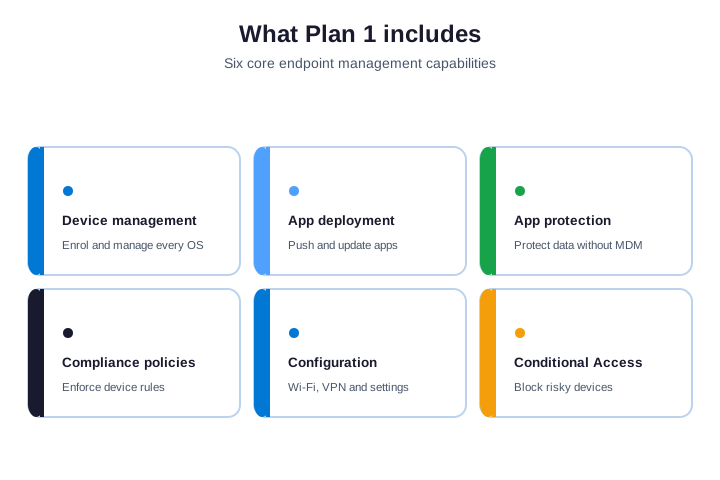
Device management enrols and controls Windows, macOS, iOS, and Android. App deployment pushes and updates software. App protection policies guard company data even on personal phones. Notably, together, these three cover most of what a help desk handles.
Finally, the rest rounds out a real security baseline. Compliance policies set the rules a device must meet. Configuration profiles push settings like Wi-Fi and VPN. Conditional Access then blocks any device that fails the rules. Critically, plan 1 also includes Windows Autopilot, which can hybrid-join devices through the Intune Connector for Active Directory.
🛡️ Security baked in, not bolted on
In practice, plan 1 is not just management. It is also security. As a result, Conditional Access checks every sign-in against device health, so an unencrypted or jailbroken device is turned away. App protection policies stop company data leaking out of Outlook or Teams, even on a personal phone. You get a real Zero Trust baseline without buying a separate product.
🔗 Co-management with Configuration Manager
Therefore, plan 1 also includes co-management rights. If you still run on-premises Configuration Manager, Intune can manage the same Windows PCs alongside it. However, you move workloads to the cloud one at a time, at your own pace. So Plan 1 fits both cloud-first shops and teams that are mid-migration.
💲 Microsoft Intune Plan 1 pricing
Furthermore, Microsoft Intune Plan 1 price is simple once you know where to look. On its own, it is a flat per-user fee. Inside a bundle, it costs nothing extra.
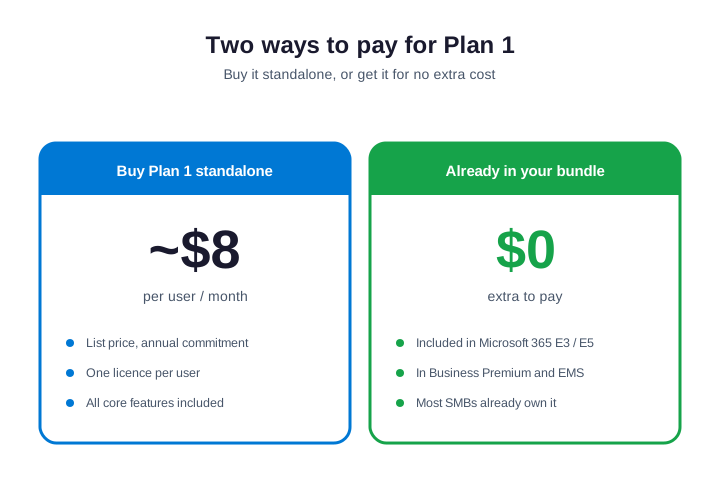
Specifically, bought standalone, Plan 1 lists at about $8 per user per month on an annual commitment. That is the microsoft intune plan 1 price per user per month most buyers search for. You can confirm the current figure on Microsoft’s Intune pricing page, since list prices change.
Notably, most teams never pay that, though. Plan 1 is bundled into Microsoft 365 E3, E5, and Business Premium. Finally, so the real cost for them is zero on top of a licence they already buy. Standalone Plan 1 only makes sense when you need device management but not the rest of Microsoft 365. For the full cost picture across every plan, see our Microsoft Intune pricing guide.
Critically, the math is easy to run. A team of 25 on standalone Plan 1 pays around $200 a month, or about $2,400 a year. In practice, the same team on Business Premium pays more per seat, but gets Office, email, and the full security stack with Plan 1 folded in. So compare the whole bundle, not just the standalone line.
As a result, where you buy matters too. You can get Plan 1 directly from Microsoft, through a Cloud Solution Provider, or on an Enterprise Agreement. Therefore, a CSP partner often bundles support and flexible monthly billing. Nonprofits and schools also get discounted or donated licences, so check your eligibility before paying list price.
🧩 Which licences include Plan 1
Before you buy Plan 1 on its own, check what you already own. However, several common Microsoft licences include Plan 1 rights at no extra charge. The table below lists them.
| Licence or bundle | Includes Intune Plan 1? |
|---|---|
| Microsoft 365 Business Premium | Yes, full Plan 1 rights |
| Microsoft 365 E3 and E5 | Yes, full Plan 1 rights |
| Enterprise Mobility + Security E3 / E5 | Yes, full Plan 1 rights |
| Microsoft 365 F1 and F3 | Yes (frontline scope) |
| Microsoft 365 Business Basic / Standard | No, Intune is not included |
| Office 365 plans (E1/E3/E5) | No, Intune is not included |
Furthermore, the pattern is clear. The “Microsoft 365” bundles include Intune, while the older “Office 365” and the cheaper Business plans do not. If you are on Business Basic or Standard, you need to add Intune or move up to Business Premium.
Specifically, one nuance trips people up. Enterprise Mobility + Security, or EMS, includes Intune Plan 1 but not the Office apps. Notably, so EMS suits teams that already have email elsewhere and only need device and identity management. If you want Office plus Intune on one line, Business Premium or E3 is the cleaner buy.
👤 User versus device licensing
Finally, plan 1 is normally a per-user licence. One licence covers all of that person’s enrolled devices, which suits most office staff with a laptop and a phone.
Critically, there is also a device version of Plan 1. It licenses the hardware, not a named person. In practice, this fits shared, frontline, and kiosk machines that many people use, like a warehouse scanner or a shop till. So you pay per device instead of per user, which is cheaper for shared fleets.
As a result, pick the model that matches reality. Count your named users and your shared devices separately. Then license each pool the cheaper way. Therefore, mixing both is normal, and it keeps spend tight.
However, a quick test decides the model. Ask who is responsible for the device. Furthermore, if it is one named person, license per user. If many people share it across shifts, license per device. Frontline teams in retail, healthcare, and logistics lean on the device model, which is why Microsoft sells frontline F-plans built around it.
🔁 Microsoft Intune Plan 1 vs Plan 2
Specifically, this is the comparison most buyers want. The key fact is simple: Plan 2 is not a replacement. It is an add-on that sits on top of Plan 1.
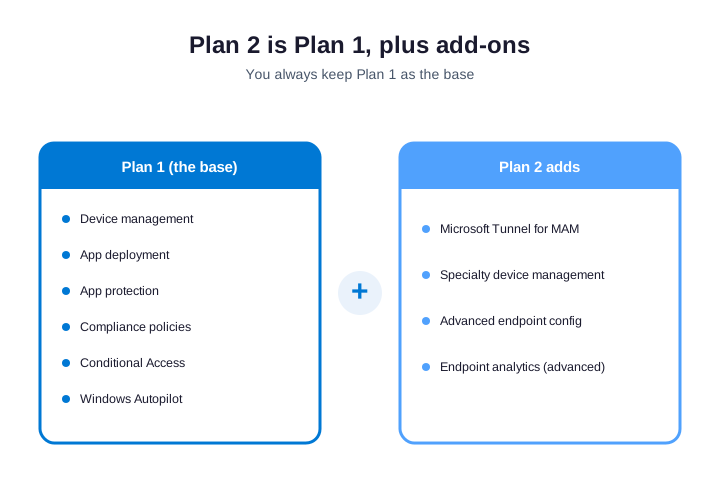
Notably, plan 2 adds a handful of advanced features. The main ones are Microsoft Tunnel for mobile app management, management of specialty devices like HoloLens, and some advanced configuration. The table breaks down the gap.
| Capability | Plan 1 | Plan 2 |
|---|---|---|
| Device and app management | Yes | Yes |
| Compliance and Conditional Access | Yes | Yes |
| Microsoft Tunnel for MAM | No | Yes |
| Specialty device management | No | Yes |
| Advanced endpoint analytics | Limited | Yes |
Finally, for most small and mid-sized teams, Plan 1 is enough. Plan 2 earns its keep in specific cases, such as field engineers who need a per-app VPN, or sites running specialty hardware. If neither applies, skip it.
Critically, a few clear cases justify Plan 2. Field engineers who need a per-app VPN to reach internal tools. In practice, sites running specialty hardware like HoloLens. Teams that need Linux enrollment or advanced configuration at scale. If your staff are ordinary office users on laptops and phones, none of that applies, and Plan 1 is the right call.
Wintive insight. In the tenants we audit, license waste almost always runs one way: teams buy Plan 2 or the Suite for everyone, then use only Plan 1 features. So we map actual feature use first, license the few who need add-ons, and leave the rest on Plan 1. That single review often pays for the whole audit.
💼 Plan 1, Plan 2, and the Intune Suite
As a result, above Plan 2 sits the Intune Suite. It bundles Plan 2 plus a set of premium add-ons into one licence. Each tier stacks on the one below.
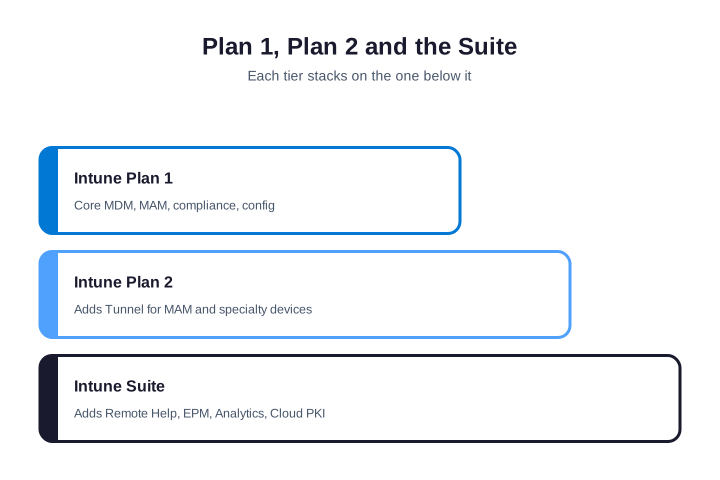
Therefore, the Suite includes Remote Help, Endpoint Privilege Management, Advanced Analytics, Cloud PKI, and Enterprise App Management. Bought together, they cost less than buying each add-on alone. So the Suite pays off once you need three or more of those tools.
However, each Suite tool solves one problem. Remote Help gives the help desk a secure, built-in remote-desktop session. Endpoint Privilege Management lets standard users run approved admin tasks without a permanent admin account. Advanced Analytics deepens reporting, Cloud PKI issues certificates without an on-premises server, and Enterprise App Management packages and patches common apps for you.
Furthermore, for a small team, the Suite is usually overkill. Stay on Plan 1, and add a single component only if a real need appears. Larger or regulated teams are the ones that tend to justify the full Suite.
🚫 What Microsoft Intune Plan 1 does not include
Specifically, knowing the limits of Plan 1 saves you from buying twice. A few capabilities live only in the paid add-ons. None of them block everyday management.
- Microsoft Tunnel for MAM — a per-app VPN, in Plan 2.
- Specialty device management — HoloLens and similar, in Plan 2.
- Remote Help — built-in remote assistance, in the Suite.
- Endpoint Privilege Management — controlled admin rights, in the Suite.
- Cloud PKI and Enterprise App Management — both in the Suite.
Notably, notice the pattern. Plan 1 handles the core; the add-ons handle edge cases and scale. Finally, so start on Plan 1, and let real needs pull you up a tier. Buying ahead of need is the most common way to waste Intune budget. So treat every add-on as a deliberate decision, backed by a real requirement, not a just-in-case purchase.
🆚 Plan 1 versus a standalone MDM tool
Critically, some teams weigh Intune Plan 1 against a third-party MDM, such as a standalone Apple or Android tool. On the price line, the two can look similar. In practice, Plan 1 usually wins on integration, not on sticker price.
In practice, the reason is that Plan 1 is part of Microsoft 365. It shares identity with Entra ID, feeds Conditional Access, and reports into Microsoft Defender. As a result, a separate tool bolts on from the outside, so you run a second console, a second agent, and a second set of policies. For a Microsoft shop, that overhead rarely pays off.
Therefore, there are exceptions. Heavy Apple estates sometimes pair Intune with a Mac specialist for niche controls. But for a mixed Windows-and-mobile fleet already on Microsoft 365, Plan 1 is the natural and cheaper choice. However, you manage every device from one place, with one login.
Furthermore, there is a hidden saving too. Every third-party tool you drop is one less contract to renew, one less agent to patch, and one less console to learn. Specifically, so the real comparison is not licence against licence. It is your whole tool sprawl against a single platform you already pay for. For most Microsoft shops, consolidating onto Plan 1 wins on both cost and effort.
🛒 How to buy and assign a Plan 1 licence
Notably, getting Plan 1 onto a user takes two steps: add the licences to your tenant, then assign one to each person. You can do both in the Microsoft 365 admin center for a few people, or script the assignment with PowerShell when you onboard a whole team at once.
🖱️ Assign in the admin center
Finally, in the Microsoft 365 admin center, open Billing, then Purchase services, and add Intune Plan 1 or a bundle that includes it. Next, go to Users, then Active users, pick a person, and open the Licenses and apps tab. Critically, tick the Intune licence and save. The user can enrol a device within minutes, and you can repeat this for a handful of people quickly. Beyond about ten users, switch to the scripted or group-based methods below.
⌨️ Assign with PowerShell
In practice, for many users at once, script it with Microsoft Graph PowerShell. First, find the licence SKU in your tenant. The Plan 1 part number is usually INTUNE_A.
# Find the Intune Plan 1 SKU in your tenant
Connect-MgGraph -Scopes "Organization.Read.All"
Get-MgSubscribedSku |
  Where-Object SkuPartNumber -like "*INTUNE*" |
  Select-Object SkuPartNumber, SkuId, ConsumedUnits
As a result, with the SkuId in hand, assign the licence to a user. The snippet below adds Plan 1 to one account. Loop it over a CSV to license a whole team in one run.
# Assign the Intune Plan 1 licence to a user
Connect-MgGraph -Scopes "User.ReadWrite.All"
Set-MgUserLicense -UserId "jane@contoso.com" `
  -AddLicenses @{SkuId = "<your-INTUNE_A-SkuId>"} -RemoveLicenses @()
Finally, confirm coverage so nobody is left out. Therefore, the check below counts how many licences you have used. Run it after any onboarding wave.
# Check how many Intune licences are assigned
Get-MgSubscribedSku |
  Where-Object SkuPartNumber -like "*INTUNE*" |
Select-Object SkuPartNumber, ConsumedUnits, @{n="Total";e={$_.PrepaidUnits.Enabled}}🧑🤝🧑 Use group-based licensing at scale
However, assigning licences one user at a time does not scale. Microsoft Entra solves this with group-based licensing. Furthermore, you assign Plan 1 to a security group once, and every member inherits it automatically. Add a person to the group, and they get a licence. Remove them, and the seat frees up.
Specifically, set it up once and forget it. Create a group such as “Intune Licensed”, assign the Plan 1 SKU to that group in Entra, then add users or use a dynamic membership rule. Notably, Microsoft processes the change in the background within minutes. So onboarding and offboarding handle licensing on their own, with no manual steps.
Finally, watch for one trap. A user can hold the same licence both directly and through a group, which silently burns a second seat. Critically, so prefer group-only assignment, and audit for direct duplicates. The licence reports in the admin center flag any overlap, and cleaning it up reclaims paid seats fast. For a growing team, group-based licensing is the single biggest time-saver in Intune administration.
⚠️ Common Plan 1 licensing mistakes
In practice, a few licensing errors show up in almost every audit we run. Each one quietly wastes money or blocks a device. Design them out from the start.
- Double-buying. Purchasing Plan 1 standalone when E3 or Business Premium already includes it.
- Over-licensing. Putting everyone on Plan 2 or the Suite when only a few need add-ons.
- Wrong model. Licensing shared kiosks per user instead of the cheaper per-device way.
- Idle seats. Leaving licences on staff who have left, so seats sit unused.
- Direct plus group. Assigning the same licence both ways and paying twice.
As a result, notice the theme. Most of these come from buying ahead of need, or from never reviewing what was bought. Therefore, so license to today’s reality, lean on group-based assignment, and run a short audit once a year. That habit alone keeps Intune spend honest, and it usually finds seats you can hand back.
🎯 Which Intune plan do you need
However, right-size on features, not on headcount. Most teams land on Plan 1, because it covers everyday management and they already own it. The flow below sorts the rest in one pass.
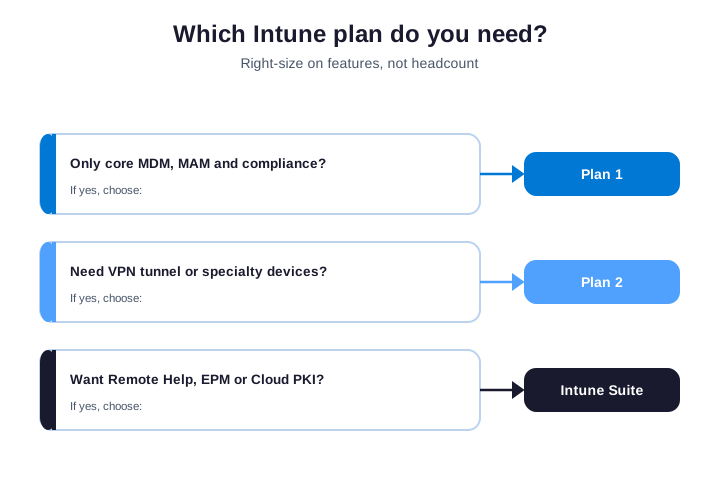
Furthermore, if you only need core device and app management, Plan 1 is the answer, and you probably already own it. Step up to Plan 2 if you need a per-app VPN or specialty devices. Specifically, choose the Suite only when you want three or more premium add-ons like Remote Help and Cloud PKI. When in doubt, start on Plan 1 and grow later.
Notably, headcount alone never decides the tier. A 500-person company of ordinary office users may run happily on Plan 1, while a 30-person firm with field engineers needs Plan 2. Finally, so map the actual features your staff use, then license to that. It is cheaper, and it is easier to defend at renewal.
✅ Microsoft Intune Plan 1 checklist
Critically, condensed, here is how to get Plan 1 right the first time.
- Check whether E3, E5, or Business Premium already gives you Plan 1.
- Only buy standalone Plan 1 if you need Intune without the rest of Microsoft 365.
- License named staff per user, and shared or kiosk machines per device.
- Stay on Plan 1 unless you truly need Tunnel or specialty devices.
- Buy the Suite only when three or more premium add-ons apply.
- Assign licences with PowerShell for any team bigger than a handful.
- Review feature use yearly so you never pay for a tier you do not use.
In practice, at Wintive, we license, deploy, and run Intune for SMBs as part of our Microsoft 365 managed services. We right-size every licence and document the setup. As a result, to get started, contact us for a free consultation. It is quick, and we do the rest.
📚 More for IT admins
Therefore, these published Wintive guides go deeper on the topics Plan 1 touches next. So bookmark the ones that fit your tenant.
🔍 Want a complete audit of your Microsoft 365 tenant?
However, the M365 Instant Audit scans your environment in under 10 minutes: license waste, security posture, MFA coverage, compliance gaps, and rightsizing. A full PDF report with prioritized fixes arrives instantly.
❓ Frequently Asked Questions
It is the base licence for Microsoft Intune, the cloud endpoint management service. Plan 1 covers device management, app deployment, app protection, compliance, configuration profiles, and Conditional Access across Windows, macOS, iOS, and Android. It is the version included in the main Microsoft 365 bundles.
Standalone, it lists at about $8 per user per month on an annual commitment, though list prices change. Most teams pay nothing extra, because Plan 1 is already included in Microsoft 365 E3, E5, Business Premium, and Enterprise Mobility + Security. Always check what you own before buying it on its own.
You need Intune Plan 1 rights on each managed user or device, plus a Microsoft Entra ID tenant, which every Microsoft 365 subscription includes. Plan 1 rights come standalone, or bundled in Microsoft 365 E3, E5, Business Premium, and Enterprise Mobility + Security.
Yes. Microsoft 365 E3 and E5 both include full Intune Plan 1 rights. Business Premium and Enterprise Mobility + Security do as well, so check your bundle before buying Plan 1 standalone.
Plan 2 is an add-on that sits on top of Plan 1, not a replacement for it. It adds Microsoft Tunnel for mobile, specialty device management, and advanced configuration. Most small and mid-sized teams only ever need Plan 1.
A per-user Plan 1 licence covers all of that user’s enrolled devices, whether that is one laptop or a laptop, a phone, and a tablet. For shared or kiosk hardware, a per-device version licenses the machine instead of a named person, which is cheaper for fleets many people use.
🧭 Your next step
Furthermore, not sure which licence you already own? First, book a short call. Then we audit your tenant, map your Intune rights, and right-size every licence. Specifically, to start, contact Wintive. It is quick, and we do the rest.