

Microsoft Intune pricing looks confusing at first, but it comes down to a few clear numbers. Therefore, plan 1 lists at about $8 per user per month, and most teams already own it inside Microsoft 365. The rest is add-ons you only buy if you need them. However, this guide breaks down every price.
Furthermore, we cover the three plans, what is free in your bundle, per-user versus per-device costs, and every add-on. Then we work out real monthly bills by team size, cover nonprofit and education rates, flag the hidden costs, and show how to estimate and cut your own bill. No fluff, just the figures.
🛡️ Free: M365 Audit Checklist
19-page PDF with 50 hands-on checks covering Entra ID, Exchange Online, SharePoint, Teams, Intune, license waste, and audit logging. PowerShell commands included. Built from 60+ real tenant audits at Wintive.
🧭 How much does Microsoft Intune cost
Microsoft Intune Plan 1 costs about $8 per user per month on its own, but it is included free in Microsoft 365 E3, E5, and Business Premium. Plan 2 is a $4 add-on, and the Intune Suite is about $10. Shared devices can be licensed at roughly $3.50 each. So most teams pay nothing extra, while standalone buyers pay per user or per device.
Specifically, Microsoft Intune pricing starts with one number. The base plan, Plan 1, lists at about $8 per user per month. That single licence covers the everyday management most teams ever need, across every device platform.
Notably, the catch is that you may not pay it directly. Plan 1 is bundled into the big Microsoft 365 plans. Finally, so if you own E3, E5, or Business Premium, your Intune cost is already covered. Standalone pricing only applies when you buy Intune on its own.
Critically, everything else is optional. Plan 2 and the Intune Suite are add-ons that layer on advanced tools. In practice, you only pay for them if you need what they unlock. For most small and mid-sized teams, the answer to “how much does Intune cost” is simply: whatever your Microsoft 365 plan already costs.
As a result, four things drive the final number. The plan you pick, the count of users or devices, the add-ons you enable, and the channel you buy through. Therefore, get those four right and Microsoft Intune pricing is predictable. Get them wrong, and the bill drifts well above what you actually use.
💲 Microsoft Intune pricing: the three plans
However, there are three Intune tiers, and they stack. Plan 1 is the base. Furthermore, plan 2 and the Suite are paid add-ons on top of it. The chart shows the list prices.
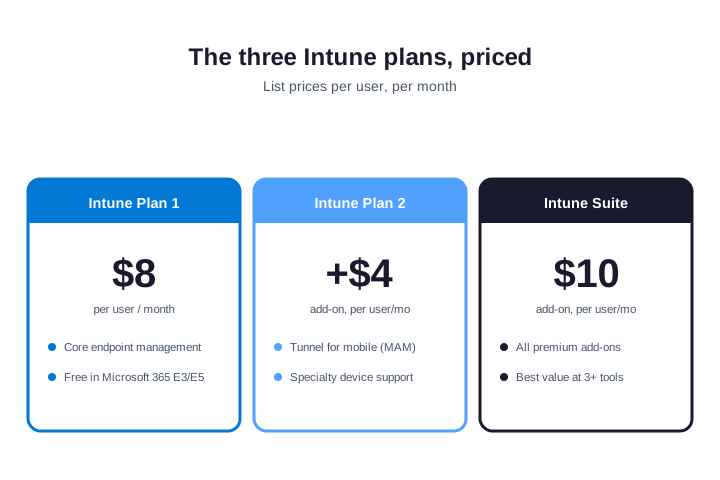
Plan 1 lists at about $8 per user per month and covers core endpoint management. Plan 2 adds roughly $4 per user for advanced features like Microsoft Tunnel. Specifically, the Intune Suite runs about $10 per user and bundles every premium add-on together.
Notably, each tier has a clear buyer. Plan 1 fits the vast majority of office teams. Finally, plan 2 suits organisations with a per-app VPN need or specialty hardware. The Suite is for larger or regulated teams that want several premium tools at once. So you rarely jump past Plan 1 without a concrete reason.
Critically, prices change, so always confirm the current figure. You can check live list prices on Microsoft’s Intune pricing page. For a deep look at the base tier, see our Microsoft Intune Plan 1 guide.
In practice, one thing to keep straight: the add-on prices stack on the base, they do not replace it. So a user on Plan 2 actually costs Plan 1 plus the $4 add-on, and a Suite user costs the Suite price on top of their bundled Plan 1. Reading the add-ons as standalone prices is the most common way teams misjudge Microsoft Intune pricing.
🎁 Which licences already include Intune
Before you pay for Intune, check what you already own. As a result, several Microsoft 365 bundles include Plan 1 at no extra cost. The table lists them.
| Licence or bundle | Intune Plan 1 included? |
|---|---|
| Microsoft 365 Business Premium | Yes, at no extra cost |
| Microsoft 365 E3 and E5 | Yes, at no extra cost |
| Enterprise Mobility + Security E3 / E5 | Yes, at no extra cost |
| Microsoft 365 F1 and F3 | Yes (frontline scope) |
| Microsoft 365 Business Basic / Standard | No, Intune costs extra |
| Office 365 E1 / E3 / E5 | No, Intune costs extra |
Therefore, the rule of thumb is simple. The “Microsoft 365” bundles include Intune, while “Office 365” and the cheaper Business plans do not. If you run Business Basic or Standard, moving up to Business Premium often costs less than buying Intune separately.
However, enterprise Mobility + Security is the odd one out. EMS includes Intune Plan 1 but not the Office apps, so it suits teams that already have email and documents elsewhere. If you want Office plus Intune on one line, a Microsoft 365 bundle is the cleaner and usually cheaper buy.
👤 Microsoft Intune pricing per user versus per device
Furthermore, Intune is sold two ways, and the cheaper one depends on who uses the device. Most licences are per user, but a per-device option exists for shared hardware.
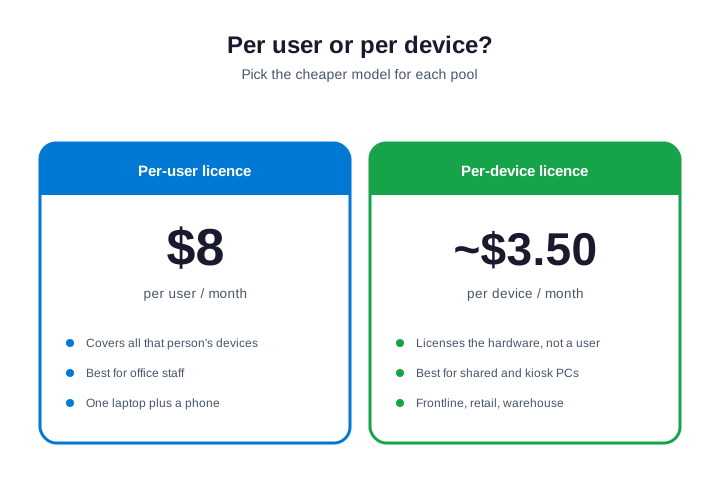
Specifically, a per-user licence at about $8 covers all of that person’s devices. It suits office staff with a laptop and a phone. A per-device licence at roughly $3.50 covers the hardware instead, which is far cheaper for machines many people share.
Notably, so split your fleet into two pools. License named staff per user, and shared or kiosk machines per device. Frontline teams in retail, healthcare, and logistics lean heavily on the device model, because one shared till or scanner serves a whole shift.
Finally, a quick example shows the saving. Twenty office staff license per user, while ten shared shop-floor PCs license per device. Critically, so you pay twenty user seats plus ten cheaper device seats, instead of thirty full user licences. Mixing the two models is normal, and it is where a lot of Microsoft Intune pricing waste hides.
🧩 Microsoft Intune add-on pricing à la carte
In practice, beyond the plans, Intune sells individual add-ons. You can buy just the one tool you need instead of the whole Suite. The table lists the common ones and their rough list prices.
| Add-on | Rough list price (per user/mo) |
|---|---|
| Intune Plan 2 | about $4 |
| Remote Help | about $3.50 |
| Endpoint Privilege Management | about $3 |
| Advanced Analytics | about $5 |
| Cloud PKI | about $2 |
| Enterprise App Management | about $2 |
As a result, do the math before you buy. If you need three or more of these add-ons, the Intune Suite at about $10 is cheaper than buying them one by one. Therefore, if you need only one, the standalone add-on wins. So count your real needs first, then pick the cheaper path.
However, a few add-ons are worth calling out. Remote Help replaces a third-party remote-desktop tool, so it can pay for itself. Endpoint Privilege Management removes the need for permanent local admins. Cloud PKI retires an on-premises certificate server. Furthermore, each one can offset its own cost by cutting another tool, which changes the real math.
🗓️ Annual versus monthly, and volume discounts
Specifically, how you commit changes the price. Microsoft Intune pricing is lowest on an annual commitment, billed monthly or up front. Notably, a month-to-month plan costs more per user, but lets you scale down at any time. For a stable team, the annual commitment is the cheaper route.
Finally, the channel matters too. Buying direct from Microsoft gives you list price. Critically, a Cloud Solution Provider can offer flexible billing and bundled support, often at or below list. Larger organisations on an Enterprise Agreement negotiate volume discounts on top. So the same licence can cost different amounts depending on how and where you buy it.
In practice, there is no public volume table, which trips up buyers used to other software. Microsoft Intune pricing is list-based, and real discounts come through negotiation or a partner, not a published tier. So if you have more than a hundred seats, it is worth asking a CSP or your Microsoft rep for a quote rather than assuming list is the floor.
As a result, the practical move is to match the commitment to your stability. Lock in annual for your core headcount, and keep a few monthly seats for seasonal or contract staff. That blend keeps your Microsoft Intune pricing low without trapping you in seats you cannot use.
Therefore, watch the renewal date, too. Annual terms auto-renew, so a seat you forgot to drop rolls over for another year. However, set a reminder a month before renewal to review the count. That single calendar entry is one of the cheapest ways to control Microsoft Intune pricing over time.
🧮 How much will Microsoft Intune cost you
Furthermore, list prices are easy. Your actual bill depends on team size and how much is already bundled. The examples below assume standalone Plan 1, to show the shape of the cost.
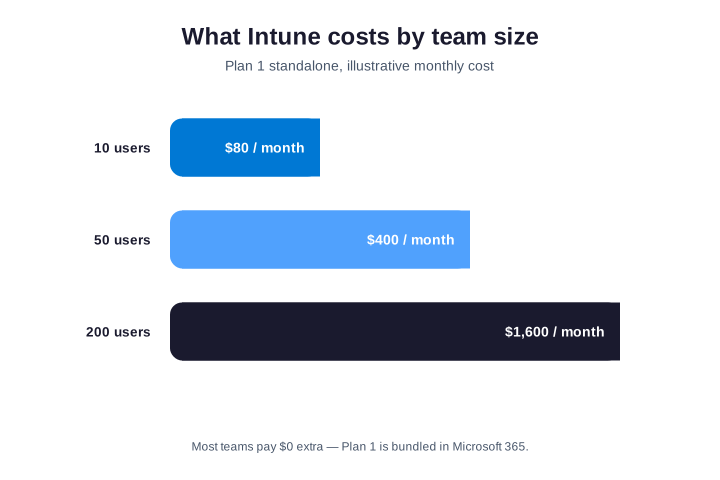
Specifically, a team of 10 on standalone Plan 1 pays about $80 a month. 50 users come to roughly $400, and 200 users to about $1,600. Those are the standalone figures, before any bundle.
Notably, now apply the real-world discount. If those users already have Microsoft 365 E3 or Business Premium, the Intune line drops to zero, because Plan 1 is folded in. So the honest answer for most teams is that Intune adds nothing to a bill they already pay.
Finally, the shape still matters for budgeting, though. Even at zero marginal cost, you should know which seats carry Intune rights and which do not. Critically, a new hire on Business Basic, for example, has no Intune licence and will silently fail to enrol. So track coverage, not just the dollar figure.
In practice, it is worth running both numbers at renewal. Compare standalone Plan 1 against the bundle that includes it. As a result, nine times out of ten, the bundle wins once you value the Office apps and security that come with it. That comparison is the single most useful step in any Microsoft Intune pricing review.
Wintive insight. The biggest line on most Intune bills is waste, not licences. In the tenants we audit, teams routinely buy Plan 2 or the Suite for everyone, then use only Plan 1 features. So we map actual feature use, license the few who need add-ons, and leave the rest on the bundled Plan 1. That review often saves more than it costs.
🎓 Microsoft Intune pricing for nonprofits and schools
Therefore, special pricing exists for two sectors, and it is easy to miss. Nonprofits and schools pay far less, or nothing, for the same Intune features.
However, registered nonprofits get heavily discounted or donated Microsoft 365 licences, and Intune rides along inside them. Schools and universities have their own education SKUs, such as Microsoft 365 A3 and A5, which include Intune for Education. So before paying commercial rates, check your eligibility through Microsoft’s nonprofit or education programs.
Furthermore, the saving is real. A small charity can run Intune for a fraction of the list price, and many schools get it at no extra cost on top of their academic plan. It is the most overlooked discount in Microsoft Intune pricing.
Specifically, claiming it is straightforward. Nonprofits validate their status through Microsoft’s nonprofit portal, then buy discounted or granted licences like any other tenant. Notably, schools purchase through their education agreement or a specialist reseller. So the work is a one-time eligibility check, and the saving then repeats every single year.
🫥 The hidden costs of Microsoft Intune
Finally, the licence is only the top line. A realistic budget for Intune includes a few costs that never appear on the price page. Plan for them up front.
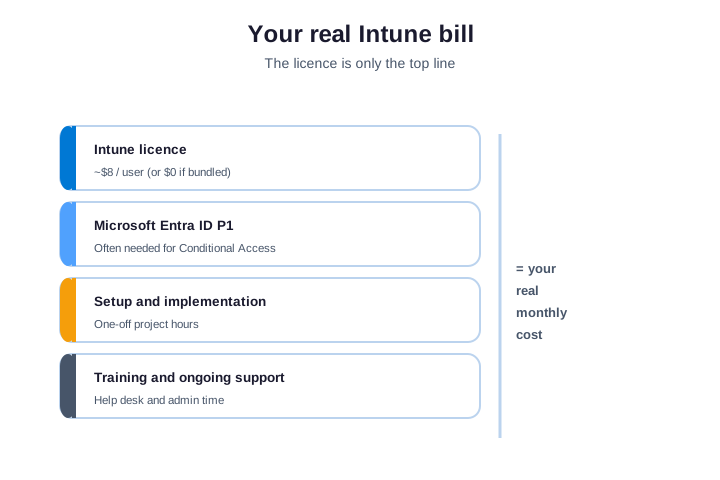
First, Microsoft Entra ID. Critically, Conditional Access, the feature that makes Intune secure, often needs Entra ID P1, which is bundled in the same M365 plans but costs extra on its own. Second, setup. In practice, a clean rollout takes project hours, whether your team does it or a partner does.
As a result, third, the ongoing work. Training and day-to-day administration cost staff time long after go-live. Therefore, none of these are huge, but ignoring them makes any Intune budget look smaller than reality. So count the people cost, not just the per-user fee.
However, one more line catches teams out: co-management. If you still run on-premises Configuration Manager alongside Intune, you keep paying for both during the overlap. That is fine and normal during a migration, but budget for the double run until the old system retires. Furthermore, it belongs in any honest Microsoft Intune pricing estimate.
📅 The 2026 Microsoft Intune pricing change
Specifically, Microsoft is adjusting Microsoft 365 prices in 2026, and it affects how you think about Intune. The headline plans get a small increase, with more security value folded in.
Notably, from mid-2026, the list prices of Microsoft 365 E3 and E5 rise by a few dollars per user. In return, Microsoft is adding more Intune and security capability into those bundles. So the sticker goes up, but the value per dollar often improves for teams that use the security stack.
Finally, the takeaway is to review your plan, not panic. If you already lean on Intune, the richer bundles may now be the better buy. Critically, if you do not, the increase is a good prompt to right-size. Either way, confirm the current numbers before you renew.
In practice, a CSP partner can soften the change. Because partners bill monthly and bundle support, they often help teams move to a richer bundle without a painful up-front jump. So if a renewal lands near the price change, it is a good moment to review the channel as well as the plan.
🧰 How to estimate your Microsoft Intune bill
As a result, you can work out your real Intune cost in a few minutes. Start with what you already own, then add only what is missing.
First, list your current Microsoft 365 licences and check which include Plan 1. Then count any users or shared devices that are not covered. Finally, add the per-user or per-device cost for that gap, plus any add-ons. Therefore, the snippet below lists your Intune licences and how many are in use.
# List Intune licences and usage in your tenant
Connect-MgGraph -Scopes "Organization.Read.All"
Get-MgSubscribedSku |
  Where-Object SkuPartNumber -like "*INTUNE*" |
  Select-Object SkuPartNumber, ConsumedUnits, @{n="Total";e={$_.PrepaidUnits.Enabled}}
However, that tells you what you pay for versus what you use. If consumed units are far below the total, you are over-licensed and paying for empty seats. The next check finds users who have no Intune licence at all, so you can size the gap.
# Count users without any assigned licence
Connect-MgGraph -Scopes "User.Read.All"
(Get-MgUser -All -Property AssignedLicenses,UserPrincipalName |
  Where-Object { $_.AssignedLicenses.Count -eq 0 }).Count
Furthermore, put those two numbers together and you have your real spend: the gap to license, times the per-user or per-device rate, plus any add-ons. Most teams find the figure is smaller than they feared, because so much is already bundled. So estimate before you buy, and you rarely overspend.
Specifically, a worked example helps. Picture forty staff, of whom thirty already hold Business Premium and ten are on Business Basic. Notably, the thirty are covered, so you only license the ten, plus any shared devices. That is roughly $80 a month, not the $320 a naive headcount estimate would suggest. Always net out what is already bundled before you quote a figure.
✂️ How to cut your Microsoft Intune costs
Finally, most Intune overspend is avoidable. A short review usually frees up real money. The chart sorts the moves that raise your bill from the ones that lower it.
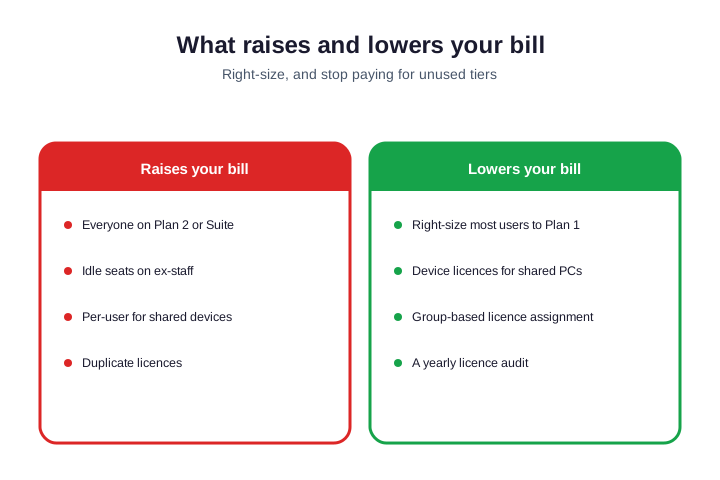
Critically, the biggest win is right-sizing. Move everyone off Plan 2 or the Suite unless they truly use the add-ons. In practice, license shared machines per device, not per user. Use group-based licensing so leavers free their seats automatically. The check below counts seats sitting on disabled accounts.
# Find licences still assigned to disabled accounts
Connect-MgGraph -Scopes "User.Read.All"
Get-MgUser -All -Filter "accountEnabled eq false" -Property DisplayName,AssignedLicenses |
  Where-Object { $_.AssignedLicenses.Count -gt 0 } |
  Select-Object DisplayName
As a result, run that quarterly, and reclaim every seat it finds. Combined with an annual licence review, it keeps your Microsoft Intune pricing tied to what you actually use, not what you bought last year.
Therefore, treat the review as a habit, not a one-off. Calendar a quarterly seat check and a yearly plan review. However, each one takes under an hour and almost always pays for itself. Over a few cycles, that discipline is what keeps a growing tenant from quietly doubling its Intune bill.
🆚 Microsoft Intune pricing versus alternatives
Furthermore, Teams often compare Intune to a standalone MDM, such as Jamf or another third-party tool. On the licence line, the numbers can look close. The real comparison, though, is total cost of ownership, not the sticker price.
Because Intune is bundled into Microsoft 365, most teams already pay for it. Specifically, a separate tool is a brand-new line item, plus a second console, a second agent, and more admin time. So even when the per-seat price is similar, the all-in cost of adding a third-party tool is usually higher for a Microsoft shop.
Notably, there are exceptions. Heavy Apple fleets sometimes justify a Mac specialist alongside Intune. But for a mixed Windows-and-mobile estate already on Microsoft 365, Intune is almost always the lower total cost. Finally, you manage every device from one platform you already own.
Critically, run the all-in numbers before you switch or add a tool. Count the licence, the admin hours, the integration work, and the training for each option. When you compare total cost rather than the per-seat sticker, Microsoft Intune pricing usually comes out ahead for any team already standardised on Microsoft 365.
✅ Microsoft Intune pricing checklist
In practice, condensed, here is how to get Intune pricing right.
- Check whether E3, E5, or Business Premium already includes Plan 1.
- Only buy standalone Plan 1 when you need Intune without the rest of Microsoft 365.
- License named staff per user, and shared devices per device.
- Buy single add-ons à la carte, and the Suite only at three or more.
- Claim nonprofit or education pricing if you qualify.
- Budget for Entra ID, setup, and training, not just the licence.
- Audit seats quarterly and right-size yearly to kill waste.
At Wintive, we right-size and run Intune for SMBs as part of our Microsoft 365 managed services. We map every licence to real use and cut the waste. To get started, contact us for a free consultation. It is quick, and we do the rest.
📚 More for IT admins
These published Wintive guides go deeper on the topics Intune pricing touches. So bookmark the ones that fit your tenant.
🔍 Want a complete audit of your Microsoft 365 tenant?
The M365 Instant Audit scans your environment in under 10 minutes: license waste, security posture, MFA coverage, compliance gaps, and rightsizing. A full PDF report with prioritized fixes arrives instantly.
❓ Frequently Asked Questions
Intune Plan 1 lists at about $8 per user per month standalone. Most teams pay nothing extra, because Plan 1 is included in Microsoft 365 E3, E5, and Business Premium. Plan 2 adds about $4, and the Suite about $10.
A per-device licence costs roughly $3.50 per device per month. It licenses the hardware instead of a named user, which is far cheaper for shared, kiosk, and frontline machines that many people use across shifts.
Intune is included at no extra cost in Microsoft 365 E3, E5, Business Premium, and Enterprise Mobility + Security. It is not included in Office 365 plans, nor in Microsoft 365 Business Basic and Standard.
Plan 1 is about $8 per user per month on an annual commitment, and that one licence covers all of a user’s enrolled devices. Add-ons such as Plan 2 or Remote Help cost a few dollars more per user each. Remember that the per-user price drops to zero if the user already has Microsoft 365 E3, E5, or Business Premium.
The Intune Suite lists at about $10 per user per month as an add-on. It bundles Plan 2 plus premium tools like Remote Help, Endpoint Privilege Management, and Cloud PKI. It beats buying three or more add-ons separately.
Yes. Registered nonprofits get discounted or donated Microsoft 365 licences that include Intune, and schools get education SKUs like A3 and A5 with Intune for Education. Both cost far less than commercial pricing.
🧭 Your next step
Not sure what you already pay for? First, book a short call. Then we audit your tenant, map your Intune licences, and right-size the spend. To start, contact Wintive. It is quick, and we do the rest.