

Microsoft 365 Business Premium vs E3 is one of the most confusing licence calls a growing company faces. Both plans give your team the full Office apps, business email, and Teams. However, they target very different organisations. Therefore, the right pick depends on your headcount, your security needs, and the rules you must meet.
Furthermore, this guide gives the short answer first, then the proof behind it. Specifically, we untangle which E3 you actually mean, what the two plans share, and where each one wins. In addition, you get the real price math, a side-by-side table, three decision questions, and PowerShell to audit your own tenant. By the end, the Microsoft 365 Business Premium vs E3 decision will be obvious for your team.
🛡️ Free: M365 Audit Checklist
19-page PDF with 50 hands-on checks covering Entra ID, Exchange Online, SharePoint, Teams, Intune, license waste, and audit logging. PowerShell commands included. Built from 60+ real tenant audits at Wintive.
🧭 Business Premium vs E3: the short answer
Microsoft 365 Business Premium and E3 share the same Office apps, email, and Teams. Business Premium then bundles a full security stack, namely Defender, Intune, and Entra ID Plan 1, and it caps at 300 users. E3, by contrast, drops that built-in security but adds unlimited archiving, on-premises rights, and no user cap. In short, choose Business Premium for an SMB that wants protection built in. Choose E3 once you pass 300 seats or need enterprise-grade compliance.
Critically, the Microsoft 365 Business Premium vs E3 choice is not about Office apps. Both plans run the same Word, Excel, Outlook, and Teams. Instead, the gap is security on one side and scale on the other. Therefore, treat it as a fit decision, not a feature race.
In practice, most firms under 300 staff land on Business Premium. It bundles the security tools they would otherwise buy piecemeal. Meanwhile, larger or heavily regulated organisations lean to E3, because they need its scale and compliance depth. So the question becomes simple. Are you an SMB that wants safety by default, or an enterprise that needs reach and control?
🔤 First, which E3 do you actually mean
Furthermore, half the confusion comes from one word. There are two products called E3, and they are not the same. Specifically, Office 365 E3 and Microsoft 365 E3 sit at different prices and carry different tools. So before you compare anything, pin down which E3 is on the table.
Notably, Office 365 E3 covers the productivity suite plus deep compliance, yet it ships almost no device or threat protection. Microsoft 365 E3, by contrast, adds the security and management layer on top, much like Business Premium does. Therefore, it costs noticeably more. In this guide, plain E3 means Office 365 E3 unless we say otherwise, since that is the version buyers usually weigh against Business Premium.
As a result, keep this split in mind throughout. Against Office 365 E3, Business Premium is the more secure plan. Against Microsoft 365 E3, the gap narrows, and price plus the user cap decide instead. Moreover, the names hide the real story. Specifically, Microsoft 365 E3 wraps Office 365 E3, the security stack, and Windows Enterprise into a single SKU. Office 365 E3 stops at apps and compliance. Therefore, the price gap is not a markup. Instead, it reflects a whole extra layer of tools. The table makes the split plain.
| Plan | Office 365 E3 | Microsoft 365 E3 |
|---|---|---|
| Office apps and compliance | Yes | Yes |
| Built-in device and threat security | No | Yes |
| Windows Enterprise edition | No | Yes |
| Approx price / user / mo | ~23 USD | ~36 USD |
⚖️ What Business Premium and E3 share
First, start with the common ground, because it is large. Both plans include the desktop Office apps on up to five devices per user. In addition, each user gets a business mailbox, Teams, SharePoint, and OneDrive. So the daily experience feels identical on either licence.
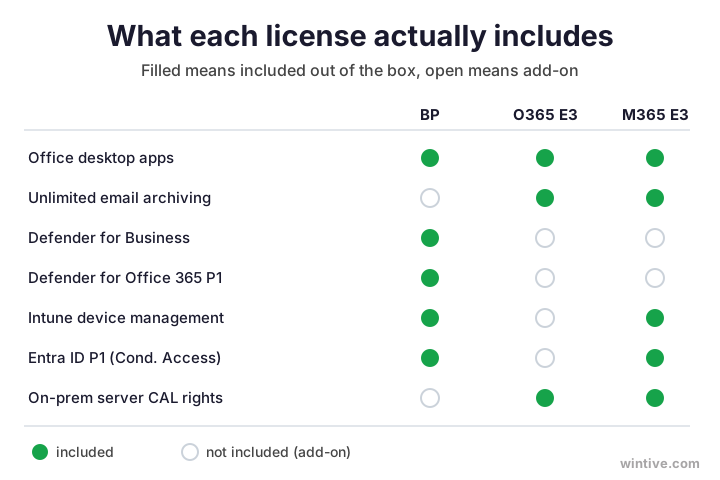
Moreover, both plans support a custom email domain, online meetings, and the web versions of every app. Your staff would not notice which licence they hold from the apps alone. Therefore, productivity is a tie. The chart below shows where the two finally diverge.
🛡️ Where Business Premium pulls ahead on security
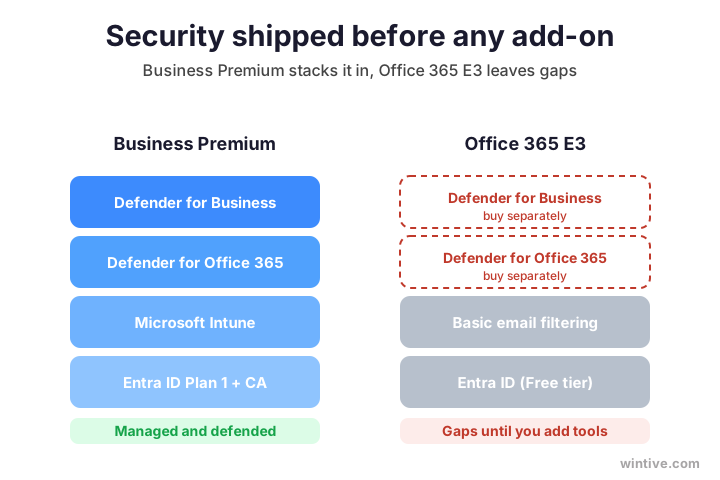
However, here is the surprise that trips up most buyers. Against Office 365 E3, Business Premium is the more secure plan, not the cheaper compromise. Specifically, it bundles Microsoft Defender for Business, Defender for Office 365 Plan 1, Intune, and Entra ID Plan 1. Office 365 E3, by contrast, includes none of those by default.
Critically, that means Business Premium can manage and wipe laptops, block risky sign-ins, and stop advanced phishing out of the box. Office 365 E3 cannot, unless you bolt on extra licences. Therefore, for a small business, Business Premium often delivers stronger protection at a lower price. The stack below is exactly what you would otherwise buy separately.
In addition, the gap shows up the first time something goes wrong. For instance, a lost laptop or one clicked phishing link can sink a small firm. Business Premium can wipe that laptop and block that login. Office 365 E3, on its own, cannot. Therefore, that single capability often justifies the plan by itself.
🏢 Where E3 pulls ahead
Nevertheless, E3 is not the weaker plan. It simply wins on different ground. Notably, Office 365 E3 offers unlimited email archiving with auto-expanding mailboxes, far beyond the Business Premium allowance. In addition, it carries deeper compliance tools, including stronger retention, legal hold, and standard eDiscovery.
Furthermore, E3 grants on-premises rights that Business Premium lacks. Specifically, it includes server licences for hybrid Exchange and SharePoint setups, which matters for firms still running their own servers. Above all, E3 has no user cap. Therefore, it scales past 300 seats, where Business Premium simply stops. For a large or regulated organisation, those three strengths often outweigh the bundled security.
In short, E3 trades built-in defence for reach and depth. Consequently, it shines in firms that already run their own security tools. Meanwhile, it leaves a smaller team exposed, because the protection is simply not in the box. So the same plan that suits an enterprise can underserve a startup.
🗄️ Mailbox, archiving, and storage limits
Beyond security, storage is a quieter differentiator. Specifically, Business Premium gives each user a 50 GB mailbox and 1 TB of OneDrive. Office 365 E3, by contrast, adds unlimited email archiving through auto-expanding archives. Therefore, firms that must keep mail for years lean toward E3.
Furthermore, archiving is not mere convenience. Notably, many regulated industries must retain messages for a fixed number of years. In that case, the E3 archive removes a real operational headache. However, most small businesses never approach the Business Premium limits. So weigh this factor only when your retention rules are genuinely strict.
👥 The 300-user cap that often decides it
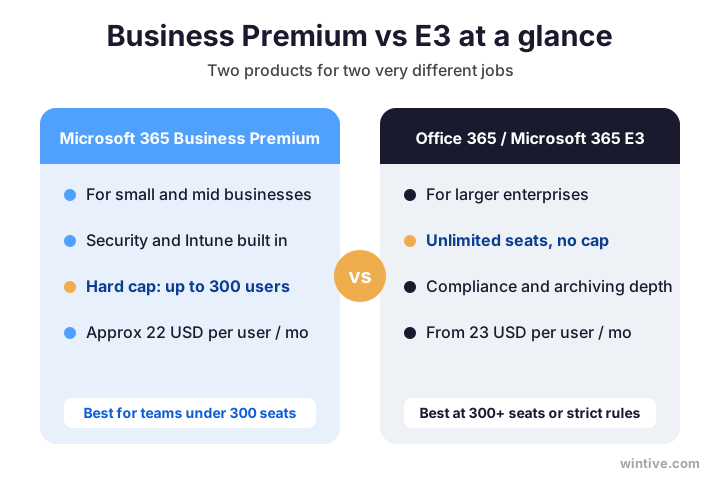
Critically, one hard limit settles many cases before features even matter. Business Premium caps at 300 users per tenant. E3, by contrast, has no ceiling at all. So the moment you expect to pass 300 staff, Business Premium is off the table.
In practice, this single rule resolves the Microsoft 365 Business Premium vs E3 question for fast-growing firms. Plan for the team you are becoming, not the one you have today. Otherwise, you risk a forced migration at the worst moment. Therefore, if 300 seats is within sight, design around E3 from the start. The lanes below sum up who each plan is built for.
Notably, the cap counts every licensed user in the tenant, not just full-time staff. Therefore, contractors and shared mailboxes can edge you toward the limit faster than expected. So track your real number, not your payroll. As a result, a firm of 270 today can hit the ceiling within a year of steady hiring.
💷 Price: what you really pay
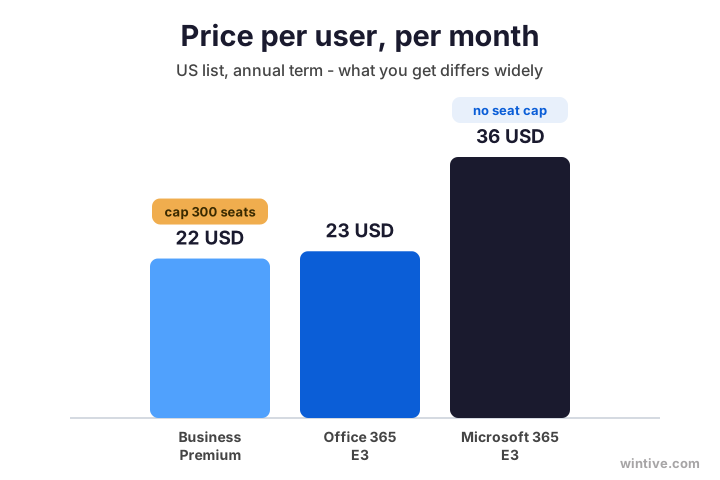
Now to the money, because the headline numbers mislead. Business Premium lists around 22 USD per user each month on an annual term. Office 365 E3 sits close, near 23 USD. Microsoft 365 E3, however, jumps to roughly 36 USD, since it bundles the enterprise security layer.
Therefore, read price next to value, never alone. Against Office 365 E3 at a similar price, Business Premium hands you a security stack for free. Against Microsoft 365 E3, you pay far less but accept the 300-seat cap. So the cheapest licence on paper is rarely the cheapest outcome. The bars below put the three side by side.
In addition, watch the billing term, since it moves the number. Specifically, month-to-month plans cost more per user than an annual commitment on every tier. Therefore, lock in a yearly term where the headcount is stable. Even so, the capability gap matters far more than these small monthly swings.
🔢 Business Premium vs E3, side by side
Finally, here is the full comparison in one place. Scan the rows that matter to your team, then ignore the rest.
| Capability | Business Premium | Office 365 E3 | Microsoft 365 E3 |
|---|---|---|---|
| Office apps, email, Teams | Yes | Yes | Yes |
| Defender for Business | Yes | No | No |
| Defender for Office 365 P1 | Yes | Add-on | Add-on |
| Intune device management | Yes | No | Yes |
| Entra ID P1 and Conditional Access | Yes | No | Yes |
| Unlimited email archiving | No | Yes | Yes |
| On-prem server rights | No | Yes | Yes |
| User cap | 300 | None | None |
| Approx price / user / mo | ~22 USD | ~23 USD | ~36 USD |
Notably, watch the shape of the table. Productivity ties at the top. Meanwhile, the real differences sit in the security rows and the final two lines. Therefore, your decision lives there, not in the apps.
🧮 A real cost example
For example, take a ten-person firm with laptops and client records. On Office 365 E3, every laptop stays unmanaged, and there is no built-in threat defence. To close that gap, you would buy Intune and Defender per user. On Business Premium, however, both are already there.
Therefore, the bundle usually wins for an SMB. First, check what your tenant actually owns today, since hidden overlap is common.
# List the Microsoft 365 licences your tenant owns (Graph PowerShell)
Connect-MgGraph -Scopes "Organization.Read.All"
Get-MgSubscribedSku | Select-Object SkuPartNumber, ConsumedUnits, PrepaidUnits
Specifically, run that, and the waste often jumps out. Many teams pay for E3, then pay again for a separate antivirus and an MDM tool. Add it up, and Business Premium would have been cheaper and simpler. So the cost example tends to point the same way for any SMB with devices.
🧠 Microsoft 365 E3 as the middle ground
Of course, Microsoft 365 E3 deserves its own look, because it blurs the line. Essentially, it is Office 365 E3 plus the security and management layer that Business Premium also carries. Therefore, it closes the security gap that plain Office 365 E3 leaves open.
However, it costs far more, and it still removes the 300-seat cap. So Microsoft 365 E3 fits a specific firm. Namely, you have outgrown Business Premium on headcount, yet you still want Intune, Conditional Access, and modern threat tools. In that case, Microsoft 365 E3 is the natural step up, not Office 365 E3.
Therefore, picture the ladder clearly. Business Premium is the SMB plan with security included, capped at 300 seats. Microsoft 365 E3 is the enterprise version of that same idea, without the cap. Office 365 E3 sits to one side, strong on compliance yet light on built-in defence. Consequently, the three rarely compete head to head once you know your size.
Wintive insight. Across the SMB tenants we audit, the costliest mistake is buying Office 365 E3 to feel enterprise-grade, then discovering it ships almost no device or threat protection. As a result, the team pays again for Intune and Defender that Business Premium already bundles. For most firms under 300 seats, Business Premium is both safer and cheaper.
🔐 Security you still have to switch on
Critically, a licence is not protection on its own. Whichever plan you pick, the security tools only help once you configure them. Therefore, Defender, Intune, and Conditional Access must be turned on and tested, not just purchased.
In practice, confirm the services are present, then enable them in order. The check below lists the active service plans on a Business Premium tenant, so you can see Defender and Intune are really there.
# Confirm Business Premium security services are active (SkuPartNumber SPB)
Get-MgSubscribedSku | Where-Object SkuPartNumber -eq "SPB" |
  Select-Object -ExpandProperty ServicePlans |
  Where-Object ProvisioningStatus -eq "Success"
Then work through the stack in order. Microsoft documents each step in its Business Premium security guide. Even so, most small teams hand this one-time setup to a partner. After all, a half-configured tenant is a false sense of safety. The table lists the first moves.
| Turn on first | What it protects |
|---|---|
| Defender for Business | Devices against malware |
| Intune enrollment | Control and remote wipe |
| Conditional Access | Sign-ins from risky places |
| Multi-factor authentication | Every account |
| DLP policies | Sensitive data in email |
🪤 The mistake most teams make
Meanwhile, the classic error is buying E3 because it sounds enterprise, then leaving the security gaps open. It feels like the serious choice. However, plain Office 365 E3 protects devices and email far less than Business Premium does. So the premium price buys scale, not safety.
Conversely, some teams buy Business Premium and never switch the stack on. A licence alone changes nothing. Therefore, whichever plan you choose, finish the job. Turn the tools on, then verify them with a test wipe and a blocked sign-in. Ultimately, a tested control is the only one worth trusting.
👤 Who should choose Business Premium
So, who is Business Premium for? Above all, it suits small and mid-sized firms under 300 staff that want security built in. Specifically, pick it if you manage company laptops, hold client data, or have remote workers signing in from anywhere.
Furthermore, Business Premium is the right call when you lack a dedicated security team. It packages Defender, Intune, and Conditional Access into one plan and one bill. Therefore, you get enterprise-style protection without the enterprise price. For the typical growing SMB, that bundle is the safest default.
🛰️ Business Premium for remote and hybrid teams
Moreover, remote work reshapes the whole decision. When staff sign in from home, cafes, and airports, the office network is no longer a wall. Specifically, Business Premium answers that with Conditional Access and Intune. Together, they vet each sign-in and keep every laptop encrypted and patched.
By contrast, Office 365 E3 cannot tell a safe login from a risky one without extra licences. Therefore, for a distributed SMB, Business Premium is the stronger fit. After all, identity is the new perimeter, so the login deserves the most protection. As a result, a hybrid team is exactly the case Business Premium was built for. The table shows the gap.
| Remote sign-in risk | Business Premium | Office 365 E3 |
|---|---|---|
| Block risky sign-ins with Conditional Access | Yes | No |
| Enforce MFA by policy | Yes | Limited |
| Encrypt and patch laptops with Intune | Yes | No |
| Remote-wipe a lost device | Yes | No |
🏢 Who should choose E3
By contrast, E3 fits larger or tightly regulated organisations. Notably, choose it when you expect to pass 300 users, since Business Premium cannot follow you there. In addition, pick E3 if you need unlimited archiving, deep compliance, or on-premises server rights.
However, remember which E3 you are buying. Office 365 E3 suits a firm that runs its own security tools already and mainly needs scale and compliance. Microsoft 365 E3, meanwhile, suits an enterprise that wants the modern security stack as well. So match the exact E3 to the gap you are filling.
📋 Compliance and cyber-insurance
Increasingly, clients and insurers ask how you protect data before they sign. Notably, both plans help here, yet in different ways. Business Premium proves that devices are managed and access is controlled. Office 365 E3, meanwhile, proves deeper retention and standard eDiscovery.
Critically, cyber-insurance forms now expect multi-factor auth, device management, and access control. Therefore, Business Premium ticks those boxes straight out of the gate. For heavier legal or healthcare obligations, however, E3 or E5 may be the safer answer. So map the plan to the exact framework you must satisfy, rather than guessing.
🧩 Mixing licences: base plus power users
Importantly, you do not have to pick one plan for everyone. In practice, many firms run a base licence for most staff, then add a richer plan for a few. Therefore, you pay for depth only where it is truly needed.
For example, put most of the team on Business Premium, then move a handful of compliance or archiving-heavy users to E3 or E5. The table shows a common split.
| Team role | Suggested licence | Why |
|---|---|---|
| General staff | Business Premium | Security built in, best value under 300 |
| Legal or finance | Office 365 E3 or E5 | Unlimited archiving and deep compliance |
| Frontline or shared | Business Basic | Web and mobile only, lowest cost |
Consequently, the blended bill often beats putting everyone on E3. Right-sizing each role is where the real savings hide.
Moreover, mixing future-proofs the tenant. As roles change, you simply reassign licences instead of re-platforming. Therefore, the model bends with the business. In short, you buy depth by the seat, not by the whole company.
🚀 Switching plans without downtime
Reassuringly, changing plans is painless in either direction. There is no migration and no downtime. You swap the licence, and the tools follow. Nobody loses a file or an email in the process.
For instance, moving a user up to Business Premium takes one command. First, assign the new licence, then configure the security stack afterwards.
# Move a user to Business Premium (SkuPartNumber SPB)
Connect-MgGraph -Scopes "User.ReadWrite.All"
$bp = (Get-MgSubscribedSku | Where-Object SkuPartNumber -eq "SPB").SkuId
Set-MgUserLicense -UserId user@yourdomain.com -AddLicenses @{SkuId=$bp} -RemoveLicenses @()
Likewise, the same command pattern moves a user to E3 when they outgrow Business Premium, simply by swapping the SKU. Therefore, your licence model can flex as the team grows. As a result, you are never locked into the plan you started on.
🧭 Decide in three questions
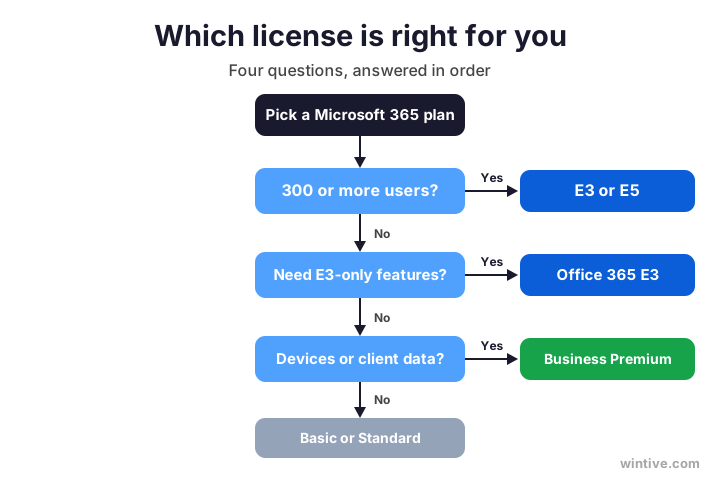
Ultimately, the Microsoft 365 Business Premium vs E3 call needs no spreadsheet. Instead, three questions settle it for almost every team. Work through them in order, and the answer appears.
First, will you pass 300 users? If yes, choose E3 or E5. Second, do you need unlimited archiving, on-premises rights, or deep compliance? If yes, E3 fits. Third, do you manage devices or hold client data? If yes, Business Premium is your floor. The flow below maps it out.
✅ Quick decision checklist
Condensed, here is how to choose and act with confidence.
- Both plans share Office apps, email, Teams, and OneDrive.
- Business Premium bundles Defender, Intune, and Entra ID P1.
- Office 365 E3 ships almost no device or threat protection.
- Business Premium caps at 300 users; E3 has no cap.
- Need unlimited archiving or on-prem rights? Choose E3.
- Manage devices or hold client data? Choose Business Premium.
- Microsoft 365 E3 is the step up once you pass 300 seats.
- A licence is not protection: switch the security stack on.
Ultimately, at Wintive we help SMBs pick the right Microsoft 365 plan and set it up properly, as part of our managed services. Moreover, we right-size every licence so you never overpay. To get started, contact us for a free consultation. It is quick, and we do the rest.
📚 More for Microsoft 365 buyers
Therefore, these published Wintive guides go deeper on the topics this choice raises next. So bookmark the ones that fit your plan.
🔍 Want a complete audit of your Microsoft 365 tenant?
The M365 Instant Audit scans your environment in under 10 minutes: license waste, security posture, MFA coverage, compliance gaps, and rightsizing. A full PDF report with prioritized fixes arrives instantly.
❓ Frequently Asked Questions
Both share Office apps, email, and Teams. Business Premium adds a security stack, namely Defender, Intune, and Entra ID Plan 1, and caps at 300 users. Office 365 E3 drops that built-in security but adds unlimited archiving, on-premises rights, and no user cap.
Against Office 365 E3, yes. Business Premium includes Defender for Business, Defender for Office 365, and Intune, which Office 365 E3 does not. Microsoft 365 E3 closes that gap, but it costs far more and removes the seat cap.
Usually Office 365 E3, since it sits near Business Premium on price. Microsoft 365 E3 is a different, pricier plan that also bundles the security and management layer. Always confirm which E3 a quote refers to.
Move when you expect to pass 300 users, or when you need unlimited archiving, on-premises server rights, or enterprise compliance. Below 300 seats with standard needs, Business Premium is usually the better value.
Yes. Many firms run Business Premium as the base, then assign E3 or E5 to a few users with heavy archiving or compliance needs. This blended model keeps the bill down while covering every role.
No. Changing licences is instant, with no migration and no downtime. You swap the SKU, and the tools follow. You then enable any new security features, since a licence alone is not protection.
🧭 Your next step
Still unsure about Microsoft 365 Business Premium vs E3? First, book a short call. Then we look at your headcount, your devices, and your compliance needs. Finally, we recommend the right plan and set it up. To start, contact Wintive. It is quick, and we do the rest.