

A Microsoft 365 security assessment answers one simple question: where does your tenant actually stand? It is not a sales scan or a long checklist. Instead, it is a structured review that finds your real risks and ranks them.
However, search for one and you mostly find vendor forms promising a “free risk assessment” in exchange for your details. This guide is different. Specifically, it shows you how to run a proper assessment yourself, how to score the findings, and what the final report should contain. As a result, you can do it, judge a provider who does it, or decide it is worth handing over.
Above all, this is written for a small business, not a security team. So it keeps the method practical and the language plain. Therefore, you end up with a clear, ranked picture of your risk, not a glossy PDF that says nothing. So whether you run it yourself or bring in help, you stay in control of the result and know exactly what it means.
Want to know where your Microsoft 365 really stands?
Wintive runs a proper Microsoft 365 security assessment: we scope it, score every finding by risk, and hand you a ranked report on the Microsoft 365 you already own. The price is a flat fee, with no long contract and no setup cost.
📅 Book a Free 30-Min Call | 💬 Chat on WhatsApp | See Our Plans →
🧭 Microsoft 365 security assessment: the short answer
A Microsoft 365 security assessment is a structured review that scopes your tenant, checks each domain, scores every finding by risk, and ends in a report you can act on. It is lighter than a full audit and very different from a penetration test. The output is a ranked risk register, not a pass or fail. Most small businesses run one to see where they stand before they decide what to fix. In short, it turns a vague worry into a prioritised plan.
First, the plain version. An assessment measures your current security against good practice and known risks. Then it ranks what it finds, so you know what to tackle first.
Notably, the value is the ranking, not the raw list. Anyone can produce a hundred findings. Therefore, a good assessment tells you which five actually matter for your business.
Crucially, the deliverable is a decision, not a score. You walk away with a register of risks and a prioritised plan. As a result, the assessment pays for itself the moment it stops you wasting effort on the wrong thing.
🔎 What a Microsoft 365 security assessment is
So, what is it really? At heart, it is a snapshot of risk across your whole tenant, taken at one point in time. It looks at identity, email, data, devices, licensing, and monitoring together. Microsoft sets out the controls it expects in its security guidance for business.
Importantly, an assessment is read-only by nature. You are measuring, not changing. Therefore, it carries almost no risk to the business and can be done without disrupting anyone’s work.
Above all, it is led by risk, not by a feature list. A finding only matters as much as the damage it could cause. As a result, the assessment spends its attention where a problem would actually hurt.

In practice, that read-only nature is what makes it the natural first step. You learn where you stand before you touch a single setting. As a result, you fix with intent later, instead of guessing now.
Notably, the read-only nature also makes it easy to repeat. You are not undoing changes each time, so the next assessment just measures again. As a result, you can run it on a schedule without it ever becoming disruptive.
⚖️ Assessment, audit, or penetration test?
Next, clear up the confusion, because these three get mixed up constantly. They answer different questions and sit at different depths.
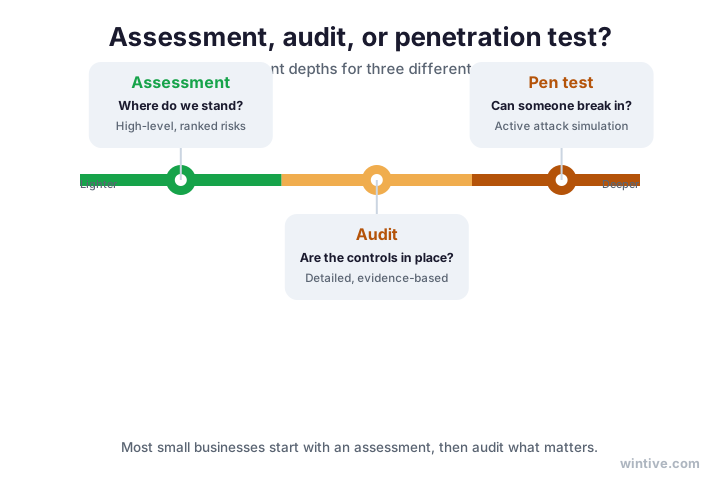
Specifically, an assessment asks “where do we stand?” and gives a high-level, ranked view. An audit asks “are the controls in place?” and checks each one with evidence. A penetration test asks “can someone break in?” and actively tries.
Crucially, most small businesses start with an assessment, then audit what matters. A pen test comes later, once the basics are solid. The diagram places the three on a spectrum from light to deep.
| Question it answers | Depth and output | |
|---|---|---|
| Assessment | Where do we stand? | High-level, a ranked risk register |
| Audit | Are the controls in place? | Detailed, evidence for each control |
| Pen test | Can someone break in? | Active attack simulation, exploits |
In practice, the names matter because buyers ask for the wrong one all the time. A client may demand an audit when an assessment is what fits. Therefore, knowing the difference lets you scope the right work and avoid paying for depth you do not yet need.
🎯 How to scope your Microsoft 365 security assessment
Now, the first real step: scope. Before you look at anything, decide what is in and what is out. A clear boundary keeps the work focused and the report honest.
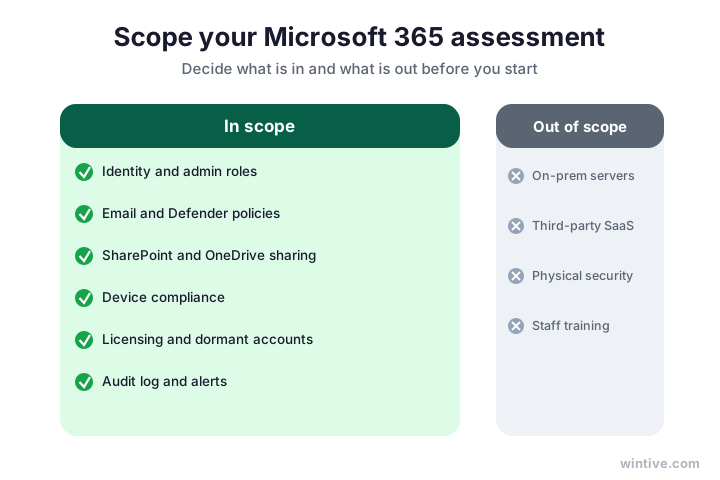
Specifically, an assessment covers your Microsoft 365 tenant: identity, email, data and sharing, devices, licensing, and monitoring. It usually leaves out on-premises servers, third-party apps, and physical security.
Importantly, write the scope down and agree it before you start. Then nobody is surprised by what the report does or does not cover. The diagram shows a sensible default scope.
Notably, keep the first scope tight. A focused review you finish beats a sprawling one you abandon. As a result, you can always widen the scope on the next round, once the core is covered.
Importantly, write down what you leave out and why. A reader should never wonder whether a gap was missed or simply out of scope. Therefore, an honest scope statement is the first sign of a serious assessment.
🔄 The assessment lifecycle
Next, the shape of the work. A good assessment follows the same four stages every time. Knowing them keeps the project calm and repeatable.
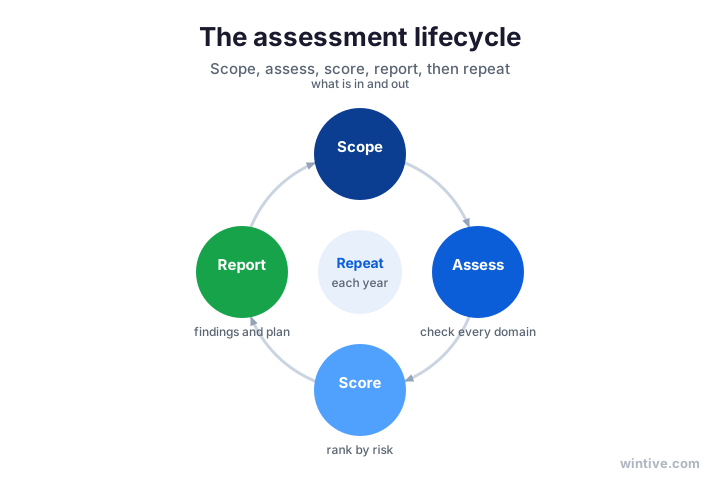
Specifically, you scope it, assess each domain, score the findings by risk, then report. After that, you repeat it on a schedule, because your tenant keeps changing.
Crucially, the stages are a loop, not a line. An assessment is a habit you return to, not a one-off event. The cycle shows the four stages in order.
Therefore, plan to run it at least once a year, and after any big change. A migration, a new app, or staff turnover can all move your risk. As a result, a regular cycle catches drift before it becomes an incident.
In practice, treat the report from one round as the starting point for the next. You check whether last time’s risks were closed and what is new. As a result, each cycle is faster than the last, and your security improves a little every time.
🧮 How to score risk: likelihood and impact
Here is the part that separates a real assessment from a list of complaints. You score each finding by how likely it is and how much it would hurt. That is risk.
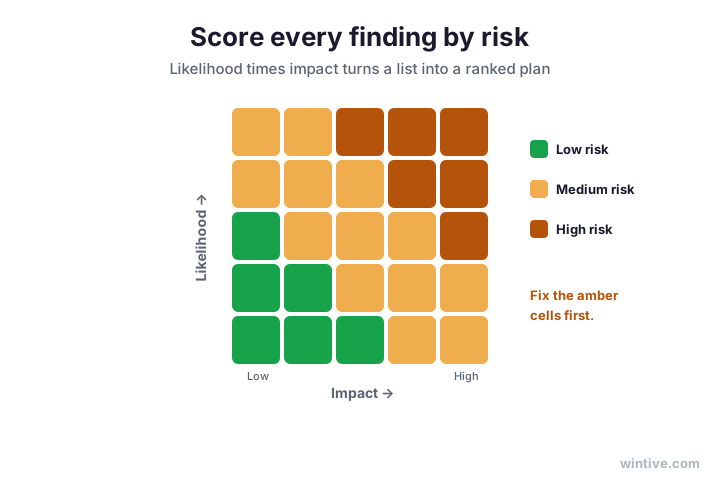
Specifically, rate likelihood and impact on a simple scale, then combine them. A likely, high-impact finding goes to the top. A rare, low-impact one can wait or be accepted.
Crucially, this is what turns dozens of findings into a short, ranked list. The heatmap shows how likelihood and impact combine into a single risk level.
As a result, you stop arguing about which finding is worst and start fixing in order. So even a non-technical owner can read the register and agree the priorities. In short, scoring is what makes the assessment useful.
Importantly, keep the scale simple, such as low, medium, and high for each of likelihood and impact. A complex model looks impressive but slows everyone down. Therefore, a clear three-by-three or five-by-five grid beats a spreadsheet nobody reads.
🗂️ What to assess in each domain
Next, what you actually look at. You work through the same six domains as a full review, but at an assessment depth rather than a fix depth.
Specifically, identity covers multi-factor coverage, admin roles, and legacy sign-in. Email comes down to Defender policies and forwarding rules. For data, you look at sharing and protection. Devices mean enrolment and compliance.
Importantly, you note the gap and its risk, but you do not fix it yet. The assessment records the finding; the fixing comes later. As a result, the review stays read-only and fast.
In practice, lean on the tools you already have. Microsoft Secure Score and the audit log surface much of this for you. Read our Microsoft Secure Score guide for how to read the number behind these findings.
Notably, do not skip monitoring and licensing just because they feel less obvious. A missing audit log and a pile of dormant accounts are real risks. Therefore, every domain gets a line in the register, even the quiet ones.
In short, assessing is about noticing, not fixing. You hold back the urge to change settings as you go, because that muddies the picture. As a result, you finish with a clean, complete view before you touch a thing.
🧾 Do not forget licensing in your assessment
Here is the finding almost every assessment misses, and it is pure Wintive. Specifically, unused and over-assigned licences are a security risk, not just a cost.
Crucially, every ex-employee still licensed and every account nobody owns is attack surface. Therefore, a real assessment lists dormant users and orphaned accounts, and scores them like any other risk.
Notably, this also tends to be the cheapest risk to close. You disable or reclaim the account, and the exposure and the bill both drop. As a result, it is often the highest-value line in the whole register.
🧾 Why a security assessment must count licences
Because this is the line item that quietly pays for the whole assessment, it deserves its own pass, not a footnote. Here is how a thorough review treats it.
Wintive insight. The free “security assessment” tools you find online almost never look at licensing, because they are built to sell a monitoring platform, not to clean up a tenant. Yet across the small businesses we assess, dormant and orphaned accounts are one of the most common high-risk findings. A real assessment counts every licensed identity, asks who owns it, and scores the ones nobody can explain. That single pass usually removes more risk than any new tool, and it lowers the bill at the same time.
Therefore, make the licence list a fixed part of every assessment, not an afterthought. Count every identity and ask who owns it. As a result, you catch the cheapest high-risk findings that the tool-driven scans walk straight past.
In short, if an assessment does not count your licences, it is not complete. The cost and the risk live in the same list. Therefore, a good review treats the licence report as a security document, not just a bill.
📋 What a good Microsoft 365 security assessment report contains
So, what should you end up with? The report is the whole point, and a good one follows a clear structure. It is the difference between a useful deliverable and a glossy nothing.
Specifically, it covers the scope, the method, a risk register of every finding scored by risk, and a prioritised set of recommendations with owners. The diagram shows the structure.
Importantly, this is exactly what the free vendor forms do not give you. They hand back a teaser and a sales call. As a result, the report is where a real assessment proves its worth.
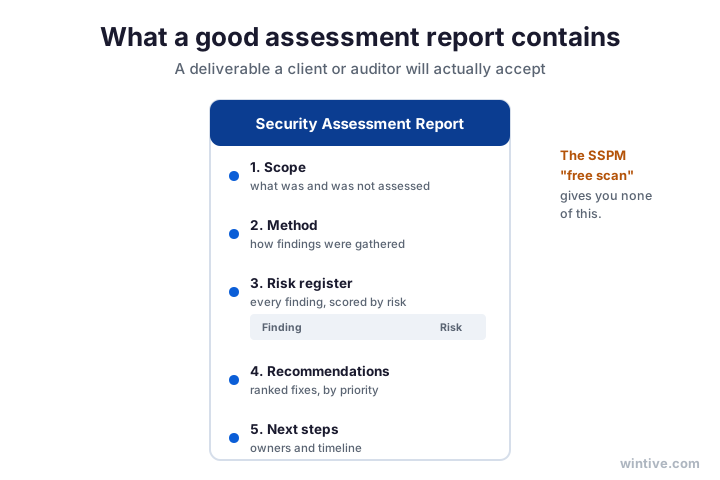
- Scope: what was and was not assessed.
- Method: how the findings were gathered.
- Risk register: every finding, scored by likelihood and impact.
- Recommendations: ranked fixes with clear owners.
- Next steps: a realistic timeline to act on.

Notably, a clear report also protects you with clients and insurers. When they ask how you manage security, you hand over a scored register and a plan. As a result, the same document that guides your fixes also proves you take the work seriously.
🛠️ Run it yourself, or have it done
So, should you do this alone? You can. The portal is readable, and this guide gives you the method, the scoring, and the report structure.
However, the judgement calls are where it gets harder. Scoring risk fairly and writing a report a client trusts takes experience. Therefore, some businesses bring in help for the assessment, then handle the easy fixes themselves.
In practice, the choice is about time and confidence. If you have both, run it yourself with this guide. Otherwise, a done-for-you assessment gets you a ranked, defensible result faster.
Notably, beware the free scan as a substitute. It is a lead magnet, not an assessment, and it skips scoping, risk scoring, and a real report. Therefore, treat it as a teaser at best. As a result, the honest comparison is a proper assessment against doing nothing, not against a form.
Above all, judge a provider by their report, not their pitch. Ask to see a sample with a real risk register and scored findings. Therefore, if all they offer is a free scan and a call, you already know what you are getting.
In short, the choice is rarely doing it yourself versus a vendor. It is doing a real assessment versus settling for a teaser. As a result, even a basic but honest review beats a polished scan that measures nothing.
🪤 Common Microsoft 365 security assessment mistakes
Before you start, learn from others. A few mistakes show up in assessment after assessment.
First, many skip scoping and end up with a sprawling, unfinished review. Second, plenty list findings without scoring them, so everything looks equally urgent and nothing gets done.
Third, almost everyone forgets licensing. Finally, some accept a free scan as the real thing. As a result, they get a teaser instead of a ranked plan, and the actual risks stay open.
In short, the pattern is the same each time. People treat the assessment as paperwork instead of a decision tool. Therefore, keep the goal in view: a short, ranked list of what to fix first, and the evidence behind it.
Notably, the worst outcome is an assessment that gathers dust. A register nobody acts on is just paperwork. Therefore, end every assessment with owners and dates, so the findings turn into fixes rather than a filed PDF.
🕒 How long an assessment takes, and what it costs
Of course, you want the practical numbers. For a small business, a focused assessment usually takes a few days, not weeks. Because it is read-only and uses tools you already have, it moves quickly.
Specifically, most of the time goes on scoping and scoring, not on gathering data. The portal surfaces the facts fast. Therefore, the thinking is the real work, which is exactly where the value sits.
Notably, cost follows depth and scope. A tight, single-round review is inexpensive, while a broad one across many sites takes longer. As a result, keeping the first scope tight keeps both the time and the cost down.
Importantly, weigh the cost against doing nothing. One business email compromise can dwarf any review. Therefore, the honest comparison is a few days of structured work against the price of an incident you did not see coming.
In short, this is one of the cheapest security moves you can make. It buys clarity before you spend on fixes or tools. As a result, it usually saves more than it costs by stopping wasted effort.
Therefore, treat the few days it takes as an investment, not an expense. You come out knowing exactly where your money should go next. As a result, every pound you then spend on security is aimed at a real, ranked risk.
📈 From the report to real fixes
Finally, the work is only worth as much as what you do next. The register is the start, not the end. So the last move is turning findings into fixes.
Specifically, take the top risks and give each an owner and a date. Then work down the list in order, closing the highest risks first. As a result, the register becomes a plan with momentum.
Importantly, do not try to close everything at once. A small business rarely has the hours, and rushing breaks things. Therefore, fix in priority order and accept the low risks you choose to leave, with a note.
Notably, this is where a full audit and remediation take over. The review says where you stand; the audit confirms the controls and the fixes close the gaps. So the two work together, not against each other.
In short, measure, then act. See the risks, close them in order, then measure again next cycle. As a result, your security improves steadily instead of lurching from one scare to the next.
Above all, keep the loop short between finding and fixing. A risk you spotted but never closed still hurts you. Therefore, the businesses that get value from an assessment are the ones that act on it within weeks, not someday.
✅ Your Microsoft 365 security assessment, step by step
Lastly, here is the whole method on one page. Follow it in order, and you have a real assessment, not a form.
- Agree the scope: what is in and out.
- Assess each domain, read-only, and note the gaps.
- Score every finding by likelihood and impact.
- Rank the findings into a risk register.
- Write recommendations with owners and a timeline.
- Include licensing and monitoring, not just identity.
- Repeat the assessment at least once a year.
Ultimately, an assessment is where good security starts, because you cannot fix what you have not measured. And a risk you have measured and ranked is one you can finally plan around, instead of worry about. So run it, then turn the register into action with a full Office 365 security audit and the fixes that follow. Then, round by round, you prove your tenant is getting safer instead of merely hoping that it is, quarter after quarter and year after year.
📚 More for Growing Businesses
🔒 Get a real Microsoft 365 security assessment, not a form
The M365 Master Audit is a full, done-for-you Office 365 security assessment and audit for a US small business. Specifically, it scopes your tenant, scores every finding by risk, ranks the fixes, and hands you the report and the evidence. As a result, you get findings, a roadmap, and proof of where you stand.
❓ Frequently Asked Questions
Scope it first. Review each domain read-only and note the gaps. Score every finding by likelihood and impact, rank them into a risk register, and write recommendations with owners. Repeat on a schedule.
An assessment is a higher-level review that gives a ranked risk register. An audit goes deeper, checking each control against evidence. Most small businesses assess first, then audit what matters.
The free scans are usually lead magnets for a monitoring product. They skip scoping, risk scoring, and a real report. A proper assessment gives a ranked register and a plan you can act on.
For a small business, a focused assessment takes a few days, since it is read-only and uses tools you already have. The biggest variable is scope, so a tight first round keeps it fast.
Scope, method, a risk register of every finding scored by risk, prioritised recommendations with owners, and next steps. If it skips the scored register, it is a teaser, not an assessment.
At least once a year, and after any big change such as a migration, a new app, or staff turnover. The threats and your tenant shift, so a regular cycle keeps the picture current.
🧭 Your next step
Want a real Microsoft 365 security assessment, not a form? First, book a short call. Then we scope it, score your risks, and hand you a ranked report. To start, contact Wintive. It is quick, and we do the rest.