

A good NIST 800-171 checklist turns 110 controls that sound intimidating into a list a small contractor can actually work through. Better still, most of those controls already live in the Microsoft 365 you run.
However, most versions of this list online are a dry reprint of the standard with no help applying it. This one is different. Specifically, it groups the controls, maps each area to Microsoft 365, and separates the settings you own from the policies you write.
Notably, you do not need to be technical to use this NIST 800-171 checklist. This guide explains each item in plain language, with what it means and where it lives in your tenant.
In short, treat this as a working list, not a read. By the end you will know what the 110 controls cover, how much you already meet, and what is genuinely left to do.
Staring at a 110-control NIST 800-171 checklist?
Wintive maps a NIST 800-171 checklist to the Microsoft 365 you already own, confirms the settings, and builds the policies and evidence an assessor will ask to see. We rank the gaps by real risk and close them on the tenant you run. The price is a flat monthly fee per user, with no long contract and no setup cost.
📅 Book a Free 30-Min Call | 💬 Chat on WhatsApp | See Our Plans →
🧭 NIST 800-171 checklist: the short answer
A NIST 800-171 checklist is the set of 110 security controls, grouped into 14 families, that protect Controlled Unclassified Information on a non-government system. It is the standard behind CMMC Level 2. Most of the technical controls, access, multi-factor sign-in, encryption, logging, and threat protection, already exist in Microsoft 365, so the work is configuration plus the written policies and evidence to prove it. Work it family by family, map each control to your tenant, and the list becomes a plan rather than a wall.
First, the plain version. A NIST 800-171 checklist walks the 110 controls in NIST Special Publication 800-171, the standard for protecting controlled information on systems you own rather than the government’s.
Notably, the controls split into 14 families, which makes the list far easier to manage than 110 separate items. You work a theme at a time, not a wall of requirements.
Crucially, this is the same standard that sits behind CMMC Level 2. So a solid NIST 800-171 checklist is also most of your CMMC preparation, done once.
Above all, much of it is already in place. A large share of the controls live in the Microsoft 365 you pay for, so the real work is closing the genuine gaps, not building from scratch.
Notably, the order you work the list in matters as much as the list itself. Tackling the heavy families and the quick settings first builds momentum, so the project feels like steady progress rather than a long, uncertain slog toward a distant finish line.
🔎 What NIST 800-171 actually is
So, what are we really talking about? NIST Special Publication 800-171 is a catalogue of security controls for protecting Controlled Unclassified Information. NIST publishes the standard on its official 800-171 page.
Importantly, NIST wrote it for non-federal systems, meaning your business, not a government agency. So it assumes ordinary tools, which is why so much of a NIST 800-171 checklist maps neatly onto Microsoft 365.
Notably, the controls describe outcomes, not products. The standard says you must control who can access data; it does not say which tool to use, which leaves you free to meet it with what you already own.
Therefore, think of the standard as a set of goals to satisfy, not a shopping list. Each control is a question about your environment that you answer with a setting, a policy, or a record.
In short, NIST 800-171 is a practical, outcome-based standard. Once you see it that way, a NIST 800-171 checklist stops being a compliance chore and becomes a clear description of a well-run tenant.
Notably, that outcome focus also future-proofs your work. Because the standard describes goals rather than products, a control you satisfy with Microsoft 365 today keeps counting even as tools change around it. So the effort maps forward, not just to this contract but to the next one.
🔗 How the NIST 800-171 checklist relates to CMMC
Next, where this fits the bigger picture. A NIST 800-171 checklist is the bridge between a voluntary framework and a mandatory certification.
Specifically, the NIST Cybersecurity Framework is a high-level, voluntary guide. NIST 800-171 turns the relevant parts into 110 concrete controls. CMMC is the Department of Defense programme that certifies you actually meet them.
Notably, that means the checklist is the workable middle. The chain below shows how the three relate and why the controls are the part you actually implement.
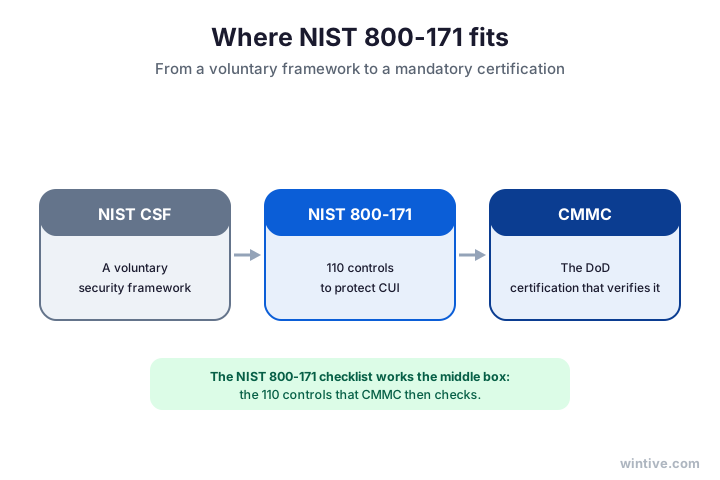
Therefore, working a NIST 800-171 checklist is not separate from CMMC; it is the heart of it. The controls you tick off are exactly what an assessor later verifies.
In short, do the controls once and you serve both. A clean NIST 800-171 checklist is the foundation a CMMC assessment builds on, so the effort is never wasted.
Notably, this also explains why the checklist outlives any single assessment. Contracts renew and primes change, but the controls stay put, so a contractor who works the list once carries that readiness from one opportunity to the next without starting over.
📋 The NIST 800-171 checklist itself
So, what does the list actually contain? Rather than 110 lines of jargon, a usable NIST 800-171 checklist groups the controls into plain themes you can tick off.
Specifically, it covers who can access information, how people sign in, how data is encrypted and logged, how threats are caught, and how staff and incidents are handled. Each maps to a control you can check.
Importantly, you tick each honestly, because an assessor checks the same list. An honest first pass shows you exactly how far you have to go.
- Identify your Controlled Unclassified Information and where it lives.
- Limit who can access it, and enforce least privilege.
- Require multi-factor authentication for every user.
- Encrypt data at rest and in transit.
- Keep an audit log of activity and review it.
- Run anti-malware and threat protection on email and devices.
- Control removable media and how devices are handled.
- Write and test an incident response plan.
- Train staff on handling controlled information.
- Document it all in a System Security Plan.
Notably, none of these is exotic. Each is a normal part of running a secure business, and most are settings rather than new purchases.
In short, the value of the NIST 800-171 checklist is the order it brings. Instead of a vague sense of risk, you get a sequence of concrete, checkable items anyone can track.
🗂️ The 14 families behind the list
Next, how the standard groups the 110 controls. Every item on a NIST 800-171 checklist belongs to one of 14 families, and the families keep the work structured.
Specifically, they run from access control and identification through audit, configuration, incident response, and system protection. Each is a theme with a handful of controls, not a mountain.
Notably, a few families carry most of the controls. Access control and system protection are the heaviest, so they are the sensible place to start.
Therefore, work the heavy families first. Closing access control and system protection early removes the most risk and the most checklist items in one push.
Notably, the families also map onto the people who own them. Identity sits with whoever runs your tenant, training with HR, physical protection with facilities, so the 14 themes share the work out naturally.
In short, 14 themes are far easier to hold than 110 line items. The families turn a long NIST 800-171 checklist into a plan you can assign and track across a small team.
Notably, grouping by family also makes progress visible. You can mark a whole theme green once its controls hold, which turns a daunting count into a short list of areas still in progress. As a result, even a non-technical owner can see how far the work has come.
🟢 Map each control to Microsoft 365
Here is the part the generic templates skip. The fastest way through a NIST 800-171 checklist is mapping each control area to where it already lives in Microsoft 365.
Specifically, access and identity map to Entra ID, encryption and data protection to Purview, threat alerts to Defender, and device control to Intune. So much of the list is one setting or one export away.
However, the gaps that remain are usually written policies and evidence, not missing tools. The connector shows how the areas line up with the products.
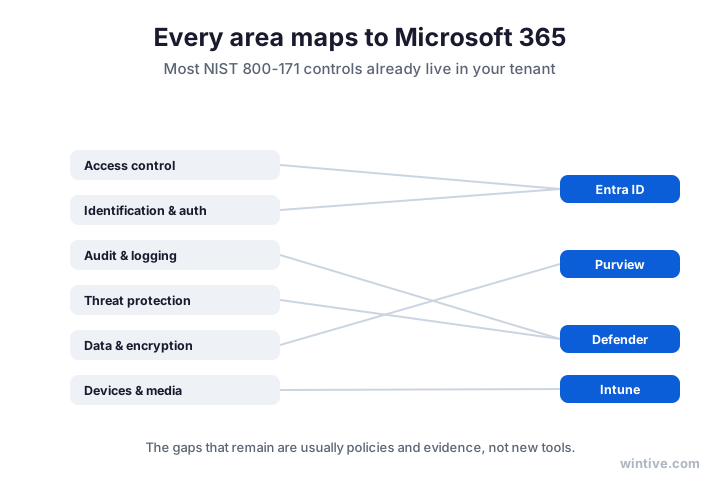
Therefore, build the map once and reuse it. A simple table of control, where it lives, and the evidence to export becomes the backbone of your System Security Plan.
In short, a mapped NIST 800-171 checklist is worth ten generic templates. It tells you not just what to do, but exactly where in your own tenant to do it.
Notably, a mapped list also speeds up every later step. When each control already points to a place in your tenant, gathering evidence becomes an export rather than a hunt, and answering an assessor turns into a quick lookup instead of a scramble.
🔀 A setting, or policy and evidence
So, why do two contractors with the same NIST 800-171 checklist spend very differently? Because each control is either a setting you already own or a policy you have to write.
Specifically, many controls, multi-factor sign-in, encryption, logging, sit inside Microsoft 365 once you switch them on. Others, an incident response plan, access reviews, staff training records, are paperwork you create and keep.
Notably, knowing which is which lets you sequence the work. The settings are quick wins; the policies and evidence are where the real time goes.
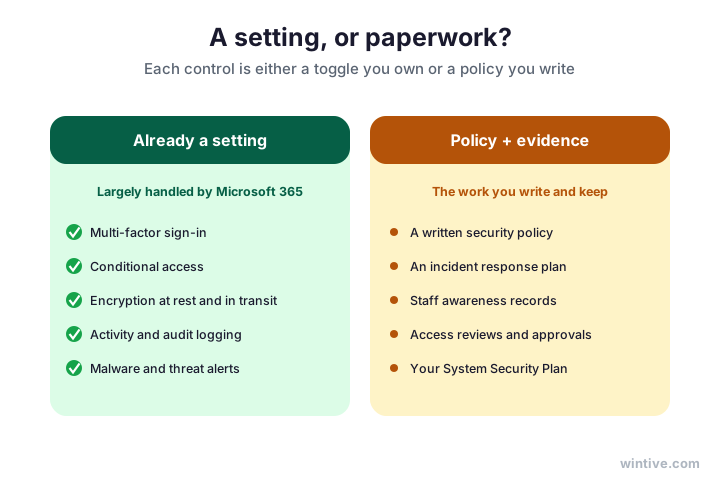
Wintive insight. The pattern we see across small contractors is that the technical half of a NIST 800-171 checklist is mostly done the day they finish configuring Microsoft 365, while the paperwork half is barely started. Sign-in policies, encryption, and audit logs are already producing evidence you can export. What is missing is almost always the written side: a security policy, an incident response plan, access-review records, and a System Security Plan that ties each control to how your tenant meets it. Building that documentation from the live tenant, rather than a template, is the highest-value work, and it is exactly what our Master Audit produces.
In short, split the list into settings and paperwork early. The settings confirm fast; the policies and evidence are the work that genuinely needs your time.
📊 How much Microsoft 365 already covers
Next, the encouraging part. Run the numbers and a large share of any NIST 800-171 checklist is already satisfied by the Microsoft 365 you pay for.
Specifically, multi-factor sign-in, conditional access, encryption, logging, and threat protection are all in your plan. So most of the technical controls are configuration, not new spend.
Notably, the rough read for a typical small contractor is that most technical controls are covered, with the remainder being policy and evidence. The dial shows the picture.
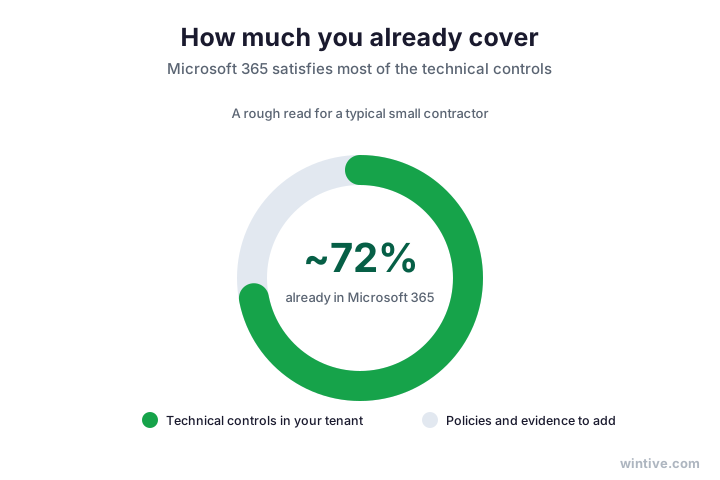
Therefore, count what you already own before pricing anything new. Mapping a NIST 800-171 checklist to your tenant usually shows you are far closer to done than a template implies.
In short, your licence does much of the heavy lifting. Use what you own, scope it tightly, and the list shrinks to the genuine gaps rather than a catalogue of purchases.
Notably, leaning on what you own also keeps your evidence consistent. Because the same tenant produces the proof for many controls, your records line up with your settings, which is exactly the coherence an assessor trusts and rewards with a faster review.
🔁 Revision 2 versus Revision 3
So, which version of the standard should your NIST 800-171 checklist follow? It depends on what your contract names, and the difference is smaller than it sounds.
Specifically, Revision 2 is the long-standing baseline that most contracts still cite. Revision 3 reorganises and streamlines the controls and adds organisation-defined parameters, but the underlying goal is unchanged.
Notably, the controls barely move in substance between the two. A few are merged or reworded, but the work of protecting controlled data is the same. The columns show what changed.
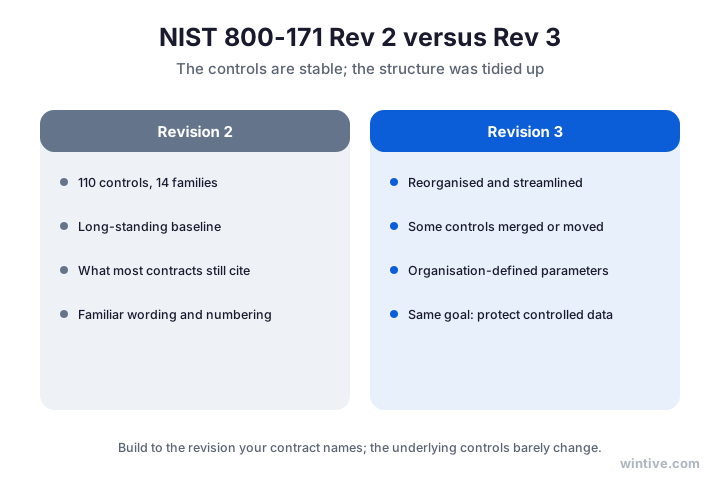
Therefore, build to the revision your contract names, and do not panic about the other. The effort transfers almost entirely from one to the next.
In short, the revisions are a structural tidy-up, not a new rulebook. A solid NIST 800-171 checklist built today keeps its value as the standard is refined.
Notably, the stability across revisions is a feature, not a footnote. It means a small contractor can invest in the controls with confidence, knowing a structural update will not throw the work away. So you can start now rather than waiting for the next revision to settle.
🪤 Where the gaps usually are
Meanwhile, it helps to know where a NIST 800-171 checklist usually falls short for a small contractor. The gaps are rarely the technical controls.
Specifically, the common gaps are written policies, an incident response plan, access-review records, staff awareness, and a current System Security Plan. The settings are usually fine; the paperwork lags.
Importantly, another frequent gap is evidence. A control can be in place, but if you cannot show it, an assessor treats it as missing, so capturing proof matters as much as the control itself.

Therefore, focus your effort on the written and evidence side, where the real gaps live. The settings confirm quickly; the documentation is the work.
In short, the gaps are predictable, which makes them plannable. Knowing the paperwork is where a NIST 800-171 checklist usually lags lets you spend your time exactly where it counts.
Notably, naming the likely gaps in advance also makes them cheaper to close. A contractor who expects the paperwork to lag can draft policies alongside the technical work, rather than discovering the shortfall the week an assessor arrives and paying for speed.
📉 Common NIST 800-171 checklist mistakes
Of course, a few mistakes trip up small contractors working a NIST 800-171 checklist. First, many buy a compliance platform before checking what Microsoft 365 already covers, then pay twice.
Furthermore, some treat the checklist as a one-time tick rather than a living record, so the System Security Plan drifts out of date and an assessor notices.
Finally, plenty capture no evidence, so controls that are genuinely in place still read as gaps because nothing proves they run.
Therefore, map before you buy, keep the documentation current, and capture evidence as you go. As a result, you avoid the three most common mistakes in one move.
Notably, the cheapest mistake to avoid is mismatched scope. Pulling systems that never touch controlled data into the checklist adds controls and evidence you never needed.
In short, the pattern behind every mistake is the same: treating the checklist as a purchase or a one-off. Work it as a living record, and a NIST 800-171 checklist stays accurate and cheap to maintain.
Above all, do not let a deadline rush you past the mapping step. The contractors who struggle most skip straight to buying tools, while the ones who do best map their tenant first and spend only on the genuine gaps that remain after.
👤 Who needs a NIST 800-171 checklist, and when
Of course, not every business needs a NIST 800-171 checklist yet. So decide by your contracts and your data, not by fear.
Specifically, you need it when you handle Controlled Unclassified Information for a federal or defense contract. The requirement flows down, so a subcontractor can inherit it from a prime that passes controlled data along.
Notably, the contract sets the timing. Because the controls take time to implement and document, starting before a bid asks for it is far calmer than scrambling after.
Specifically, scope decides how much of the checklist applies to you. If only one system touches controlled data, you can often carve it out and keep the rest of your tenant out of scope, which shrinks the list dramatically. So a careful boundary around controlled data is one of the cheapest and most effective ways to make the whole project smaller.
📌 When a NIST 800-171 checklist becomes urgent
In short, let the data and the contract decide. The moment controlled information lands in scope, a NIST 800-171 checklist becomes your roadmap, and early work gives you a head start.
Therefore, watch your pipeline, not just today’s contracts. A single new opportunity involving controlled data can make the checklist urgent overnight, so knowing your position early pays off.
In short, the requirement follows the data down the supply chain, so a single contract can change your status. Knowing whether controlled information would put the checklist in scope lets you prepare on your own schedule instead of reacting under pressure.
✅ Your NIST 800-171 checklist recap
Condensed, here is the NIST 800-171 checklist to keep on hand.
- Identify your controlled information and scope tightly.
- Group the 110 controls into the 14 families.
- Map each control to where it lives in Microsoft 365.
- Confirm the settings first; they are the quick wins.
- Write the policies and capture the evidence next.
- Build a System Security Plan from your real tenant.
- Follow the revision your contract names.
- Keep the checklist live so it stays accurate.
Notably, a finished NIST 800-171 checklist is worth far more than a printed one. Mapped to the tenant you already run and kept current, it doubles as your evidence package, your System Security Plan backbone, and a head start on every future contract that asks the same questions.

Ultimately, at Wintive we turn a NIST 800-171 checklist into a finished result on the Microsoft 365 our clients already run, as part of our managed security services. So we map the 110 controls to your tenant, confirm the settings, build the policies and evidence, and show you the gaps and the budget. As a result, you get a checklist that is done, not just printed. To get started, contact us for a free consultation. It is quick, and we do the rest.
📚 More for Growing Businesses
🔒 See your NIST 800-171 checklist mapped to your Microsoft 365
The M365 Master Audit is a full Microsoft 365 security audit for a US small contractor. Specifically it reviews your identity, email, device, and data controls, maps them to the 110 NIST 800-171 controls and the CMMC requirements, and ranks the fixes by real risk. As a result you get a written report, a clear action plan, and the evidence to show an assessor.
❓ Frequently Asked Questions
It is a practical list of the 110 security controls in NIST SP 800-171, grouped into 14 families, that protect Controlled Unclassified Information. You work through it to see which controls your business already meets and which still need work before an assessment.
There are 110 controls, organised into 14 families covering areas like access control, identification, audit, configuration, and incident response. Most of the technical controls already exist in the Microsoft 365 you pay for.
They are linked but not identical. NIST 800-171 is the standard of 110 controls; CMMC is the Department of Defense programme that certifies you meet them. A solid NIST 800-171 checklist is most of your CMMC Level 2 preparation.
It covers a large share of the technical controls. Multi-factor sign-in, encryption, logging, and threat protection map to Entra ID, Purview, and Defender. The gaps that remain are usually written policies and evidence rather than new tools.
Revision 3 reorganises and streamlines the controls and adds organisation-defined parameters, but the underlying controls barely change. Build your NIST 800-171 checklist to the revision your contract names; the effort transfers between them.
Identify your controlled information, scope tightly, then map each control to Microsoft 365 and confirm the settings. Write the policies and capture evidence next, and document it all in a System Security Plan.
🧭 Your next step
Want a NIST 800-171 checklist mapped to your actual Microsoft 365, not a generic template? First, book a short call. Then we map the 110 controls to your tenant, confirm the settings, and show you the gaps and the budget. To start, contact Wintive. It is quick, and we do the rest.